After indications from LL that there may not be a Main channel deployment on Tuesday 27th November, restart commenced as the deployment made to the RC channels last week went ahead as per the usual schedule.
Wednesday 28th November should see the three main RC channels updated as follows:
BlueSteel and LeTigre: should receive a maint-server project. There are a few new flags for the LSL function llGetObjectDetails(), but the most important changes are some fixes for physics and mesh-based crash modes – see the server release notes
Magnum should receive the say package, with additional stability improvement changes – see the Magnum server release notes.
As usual there is a forum thread for the week’s server deployments.
Viewer News
Release Viewer
The 3.4.2 viewer code finally reached the release (production) version of the LL viewer with the release of 3.4.2.267137 on Monday 26th November, which I briefly reviewed here.
Beta Viewer
The beta viewer, now cleared of the crash issue bottleneck, moved rapidly through the 3.4.2 code base prior to Thanksgiving in the US, as previously reported in the news updates, and then reached 3.4.3 with the surprise release of 3.4.3.267135 during Thanksgiving week, after it had been indicated there would be no viewer releases during the week due to decreased support staff availability during the long weekend period. As reported last week, this release includes the first phase of Monty Linden’s HTTP texture fetch project, which should see people experiencing significantly faster texture rezzing when in-world.
CHUI Viewer
The CHUI – the Communications Hub User Interface – project viewer is due to go through another couple of iterations before moving towards a development / beta viewer code merge. There has already been one update since the project viewer, which is aimed at improving the capabilities and reliability of in-world text and Voice conversations, first appeared.
CHUI: potentially a couple more iterations to come
While he has not followed the project first-hand, Oz Linden believes CHUI to be nearing a “feature complete” status. The advice is that if you haven’t tried it out and wish to give feedback, now is the time to do so.
Nalates Urriah provides an update on some of the ongoing work around the mesh deformer. In the meantime, speaking at the Open Development User Group meeting on Monday the 26th November, Oz linden responded to a question from White Rabbit as to what garments are still required for testing by saying, “That’s a great question. I’m setting up a meeting with the people responsible for avatars to try to get a proper acceptance test defined for both that and STORM-1800.” STORM-1800 relates to the vertex weights of the default avatar character mesh.
While Oz didn’t specify a date for the meeting, those with a direct interest in either supplying mesh clothing for testing or in the JIRA should be hearing from him in the near future on the meeting details.
Week 47 marks Thanksgiving in the USA so as reported last time, there have been no server-side deployments for the Release Candidate or main channels, and no rolling restarts. This is liable to continue into week 48 (week commencing Monday 26th November), as there is unlikely to be any deployment to the main channel. There will, however, be deployments to the RC channels, details TBA.
HTTP Updates – Texture Fetching
After indicating that there would be no viewer releases during week 47 in the run-up to Thanksgiving, the Lab rolled out the first of the 3.4.3 beta releases – 3.4.3267135 – on November 20th. The major change to this is the inclusion of the first phase of Monty Linden’s new HTTP-based texture fetch capability, designed to significantly improve texture rezzing within the viewer. As the release notes state:
A new scheme for performing HTTP operations is introduced with this release. It is intended to reduce crashes and stalls while performing HTTP operations and generally enable performance and reliability improvements in the future. In this release, it is being used by the viewer’s texture retrieval code. Our expectation is that it will provide consistent and predictable downloading of textures. As well as the usual problem reporting, we’re also interested in confirmation of improvements where this release improves your experience.
The HTTP texture fetching code is now available in the latest SL beta viewer (3.4.3.367135)
The code for these improvements has already started appearing in some TPVs, and will doubtless be available across all flavours of the viewer in the near future.
Observable improvements in rezzing times have been reported by those who have used the project viewer releases of this code, so it should yield benefits for those using the beta. Monty Linden, who is handling this project is apparently now working on further improvements to the server-side of the equation, which should see additional improvements in the future.
Also pushed out during the week was a new version of the development viewer – 3.4.3.267201.
It is currently not clear when the renewed roll-out od beta and development viewers will result in updates appearing with the production version of the viewer, I believe that this may be additionally delayed while other requirements are put in place related to the Steam link-up (the code for the Steam link-up already having been merged into the beta viewer).
Volumetric Pathfinding
Also during the Tuesday Simulator meeting on November 20th, the question of volumetric pathfinding came up, and how pathfinding might be extended into the air, to allow birds, etc., and under Linden water. There are a range of issues with doing this – perhaps the biggest being the actual demand. There is also the matter of keeping birds and the like from crashing into buildings and skyborne objects, or in keeping fish in the water.
During the meeting, Baker Linden passed a question on the subject to Falcon Linden and indicated that Falcon felt, “It’d be about 3 months of work to get volumetric pathfinding — and that still wouldn’t handle dynamic avoidance (which is the hard part). Theoretically, it’s not that hard — it’s having to rework some Havok systems to work with intermediate data.”
This doesn’t mean that the work is about to be undertaken in any way whatsoever – just that were LL to consider it, getting the basics going for volumetric pathfinding going would take around three months. However, even then, unless the issue of dynamic hazard avoidance, it is unlikely this is something we’ll be seeing in SL for a while yet.
Server-side Object Rezzing Performance
Baker Linden indicated that he has started looking at server-side object rezzing. This work isn’t connected to Andrew Linden’s Interest list work, which is related to which assets the simulator should be loading ready for rezzing, but is rather focused on reducing the server-side lag which is induced when an object physically rezzes in a region. As Baker explained during the meeting, “If you get a really complex object, with many large meshes, or large LLSD files, it takes a while to rez into the world. I’m trying to reduce that.”
There are no timescales associated with the work, although it is expected that it will include avatar attachments as well as in-world objects have less of a performance / fps hit on the region when rezzing complex items, particularly in Baker can get the parsing of large object files to work asynchronously, which currently does not occur. Whether this will translate to visible viewer-side improvements is debatable.
SL Issues
Homestead Performance / Memory Issues
There have been growing reports of region performance issues occurring across the grid. These primarily appear to be impacting Homestead regions – although it can be encountered on full regions as well.
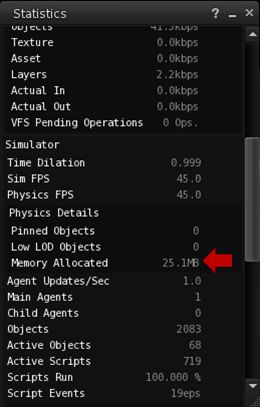
Essentially the problem manifests itself (for most users) when they find they are unable to rez objects in-world and / or as attachments, while raw prims created in-world may rez, but are reported as turning phantom on creation. The issue appears to be large and abnormal memory usage by the region’s physics system, although the precise causes as to why it is occurring are currently unknown.
Physics memory use can be monitored via the Statistics floater (CTRL-SHIFT-1)
Regions are allocated a fixed amount of memory that can use. In the case of a full simulator, this is about 1GB, while Homesteads are allocated around 250MB. Generally, physics memory usage for a region – even a busy one – is around 40-80MB. However, on affected Homestead regions, the physics memory use is reaching or exceeding 200MB.
When the physics memory for a simulator gets abnormally high (close to or on 90% of the allowed maximum) internal region safeguards kick-in and prevent object rezzing in an attempt to limit further calls of the region’s memory and keep it alive. This is the behaviour people are witnessing in their regions. The safeguards themselves are designed to help prevent regions from becoming unstable during griefing attacks. However, the problems people are experiencing appear to be entirely unrelated to any form of griefing, and are thus causing a certain amount of head-scratching at Linden Lab.
Reed Linden, in responding to a support request from Motor Loon, provides clear guidelines on what to do if you have a Homestead and experience these issues. It is thought that the most likely culprit for the problem is an unidentified memory leak, but this has yet to be confirmed. Reeds comments regarding particle systems are fascinating. Particles tend to be more viewer-intensive than server, and as many commented at the Simulator User Group meeting on Tuesday 20th November, it would take something bizarre to be going on for particles to be impacting region performance; however, at least one region affected by the issue appears to have a large number of particle emitters in operation.
A further interesting twist came at the meeting itself, when a pathfinding snake and a number of pathfinding characters were rezzed, and the region suffered a severe performance hit (sharp FPS drop experienced by all attendees, sharp increase in both physics memory use and time taken to ping the region) which appeared to be linked with the snake (which was set to follow its creator around) re-calculating its path to both follow its creator and avoid other avatars / objects. However, when the snake was re-rezzed a short time later, no similar issue was noticed, with the region using around 116MB physics memory, with no other outward performance issues.
I the meantime, and as the Linden dev team continue to investigate the issue, if you experience this kind of problem, please ensure you raise a support ticket, supplying as much information as possible, including region name / simulator version (from HELP > ABOUT (either Second Life or the name of your viewer), the time the problem occurred, how it manifested and, if possible, information from the Statistics bar: memory used, FPS and physics performance details, etc.
Wednesday November 14th saw the same code deployed to all three RC regions in preparation for the US Thanksgiving week code freeze (see below). This primarily brought all three RCs to the same code level, release-wise and fixed a bug discovered in week 45.
There will be no rolling restarts in week 47 (week commencing Monday 19th November) due to the code freeze.
SL Viewer Update
The beta viewer rolled to the last of the 3.4.2 releases on Thursday November 15th, with the release of 3.4.2266995. Providing the crash statistics remain good (they were very positive for the first 24 hours), it will be going to the production (release) viewer QA in week 47 and should result in the release of a new version of the viewer shortly after the Thanksgiving weekend.
This beta contains a lot of updates and improvements, as well as a wide range of fixes for issues encountered with earlier releases up to and including the previous beta release, 3.4.2.266708, issued on November 8th. For a comprehensive list of changes, please refer to the release notes.
At the same time, the development viewer rolled to 3.4.3.267061, marking a further update of the development viewer to the 3.4.3 code, which should be appearing in the next release of the beta viewer. This include the new viewer-side code for the HTTP texture fetch project developed by Monty Linden as a part of the Shining Project improvements.
The code for faster texture fetching / rezzing has moved from a project viewer into the viewer-development stream and is present in the 3.4.3267061 Ddevelopment viewer release and should appear in the beta viewer after the US Thanksgiving weekend
As the holiday period is approaching, viewer releases will be slowing down, but the aim remains to try to clear the backlog of waiting merges and updates by the New Year with a view to resuming their more usual cycle of releasing a development / beta update around every three weeks. Once things are back on track, LL will be looking more closely once again at the question of disabling tcmalloc completely within the viewer.
Code Change Freezes
The official dates for code change freezes during the upcoming holiday periods currently stand at:
Week 47 – Monday 19th November through to Sunday 25th November
Week 51 – Monday 17th December through Sunday 23rd December
Week 52 – Monday 24th December through Sunday 30th December.
No status has yet been given for the New Year week (Monday 31st December through Sunday 6th January 2013.
Avatar Baking
Bake fail: work on new service progressing
On Friday 16th November, Nyx Linden provided a brief update on the Avatar Baking project, which again forms a part of the Shining project improvements to Second Life. In short:
The viewer code is starting to look stable. However, merging the new code into the existing viewer code is liable to be somewhat more “painful” (Nyx’s term) than had been hoped
Work is progressing on the server-side elements (the composite baking server), with the code reaching a point where avatar texture can be generated server-side
Currently, the plan is to continue working on both sides of the equation, with the aim of ensuring the new code is successfully merged into the viewer development branch, and then offering it in a “very alpha” form to TPVs so that they can start merging it into their code and assist with testing. As this happens, one or two regions on the beta (Aditi) grid will be set-up to allow testing on the new service.
There is still no time frame for the appearance of the viewer code in the development branch or any test regions on Aditi, but in Nyx’s view, both are liable to be on the horizon “pretty soon”. Overall, the plan still remains to have at least a two month period from when the code is made available for testing purposes through to the official implementation of the new service.
Interest List Demonstration and Weirdness
The focus of this project is to optimise the data being sent to the viewer, information already cached on the viewer and the manner in which that data is used in order to ensure it is used more efficiently so that things rez both faster and in a more orderly manner than is currently the case.
This work is being undertaken by Andrew Linden in a number of stages, the first being to clean-up the code related to information sent to the viewer from the simulator relating to objects in the camera’s viewing range such that only objects actually in the camera frame are updated (if updates are required) and that objects outside of the current camera frame are not updated, thus reducing the amount of data both the server and the viewer need to process, which should lead to performance improvements.
It is possible to visualise the update process using a viewer debug setting (Develop > Show Info > Show Updates to objects or Ctrl+Alt+Shift+U) to show object updates being received by the viewer. This shows updates in three colours: red, which indicates the viewer is receiving a “full” update on the object (generally because it is being “seen” / is within draw distance) for the first time; blue, which indicates the viewer already has data on the object and is receiving “terse” updates relating to changes in the object’s appearance / position relative to the viewer’s camera position; and green, which indicates the object has been deleted / remove from the camera view, and updates are about to cease.
On the 15th November, Andrew used this debug setting, together with a set of scripted “bouncing” cubes to demonstrate his improvements to this update process. Observers were asked to focus their camera on the cubes, which were initially static and had no coloured data stream associated with them. The cubes were then set bouncing, which generated a stream of blue “terse” updates, indicating the motion of the cubes in the viewer was being updated. However, when observers angled their camera to view the space above the cubes (so the cubes were not directly in their world view), the update stream ceased – indicating the viewer was no longer receiving update data for the cubes.
This may seem a small change, but it does dramatically decrease the amount of information the viewer has to process relating to in-world objects, and should result in performance improvements within the viewer. In the future, further work will be undertaken to enhance the interest list code even further – such as prioritising the order in which objects in the world view are actually rezzed, so that items closest to the camera view are rezzed first, etc.
HUD Issues
Following the demonstration, however, some people started noticing an odd issue: they could right-click on the centre of their screen and reveal a prim attachment belonging to someone else’s HUD. Chieron Tenk was the first to raise the issue, although Ana Stubbs also quickly reported the same problem.
Chieron Tenk posted an image of the problem: a prim appears in the centre of his viewer which, on inspection, appears to be linked to a HUD worn by Rex Cronin
After initial confusion, investigation revealed it was possible for anyone to find they had random prims from other people’s HUDs appearing on their screen, simply by attaching a HUD or a prim to their own screen. Concerns were further raised when it appeared that events might be able to be triggered if the prim was touchable.
I find I have a prim belonging to Ana Stubb’s Mystitool appearing on my screen
The issue appears to be tied to changes made to the interest list code on the test region, and is obviously going to be the subject of further investigation on the Lab’s part prior to the interest list project being carried forward.
Deployments for the week are progressing as planned.
Main Channel
The main channel received the code which had been running on the Magnum RC channel as well as some updates.
This now means that the server-side Group Services code to improve the loading and editing of very large groups (10K+ members) is active right across the main grid – see the section on Group Services below for further information.
This roll-out restored functionality within the Estate Tools which allows region physics to be put in a condition of limited functionality, which is sometimes useful in dealing with issues and problems within a region. The capability was disabled around the time of the mesh roll-out, and has now been restored with this release. This caused some minor inconvenience on some regions (at least one), where the option has been enabled at some point, with the result that following their restart, objects within the region(s) were not functioning correctly. However, this was corrected without major incident.
Wednesday 13th November will see all three Release Candidate channel receive the same update package, including the BUG-166 update, which means that linksets with bounding boxes larger than 64m (in any dimension) are prevented from being rezzed if doing so will cause the object to collide with an avatar excluding the object owner.
There will be no server roll-outs in week 47 (week commencing Monday 19th November) due to the forthcoming Thanksgiving weekend in the United States. There will be deployments between Thanksgiving and Christmas, but it currently looks as if these may be limited to a couple of weeks during that period according to Simon Linden (details on the likely number pending), and there will as usual be no releases over the Christmas / New Year period.
Interest List and Object Caching
Andrew Linden reports that the first phase of this work is drawing to a conclusion, and he is planning on having a possible demonstration of the capability on the beta (Aditi) grid on Thursday 15th November, most likely during the Bet Server User Group meeting.
The focus of this project is to optimise the data being sent to the viewer, information already cached on the viewer and the manner in which that data is used in order to ensure it is used more efficiently so that things rez both faster and in a more orderly manner than is currently the case.
Interest lists and object rezzing: initial srver code updates almost ready
Andrew reports that general performance on object rezzing should be improved, although the overall sorting element of the code (ensuring objects closer to an avatar’s camera position rez sooner than those further away) isn’t currently as rigorous as it could be. However, the server and viewer do now interact better, so less information is sent to the viewer relating to in-world items which are not visible within the current camera view for the viewer.
Commenting on demonstrating the capability when speaking at the Simulator User Group meeting on Tuesday 13th November, Andrew acknowledged that it may be difficult to achieve on Aditi, which is a relatively static environment (improvements will hopefully be more noticeable on regions where there is a lot of movement and activity); however, anyone interested in this work may want to try attending the Beta Server Group meeting on the 15th November, in case a demo is provided.
Currently, this represents the fist pass in Interest list improvements, and one which is liable to be heading to an RC channel in the near future – it does not require any specific viewer updates to work -, and Andrew expects to be building on this work in the future.
Group Services
As mentioned above, Baker Linden’s Group Services HTTP code is now available across the main grid. As there was some confusion evidenced on Plurk yesterday, here’s a quick re-cap on what this means:
The new code allows for improved loading of membership lists of very large groups, together with improved reliability in editing such groups (i.e. assigning roles, removing people, etc.), by the group moderators
The code requires a viewer update. At the time of writing, this is available with the official Second Life beta viewer (3.4.2.266708+), and the code will be filtering into the majority of popular TPVs as they update (and currently appears to be available in Zen (3.4.2.2+) and Niran’s Viewer (2.0.3.2262+) and Cool VL (1.26.4.38), all of which successfully loaded large group lists for me)
Until such time as the viewer-side code has been incorporated into TPVs, the “old” method of loading group lists into the viewer will still be available. However, viewers using the “old” method (a protocol referred to as UDP) will have group loading capped at 10K members. This means:
That for groups with 10K or fewer members, there will be no change regardless as to whether the viewer is using HTTP or UDP
But for groups large than 10K, viewers running the UDP code will be unable to load the group until such time as they have been updated to the new code
The code will not lead to any improvements in group chat reliability, and is not aimed at improving group chat.
Materials Processing and Avatar Baking
No news on either of these, beyond what has been previously reported in these pages. Materials processing has a test region on Aditi, but there is no timeline on when a project viewer is to be made available. For an overview of the initial capabilities for material processing, please see my project update here, and remember that the capabilities will be applicable to prims and mesh, but not directly to avatars or system layer clothing.
Avatar Baking is progressing, but without any significant update at this time, please refer to my last detailed update on this project for information.
Mesh Importer Fix
JIRA SH-3055 records a problem with the official viewer’s mesh uploader which has been affecting people over the course of the year. The fix for this, released as a project viewer (3.4.2.266471, available for Windows, Linux and Mac OS) on November 5th, is still available for those experiencing uploader issues, although it is in the pipeline to be merged with the beta viewer now that crash issues seem to have been resolved. Bear in mind that – as Runitai states in his JIRA comment, the viewer is a pre-beat project version, and may include other bugs and problems. While reports on the JIRA seem to point to it being relatively stable, caution should still be taken if attempting to use it as a primary viewer.
The deployments schedule for this week (Tuesday 6th and Wednesday 7th November) went ahead as planned, namely:
Tuesday 6th: the Main Channel received get the code currently running on BlueSteel and LeTigre – release notes
Wedneday 7th:
Magnum received get fixes and updates to the code currently running there (including the Group Services code) – release notes
LeTigre and BlueSteel should get the next bug fix server in the pipeline, which includes the code currently on Magnum, and more – release notes (BS) and release notes (LT)
The main channel deployment now means that all regions are running on the same version of Havok with the exception of Magnum regions, which should be getting the update in week 46 (see below).
LeTigre and BlueSteel both have an additional “feature”: Linksets which have bounding boxes larger than 64m (in any dimension) are prevented from being rezzed if rezzing would cause the object to collide with an avatar excluding the object owner (BUG-166).
In addition, both LeTigre and BlueSteel include the following oft-requested bug fixes:
Script Time in the Statistics Bar now correctly shows 0ms when scripts are disabled in the sim (BUG-311)
Script error messages now include information about the object’s root prim, when certain operations fail due to the object’s pathfinding setting (PATHBUG-198).
A crash bug was also found in the Magnum code, and this has received attention, with the fix due to go out next week.
Week 46 Deployments
Things are gradually slowing down in preparation for the Thanksgiving code release freeze which will see a suspension of code deployments during the Thanksgiving week later in November. As it stands, the following roll-outs are planned for week 46 (week commencing Monday 12th November):
Main channel: should receive the code currently running on Magnum (including Baker Linden’s Group Services code – see later in this article)
Magnum: should receive the code currently running on BlueSteel and LeTigre, which will mean the entire main grid is now running the same version of Havok
BlueSteel, LeTigre and Magnum should also get the same additional updates (details yet to be specified).
Beta Viewer Update – Steaming Ahead with Project Code Merges
As indicated in Part 1 of this report, the crash issues impacting the beta viewer code have been resolved, and LL have been engaged in merging-up code into the beta and paving the way for the first of the 3.4.2 beta releases. These were always intended to have the code from some of the major SL projects which impacted the viewer, including Baker Linden’s Group Services code and Monty Linden’s HTTP texture fetch code.
The first 3.4.2 beta viewer was release on Thursday 8th November (3.4.2.266708), which includes a range of updates from the Lab as well as a number of contributed updates and improvements (see the release notes), although precisely which of the LL project elements are in the release isn’t obvious from the release notes themselves – the removal of JIRA numbers from the release note entries makes identifying updates, features and fixes that much harder, even though the JIRA items themselves are still open for public viewing.
One element that is clearly in the latest beta viewer release is the code for the steam link-up, as evidenced by the arrival of the new splash screen which I first reported on back in August 2012 – complete with a promotional piece for the Lab’s Pattern’s game.
There was some confusion on the server channel deployments this week. As reported earlier this week, roll-outs were put back by a day due to issues within LL. This meant that the main channel deployment did not occur until Wednesday 31st October, and the RC channels on Thursday 1st November.
There was further confusion as the main channel had been scheduled to receive the code which had been on BlueSteel and Magnum, but it instead received code which had been on BlueSteel some two weeks ago, and caused some confusion on the Server Deployment forum discussion for the week.
Other than being 24 hours late, the RC releases were more-or-less as planned and previously documented:
BlueSteel received the Havok updates deployed to LeTigre, complete with the lHTTPRequest header “fix”
Magnum has the Group Services code from Baker Linden for handling the editing and managing of large in-world group lists. The code includes some fixes to problems found in the Snack RC deployment of the Group Services code (again, see part 2 of this report)
LeTigre received further updates for the Havok deployment, etc.
In addition, Magnum received a fix for the Estate Tools debug capability to disable collisions. When enabled, the option freezes all physical objects in a region in place and prevents avatars colliding with objects. As such, it is primarily a useful tool when trying to sort-out performance issues or locate and remove unwanted objects (although in the latter case, any TPV with Area Search included can achieve the same result. The option has been broken for some time, and the code deployed to Magnum should fix it.
Also on Magnum, Qie Niangao reported issues which may – or may not – be linked to previously encountered problems with llsensor(). However, it is not clear as to how widespread this might be.
Deployments for Week 45
As they currently stand, the plans for Week 45 (commencing Monday 5th November) are:
Tuesday 6th: the Main Channel should get the code currently running on Bluesteel and LeTigre – so this will be the Havok updates, etc
Wedneday 7th:
Magnum should get fixes and updates to the code currently running there (including the Group Services code)
LeTigre and Bluesteel should get the next bug fix server in the pipeline, which includes the code currently on Magnum, and more.
Further details will be available as the release notes are issued
Threaded Region Crossings
This has been a project which has been going on for some time now, with Lindens working on it quietly in the background. As it hasn’t been openly mentioned in User Groups for some time, it had led some commentators to believe the project was no longer being worked on. However, as I’ve commented in these pages (and more recently quoted Baker Linden as commenting on it), the work has been progressing, and may now be nearing the time when it will see greater light of day. As a part of this, it looks like there might be a call for volunteers to participate in a “pile-on” test in the near future, specifically to test whether the new code is easing region crossing issues and generally leading to an improvement.
Avatar Baking
Avatar bake fail
Questions about server-side baking are a common occurrence at OpenDev and TPV meetings.
Currently (and as all too often indicated in these reports!) work is progressing on both sides of the equation within LL, but there is currently little of major impact to report. The emphasis has been on the viewer code (which will be used as the basis for the new Texture Compositing server the Lab will be implementing.
However, it remains that are still no ETAs on the availability of either the viewer code or the server. The plan, however, remains that TPVs should receive around 2 months notice as to the availability of code for merging into test viewers. Given this, it remains highly unlikely that there will be visible progress with the project before the start of 2013.
Please use the page numbers below to continue reading