In my week 35 project updates on SSA, I brought word that both Henri Beauchamp’s Cool VL Viewer (V1-style) and Marine Kelley’s Restrained Love Viewer (V3-style) have incorporated a means developed by Henri by which the new “hover” capability from LL can be used to make on-the-fly avatar height adjustments in a similar manner to the old TPV “z-offset”.
However, a slight error with the initial release of the new “z-offset” capability within the Restrained Love Viewer (version 2.8.5.3) meant that any changes made were only locally applied; they were not being passed to the baking service for onward transmission. This meant that while you would see your avatar’s height adjust, no-one else would.
Marine has rectified this with the release of Restrained Love 2.8.5.5. If you’ve already downloaded and installed 2.8.5.3, you’ll need to update for the capability to work correctly. As with Henri’s original implementation, there are a number of up-front points to note how things work, as they have changed from the “old” z-offset functionality:
As with LL’s hover feature, that avatar shape must be modifiable (if not, the Z-offset won’t work)
There will be a delay in setting the offset and seeing the final result because each change does require viewer / server communications. Multiple quick changes to the z-offset should therefore be avoided, as they may not propagate correctly.
Marine notes that there are a couple of niggles with her implementation, and that care should be taken with height adjustments.
In addition to the time taken for adjustments to propagate through the system, you may find that when they have done so, you avatar may appear a little higher or lower than you originally set. Should this happen, don’t juggle with the slider; wait another second or two and the avatar’s height will make a final adjustment and appear as you intended.
With this update, the slider will also adjust a seated avatar as well, although adjustments don’t show-up on-the-fly; instead you have to make an adjustment and wait for it to propagate via the baking service in order to see your avatar shift (along with everyone else).
The update is available for all three versions of Restrained Love, links below.
Update August 27th: In reference to the “z-offset” notes at the end of this report. Marine Kelley has issued an important fix for her implementation of the capability for the Restrained Love Viewer (2.8.5.5). If you’re already using 2.8.5.3 as originally referenced in this article, you’ll need to update. I’ve revised the piece to point to 2.8.5.5’s release notes (download will also go to 2.8.5.5).
Week 34 saw Server-side Appearance go grid-wide in Second Life. Overall, the deployment went smoothly for the majority of people, although some have encountered issues, of which more below.
Commenting on the deployment in general terms, Nyx Linden said:
The roll-out this week went really well and seems to be performing well. We definitely have enough ovens to do the baking with, and there have only been a handful of users with issues, as far as I’m aware currently.
Issues
Where problems have occurred, there appear to be a mix of known issues and issues which appear to be related to the user’s connectivity between their viewer and the SL servers.
SUN-99
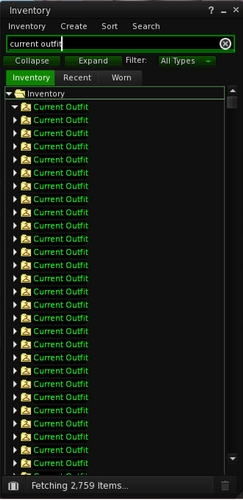
In the case of known issues, there have been further reports of issues arising with people having multiple versions of the Current Outfit Folder in their inventory (SUN-99).
Multiple instances of the COF (images courtesy of Cinder Roxley)
Nyx reports that the Lab has been analysing the issue, and as a result has a list of accounts likely to be affected by it. They are currently putting in place a system by which these accounts will be flagged and automatically fixed when they next log-in. If all goes well, this new system should be coming into play in week 35, or at least in the not-too-distant future.
The Lab is reasonably confident that this work will eliminate the SUN-99 issue; however, Nyx has requested that if people continue to see multiple instances of their Current Outfit Folder appearing, to please raise a JIRA, including the viewer (and version) being used, so that it can be investigated for other possible causes.
Nyx also indicated that there has been one report of a user who was able to move their duplicate COF folders to their trash and then flush them, although this shouldn’t be possible. So if you do encounter the problem, it might be worth a try.
Until the new automated fix solution is implemented, instructions have been passed to LL’s support team, and they generally will try to provide a manual fix when contacted, and will do so for both Premium and Basic members. It has been suggested that the best way to gain support’s assistance is to file a ticket under Account Issues and then clearly marking it as being a BUG-99 / Current Outfit Folder problem.
High Bandwidth and Draw Distance
Issues relating to a poor connection between the viewer and the SL servers are resulting in people having either fully grey avatars or one of the three skin layers (head, upper body, lower body) remaining grey. The Firestorm support team in particular have had reports on this. Commenting on it at the TPV Developer meeting, Lead Support for Firestorm, Ed Merryman, said:
For the most part, in my personal experience, it’s been people with bandwidth and draw distance settings that were, let’s say, “extreme”. Normally, if we get them to drop their bandwidth and draw distance to a reasonable setting, they’re fixed.
The Firestorm team have a wiki item about checking and setting the viewer’s network bandwidth which is useful as a rule of thumb for all viewers.
HTTP Textures
Ed also reported that some users who found a part or all of their avatar grey were seeing the problem resolved if they disabled HTTP textures from within the viewer.
Whether this was due to a poor connection with the SL servers or a hardware issue is unclear. However, the thinking is that it is most likely due to something in the network path between the viewer and the SL servers getting hit with too many HTTP connections (which now include avatar baking). Disabling HTTP textures in the viewer forces regular texture downloads to shift back to the UDP service, thus reducing the number of HTTP connections, allowing avatar textures to load.
Issues when Connecting to SL via a Cell Phone
Problems have also been reported for those using a connection via their cell phone (non-public JIRA BUG-3323). This appears to be down to a issue whereby the size of the packet that the viewer is expecting from the SSA servers doesn’t align with the amount of data actually in the packet. The Lab is currently investigating this, but the issue does seem to be constrained to only a few users.
Next Steps
Commenting on what is coming up next while at the TPV Developer meeting on Friday August 23rd, Nyx Linden said:
I also have the next round of [viewer-side] changes ready to push from Sunshine internal [LL’s private repository] to Sunshine external [the public repository] … In it, you’ll see what should be all of the new inventory capabilities for the new inventory functionality for getting your Current Outfit Folder set. These changes appear to work on our developers’ machine, but are completely untested as far as you’re concerned. So this code is definitely not ready for merging into a mainline branch but feel free to do a merge into a side dev branch.
As always, please refer to the week’s forum deployment thread for news, updates and feedback.
Second Life Server (SLS Main) Channel – Tuesday August 20th
The Main channel had Server-side Appearance (SSA) enabled, as per this blog post from the Lab. As I’ve previously noted, users will need to run a maintained viewer which incorporates the SSA code in order for other avatars to render correctly in their view. See the release notes for additional information to the above links.
There were no other updates in this deployment.
Release Candidate Channels – Wednesday August 21st
Magnum should receive a new maintenance package which “only includes a few internal bug fixes which shouldn’t show any visible changes to the residents”. In describing this at the Simulator User Group meeting on Tuesday August 13th, Simon Linden said, “There’s one performance fix that you might see in the viewer … you shouldn’t get those situations where you see lots of ‘duplicate caps. messages” – this package was deployed to LeTigre in week 33
Bluesteel and LeTigre will both be on an update to the package deployed to BlueSteel in week 33, which includes:
A fix for the “grey box attachment issue” (non-public BUG-3547, details below)
A (further?) update to for “llListen in linked objects is listening at root instead of linked object local position *after re-rezzing the linkset*”, which was also listed in the BlueSteel release notes for week 32 (non-public JIRA BUG-3291)
The code to block avatars entering a region / objects being rezzed in a region during the last 60-seconds before a restart. In addition, restart warning pop-ups will include the region name. This was again in the release notes for week 32, so would appear to be a further update to that code
Fixes for further simulator crash modes.
Further, all three RC channels will have Server-side Appearance enabled at the conclusion of the Wednesday August 21st deployments.
SL Viewer Updates
Release Viewer Updated
Tuesday August 20th saw a new update to the de facto release viewer, when the former Maintenance Viewer RC 3.6.3.279564, dated August 12th, was promoted. The full list of updates for this release can be found in the release notes. However, of most interest to many will be the fact that it includes the particle selection capability.
As previously reported in these updates, this capability (MAINT-2268) allows a user to right-click on a particle emitter and mute it, blocking the particle emissions from their viewer. This is liable to be very welcome to those using regions which are frequently the target of particle griefing, as it means that the emitter itself no longer needs to be located and blocked. In addition, the new code has a FPS limit on particles, and will stop generating new particles when frame rates drop to 4 FPS or lower.
Other SL Viewer Updates
The promotion of the Maintenance Viewer RC to release status leaves four remaining release candidate viewers at this time: CHUI, the MAC-focused Cocoa RC viewer, the Google Breakpad RC for better crash / stats reporting and the Snowstorm RC, which contains updates contributed to LL by third-party developers. As is now the practice, these will each be rebuilt using the “new” de facto release viewer code, and so will have updates appearing over the coming days.
Oculus Rift
Oculus Rift – UI work progressing at the Lab
Work is progressing with integrating Oculus Rift with Second Life. While I’m not overly interested in the Rift myself, one are that does interest me is that of the UI and how it is going to be integrated with the headset – as I’ve commented in the past, while others see it as a potential issue, I don’t necessarily agree, although I’ve felt that a balance would have to be struck in order to avoid the UI completely overwhelming / spoiling the first-person view.
Speaking at the Simulator User Group meeting on Tuesday August 20th, Simon Linden indicated that this is on the Lab’s collective mind as well – and that a potentially clever solution is being tried-out to ensure the UI menus, etc., are usable without interfering with the user’s view of things:
I know recently they were working on how to have the SL UI appear … having menus hanging out in your vision is an interesting design, but you’re not in a “window” anymore … In the Rift it’s projected on a surface around you … so you look up to see the menus and they float there in mid-air … I think they’re experimenting with the shape of that surface too … if it’s flat, the text can look funny as it’s slanting away from you.
This, I have to say, does sound intriguing, and I’d be curious to see it in action; if nothing else, it gets me thinking somewhat of Bruce Branit’s World Builder – although admittedly, the protagonist in that piece is physically “inside” his virtual realm…
If nothing else, that gives me an excuse to post the new HD version of World Builder Bruce posted to his YouTube channel earlier this month (yes, I know it’s not the first time I’ve posted it, but I do love the movie).
A blog post has appeared from the Lab announcing that Project Sunshine – otherwise known as Server-side Appearance (or Baking as was), and a part of the Project Shining initiative – will go live across the grid this week.
The blog post doesn’t provide any date(s) by which this will occur, however Nyx Linden has confirmed that:
The Main channel will have Server-side Appearance (SSA) enabled following the server deployments on Tuesday August 20th
BlueSteel and LeTigre will have SSA enabled following the Release Candidate deployments on Wednesday August 21st (as Magnum is currently the only channel with SSA enabled).
So, if you haven’t already updated to an SSA-capable viewer, you have less than 24 hours in which to do so before you start seeing a lot of avatars failing to render correctly.
Currently, all maintained TPV viewers with the exception of Dolphin (V3-style) and Imprudence (V1-style) support SSA rendering of avatars.
Commenting on the upcoming enabling, Nyx Linden said:
We have stats that show that it should speed up avatar loading time for everyone, so hopefully it will go smoothly and be a great improvement across the grid.
As with previous blog-posts on the subject, the Lab have included a viewer of the new service and what it means.
So, as the video says, “Don’t be cloudy and grey, enjoy Sunshine today!”
As always, please refer to the week’s forum deployment thread for news, updates and feedback.
As noted in part 1 of this report, there was no deployment to the Main channel in week 33, as a result of the “grey box” attachment issue appearing in the week 32 BlueSteel deployment
The Magnum RC channel remained on SSA, with no other updates
The LeTigre RC received a new server maintenance package with “under the hood changes” which should not be visible / perceptible to users. This package saw the removal of SSA from LeTigre – Caleb Linden apologised at the Server Beta meeting for the confusion this caused as the forum thread & release notes did not initially make it clear
The BlueSteel RC received further updates to the fixes released in week 32 and the fix for the “grey box” attachment issue
Viewer Updates
The CHUI RC viewer updated to release 3.6.3.279849 on August 15th (download & release notes). The Materials project viewer also underwent a further update to release 3.6.3.279904 on August 16 (download & release notes).
Server-side Appearance
As noted above, SSA is currently only enabled on Magnum for the time being. A decision will be made on Monday August 19th on server-side updates and deployments, and until then the Lab is keeping quiet as to what may or may not happen in terms of SSA enabling. However, from comments passed in recent discussions and a hint in the forum deployment thread, it would appear that if the data obtained from Magnum during the week remains solid, SSA might be considered ready for “prime time” in week 34.
The removal of SSA from LeTigre did cause some confusion, with at least one JIRA (SUN-109) being raised as a result. Given the JIRA refers to the slowness of avatar rendering, rather than to any overall failures (which shouldn’t happen anyway, given the viewer code is currently backwards compatible with the “old” avatar baking service), this tends to point to the fact that the rapid nature of SSA baking is being appreciated.
Group Ban list
The obligatory Baker Linden shot 🙂
“Group bans are coming along pretty well,” Baker Linden informed his ‘Thursday after meeting class’. He went on:
I chose to take the rest of this week to improve the code rather than continue progressing. I really hated copying an entire source file without trying to refactor it … So now it’s refactoring, cleaning up, and after that the viewer will be finished. Well, I need to add the functionality to some other subsystems and have it actually send an HTTP message but that stuff is all stubbed in anyway.
Some of the cleaning up work apparently involves removing the, umm, colourful metaphors he used when first commenting on the code to highlight those bits he wanted to poke about at. These have apparently been causing a few giggles among those able to peek into the repository!
Given the work is still ongoing, there is no ETA for a project or beta viewer as yet, and this may be delayed a little more while Baker considers the problem of group chat.
Because of the way in which group chat works, anyone who is removed from a group while they have the group chat window open is actually able to continue chatting / spamming within the group until they close the group chat window, unless the group moderator remembers to block them from chat first. This hadn’t been on Baker’s radar, and he’s going to take a look around and see what can / needs to be done to try to make sure the group ban function won’t suffer this weakness, if possible.
As always, please refer to the week’s forum deployment thread for news, updates and feedback.
Second Life Server (SLS Main) Channel – Tuesday August 13th
There was no update to the Main channel. It had been anticipated that the package deployed to BlueSteel in week 32 would reach the Main channel this week, but this is not the case, for the reason given below (see the Grey Box Attachment issue notes, below),
Release Candidate Channels – Wednesday August 14th
Magnum remains with SSA enabled, but otherwise received no further updates.
LeTigre should receive a new maintenance package which “only includes a few internal bug fixes which shouldn’t show any visible changes to the residents”. In describing this at the Simulator User Group meeting on Tuesday August 13th, Simon Linden said, “There’s one performance fix that you might see in the viewer … you shouldn’t get those situations where you see lots of ‘duplicate caps. messages”
Bluesteel should receive a new server maintenance package comprising:
A fix for the “grey box attachment issue” (non-public BUG-3547, details below)
A (further?) update to for “llListen in linked objects is listening at root instead of linked object local position *after re-rezzing the linkset*”, which was also listed in the BlueSteel release notes for week 32 (non-public JIRA BUG-3291)
The code to block avatars entering a region / objects being rezzed in a region during the last 60-seconds before a restart. In addition, restart warning pop-ups will include the region name. This was again in the release notes for week 32, so would appear to be a further update to that code
Fixes for further simulator crash modes.
“Grey Box” Attachment Issue
This is a problem whereby a grey prim appears around any passenger(s) sitting on a boat / vehicle when crossing from a BlueSteel region to any other region (including another BlueSteel region) – the driver / pilot is left unchanged. The affected avatar has no control and requires a relog, while the prim itself appears to be linked to vehicle when edited.
The “grey box attachment issue” (image courtesy of Jen Cuddihy via the SL forums)
It is thought the bug was introduced during the week 32 BlueSteel deployment, and Simon Linden indicated it was the reason there was no Main channel deployment for week 33, saying:
We didn’t update the main channel today. There was a bug found involving vehicles and region crossings that needed to be fixed, so that update will go out tomorrow [the BlueSteel RC deployment]. Basically, don’t sit more than 1 person on a vehicle when leaving a BlueSteel region, otherwise it turns you into a box :P. It happens to the 2nd (and probably more, if you had a crowd) person seated on the object.
Kelly Linden explained what was happening to cause this:
Every agent has a ‘task’ representation on the server that is the same as a prim. The bug is in sending the linked set w/ avatars to the other region: avatars after the first are losing the special avatar treatment and getting passed as a regular linked prim. So that prim is what the server thinks all avatars look like.
Simon added:
The region crossing code basically un-sits avatars from an object, sends both the avatars and object to the next region [as separate sets of data], which puts them back together. In this case, the 2nd avatar doesn’t get detached properly and things go south from there. So the 2nd avatar gets sent over bundled up with the object … which it’s not designed to do.
The additional avatars on the vehicle at the time of the region crossing essentially end-up in limbo, with data caught between the two simulators. “The regions are very confused about that avatar data by that point, I’m sure a relog would be needed,” Simon said.
An interesting side-effect of this is that the bug makes it possible to exceed the 256-prim linkset limit – sort-of. Enterprising individuals have realised that if you rez a 256-prim linkset, sit a number of avatars on it and move it across a region boundary, it will acquire an additional prim for each additional passenger over the first avatar to sit on it. However, the ability is of limited value; make any changes to the enlarged linkset, such as unlinking a child prim or trying to texture one of the greyprims, and the entire thing turns no modify / no copy – and the fix being deployed to BlueSteel should correct the problem anyway.
Server-side Appearance
Just as a reminder. There are no further SSA deployments planned for week 33. This is to allow for some back-end updates to be made to the SSA servers. These updates shouldn’t result in any visible difference to users on SSA-enabled regions, and are intended to fix a couple of scenarios where the viewer would have to re-try requests when it shouldn’t have to. The Lab wants to get these updates deployed to the SSA server prior to making any move to rolling-out SSA to the entire grid.
There have been comments on the forums that SSA “must” be encountering major problems as the deployment has been so protracted. This is not the case. Linden Lab (via Nyx Linden) have always stated that the deployment would proceed very, very cautiously because it is such a fundamental change in how Second Life functions. Even though the Lab has indicated that very, very few problems have been encountered with enabling the service so far, and the load testing on both Magnum and LeTigre (representing a little over 20% of the grid) has been very positive, they are sticking to their softly, softly approach.
Viewer Updates
As the Vivox updates became the de facto release viewer in week 32, the remaining five release candidate viewers in the viewer release channel have been underground rebuilding using the updated release viewer code base. On Monday August 12th, updates for both the Cocoa Viewer for Mac (version 3.6.3.279554 – download and release notes) and the Maintenance Viewer (version 3.6.3.279564 – download and release notes) were released.
Materials Project
The Materials Project viewer was updated to version 3.6.3.279651 on August 8th. This release lists a large number of fixes, perhaps most notably those related to problems with the appearance of alpha textures under both local lights and sunlight, and numerous issues with mesh rendering and lighting within the materials viewer. Please refer to the full list of JIRA items in the release notes linked-to above.
ALM Concerns
Concerns have been raised about performance issues as a result of having the Advanced Lighting Model (ALM) enabled by default (as is now frequently the case for most graphics cards, as is a requirement in order to see materials in use in-world).
The amount by which ALM can affect the user experience is variable, and subject to a lot of influences, not just the graphics cards / computer system the viewer is running on. Some people with systems similar to my own (see the panel on the right for my system spec), have noted “significant” impact when running with ALM enabled on a materials-capable viewer.
Part of the problem is the “ALM” is a very broad term, and other options within the viewer can influence performance, but will not impact the ability to see materials even if they are turned off – such as having shadows set to None, for example, or having water reflections set to Minimal and turning off local lights (via debug or Phototools, for example). So part of the problem is that of communicating what can be done from within the viewer to help offset performance impacts should they occur, but which don’t limit their ability to see materials in use.
Quick ways to improve performance when running in ALM to see materials. Top left: you can uncheck Ambient Occlusion, keep Shadows set to None and drop water reflections to Minimal. Bottom Left: Using Debug Settings from the Advanced Menu, set RenderLocalLights to FALSE. Right: Firestorm / Phototools, ambient occlusion, shadows, local lights and facelights can all be disabled from the Light tab and water reflections lowered from the WL tab


 Inara Pey: Living in a Modemworld