2025 Week #21 Project Zero User Group Meeting: updates

via Linden Lab
The following notes were taken from the Thursday, May 22nd 2025 Project Zero User Group (PZUG) meeting.

  • They are based on my audio recording of the meeting + chat log.
  • They should not be taken as a full transcript of the meeting.
Table of Contents

Meeting Purpose

  • The Project Zero User Group provides a platform  for open discussion about Project Zero, the cloud-streamed version of the Second Life Viewer. Topics can range from sharing the goals for Project Zero, demoing the current experience, and gathering feedback to help shape the future of cloud access for Second Life.
  • These meetings are conducted (as a rule):
    • The second and fourth Thursday of every month at 13:00 noon SLT.
    • In Voice and text.
    • At the Hippotropolis Campsite.
  • Meetings are open to anyone with a concern / interest in the above topics, and form one of a series of regular / semi-regular User Group meetings conducted by Linden Lab.
  • Dates and times of all current meetings can be found on the Second Life Public Calendar, and descriptions of meetings are defined on the SL wiki.

Resources

Note: “Zero” or “Project Zero” in these summaries always refers to the SL official viewer running in a browser; “Firestorm Zero”, “FS0” or “FS Zero” always refers to the Firestorm viewer offering in a browser.

Recent Updates

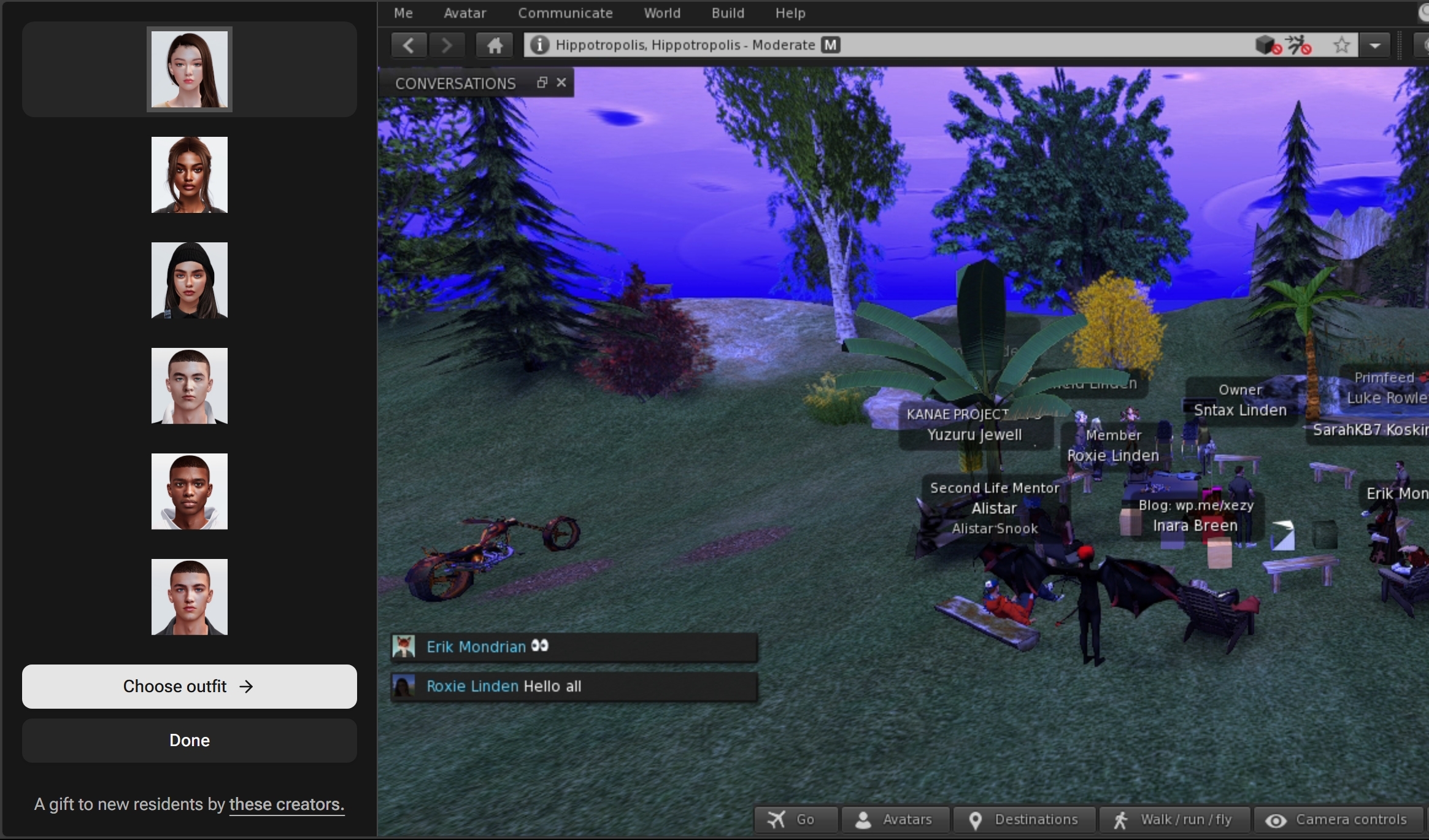
Avatar Picker

The Avatar Picker. Credit: Linden Lab
  • The Picker is actually a browser HTML element separate to the viewer, popping out and to the left of the viewer within a browser tab.
    • This is currently experimental, but is something the Lab would like to move towards.
    • The idea is is move away from floaters in the viewer, where appropriate, moving things to one side in the browser so as to leave the in-world view less cluttered.
  • The picker is associated with the new Avatar Welcome Pack also issued in April, and forms first part of presenting Project Zero with a new UI, built using HTML / React, and first discussed by Philip Rosedale when Project Zero was initially launched.

Go Menu and Toolbar Button

  • Previously referred to as the “Destination Picker”, the Go Menu has now been implemented, the name aligning with the Go button seen on the web account registration  / join pages.
  • Accessed by a new Toolbar button within Project Zero – also called Go – the “menu” is a scrollable  panel of potential destinations for (new) users.
  • Currently, the panel contains three destinations, rather than the 12 indicated in the April meeting. These have been selected on the basis of activity, rather than location; the activities being: meeting people, building, joining a role-playing game.
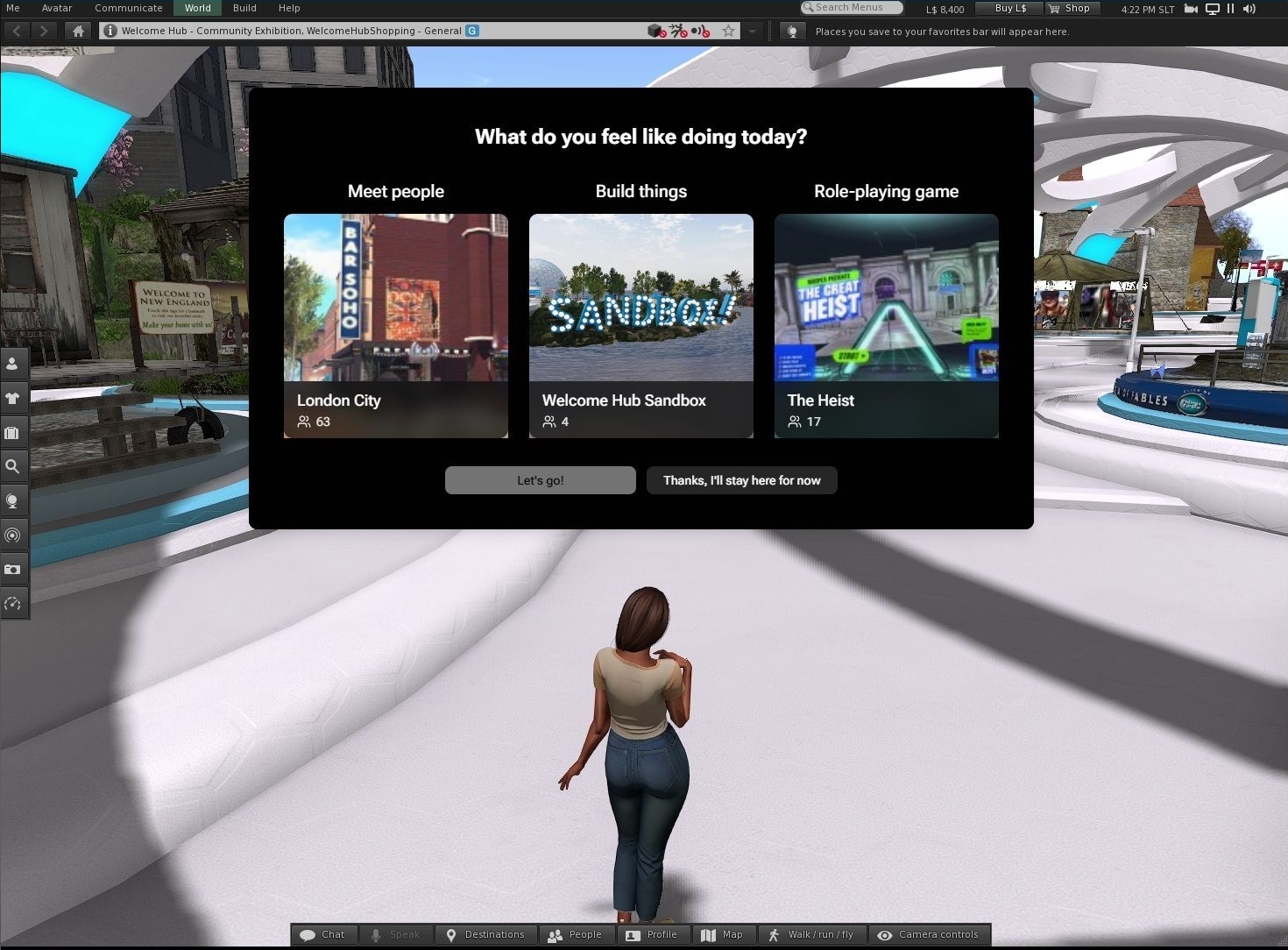
The Go Menu panel. Credit: Linden Lab
  • The Go Menu is automatically displayed when a new user first launches Project Zero, and is experimental at this point, and:
    • May well be expanded more towards the notional 12 places.
    • Is not intended as a replacement for the Destination Guide.
    • Is being monitored by LL to gather information of how well it is used and the potions people tend to use the most.
  • In addition, a new Toolbar button has been created.
    • This is called “Go” and has an airport-style image of an aircraft departing.
    • It is part of the default set of Toolbar buttons.
    • Allows a user to re-display the Go Menu panel.
  • Even with the limited choice on offer, the Lab has already noted that users coming into SL tend to pick on the option that has other avatars present, rather than being purely driven by activity. However, s noted in the meeting, it is still too early in testing to say this is definitively so (it might just be that as the first location in the panel, London City is just naturally clicked on, for example).

Toolbar Refresh

  • The general display of the toolbar buttons has been refreshed for Project Zero.
  • In particular, buttons are no longer displayed on the left side of the viewer window; everything defaults to the bottom of the window, with the number of buttons reduced to better-suit the initial needs of incoming new users.
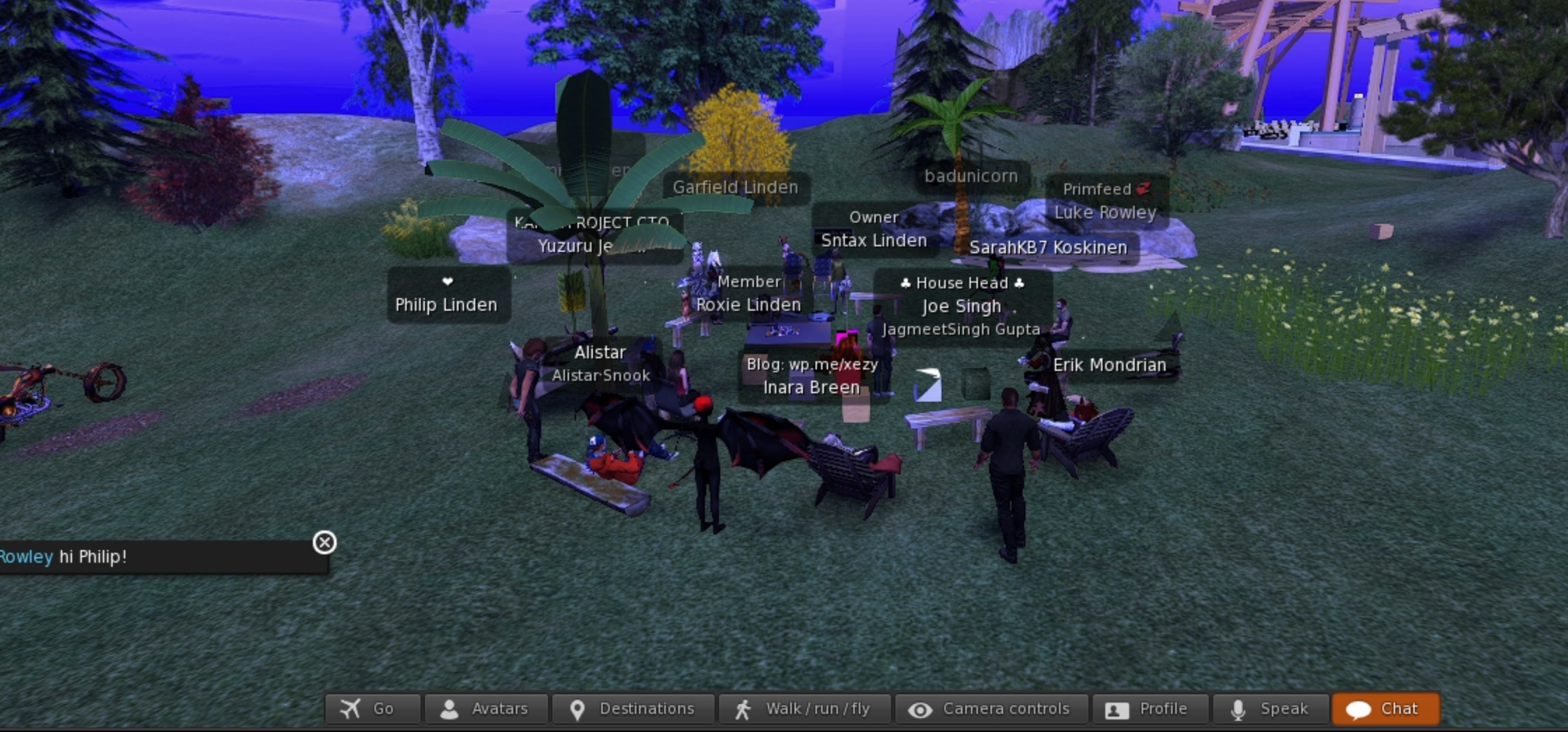
The new Project Zero Toolbar layout as seen by incoming new users – click for full size, if required. Credit: Linden Lab
  • By default, this Toolbar comprises:
    • Go button – described above.
    • Avatars – opens the avatar picker, also described above for changing an avatar / altering the style of dress.
    • Six unchanged buttons: Destinations, Walk/Run/Fly, Camera Controls, Profile, Speak, Chat.
  • During the meeting, the following default buttons were additionally suggested:
    • Chat Bar (per most viewers outside of the official viewer).
    • Inventory.
    • People / Friends + access to Groups.

General Discussion

  • It was noted that those attending the meeting had all been unable to access Project Zero to test the new features – it is hoped (no promises) that this might bee addressed.
  • Suggestions for alternative Go Menu destinations were offered:
    • Builders Brewery and Ivory Tower of Prims as places for those wishing to learn to build.
    • A broader selection of game destinations, rather than just MadPea.
    • Places like Dreamer’s Bay, where newcomers can receive assistance, have the opportunity for free housing, etc.
  • There was a general Discussion on how people make friends, and the various means of doing so, possibly in the hope of finding a route to making it easier for newcomers to do so, rather than them getting confused by multiple different ways.
  • The above led to a more esoteric discussion on Calling Cards; the Friends List (and how it’s not really that, it’s more a contacts / acquaintances list for many, which strayed into the realm of Firestorm Contact Sets); feedback on how people might go about making friends. These discussion appeared to be more for gleaning information than aiming towards anything planned for Project Zero.
  • The point was made that Second Life is potentially far less sociable nowadays than previously, and that while the onus seems to be on creators and content – which can help – the sense of wider community and of having places to go and things to do has been somewhat lost. In this, mention was made of fun activities such as skydiving, regions like the Greenies and other builds by Rezzable, etc.

Date of Next Meeting

2025 Week #17 Project Zero User Group Meeting

via Linden Lab
The following notes were taken from the Thursday, April 24th 2025 Project Zero User Group (PZUG) meeting.

  • They are based on my audio recording of the meeting + chat log.
  • They should not be taken as a full transcript of the meeting.
Table of Contents

Meeting Purpose

  • The Project Zero User Group provides a platform  for open discussion about Project Zero, the cloud-streamed version of the Second Life Viewer. Topics can range from sharing the goals for Project Zero, demoing the current experience, and gathering feedback to help shape the future of cloud access for Second Life.
  • These meetings are conducted (as a rule):
    • The second and fourth Thursday of every month at 13:00 noon SLT.
    • In Voice and text.
    • At the Hippotropolis Campsite.
  • Meetings are open to anyone with a concern / interest in the above topics, and form one of a series of regular / semi-regular User Group meetings conducted by Linden Lab.
  • Dates and times of all current meetings can be found on the Second Life Public Calendar, and descriptions of meetings are defined on the SL wiki.

Resources

Note: “Zero” or “Project Zero” in these summaries always refers to the SL official viewer running in a browser; “Firestorm Zero”, “FS0” or “FS Zero” always refers to the Firestorm viewer offering in a browser.

Avatar Picker

  • Released on April 24th, 2025.
  • Actually the first part of presenting Project Zero with a new UI, built using HTML / React, and first discussed by Philip Rosedale when Project Zero was initially launched.
  • Takes the form of a UI element that “pops in and out” of the left side of the browser window for the viewer.
  • Allows a user to select one of the avatars available within the new Avatar Welcome Pack, and the dress it in one of the available outfits.
  • The idea is to help new users get started with the kinds of avatars and avatar accessories more generally found in SL, thus grounding them more in the platform and the avatar ecosystem.

Project Zero and On-Boarding New Users

  • With the resumption of direct advertising of SL, the Lab has noted:
    • Only around 10% of users responding to an ad and who are directed through the sign-up process that requires them to download and install the viewer, actually get as far a logging-in.
    • However, the number responding to an ad and being directed to the sign-up process culminating in them being able to access SL directly through their browser using Project Zero, has a success rate of over 50% actually logging-in.
  • Data gathering on incoming new users responding to ads suggest that the majority are using computers that would not be able to run the viewer to its fullest visual extent; however, 90% of those users coming in via the Project Zero route are able to properly “see people and hear the birds”.
  • The next strategic step is seen as encouraging those new users to more fully engage with the platform, and two steps are being taken in this direction – the Avatar Picker noted above, and an upcoming “Destination Picker”, which is seen as an extension to the avatar onboarding process.

Project Zero “Destination Picker”

  • This is liable to be the next element for the new UI.
  • When available, it will allow (new) users to select one of the 12 destinations, in a similar manner to the Go button seen on the web account registration  / join pages.
  • The desire being to point them towards locations and experiences that bring home the value of Second Life, and which encourage them to continue to log-in to the platform.
  • In this it is recognised that:
    • Simply listing a plethora of destinations which may or may not have active use risks losing incoming new users on the basis if they get sent to places where there is no engagement with others, they simply will not stay.
    • Similarly, just sending people to “crowded” places (clubs, shopping areas, etc.), is not necessarily a good idea, and people within those environments may not be amenable to answering questions / offering assistance. etc.
    • People are much more likely to stay if they find people who are friendly, willing to offer help, point them towards community resources, etc.
  • As such, the destinations placed in the Picker are going to be curated (and possibly rotated), based on how well they assist in helping new users feel “part” of SL.

Additional Notes on Destinations / On-boarding

  • Selections for inclusion are liable to be along lines that reflect the typical reasons people give for signing-up to SL – such as an interest in art, a desire to experience live music, etc.
    • In this regard, incoming new users are already being “round robined” to a number of potential starting points: the Welcome Hub, Gateways such as Firestorm’s gateway, experience-oriented hub like MadPea, etc.
    • However, the Lab wants to move this on to the users themselves being able to make a choice as to where they go on logging-in.
  • A new channel will be provided to those managing the selected destinations, which will provide them with data such as: numbers of new users returning for a further session, number of users going to no upgrade to a subscription tier, and other data that can help illustrate the success of a location in supporting new users, and possible highlight areas for possible optimisation.
  • With regards to the success of destinations used within the on-boarding of new users over the year, Philip Rosedale noted the following:
Over all these years, when we have looked at the statistics for destinations for areas as different as those I’ve mentioned – the Welcome Hub, the Adventure Island, the Firestorm Welcome Island, the MadPea games, for example – fascinatingly enough, we see that the success at retaining new users is virtually identical for all of those destinations; and overall, is of course very poor. 
So its interesting to not that we’re not even close, it would seem, on what the right on-boarding experience is; because all of the ones we have tried are equally unsuccessful. 

– Philip Rosedale

New Users and a Sandbox

  • Sntax floated the idea of offering incoming users the opportunity to go to a specific sandbox environment were they could join other users and new users in collaborative building / learning to build.
  • Active Worlds used to have something similar for its incoming new users.
  • Responses to this at the meeting were mixed.
    • Positives: offers the opportunity for collaborative work using the built-in tools; allows experienced 3D content creators new to SL experiment with importing mesh; could become an informative learning “playground”.
    • Negatives: built-in tools for content creation are both complex and have not seen any real TLC in years; primitives fall well short of more refined meshes; the potential for griefing.
  • This lead to a more general discussion on engaging new users, opportunities for engaging them in activities and how to direct them (e.g. offering those wanting to use Voice to “Voice friendly” locations; offering experiences such as games, sailing, flying, etc.

Notes on Availability

  • Existing users can also use the Avatar Picker, however:
    • It is only available on Project Zero.
    • Project Zero is geared towards incoming new users, so existing users might find it difficult to obtain a slot when trying to log-in via Zero.
  • Part of the reason for this is the Lab feels the capability needs to mature before becoming more widely available to existing users.
  • That said, if people would like to use Zero because it would potential offer a better experience than a viewer running locally on their computer, should IM Sntax Linden stating why they want to use Zero and what, specifically, they would use it for and the perceived benefits. Such use cases might then help speed the development of the capability.
  • Passes for Firestorm Zero are currently not available.

Date of Next Meeting

April 2025 SL Web User Group: Project Zero and AI on the MP

The Web User Group meeting venue, Denby
The following notes cover the key points from the Web User Group (WUG) meeting, held on Wednesday April 2nd, 2025. These notes form a summary of the items discussed and is not intended to be a full transcript.

A video of the meeting, recorded by Pantera Północy, is embedded at the end of this summary, with sections of this summary times stamped to the relevant points in the video for those wishing to refer to the audio. My thanks as always to Pantera for recording it and making it available.

Table of Contents

Meeting Overview

  • The Web User Group exists to provide an opportunity for discussion on Second Life web properties and their related functionalities / features. This includes, but is not limited to: the Marketplace, pages surfaced through the secondlife.com dashboard; the available portals (land, support, etc), and the forums.
  • As a rule, these meetings are conducted:
    • On the first Wednesday of the month and 14:00 SLT.
    • In both Voice and text.
    • At this location.
  • Meetings are open to anyone with a concern / interest in the above topics, and form one of a series of regular / semi-regular User Group meetings conducted by Linden Lab.
  • Dates and times of all current meetings can be found on the Second Life Public Calendar, and descriptions of meetings are defined on the SL wiki.

General Updates Since last Meeting

[Video: 0:00-0:50]

  • Some clean-up of the What’s Next page – but no re-integration of the Destination Guide as yet (The DG situation is further discussed between 17:32-21:33].
  • Fixes for spaces within Map links, with more fixes for incorrect spaces in links still to come.
    • Requests were again made to be able to search maps.secondlife.com by region name, which is apparently a little harder to implement than had been thought.
  • Minor fixes to the Marketplace:
    • See Mature Content link was not working as expected.
    • Translations updates and added.

Project Zero / Firestorm Zero (SL  in a Browser) Update

[Video: 4:59-17:00]

SL Viewer Work

  • Recent work has been focused on stability and performance.
  • Work has resumed on the new viewer UI for the Project Zero SL Viewer, and the first iteration, featuring very small changes should be released “pretty soon”.

Firestorm Zero

  • A core focus has been on the Firestorm version of Zero (Firestorm Zero, launched in March), running through bugs and issues reported with that. Some issues include:
    • People purchasing time and having issues launching a session.
    • People being locked-out of Firestorm Zero after a session (or even during) – most likely as a result of Cookies being corrupted, thus requiring Cookies to be cleared from the browser & the browser restarted.
    • It’s also been suggested that using a private / incognito version of a browser works better, as this should clear all Cookies on exiting.
    • Note: I have experienced multiple “locks-outs” (one both “public” and “private” browsers – Chrome, Firefox, Opera, Brave) and have found that clearing / resetting Cookies within the browser does not work, and it requires LL to bang on things (indeed, as of this moment, I cannot access Firestorm Zero!). If you encounter the same, please file a report.

General to Both

  •  It was acknowledged there there is a degree of confusion around Project Zero and Firestorm Zero, and the fact there are differences between them:
    • Project Zero is effectively the official viewer, offered on a limited capacity basis, with the focus more towards incoming new users / returning users.
    • Firestorm Zero is the “paid” service utilising the Firestorm viewer and focused more towards current users.
  • Some aspects of this confusion might be seen in:
    • The link found at the top of the Second Life Dashboard (Launch Second Life in a Browser) will launch Firestorm Zero.
    • The fact that at the WUG meeting, people conflated issues of logging in to Project Zero which were likely due to the limited capacity / new user focus more than anything else, with a discussion on specific issues those attempting to use Firestorm Zero were experiencing.
  • As a result, Sntax Linden noted that there should be more / better differentiation between the two.
  • Shortfalls with both Zero and Firestorm Zero were (again) noted as:
    • Lack of ability to directly upload (mesh, textures, etc.) to your account.
    • Lack of ability to save snapshots, etc., to a local disk.
    • The noticeable latency in camera movement (and similar) for those more distant to the host computer running the viewer. [It has been hinted that this could be address by relocating host computers for Project Zero / Firestorm Zero in additional Amazon GameLift end-points such as Éire.]

AI Content on the Marketplace

[Video: 36:20-End]

A feedback request to Add marketplace policy regarding AI generated content sparked a request for clarification on what people would like (e.g. disclosure of the use of AI generated content / listing images; outright banning of anything related to the use of AI tools; filtering out content made purely with generative AI (as opposed to content which has been created by someone and which happens to use some AI elements), something in-between; limiting some forms of AI content, etc.).

  • Within the meeting, disclosure (e.g. clearly indicating a item uses AI generated content / the listing images are AI generated, etc.), was preferred by most.
    • It was noted that using purely AI-generated images (e.g. created using Midjourney) as a non-representative means to promote / sell content on the MP is already against policy (misleading advertising) and so can currently be reported.
    • Kali Linden indicated LL are looking to add reasons for flagging content, and something along the lines of “violates LL policy” might be considered, to make such reporting easier.
  • It was acknowledged that those using generative AI tools (e.g. Meshy) for content on the MP probably are not going to self-identify through marking check-boxes etc.
  • It was also noted that some people using generative AI images for advertising on the MP are not doing so with intent – but rather because it is the New Shiny for them to play with, and so some allowance should be made for this.
  • There’s also the issue with people who may take images of their creations and then heavily post-process them to the point where they are no longer fully representative of the item it promotes – so what should be done in these cases? Or with those using art pulled from the physical world?
  • Part of this conversation inevitably rolled over the idea of AI “companions” / bots and an expressed desire to “ban everything” about AI – including bots, despite there being nuances – such as with the latter (e.g. in-store CSRs, more dynamic role-play NPCs, etc.).

In Brief

Please refer to the video for details on the following.

  • [Video: 1:32-4:44] General discussion on the Second Life booth at the 2025 Games Developer Conference, which some at the meeting felt to be underwhelming based on the photographs posted to social media, etc.
    • LL also appear to have received feedback from the SL creators who attended the event, and it appears lessons are being learnt for future possible events / appearances.
  • [Video 17:32-18:50] Further  discussion over the lack of a visible-by-default chat bar in the official viewer.
  • [Video: 22:03-35:15] Discussion on use of the in-viewer browser vs. using an external browser – most preferred the external browser option.
    • However, most browser-based shopping stats the Lab has for the Marketplace point to the viewer’s internal browser being primarily used for purchases.
    • Sntax Linden noted that as the internal browser is the only option for accessing the web from within Project Zero / Firestorm Zero, LL do want to improve on it – such as making the responsive MP not only work on small device screens, but also work better within the in-viewer browser.
    • Traditionally, the in-viewer browser has been avoided due to concerns of general security (e.g. clicking on phishing links and opening them within the in-viewer browser). This led to a discussion on ways to block “bad links”.

Next Meeting

  • Wednesday, June 4th, 2025.

Using Firestorm in your browser for Second Life

As of Friday, March 14th, 2025, Firestorm is available as a viewer-in-a-browser option via Linden Lab
On Friday, March 14th, Linden Lab, in conjunction with the Firestorm viewer team, launched Firestorm Zero, an expansion of the Lab’s viewer-in-your-browser Project Zero which, as the name suggests, features the release version of the Firestorm viewer.

I provided an initial overview of the offering, together with notes on the overall status of Project Zero in Project Zero Update: Firestorm in your browser as well.

Table of Contents

Update: all available passes are sold out!

In this article, I hope to provide a brief re-cap on the work, and provide an hands-on to getting started and using Firestorm Zero.

Key Points To Note

  • Firestorm Zero is a means to access Second Life by means of the Firestorm viewer being streamed to your computer from an Amazon GameLift servers, and your inputs transmitted back to the server.
  • The service currently operates at a fixed 1080p screen resolution, and should generally provide a Second Life experience at least as good as any mid-range gaming PC, direct to your computer, no matter how old the latter might be.
  • As the service is being streamed to your computer, not all of Firestorm’s setting and options may be saved between sessions – see below for more on this.
  • Firestorm Zero is provided on a pay-to-play basis, using passes costing L$250 for up to five hours use of the service. See below on how to obtain passes.
    • Please note that this is an initial price, and may change – again, please refer to Project Zero Update: Firestorm in your browser as well for general information on the cost of streaming.
    • Payment is for using Firestorm Zero only, the official viewer Project Zero access at zero.secondlife.com is still free, but with limited access to existing users.
    • There are a limited number of passes available.
  • The Firestorm viewer version is 7.1.11.

Purchasing a Firestorm Zero Pass and Accessing the Service

Purchasing a Firestorm Zero Pass

  • Go to your Second Life dashboard.
  • In the left-side menu column, click on Account → Purchase Streaming Hours.
  • Click the Purchase 5 Hours for L$250.
Purchasing hours for using Firestorm in your browser
  • Once you have purchased your hours, continue below.

Accessing the Service

  • On purchasing a pass, go to the the Firestorm Zero webpage – note that this may be referenced a “Second Life” in your browser tab, because it is Linden Lab providing the service, it does not mean you are about to be logged into the Official viewer.
  • If you are logging-in for the first time:
    • Log-in with your log-in credentials using the Second Life web log-in request.
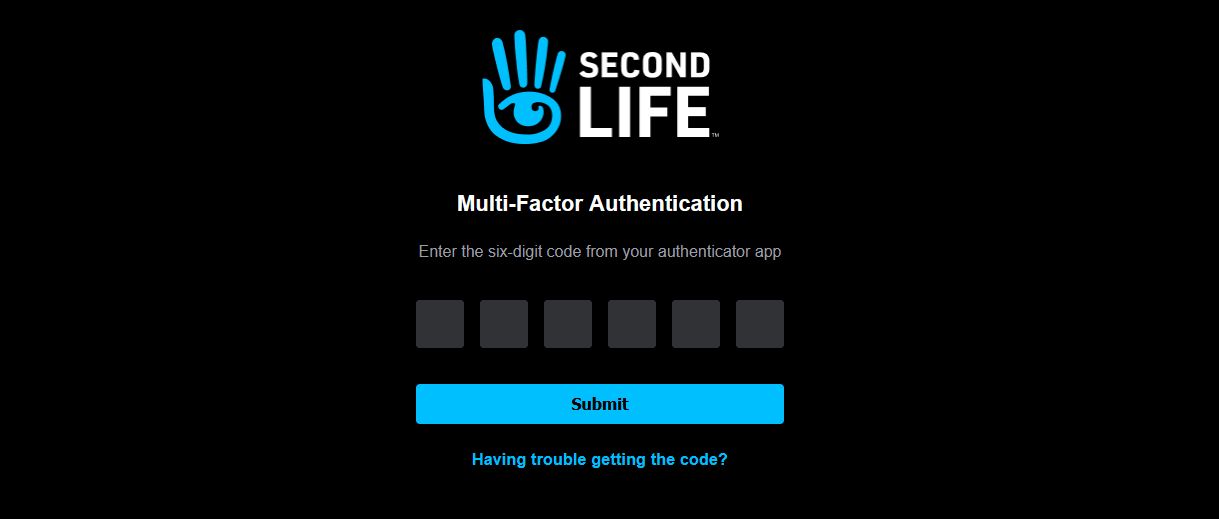
    • If you have Multi-Factor Authentication (MFA) enabled (see: Second Life Multi-Factor Authentication: the what and how), you will additionally be asked to supply a Token.  Be sure to accept cookies to save you Token information.
As Firestorm Zero is provided via Linden Lab, you may be requested to log-in to the Second Life web services and, if you use MFA, to provide a Token
  • The warning that Project Zero is experimental will be displayed. click the Play button to proceed.
  • The viewer will load and launch, delivering you in-world.

Settings and Options: Available and Limitations

As Firestorm Zero is streamed to your viewer, not all of Firestorm setting / options for saving settings within the viewer may work / be available. The following is a list of features I’ve been able to test; note that there are other Preferences that may also disabled within Firestorm Zero when compared to the locally-installed versions of the viewer. Also, these are obviously at the time of writing, and subject to future changes.

Option Firestorm Zero
Retain Preferences between sessions Yes
Set and retain Graphics Presets Yes
Set and retain Camera Presets Yes
Customise Toolbar buttons Yes
Set and retain Camera Presets¹ Yes
Retain toolbar button size and alignment between sessions No
Access Advanced Menu No
Access Developer Menu No
Upload textures, sounds, models, etc. No
Retain IM histories Yes
Retain Local Chat history No
Back-up and Restore Settings No
Enable RLVa & retain Yes
Space Navigator Support No
Save Snapshots to Disk² No
  1. I personally had issues with accessing Firestorm Zero after setting custom camera presets, and have reported this as a potential issue. Your mileage may vary.
  2. As alternatives – use the options to save snapshots to e-mail or save to Flickr.

Support And Feedback

Firestorm Zero is a collaborative effort between Linden Lab and the Firestorm viewer team.

  • Linden lab is responsible for the overall provisioning of the service: purchasing passes, accessing Firestorm Zero, providing capabilities such as viewer Preferences and settings being retained between sessions, etc.
    • Issues relating to any of the above can be reported through the Firestorm Zero category of the Second Life Feedback Portal.
  • The Firestorm team retain responsibility for general support within the viewer itself.
    • Issues relating to using the viewer itself should, in the first instance, be raised through the usual Firestorm support channels.

Related Links

Project Zero Update: Firestorm in your browser as well

From Friday, March 14th, 2025 (if all goes according to plan) Firestorm will be available as a viewer-in-a-browser option via Linden Lab

On Wednesday, March 12th, 2025, Philip Rosedale, the Lab’s Chief Technology Officer and Syntax Linden, the lead for Project Zero, the viewer-in-a-browser project, provided a special update to members of the Blogger Network on the status on the project, including the news that Firestorm is joining the project with “Firestorm Zero”.

Firestorm Zero

The release version of Firestorm will be available to users as a viewer-in-your-browser offering in collaboration with Linden Lab. All things being equal, it will be launched on Friday, March 14th, 2025, in addition to the current Project Zero offering of the Official viewer (see below for more on this) and has the unofficial title (likely to become official now!) of Firestorm Zero.

Audience

The primary audience for Firestorm Zero is seen as existing  and returning users  – the majority of whom already use Firestorm, and who might therefore find Firestorm Zero a more attractive option that Project Zero’s Official viewer.

Payment “Passes”

  • Unlike Project Zero, Firestorm Zero will be offered on a pay-to-use basis  from the outset, in the form of purchasable “passes”.
    • Passes will cost L$250 and provide up to 5 hours of use with Firestorm Zero (passes will not apply to the official viewer at this time, which remains free to use.
    • Passes will be available through a Dashboard web page “similar to how you purchase Linden Dollars”, once the service has been announced and is live.
    • Firestorm Zero passes will not be available via either the Project Zero website or the Firestorm website.
  • While the number of passes available at any given time may be limited, once purchased, they guarantee immediate access to Firestorm Zero without any of the waiting experienced with Project Zero.
  • With regards to the above, the idea of selling passes for Firestorm Zero is two-fold:
    • To test the waters on charging for the streaming service, to see how users respond to it, how they go on to use the service based on the fees charged, etc.
    • To offer the service at a price-point potentially in line with the expectation of the actual streaming costs coming down over time to match or come close to the cost of passes.

Additional Firestorm Zero Notes

  • The viewer is streamed at 1920×1080 (as with Project Zero).
  • Whilst this is the Firestorm viewer, it is being surfaced to users directly by Linden Lab. As such:
    • If a user has opted-in to MFA, they will be required to provide a token (again, as per the usual requirements).
    • The viewer will be accessible through a Linden Lab web page after a pass has been purchased, not through the Firestorm website nor the current Project Zero web page.
  • Once available, issues with Firestorm Zero can be reported through the Feedback Portal dedicated Firestorm Zero category.

Project Zero Update

Note: for a general overview on the Project Zero work, please see: Second Life in your browser: a new initiative from Linden Lab.

General Update Notes

  • As noted above, the Official viewer Project Zero option will remain available at no cost at present, through its dedicated website, and with individual sessions still limited to 1 hour.
  • Project Zero is currently provisioned out of Amazon’s AWS facilities on the US West Coast. However, Linden Lab is in discussion with AWS about offering Project Zero through UK and European end-points “soon”.
  • Work is continuing on the React / HTML updates to the viewer UI within Project Zero, but these are not ready for surfacing just yet.
  • IMs within the Zero viewers are now saved – however, local chat sessions cannot, at present, be saved.
    • More general work on Chat is being carried out to try to ensure chat messages are properly synched between different modes of access (e.g. between the viewer and SL Mobile).

More On Possible Future Fees

  • Currently, Project Zero is costing Linden Lab around US $1.75 per hour per user.
    • While there are expectations / confidence that this price will be reduced in the future, it still means LL are running the service at a loss at present.
    • Some of the ways these costs are likely to come down involve switching the service away from Windows machines to Linux systems (hence why at the week #10 CCUG meeting, Linux support was described as becoming “more and more of a forefront priority” with “internal dependencies on supporting it”), and in moving away from dedicated per-user hosting for the streaming viewer to more of a “shared tenancy” model.
    • It is the expectation of the overall cost eventually coming down to under US $1 an hour which has encouraged the Lab to settle on the idea of selling “passes” in conjunction with Firestorm Zero, as a means to test the water among users.
  • In terms of charging for the service in the future in order to cover costs, it was indicated that offers passes as a subscription perk of some kind (e.g. at a reduced fee(?)) might be considered.

New Users

  • The Lab has been seeing “hundreds” of new users per day come into to Second Life via the workflow that leads them to running Project Zero and the Official viewer rather than having to download and install the viewer.
  • New users have up to four hours for a session when accessing Second Life through the on-boarding process / Project Zero.
  • Those entering SL through the workflow / Project Zero who have responded to the Lab’s surveys have done so “very positively”.
  • However, it’s not clear how well these users are being retained beyond their first log-in, as this is harder to track, particularly as retention really needs to be measured in terms of multiple months rather than weeks.
  • As a broader note on new user on-boarding, LL is looking towards a “simpler” approach to the on-boarding process as a whole, including giving people the option of using Firestorm / Firestorm Zero as a part of the workflow.

General Notes

  • It was suggested that as there is no facility to save snapshots to a local disk in either Project Zero or Firestorm Zero, that those taking snapshots on either try the Save to E-mail option on the Snapshot floater (both Zero and Firestorm Zero) or Save to Flickr (Firestorm Zero) and – if post-processing is required, download the image from there.
  • Update: the issue of saving Preferences originally mentioned in this article was fixed on March 13th.

March 2025 SL Web User Group: web site refreshes, Project Zero and Mobile

The Web User Group meeting venue, Denby
The following notes cover the key points from the Web User Group (WUG) meeting, held on Wednesday March 5th, 2025. These notes form a summary of the items discussed and is not intended to be a full transcript.

A video of the meeting, recorded by Pantera Północy, is embedded at the end of this summary, with sections of this summary times stamped to the relevant points in the video for those wishing to refer to the audio. My thanks as always to Pantera for recording it and making it available.

Table of Contents

Meeting Overview

  • The Web User Group exists to provide an opportunity for discussion on Second Life web properties and their related functionalities / features. This includes, but is not limited to: the Marketplace, pages surfaced through the secondlife.com dashboard; the available portals (land, support, etc), and the forums.
  • As a rule, these meetings are conducted:
    • On the first Wednesday of the month and 14:00 SLT.
    • In both Voice and text.
    • At this location.
  • Meetings are open to anyone with a concern / interest in the above topics, and form one of a series of regular / semi-regular User Group meetings conducted by Linden Lab.
  • Dates and times of all current meetings can be found on the Second Life Public Calendar, and descriptions of meetings are defined on the SL wiki.

MFA Enabled across Web Property Log-ins

[Video: 2:56-3:14]

  • Multi-factor authentication (MFA) is now enabled for all Second Life web properties.
  • Those with MFA logging-in to the majority of SL web properties (e.g. the dashboard, Marketplace, Project Zero, the Destination Guide, etc.,), will be asked to supply a token from an appropriate authenticator the next time their current token expires.
  • As with the viewer, tokens will generally be valid for 30 days, the exception being should you clear cookies from your browser, in which case you will also have to supply a new token on logging in.
Those with MFA enabled on their account will now see an MFA token request when logging in to the majority of SL web properties (which includes Project Zero) for the first time OR after clearing browser cookies will be asked to present a authentication token – which should now remain valid for the 30-day period / until the site cookies are cleared (whichever comes first)
  • This work should harmonise logging-in across most of the popular SL websites.

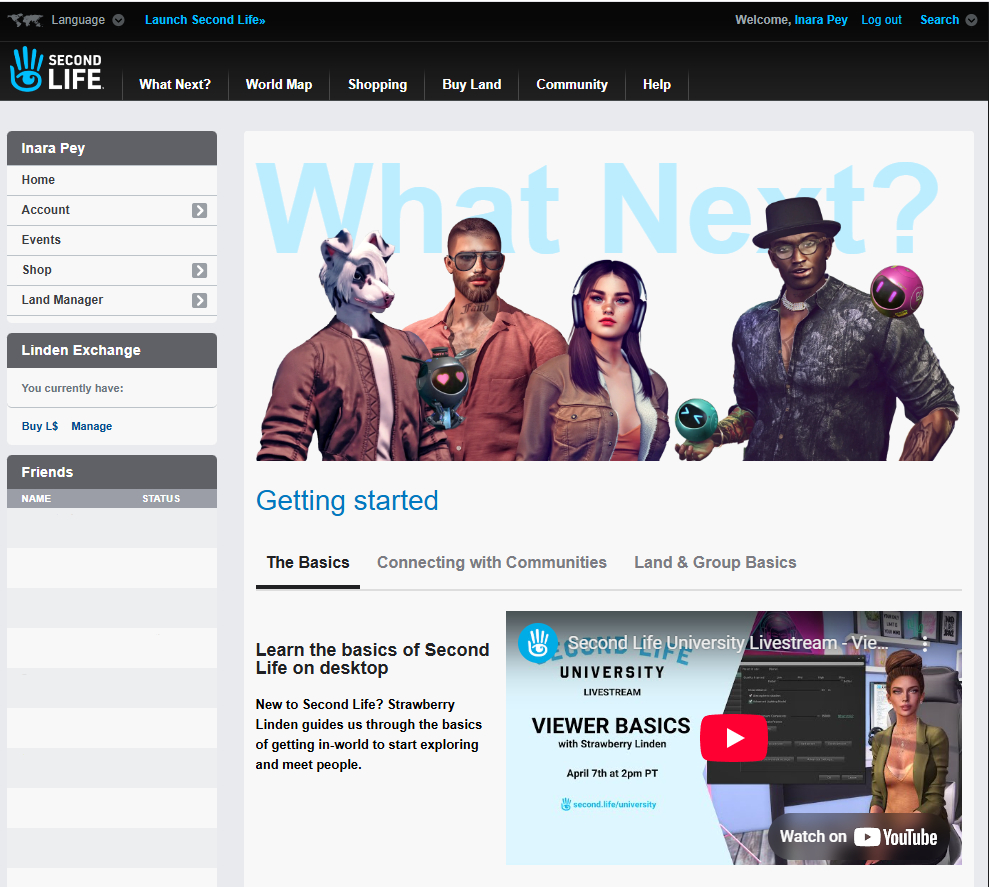
What Next? Page Refresh

[Video: 3:15-3:38]

  • The What Next page, accessible via the Dashboard menu has been refreshed.
  • The new look include new tabbed sections, more relevant video, and the style in keeping with the overall web properties style refresh.
  • However: at the time of writing, the Destination Guide – present under the drop-down previously available when hovering the mouse over the What Next? menu option – is absent from the page.
  • This means that currently, the Guide can be accessed using its dedicated URL – https://secondlife.com/destinations.
  • This prompted a discussion later in the meeting on where the Destination Guide should go – e.g. as its own menu item.
The refreshed What Next? page as accessed from the dashboard

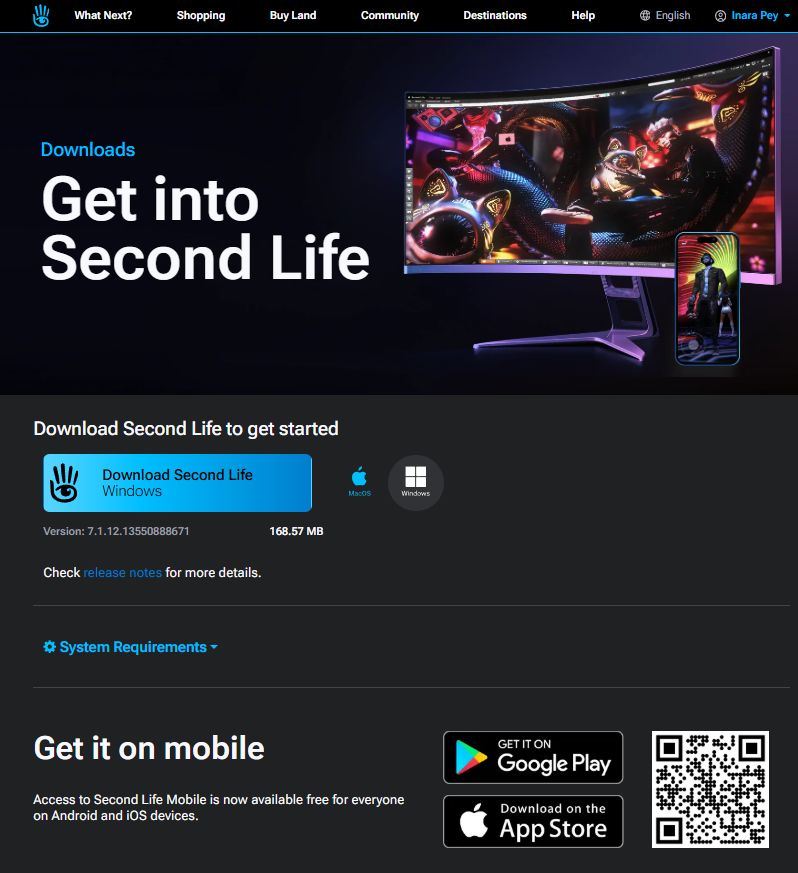
Viewer Download Page Refresh

[Video: 3:15-4:03]

  • The viewer download page has been updated to the new Dark Theme, and includes a refreshed look which now includes links to the SL Mobile viewer pages on the Apple Store and Google play.
The updated viewer / SL mobile download page

Marketplace

[Video: 4:09-7:25]

  • Responsive product listing pages were enabled on Wednesday, March 5th, 2025.
    • This should mean product listings should be displayed in a responsive manner, depending on whether you are viewing them on a large monitor or Tablet / Mobile device.
    • Not all of the Marketplace is responsive as yet, so expect this to be an iterative implementation.
  • The Marketplace legacy pay-out page has been “put back”, and work has been carried out some optimisations to the Account History page, with more to come.
  • Coming Soon: Improvements to the Mobile / Tablet versions of MP Search, which are “pretty stripped down” at present.
    • This is being actively worked on, and the iteration of further responsive MP pages will come after this work has been completed.
    • The approach is to start making “small, incremental improvements to your Marketplace lives.”

Project Zero and SL Mobile

[Video: 28:00-46:13]

Note: Project Zero is the code name for the viewer-in-a-browser experience:

Project Zero

  • Numbers able to access the service are still limited, with the priority (for want of a better term) being given to users signing-up to Second Life over existing users.
    • If the service is running at capacity, the “endlessly spinning” loading circle should now eventually time-out and display the message below.
The number of existing users able to access Project Zero is limited in favour of users signing-up to SL, so the above message might be frequently encountered.
    • Whilst the number of concurrent users able to use Zero is low, when combined with the session limit and the fact the service s available 24/7 it should still mean that “several thousand” users per day are be able to access it.
    • The ratio of slots for existing users and those for new users is also subject to adjustment up and down.
  • LL are curious as to why existing people are using the viewer in a browser and the type of device being used. Those at the meeting responded in terms of:
    • Curiosity, better performance than on their own machines, testing (including trying it on different devices), logging-in via a tablet device to offer support to customers.
    • Devices used ranged from desktop PC through laptops to tablets + mobile devices(!).
  • Feedback on experience varied in feedback:  avatar loading was seen as better; region crossings / teleports (and associated failures) were seen as about the same for some, improved in terms of success for others.
  • The fact that many appear to be using Zero from a tablet seems to have surprised LL, with Sntax Linden (project lead) curious as to how people were managing sans and UI overlay (in my case, multi-channel wireless keyboard and trackball both switched to BT mode and linked to tablet).
  • Feedback was also taken on whether people would prefer using Project Zero over the Desktop experience (screen resolution, etc., adjusted). Responses were varied.

SL Mobile

  • The Lobby function has been extended to Premium Plus subscribers and to (some? iterative deployment?) Premium members.
    • Lobby appears to be included with iOS version 0.1.534 and Android version 2025.2.543.
  • Requests have been made to be able to simultaneously log-in to SL Mobile whilst also being logged-in to the viewer (and vice-versa).
    • This is something for which LL has an awareness, and the Lobby function is seen as a possible first step towards it by allowing communications ,etc., to occur prior to the world loading-in.
    • However, overall, making it possible to be logged-in from both Mobile and the viewer simultaneously does have some significant technical challenges, due to the way client / simulator interactions are managed. For example, a client must have an avatar physically present in SL in order for chat, IMs, etc., to work, and the system doesn’t support having an avatar effectively in-world twice.
  • Philip Rosedale asked for people’s preferences for SL Mobile, if they are only given a binary choice, either:
    • Have SL Mobile fully render the 3D world and use it to interact with the world through it much as they would with the viewer? Or:
    • Have it as a “communications companion” with chat, IMs, Groups, etc., prioritised and without the associated world rendering etc (e.g. pretty much as the iOS Mobile project had originally been initiated under Oz Linden)?
    • Those at the meeting, while a small sample, leaned towards the latter (rather ironically, given that during the development of the iOS Mobile option, there were multiple calls for it to offer world rendering as a priority in order to be useful).
  • As an extension to the above conversation, some at the meeting indicated they’d actually prefer some means of chatting / responding to IMs via their account dashboard.
    • As per the notes regarding being simultaneously logged-in via Mobile and the viewer, whilst the Lab are aware of the desire for a web-to-in-world chat capability, it would require a substantial re-engineering effort given chat + IM communications are predicated on the avatar being logged-in to a location in SL.

In Brief

Please refer to the video for details on the following.

  • [Video: 7:30-9:18] Marketplace Styles (aka variants):
    • Styles is the ability to list multiple versions of a single items in a single Marketplace Listing (e.g. different colour versions of the same sweater, together with a demo and any fatpack (if offered)).
    • As I’ve previously noted, this was reported as something planned for deployment at that start of 2023, but has since seemingly fallen off the table.
    • Kali Linden indicated that the Web Team still want to implement Styles, but the work essentially lost its management sponsor before it could be seen as completely ready for deployment.
    • Threfore more the subject is mentioned, the more likely it is to receive the necessary management support – this being the case: Brad, Grumpity, whomever! give us Styles on the MP! 😀 .
    • Also, if you would like to see the capability implemented on the MP, upvote the feature request.
  • [Video 10:00-11:47] maps.secondlife.com:
  • [Video: 15:42-20:20] A general discussion on on things like style cards, lists of items, etc., new starters can get to assist them in customising / clothing their avatars.
    • This included the idea of the Lab providing a “Starter Pack” that could include things like a basic AO, leading to a broader discussion on the use of AO, their availability and importance to news users, the weakness of the Senra wearable AO system, building the AO system into the viewer, etc.
    • No conclusions drawn.
  • [Video: 20:34-25:56] General discussion on web properties and issues / possible updates, including:
    • The status of Place Pages (in short: a means to promote in-world locations user have created, introduced in 2017 as a “beta”,  then launched shortly thereafter – and basically left to wither on the vine.
    • (Again) aligning maps.secondlife.com functionality with that seen within the in-viewer World map.
    • Giving the dashboard page (and associated pages – transaction history, etc.) a broader facelift. Kali indicated this requires the input of two teams, and will likely be a longer-term top-to-toe redesign.
    • Reducing the amount of sub-menu nesting evident in some web properties.
  • The last 15-ish minutes of the meeting (approx: 47:00 onwards) formed a more general conversation on MP reviews (particularly “bad” reviews), dashboard chat capabilities and what else might be possible, such as making notecards viewable without being logged-in – which led to mention of having Inventory accessible through the web), search the MP via date ranges, etc.
    • Kali notes that a feature request to add the date listed (/updated) added to an item’s listing has been accepted, and will likely be implemented (see also the Chrome Marketplace Enhancer extension).
    • Adding a tab to listing where creators can drop their log files / update notes into a listing.

Next Meeting

  • Wednesday, April 2nd, 2025.