Project Bento User Group update 34 with audio

Project Bento – extending the SL avatar skeleton

The following notes and audio were taken from the weekly Bento User Group meeting, held on Thursday, November 17th at 13:00 SLT at the the Hippotropolis Campfire Circle. and chaired by Vir Linden. For details on the meeting agenda, please refer to the Bento User Group wiki page.

Bento Viewer

The new Reset Skeleton and Animations option

The Bento viewer RC updated on Tuesday, November 15th to version 5.0.0.321598. This build has fixes for the following (non-public) JIRA issues:

  • SL-524 – Reset Skeleton does not restore collision volume joint positions
  • MAINT-6913 – Problem with alpha on some Nvidia Mac systems when shadows are enabled
  • MAINT-6915 – Reset Skeleton is not enough to remove all traces of a previous Bento avatar.

To handle the last point, the Lab has added a Reset Skeleton And Animations option to the right-click menu (shown on the right).

However, as the problem can occur intermittently, it is still not guaranteed the additional option will handle those situations where an avatar isn’t fully reset using Reset Skeleton. Wider testing will hopefully uncover any remaining corner cases where this is the case – Firestorm hope to have a build available for testing with these updates fairly soon.

The “Viagra Bug” and Further Viewer RC Updates / Viewer Release

It is likely there will be one further RC update before the viewer is promoted to the de facto release viewer, courtesy of a new bug which has cropped up recently which results in a *cough* “ever-growing groin bone”, aka the Viagra Bug”. This is related to the addition of the groin slider,

Providing nothing else of significance is found, it is hoped that the next RC will be the version of the viewer which will be the one that will get duly promoted to release status. Given week #47 is Thanksgiving, it would seem likely this won’t be before week #48 (week commencing Monday, November 28th). The only other caveat to this would be an unexpected and particularly nasty bug showing up.

Best Practices and “How To” Guidance

Bento is going to bring with it a lot of questions from both creators and consumers. To help advise / educate people, The Lab is considering putting together a series of video and / or a set of “best practices” pages on the wiki – with a lean more likely towards the latter.

The general idea would be to showcase the work of individual creators, including their own guidance and advice (e.g. advice they have perhaps previously supplied, and now buried in, the 130+ pages of the Bento forum thread), and links to any videos, advisory web pages, etc., they have created (such as this series on Bento horse avatars, by Teager), so that creators and consumers can be better informed of Bento’s capabilities and opportunities. These best practices pages could include a biography of the creator providing their time / ideas / tutorials, while official videos – if the Lab go that route – could also showcase their work, discuss Bento with them etc.

Bento creators interested in helping the Lab in developing ideas and information along these lines are asked to contract Troy Linden directly (troy-at-lindenlab.com).

Other Items

Future Considerations

Its been suggested that having a “reset all skeletons” option might be an option for the future, rather than having to right-click individually on avatars which may be deformed and then correct them in your view – particularly as the Reset Skeleton options might be buried in the pie menu for those still using it.

Such an option would “fix” multiple deformed avatars (which might be the case when teleporting into an area with a lot of avatars), but it also might cause avatars which were not deformed in a person’s view to deform, possibly with no means to fix without a relog on the part of the person seeing them deformed. However, it is an idea the Lab is willing to consider for the future, if submitted as a feature request.

Similarly, the option to have unweighted (but referenced) bones be removed from the max bone count in a mesh (e.g so volume bones no longer count towards the available allocation) is being looked at as a possible follow-on update to the project.

Next Bento Meeting

Due to Thanksgiving in the United States, followed by a possible internal meeting at the Lab the week after, the next Bento meeting – subject to confirmation on dates in the user group wiki page – may not be until Thursday, December 8th.

Post Release Bento User Group

Thought is being given to continuing the user group meetings once the viewer has reached release status, initially as Bento meetings, where people can come and seek information, and then possibly but broadening into a (avatar focused?) content creators’ meeting, if there is a demand.

Additional Bento Links

2016 SL project updates 45/2: Bento update 33 w/audio + server / viewer

Project Bento – extending the SL avatar skeleton

The following notes and audio were taken from the weekly Bento User Group meeting, held on Thursday, November 10th at 13:00 SLT at the the Hippotropolis Campfire Circle. and chaired by Vir Linden. For details on the meeting agenda, please refer to the Bento User Group wiki page.

There is a further RC update pending, as the Lab continues to work on reported bugs. Issues in particular which are receiving attention are:

  • An issue affecting some Mac systems running Nvidia graphics running out of the GL uniform buffer space. This can be fixed by cutting the number of joints per mesh, which may not always be ideal from a creator’s perspective. However, a further fix has been suggested by the alchemy viewer team, which Vir is looking at, which may be an option going forward.
  • An issue with the Reset Skeleton option not always un-deforming an avatar. This appears to be a permissions issue (you can generally deform your own avatar, but may not be able to properly un-deform someone else due to the permissions set on their animations). Vir is currently having a hard time pinning the issue down, and has requested than anyone able to consistently repro it with a model to drop him a line.

A further fix still to be added to the RC viewer is for collision volume joint positions which were failing to reset correctly when using Reset Skeleton.

There have been more bugs filed as a result of the Firestorm Bento pre-release and alpha version being made available to testers, which is helping to pin down the more significant issues and ensure that, where possible, fixes are put in place.

The most recent RC for the viewer at the time of writing (version 5.0.0.321250) has been showing an improved crash rate, with no significant spikes when compared to the current release viewer.

Legacy Content Deformation Issues

The deformation issue affecting some early Bento avatars and due to bad joint position overrides, as initially reported in BUG-40672 doesn’t appear to be widespread. As such, and subject to final confirmation by the Lab, it looks as though no changes will be made to the viewer to fork rendering behaviour (as discussed in my Bento update #32), which would require Bento content to be re-uploaded.

There are other bugs reported within BUG-40672 which have fixes, such as for the eye problem (again, see my Bento #32 update), the Haste Coy product problem, and the 1st Act Garou Male Avatar, and these either are, or will be in RC updates to the Bento viewer, where code fixes are required.

Firestorm Bento FPS Issue

Some people on the Firestorm Bento alpha release are reporting poor performance / low FPS when around other avatars. However, others are reporting an improved performance with the Bento version over the current 4.7.9 – although that could be a placebo effect. For those experiencing lower than expected FPS on their systems,try running the latest official Bento RC and see if the same performance issues are apparent. If they aren’t, try one of the following:

  • Try raising your Avatar Complexity to a high value / No Limit, as there is an odd issue on some systems where rendering a lot of “Jelly Dolls” can negatively impact viewer performance
  • Back-up your settings, and then reset everything to default values (e.g. as defined by the Bento RC) and check performance. If there is a noticeable improvement, gradually work through graphic settings and see if / when the updates start to impact performance. If you see a consistent impact which can be reproduced, file a Firestorm bug report.

Additional Bento Links

The Prim Rig, ANWR Channel
The Prim Rig,  – blog post

Other Updates: Server, Viewer, Avatar Complexity and Aditi Log-ins

Server Deployments – Recap

  • There was no Main (SLS) channel roll on Tuesday, November 8th.
  • On Wednesday, November 9th, the three RC channels should all receive the same new server maintenance package, which includes:
    •  llGetEnv() will support “region_max_prims” (feature request BUG-40825).
    • llGetObjectDetails() will have a new OBJECT_GROUP_TAG function  (feature request BUG-20064) – when pointed at avatars it returns the group tag you see floating above them; and also OBJECT_TEMP_ATTACHED – to tell you if something is a temp attachment (feature request BUG-5195).

SL Viewer Updates

The Maintenance RC viewer updated to version 4.1.2.321518  on Thursday, November 10th. This may well be the next RC to gain promotion to release status, given the Bento viewer is still awaiting a further RC update, as noted above.

The 360 Snapshot project viewer updated to version 4.1.2.321431 on Wednesday November 9th.

Avatar Complexity Issue

As noted in the Bento update, some people are experiencing FPS / performance issues on the Firestorm Bento viewer. However, there are a number of issues related to the level of detail (LOD) on “jellied” avatar attachments, which can have an impact on general viewer performance. The Lab is working on these problems, and hopefully, a fix will be appearing in a Maintenance RC at some point.

Aditi Log-ins

Some people are having issues when trying to log-in to Aditi, These are generally people who having logged-in to the beta grid in a very long time or are trying for the very first time with a particular account. If you are encountering problems, the best solution is to file a support ticket. It should generally be dealt with within 24 hours (weekends allowing), and your Aditi inventory will be synced with Agni (Main grid) as a part of the process of granting you access. You should only need to file a support ticket once.

Project Bento User Group update 32 with audio

Project Bento – extending the SL avatar skeleton

The following notes and audio were taken from the weekly Bento User Group meeting, held on Thursday, October 27th at 13:00 SLT at the the Hippotropolis Campfire Circle. and chaired by Vir Linden. For details on the meeting agenda, please refer to the Bento User Group wiki page.

Note that this update is not intended to offer a full transcript of the meeting, nor does it present the discussion points in chronological order. Rather, it represents the core points of discussion, grouped together by subject matter were relevant / possible, whilst maintaining the overall context of the meeting.

General Project Status

Work continues on Bento bug fixes. As a result of the Bento code being available in a pre-release version of Firestorm, the number of reported issues with legacy content have increased (see BUG-40672). There are two issue in particular the Lab have been looking at:

  • The previously reported issues of some mesh content having latent “bad” joint positions which were previously overlooked by the viewer, but which are now taken into account under Bento, leading to avatar deformation (see my update #30 for more on this)
  • An issue related to the eye joints now being scaled by the eye size slider, which can result in existing mesh eyes appearing to bug out of avatar’s heads when viewed in the Bento viewer. The easiest way to fix this is to reset the eye slider to the default 50 value.
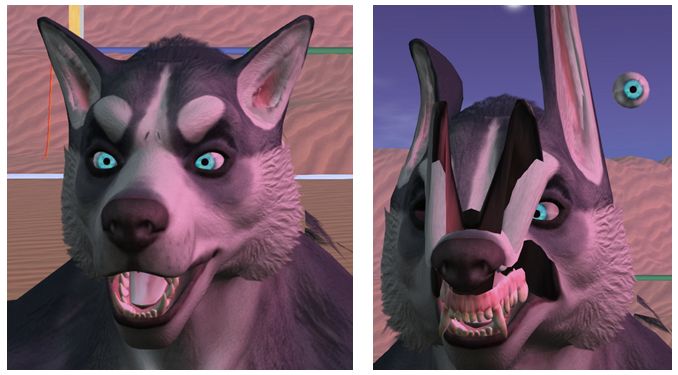
Eye sizing issue: as Bento allows mesh eyes to be affected by the eye size slider, they can suddenly appear to resize when seen on the that viewer (r), compared to how they appear on a non-Bento viewer (l)

Outside of these problems – which are still being looked at (see below), there is at least one bug (initially noted with Haste Coy products and also reported on BUG-40672), which should have a fix in the next Bento RC update, and a crash issue which also should be fixed in the next update.

If anyone is encountering issues with existing content when using the Bento viewer, they should report their problems via the JIRA (BUG-40672) so the Lab can look at things.

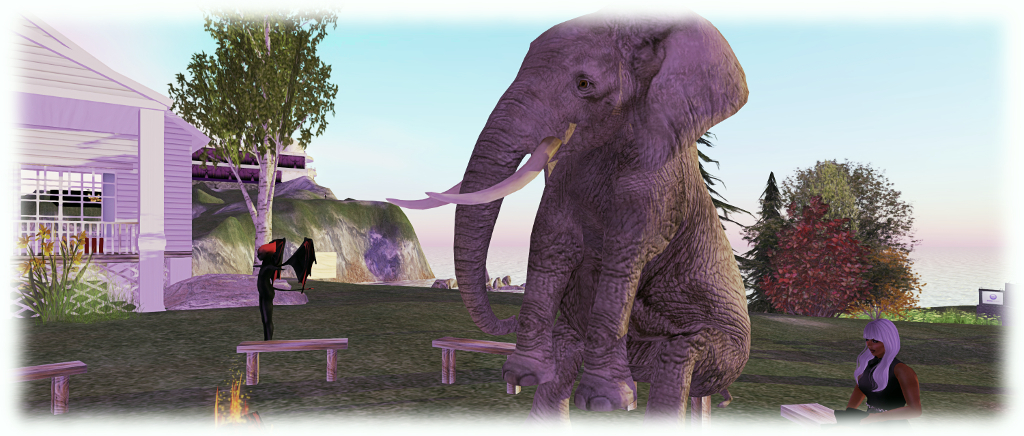
Benches: because even an elephant needs the occasional sit down. Medhue Simoni's stunning Bento mesh elephant
Benches: because even an elephant needs the occasional sit down. Medhue Simoni’s stunning Bento elephant avatar

Legacy Content Deformation Issue

There has still been no decision on how to handle the “werewolf deformation” issue, which now extends to about three creators, and may extend beyond werewolf models. There have been suggestions on forking rendering behaviour by something like upload date, so that if an item was uploaded prior to date X, then it is handled as “non-Bento”; if uploaded after date X, it is handled with Bento in mind.

A problem here is setting an arbitrary date may not actually solve anything. Bento has been around for over a year, with content creators working on it for the last several months at least, during which time other creators have been creating / updating and uploading non-Bento content. So, determining which is which by date likely won’t work.

That said, if there is a large amount of legacy content impacted by the viewer change, it still might be preferable to set a date and have Bento content creators re-upload their work to be on the “right side” of that date, rather than trying to get legacy content creators to re-upload. This is because some creators may not already be around and / or some may have used mesh creation kits which don’t have the necessary .DAE file for them to modify.

A further complication here is that any impact of the viewer behaviour change may simply be negated by creators of older avatar models updating to Bento models, to which their customers subsequently update.

Other Items

No Modify Shapes

The eye issue mentioned above once again raised concerns around users employing shapes that do not have modify permissions. Such shapes prevent the use of the appearance sliders, so even apparently “easy fix” issues, such as adjusting the eye size slider, may not be applicable.

This particular issue sparked a lengthy conversation about using the (currently non-obvious in the official viewer) XML shape exporter coupled with additional code to more easily export a shape’s XML file, which could then be re-imported with a check box to ensure the default 50 setting for things like the eye size sliders.

One problem here, as Vir pointed out is that users who are unaware of unfamiliar with using the shape sliders likely aren’t going to be enamoured with the idea of exporting an appearance XML file, creating a shape and then importing the appearance XML data against that shape, even though some TPVs have, with the Lab’s approval, sought to make this easier.

There is also the problem that creators may object to users being given the ability to export / import shape data, as it effectively bypasses the permissions system, allowing anyone to take shape data and use it as they please. However, given there is already a TPV methodology available, to assist with shape data import which has been given the nod by the Lab,  Vir will take the matter back to the office for further discussion.

The more direct solution might be for creators to indicate that Bento avatar meshes require the use of a modifiable shape (either supplied with the mesh or which the user can create and edit).

The Skeleton

Vir highlighted the fact that while different terms are used, there are technically three types of joints in the avatar skeleton: bones, the “standard joints” for rigging to; collision volumes, as used by things like fitted mesh; and attachment points,  which have most of the properties of joints, hence why some creators started rigging and animating to them, even though this was never an intended use.

Next Meeting

The next Bento meeting will likely be Thursday, November 10th, 2016, as November 3rd clashes with the Lab’s monthly internal meeting.

Additional Links

Project Bento User Group update 31 with audio

Bento: extending the avatar skeleton

The following notes and audio were taken from the weekly Bento User Group meeting, held on Thursday, October 20th at 13:00 SLT at the the Hippotropolis Campfire Circle. and chaired by Vir Linden. For details on the meeting agenda, please refer to the Bento User Group wiki page.

Note that this update is not intended to offer a full transcript of the meeting, nor does it present the discussion points in chronological order. Rather, it represents the core points of discussion, grouped together by subject matter were relevant / possible, whilst maintaining the overall context of the meeting.

Bento Viewer Status

The 4th iteration of the Bento RC viewer appeared on Thursday, October 20th, ahead of the meeting. Version 5.0.0.320815 is primarily an update to keep the viewer on a par with the release viewer code (VLC Media plug-in for Windows), although it does include a rendering bug fix.

The fix including in the new RC version is for some existing Haste Coy assets, which were  reported on BUG-40672 (the deformed werewolf issue noted in my previous Bento update).

There has been no decision on what to do about the werewolf deformation issue itself (the result of a change in viewer behaviour – see my previous update, linked to above). It’s not clear how widespread this issue is – at the moment it appears to be somewhat limited. The problem here is whether the viewer behaviour is maintained for Bento or rolled back to how it was, it will mean some content will have to be re-worked and re-uploaded. Thus, a deciding factor for the Lab in determining what to do will be discovering exactly how much existing content is actually impacted.

The focus is now on bug fixing with the viewer. There is no date being considered for promoting Bento to release status; as previously indications, this will depend on bugs and fixes, the viewer’s crash rate, and the relative priority it has when compared with other viewers in the release channel (there being only one at the time from writing).

Reported Issues

Scale Locking Bug

A bug was reported just prior to the previous Bento meeting about an issue with the new scale locking capability. This allows creators to disable shape sliders from having any influence over joint positions when uploading their models. However, it had been reported as working intermittently,  Vir has developed a fix for this issue, but it will not be available until the next RC update for the viewer.

Skin Weight Viewer Crash

BUG-40725 reports that checking the Skin Weights option when previewing joint positions will crash the viewer (Bento RC 5.0.0.320160). This has yet to be investigated.  This is actually one of two places where skin weights can be checked, the other being in the upload option, so the preview doesn’t have to be used. However, the Lab will be looking into the issue.

Feet Resizing

There was some confusion as to whether feet on models could be resized or not using the sliders. It appears that they can, providing the model is rigged to the L_FOOT and R_FOOT collision volumes for the feet.

MayaStar

Cathy Foil reports that MayaStar has been updated completely to Bento. Those using it should rez their update Checker to get the latest version. Report are that it handles sliders really well. This represents the culmination of several long months of work for Cathy in updating her product to be fully Bento compliant – congratulations to her!

Additional Links

Project Bento User Group update 30 with audio

Bento: extending the avatar skeleton

The following notes and audio were taken from the weekly Bento User Group meeting, held on Thursday, October 13th at 13:00 SLT at the the Hippotropolis Campfire Circle. and chaired by Vir Linden. For details on the meeting agenda, please refer to the Bento User Group wiki page.

Note that this update is not intended to offer a full transcript of the meeting, nor does it present the discussion points in chronological order. Rather, it represents the core points of discussion, grouped together by subject matter were relevant / possible, whilst maintaining the overall context of the meeting.

RC Viewer

The Bento viewer is now on its third version as a release candidate (version 5.0.0.320160 at the time of writing). It is performing well crash-wise in comparison with the current release viewer, so the hope is – bugs allowing – it might not be too long before the viewer moves up to release status.

The first of the bugs mentioned by Vir in the audio is that the scale locking capability recently added to disable shape sliders from having any influence over joint positions has been reported as working intermittently at times. Vir is still looking into this.

The second is a report instance of pre-Bento content being deformed when viewed on the Bento viewer – see BUG-40672.

The problem appears when a sub-mesh contains bad joint position overrides for various joints that the model is rigged to. Prior to Bento, these joint position overrides were not applied, because the Lab was enforcing a 20-joint minimum: if a sub-mesh was rigged to fewer than 20 joints, then it was not treated as rigged, and the joint positions were ignored.

The BUG-40672 issue as seen in the Bento viewer, and apparently the result of "bad" joint overrides defined in the pre-Bento model, and changes made to how overrides are handled in the Bento viewer
The BUG-40672 issue as seen in the Bento viewer, and apparently the result of “bad” joint overrides defined in the pre-Bento model, and changes made to how overrides are handled in the Bento viewer

For Bento, this restriction has been relaxed to make it easier to produce meshes only affecting part of the avatar (wings affecting wing joints positions, head that affects only head join positions, etc.), making it possible to “mix and match” different meshes. Unfortunately, it also means that any model with “bad” (but previously “invisible”) joint positions defined may now appear deformed.

Reverting the viewer to its previous behaviour is not seen as optimal, because of the potential to break some Bento models and make the extended skeleton less useful (no more mix and match of meshes). Similarly, it is currently unclear as to how much content might be affected if the updated behaviour is retained, so the Lab is still considering what to do.

Makers of pre-Bento mesh avatars are asked to check BUG-40672 and then test their avatars using the current Bento viewer to see if similar issues manifest themselves. The most direct way to “fix” things is for affected content being re-uploaded with the bad joint positions removed, or by adding an animation to fix the joint positions after the fact (assuming said animation doesn’t conflict with others the model is using). Of course, if the model does not require joint positions at all then the option could also simply be unchecked at upload time.

Animating Hands

A complex discussion has been unfolding on the discussion forum concerning animating hands (from around page 122 onwards), and which also encompassed a part of the user group meeting (in text). It’s a convoluted subject involving several elements, of which perhaps the most important thing is understanding how best to animate hands.

To try to address this, Cathy Foil has produced a comprehensive video on hand animations, which anyone developing mesh hands for Bento may find informative and helpful, and so is embedded below.

Cathy also provided some hints and tips during the meeting.

Feet

There has also been forum discussion on feet. Bento doesn’t add and further joints to feet, and there are no plans to change the rig specifically to a support for animating feet. However, as Vir pointed out, there are more joints than the system avatar does not use – mToe and possibly mFoot – which might offer a degree of flexibility for mesh creators. If these are used, a point to keep in mind is that they are not used in the avatar height calculations, so some unexpected results my occur.

Other Items

Bounding Box Clipping / LODs

A non-Bento issue which can be frequently seen at Bento meetings due to the number of meshes being worn is that of bounding box clipping – part of the avatar appears to vanish as a camera is pulled back.

This generally occurs when the viewer is operating at the limit of its imposter avatars setting, and a conflict occurs trying to both display the avatar mesh (which the viewer will try to render at a united LOD (level of detail) whilst also trying to switch to displaying an avatar as an imposter. It can be overcome by setting the imposter slider to No Limit in Preference > Graphics.

While fixing this issue is not part of Bento, it raised the subject of why LODs aren’t used rather than the imposter setting. Vir explained that one reason is this idea that the viewer will try to render avatars and their attachments at a high LOD, rather than stepping down through LOD models, as is the case with in-world mesh objects. Another isse us that many creators tend to only use high LOD models, and incentivising people to use the LOD system correctly isn’t easy, although there are tools (e.g. Decimator in Blender) which help in the creation of LODs for models.

As the whole issue of rendering and associated costs and calculations is now being looked at by the Lab, changes might be forthcoming to help with matters – time will tell on that.

Additional Links

2016 SL project updates 40 (2): TPVD meeting, Bento

It All Starts With a Smile; Inara Pey, October 2016, on Flickr It All Starts With A Smileblog post

The majority of the notes in this update are taken from the TPV Developer meeting held on Friday, October 7th. The video of that meeting is embedded at the end of this update, and references to it are indicated through the use of time stamps in the paragraphs below. My thanks as always to North for recording and providing it.

This is not intended to be a transcript of the entire meeting, which featured discussions of some situations specific to individual region rather than SL as a whole. However, key discussion points have hopefully been highlighted.

Server Deployment – Recap

As always, please refer to the server deployment thread for updates or changes.

  • Tuesday, October 4th saw the Main (SLS) channel updated with the server maintenance package previously  deployed to the three RC channels, which includes a fix for BUG-40565, introduced as a result of the deployment of the week #38 server maintenance package.
  • There was no planned deployment / restart for the three RC channels, although there should be a new RC package available for week #41 (commencing Monday, October 10th).

SL Viewer Updates

From 00:05 in the video.

The VLC Media Plug-in RC viewer updated to version 4.1.1.320331 on Thursday, October 6th, intended to fix a number of outstanding bugs, including setting the volume slider to maximum, causing the voice sound to cut out completely. This view has been performing well, with a low crash rate, so if this trend continues with the latest update it may well finally make it to release status in week #41 (commencing Monday, October 10th).

The Project Bento RC viewer updated to version 5.0.0.320160 on Friday, October 7th (see below for more).

Project Bento

There was no Project Bento user group meeting during the week, due to a timing conflict with the Lab’s internal monthly meeting. The next Bento meeting will be on Thursday, October 13th, at 13:00 at the Hippotropolis camp fire circle.

In the meantime, as noted above, there was a new Bento RC update, which includes the following additions and fixes:

  • Adds a scale locking feature to mesh upload
  • Optimisations should improve the frame rate in mesh-intensive regions
  • Probable fix for an intermittent crash.

The scale locking feature adds a check box which, if checked will lock joints against scale changes, and thus the sliders affecting the joint will no longer influence it. Leaving the box unchecked for the joint will allow scale changes. This might be useful for those wishing to produce (non-human?) avatars where it might be preferable to have certain parts of the body locked from slider-driven changes to prevent distortions / conflicts arising, without necessarily locking in the entire mesh against slider changes (e.g. the face could be “frozen” to prevent distortion, but body height or tail length, etc).

In addition to their brief Bento Hands preview first seen in July, Vista Animations have now produced a more details preview, with the beta version of the hands (with free update to the release version) available on the Marketplace for L$999.

64-bit Viewer and Viewer Build Process

[03:19] Work on the 64-bit viewers is temporarily paused as the Lab shifts over to their improved viewer build process, which will come into effect with the 64-bit builds.

The updated process involves changes to almost everything in the build pipeline other than the compilers. However the work is progressing well, and the Lab anticipates running builds using the new libraries from week #41, and the library repositories are already public for TPVs to examine and use.

In particular, the Autobuild environment has been updated to support platform-specific switches within the build scripts via a new option in the autobuild_source_environment command. The varsfile is a file containing template variable assignments to be modified based on the build type, so that all builds(library and viewer) use the same compilation and option switches. The variables file used by Linden Lab to build the viewer and its libraries is in the viewer-build-variables repository. TPVs are free to us this, or adopt / continue to use their own.

As noted, given the extent of the work, the Lab is avoiding updating Visual Studio and Xcode. Instead, they will be updated as a follow-on project once the current work is completed.

Snapshot 360

[08:49] The Lab is working on a new viewer capability – the ability to take 360-degree panoramic snapshots using the snapshot floater. I’ve covered this in a separate article, with key audio extracts.

Experience Force Sit

Rider Linden is continuing to work on this new capability (see my article here) which will allow for the scripted seating of avatars engaged in experiences (Project Espeon). In particular, the latest Maintenance RC allows avatars to use the stand button to stand (Server Beta Meeting, Thursday, 6th October).