
The following notes were taken from my audio recording and chat log transcript of the Content Creation User Group (CCUG) meeting held on Thursday, July 18th, 2024.
Meeting Purpose
- The CCUG meeting is for discussion of work related to content creation in Second Life, including current and upcoming LL projects, and encompasses requests or comments from the community, together with related viewer development work. This meeting is held on alternate Thursdays at Hippotropolis.
- In regards to meetings:
- Dates and times are recorded in the SL Public Calendar.
- Commence at 13:00 SLT on their respective dates.
- Are conducted in a mix of Voice and text chat.
- Are open to all with an interest in content creation.
- The notes herein are a summary of topics discussed and are not intended to be a full transcript of the meeting.
Official Viewers Status
- Release viewer: version 7.1.8.9375512768, formerly the Graphics Featurettes RC viewer dated June 5 and promoted June 10th.
- Release channel cohorts (please see my notes on manually installing RC viewer versions if you wish to install any release candidate(s) yourself).
- WebRTC Voice RC, version 7.1.9.9688089989, July 1.
- Atlasaurus RC (object take options; improved MOAP URL handling), version 7.1.9.9620320242, June 27.
- Maintenance B RC (usability updates / imposter changes) 7.1.9.9555137545, June 21.
- Maintenance C RC (reset skeleton in all viewers), version 7.1.9.9469671545, June 14.
- Project viewers:
- None.
WebRTC Voice Update
Not strictly a Content Creation tool / subject, but of import to SL as a whole.
Summary
- A project intended to move Second Life away from reliance on the Vivox voice service and plug-in, and to using the WebRTC communications protocol (RTC=”real-time communication”). Roxie Linden is leading this work.
- Key benefits:
- WebRTC supports a wide range of real-time communications tools in common use (e.g. Google Meet), supporting audio, video and data communications, and is thus something of a “standard” approach.
- Offers a good range of features: automatic echo cancellation, better noise cancellation and automatic gain control, much improved audio sampling rates for improved audio quality.
- Opens the door to features and capabilities to voice services which could not be implemented whilst using Vivox.
- In addition:
- LL are are of some of the security concerns around WebRTC voice (e.g. risk of eavesdropping, exposure of users’ IP addresses, etc), and is actively working to block these through the use of an internal proxy service.
- LL will be looking to Linux devs to help give feedback on how well WebRTC is working on their Linux viewers
- Feature requests for WebRTC should be made via the WebRTC board on the SL Feedback Portal.
Status
- There is a Release Candidate viewer available on the Alternate Viewers page. Thus is expected to be the next viewer to be promoted to de facto release status.
- This promotion is liable to occur ahead of the planned simulator deployments (see below), allowing time for TPVs to adopt the code.
- Currently, LL is looking at August for a potential deployment across all of SL on the server-side.
- This will follow the usual approach of roll-out to the simulator RC channels first, then to the SLS Main channel.
- As a result, there will be some short-term issues around peer-to-peer, Group and ad-hoc voice connections between those on regions running the two different voice services (Vivox and WebRTC).
- Depending on how the deployment goes (e.g. first to a single RC, then multiple RCs, then the SLS Main channel), it is hoped that any such issues will only be for around 2 weeks.
- Viewers adopting the WebRTC code prior to or during this deployment period will be able to process both WebRTC and Vivox voice, so outside of the possible short-term issues during the back-end deployment mentioned above, voice services should not be interrupted for users.
Graphics / glTF
Transmission / IOR
- Geenz Linden continues to work on Transmission and Index of Reflection (IOR). This will provide:
- Both refraction and “blurry” refraction suitable for things like frosted glass surfaces.
- Dispersion, allowing chromatic aberration, allowing the RGB channels to “separate out” based on a certain factor.
- Volume, allowing an object surface to be tinted at different surface thicknesses.
- There are still some bugs to be resolved with this work, after which it will be folded into the main viewer development branch, but is currently tied to the work on mesh import, but may be separated out.
PBR Terrain Painting
- This is the next planned project for Cosmic Linden, and is in the very early stages of planning, so things are subject to potential change.
- Currently, the thinking is:
- The four PBR materials currently used for PBR terrain would remain available for use / painting.
- The painting element would allow a user to define how these materials are mixed (via a paint map), rather than having to rely purely on the the existing height map.
- The paint map is likely to initially be on the basis of one blended texture at region level (not parcel), although the resolution of the texture is still TBA at the time of writing.
- The permissions for terrain painting will be based on ability to edit the height map (if you can alter the latter through the Region settings, then you’ll be able to use the terrain painting capability).
- This effectively means:
- Users who have terrain editing permissions will be able to use the existing terrain texture system, using the height map (terrain elevation) to define which textures are visible, and the “blending” between them. or – if provided at the region level – access the PBR terrain paint map and use that to define the terrain (e.g. where grass, dirt, rock, etc., appears), without having to use terrain elevation changes.
- Use of the paint map will still be based of the X,Y positioning of terrain (as with the current height map), but all allow for actual blending of materials, rather than just creating transitional noise between textures set for different elevations, as with the height map.
- Terrain painting will be a significant departure in how terrain texturing has been managed, requiring a new entity to be introduced. This is also still being thought through, but it is unlikely it will be a new asset type stored on the asset servers.
- LL prefer to limit terrain painting to the four available slots at region revel, rather than allowing fully customisable swatches / slots at parcel level, as the latter presents “non-trivial issues” for terrain texture handling /loading.
- Two further ideas being discussed in relation to terrain but not on the implementation road map are:
- Implementing a means by which a prim can act as if it is part of the terrain, and inheriting the materials of the terrain on which it is placed, whilst allowing the geometry of the prim to be still be manipulated.
- Instead of using terrain, provide a means by which “something else” (something created external to SL and then imported) as terrain. However, it idea is described as “more pie in the sky” thinking.
glTF Scene Import
- No update, as Runitai Linden is out of the office.
(Non-Ambient) Lighting
- Punctual lights is a glTF extension that has recently been folded into the main specification, defining the use of lighting sources (house light, table lamps, street lights, etc.).
- Geenz Linden is working to implement punctual lights, but they will be tied to the node hierarchy for glTF scene imports.
- Longer term, they hope to use the extension to enable punctual lights to render shadows (so, if your table lamp is a punctual light, it will cast shadows).
- However, the extension is currently ambiguous as to what parameters should be used to define/ constrain such shadows, so this aspect of the work is liable to take longer to achieve, and may be dependent upon how other companies implement punctual lighting shadows.
- In the meantime, Geenz does have some ideas on handling shadows from point and spotlights, which might leverage the work done on reflection probes.
- In discussing the adoption of glTF punctual lighting, Geenz further noted:
- There are some notable differences between glTF lighting and SL’s physically-based lighting model and also with the capabilities of lighting projectors as they are currently in SL.
- As such, trying to unify punctual lighting with SL’s existing lighting / projectors could lead to content breakage.
- Because of this, it is likely that as punctual lighting ins introduced, the existing lighting system will cease to be significantly enhanced, and pretty much left as-is, with the focus shifting to enhancing the punctual lighting system.
General Notes
- Cosmic has also been completing work on support for PBR terrain texture transforms. This is s subset of the texture manipulation options (scale, offset, rotation, etc.), available with texturing prims, and is per material.
- A request has been received to get planar face alignment to be functional for PBR, and this is defined as something the Lab wants to resolve “soon”.
- Order-independent transparency is not something on the current road map, as it is seen as “too performance costly” to implement.
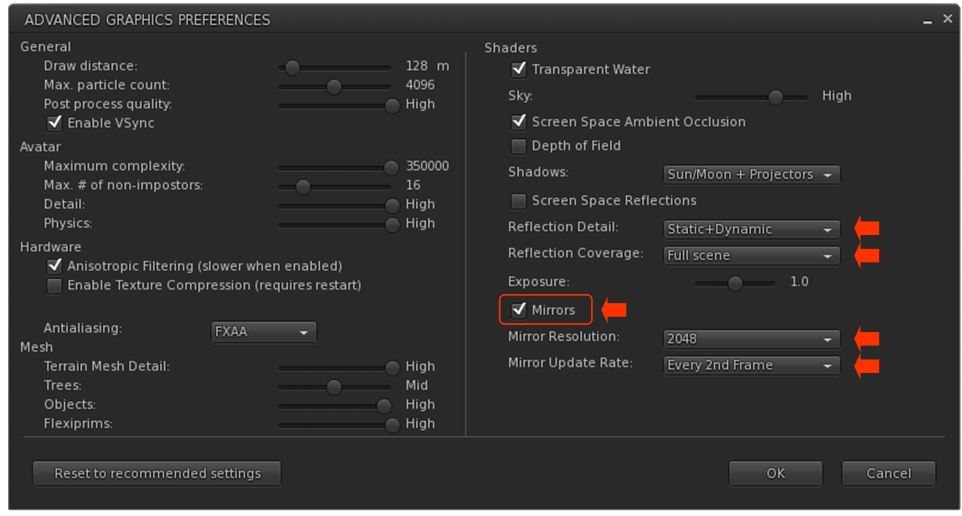
- There is some potential for performance improvements / optimisations for mirrors.
- Currently, whilst the mirror surface is planar, the reflection probe generates reflections for a full 180º in front of the mirror, not all of which might be required.
- It might therefore be possible to adjust this to angles more appropriate for such viewers, making them slightly more performant – but the improvement will not be huge.
- It should be remembered that mirrors can also be turned off (or have the update rate reduced) through Preferences by those feeling a mirror they are closes to and is active is too big a performance hit.
- There have been multiple calls for Linden Water to be restored to its pre-PBR looks. Geenz noted that while making improvements to the appearance of Linden Water are not out of the question, the fact that Linden Water is not glTF compliant makes what can be done more difficult.
Next Meeting
- 13:00 SLT, Thursday, August 1st, 2024, at the Hippotropolis Campsite.
† The header images included in these summaries are not intended to represent anything discussed at the meetings; they are simply here to avoid a repeated image of a gathering of people every week. They are taken from my list of region visits, with a link to the post for those interested.




 Inara Pey: Living in a Modemworld