My original ruminations on Amazon AppStream have led to a couple of people giving the service a go. Nabadon’s Izumi has tried the service with the OnLook viewer and OS Grid, and Bill Glover has given feedback through his blog on using AppStream with Firestorm connecting to Second Life.
However, as several people have said, AppStream isn’t the only way to go – there are other options. One of these is Frame, which uses Amazon’s AWS and Microsoft’s Azure cloud services. In fact, it was Frame’s founder, Nikola Bozinovic, who suggested people look at the service as s potential means of accessing SL and similar grids via the cloud through a comment he left on this blog. He also provided a link to a demonstration he his have said up using the official viewer, together with an invitation to try it out.

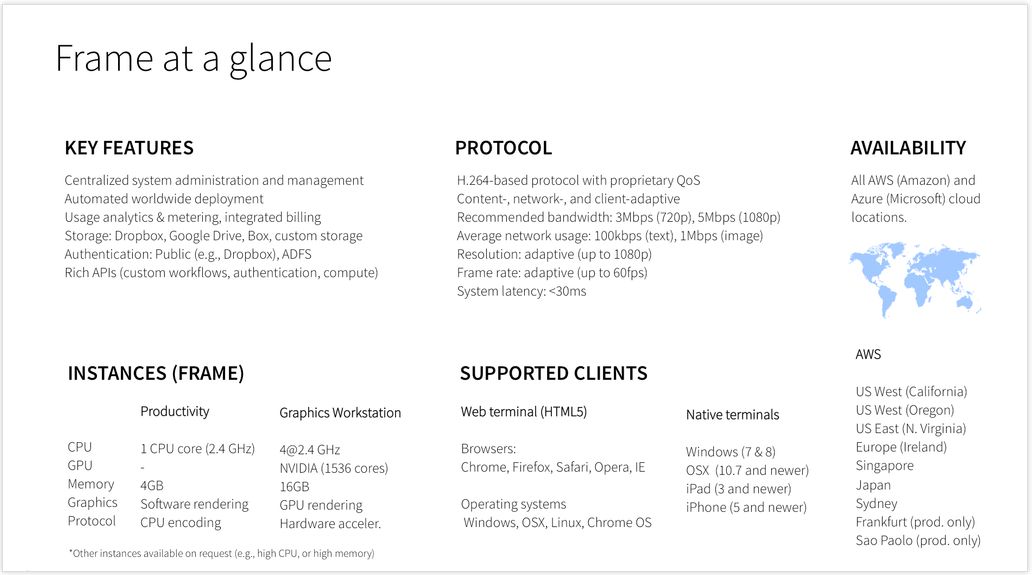
I don’t want to get blogged-down about what Frame is, but the infographic below should give the basics – suffice it to say here that it allows you to stream Windows and web apps, using a number of locations around the world, to a range of devices. It also provides a number of different use levels: Personal, Education, Business, and Platform. You can also find out more about it here.
The key point with Frame is that it potentially offers two approaches to accessing Second Life and other grids via the cloud:
- As a do-it-yourself option, where you can sign-up for a Personal account, upload your choice of viewer and run it yourself when needed
- As a packaged service similar to SL Go – which is how Bill Glover is approaching things through his Bright Canopy project, which has a demo up-and-running using Firestorm, and those interested can sign-up to find out about the work and try the demo version.
Nikola extended an invitation to me to try the Personal account / “do-it-yourself” option for myself, which I was happy to do as a proof-of-concept attempt, and this article is primarily focused on doing that, and providing some short-form feedback. As Bill is working on the packaged service option, I’m not touching too much on that at this point in time.
Getting Started On your Own With Frame
Anyone wishing to try accessing Second Life through Frame can do so by requesting access to Frame Personal. An access code will be sent to you, allowing you to set-up your Frame account, and select the nearest PoP to you, and your preferred server type (I opted for the four core system with 16Gb of memory and 20 free hours running a JavaScript client).
Once this has been done, the Launchpad is displayed. This is the normal starting point for Frame operations, and is used to manage the applications you’re running on the service (two are provided by default). This may take a short time to load the first time.
Adding a Viewer to your Frame Account
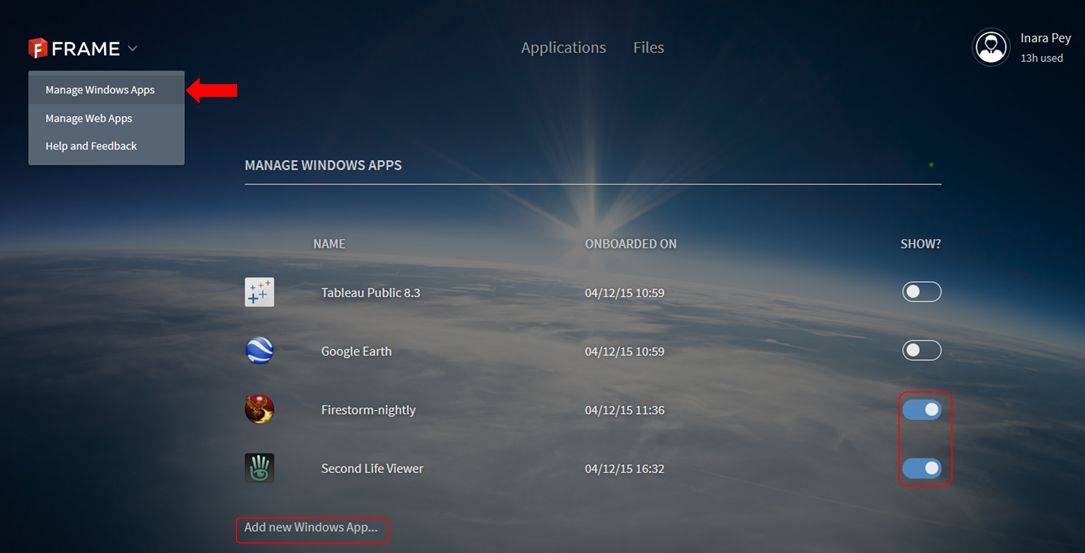
- click on the chevron next to the Frame logo in the top left corner of the screen and select Manage Windows Apps.
- A list of your installed applications is displayed (Tableau Public and Google Earth are provided by default).
- Click on Add New Windows App … under the list.
- Your virtual desktop will launch. Use the Chrome browser in the desktop to navigate to and download the Windows installer for your preferred viewer OR, if you have the EXE on your computer, use the Upload button (arrow in a circle) button in the lower right corner of the desktop screen to upload it.
- Run the installer as if you were installing the viewer on your PC.
- Once the viewer has installed, Frame will ask you if you wish to “on-board” it – confirm this, and accept the ToS – having read them, obviously! 😉 ).
- When the “on-board” process has finished (it takes about 15 seconds), go to the gear icon in the lower left of your virtual desktop and
DISCONNECT.This returns you to your Launchpad - Activate the viewer by toggling the “switch” to the right of it so it turns blue (shown above). This adds the viewer (and any other app you activate) to your Frame dashboard.
- Click on Applications at the top of the screen to go to your dashboard. Double click the displayed viewer icon to launch the viewer.
While it may sound long-winded, the entire process of setting-up an application like this can be done in just a few minutes.
Continue reading “Streaming Second Life (and other grids): Frame enters the arena”


 Inara Pey: Living in a Modemworld