Examining Firestorm’s landing pages for Second Life

MadPea and Firestorm: working in collaboration to enhance the experience those new to Second life have with the platformUpdate #3, January 9th, 2016:  The testimonials on the landing pages have now been updated with genuine comments and images from Second Life users.

Update #2: I’ve further been informed that the testimonials are intended to the express the sentiments of SL users and are based upon feedback. expressed by SL users. Similarly, the images are in fact stock Internet images. A footnote to the effect that “The consumers above are not actual consumers of the advertised product.” has now been added to each of the landing pages.

Update #1: I’ve been informed by various third parties that the testimonials on the landing pages may not in fact be genuine. I’ve therefore revised this post until I hear further on this matter.

On Monday, December 28th, Friestorm announced the arrival of their Gateway landing pages, and asked Firestom users for their assistance in helping to spread the word about Second Life.

The Landing pages are an integral part of the Firestorm Gateway, which itself forms a part of the upcoming trail Gateways Programme I previewed back in September, and which hopefully will be officially announced as up and running by the Lab in the near future.

In all, six landing pages have been produced, each one of which is intended to showcase a specific aspect of using Second Life, and encourage those new to Second Life to sign-up and log in to the platform. To help with this, Firestorm is asking SL users to share those pages they feel their non-SL friends and contacts would find to be of the most interest and thus sign-up.  The six pages have the following topic descriptions:

While one might quibble over the subject titles (role-play and exploring might seem to exhibit a high degree of cross-over, for example), the pages themselves offer a crisp, clean approach to present Second Life, including endorsements from (and photos of) actual SL users.

Each of the pages includes a series of sign-up buttons which carry those interested to the initial phase of sign-up: creating an account – providing a user name, etc.

The sign-up form
The sign-up form using the Lab’s API

It’s probably worth pointing out here, and before the conspiracy theorists reach for their tin-foil hats,  that this sign-up process uses an API supplied by Linden Lab. This means that, just like all third-party TPVs, none of the gateways in the programme – Firestorm or anyone else – is storing or accessing the sign-up information a new user provides. The information is strictly between the user and the Lab. The only part of the sign-up information which can be accessed is the e-mail address: and that only for as long as it takes for an automated welcoming e-mail to be sent.

Providing the fields are correctly filled-out  – error messages will be displayed at the foot of the input fields, although you may have to use the vertical slider to bring them into view thanks to the API – clicking Get Started will move you on to the next page, intended to step the user through downloading, installing and launching the viewer.

The Firestorm instructions page

To me, this page presents some issues which perhaps need to be dealt with if it is to be as effective as might be hoped – I’ll come back to this a little later.

One thing established SL users are bound to note is that nowhere is there any opportunity for the new user to select an avatar.

This isn’t an oversight on the part of the Firestorm team – it is a result of having to use the “old” user sign-up API, which doesn’t have any hooks into the Avatar Picker seen on the Lab’s own sign-up pages.  Thus, the first opportunity new users get to picker the gender of their avatar is after they have logged-in – and even then, they only initially get either the male or female default Character Test avatars which (a long while ago) replaced the infamous “Ruth”.

As the gateway has to use the "old" SL registration API, users do not get to select the gender of their avatar until after they log-in (left), and are then defaulted to either the female or male Character Test avatar
As the gateway has to use the “old” SL registration API, users do not get to select the gender of their avatar until after they log-in (left), and are then defaulted to either the female or male Character Test avatar (click to enlarge, if required)

Obviously, this is far from ideal. First impressions count, and many people seeing their avatar for the first time and comparing it to the glossy images on the landing pages could end up feeling a tad bit aggrieved or disappointed and might even simply log off.

This issue has already been raised with the Lab, so hopefully, something can be done about it,  either by providing the updated API with the avatar picker to those involved in the gateway programme, or by the Lab finding the means to present new users coming into SL via these gateways with at least one of the new “Classic” avatars instead of the Character Test versions.

Once they have selected their gender and have seen their avatar appear, the new user will find they’re starting at the start of the Firestorm’s orientation island, where they can start learning to use the viewer, before progressing on to finding out more about Second life in general through the various activities and events operating within the Firestorm gateway regions.

Given that new users are confronted with the Character Test avatars on first logging in (and allowing for the fact this will hopefully be changing), I did find myself wondering if a short lesson couldn’t be provided showing the new user how to access the Avatar Picker and quickly create an alternative look, just to reassure them that avatars in SL really don’t all look like they first see themselves.

The Firestorm Gateway incorporates their viewer orientation island and includes social areas for users
Once new users have progressed through the Firestorm landing / sign-up pages and have installed the viewer and logged-in with it, they’ll be delivered to the orientation island in the Firestorm gateway regions

Continue reading “Examining Firestorm’s landing pages for Second Life”

Firestorm ready to launch Gateway; MadPea join as partners

The Firestorm Gateway: partnering with MadPea Games

I recently covered the soon-to-be-launched Lab trail progamme which will see a new set of community gateways active within Second life and geared towards helping incoming new users get to grips with the platform more positively, and help them to start to engage in activities, thus hopefully improving the chances that they’ll “stick”.

The Firestorm team are one of the groups invited by the Lab to be a part of this new trial programme, and as I reported earlier in October, they will be launching their Gateway on Saturday, October 31st with a special party followed by a month-long Spooky Nights hunt which will take place across the five core regions of the Firestorm Gateway.

What I couldn’t reveal in that article, but am able to now, is that MadPea Games have agreed to partner with Firestorm to help get new users engaged in Second life.

madpea-logo
A number of MadPea games will be available in the Firestorm Gateway regions

In a press release on October 28th, MadPea confirm they are providing Firestorm with a number of their vintage games which income new users will be invited to play free-of-charge, in order to present them with even more opportunities to learn about and engage in Second life.

Commenting on the partnership, Kiana Writer, CEO and Queen Pea of MadPea Games says, “We are all very excited about the opportunity of working with Jessica and her team and waving the flag for what is achievable for user-created content on the grid. There’s a huge learning curve when you enter SL for the first time and we believe Firestorm, along with their partners, are best placed to help guide new users through that arc.”

Jessica Lyon, speaking for the Firestorm team, said: “We are super excited to announce that we’ve formed a mutually beneficial partnership with MadPea Productions! Essentially MadPea will install some of their older games as free play in our environments, and in exchange new residents will learn about MadPea Games to become potential new customers. MadPea will also then be able to send their new users to our installations to learn how to play MadPea games.”

The Firestorm Halloween Party stage area

The Firestorm Halloween Party will kick-off at 13:00 SLT with a series of live performances running through until 16:00, when things will switch over the DJs, and the Spooky Nights Halloween Hunt will launch.

Topping the bill for the party are:

  • 13:00 SLT – Mankind Tracer
  • 14:00 SLT – Nance Brody
  • 15:00 SLT – The Changhigh Trinity Sisters Fireshow
  • 14:00 SLT onwards – DJ Quad

Over 150 well-known Second Life merchants have contributed to the hunt, and you can read a list of participating creators on the Firestorm post on the party, and also catch photos of some of the prizes on offer.

Four landing points will be in operation for the party, as follows:

For further information on the party and the Firestorm Gateway, please refer to the Firestorm blog post, or to find out more on the Gateway and the new Gateway programme, please refer to the articles in this blog.

Related Links

Firestorm Halloween Hunt to open Gateway

The Firestorm Gateway regions: setting for a special Spooky Hunt, but merchant assistance sought

Firestorm will be opening their new Gateway regions to the public on Saturday, October 31st, with both a special Halloween party and the launch of their Spooky Nights Hunt, which will run through until Monday, November 30th.

The Firestorm Gateway is one of up to 20 new Community Gateways which will soon be opening as a part of a trial of a new Community Gateway programme initiated by the Lab, and  which I previewed back in September.

The idea is to allow communities and groups within Second Life to build their own gateways focused on bringing new users into Second Life and to help get them started. These gateways will include web pages to attract new users to them, which will include a registration API to allow those users to sign-up to SL and create and account without necessarily having to go through the central registration process at secondlife.com.

While the hunt isn't focused on encouraging new users into Second Life, the Firstorm Gateway regions, once officially opened, are itentded to help incoming users gain familiar with SL, gain support, and experience some of the activities to be found in-world, such as socialising, flying, boating and - as shown here - scuba diving
The Firestorm Gateway regions, once officially opened, are intended to help incoming users gain familiar with SL, gain support, and experience some of the activities to be found in-world, such as socialising, flying, boating, playing games, and – as shown here – scuba diving and underwater exploring

The Firestorm party and Spooky Nights hunt do not mark the official opening of the new Gateway programme as a whole – the Lab will hopefully be announcing this is due course. However, they do present the opportunity for Second Life users to explore the Firestorm Gateway regions, five of which will be featured in the hunt, which will also serve as the first event designed to attract new users to Second Life via Firestorm’s website.

A special stage area has been created for the party on October 31st, which will feature Mankind Tracer and Nance Brody, among others. There will be more details on this announced by the Firestorm team in due course.

The Firestorm Gateway regions also include areas suitable for intdoucing people to role-play, etc. - and you can explore them once the Spooky Hunt opens on October 31st
The Firestorm Gateway regions also include areas suitable for introducing people to role-play, etc. – and you can explore them once the Spooky Hunt opens on October 31st

The Spooky Nights Hunt will take place across the five activity regions of the Gateway, and it is hoped it will provide fun and interaction for both established and new users. Right now, and in support of the hunt, the Firestorm team are reaching out to Merchants who are willing to provide goodies as hunt prizes, with Jessica Lyon, the Firestorm project manager noting:

Although it is a Halloween hunt, the hunt remains open after Halloween. You can make a spooky gift or not.

If you are a Merchant interested in supporting the hunt, please hop over the Firestorm website and the Spooky Hunt application page for further information.

As well as participating in the hunt, newcomers and visitors will be able to explore all six of the Firestorm Gateway regions, which include an orientation region for people new to Second Life and a social area where people can meet and interact (and where questions on using Second Life can be answered). In addition, they’ll be able to participate in any of the activities offered across the regions. These are designed to present a broad feel for the things people can enjoy in Second Life, and include fly aircraft, sailing, jet skiing, scuba diving, playing games, etc. In addition, they can explore a simple role-play environment, or use the sandbox area to learn the basics of building.

The Firestorm Gateway opening will focus on a Halloween party of Saturday, October 31st, followed by a month-long Spooky Nights Hunt in the 5 activity regions of the Gateway

The Firestorm Gateway opening will focus on a Halloween party of Saturday, October 31st, followed by a month-long Spooky Nights Hunt in the 5 activity regions of the Gateway

One of the most important aspects of any Community Gateway is providing volunteers who are willing to spend time in-world providing help and support for new users as they arrive. If you would be interested in supporting the Firestorm Gateway by becoming a mentor there, please send a note card with your name and relevant background information (e.g. whether you have been a mentor in the past, experience in helping newcomers and users, etc.), to Jessica Lyon.

To keep up to date with preparations for the party and the hunt, as well as with further news on the Firestorm Gateway, keep an eye on the Firestorm website. I’ll hopefully have more news on the Gateway programme itself as it is announced by the Lab and / or more Gateways come on-line.

If you are participating in the Gateway trial programme, and would like your Gateway to be previewed in this blog, please use the contact form to drop me a line, or contact me in-world.

Landing pages: marketing Second Life

secondlifeDuring the SL12B “Meet the Lindens” presentations, mention was made a number of times about the new user on-boarding process, and steps the Lab are and would be taking to try to improve the overall experience for those signing-up to Second Life.

In particular, two of the talks touched on the Lab making use of new Second Life “landing pages” on the web, and the upcoming new community-focused Gateway Programme. The comments made were enough to pique my curiosity, so I approached Peter Gray, the Lab’s Director of Global communications to find out more about both of these activities. As I covered the upcoming Gateway Programme  in September, this piece looks at the new “landing pages” on the web.

These are dedicated web pages for Second Life which operate alongside the generic landing page at secondlife.com, but which are used for focused marketing of the platform, by highlighting a specific activity or market vertical, such as education, VR, the global music community, business (affiliate programme), etc., as well as social activities, fashion and content creation, together with pages devoted to familiar topics such as vampires, breedables, zombies, etc.

A part of the education landing page, which includes links to details on the education discount, the SL education wiki,
A part of the education landing page, which includes links to details on the education discount, the SL education wiki and forum and two use case studies (Texas A&M and Nova Southeastern University, as provided by the Drax Files World Makers Series – click for larger view or follow the link

“We run ad campaigns, targeted with our ad partners, that point back to some of these pages,” Peter told me. “But not all of them at the same time. We also use ad networks to target people who share interests similar to those offered in the landing pages we bring them to.”

So, for example, the education landing page can be used specifically with a campaign focused directly on the education sector, and  also to promote Second Life more broadly to those who may have an interest in using virtual environments for educational purposes.

And were they yielding positive results?

“For the pages that we are running ads against, we’ve seen improvements in conversion rates compared to the old versions, Peter confirmed, without being drawn into discussing figures.

In exploring the pages, I did notice that while they were very content specific in their presentation, all of them nevertheless linked back to the generic sign-up page and it broad choice of avatars. I wondered if this might be off-putting to some potential market sectors. Those looking at the platform fora business or education use, for example might prefer not to have the vampire / zombie options displayed to their clients / students. So I asked if any thought had been given to narrowing the choice of initial avatar to more closely match the possible expectations generated by some of these tailored landing pages?

“We currently default to generic avatars to offer the widest choice,” Peter told me. “But if a user comes in from a vampire page, we try to direct them to those avatars. In the future, we would ultimately like to customize the new user experience all the way through the flow, based on interests.”

Former CEO Rod Humble once indicated he’d love to see more of the millions of users who signed-up to and then departed from SL make a return. Given these pages allow for targeted campaigns to be run, I asked Peter if they were playing a part in any such attempts to recapture former users, if indeed they were still being targeted.

“We do continue to re-target lapsed and former users to encourage them to return to SL,” he confirmed. “For users that leave SL because they didn’t find the thing that interests them, these pages and ads may also help surface that area of interest and better funnel them back towards  SL.”

Overall, this is an interesting approach which tends to show that the Lab is trying different strategies and approaches in their attempts to encourage people into second Life, although It would be interesting to know more on the figures in terms of the retention (conversion) upswing mentioned when compared to the  older pages.

For those working with the Lab on the new (and still to be officially announced) trail gateway programme, the Lab’s targeted pages such as those for education, community and content creation might offer hints on how they might approach their own landing pages.

Community Gateways set for a return to Second Life

secondlifeDuring the SL12B “Meet the Lindens” presentations, mention was made a number of times about the new user on-boarding process, and steps the Lab are and would be taking to try to improve the overall experience for those signing-up to Second Life.

There were two aspects mentioned during the talks which piqued my interest. One of them was the Lab’s use of new web landing pages – something I’ll be discussing with Peter Gray, the Lab’s director of global Communications, in an upcoming article.  The other was the potential return of the Community Gateway Programme.

For those unfamiliar with the latter, at one time the Lab ran a programme which allowed communities to connect to the Second Life registration pathway, enabling them to steer incoming users directly to their own orientation / support environment, and thus provide them with assistance and hands-on support in getting started in SL. The programme was discontinued in August 2010, with the Lab citing several reasons for doing so, including issues around scalability and management oversight, together with question marks around the overall effectiveness of the programme.

However, there have been repeated calls from within the community for the Lab to bring the programme back, and this now appears to be what is happening, initially as a test to see how things go.

The community Gateway Programme, discontinued in August 2010, allowed communities to connect to the registration path and bring users directly to their own orientation / support areas - such as Help People Island (which itself discontinued in 2011)

The new programme is designed to allow communities and groups bring users into Second Life, present them with help and support in getting started, much like the original Gateway programme, and hopefully present them with interests and activities to keep them engaged with the platform. These gateways will include web pages to attract new users to them, which will include a registration API to allow those users to sign-up to SL and create and account without necessarily having to go through the central registration process at secondlife.com. Additionally, if they wish, those running the gateway can provide dedicated links for downloading a viewer (official or TPV).

I caught up with Patch Linden on the matter at the end of July, to find out some more. “We are bringing back Community Gateways as a test, based on the positive feedback and indicators of success they had in the past,” he confirmed with me. “We have 20 Gateways with whom we’re currently in discussions, but we’ve not decided on all of the programme details yet and plan to take an organic approach to re-establishing things.”

Did this mean those involved in the new programme would be able to bring new users directly into their experience, I asked, or would they have to go via the current sign-up page, and have new users connect to them via the existing Learning Island / Social Island portal system?

“We’d like to allow gateway creators to help bring in users,” Patch replied.The idea is that the new registrant would begin their time in SL in the experience that matches their interest, instead of Learning Island.” He paused and then added, “However, adding Gateways to the end of Learning Island and/or Social Island are still being considered.”

Communities and organisations within SL have attempted to offer guidance to new users, including the UWA, with their education-focus guidance for students and teachers arriving in SL - find out more about it here
Communities and organisations within SL have continued to offer guidance to new users. The UWA, for example, offer the SL Educate orientation, designed by Carmsie Melodie and focused specifically at students and teachers arriving in Second Life. You can read more about it here

A look at the Firestorm Gateway

One of the groups involved in the new Gateway Programme is the Firestorm team. Together with a number of other groups offering new user orientation facilities, they participated in a 6-week experiment run by the Lab to monitor how new sign-ups faired as a result of passing through their orientation process, and gather comparative retention data. Following this, Firestorm were one of the groups invited into the upcoming new Gateway Programme.

“The Gateway idea is mostly based on a single region,” Jessica Lyon, Firestorm’s Project Manager said as she and Ed Merryman gave me a tour of their new user experience shortly after I’d talked to Patch Linden. “But you know me :). I wasn’t satisfied with one region – if we were going to do this, we wanted to do it right!”

The result is that the Firestorm Gateway comprises six regions in total, including the original Firestorm Support region, which has been re-purposed to fit with the Gateway approach. “One of the new regions is going to be a Firestorm Orientation for new sign ups only,” Jessica continued as we explored, “it’ll be a similar to our current orientation island.”

Firestorm are participating in the new Gateway Programme, offering an experience focused around their self-help orientation island
Firestorm are participating in the new Gateway Programme, offering an experience focused around their orientation island

The rest of the regions offer an assortment of facilities and activities intended to help new users get better acquainted with Second Life, using the viewer, and participating in some of the activities they can find during their in-world travels. A staffed support area provides practical help and support, for example, while users can also enjoy activities such as jet skis, sailing, boating, and flying within the regions, or try their hand at a scuba diving adventure.

There’s also an amphitheatre (under construction at the time of my visit) which will be used for events focused on new users, viewer Q&A sessions, and so on, while social areas around the island will offer new users the opportunity to relax and meet with established SL users as well.

Firestorm also aim to help people discover popular activities such as flying, boating, and boating in Second Life
Firestorm also aim to help people discover popular activities such as flying, boating, and scuba diving in Second Life

To help draw users to the experience, Firestorm will also be remodelling their website, allowing it to be linked to the Lab’s user registration process. Thus, people visiting the website will be able to sign-up to Second Life, select their avatar, download the Firestorm viewer and log-in directly to the Firestorm new user experience, reflecting Patch’s view that new users should be able to directly reach the experience which interests them. Other participants in the Gateway Programme will be able to offer similar sign-up / log-in capabilities for people to reach their experiences as well.

As noted earlier in this article, the new Gateway Programme isn’t quite ready for launch at present – but it will be soon. When it does so, the Lab will be publishing more information on it, including participation guidelines, and I’ll be offering a follow-up to this article at that time.

Similarly, the Firestorm regions are ready for opening just yet; when they do, I’ll be bringing you a in-depth review of the facilities and Firestorm’s approach to the new user experience.

My thanks to Pete Linden, Patch Linden, Jessica Lyon and Ed Merryman for their time and assistance in writing this article.

Second Life new user experience now with Experience Keys

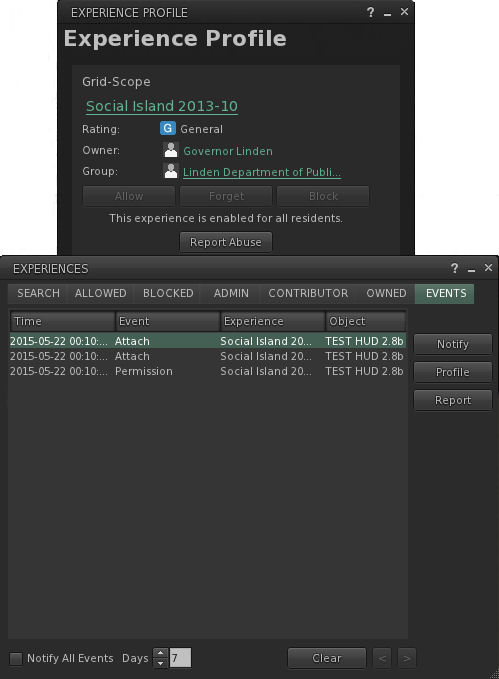
Experience Keys are being used as a part of the new user experience
Experience Keys are being used as a part of the new user experience – click for full size (note viewer UI is intentionally turned off)

update, April 2016: The Lab is apparently A/B testing the use of Experience Keys with task-oriented learning at a set the Social Islands. See my article on this for further details.

As a part of my periodic poking at things in Second Life, I recently logged-in using the avatar I keep “parked” at one of the Learning Islands which are the initial arrival points for new users, and  noticed that the Lab has added Experience Keys capabilities to the first-time log-in experience for new users as part of continuing efforts to improve the experience new arrivals have when arriving in-world for the first time.

For those not already in the know, and keeping things to their briefest, Experience Key (also referred to as Experience Tools) are a relatively new (and at the time of writing, yet to be fully deployed) feature that allow users to opt-in to an “experience”  – which could be a game, a tour, an educational activity, and so on – just once, rather than having to repeatedly grant specific permission each time something wants to act upon their avatar – such as a teleport offer, attaching an object, etc.  This means that the experience can be enjoyed much more fluidly and without the distraction of multiple dialogue boxes constantly popping-up. when the user leaves the experience area, their status in the experience is saved (e.g. their progress and items collected), all permissions are revoked, and all attachments removed.

Experience Keys in use as a part of the New User Experience

Within the first-time log-in environment, Experience Keys are being used to help guide new users through the basic steps of using the viewer. The focus (at least at the time when i noticed the use of Experience Keys) is specifically on avatar movement. However, there is no reason why the approach couldn’t be expanded in the future to cover other aspects of viewer use, and other aspects of gaining familiarity with SL.

A key difference between the use of Experience Keys in the new user experience is that the HUD system is attached seamlessly when logging-in for the first time; there’s no initial pop-up dialogue box for the users to accept as they log in.

This is a good idea, as it avoids potential concern which might otherwise occur for a new user in having a potentially confusing / worrying dialogue box displayed as soon as they log-in, stating it wants to take control of this and that. Instead, the HUD attaches, and a couple of seconds later, the first pop-up displayed, providing a brief, basic overview of walking and turning.

In all, there are four pop-up hints given as the user progresses around Social island, each one appearing at an appropriate point in their travels. The hint on flying, for example, comes just ahead of the user reaching a broken bridge which should otherwise span a chasm.

The four pop-up helpers which appear as a part of the experience as the new user progresses around Social Island
The four pop-up helpers which appear as a part of the experience as the new user progresses around Learning Island – click for full size

The process stops when the user passes through the portal leading to one of the Social Islands, with the experience HUD detaching automatically as they do. Once at the latter, things become more of the familiar mix (to those of us familiar with the new user experience, at least!) of potential confusion, wandering and poking at things in order to work out what to do, even with the help from established users, who have for a while now been able to access the Social Islands (and some of whom can themselves be somewhat unhelpful, and do act as an illustration of the Lab’s misgivings on this area).

However, to stick with the use of Experience Keys, the current deployment is pretty basic, but it does offer a rough foundation on which more might be built. As such, I asked Peter Gray, the Lab’s Director of Global Communications about the use of the Experience Keys capability, and whether it might be extended within the new user experience.

“We’ve been using Experience Keys for some time with the new user experience,” Peter confirmed, before continuing, “We plan to continue to test and improve the new user experience, but at this time, we’re not able to share a pipeline for planned changes.”

The How To guide provide a range of information on movement, communications and other basic aspects of using the viewer - yet seems oddly overlooked; it is not opened by default on a first time log-in, nor are new users directed to it
The How To guide provide a range of information on movement, communications and other basic aspects of using the viewer – yet seems oddly overlooked; it is not opened by default on a first time log-in, nor are new users directed to it

How this might be done is a matter of speculation; Experience Keys certainly offer a raft of opportunities for easy learning activities along the lines of the old Orientation Islands of yesteryear, but with a potentially greater level of engagement and interaction.

As it is, the viewer does have a reasonably good introduction to the basics of using the viewer in the form of the How To guide (which has never seemed to really form a part of the various attempts to tweak the on-boarding process). It would be interesting to see the information this contains put to far better use, possibly as part and parcel of a more immersive, interactive means of guiding new users through the basics of the viewer utilising Experience Keys.

Getting to grips with the viewer is, of course, only one aspect of bringing new users into SL and getting them to stick – and it is one perhaps we focus on a little too much. The key to getting people to stay is to get them engaged in the platform – and that comes through positive interaction with others, preferably by helping them to find people within environments and activities which interest the incoming users.

This is perhaps a harder aspect of the problem to solve. However, as write Beau Hindman demonstrates in his recent video on the new user experience; there are options which might be considered. One in particular could be to direct incoming users more towards Experience Keys-led activities within SL, as more and more come on-stream, as it is likely these will tend to be something of a focus of established users as well, thus providing a potential mix of activity and interaction with others. It also fits with the Lab’s vision for on-boarding people in their Next Generation Platform.

As noted above, what is currently employed at the Leaning Islands is rudimentary; but it is also a start. Experience Keys will hopefully be fully deployed across the grid in the near future. Once that’s the case, it’ll also be interesting to see how the various mentor groups might leverage them to help new users as well.