In June Rod Humble indicated that the Lab would be evaluating a “new” new user experience in an A/B test against the current Destination Islands. During a conversation I was able to have with him a little more recently*, I asked whether the new experience would include anything of the “personal touch” – getting new users more easily get to the things which interest them. He replied:
We definitely want to make it easy for Second Life users (especially new ones) to connect with the things in-world that match their interests. What we’re testing at the moment is more geared at getting new users familiar with basic controls, so it comes even before the point where they’re ready to connect with relevant content.
Given this, I’ve been curious as to what form the “new” new user experience might take – and today I had my answer.
The sign-up process itself remains unchanged, so far as I can tell. as does the first-time installation of the viewer, which I looked at back in March 2012 – although this does differ significantly to the installation process established users may be familiar with.
As I reported in 2012, when installing from the sign-up process, the viewer includes a series of panels which give various hints as to what SL is and how to get a start in it, such as the use of text and voice chat – although admittedly, the fact that these panels still feature viewer 2.x did raise a couple of eyebrows. Nothing like staying up-to-date, eh?
One of the explanatory text panels displayed during the viewer installation process. note the viewer 2.0 UI, complete with sidebar!
Once logged-in to Second Life, things are now noticeably different. New users are initially delivered to one of several versions of “Social Island”, arriving on a beach. The landscaping here is somewhat more pleasing to the eye than the older Destination Islands, However – and bearing in mind, I have no idea just how “preview” or “work-in-progress” this approach is – it tends to start to unravel from here. Just what do you do? Where do you go? What the heck is going on? There is currently no indication at all.
Well, actually, there are clues. They’re just not terribly obvious clues.
“Where am I? What am I supposed to do?” A plaintive question from a newcomer on the beach at Social Island
Up in the navigation bar, alongside the region name is the parcel description “Find the path”. The clue refers to one of two paths off of the beach. The first refers to on which leads up from the eastern end of the beach, under a stone arch, and the other goes through a tunnel to the island’s interior. Taking either results in the parcel description changing to “cross the bridges”. And indeed, there are wooden bridges to cross; although if you went through the tunnel, you’ll need to master climbing the rock face first (up a set of pretty obvious “steps”.
“Social Island” is perhaps well-named. There was a lot of chatting going-on when I arrived. Admittedly it was of the “Help!” variety of conversation – which included comments like, “What am I supposed to be doing?”, “Can anyone tell me what this is?”, and, “Does anyone else here use IMVU? Why isn’t this like it?” (yes, honestly, that is exactly what was being asked) – but at least people were communicating and socialising. Sort-of.
Perhaps the most disheartening thing was – again, my direct experience – trying to help a newcomer, only to have her respond, “I hate this,” before she vanished, presumably logging-off into the ether, never to return.
The Social Islands appeared geared towards getting people walking around and perhaps talking – although much of the conversation might be pleas for help from genuine newcomers…
The path leads newcomers to a single teleport portal which uses the experience tools teleport capability to deliver them to one of the Learning Islands. Here things are, if anything, slightly more confusing – again with the caveat that it may be a work-in-progress.
Earlier, I blogged about a number of Chrome browser extensions users have developed for use with Second Life, and which Daniel Voyager had spotted. As a result of that article, Lance Corrimal pointed-out he had a number of SL-related search helpers for Firefox, which he suggested he could make available on his Dolphin Viewer website.
Well, he did – so true to my word, here’s a look at them.
The helpers are designed to allow a user to use the Firefox search option to use for terms and items using the various Second Life search engines. In all, Lance provides five helpers:
JIRA search – locate any JIRA directly from Firefox search (now subject to JIRA access / viewing)
Second Life Search – search for anything directly related to Second Life
Second Life Marketplace Search – search for an item in the Marketplace
Second Life Marketplace Merchant Search – search for a given merchant in the Marketplace
Second Life Wiki search – search the SL wiki from Firefox search.
All of the options can be used without you having to be logged-in to Second Life (or the JIRA or the Marketplace or wiki).
Installation
You’ll need to download and install the helpers:
Go to the Dolphin viewer website and download the helpers ZIP file (direct download link)
Open the ZIP file and drag-and-drop the five .XML files it contain into the Firefox Searchplugins folder. For Windows this is located at either: C:\Program Files\Mozilla Firefox\browser\Searchplugins or C:\Program Files (x86)\Mozilla Firefox\browser\Searchplugins (depending upon whether you’re running 32-bit or 64-bit Windows)
Restart Firefox if you are already running it.
Using the Helpers
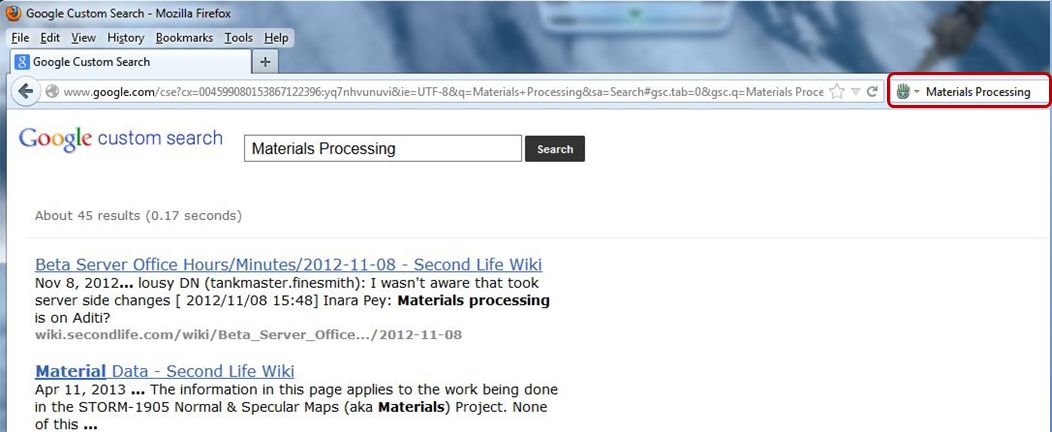
The helper options when installed in Firefox
One the helpers have been installed, they will be available directly from the Firefox search option. Simply click on the search engine selector in the search field to display a drop-down list of your installed search engines / options, and select the required SL helper.
When a helper has been selected, its name will base displayed in the search bar, and you can type-in your search term as you would for any other search engine.
The JIRA Search
Typing-in a JIRA number (such as “OPEN-173”) will display that JIRA, assuming it is publicly viewable. If not, you’ll get the “permissions violation” warning if you do not have the requisite JIRA access permissions
Typing-in a descriptive text (e.g. “Music stutters”) will display a list of possible JIRA matches, as with the normal JIRA search.
Second Life Search
Typing in any term using this Helper will cause the normal SL search engine to run and will return results using the search engine’s default page display.
Using the SL search option will return results from the main SL search engine – whether or not you’re logged-on to the SL website
Marketplace Searches
The two Marketplace searches work in much the same way as the SL Search option, except they invoke the Marketplace search engine. Using the general Marketplace search allows you to display a Marketplace page displaying all products which match the search string, while the Merchant search will display one or more Merchants matching the search string, allowing you to click on the required name and view the store.
Wiki Search
The wiki search helper will search the English language version of the SL wiki, returning a list of topics which may match the given search text.
An SL wiki search directly from Firefox’s search option
Feedback
Installation is simple, the helpers all do exactly what they same in their names, and work – as mentioned above – regardless of whether you are logged-in to the SL website or not. As such, for any Firefox user who spends time searching SL, they form a most useful suite off add-ons to Firefox (the 2012 changes to the SL public JIRA notwithstanding). Kudos to Lance for developing them and for making them available for general use!
Update: Lance Corrimal has produced a set of search helpers for Firefox, which I’ve reviewed as well.
Daniel Voyager brings word that the Chrome browser offers a number of user-made extensions for Second Life. In particular, he points to three which appear to have value. As a sometimes-Chrome user (I tend to switch between it and Firefox on Windows, depending on what each new release brings), I decided to take a bit of a closer look at them. All three were located by searching for “Second Life” in the Chrome extensions web store.
This is described as an extension which, “Shows a list of friends online when logged into the SL website” and that “Users can check if their friends are online from any web page, instead of having to go through the tricky Second Life dashboard.”
The extension adds a Second Life icon to the browser, and I assume clicking on it is intended to display a list of friends online when you are logged-in to the SL website (although not necessarily with the web dashboard page open). However, the last update for the extension is 2010, and I was unable to get it to work.
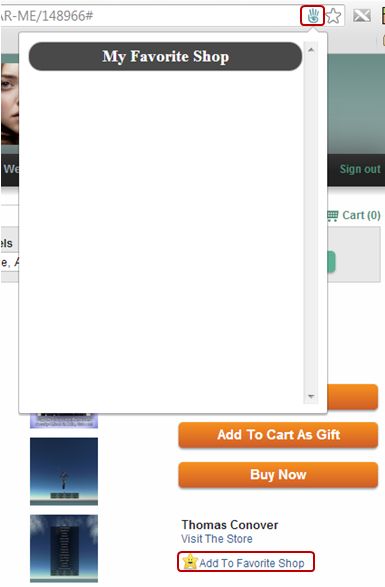
The Marketplace helper showing the address bar icon, additional page link and (empty) “Favourite Shop” list
Apparently last updated in January 2013, this extension is supposed to make browsing your SL Marketplace favourites easier. Installing it does two things:
Adds a Second Life icon to the browser’s address bar when using the Marketplace
Add a new link to the right side of Marketplace product pages, “Add to Favourite Shop” (note this is not the same as the LL-supplied “Add to Favourites” link, which appears further down the product page).
I gather the idea is to click on the “Add to Favourite Shop” to add an item to a “Favourite Shop” list which can be opened using the icon in the address bar. However, I was (again) unable to get anything to work, although it did not, as the one review of the extension suggested, “make the Marketplace unavailable”.
This is the one extension I did get to work. It adds a Second Life icon to the Chrome tool bar which, when you are logged-in to the SL website (regardless of whether you have your SL web dashboard page open in the browser or not) will display the number of your friends currently on-line. Additionally, as friends log-in to SL, a pop-up will briefly appear in the bottom right corner of your screen announcing the fact they have.
Clicking on the icon itself will display a list of all your friends currently on-line, and if any have given you permission to map them, hovering the mouse over the globe which appears alongside their name will display a hovertip of their location.
When clicked, the icon also displays a note of your current L$ balance and a list fo your Groups. The extension is also configurable in terms of what is displayed via the Options link in your browser Extensions page.
The Chrome Life options
Feedback
I assume the reason why Second Life Friends isn’t working is because it has not been updated in a good while and may no longer be displayed. Quite why the Marketplace Helper doesn’t appear to work, I’ve no idea. Chrome Life appears handy if you need to keep tabs on specific friends and want to see when they go in-world without having to keep the SL web dashboard open in a browser tab. I’m not sure I’d want to use the extension all the time myself (I actually removed it after playing with it through my Crash Test Alt), but for the SL-addicted it could prove useful :).
Obviously, these are third-party extensions, so the usual warnings about them not in any way being associated with Linden Lab or Second Life and using at your own risk, etc., apply.
In 2011, I – among many SL bloggers – covered the release of Login2life – a documentary on Second Life, virtual worlds, and the people who use them, directed by Daniel Moshel which was some four years in reaching a broadcast.
I was fortunate enough to watch the video when it was broadcast by the German television channel ZDF in 2011, and provide a review and thoughts on the programme – which is perhaps the most comprehensive, watchable and intimate look at people’s virtual lives which has been produced.
Inspirational: the creation of Virtual Ability and Virtual Ability Island seen through Login2life during the ZDF broadcast is 2011
Now everyone has the chance to see what makes this programme so very special – as it is (for the time being at least) now available on YouTube.
If you didn’t get to see Login2life back in 2011, I really cannot recommend that you take 85-90 minutes of you time to sit down and watch it. It really is worthwhile.
I was informed about it’s appearance by a little birdie at the weekend (and my apologies to said birdie for not blogging sooner on the matter – I’ve not been entirely on-the-ball the last week for a range of reasons).
Anyway, here is the video and for those who wish to know more, Daniel Moshel has a very short Q&A video dating from November 2009, addressing questions raised by ZDF back when, if I understand things correctly, they were still in the early phases of mulling over broadcasting the film.
I don’t actually use the SL forums that much in terms of posting; my visits are more a case of diving into things like the technology and Commerce sub-forums, reading those threads which interest me and then buggering off again. Ergo, what I’m about to post here is liable to be very old news to a lot of forumites, and I apologise if this is the case, but as the saying goes, there’s no news like old news (or something like that…).
The issue with the default SL forum layout for many people … OK … one of the issues with the SL forums, because there are many, is that of general presentation / readability. It is not exactly easy-on-the eye for some, and while people have the option of having their own nice forum badges, these get semi-obliterated by icons and additional information not everyone is particularly interested in and can have problems with names being legible where dark colours are used in the badge.
To overcome this, Cerise Sorbet “recently” wrote a CSS theme for community.secondlife.com which can be used to replace the default theme, together with some additional snippets, all of which are aimed at improving the presentation / readability of the forums.
And by “recently”, I mean “early 2011” – yes, I’m on the ball here, folks…
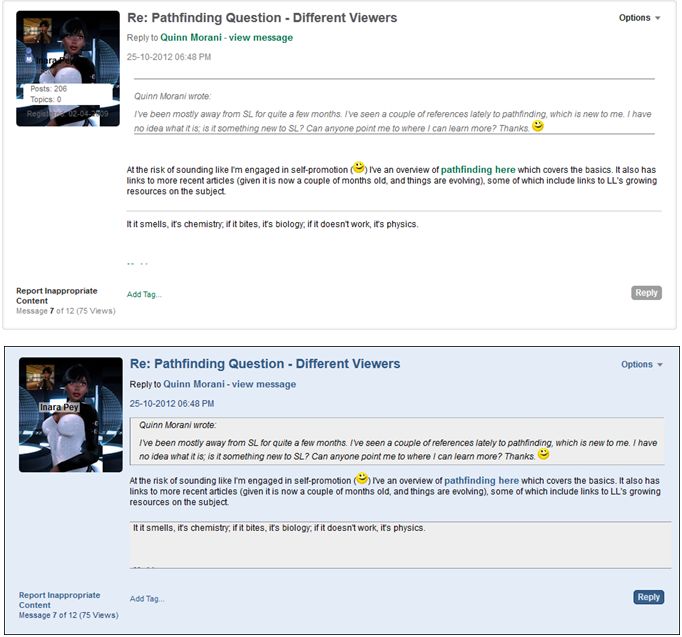
The Blue Goo theme replaces the default forum theme with a set of muted colours which are designed to enhance the readability of the forum pages and which, at the same time, takes care of some formatting issues.
The default forum page presentation (top) and Blue Goo (bottom)
The code snippets also do much to improve the appearance of badges in forum posts, by adding a level of transparency to user names in badges, and by converting the additional information (number of posts / topics, the “bowling pin” icon”) so it is only displayed on a mouse-over. An additional CSS snippet adjusts the layout to suit 1024-pixel displays.
The optional badge CSS snippets: (l) – my badge as original displayed; (c) with the transparency added to my name; (r) with the additional information converted to appear when the mouse is over my badge
The theme and the CSS snippets can be used individually or together in any combination – so you can install all of them to present yourself with a complete “new look” forum display, or you can take things like the badge updates and add them to the default forum theme.
For those using Firefox or Chrome, the CSS code can be installed directly using Stylish. Greasemonkey can also be used for Chrome, and options are provided (as far as possible to enable installation on other browsers via the Blue Goo download page. Gavin Hird also provides assistance for Safari users in getting the theme working on the Mac.
As I’m a Firefox user, installation was a breeze: install the Stylish add-on, then click the theme / snippet buttons to install them as required. The same was true for Chrome, which I also have installed as an alternative for when Firefox throws the occasional fit. Once installed, the options are easy to control via the Stylish icon, which allows any of them to be instantly disabled / enabled, so no worries about installing something and finding you don’t actually like it – simply turn it off. Stlish also provides a number of other options as well for managing themes (and can be used on almost any site which allows for user-generated themes and options).
How it looks on individual replies: (t) a default forum post reply; (b) with Blue Goo enabled
With thanks to Cerise Sorbet for Blue Goo and snippets and to Darrius Gothly for pointing me to the theme back in November. Apologies to both for not giving a write-up sooner.
It has been almost four years in the making – growing from the seed of an idea planted some five years ago -, has a truly global reach in terms of those involved, and spans two rich virtual environments.
Login2Life, a documentary directed by Daniel Moshel, follows a group of people from around the world, each of whom spends some of their time engaged in either Second Life or World of Warcraft – and in some cases, both. On the 17th October, the film received its premier in Germany, and is being streamed for this week only on the ZDF website.
At a touch under 85 minutes in length, the film doesn’t have a specific narrative flow – there is no narrator’s voice-over to guide us from a given starting-point vis-a-vis virtual worlds or lead us to a particular conclusion. Instead, we’re left to meet each of those the film involves, and follow them as they engage in their virtual lives and voice their views and feelings on their lives, what virtual worlds provide for them, about love and relationships and family living and much more. Obviously there is a degree directorial influence involved here – the selection of which part of people’s stories made it into the final cut, etc., but on the whole, the approach leaves the person watching the film free to consider all that they see and draw their own conclusions.
The film opens in real life, with the story of Corey Shea Franks, a young man from California who, in 2002, was left paralysed from the neck down following a car crash. From here we journey to Aurora, Colorado and Alice Krueger, perhaps better known in SL as Gentle Heron. She is watching a performance in Second Life by Jaynine Scarborough (real name: Juliane Gabriel), a singer and vocal music teacher from Berlin, Germany.
Alice has severe multiple sclerosis, which leaves her reliant upon both crutches, or more usually, a powered wheelchair, rarely able to venture out of her own home. Within Second Life, as Gentle Heron, she has been central in the creation of a Second Life community dedicated to those with disabilities – Virtual Ability, with its hub at Virtual Ability Island.
Inspirational: the creation of Virtual Ability and Virtual Ability Island seen through Login2Life
However, it was not her original intention to found and build a community; rather she arrived in SL together with two friends she met via the Internet looking for a community in which they could join. This grew out of feelings that, as disabled people in real life, they were not a part of the respective geographical communities in which they lived. When they failed to find what they were looking for, they decided to make it, and bring people to it.
It sounds so simple – and the machinima accompanying Alice’s description of those early days is touching without being overly sentimental. Yet it is here that we see one of the powers of Second Life revealed: that it is an environment where people can come together openly and, with the right impetus, create something that is truly marvellous and beneficial.
The laughing gnome: Philippe Fatoux and his WoW character
Elsewhere in the film we get to meet Philippe Fatoux, a machinina creator in World of Warcraft – in which he delights in being a cheeky little Gnome, getting up to various amounts of mischief, and Thomas Bengtsson, Guild leader for Ensidia, also within World of Warcraft. There is also Chinese family who play WoW together with the express aim of farming gold – which can be exchanged for real-world currency.
This part of the did leave me feeling rather discomfited; there was something unsettling about seeing almost an entire family almost desperately farming gold in WoW as a source of income while others engaging in the game gave the impression they looked down on those who do this with either pity or disdain.
We also once more meet up with Corey Shea, himself a skilled player in WoW, and his family; and we gain a candid look into the life Kevin Alderman, better known to many in SL as Stroker Serpentine in SL, owner of Eros LLC and the SexGen brand, although he originally started out in Seducity.
What is striking about the film is the way it naturally blends people’s virtual lives with their real lives. There is no sense of delineation between the two as the film moves back and forth between the virtual and the real. Nor should there be – what happens within the virtual environs is as much a part of these people’s lives as anything they do in the real world. I think it fair to say anyone who invests themselves in a virtual world to a similar degree will readily identify with this lack of delineation as well.
For me, the stand-out elements of the film are with Alice and with Corey’s family – in particular, his mother. Both women are dealing with the massive impact a disability has had on their real lives – Alice in terms of the limiting factors MS has created for her, including her inability to easily socialise and meet people in her every day life; Margeau Janae Franks in dealing with Corey Shea’s condition and the impact it has had upon her family. Seeing both women working through Second Life to bring Margeau Janae’s book, The Length of a Breath to an audience and in the hope of helping others is particularly moving. I felt very privileged to be able to share a part of both of these women’s lives through the lens of Daniel’s camera.
Margeau Janae Franks (podium) and Alice Krueger (Gentle Heron) with her back towards us, work on Margeau Janae’s presentation in SL
Similarly, it is fascinating to follow Kevin Alderman and his family. Here is a man who clearly loves and values his family and who, with them, has demonstrated how very disparate real and second lives can be brought together relatively harmoniously, to the benefit of both. Several of my favourite moments in the film came from being allowed to witness Kevin’s interactions with his family. I also very much liked the scene showing Kevin / Stroker meeting with Alice / Gentle – to discuss the creation of a couples dance animation that would enable someone in a wheelchair in-world to dance with someone more able-bodied.
Alice and Kevin meet via Gentle and Stroker to discuss dance animation (inserts my own)
Given the range of subject matter covered by the film – including sex – Daniel Moshel is to be congratulated on his overall handling of the subject matter. What we see in this film are not oddballs or people who are socially inept – which is all too often the way the media like to portray those engaged in virtual lives.
Instead, we have people who both directly and indirectly have found that through the virtual medium they have been able to hugely extend their and enrich their real lives. This makes Login2Life one of the few films out there that provides clear insight into why people are motivated to spend a good portion of their time engaged in virtual worlds without pandering to the need to titillate through overt sexual references. The sex is there, certainly, but there is none of the nudge-nudge, wink-wink that many in the media find hard to avoid when looking at virtual world environments. Instead, Login2Life simply introduces us to some amazing people who in turn invite us to share a little of their lives.
Some might critique Login2Life for the lack of narrative flow – or at least the lack of narration; it’s fair to say that at times the jumps in the film are a little disconcerting as we move from story to story, and one’s focus is broken in the mental gear-shifting that follows some of the jumps. If I’m honest, it also makes the film hard to review – I’ve really only scratched the surface in this article and focused on those elements that held the core of my attention. There is so much more going on within Login2Life that in some ways, had there been more of a narrative arc, it would have been easier to review and give feedback.
But the film has not been made simply to be reviewed. It has been made to be experienced, and in that regard, I think the lack of narration / narrative arc works and makes the film more engaging than might otherwise have been the case. Without an apparent central message, the film is far more a voyage of discovering for the audience, and thus that much more satisfying to watch and absorb, as we are free to be drawn into those elements that engage us and come to our own conclusions as the vignettes unfold.
Which is not to say the film does not lead up to something very special. The last fifteen minutes bring so much of what has gone before together in a series of very poignant moments which I’m not about to spoil by describing. You’ll have to watch and see for yourself.
Daniel and the production team are to be congratulated for putting in the years of hard work and effort that were required to make this film. Their effort has been more than worthwhile. Login2Life is a tremendous film, and all those who participated also deserve our thanks for allowing us into their lives.
Login2Life – why not login and watch it yourself? You can do so all this week, and you won’t be disappointed.










 Inara Pey: Living in a Modemworld