Since it opened in June 2024, Primfeed, the social media / photo-sharing platform geared towards Second Life users has been gradually gaining ain features and capabilities – as well as users; and December 13th, 2024 marked would could be a particularly significant move: providing the ability for Primfeed users to open their feed and gallery for viewing by non-Primfeed users / those not logged into the service.
This is particularly relevant, as one of the critiques of the platform since it opened is that is a essentially a closed service: to view anything, up until December 1th, 2024, one had to create a Primfeed account; something long recognised by Primfeed’s creator, Luke Rowley.
For a social media [platform], this restriction was a considerable downside for discoverability, or just knowing what to expect when you click a link. Now, every resident can open their profile and content to the public. You can change this setting by navigating to the “Edit your profile” button on your profile. If you open your profile to the public, your content will be visible to anyone, even if they’re not logged into Primfeed.
– Luke Rowley, announcing the ability to make Primfeed feeds public
As noted above, making a Profile (/timeline) public is a simple two-step process for those who wish to do so, and can be reversed at any time. Whether it is used or not in therefore a matter of personal choice; by default, users’ feeds will remain private unless the “public” option is explicitly set.
To make your profile (timeline) public, click on the Edit My Profile button from within your Primfeed profile (top), and then enable Make My Profile Public (bottom)
In addition, when the option is set:
Each type of link (events, profiles, or posts) now has its own preview when shared on messaging apps or social media.
Only General or Moderate content within an individual’s profile will be visible when it is made public; to avoid the potential of giving offence or violating other platform’s terms of service when sharing content, items rated as Adult and Adult+ within an individual’s profile will remain only viewable to those actually logged-in to Primfeed.
When a Profile is make public all General and Moderate posts, etc., made to that profile will be visible to people not logged-in to Primfeed, together with an invitation for them to join the service at the top of the profile’s timeline (top right, above)
On a purely personal note, I think Luke taken the optimal route in making this capability opt-in rather than opt-out. Not everyone will want to have their profile generally discoverable, and it is a lot more sensible to have those who do to go through the one-time step of setting the option for themselves rather than risking those who don’t want to have their profile so exposed, and feeling they’d has been forced to do so, and inconvenienced by having to disable the option.
There is still much that I would personally like to see added to Primfeed – such as the ability to use BB code or similar with the images I post to Primfeed so that I might also embed them into blog posts, etc., – but I know Luke has a sizeable backlog of options and capabilities he is working through (including the above). As such, he’s attempting to deal with things on the basis of adding the more popular requests as a priority – and and noted, Primfeed being a “closed” environment has been is particular cause of frustration with the platform. Hopefully, this will now change – and I certainly look froward to seeing what else is coming down the pipe for the platform in due course.
Sharing your Second Life experience via social media can be something of a scattergun effort, utilising different platforms for different activities: Flickr or Deviant Art for photos, for example, Twitter or Bluesky or Discord, etc., for messaging and so on. But what if there was a single platform where these various needs could be met, one which – although independent from Second Life and Linden Lab – had been developed specifically for, and with input from, Second Life users and offered a degree of integration integration with Second Life, with the potential for more in the future?
Well, as of June 20th, 2024, there is: Primfeed. And this is its story so far.
First formally announced on May 26th, 2024, Primfeed is the brainchild of Luke Rowley, a Second Life resident and developer with over 17 years history on the platform. He is also the developer behind EasyBloggers, a blogger management system specifically designed to simplify the management of blogger teams by Second Life store owners and which has proven exceptionally popular and highly regarded among Second Life creators and bloggers alike since its launch in 2023.
About Luke
Primfeed developer Luke Rowley
Initially introduced to Second Life by his brother, Luke at first treated the platform as most of us do: as a means of fun and relaxation. However, he became fascinated by Linden Scripting language (LSL) and starting with objects scripted purely for fun, he quickly graduated to developing practical tools (including a complete combat meter system – something that also has relevance in 2024, as Rider Linden works to overhaul the Second Life Combat System (SLCS) and make it a more robust set of tools for combat system developers).
From here, Luke started developing web interfaces that could be used with Second Life, work which led him being engaged by one of the biggest hospitals in France developing a Second Life-based simulation to help train medical interns in providing support during disaster situations. Two years later, and still working in the healthcare sector, he started on a career as a web developer.
The main aspect of code I love is: Your code visually creates something. And with SL being this 3D world where the objects you script in-world directly interact with your avatar, I was sold.
While we can think SL looks outdated, I do feel that they are making huge progress, and trust me, it’s not easy when you have 21 years of legacy behind you, while maintaining what’s working now on the grid. What they are doing with PBR is awesome. It looks awesome, and it will save hours of work for every designer.
– Luke Rowley on the appeal of Second Life
Throughout all of this, Luke maintained his love of Second Life, looking for a means to combine his professional skills with the platform and develop something that would not only produce a useful service to Second Life users, but would actually raise the bar in how external websites can both support Second Life and offer a professional level of integration with the platform.
After much discussion with fellow SL users and creators, he came up with the idea for EasyBloggers, a platform which, at the time of writing and just 10 months after its launch, is used by over 400 designers and 2000 users. Part of this success is down to the fact that not only does EasyBloggers fill a much-needed gap in the Second Life creator / blogger ecosphere, it is exceptionally easy to use, feeling like a natural extension to SL. Another aspect with EasyBloggers is that Luke has not rested on his laurels: he has continued to develop and enhance the platform in response to user feedback. At the same time, he started looking at what else might be done to help support Second Life users, and his thinking quickly turned towards social media platforms.
Enter Primfeed
As anyone who has used any social media platform is aware, they can be difficult places for Second Life users, both directly, and Luke notes from his own experience. “You try to see what other SL users are doing and what’s going on but within second of scrolling on a traditional platform, about 90% of your timeline is flooded with ads and suggested content that have nothing to do with SL.”
This led him to thinking about a platform that might be specifically geared towards Second Life users and avoid the pitfalls of more generic options like Twitter/X et al. At the same time, he was aware of increasing frustrations within other spheres such as Flickr. Combining these two factors gave birth to the idea of a dedicated social media / photo sharing platform.
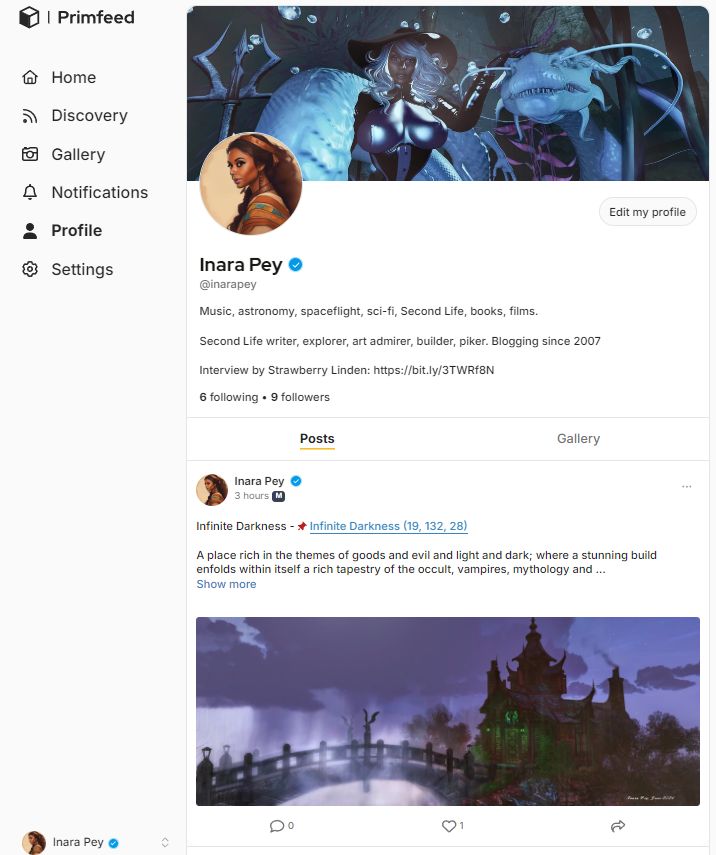
My personal timeline / feed on Primfeed
However, coming up with the idea for such a platform is not the same as developing one; as Luke noted, it’s another level of product management – one that would require some indication it would be welcomed if effort were to be put into it. As such, Luke initially thought it might be something to approach over time, starting with him testing the water first. “My original idea was to perhaps start work on it in 2025; but I was not sure residents were sharing my observations and frustrations,” he notes. “So I thought, ‘Well, let’s make a simple Google Form and see if people are interested’. I included some simple questions with the idea that if 30 to 50 people responded, I’d consider the idea as a future project.”
That questionnaire went live on May 16th, 2024 and the response was overwhelmingly positive, with people not only confirming they’ve love to see such a platform – but that they wanted it now. A message Luke received very clearly.
“I knew I’d have to start working on it as soon as possible,” he told me wryly, “So the next day I worked through the number of responses, looked at the realistic costs of building and running such a service, and quickly became convinced that yes, such a platform could be viable and supported by users. On the back of that, I made an informal announcement that I’d soon start work on the new platform – and the reaction was again overwhelmingly positive.
Over the next several days, Luke continued to refine the idea, looking at what he could initially achieve and how the service might be expanded. From the start, and like EasyBloggers, he wanted the platform to fulfil an identified need. He also wanted to make using it feel, as much as possible, as an extension to Second Life. By May 26th, he was ready to formally announce his new service, with his initial focus for its capabilities being to support the abilities to both upload photos in up to 4K resolution and share thoughts and ideas through simple Twitter/X-like posts.
Integration / Extension
Of course, Primfeed is not the first attempt as a dedicated Second Life centric social media platform – I’ve covered some past attempts in these pages. However, those services have tended towards the use of pre-existing software platforms and services. Primfeed, like EasyBloggers is being built as a dedicated service by Luke under his Kynno brand. This means he has the unique ability to directly engage with SL users and develop / tailor the platform in response to requests and feedback, thus helping to make the platform a genuine extension of people’s SL.
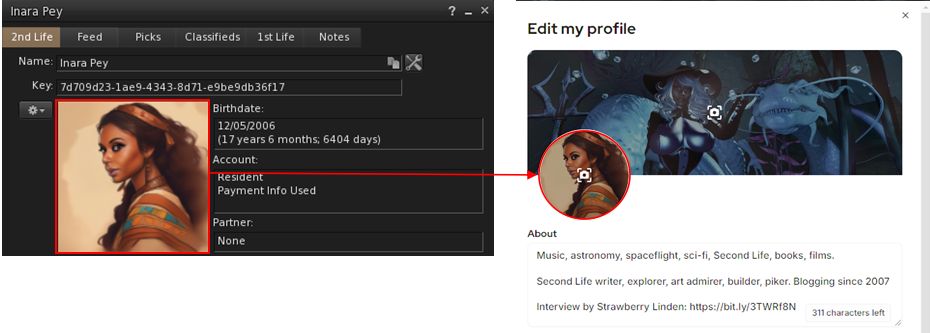
Already this is manifest in a number of ways. Take sign-up for example: Primfeed will automatically pull your Second Life profile photo across and use it as the default profile image there (although you can also change it if you wish).
An example of integration: when signing-up, Primfeed will automatically use your SL profile image for use with your Primfeed profile (which you can later change if you wish)
More particularly, Primfeed offers a set of maturity ratings that are remarkably similar to those found in Second Life and with similar icons and definitions, allowing Primfeed users to filter the content they see on the platform in a manner similar to that found on Second life, providing an instant sense of familiarity.
That said, Luke has taken things a step further than Second Life in this regard: as well as an Adult rating, he has provided an A+. The former indicates things like nudity are likely present, with the A+ indicating active sexual content, and others legal extreme content. Given the (incorrect) claim oft made by some that Adult always equates to “extreme content”, this is a useful distinction – art, for example, can include nudity, but is hardly “always” extreme content.
When you build your websites totally from scratch and you are not using a paid template, you can deeply and carefully add features that really matters and match what residents really want.
– Luke Rowley on designing Primfeed
Primfeed leveraging popular approaches from social media platforms such as Twitter/X, with a left-side menu providing users with easy access to options, and a Flickr-like gallery display of images
Nor does it end there; for those familiar with using the likes of Twitter/X, Bluesky and so on, the Primfeed interface will be immediately feel comfortable, sharing a lot of similarities of approach and layout:
The left-side quick-access menu.
The ability to click on a user’s name in the timeline and open their timeline and / or hover the mouse over their name to see their profile summary.
When viewing a user’s profile, the option to view a gallery of their uploaded images.
The ability to access a timeline directly (subject to being logged-in to the platform) using the format “primfeed.com/user_name” (so you could add your own timeline to your SL profile, for example.
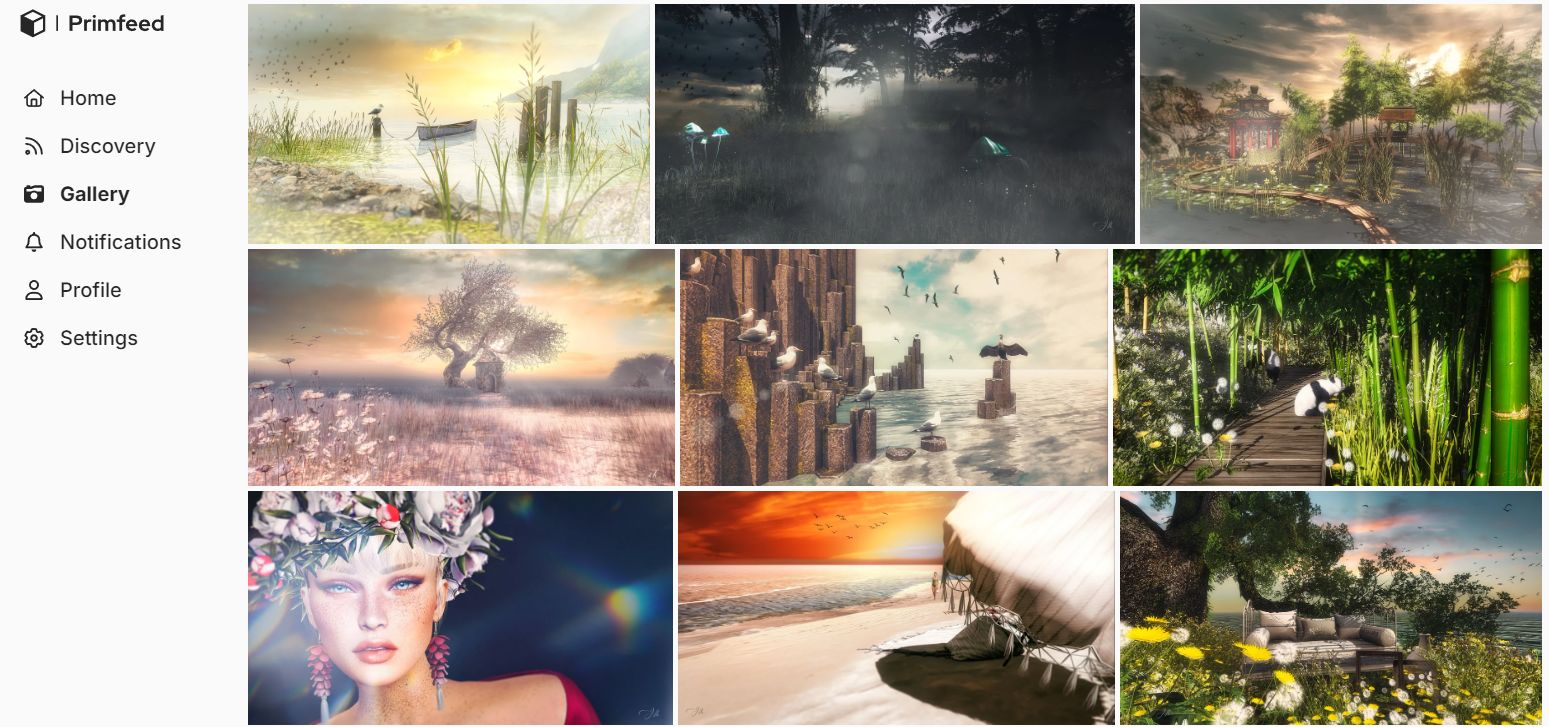
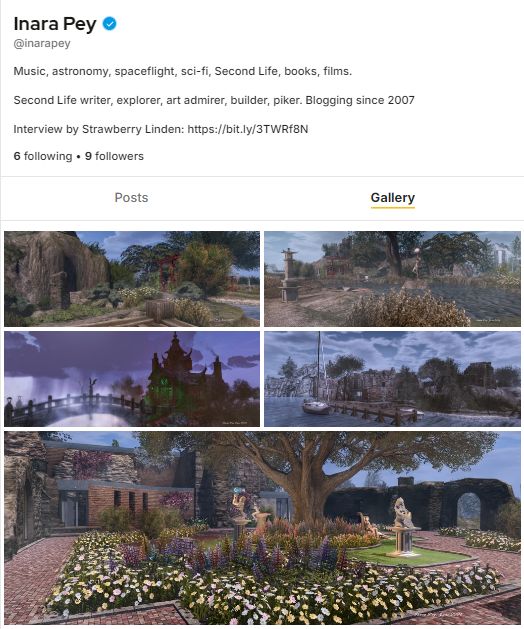
Similarly, and in response to requests from Beta users, Primfeed presents a Flickr-like Gallery option for display uploaded photographs from all users, as shown in the image above.
An example user Gallery display, in this case the gallery accessed from my timeline / feed
Another aspect of integration – so to speak – is the fact that Primfeed is mobile / tablet friendly, offering the same capabilities and design layout, making it exceptionally easy for used to be able to use it and keep in contact with one another wherever they are (Internet connectivity allowing, of course!).
Photos and Posts – But More to Come
The initial release of Primfeed focuses on the ability to upload photographs and post then directly or with accompanying text, and the option to send Twitter-style text posts, which also includes these capabilities:
Posts (text and / or image) can be deleted or be opened to have their text edited.
URLs are automatically converted to clickable links.
Clicking images will open a viewing overlay, allowing the image to be zoomed in on to be viewed in detail, with any text accompanying it (and any posted comments) displayed on the right, a-la Twitter/X, etc.
But there is more to come, including:
Two public feeds / timelines: the first featuring both text posts and images (as is currently the case) and one specifically for uploaded images.
Support for direct messaging between users.
The integration of EasySubscribers: residents will be able to follow subscribe to a given store’s newsletter from the store’s profile.
The ability for creators to create personal accounts and have “Store” pages for their products, and the ability to switch between the two.
While the initial focus appears to be photography, Primfeed is not just about photographers; it will be for every Second Life resident who wants to use it. There will be a lot of features coming as the platform grows and I receive feedback and people vote on ideas through the upcoming Feedback Portal.
– Luke Rowley on expanding Primfeed’s capabilities
As Luke mentions, the Primfeed Feedback Portal will be an important element for helping to enhance Primfeed going forward. During the most recent period of development, Luke has relied on Discord and a group of Second Life users in a closed Beta phase of testing / feedback/ enhancement. However, he’s also recognised that when the platform is launched, he would need the mean for any and all users to have an easy, direct means of providing feedback, requesting features and – equally importantly – reporting issues.
This portal might also be said to be another aspect of trying to make using Primfeed as comfortable and familiar to users as possible: Luke has built it using the same software as Linden Lab now uses for its feedback portal, thus making filing and viewing requests, etc., as familiar as doing so for SL.
Costs and Payments
Obviously, running a service like Primfeed involves costs, both in terms of hosting and management and in development. As such, the platform will be based on a tiered / free / subscription model. At launch this will mean:
Those using free accounts will be limited to a maximum image resolution of 1500×1500.
Those opting to subscribe to the platform’s Pro option will be able to upload images up to 8196×8196 resolution.
As further features are added, so the Pro subscription will gain further benefits over free accounts, although these will be carefully weighed. “I do want to provide more value to the Pro subscription, but I don’t want to paywall every feature on Primfeed,” Luke notes. “So my guiding principle is, “What can I give to people wanting to pay without making those on free accounts feel they are being penalised?”
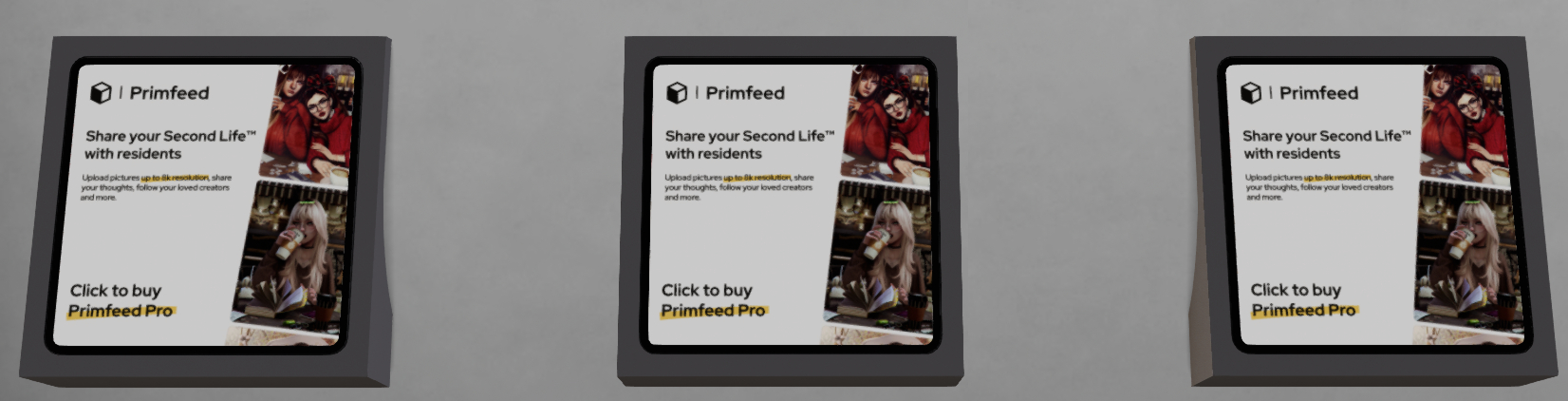
One of the biggest aspects of Primfeed in this regarded is that right from launch it supports subscription payments in Linden Dollars. These can be made in-world at the Primfeed Payment Centre. At launch, a Pro subscription will be offered on a 4-week payment basis at L$1860 for 4 weeks or L$8870 for 24 weeks (representing a 12% saving of the 4-week rate).
Primfeed Pro subscriptions can be paid for in L$ through in-world terminals
“It’s important to me to offer a Linden Dollar payment service,” Luke told me. “Not only does it make Primfeed unique among social media platforms, but it does so at great convenience for SL users who might otherwise be put off by, or unable to make, payments in US dollar values. It also means that there is no requirement for users to have to provide personal payment data in order to use the service.”
How to Get Started
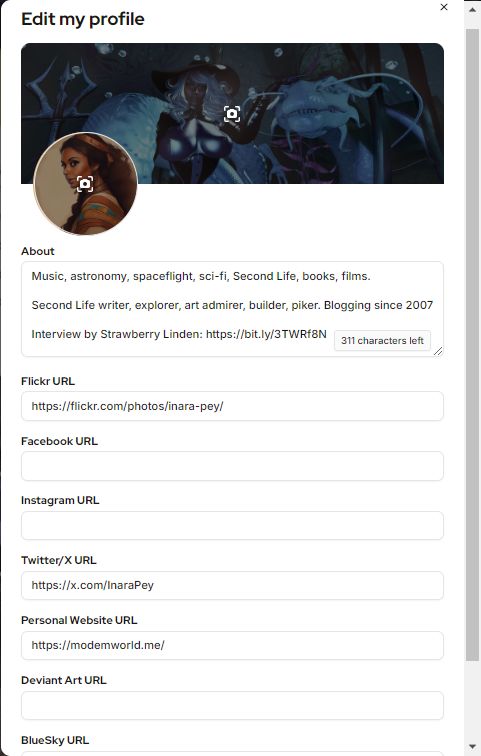
The Primfeed Profile edit pop-up
If all this sounds of interest to you, getting started with Primfeed couldn’t be easier:
Enter your Second Life avatar account name (not your Display name).
A special code will be sent to you in-world via local chat.
Enter this code into the sign-up page, accept the Primfeed Terms of Service, and you’re in!
Once your Primfeed account is established, you should go to the Settings option and add a password to your account. While this is not required, if you do not, you’ll have to repeat the steps above each time you want to log-in to Primfeed.
You can also use the Settings option to:
Set the maturity ratings you wish to be able to see when using Primfeed.
(If you are a Pro subscriber), see the time remaining on your subscription and use a button there to enabling teleporting to the in-world payment centre (by way of the SL World Map and launching your viewer, if required / enabled).
After this, you can update your Profile via the dedicated Profile link. In doing so, you can:
Update the profile photo and / or set the banner image displayed when viewing your Primfeed timeline / feed.
Provide a brief About bio.
Include links to any other popular social media and photo / art sharing platforms.
Closing Comments
Despite the rapidity of its initial development, Primfeed already has a lot to offer Second Life users, and it is clear Luke has a lot more planned in carrying the platform further. Even so, it is a service developed and operated by a Second Life user – which means that while it is developed by someone with an innate understanding of Second Life, its user base and what they would like to have, it also means it is a personal project, rather than a commercial offering – and thus lacks the weight and “assured” longevity of a platform like Twitter or Flickr. Thus, there are bound to be some concerns as to what might happen to Primfeed should Luke’s interests move elsewhere.
This is something Luke is all too aware of, as he noted to me. “It is always a gamble with any Second Life product or service; however, I have no intention to go somewhere else. Yes, I am a single developer and entrepreneur; but as long as residents continue to support Primfeed, EasyBloggers and EasySubscribers, I don’t see any reason to stop anything; all my products are very much a part of my work – so I’ll be staying in Second Life for as long as I possibly can!”
In proof of this, he’s not resting on his laurels but is already considering additional services for future development. “I will be working on a vendor system, again as a result of multiple requests from users of my current services. Can you imagine for a second what kind of integration could be done between Primfeed and EasyVendors? That’s exciting!”
And in case anyone is wondering why Primfeed doesn’t share the “Easy” naming convention with other products, the reply is simple, as Luke again explains.
I feel like my EasyApps are dedicated to creators/designers (EasyBloggers, EasySubscribers, EasyTextures, and so on), while Primfeed is for everyone, so it deserves distinction. It is also a reminder of where everything started in Second Life. Creating a prim is probably one of the first action you would do back in the days when you were playing Second Life, and I liked that element of nostalgia in the name.
– Luke Rowley
In closing, and with the launch of Primfeed, I would like to thank and congratulate Luke for his time and on the launch of the service, and I look forward to continuing to use it. I’ve enjoyed the past week’s opportunity to try Primfeed and discuss the platform with him. As we were drawing things to a close, I offered Luke the opportunity for a final word.
“I’d like to thank everyone who has supported my work, and who have directly contributed to Primfeed’s development by responding to my questionnaire, who helped with initial alpha tests and engaged in beta testing, who provided feedback, identified issues and helped spread the word about Primfeed through their own social media activity. Most of all, I’d like to thank my RL partner, who has been an insane support for me.
“I hope everyone enjoys Primfeed and helps to make it a success!”
Addendum
To mark the launch of Primfeed there will be a party in-world:
In conversation with The Avatar’s Voice host, Erik Mondrian
The Avatar’s Voice is a video series of conversations hosted (and filmed / produced) by writer, artist, scholar, and virtual worlds thinker, Erik Mondrian. The third segment in the series, featuring an interview with Cubey Terra, recently launched on Erik’s You Tube channel, which further fuelled my interest in the series as a whole and how it came into being, and recently Erik kindly agreed to discuss the series with me – how it came about, his approach to it and future plans, as well as touching on his work in general.
However, before we get to that, some background on the series for those who may not have seen it.
The Avatar Voice, is an ongoing series of conversations between Erik and active virtual world residents, with each 30-minute segment focusing on a single guest (all of whom have thus far been Second Life residents, although Erik hopes to expand the series to cover other worlds), discussing their involvement in virtual environments, their interests, and their thoughts on a range of subject related to virtual living and virtuality.
In this, they are in many respects the virtual equivalent of interviews conducted by the likes of Larry King in his heyday or Christiane Amanpour; rather than being solely interrogatives, they are conversations wherein the host takes a back seat, gently offering up questions and occasional feedback while letting the guests tell their story and offer their views entirely in their own words, without the need for undue interjection. The 30-minute time length Erik has set for each segment allows for a more informative conversation to take place than a shorter format might allow, but without the audience ever feeling it is perhaps being drawn out or becoming stale, as might be the case with a longer time frame; instead, we are able to become quiet listeners as the discussion naturally flows between host and guest.
Erik with MangroveJane
In discussing the series with Erik, I started with perhaps the most obvious question: where the idea for the series originated.
Erik Mondrian (EM): Many years ago, I thought The Avatar’s Voice would be cool as the name of an on-line ‘zine I might eventually start about virtual worlds, pulling together stories/headlines from and about these worlds with “correspondents” from them working and writing together on the one site … I haven’t really done anything with that idea; but at some point I started thinking about it as a podcast instead, with the purpose being to go directly to the avatars themselves, to hear from them personally about what virtuality and their chosen virtual world(s) mean to them, what they’ve done and experienced there, and so on.
Inara Pey (IP): What in particular crystallised the idea of a podcast?
Erik Mondrian
EM: I think the idea for it as a podcast became more clearly defined and make sense to me because of my MFA¹ studies, and the fact that the one side of my multidisciplinary degree at CalArts was in what the Institute calls “voice arts”. So The Avatar’s Voice felt like it fit with the idea of actually hearing people’s voices – the people behind the avatars – in a format that’s not necessarily focused on any one topic or overarching goal, but allows people involved in virtual worlds to have more of their story to be told.
Also, while at CalArts and studying for my MFA,there was a call for graduate students to suggest and run courses during the two-week Interim sessions about anything that interests them. I presented two courses – Virtual Worlds, Real Artists and Virtual Worlds: Placemaking as Art Practice, in January 2017 and January 2018. In them, I attempted to show my students as many examples of virtual world creativity as I could, including having guests appear remotely from Second Life. I think teaching those two courses and especially, having those speakers share their perspectives, was crucial in leading up to the podcast, cementing my desire to try to start a project like this.
IP: Is there a particular fascination for you personally in setting up the series?
EM: I’ve always had a desire to learn more about what makes virtual worlds tick and why so many people, including myself, are drawn to them as places to “live”, often for years or decades. There is also a desire to preserve and document these worlds and their history by recording these conversations and hearing people’s perspectives.
IP: How do you select possible candidates for the series?
EM: I have a long list, even if just in my head, of people I’d love to interview. I’m sort of in a constant state of admiration for what people do in and with virtual worlds, even if it’s “just” living their lives there, building relationships and creating a home of some kind in a way that’s meaningful to them.
Since there are so many people I want to interview, the “who I select” is probably more a matter of scheduling and who’s available and willing; Groves [Mangrovejane] was the first both because I really admired her work and because we’d become good friends in SL, so she was willing to be my guinea pig for the very first interview. For that first session as well, I wanted to have a level of trust and comfort, as I was – and still am – learning by doing; so I wanted a guest who could be at ease with me and I with them.
I’m approaching people over time, and have a couple who have already said yes, and there are two more I haven’t asked yet but I think would do it. Ultimately, I want to have a variety of people, who’ve done different things, lived different virtual lives.
Erik with Cubey Terra
IP: Is there anyone in particular you’d like to interview?
EM: I would absolutely love to interview Steller Sunshine at some point, though I have no idea if she still logs in to SL or what she’s doing these days. I think it would be absolutely amazing to talk to her and hear at length about her experience, given she was the first non-Linden SL user, back in 2002.
IP: One of the attractions with The Avatar’s Voice is the relaxed approach you take with your interviewees. Is this a case of research only, or the result of an initial conversation with them, from which a core set of questions is formed, or a combination of both?
EM: I think it’s a mixture, and may change as I do more interviews and get a better feel for the process. I do try to have certain questions or topics in advance that, for that specific person, I know I’ll want to raise; but at the same time, I try to let things come up naturally during the conversation. How I ultimately edit that conversation’s recording down into the interview is another story; but even there, I try to maintain that sort of (hopefully) unforced flow, mixing thought-out questions with interesting little conversational tangents here and there, sometimes circling back around to cover a particular topic from another angle or in greater detail.
One little addition: I’m a big admirer of Syrmor and his VRChat video interviews. While his approach is to talk more about people’s lives as whole, I think his interviews are quite validating and inspirational as far as being able to use virtual existence and interaction to hear from people in this kind of way, although I don’t try to occupy his space, as The Avatar’s Voice is very much tied to virtuality, virtual worlds, and avatar-based identity as underlying driver of the discussion.
IP: Tell me more about the editing process.
EM: Editing those recordings down to fit that limit can be a challenge, to say the least! But I do find that certain things, certain topics, seem to fit together more easily. I try to also listen and “feel” for when a topic seems like it’s probably more important/personal for the interviewee, and leave those areas in as opposed to other parts of the recording where I can hear it’s [perhaps] less meaningful to them. [It’s] a question of palpable enthusiasm, maybe? Listening for even just a subtle sense of things that are unique to them, rather than being just a part of the conversation that could be seen as a little more generic and unfocused.
In conversation with Erik Mondrian
IP: Given you do have guests who have already committed to the series and have others in mind, how frequently are you hoping to produce segments of The Avatar’s Voice? Is it something you’re aiming to put out perhaps monthly, as with the Bizi and Cubey interviews, or will it be more a case of as time and commitments allow?
EM: I would say that while I would love to actually put out an episode weekly, it’s more likely to be closer to every few weeks or worst case even monthly, as you said, at least for the time being. As I do more of them, of course, I’ll hopefully not only get faster at the editing process but also be better with the planning beforehand and with the interviews themselves in the moment.
I have thought about the possibility of doing a sort of “interlude” episode every 4 or 5 interviews, to keep the momentum going whilst also involving more people. Rather than a whole 30-minute episode with one person [these “interludes”] would instead be me sharing responses from residents to a call I’ve made via Twitter or what-have-you [for thoughts and feedback], either with me giving their response in voice if they answered through text, or even letting them speak for themselves if they wanted to share a brief recording of themselves responding.
IP: In closing, is there anything your like to add concerning the series and your aspirations?
EM: I’m eager to hear what people have to say, whether in the full interviews or in the interlude submissions idea. I started this because I truly believe that there have been, and still very much are, many amazing people in virtual worlds of all kinds, [with] so many interesting things being done; this is a way for me to know more about them and to hear directly from them about why virtuality has been a meaningful part of their lives.
I should also mention that while I do expect the bulk of my interviewees, at least for the time being, to be SL Residents, I think much if not most of what they have to say is applicable to virtual worlds at large, and I do also hope to interview residents of other virtual worlds as well, to ultimately have that diversity of realities represented.
I’d also like to say that – time and money permitting – this is only one series, one facet, of the projects that I’d love to be able to do to show SL and virtuality in multiple ways. [For example] I also have in mind a video series exploring SL as a connected world, and another that would examine some of the activities therein. These would be in addition to the fly-throughs and music videos I’ve made to showcase places … [and] would sort-of complement the podcast by having a similar style or approach with a voice-over talking about them.
In conversation with Erik Mondrian
As noted towards the top of this article, the first three segments of The Avatar’s Voice are available via Erik’s You Tube channel, and are summarised below with links to them for viewing. I recommend anyone with an interest in virtual worlds, Second Life and virtual living take time out to listen to them; they are all equally fascinating.
The Avatar’s Voice 1 – Mangrovejane (August 2018): a visual artist who has been in Second Life since August of 2016, who discusses her time in Second Life, how she established it as her virtual home; the differences she’s noted between it and platforms like Sansar and High Fidelity; and the power (and peril) of avatar embodiment.
The Avatar’s Voice 2: Bizi Pfeffer (January 2020): a software engineering student and accomplished virtual explorer active in SL since early 2007, discussing his travels around the SL mainland and how having a contiguous world can help foster a sense of community and discovery, especially when the spaces there are user-created; the rewards and occasional challenges of sharing that world with a diverse population of people from around the globe; and the impact of decentralisation & open-source software development (or a lack thereof) on a virtual world platform’s evolution and survival.
The Avatars Voice 3: Cubey Terra (February 2020): an acclaimed content creator and pioneering virtual aviator active in SL since the latter half of 2003, discussing the history of the original Abbotts Aerodrome, which he co-founded; the value of SL’s in-world building tools and thoughts on the arrival of mesh in SL; and how Second Life, as a shared, user-built environment, still manages to pull people in and keep them engaged despite the platform’s limitations, visual and otherwise.
Also, if you would like to help support Erik in his work in producing The Avatar’s Voice and to help him with his other projects related to virtual worlds, please consider buying him a coffee via his ko-fi page – the donations made will directly support his work.
MFA: Master of Fine Arts, studies that saw The Avatar’s Voice interrupted between its first and second segments while Erik focused on producing his thesis, which included producing a fabulously engaging 11-part video series exploring matters of identity, life, emotions, desires, introspection and self-understanding as a part of his thesis for his Master of Fine Arts (MFA) in Voice Arts & Creative Writing (please read Erik Mondrian: master of fine arts in and beyond Second Life for more).
ReShade: overlaying your SL world view with shader effects. In this image, I’m using the ReShade split screen option to show a real-time view of Oyster Bay, with the original windlight-based view on the left, and a preview of effects overlays on the right. (which have been deliberately exaggerated for effect)
ReShade is an application which has been generating a bit of buzz around Second Life for the last couple of weeks. When installed on a Windows PC (7, 8 or 10), it allows you to overlay you Second Life world view with a wide range of shader-based effects, which can be used in screen captures for images, or when recording machinima to offer real-time visual effects.As it is an overlay system, it also works with OpenSim environments.
I first got to hear about ReShade from Whirly Fizzle at the start of August (she in turn got to learn of it through Caetlynn Resident), and having been playing with the beta since then. Just how practical it might be is a matter of personal choice / want / ability with more traditional post-processing tools, etc. However, as version 1.0 launched on August 10th, with some much-need clean-up, I thought I’d offer a write-up on it, together with a few thoughts.
Remember, ReShade is third-party application, LL and TPVs cannot provide assistance in using it – and nor can I. If you need help with it, please refer to the ReShade forums. As relatively new software, it can be a little buggy, and it doesn’t always run with the viewer when installed – again, if you have problems getting it going, neither viewer support teams nor I can really help.
A quick and dirty demo video showing how ReShade effects can be used in real-time machinima capture in Second Life
Set-up
Please ensure you’re logged-out of Second Life when setting-up ReShade.
Download the ReShade Framework ZIP file from the ReShade website.
Unzip the contents of the downloaded file to a location of your choice.
Navigate to the unzipped folder location and right-click on ReShade Mediator and Run As Administrator.
The Mediator will launch to display the configuration tab (shown below). This is the UI element used to apply and adjust effects.
You now need to create a profile for Framework to work with your viewer.
Your first step is to configure the Framework Mediator to recognise your viewer
Under the Profile section on the left of the Mediator, click Add. A file picker will open Use it to navigate to your viewer’s installation folder.
Locate the viewer’s .EXE file in the installation folder and click it once to highlight it, and then click the Open button in the picker
You will be returned to the Mediator panel, and the viewer name or “Second Life” should be displayed in the profile drop-down (below) – note that some TPVs may display their own name or may display “Second Life”, it makes no difference.
Make sure OpenGL has been correctly identified. Click on the Confirm button to create a profile for your viewer.
When adding a viewer to ReShade Framework, note it may display as “Second Life” rather than the viewer’s name – this doesn’t prevent things from working
When Mediator has finished creating the profile, click Apply at the top right of the panel.
The set-up process is now complete. However:
Note that this has created two files in your viewer’s installation folder: reshade.fx and opengl32.dll. These must be deleted if you decide to remove ReShade from your PC.
Also, as I’ve found ReShade to be slightly flaky, before going any further, copy the opengl32.dll and save the copy in another location – I’ll explain why later.
The Shields 1.2 by Burt Artis in my custom red / white finish, and named “Imladris”
For those starting-out with sailing – which I enjoy simply for the pleasure, rather than for racing or anything – there are numerous little freebie boats available to help, of which the veritable little Nemo, which can be found in rezzers all over the waterfront in Second Life, is perhaps the most famous.
However, my attention was recently drawn to a relative newcomer to the freebie sailing market by a comment left by ZZ Pearl Bottom concerning the work of Burt Artis. My interest grew following a visit to the Three Pines Sailing School and Resource Centre, where I found a vendor for the boat, and decided to grab a copy and have a look. And even to my untutored sailor’s eye, the boat is a heck of a lot of fun, and great introduction to sailing in SL.
My Shields boat by Burt Artis in default colours & me sitting in the default boarding pose
The boat in question is a Shields sloop-rigged keeled racing boat, and is offered in a size pretty close to the physical world boat on which it is based (that has an overall length of 9.19 metres, and Burt’s is 11.29 metres). It’s a mesh build, with a land impact of 27 and is quite packed with features – including two versions of the boat itself: the original 1.0a and the more recent 1.2, which is the one I took out on the water.
For those with an technical inclination, I’m reliably informed via Maiti Yenni that the the sailing engine is based on the original Tako scripts that Kanker Greenacre published, with the WWCmod from Mothgirl. The wind system used by the boat is Zephi Boat Weather, developed by Burt and JoyofRLC Acker. Also included with the package are a set of texture and UV maps (the boat is mod when rezzed, allowing you to customise it). The whole thing is delivered in a neat little sailor’s knapsack when purchased.
Getting under way
On the water, the boat looks good – although barefoot sailing (or in a pair of wellingtons / galoshes!) is recommended, as the floor of the boat can get a little wet 🙂 ). The skipper should board first via the usual right-click and sit, which will place you sitting on the boat with legs dangling over the side, and displays the initial set-up menu, with instructions in the board’s note card manual.
From here, everything is more-or-less operated by keyboard and chat commands. To start sailing, simply type “raise” – this both hoists the sails and rotates you into a position inboard the boat and handling the tiller. If you’re sailing with friend, you my need to issue the “crews” or “crewp” command to get them seated correctly.
Handling-wise, the LEFT / RIGHT keys turn the boat, and the UP / DOWN keys let the sails out or take them in. Colour codes help to understand the sail settings: green – good; cyan is tight and blue is much too tight (so let the sails out); yellow is loose and red much too loose (so bring the sails in). You can also go “in irons” (steering into a headwind), indicated by the wind colour turning orange, which can happen rather quickly, killing your momentum and requiring some careful manoeuvring.
Under full sail
Crew and helm positions can be altered in chat to suit the sail position, using the “hp” (helm port) and “hs” (helm starboard) commands and “crewp” and “crews” (crew can move themselves using the LEFT / RIGHT arrow keys). There are also keyboard commands for setting the angle of the sails, etc., and to “wing” the jib in place of a spinnaker when downwind.
If all this sounds complicated, it’s not – a little practice gets you sailing along nicely and the commands give a good feel for sailing more complicated boats.
Texturing-wise, the maps that are provided are basic, but sufficient to nicely customise the boat for personal tastes. It took me less than 10 minutes to have my Shields 1.2 repainted and named.
My familiar red / white colour scheme applied to the shield 1.2
Sailing on my own, I found the Shields 1.2 to be a delight: smooth and easy on region crossings and fast enough when “in the green” without being stupid fast and feeling like it has a secret V8 powering it. The wind system keeps you very honest, and encourages more thought on sail management than simple “raise and go” and manually changing the wind to suit needs. Region crossing with crew did result in us ending up in some odd seating positions, but these were easily corrected via chat / with the arrow keys, and didn’t interrupt sailing.
All told, this is a great boat – one couldn’t ask for more from a freebie; so if you’ve been looking for something to try that offers a little leg room and gives a good feel for SL sailing, why not give the Shields a go? Vendors are available around SL, including at the Three Pines Sailing School – just follow the link towards the top of this article, and wander down to the quayside.
In April, I wrote about Ape Piaggo’s latest waterborne project: the AD25H “Little Bee” tender speedboat. Since that time, things have progressed, and while the boat is still not quite ready for release, Ape offered me the opportunity to do some further testing on what amounts to the pre-release version – and obviously, I jumped at the chance!
This latest version features just about everything the “full” version will include, other than the car.
Yes, that’s right, the car. As this is a trailer-mountable speedboat which comes complete with its own trailer, Ape has decided to include a car capable of towing both in the release version of the boat as well. Coming on top of everything else packed into the Little Bee – an extensive range of couples and singles poses, a racing mode, the hydrofoils, ACSS, painting options, the ability to let friends drive it, coffee making (yup, really!) plus the wakeboard and parasail, this makes for a pretty comprehensive package.
Wakeboarding on the AD25H “Little Bee”
The parasail system was actually available on the earlier model of the boat I previewed. However, this has since been improved and was one of the things Ape asked me to test. So, one bright Second Life morning, as the Sun came up over the straits, I hopped into the boat and bravely volunteered my Crash Test Alt to give the parasail another go while I tried the wakeboard. The last time my alt took to the air in the parasail, she was fully clothed; I was kinder this time, and furnished her with a swimsuit 🙂 .
Both the wakeboard and the parasail are rezzed from the boat’s Accessories menu. Note that you will have to be on water that allows object entry, and should leave a degree of space behind the boat (don’t rez them when moored with a pier right behind you, for example). Once rezzed, riders simply sit on the wakeboard / parasail (and will receive a wearable handle for the former), and away you go.
Parasailing on the AD25H “Little Bee”
During testing, I found it best to keep the boat to around 40% of throttle; any higher, and things began to get decidedly iffy on region crossings. The board is independently steerable from the boat using the LEFT / RIGHT arrow keys, and the parasail rider can adjust their height with the UP / DOWN keys. The wakeboard also includes stunts accessed via the PAGE DOWN and the UP / DOWN keys, although I could only get the latter to work, which had me dipping low to run my hand through the water.
The PAGE UP key for both the wakeboard and the parasail allows the “CineCApe” camera to work, which provides interesting views of things for the rider of either, and I’ve made use of this in the sneak peek film below. I do recommend using the camera with the wakeboard in particular, as it really adds a further dimension to riding the board.
Parasailing on the AD25H “Little Bee” – getting into the air
Slowing the boat will have the obvious effect of dropping both the wakeboard and parasail rider back into the water, and the former will adopt a “waiting” pose, ready for the boat to start moving again, while the latter will see the parasail gently collapse as the air resistance lessens, and the rider drops down to a gentle splashdown.
Given all it has packed into it, the AD25H “Little Bee” is liable to be a “must have” buy for anyone interested in owning / driving a compact speedboat; I’ve yet to come across anything quite so enjoyable to drive and ride it in its class, and given the price is set to be under L$3000 for the boat, trailer and car, it’s going to be an absolute steal when released.
I’ll hopefully be running a full review of the boat once it is available. In the meantime, as noted above, another sneak peek video.







 Inara Pey: Living in a Modemworld