Jessica Lyon has issued a statement on the Phoenix website concerning the future of the Viewer. It makes interesting and clear reading.
On Mesh
A release of Phoenix will be forthcoming that can render mesh objects in-world. Jessica makes it absolutely clear that credit for this largely goes to Henri Beauchamp and his work in backporting the Viewer 2.x/3.x rendering code into Cool Viewer. She also makes it clear that the Phoenix implementation pretty much is Henri’s code as is. In the post, Jessica states:
“I don’t want you all thinking we’ve changed our focus back on phoenix, truth is we haven’t. Ansariel handled all the work of pulling Henri’s work into phoenix, LGG has helped. Aside from Tonya and Tech fixing some of the bugs.. That’s it.. essentially we’ve only had two developers working on this, and there are no plans to increase development on phoenix beyond that. However, mesh in phoenix will accomplish two things. It will complete [the] adoption of mesh in SL, which is pretty cool actually. But equally important, it will also fulfill our promise to keep phoenix going until it’s dying day.”
She also gives a stark warning on Phoenix with mesh rendering:
“Speaking of QA, don’t expect phoenix to be just like the last release only now it has mesh support. This work effectively makes Phoenix a Ford Pinto with a diesel engine from a school bus duct taped into it. Not only will it have all the existing mesh related bugs, but it will have plenty of its own bugs specific to having a diesel engine in a Ford Pinto. It will have a negative effect on crash rates no doubt, will be a performance drop for some, an increase for others. It will not be perfect, as it is not designed to support mesh.”
On RLVa
Jessica has also indicated that the next Phoenix release will have an update to RLVa as a result of Kitty Barnett’s hard work as well. Details aren’t clear, but one assumes this will bring it into line with the updated RLVa seen in Firestom.
On the Future
Jessica is unequivocal as to the future however: Viewer 1.x is, in her opinion, on its deathbed where SL is concerned, and as such, trying to maintain the Phoenix code on a par with Viewer 3 is going to be too much of a headache. As she points out:
“Consider this.. it took over 9 months to get mesh to work in a v1 viewer.. it took us just over 2 weeks to merge mesh into Firestorm once we started the merge. This will be the pattern with all new things LL releases, making it work in Firestorm or a v2 based viewer will be far easier to adopt faster than making it work on a v1. Maintaining v1 long-term is just not being realistic.”
No date is given for a release of Phoenix with mesh rendering capabilities, other than it will be released once it has passed QA.
The release is also liable to mark the end of the road for Phoenix where non-SSE2 capable computers are concerned. The release for such machines will not include mesh rendering support.
Overall, this news is liable to be met with approval from Phoenix users not yet ready to make the jump to Firestorm and might, conceivably ease some of the pressure on the Firestorm team to get some of the current bugs and issues with the latest Beta release ironed out.
And on the subject of Firestorm, Jessica did offer a small tease: “Mesh upload capability is also under development and making some promising advancements thanks to Nicky Dasmijn.”
In the wake of the arrival of mesh, and in the hope of alleviating confusion / making things a little more understandable, there are changes coming down the road for Viewer 3. Some of these will undoubtedly make their way into TPVs as well, so here’s a quick overview.
The changes described below can be seen in the latest Mesh Development Viewer from Linden Lab (3.0.5 (240741)+), which can be obtained from the alternate viewer wiki download page. note that as this is a development Viewer, some elements may change in relation to descriptions provided here.
Prim Equivalence and Land Impact
For a general user perspective, this is probably going to be the most obvious change.
Prim Equivalence, or PE has been an issue on many levels, not the least of which, for consumers, is that it tends to be bracketed with a prim count value – and is frequently greater than the associated prim count (although there are items where the reverse is true). People therefore get confused as to which is the key value: prim count (which everyone is familiar with) or PE.
In order to try to solve these issues, the terms “Prim Equivalence” and “prim count” are set to be replaced by a single value: “Land Impact”. How this will work takes a little explaining on two fronts, as it relates to a couple of changes within the Viewer and how we need to view things. So bear with me while I attempt to explain.
The first of these changes is that land will no longer be referred to in terms of prim counts and usage, but rather in terms of its “capacity”. Essentially, this means that:
Full sims have a “capacity” of 15,000
Homestead sims have a “capacity” of 3,750
OpenSpace sims have a “capacity” of 1,875.
Land parcels will also be referred to in terms of their “capacity”:
About Land today: prim counts (l); As it will be: capacity (r) (click to enlarge)
This might all sound like unnecessary semantics – but it does have a point in that it allows everything to be thought of equally, regardless of its origin – as we’ll see below.
Note as well, that nothing is physically being “lost” from your land. A 4096 sq m parcel that had a prim count of 937 prims before the arrival of the new Viewer will simply have a “capacity” of 937 after the new Viewer has entered general use, as shown by the figures highlighted in green in the above images.
To align with this, objects need no longer be through of in terms of their prim count or their PE – but simply in terms of their Land Impact – that is, how much of the available “capacity” on a sim / parcel they take up. This is reflected in changes being made to the Build menu floater:
Build floater: As it is with Prim count & PE (l); The new Land Impact values (r)
As can be seen, the prim count / PE values are being replaced with two simple figures:
The impact the rezzed object has on the land
The remaining capacity that is available for rezzing further objects.
So if an object has a Land Impact of 15, it will reduce the land capacity by 15; if it has an impact of 150, it will reduce the land capacity by 150, regardless as to whether the object itself is made of prims or is a mesh object.
For people who want more detail on individual objects, the new Build menu also includes a MORE INFO link. This opens an additional floater which provides:
Information on the object itself (including the prim count for those missing it!)
If the object is a mesh creation, the “weights” applied to it in terms of the bandwidth required to download it, the server resources it uses, its physics weight, etc.
The overall land impact: impact of the object itself, impact of all objects rezzed, remaining free capacity and total capacity for the land itself.
MORE INFO: for a prim object (l) and mesh object (r) – note the weights for th mesh object
There will also be a WHAT IS ALL THIS? link which will open a Help page that explains the various figures.
Replacing both prim count and PE with a single, easily understood value (Land Impact) makes sense, and at a stroke makes the impact of rezzing any object in-world easy to understand, removing any confusion between prim count and PE.
Of course, there are going to be voices that proclaim the change is about further “hiding” the “real” cost of mesh objects from the user, with the underlying implication that the users are somehow being hoodwinked by Linden Lab. But, c’est la vie. People are wont to make waves come what may.
It will be interesting to see how merchants react to the change – given that all vendors, etc., refer to prim counts right now, and getting wording changed to “Land Impact” (or simply dropping the word “prim” from displays) is a nontrivial issue for many. Some may even opt to retain the use of “prim count” in their vendors for this reason.
And when considering merchants – one hopes that Linden Lab will actually remember to update the Marketplace so that listings also reflect the use of “Land Impact” (i.e rename Prim Count!).
Avatar Rendering Cost and Avatar Draw Weight
Alongside the changes around PE and Land Impact, the Viewer will also be losing another measure that has always caused controversy and angst: Avatar Rendering Cost, or ARC.
Always intended to be an indicative figure for the amount of potential Viewer-side lag avatars create, ARC quickly became viewed by some as the figure for determining whether or not an avatar was “creating lag”, which in turn lead to a lot of drama in some quarters – up to and including people being banned from venues / sims on the basis of their ARC count.
DWA: 197,484 – but don’t panic!
From 3.0.5, things will be totally revamped. ARC as a term is vanishing from the Viewer to be replaced by Draw Weight for Avatars (DWA). Furthermore, how DWA is calculated is radically different to how ARC has been calculated, as Nyx Linden explains.
DWA should be far more accurate than the old ARC system; and therein, one cannot help but feel, lies the rub.
If the figure is indeed more accurate, it is likely to be pounced upon within even greater zeal by those already obsessed with ARC. As such, I can’t help but hope this is one value that Linden Lab don’t make a song-and-dance about when these changes to the Viewer are formally released for general use.
Mesh Uploader
Another source of irritation for content creators has been the mesh upload floater. At SLCC 2011, Charlar Linden himself admitted the current floater is isn’t overly user-friendly. As such, it is also being overhauled, as can again be seen in the current Mesh Development Viewer.
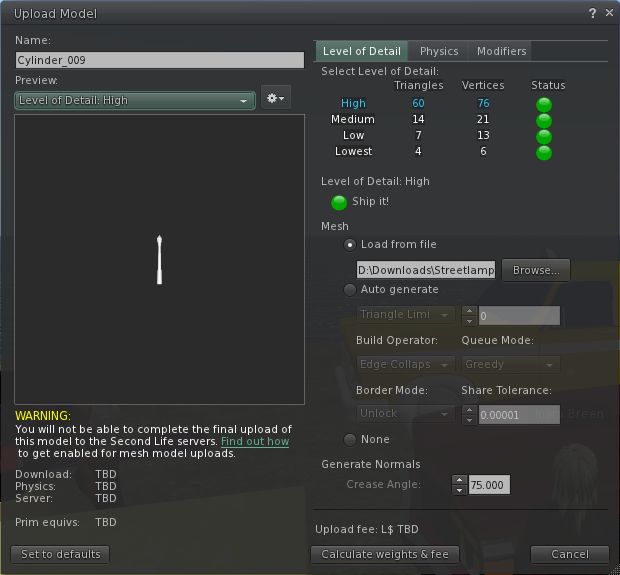
The current upload floater presents a basic set of modifiers that can be applied to a mesh object prior to uploading in order to optimise it. These tend to encourage a lot of trial and error / guesswork on the part of the creator in order to arrive at a desired result.
The current mesh object upload floater
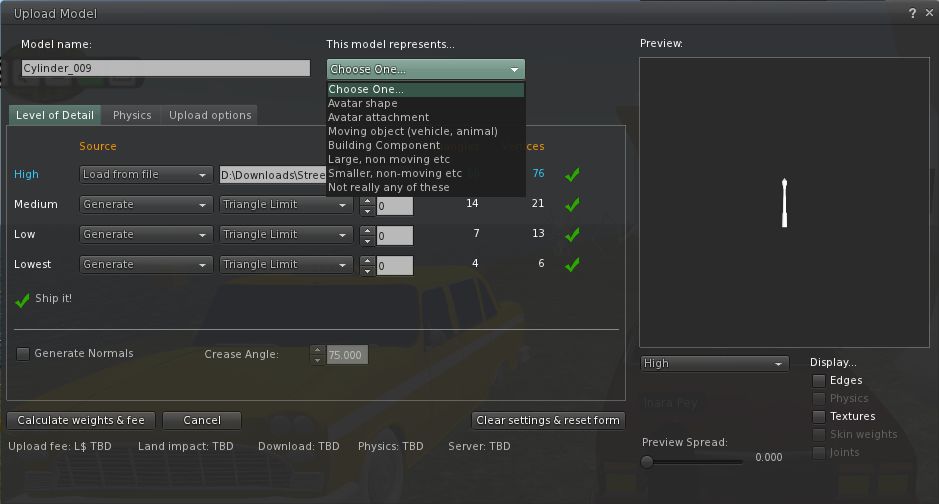
The new upload floater offers a greater range of modifiers and the ability to better define the model itself in terms of what it represents (avatar shape, avatar attachment, moving vehicle, etc – see the drop down in the image below), which presumably apply suitable algorithms that help optimise the object and calculate its overall weight.
The new mesh upload floater as it appears in the Mesh Development Viewer
I understand that several of the changes in the new upload floater are as a result of consultations with / requests from mesh content creators, so hopefully they will go some way to easing the process of importing objects into Second Life.
More to Come
These are by no means the only changes coming to Second Life and the Viewer as a result of the arrival of mesh object support. For one thing, more needs to be done in the area of mesh clothing in order to make it easier to adjust clothing to fit the avatar, rather than the other way around as is currently largely the case. Therefore we can expect to see further changes in relation to this in the future (indeed, those interested in the issue should check Maxwell Graf’s JIRA relating to a parametric deformer).
In the meantime, the above should hopefully give insight into what is waiting just around the corner.
Lance Corrimal has launched Dolphin 3, the latest in the Dolphin range of Third-Party Viewers, and another alternative to Viewer 2.x/3.x.
The new release follows hard on the heels of the Firestorm “Mesh Beta” brings with it a wealth of new features – including mesh object rendering. The full list of new features reads:
All new goodies from Linden Labs up to their internal version 3.0.3:
Mesh object rendering
Camera depth-of-field
Avatar physics
Native 64m prim support
Build tool improvements (see below)
Increased maximum cache size (up to 9984 Mb)
Increased maximum setting for LOD (up to 8 )
Mini-map back in the People sidebars with options to turn off & re-size
Enhanced parcel privacy, a check box in About Land/Options
Marine Kelley’s Restrained Love v2.07.03.03
All of Lance’s own additions to Dolphin 2, with the exception of Qarl Fizz’ “select Linden plants” patch, which does not work with the mesh engine
The improved build tools include:
Ability to perform simple mathematics in the spinner controls in the Build tool’s Object tab (numeric fields in Position, Size, Rotation). For example, to double the length of a prim along the y axis you enter sy*2 in the y-size field. The other “variables” are px/py/pz for position, sx,sy,sz for size, rx,ry,rz for rotation.
A new button in the Build tool is present, so that creators can create a sculpted prim directly instead of first creating a box and then changing it to a sculpt.
The maximum number of repeats for textures has been set to 256
The maximum size for hollow has been increased to 99.99% from 95%
More precision (4 decimals) in the spinner controls in the Build tool, together with a way to increase and decrease the single digits with your keyboard
This release does not include mesh object uploads, for the same reason a Firestorm 3, and may also have inherited the Linden-generated nVidia 400-series+ crash bug – so caution may be required in using Basic Shaders.
I’ll hopefully have a features review of Dolphin 3 out within the next 24 hours.
Robin Wood (Robin Sojourner in SL) is a well-known content creator in Second Life who has been turning her hand to mesh items. As a result she has produced an excellent 3-part video tutorial on mesh, which she has kindly allowed me to display here.
Visit Livingtree and all of Robin’s excellent stores, where she supplies everything from avatars and skins through to clothing, scripts and tutorials.
Update 30th August
Robin has now added the videos to her own blog as well, and can also now be found on the Livingtree blog – enjoy!
Mesh has been rolled-out to the Main grid. Doubtless, there will be some tweaking and nips and tucks, plus we already have the promise of further improvements / updates in the future – and the rendering code has yet to find its way into widespread use – but this is the start of something new and hopefully full of potential for SL.
Kkudos to Rodvik, Charlar, Runitai and all at Linden Lab and all those users who worked through the Beta programme and the Mesh/Live Volunteers programme for making this possible in Second Life.
YouTube is awash with mesh-related videos, but to mark the roll-out I thought I’d pin and handful of my favourites here.
And because it is so stunning, Rockerfaerie’s video of Claudia222 Jewell’s amazing creations:
 Jessica Lyon has issued a statement on the Phoenix website concerning the future of the Viewer. It makes interesting and clear reading.



 Inara Pey: Living in a Modemworld