SL projects update, September 26th

Update 28th September: Please also refer to an update post on some of the projects / news given here.

SL Viewer Status Updates

Linden Lab have been working hard on a range of viewer-related issues, notably crash rates and memory leaks, which have slowed the viewer update a release process up over the last few weeks. In terms of memory leaks, tcmalloc has been identified as the culprit, with Linden Lab deciding that dropping it is “probably a good idea”, according to Oz (tcmalloc has previously been implicated in crashes linked to the use of things like Microsoft’s Skydrive). There have also been an issues with LL’s statistics system which have meant that the viewer hasn’t necessarily been accurately tracked in terms of crash rates, etc.

Beta Releases

As it stands, LL hope to have the blocks on the various code merges removed during this week, which should see a rapid series of beta releases coming down the pipe. This work commenced with an initial 3.4.1 beta release (3.4.1.265134) emerging on September 24th. It will be followed by around three or so additional and rapid 3.4.1 build iterations aimed at confirming the viewer’s stability and at replacing various fixes which had previously been removed from the viewer code while trying to identify the causes for the viewer crashing / suffering memory leaks. It is expected that each of these iterations will be on the beta release build channel for a couple of days, prior to being replaced. Following these there will be a series of project updates, the first of which gatekeeper compliance project, which is also targeted for a 3.4.1 release build.

Project-related Releases

Once the stability of the beta viewer has been confirmed, it is anticipated that project-related code will be merged into the viewer, most likely starting with 3.4.2 builds. Among the releases planned for 3.4.2 is Monty Linden’s HTTP Library Services and Baker Linden’s Group Services code. These are currently targeted to reach the beta build channel in week 40 (week commencing Monday October 5th).

These releases will at some point include the Steam updates currently in a Development branch as well, which might in turn mean that Second Life could be ready to appear on Steam in the very near future, once these updates have reached a release version of the viewer.

Account creation prompt: heading for the beta viewer

Group Services Project

The Group Services project is an attempt to improve the management and editing of large SL groups by replacing the current UDP-based service (which has capacity issues with the size of group lists it can comfortably handle) with a new HTTP-based service. The project viewer for this is already available (for Windows, Linux and OSX.), however, as mentioned above, the current plan is to get this into the 3.4.2 build stream alongside the HTTP textures project, possibly in week 40.

Originally, the server code for this project was due to have been rolled to the RC channels during week 38, (week commencing September 17th), but the channel deploys were postponed after QA issues were found. As a consequence, the roll-out was due to take place on Wednesday 26th September, but has again been postponed.

There has been some confusion as to the aim of this project, with some people believing it is focused on fixing group chat issues such as  lag and chat failing to start. This is not the case at all; as stated above, the project is aimed at improving the management and editing of large groups (10K+) through the use of a new HTTP service.

HTTP Library Services

As indicated above, the first phase of this work, covering a new texture fetch service, should be appearing in a 3.4.2 beta release of the viewer in the near future.

HTTP Libraries project viewer: improved texture loading and rezzing

Please use the page numbers below left to continue reading this article

Upcoming SL projects update

There is a lot going on in terms of projects and development work in Second Life. The following is a further update on a number of key projects I’ve been following and reporting upon through the pages of this blog.

Group Services Project

The Group Services project is an attempt to improve the management and editing of large SL groups by replacing the current UDP-based service (which has capacity issues with the size of group lists it can comfortably handle) with a new HTTP-based service. The project viewer for this is already available (for Windows, Linux and OSX.), as I reported last week.

This week sees the server-side code rolled-out to all three RC channels (Magnum, LeTigre and BlueSteel), allowing the project viewer to be tested in handling very large groups (significantly larger than are available on Aditi). Note that those running viewers without the new code on any RC region will be unaffected, as they will continue to access the current UDP service.

There are still no timescales as to how long the testing of the service will last (“It’ll take as long as it takes,” Baker commented recently), or when the viewer code will progress beyond the project viewer. However, a number of things should be noted in reference to the eventual roll-out:

  • The viewer code is not being made back-compatible with V1 code by the Lab. Therefore, TPV developers using the V1 code base will have to backport the code themselves in order to use the new service
  • The initial HTTP service roll-out does not include any data compression. This means there will still be some delay in downloading member lists for very large groups with tens of thousands of members
  • Once the new service is rolled-out, which service is used is entirely transparent to the user. If a viewer with the new code is running on a region which has the server-side HTTP service, it will connect to that service. If it is on a region using the older UDP service, it will connect to that service instead
  • Once the HTTP service is fully deployed, viewers which do not implement the viewer-side code will still be able to access groups with member lists up to 10K in size via the UDP service until such time as it is switched off (which will not occur for some time after the HTTP service has been rolled-out). However, attempts to access groups with lists larger than 10K will fail.

Interest Lists and Object Caching

It’s been a while since I’ve reported on Interest Lists Object Caching, which forms a part of the Shining Project.

To recap: when you enter a region at the moment, your viewer receives a huge amount of information on what requires updating, much of it relating to things you can’t even see from your position in the region. This information is received in no particular order, with the familiar result that things appear to rez in your view in a totally random order. Not only that, but the chances are that if you’ve previously visited the region, much of the information being sent to your viewer is already locally cached – but is being ignored. The focus of this project is to both optimise the data being sent to the viewer and the information already cached on the viewer with the aim of significantly improving object rezzing times in terms of speed and order (so objects closer to you rez before those further away, for examples).

Object caching and interest list changes: easing the pain of random rezzing

Andrew Linden had hoped the project would be going to QA this week ready for roll-out to one or more RC channels in the near future, but some last-minute problems popped-up and have delayed things until he can get them sorted out. In the meantime, the code has been deployed to a number of regions on Aditi, and Andrew plans to, “Try to throw a pile of test avatars at it to stress it out. Later this week.” No viewer-side changes are associated with this work.

Materials Processing

Work continues on the project to bring materials processing to Second Life. Last week, it appeared as if the new materials – normal and specular maps – would have their own rotation and positioning options independent of any texture (diffuse) map. This week, it appears that this is the hoped for situation, but the matter is still open to question – which goes to show how fluid the project is.

The new capabilities require changes to the rendering pipeline, and details have been released on some of what this entails.

In order to work, normal and specular maps require what is referred to as per-pixel lighting (as noted in the original blog post on the subject). As such, there has been a debate on whether it would be better to develop a per-pixel lighting framework within the viewer, or work to make the current deferred rendering system more accessible to per-pixel lighting capabilities. As the latter approach will allow getting materials processing working within SL sooner than would otherwise be the case, it has been decided to go that route. Thus work is focused on making the current lighting system more configurable and able to better handle a broad range of material types (metallic, matte, plastic, etc.), together with adding support for both per-object and per material shading differences.

However, a dedicated per-pixel lighting framework does offer advantages of its own, and as such is being considered as a possible future extension to the project, which may be implemented at some point down the road. One such advantage is that could potentially be run in a non-deferred mode, which might lightening the load on older graphics systems.

Please use the page numbers below to continue reading

More on materials processing

Materials processing was further discussed at the Content Creation Informal User Group meeting on September 11th. During the meeting, Oz confirmed that normal and specular maps will have their own rotation and offset controls from the start, which stands in difference to thoughts that they would initially be locked to the same rotation, etc., as the texture map used on an object or object face.

Materials processing: using a normal and diffuse (texture) map to generate a 3D effect on an in-world wall – coming to SL in the near future

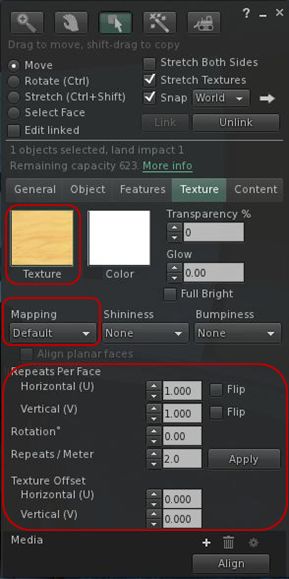
This means that the new materials processing maps will have the same positioning and scaling properties are currently available for texture (diffuse) maps, namely:

  • Mapping: one of Default or Planar
  • Horizontal  and Vertical Repeats: number of repeats of the image over the surface (used only in default mapping)
  • Rotation: degrees clockwise by which the map is rotated
  • Repeats per Metre: number of repeats of the image per in-world meter of the surface (used only in planar mapping)
  • Horizontal and Vertical Offset: distance in meters the image is shifted right (horizontal) or up (vertical) on the surface.
Options to be used by normal and specular maps as well as by textures

This obviously increases the amount of control content creators will have over the additional maps once the new capabilities are live, but it does open up more issues around incorporating the capabilities into the build floater. Thus, it was the build floater which once again became the focus of the conversation during the meeting.

How the build tools are presented to users has already been the subject of much broader consideration within the CCIIUG, although that discussion appears to have stalled for the time being. The materials processing process, however, requires a more focused examination of the build floater in terms of enabling the additional controls without either making the existing floater too large or overly complicated.

As such, two ideas were briefly discussed at the meeting, and further input to them both will doubtless be sought. The first involved having the additional options contained within the existing Texture tab as sub-tab options, while the second involved having all of the mapping options (Texture/diffuse, normal and specular) and their associated positioning and sizing options moved to a dedicated floater of their own.

Of the two options, both have merit and pitfalls. Sub-tabs mean keeping everything together on a single floater, but could lead to things becoming cramped or possibly confusing. Splitting between two floaters would provide more space with which to present options and controls, but could lead to a reduced in-world view should people find they need to work with both floaters open.

Given the small number of attendees at the meeting, neither option was discussed in-depth, and so, as mentioned above, this is liable to be a subject which is returned to in future meetings.

Rendering Pipeline Changes

As a part of this project there will be changes to the viewer rendering pipeline. While the project is still some way off in terms of delivery, Oz Linden used the TPV/Dev meeting of September 7th to advise TPV developers that they will need to ensure they are current with the 3.3.4 rendering code, which will form the basis for implementing the materials processing system changes.

Oz also indicated that while it would be “quite a bit of time” before the project reaches a development or beta viewer because the overall specification is not yet frozen (but is, in his words, “Very, very slushy”), it is hoped that a project viewer would soon be available to allow the new materials processing capabilities to be seen and tested.

In referencing the release of a project viewer, Oz advised against anyone trying to pull the code and using it in any viewer intended for wide distribution. This is because it is possible the material processing capabilities may change in very significant ways before they are ready for more general release, leaving the code presented in any project viewer as limited in both value and function.

Accounting System Costs

It is still unclear whether the new materials processing system will fall under the new land accounting system in terms of server and rendering costs. While questions have been asked in this regard, no definitive answers have yet been furnished by LL. This again is potentially due to the matter still being under consideration and the specification itself still being revised as impact and changes are considered.

Discussions on the project will doubtless resume at the next CCIIUG meeting.

Related Links

Materials processing: the what, why and where

On August 16th, Linden Lab announced the forthcoming arrival of material processing in SL in the form of specular and normal maps. At the same time, a video was released demonstrating some of the capabilities. But what does this actually all mean for the everyday user in SL? Here’s what I hope is a lay guide to things, including comments from one of the architects of the new system, Geenz Spad, as to how it came about.

Materials Processing

This is not intended to be a technical discussion on computer graphics mapping in general or on normal or specular maps in particular. Rather, it is intended to provide a broad, non-technical explanation as to how the latter work. 

Materials processing is the combining of various computer graphics “maps” to significantly increase the level of detail that appears on any object or surface within a computer game. Within Second Life, textures (themselves a form of computer graphics map called a diffuse map) are routinely used to add the illusion of surface details to in-world objects and surfaces. The new material processing capability will introduce two further kinds of computer graphics map to SL which can be used in-world with textures to dramatically increase the detail and realism of objects and surfaces. These additional maps are called normal maps and specular maps.

Normal  Maps in a Nutshell

Normal maps (sometimes referred to as bump maps, although they are more rightly the most common form of bump map) are a means of faking high levels of detail on an otherwise bland surface by means of simulating the bumps and dips that create the detail. Normal maps can be created in several ways.

For example, when working with 3D models, a common method is to make two models of the same object: one a very complex, highly detailed model with a high polygon count, the other a much lower polygon count model with significantly less detail. An overlay process is then used to generate a normal map of the detailed model’s surface features which can be applied to the less complex model, giving it the same appearance as the highly detailed model, but for just a fraction of the polygon count, reducing the amount of intensive processing required to render it.

Using a normal map to enhance the detail on a low-polygon model. The image on the left shows a model of some 4 million triangles. The centre image shows a model with just 500 triangles. The image on the right shows the 500-triangle model with a normal map taken from the model on the left applied to it (credit: Wikipedia)

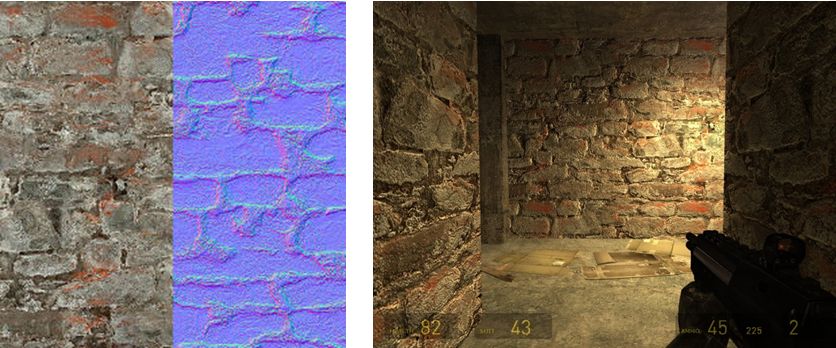
Another common way to produce a normal map is to generate it directly from a texture file. Most modern 2D and 3D graphics programs provide the means to do this, either directly or through the use of a plug-in (such as the nVidia normal map filter for Photoshop). When combined with diffuse maps, the normal map creates the impression of surface detail far greater than can be achieved through the use of the texture alone.

Normal map from a texture: left – the original texture (diffuse map) and its normal map shown as a split view; right – the material resultant from applying both maps to surfaces inside a game (credit: Valve Corporation)

Specular Maps

In the real world, every highlight we see in an object is actually the reflection of a light source. Surfaces and surface details reflect light differently to one another, depending on a range of factors (material, lighting source point(s),  etc.). Specular maps provide a means of simulating this by allowing individual pixels in an object to have different levels of brightness applied to them, giving the illusion of different levels of light being reflected by different points on the object.

When life gives you lemons: a mesh lemon with (l) a  normal map  applied, and (r) a normal and a specular map together. Note how light is apparently being reflected across the surface of the latter (credit: Mind Test Studios)

Like normal maps, specular maps can be produced in a number of ways, both within 3D graphics modelling programs and in tools like PhotoShop. As shown above, they can be combined with normal maps and textures to add detail and realism to 3D models and flat surfaces.

What Does This Mean for Second Life?

Second Life itself already includes a dynamic example of how normal and specular maps can be used: Linden Water. This is created using an animated normal map to create the wave-like effect for the water, while an animated specular map adds the highlights and reflections. The result is a very realistic simulation of moving water able to catch and reflect sunlight.

Just as the use of normal and specular maps create a very real illusion of water with Linden Water, the new materials processing capabilities will significantly enhance the look and realism of both mesh and prim content within SL. Mesh content should additionally benefit as it will be possible to produce high levels of detail on models with low polygon counts (as shown in first image in this article). This will improve rendering performance while also having the potential to lower things like land impact for in-world mesh items.

The only initial limitations as to where and how normal and specular maps can be applied is that they will not be applicable to avatar skins and system layer clothing. Any decision on whether the material processing capability should be extended to include these will depend upon at least two things:

  • Community feedback – whether there is a demand for normal and specular maps to be used with avatar skins
  • Understanding what is happening with the avatar baking process, and determining what is involved in getting the new baking process and material processing to work together.

Use the page numbers below to continue reading

Linden Lab announces normal and specular maps coming to SL

Today, Linden Lab has announced a major new open source initiative to improve graphics rendering performance within the viewer. The announcement reads in full:

One of the challenges that virtual world creators face is the trade-off between rich visual detail and geometric complexity. Ideally, by adding more and smaller faces to an object, a designer can model different surface textures and create realistic variations in the interplay of light and shadow. However, adding faces also quickly increases the size of the model and its rendering cost. Normal and Specular Maps are ways to address this by allowing for the appearance of a complex surface without actually modelling fine scale geometry. 

A Normal Map is an image where the color codes indicate how the renderer should reflect light from each pixel on a surface by modifying the direction that the pixel “faces” (imagine that each pixel could be turned on tiny pivots). This means that pixels on a simple surface can be rendered so that they appear to have much more detail than the actual geometry and at much lower rendering cost. Light and shadow are rendered as though the surface had depth and physical texture, simulating roughness, bumps, and even edges and additional faces.

Similarly, a Specular Map allows each pixel to have its own degree of reflectivity, so that some parts of a single face reflect sharply, while adjacent pixels can be dull.

The open source developers of the Exodus Viewer are contributing Viewer support for Normal and Specular Maps, as well as some additional controls for how light reflects from faces. Linden Lab is developing the server side support so that this powerful tool will be available in Second Life.

Design and development are under way. Watch this blog and the Snowstorm Viewers page for information on when test Viewers with these new capabilities become available.

For additional information, or to learn more about how you can participate in the open source program, please contact Oz@lindenlab.com.

A video has also been released, demonstrating the capabilities.

With thanks to Pete Linden for the heads-up