Test drive: Firestorm Beta

Yesterday I gave a rapid overview of Firestorm Beta. I’ve now had more of a chance to take it for a spin, so here’s a more detailed look.

Installation

First off, make sure you completely remove any previous versions of Firestorm prior to install – in the case of Windows, probably best to restart your PC after doing so and prior to installing the Beta. The Widows installer comes in at around the same size as the official Viewer 2 installer (25 Mb) and runs a seamless install, and places 151 Mb of data onto your hard drive.

The first thing you may notice on logging in – assuming you do not rez directly – is that Firestorm has borrowed from Imprudence  / Kokua, and while a cloud you are now an orange cloud, rather than the default grey mist.

Pie Anyone?
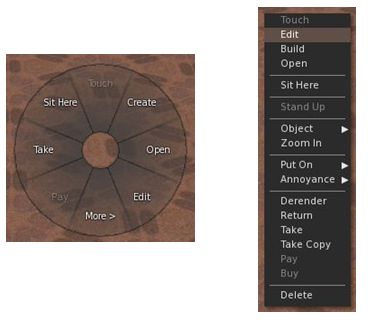
Pie or Context – you decide

The next two things you’re liable to notice is that there is now an AO button on the bottom toolbar, and if you click on anything, you get…a pie menu! Viewer 1 lovers, your prayers are answered.

I’m going to commit sacrilege here and say that, after using Firestorm and Viewer 2 and S20 / S21 for a while – and despite Phoenix still being my primary Viewer – I actually think the pie menu is vastly overrated (particularly given it varies so widely as to where anything is, depending upon which Viewer you use; one person’s Detach is another’s More, so to speak). I’ve found the Viewer 2 context menus to be far more consistent in options faster to learn and easier to use.

This being the case, I went straight to AVATAR -> PREFERENCES and pulled up the UI Extras. Much work has been done here to bring together some great UI customisation options on the Viewer – including a check option to toggle between the pie and context menus. I’m not going to run through the options – they are all pretty self-explanatory, and to be honest, most have been available in the earlier Preview options.
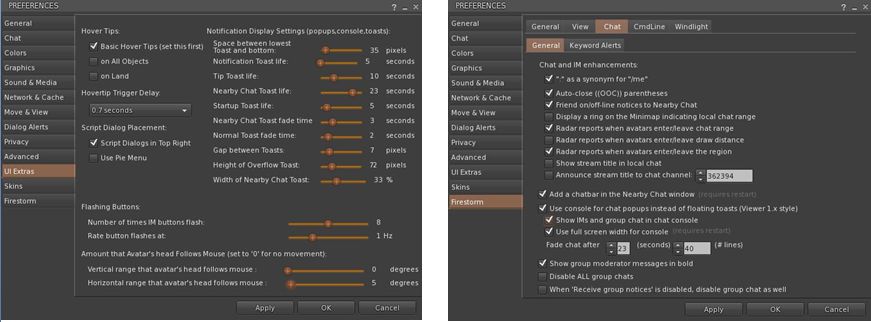
Updated Preferences tabs – new options

Other tabs within Preferences have also been massively improved. The Firestorm tab now includes pretty much everything those familiar with Phoenix would expect to see – with a lot of rationalisation and simplification of tabs and options. A nice touch here is that under FIRSTORM -> GENERAL you now get a greater choice in how names and display names are seen, and you can toggle between the Viewer 2 search and the “improved Viewer 2 beta” search (currently on the Search Project Viewer) – those who wish to compare and contrast and identify improvements can now have a field day playing with both! Within this sub-tab is one of my personal favourite new additions: TURN AVATAR AROUND WHEN WALKING BACKWARDS. This is something HUDdles has long had and I’ve really missed it when relying on built-in AOs.

A new element to the FIRESTORM tab is the VIEW sub-tab, which brings together several camera-related functions previously scattered around the place, if available at all. Along side it, the CHAT sub-tab has been massively expanded over earlier releases – and now includes a set of options related to … radar!

I See You!
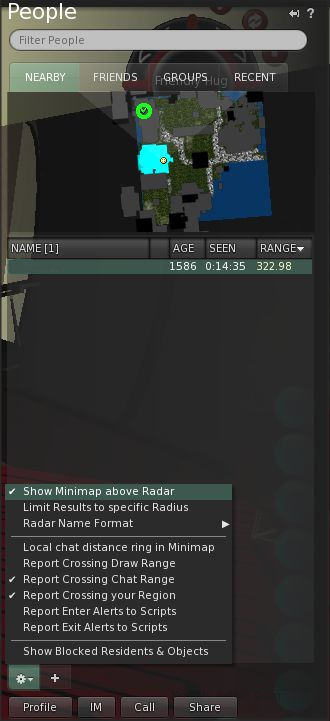
Radar tabbed

Radar is one of the biggest bones of contention in Second Life. People either love it or loathe it – with those loathing it frequently loudly and persistently screaming here, there and everywhere about it being an “invasion of privacy” and a “tool for drama” (and in the latter case, totally missing the irony in the fact that they tend to be the ones creating the drama).

If I’m honest here, almost any tool in the Viewer can be used properly or to create mischief and the radar is no exception – it is how you choose to use it, and I think it fair to say that most people use it responsibly. Those screaming on…and on…and on… about it representing an invasion of privacy would do well to remember that privacy can be invaded simply by removing camera constraints, pushing up draw distance and camming-in remotely (all possible on the “official” Viewer).

As far as I’m concerned, radar is a HUGE boon. As a former estate manager, it enabled me to identify problem people / areas quickly, get directly to them and deal with matters / provide assistance. Combined with other tools, it enabled me to deal with trouble remotely and confirm the required action had been taken. Even today I find it very useful at times – and it is one of the reasons I’ve stuck it out with Phoenix for so long. Well, no more. I’m in love with the improved Firestorm radar.

Aswith the Preview, Radar forms a part of the PEOPLE tab on the Sidebar – but is much improved. For a start there is an optional minimap display; you can also adjust the scan range for the radar and alter the way avatar and adisplay names are displayed.

If you want a more Phoenix-like radar display, simply go to the tab PREFERENCES (shown in the image), uncheck the show minimap option, and then undock the PEOPLE tab from the sidebar and resize accordingly; however, be aware that doing so can make scrolling through your friend list a tad more tiresome. As with Phoenix, the radar also includes a right-click option when highlighting specific names, allowing you to IM people, etc.

Continue reading “Test drive: Firestorm Beta”

Firestorm Beta

firestorm-logoSecond Life Viewers are making the news this week. As Linden Lab roll-out the Windlight Project Viewer and Viewer 2.7.1 with “real time” shadows, Jessica and the team over at Phoenix Firestorm roll out a Beta version of their offering.

Firestorm has been around in a couple of pre-release versions for a while, both of which I’ve looked at here in the past. I have to say that overall, it’s been a magnificent addition to TPVs even while still a work-in-progress; currently my only complaint is that it isn’t as faster, fps-wise as either Kirstenlee’s S21 and LL’s own viewer 2.

The Beta release moves Firestorm closer to prime time, and includes many features users have been requesting, making it something of a true hybrid – Viewer 2 functionality with the capability to use Viewer 1 facilities such as pie menus. Here’s a bullet-point outline of some of what to expect with it:

  • The option to switch between Viewer 1 pie menus (default) and Viewer 2 context menus
  • A resizable chat bar in the bottom toolbar area
  • Radar (still embedded in the People tab of the Sidebar by default) gets:
    • A minimap option
    • Most of the features of the Phoenix radar
    • Additional options
    • The ability to undock it from the People tab and have in displayed in its own window
  • Client-side AO with improved functionality
  • Massively-improved Bridge capabilities and security
  • Keyword alerts
  • Shared Windlight settings
  • Everything currently in the pre-releases.

You can download the Beta from here.

A video has also been produced, featuring Jessica herself, to support the release:

A look at Firestorm Preview 2.4.2

A little under two months ago, Firestorm, the Viewer 2-based offering from the Phoenix team made its initial appearance, and I gave a brief overview of it then, with a follow-up a few days later. Overall, the Viewer was impressive, despite being a pre-release, and hinted that while there was obviously a lot missing, the Phoenix team were well on the way to delivering a first-rate product.

Today, the “Beta” of Firestorm made its appearance, and it substantially builds on the initial release very positively. A list of key changes has been provided by the Phoenix team, but I’d thought I’d take a little more of a closer look at for myself.

Again, this isn’t intended as an in-depth review; it’s more a personal look at what I like in particular in this release – and what I hope to see down the road!

The installation was as expected: smooth and precise. Once loaded for the first time, Firestorm displays a Viewer 1-style COMMUNICATIONS window and has the Sidebar open – both of which I’ll return to in a moment.

Media Filter

Media Filter pop-up

However, it is on clicking the option to enable media that one will notice the first major change. As soon as you confirm you wish to enable media, (and assuming  a media stream is being directed at you), the Media Filter will pop-up a request asking you if you wish to accept the incoming stream.

For those unfamiliar with the Media Filter, I strongly recommend you read the available Tutorials on it – I have one in this blog, and there is also one available on the SL Wiki. Suffice it to say here that the Media Filter helps you to safeguard your privacy when using Second Life.

If there is no media stream available when you first start Firestorm, the Media Filter pop-up will be displayed the first time you click on the media PLAY button, (top right of your screen) and a stream is available.

Sidebar and Tool bar Options

One thing that may confuse Viewer 2 users in trying-out Firestorm is that the default Firestorm skin doesn’t have the familiar Sidebar tabs. It also has a substantially different toolbar at the foot of the Viewer Window.

Both are because the Sidebar options can now be directly accessed from the toolbar. Simply hover the mouse pointer over the available buttons to see a tool tip description of their functions.

The Firestorm toolbar

The more familiar buttons of MOVE, VIEW and GESTURE can be enabled by right-clicking the toolbar and selecting them from the pop-up menu – from which buttons can also be disabled as required.  Note that in addition, the Camera controls (VIEW) can be displayed by enabling AVATAR -> CAMERA CONTROLS.

For those who still prefer the Sidebar, AVATAR -> PREFERENCES – > SKINS provides you with access to alternative UI skins that include the Sidebar. Simply re-start the Viewer after selecting your preferred skin.

A nice touch with the Camera (VIEW) controls is that the floater panel can be resized to suit your needs – and is actually a lot more compact than the Viewer 2 floater to start with.

Conversations Window

This is a nice carry-over from Viewer 1.x, and was actually in the pre-release version of Firestorm, although I didn’t mention it in my first post. By default, IM tabs are vertically placed (as opposed to horizontally, as with Phoenix). This gets a big tick from me, as I find the vertical tabs make incoming calls easier to track, and so it’s one less preference to have to set & then restart the Viewer.

The Conversations window is open by default on first starting Firestorm, and thereafter can be opened by clicking the ^ button to the right of the text entry box in the tool bar.

The Nearby Chat tab of Conversations also dispenses with the Viewer 2.x-style headers to chat items by default, again saving one the need to fiddle with preferences, while streamlining the chat tab’s display.

Radar

This release of Firestorm sees an initial implementation of the Phoenix radar functionality. While many see this as a curse, I have to say that from a sim management point-of-view, I’ve always found the radar functionality a great boon when trying to help people in a hurry. As such, it is something I sorely missed in the initial release of Firestorm – and partly what stopped me using it full time.

In the Beta, some Radar functionality has been included – and hopefully it will be built upon over the next few releases. Bullet items regarding it are:

  • The Radar is limited to a 400m range at present
  • The Radar information is included in the PEOPLE tab / window and includes an option to teleport to someone as well as the standard Viewer 2.x options displayed when right-clicking on a name
  • Announcements from the Radar are limited to people entering chat range and / or draw distance, and are set separately via AVATAR -> PREFERENCES -> FIRESTORM -> CHAT.

I’d personally like to see the range of the radar increased – and I know this is being worked on. I’d also like an option to announce when people enter / leave a sim; this again can be useful when monitoring a sim where there has been trouble, but not enough to warrant an outright ban as yet.

Profiles

In a major move away from Viewer 2, Firestorm does not utilise web-based profiles.

Instead, it uses a two-tier approach to displaying Profiles:

Personal Profile

Selecting your own Profile takes you to a modified Viewer 2 Profile tab in the Sidebar. This displays your “1st Life” and “2nd Life” information under two tabs called “Avatar” and “More Info” (which also includes a web link field as well).  Currently, there is no PICKS tab, nor does there appear to be a way of getting “out” to your web profile from the display (other than getting to Partner information).

I presume additional functionality will be added here – and that the functionality will include the ability to get out to the web-based version of one’s Profile, should one wish. Not everyone is opposed to web-based Profiles, and as such, the flexibility to choose should be included for those wanting to go in that direction.

Other Avatar Profile

When it comes to other people’s Profile information, a window somewhat similar to those from Viewer 1.x pops-up. This is a huge improvement over Viewer 2.x for two very good reasons:

  • It’s actually a lot faster – twice as fast on my PC – when loading a profile
  • It takes up much less screen real estate

There are some very nice touches in this Profile display as well. Take Groups, for example; when you highlight one, a little “I” for information appears, together with a right-point arrow. Click on the “i” and you are given the option of joining the Group, or displaying the Group information. Click on the right-pointing arrow, and the Group information (Profile) is displayed in the PEOPLE tab of the Sidebar.

Other Little Bits

  • Role players have been further catered to, with MU* poses and OOC options being added
  • There is now a first pass at a persistent de-render (change Group tags to re-render, although you may need to re-log as well)
  • Phoenix-style commands are now supported in chat
  • “Always rez under land group” is a pre-set default
  • Starlight skin support has been improved
  • Additional preferences ported from Phoenix
  • In-chat on-line / off-line notifications for friends.

Under the hood there are a number of bug fixes and various performance improvements as well, giving Firestorm even more polish even at this stage.

Opinion

The pre-release version of Firestorm was impressive. This is even more impressive. Clear inroads have been made into a lot of the functionality that has made Phoenix such a success, and while there is still more to do, that Firestorm has reached this level of capability and functionality in just two releases is remarkable.

For me, the big wins with Firestorm are:

  • First pass at the inclusion of radar functionality
  • The Viewer-based profiles for other avatars
  • The in-chat online/offline notifications for friends
  • The Media Filter.
Web browser warning

As well as the media filter, use security has been enhanced with the addition of an optional prompt that is displayed when you are using an external browser rather than the viewer’s in-built browser. This gives a reminder of the possible risks involved in visiting other websites directly with your browser. The warning can be disabled, and will turn off automatically if you switch to using the in-built browser in the Viewer itself.

There are some additional elements from Phoenix I’d personally like to see pop-up in a future Firestorm release. For example, right now, Outfits still remains something of a royal pain in the rear bumpers.

  • There is no means of ADDing clothing / attachments from an OUTFITS folder in Inventory – the only option is REPLACE, and this DOES knock-off pre-existing attachments. The only way to add items is via the OUTFITS tab of the Sidebar
  • There is no means of adding subfolders (or even displaying subfolders) in the OUTFITS tab of the Sidebar – this can only be done through Inventory.

To be fair, both of these are long-standing issues with Viewer 2, rather than anything specific to Firestorm – but both are bloody inconvenient and need sorting out.

I did notice the text overlay issue remains as well; if you scroll up a chat tab in Conversations and a message comes in for that tab, the text tends to overwrite anything you are trying to read until you scroll back to the bottom of the screen once more. Not a show-stopper, but it would be nice to see someone sort this out.

But, these niggles aside – which are, as I said, more to do with Viewer 2 than Firestorm – it is fair to say that this release moves Firestorm a stage closer to being ready for prime time and potentially becoming the most popular Viewer 2 variant on the grid. While there is still a good way to go before this is the case, Firestorm Beta 2 is pretty much usable right now.

Kudos to Jessica and the team!

Firestorm: take two

So, I’ve been working with Firestorm for a few days now, and I have to say, I’m still enjoying it. I’ve not had any significant issues, although there have been a few things that had caused passing annoyance:

  • The CONTACTS list seems a bit ropey at times: on logging in, name frequently appear either in reverse alphabetical order or completely jumbled, and require the window to be closed and re-opened to correct
  • I still cannot figure out how to enable Map for friends, should I wish (or indeed, disable it)
  • Some Preferences seem to fail on persistence occasionally – although this could simply be the age of my graphics card

But…these aside, I’ve have no crashes or other major upsets attributable to the Viewer itself. True, I’d like a more powerful graphics card to run all the nice things, but sadly, due to power supply limitations, that’s not going to happen on my current PC.

I really do like seeing shadows rendered, tho. After tweaking and playing, I’ve managed to up my frame rate to an average of 12-13fps – with peaks around 15-16 and troughs around 10fps. not perfect, but workable with only one or two other avatars near me. Any more than that, and things crawl to a near standstill.

Anyway, a couple of shots to demonstrate why I’m coming to love shadows – nothing new or radical for those who are already familiar with them.

Me – without shadows

This is probably the way most of us see one another in SL, so no big surprises. However, turn shadowing on, and not only does the house and the trees cast nice shadows, but…

Me…with shadows active

…I get much better facial definition, and shadows cast across my feature from my hair – shadows with move in time to any hair movement.

One thing I have found is that shadows, like Windlight, demonstrate the need for subtle face lighting: illumination points really need to be considered carefully, and face lights are best “turned down low”, rather than being left full-on. I’d especially avoid lights that are very face-on: a couple of friends have these, and under Windlight it’s like having a car headlight shining during the dusk / night / dawn. With shadows and lighting combined, it’s like having a set of mobile spotlight illuminating anything within a 10-15 metre range, to say nothing of washing-out facial detail.

Now if only I could take courage and upgrade my power supply and then get a higher specification graphics card….

Firestorm: take one

This is a look at the PRE-RELEASE of the Viewer 2-based Phoenix Firestorm Viewer. As such, certain things should be borne in mind both if you are reading this piece and / or using the software:

  • This is not intended as a comprehensive review OR comparison with Viewer 2.x OR an in-depth investigation of bugs, etc. Rather it is an initial look at Firestorm. More details examinations will come as the Viewer stabilises and more features / functions are implemented
  • If you are trying out the pre-release for yourself, please make sure you have joined the Support Group for it, and have watched the introductory video
  • Please don’t expect this review to be a comprehensive list of bugs (see above) or for the software to work *perfectly*.

Download and Installation

I use a PC, and so downloaded the Windows version of the pre-release, which installed smoothly into its own dedicated folders, well away from Phoenix .818 (my primary Viewer). This installer quoted around 116Mb of disk space being required for the Viewer – but as with Phoenix, it ended up grabbing 217Mb of space, far more than the 92Mb required by Viewer 2 or the 198Mb used by Kirstenlee’s S21. Nevertheless, the installation was fast and smooth, and finished with an option to start Firestorm directly.

It *is* pre-release!

As a precaution, I’d cleared cache beforehand, and so hit YES to fire-up Firestorm from the prompt. May not have been necessary, but did so all the same.

On starting, got a new splash screen which again – wisely – hammers home the point that this is a pre-release, and as such will not contain absolutely every function one might expect of a Viewer, nor will it always work as anticipated…

Give the status of the software, writing a blow-by-blow review at this point in time is relatively pointless; anyway, Jessica’s intro video pretty much lays out what the user needs to know in accessing Firestorm. Clearly, given it is based on Viewer 2.x, Firestorm is going to have elements that people aren’t going to like – context menus rather than pie menus; the revised camera and movement controls, etc. Some of these the Phoenix team have tried to address, others they haven’t – and nor should they be expected to. This *is* a new Viewer, based on new software – as such, things are going to change and – frankly – people should show some willing and be prepared to change as well, rather than harping on about X not being Y, and how much they like Y in Viewer 1.2x….

The Good

  • Clean UI
  • Much tidier Sidebar
  • No Sidebar mini-tabs on down the right of the screen (unless you want them)
  • Persistent Sidebar tab behaviour – unlock and move a specific tab (say, Inventory) – it will remember where it was last displayed on your screen and re-open there (rather than back in the Sidebar), just like Viewer 1.2x menus
  • Buttons to Sidebar now contained in the Toolbar, and can be independently turned off / on
  • Chat bar in Toolbar can be resized
  • Ability to remove chat “headings” so that chat resembles 1.2x (date stamp and name, no little icon as per Viewer 2.x)
  • Improved Viewer 2.x Navigation Bar and new options in the LAND heading at the top of the Viewer Window
  • Improved skin options (with more to come)
  • Google translation tool retained (moved to the CHAT tab of Preferences and appears as an icon in IM tabs)
  • RLV/a support
  • Double-click teleports, etc.
  • Nearby chat window now includes a chat entry box AND has vertical IM tabs by default

The (Currently) Missing (that I use)

  • No client-side AO
  • No Radar tool
  • No real privacy options
  • No ability to click on the LAND information at the top of the Viewer window and bring up ABOUT LAND
  • No MU poses or auto-complete
  • No build enhancements in terms of highlighting prims, changing the default appearance of new prims, etc.
  • No client tag colours
  • Display Names are not displayed if chat headers are turned off in Preferences
  • Flexibility of use with MY OUTFITS

The Buggy

  • Had initial issues with the CONTACTS list in the Chat window:
    • Not all friends appeared on first logging
    • Options in FRIENDS list (see when you’re online, locate you on the Map, etc.), did not carry over from settings made in 1.2x. Some Friends lost the ability to locate me on the Map, others that did not have that privilege under 1.2x did in Firestorm, etc. I was also unable to change the options at all
    • Both issues were cleared by a couple of relogs
  • Scrolling up in Group chat caused incoming IMs to appear to “overwrite” text I was scrolling through – this was persistent through several log-ins and tests
  • Some people have reported crashing when editing their shape or outfit – although I haven’t encountered this
  • Not all the skins work – Jessica warns that there might be issues with some of the Starlight skins, and I found that some skins wouldn’t display LAND information at the top of the Viewer windows (e.g. MetaHarper Modern)
  • Disabling the teleport screen doesn’t actually work at present

Continue reading “Firestorm: take one”

Storming the fire….

firestorm-logoJessica Lyon over at Phoenix has announced that a pre-Alpha version of the Phoenix Firestorm Viewer will be released on Monday 31st January. Over on the Phoenix website she states:

Speaking of Firestorm!As most of you already know, we have been very busy working on the Firestorm Viewer. Most of you seem to also know that we plan to put out a “Preview” build of firestorm at the end of this month.. and most of you seem to be very eager to try it out. A lot of work has gone into Firestorm already but is mostly interface improvements and changes. It is critical that you understand the Firestorm Preview is just that… a preview, it is not yet ready for full-time use. But this will give you an idea of what’s in store in the future. If you would like to try out the preview of Firestorm at the end of the month, please join our in world group named Phoenix-Firestorm Preview Group. The build will be announced in that group and you can find help there as well.

Do understand! The Firestorm Preview build should be considered Pre Alpha! Not beta, not Release Candidat.. it is pre alpha and as such it has a lot of bugs that still need to be worked out.

To aid those eager to get their hand on it, Jessica and the team – in a move Linden Lab really, really, really should have thought of for themselves prior to the issuance of Viewer 2.0 a year ago – have released a video introduction to the new Viewer.

The highlights are:

  • Phoenix has adopted a broad Viewer 2.x front end that is robustly “clean” in its overall look.
  • They have followed Kirstenlee Cinquetti’s lead and completely re-sized the Sidebar so that it no longer takes up the entire right-side of the screen, but fits into its own window
  • The Sidebar is now accessed from a set of tool bar buttons – again like Kirstenlee’s Viewer2 hybrid, but with the buttons actually embedded in the tool bar, rather than on a floating palette – and those buttons that are not required can be “turn off” (hidden)
  • In a further improvement, the behaviour of the Sidebar is more persistent: if a specific Sidebar tab (say, HOME, is undocked, moved and closed, Firestorm will remember the last used position and size of the tab, and will reopen it again at that size and position rather than pushing it back into the Sidebar once more (one assumes this behaviour is persistent between log-ins)
  • Within the Inventory tab on the Sidebar, there is an additional button to quickly and easily open a further Inventory window – no need to remember keyboard combinations
  • The chat bar / tool bar combination at the bottom of the screen is re-sizeable, thus allowing those who wish to have more room for their chat entry to have more room – again, especially useful when the more useless Sidebar buttons are hidden
  • Viewer 1.x camera control / movement control window functionality is retained – both can be open at the same time, although both use the Viewer 2.x layouts
  • Firestorm retains the Viewer 1.2x combined window for chat / IMs and your Contacts list (avoiding the need to use the “Nearby Friends” Sidebar tab) and which includes the local chat entry bar that has been conspicuous by its absence in Viewer 2.x
  • Further, there is a PREFERENCES option that removes the space-wasting Viewer 2.x “headings” from the chat and IM windows, leaving you with the more user-friendly Viewer 1.2x appearance – and in keeping with Viewers like Phoenix 1.5.2 and Imprudence 1.4 et al, the tabs for chat and IMs in the chat window can be stacked vertically
  • Viewer 2.x’s Navigation Bar / search bar is retained, and by default includes a LAND button (sorely missed from early iterations of Viewer 2) and:
    • Includes a SKY button for quick Windlight tweaks
    • Can be controlled from the LAND display at the very top of the Viewer window, allowing you to turn the Navigation, Search and Favourites elements off or on
    • The bars are all semi-transparent, further lessening their impact on the main display window
  • Other items that are familiar to current Phoenix / other Viewer 1.2x-based TPVs will be familiar with include:
    • RLVa support
    • Ability to disable the login, logout and Tp splash and “progress” screens
    • Double-click teleporting
    • Running multiple Viewers
    • An option to quickly and easily change the UI skin (including a skin that retains the Viewer 2-style little Sidebar tabs on the right of the screen for those who like (!) them. A nice touch with the Skin option is the automatic inclusion of Hitomi’s Starlight skins (although there may be issues using Starlight with the pre-release of Firestorm)

There are some things that are potentially missing from Firestorm at present – Jessica states it currently retains the Viewer 2.x behaviour of having media streaming ON by default, something people don’t like – but this will be altered in a future release. The LAND display at the top of the Viewer window, while allowing you to turn things like the Navigation Bar off / on, appears to lack the ability to open the ABOUT LAND window if the Navigation Bar is turned off.

Overall, I have to say this Viewer has me excited. It appears to combine the best of Viewer 2.x and Viewer 1.x to present a crisp, clean Viewer environment that is highly customisable. Certainly, I’m looking forward to trying it out from Monday.

For those who wish to try the pre-release, it is recommended that you join an in-world Group that has been set-up specifically for the Firestorm release – as Jessica states, the Phoenix support network is still itself ramping-up on the new Viewer and so may not be able to provide the necessary support.