I’ve been asked to pass on the following – and while only too happy to do so, I’m closing the item to comments as it is important anyone who has questions and who can’t attend the event, post their question to the official Phoenix Firestorm blog.
The Phoenix / Firestorm team are holding a public Q&A session this coming Saturday to answer questions and concerns relating to both the Phoenix and Firestorm Viewers.
The meeting will take place at 13:00 SLT at the 4-region auditorium at Rockcliffe University and will be hosted by Nigma Sterling of Rockcliffe University.
Those wishing to attend are advised to arrive early, and using the following SLurls according to the first initial of your FIRST name:
The event will be recorded and made available online after the fact (no live streaming planned at this point).
Note that the focus of the event is to discuss genuine concerns relating to either Viewer and their future development, and to answer questions and address specific critiques.
Note: thie version reviewed here is 3.2.2.24336 with the openGL fixes. If you continue to have issues with Firestorm, try 3.2.1.24179.
It’s here, and it has the OpenGL fixes. And it is quite simply superb.
Firestorm 3 is everything a Second Life Viewer should be – and so much more. So much, in fact, that putting together a review has been something of a headache for me – where do I start, how do I order things?
One thing I will say right off the bat – and that is to give a very personal thank you to Jessica Lyon in particular for giving me the means to get started on this review ahead of the official release.
The Log-in Screen
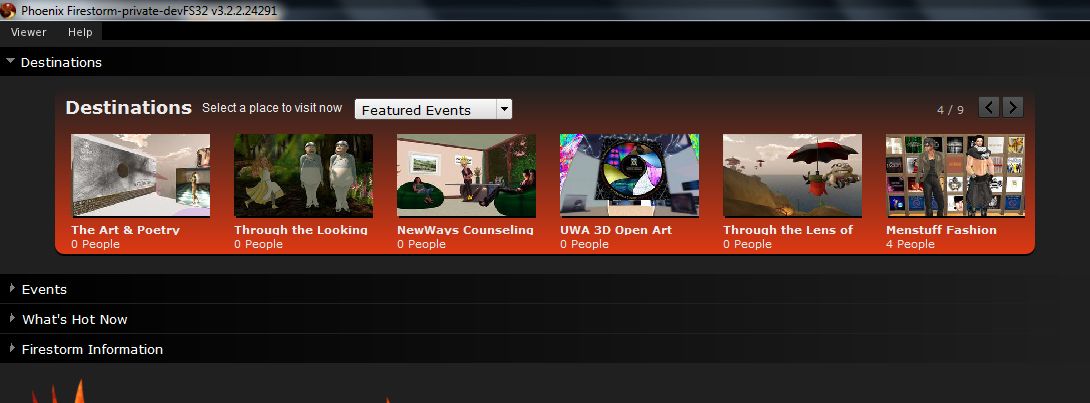
The first of the big changes hit you right from the start: the log-in / splash screen has been significantly revised, incorporating much of the Viewer 3 log-in screen capabilities and, in some areas, extending them.
Making a Splash: the Firestorm log-in screen
At the top of the screen are four headers. The first three of these, Destinations, Events and What’s Hot Now, pull information directly from the Viewer 3 log-in screen I reviewed back in August 2011. For those who have not encountered this up until now:
Clicking on any of the drop-downs will display a sliding panel of Destinations, Upcoming Events, and “hot” places to visit (the latter determined by the number of people currently visiting it)
Finding a place to go has never been so easy
Opening any one of those drop-down will, very tidily, close the previously-open drop-down
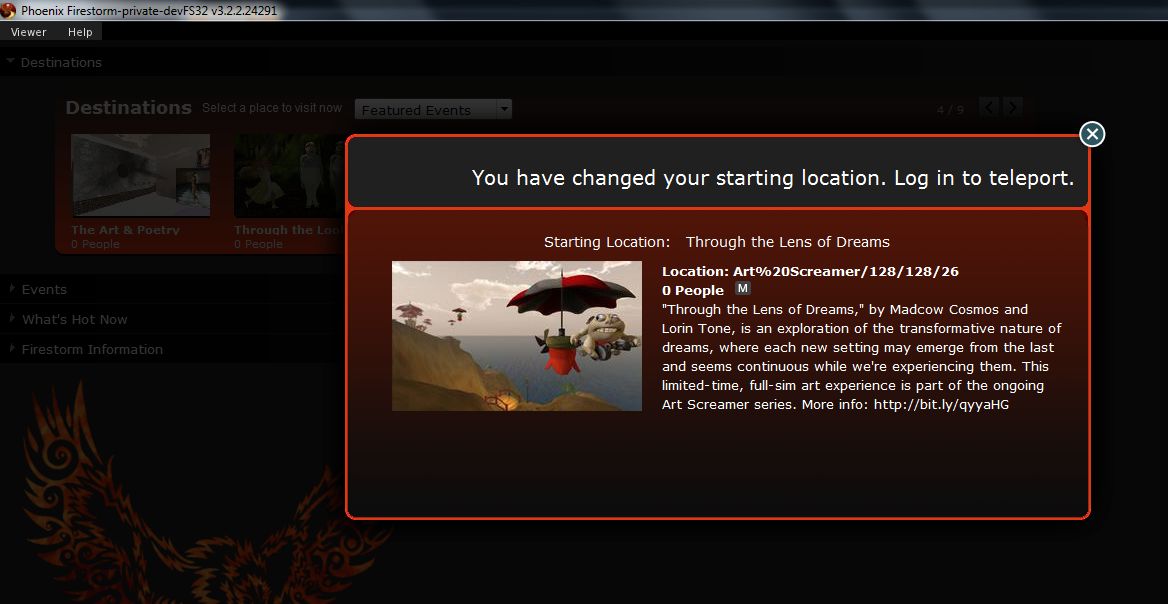
Hovering the mouse over the middle of any of the images in a panel will display a SELECT button; clicking on this will open a pop-up of further information, together with a notice that your start location on logging-in has been set to the selected location
You can still switch back to your Home or Last Location via the START AT option at the bottom of the log-in screen.
The last option is that of Firestorm Information, which is open by default. This provides links to the Firestorm download page, the wiki pages and the JIRA; the Firestorm Blog; and information on the Viewer version currently under development. most significantly of all, it includes links to the SL Grid Status Page, allowing users to immediately see if there are any known problems of which they need to be aware.
I am an unabashed fan of the Viewer 3 log-in screen; that Firestorm has adopted it is a major plus in my book. That they are further willing to go where Linden Lab apparently refuse, despite repeated cajoling through the likes of Twitter by a lot of people, gains it another huge tick in the Pey Book of Viewer Satisfaction. Would that LL understood the need to put this information front-and-centre, especially given that with the best will in the world, the grid dows tend to go Swedish Chef every so often and bork, bork, bork. But then, the Firestorm developers are all regular users of the platform…
At the bottom of the log-in screen are the familiar log-in credentials boxes. As is common for TPVs (and previous versions of Firestorm), the Viewer can store log-in information for different accounts, making logging-in with an Alt, etc, a matter of simply selecting a name (or indeed, name / grid combination) from a drop-down list. A DELETE THIS ENTRY button allows for the removal of any selected account from the Viewer’s records.
Default Settings (Viewer Modes)
Choose your desired mode
The log-in area also includes a DEFAULT SETTINGS drop-down. This allows you to chose from one of three operating modes for the Viewer. These are: Phoenix, Hybrid, and V3.
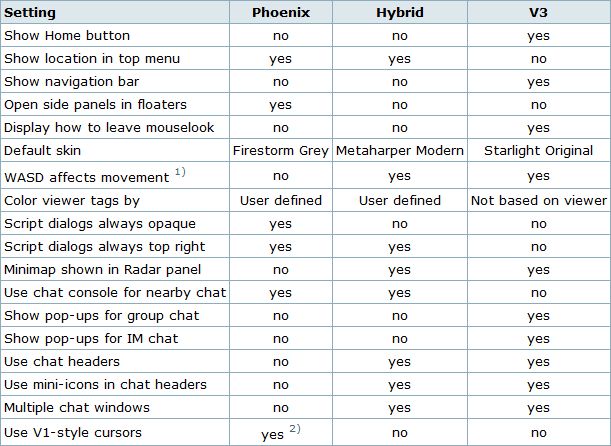
I’ve already outlined the three UI looks, and this version doesn’t change them that much, so I won’t spend time on them here per se; however, for the curious of mind, the default settings for each mode can be found in the table below (from the Firestorm wiki).
Defaults for the three Viewer modes
Note: Phoenix does not mean the Viewer will present a Phoenix / Viewer 1.x-style interface.
Preferences
Firestorm’s preferences have had a major overhaul, with many options being more pragmatically grouped and thus hopefully easier to find. I’ve tried out outline the key changes below. You can also find a quick reference table to the changes in the Firestorm wiki.
General
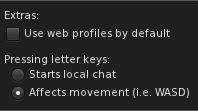
Move or type: you choose
The general tab now includes and EXTRAS panel that allows you to:
Select whether the Viewer display your own or other people’s in-world profile or your / their web profile
Whether the WASD keys will move your avatar or focus the cursor on the chat bar (also found in the Chat tab).
Note: By default, Pressing Letter Keys is set to START LOCAL CHAT for the Phoenix mode, but set to AFFECTS MOVEMENT for the Hybrid / V3 modes.
Chat
The Chat tab rationalises the majority of options associated with setting chat preferences. As well as presenting the expected Chat options, the tabs originally located in Preferences->Firestorm->Chat (General (renamed “Firestorm”), Radar and Keyword Alerts). This tab also includes:
Popular chat log options also found in Preferences->Privacy
A Notifications tab, allowing you to define how IM and Group Chat notifications are handled using either the Viewer 3 pop-ups an/or in the chat console (i.e. lower left-hand corner of your screen, as per Phoenix / Viewer 1.x)
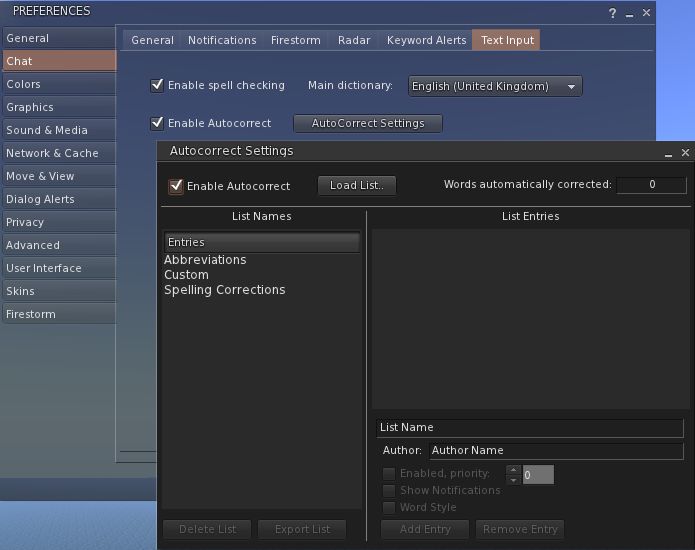
A Text Input tab comprising the Spell Check and AutoCorrect functions
AutoCorrect and Spell Check – together under Preferences->Chat
Graphics
The graphics tab see the arrival of a FULLSCREEN mode for Firestorm. The option requires a restart to take effect, but renders the Viewer beautifully on screen without the usual application window.
Sound & Media
The Sound & Media tab has been refreshed, splitting media and Voice functions into two sub-tabs: General and Voice Settings. The General tab now includes the Media Audio Rolloff Distance settings originally located in Preferences->Advanced.
Sound & Media: new Voice tab and the Media Audio Rolloff sliders
Move & View
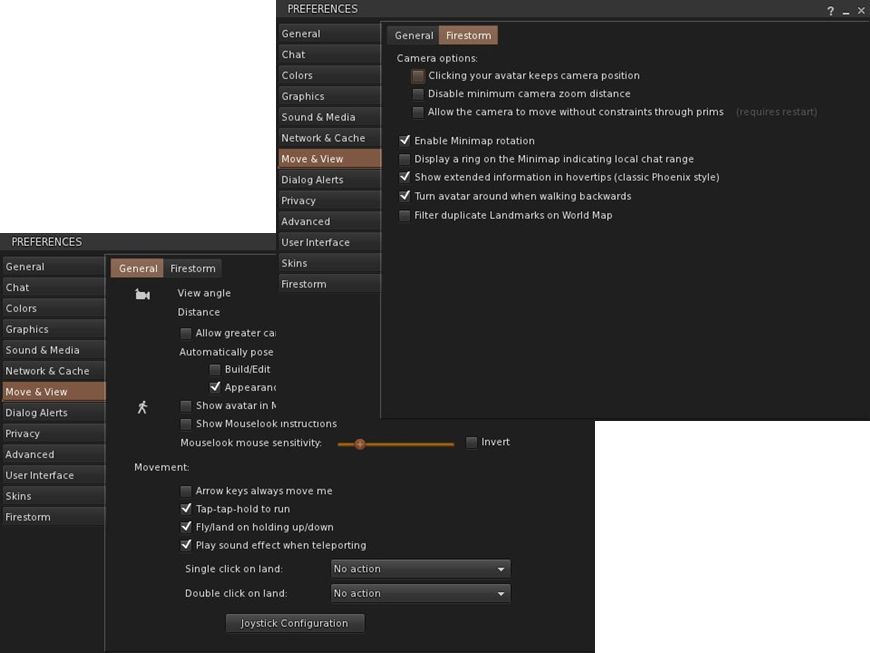
The Move & View tab includes the Viewer 3.2 “click-to-move” functionality (which will reverse avatar mouse steering if you use it!), and moves the Firestorm Camera options originally found under PREFERENCES->FIRSTORM->VIEW to a new sub-tab called Firestorm.
Move & View: incorporate click-to-move and Firestorm’s camera options
Privacy and Advanced
The Privacy tab is rationalised so that LookAt options are now located on their own sub-tab, including the LookAt Target option originally found in Preferences->Firestorm-General.
The Advanced tab has been reduced to the Viewer / grid / Advance / Developer Menu options.
User Interface
Originally called UI Extras, this tab now:
Includes the UI Scaling slider (originally in Preferences->Advanced)
Includes the lag meter check box (originally in Preferences->Firestorm->General)
Includes the Avatar Head movement options ( originally in Preferences->Firestorm–>Avatar)
Allows both script dialogue and Group notices to be displayed in the top right of the screen a-la Phoenix / Viewer 1.x.
The Font tab has been expanded to include options to adjust chat line spacing and folder item height.
Firestorm
The Firestorm tab has undergone significant changes
The General sub-tab has been rationalised as a result of options being either moved elsewhere or dropped
The Protection tab now include the Phoenix Spam Protection options
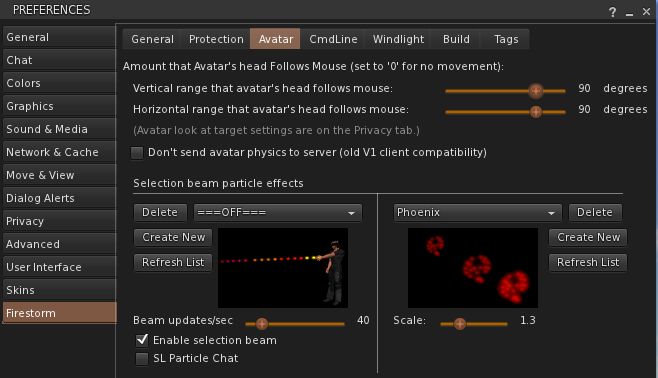
The Avatar tab replaces the View tab and combines the Avatar Head movement options with Selection Beam Particle options
Preferences->Firestorm->Avatar
The Windlight tab includes additional options for accepting region settings and cross-fading changes.
Chat Bar and Chat
The Chat Bar now includes two buttons: the first opens / closes the Nearby Chat floater, while the second opens the Conversations floater. However:
If the Nearby Chat floater is docked with Conversations (as it is by default), then both will appear to perform the same function.
With Nearby Chat undocked, Conversations opens to display your Contacts.
New Feature: Hiding the Chat Bar
Like Phoenix, the Firestorm Chat Bar can now be hidden:
Go to Avatar->Preferences->Chat->Firestorm and check AUTOHIDE MAIN CHAT BAR
The Chat Bar is now hidden.
To access it, tap ENTER – the Chat Bar will open at full window width
Type your text and press ENTER – the text is sent and displayed in the chat console or Nearby Chat (if open)
If you open the Chat in error, simply tap ENTER or ESC to close it without typing anything.
If you prefer, you can set the Chat Bar to open as soon as you start typing:
Go to Preferences->General->Extras or Preferences->Chat->General and make sure PRESSING LETTER KEYS is set to STARTS LOCAL CHAT
Pressing any letter, number or character key will now open the Chat Bar and capture your typing
As above, pressing ENTER will both display the test and close the Chat Bar
Note: setting this behaviour will disable the WASD keys as avatar movement keys.
To disable Chat Bar hide, the feature, go to Go to Avatar->Preferences->Chat->Firestorm and uncheck AUTOHIDE MAIN CHAT BAR. Remember to reset your the WASD functions, if required.
Additional New Chat Features
There are two further new chat options in this release:
Visible hint for when someone is typing: go to Preferences->Chat-> and check SHOW TYPING INDICATOR IN BUBBLES… tags will update to show if someone is typing, even if they have the typing animation turned off
You can display an optional channel selection box in Nearby Chat. Go to: Preferences->Chat-> and check SHOW CHANNEL SELECTION IN CHAT BAR
Channel display in chat
Chat Echo Fix
In previous versions of Firestorm, both the chat bar and Nearby Chat would echo whatever was typed into the other. This has been fixed so that text can be typed separately into each.
Camera Floater
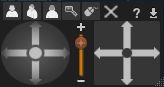
The Camera floater used within the Phoenix /Hybrid modes has been refined, with the view buttons (rear, front, 3/4s, zoom & Mouselook) now along the top of the floater. This makes the floater more compact, by some may find it harder to reposition once undocked from the toolbar as a result.
Quick Preferences
The Quick Preferences button now includes options to turn name tags over avatars off / on, and a time-of day slider for altering the region daylight in your own Viewer.
Mesh Uploads
One of the most eagerly-awaited capabilities within both Firestorm and Phoenix is that of mesh object uploads.
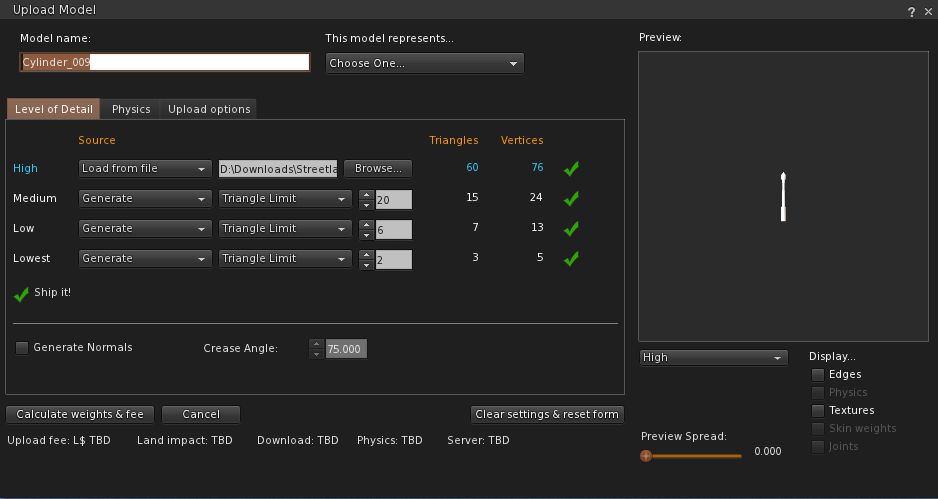
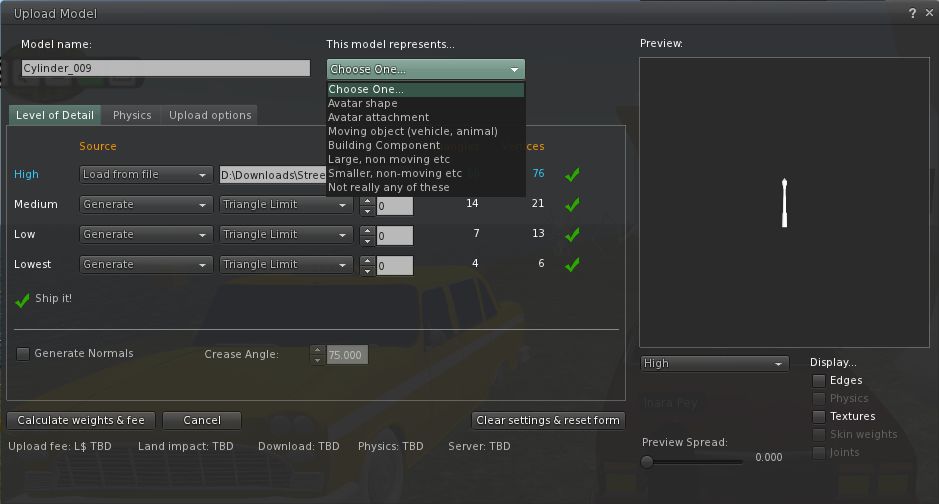
This release sees Firestorm gain the capability, thanks to Nicky Dasmijn. The upload process uses the latest Viewer 3 upload window, and while I am no mesh expert, it appears to match the official Viewer in terms of smoothness of operation.
Note that the upload feature includes the fix for CTS-627 (Mesh upload crashes Linux).
I reported on the last Phoenix Hour update recently, in which Jessica made it clear that where new releases of Firestorm are concerned, the team is pretty much waiting on Linden Lab and fixes to the OpenGL issues (for which the team are also providing assistance).
At the time of that broadcast, LL were saying that it could be another couple of weeks before suitable fixes are in place and ready to roll. However, since that time, progress has been made, although there still issues to be resolved. Among these is an issue with Mac systems using nVidia, which can experience black screens when running SL.
While there is still no date for merging the revised code into the main Viewer code, the progress, together with the fact that it has been a little quiet over on the Phoenix blog has prompted Jessica to drop a line or two on what is going on.
In the post, Jessica discusses the OpenGL issue, before going on to state:
“As of yesterday Firestorm development shifted into release mode. This means we are now focused on fixing the significant remaining bugs, polishing up any unfinished features that have been in progress and we’ve started an intense QA program. If all goes well, the next release of Firestorm will be the big one!”
Of course, such an admission is bound to bring cries of when, as Jessica acknowledges. However, she will only say:
“Unfortunately it seems every time we announce a date.. something goes wrong to jinx it, so I won’t go down that path, but I will say.. VERY SOON!”
This is pretty positive news, as the release promises to be pretty amazing, featuring, among a long list of things:
Spell checker
AO updates
Inventory “jump” fix and improved inventory load times
Mouselook zoom
Notecard text search
Chat bar auto-hide
More V1-style functionality in the Phoenix mode
Radar-in-a-floater
Right-click -> reload texture
Mesh uploads!
Commenting on the promised mesh-rendering version of Phoenix, Jessica indicated this will be following a couple of weeks behind the Firestorm release.
I’ll be aiming to bring a review of the release as soon as possible after it hits the download page!
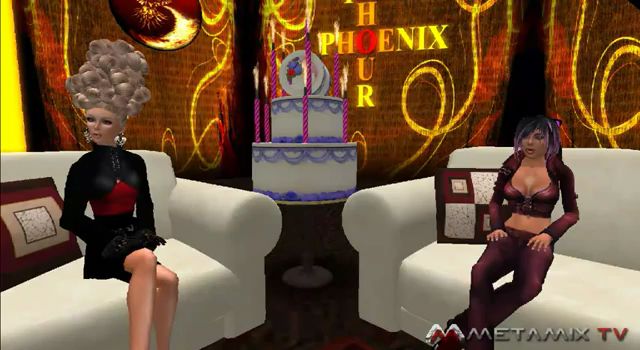
This week’s Phoenix Hour saw a couple of guests sharing the sofa with Jessica: Ed Merryman and Lette Ponnier, who would be joining Jessica and Phaylen in a discussion on matters relating to Viewer support. Ed actually heads-up the Viewer support side of the Phoenix / Firestorm group, and both he and Lette provide classes in using Firestorm.
To kick things off, however, Jessica ran though the latest status for both Phoenix and Firestorm before going on to pass comment on the new LL Viewer UI – which, at the time of her comments, was about to be merged with the Development Viewer code but had not actually been released for anyone to see.
The Viewers
Overall, not a lot has changed since my last report on The Phoenix Hour – the team are really waiting on LL to resolve issues their end before making any further releases of either Phoenix or Firestorm.
Phoenix Status
The mesh rendering code, supplied by Henri Beauchamp, is in the Phoenix code repository
The current graphic issues being experienced with the Firestorm Mesh Beta (and other mesh-capable Viewers) will be in the code for mesh rendering in Phoenix; Jessica estimated that around 50% of people using mesh-enabled Viewers are caught with the issue (basic shaders causing Viewer crashes)
This issues are Linden Lab issues, and as such, Phoenix is being held pending a fix or fixes from the Lab
The team have been working with LL with these bugs, and a version of Firestorm would be pushed to the Beta group to assist with further testing on the working being undertaken to fix things.
Firestorm Status
The next release of Firestorm is good to go, but again awaiting the GPU-related fixes from Linden Lab
All blocking issues from with the Firestorm project that might have delayed a release have now been resolved
There are still a number of targets the team would like to achieve prior to a release, but these are not blockers to a release; so if a graphics fix comes out of LL before all the targets have been reached, a release may still go ahead
Issues and fixes for Firestorm can be tracked via the project JIRA – although people will need to register in order to gain access
Focus has been placed on Firestorm locking-up and going into “(not responding)” mode and also inventory load times; Nicky Dasmijn has, in Jessica’s words, “Made a world of difference” to the issues
Jessica is convinced even those who didn’t have major inventory load time issues are going to notice a significant performance improvements as a result of this work once the new release can be rolled out
As an example of the improvements, she stated her own 72K+ inventory now takes around 20 seconds to load!
While the new mesh uploader will be in the next release, as per the last Phoenix Hour, there are some issues around the physics weight calculations for mesh objects (which are presumably being worked on)
New feature: Jessica revealed during discussions that a new feature has been added to Firestorm for the next release: right-click -> reload texture. This forces the server to re-send a given texture (worn or on a prim) which has failed to rez.
So to repeat: progress on both Phoenix and Firestorm has been good, but until the graphics issues are resolved by Linden Lab, there will not be any releases. As a side note, Jessica and Ed said the Lab themselves are indicating it will possibly take another two weeks of effort on the Lab’s part to resolve the issues – but this is not guaranteed.
New Official Viewer UI
Jessica expressed disappointment around the way in which Linden Lab has handled the new Viewer 3.x UI, going so far as to state the view that working “in secret” on the UI was “Wrong. In so many ways”. Given the degree with which TPV developers working on V3-based code have been trying to make the Viewer more accessible and acceptable to die-hard V1.x users, one has to admit it is hard not to agree with her – although not necessarily for the reasons she cites.
Had the Phoenix team, for example, been made aware of LL’s plans, they could have made a choice as to whether to pursue the massive amount of effort they’ve put into creating a V1-style option for the Firestorm UI or whether to direct that effort elsewhere – such as in supplying even more help to LL in trying to resolve the current graphics problems. As it stands, a lot of effort on the part of the team may well have been wasted, and LL have run the risk of alienating TPV developers who might otherwise be well-placed to assist them with future issues.
However, the flip side to this is, of course, that the new UI hasn’t been developed “in secret” in the strictest sense. While the code may have been developed without much in the way of consultation with the user community, Linden Lab nevertheless do have over 18 months of considerable feedback from users on the Viewer 2 UI. They’ve also taken positive steps to better understand its limitations for themselves, as demonstrated at SLCC 2011. Ergo, the redevelopment work isn’t directly comparable to the situation that brought about Viewer 2.0, with the work being carried out in an apparent vacuum.
Support
The core of the show was devoted to support issues – especially in relation to Firestorm, but some of which also applied to Phoenix. This started with a review of the Firestorm courses the team offer, the schedule for which can be found on the Phoenix / Firestorm wiki, before moving on to the most common issues the support team deal with.
Bake Fail
Bake fail is the number one issue for the Phoenix / Firestorm support team, despite the fact it is not actually a Viewer issue per se. Rather it is a server-derived issue involving a communications failure, such as between the server and your computer, or the server and someone else’s computer / a group of computers. Typical examples of each are:
Everyone else sees you in an outfit you just changed into, but you still see yourself in the previous outfit = you have suffered bake fail
You see yourself wearing the outfit you’ve just changed into, but others see you still in your previous outfit = others have suffered bake fail.
Oz Linden has defined this problem as being the result of a series bugs within the rendering pipe (not all of them directly connected with bake fail itself) that have individually been treated with a band-aid at the time they occurred, with each bug causing the next bug in the chain. This has resulted in an issue that – as much as Oz has stated he’d personally like to see fixed – is next to impossible to sort out without significant time and effort (and risk) being put into the rendering pipe itself – a piece of code LL tend to treat with the utmost caution.
Ed makes a point of expressing the value in making sure you make a “backup” copy of your appearance as far as you can – skin, hair shape & suitable clothing. If you have severe rendering issues, and REPLACE CURRENT OUTFIT isn’t available as an inventory option because it is grayed-out, drag the folder with the back-up from your inventory and drop it onto your avatar.
Blurry Textures
If your avatar bakes, then the textures go blurry, you rebake & go blurry, try:
Reducing your texture memory allotment by around 75% of the current setting
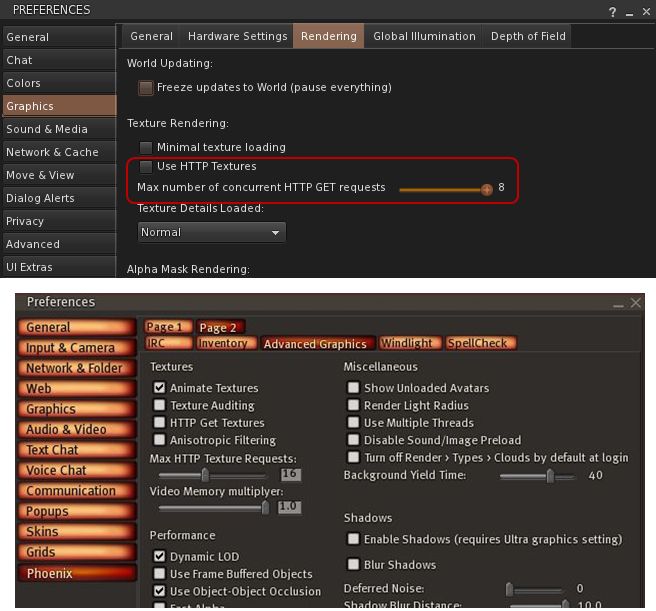
If both of these fail to resolve the issue, disable the HTTP Get function entirely (uncheck USE HTTP TEXTURES in Firestorm or GET HTTP TEXTURES in Phoenix, which are contained in the respective Viewer Preferences tabs defined in the above steps. If you disable the option, make sure you clear cache to avoid texture corruptions.
HTTP get texture options – possible aid in resolving avatar blurring issues
I See Grey People
An interesting tip from Ed Merryman formed a part of the bake fail discussion: if you see a grey avatar or avatars near you, don’t ask them to rebake – try changing your Group tag.
DNS Issues
Lette offer a number of solutions were offered for those experiencing a DNS related error on trying to log-in to Second Life:
Check your anti-virus software, some anti-virus software mistakenly view the Viewer as somehow harmful / trying to make an illegal connection and block it from doing so (some may even throw out a virus infection warning)
Change your DNS server to Google Public DNS or OpenDNS.
DNS errors appear to be on the increase across all Viewers, although why this should be isn’t clearly understood at this point in time.
The Phoenix / Firestorm Wiki
One of the best places to get help for either Phoenix or Firestorm is through the wiki. This includes details on basic troubleshooting, dealing with issues such as bake fail (as described above) and information on Firestorm classes, etc. The wiki also has a number of pages that cover broader issues and items, including:
The hot LL JIRA list – those items that are on the Linden Lab JIRA as known issues
Both of these pages are being continually updated, so people are asked to take a peek at them when encouraging issues.
The Phoenix Team Halloween Party
At 14:00 SLT on Saturday 29th October, the Phoenix team will be hosting its second annual Halloween Costume Party. Arrangements are still being made, but details and an LM will be sent out via the support group nearer the date.
On the 4th October, the Phoenix Hour was on-air and had a sort-of celebration for it’s first birthday, having first aired in 2010, and moved home in the interim. A belated happy birthday from me to Phalen, Jess and all the team who work on the show.
Support Groups
Jessica kicked-off the meat of the show with a warning about “unofficial” in-world Support Groups for Phoenix/Firestorm.There are a number of such Groups operating in-world, some of which have proven to be problematic for Phoenix and Firestorm users who have joined them in the mistaken belief that they are a part of the Phoenix / Firestorm team. In order to help people avoid similar issues in the future, Jessica reiterated that “official” support teams will always have either herself (Jessica Lyon) or Ed Merryman as a Founder and / or in the Ownership. As such, when looking to gain “official” support, users should only join these Groups.
Phalen Fairchild (l) and Jessica Lyon filming The Phoenix Hour
Firestorm Update
V1 Functionality
Firestorm has surpassed Linden Lab’s Viewer 2(/3) usage hours, which demonstrates the Viewer has a very strong uptake. However, adoption among existing Phoenix users remains an issue of concern. To overcome this, the team will be carrying out further work on the Phoenix mode log-in option for Firestorm:
The toolbar at the bottom of the screen will receive further work, possibly to include text rather than icons in the buttons to help make it look more like Phoenix
Phoenix / V1 chat bar behaviour is to be included in the mode:
V1 Auto-hiding of the chat bar will be included (Preferences option), so that when ENTER is hit, the chat bar will slide off to the left of the screen (rather than behind the toolbar buttons, as with V1 behaviour); pressing ENTER again will display the chat bat once more
Similarly, pressing ESC will hide the chat bar and allow the WASD keys to be used for avatar movement, a-la V1 behaviour. Pressing Enter will display the chat bar once more for text entry
A major source of complaint from V1 users coming into Firestorm has been the use of chiclets in the V2 code. The team are looking into an option for users to replace the chiclets with V1 style dialogue boxes if they wish. Firestorm does currently display script menus in the top right and also V1-style notices appearing in the lower right-hand corner – although they do not currently stay open – and the team are looking to enhance this
A further issue with adoption from V1 has been identified with the menu bar – which is clearly very different in V3 Viewers from V1.To assist people in transitioning to the new menu system, the team have started looking at ways in which the V1 style menus can temporarily displayed in Firestorm for a period of around 30 seconds at a time.
The idea behind this is not to replace the V3 menu system, but to help people orient themselves with the new menus – the capability can be used to quickly find & use options under the V1 menu system (such as uploading an image) – once an option has been used, the menu bar will revert to V3 style. In this way, people can find much-used options without frustration, while learning the new menu system at their own pace. While details are yet to be finalised, the capability will most likely be enabled through a button on Firestorm’s menu bar.
As Jessica stated in the show, the Team are trying to provide means by which V1 users find it easier to orient themselves to using Firestorm without impacting the team’s ability to keep pace with V3 developments coming out of Linden Lab. To achieve this the team must balance changes within the Viewer’s functionality with the ability to merge such changes with the code base coming out of the Lab.
Jessica also indicated that not all of the above changes will be implemented in the next Firestorm release, although the chat bar changes will be there (and gave the impression things like hiding the chat bar may be common to all three of the Viewer’s log-in modes).
General Updates
Away from V1 adoption issues, Jessica reported that:
Spell check is finished and will be in the next Firestorm release, there are just a couple of bugs to iron out
Mouselook has been updated (notably for combat users) to include:
The ability to see beacons in Mouselook
Mouselook zoom – press and hold the right mouse button and use the mouse scroll wheel to zoom in / out
The ability to display local chat and IM history
The current “chat echo” behaviour that sees anything typed into the chat bar being repeated in the Local Chat window (if open) and vice-versa, has been fixed, allowing different comments to be typed into each of the chat entry bars
Nicky Dasmijn has been working on the mesh uploader, and it looks very much as if this will be in the next release of Firestorm – there was some doubt as to whether it would be finished in time for the next release when Jessica last mentioned it in The Phoenix Hour
Mesh uploads coming to Firestorm (image from Viewer 3 for representative purposes)
Similarly, the inventory “jump” issue has been fixed by Kitty Barnett and will also be in the next Firestorm release
Notecard find & replace will be included, together with a number of fixes to the text editor, including, it would appear, the cursor placement issue
Radar is to made available as a floater in its own right, rather than as a part of the Nearby People Sidebar tab / floater – work has just started on this, so it may not be in the next release
Anti-spam controls are to be included in Firestorm – but it is unclear if these will be in the next release or not
There are a number of AO bug fixes, although at the time of the show (4th October), the issue of the AO turning itself off when you log-in was still unresolved
Code Contributions
Jessica raised the issue that Phoenix / Firestorm is in some ways viewed as the “giant” in Viewer development and as being somehow untouchable – which is far from the case. While the team does have an extensive support network for users, the development side is actually quite small (thirteen developers in total, only some of whom are able to commit large amounts of time to the project).
Therefore, rather than being large and untouchable, the team actually welcomes contributions from other developers that can be incorporated into the Viewer. Such contributions don’t have to by major new features or bug fixes, as Jessica stated:
“You may think that you’re not worthy, or you’re not good enough – but you are. Trust me. Even the littlest, smallest contributions you can provide are sometimes really big impact things Even just a typo that you find in the interface … and you can fix that easily and submit it to us … The thing is, I can put Aaron on a typo, and he’s going to spend 15-20 minutes on that typo; but that 15 minutes of Aaron’s time can be spent on really complicated things, and I’d rather keep him on the more [high] impact stuff, the complicated things that only he can do, than to put him onto something small. But if you can supply us [with] a patch, we can right-click, commit, give you credit for it and suddenly it’s fixed and it hasn’t taken us any time at all.”
Jessica then went on to outline the contributions that have come from a number of people – and other Viewers – that have helped to improve Firestorm, culminating in a further statement that Firestorm would not be where it is today without the efforts of a lot of contributors outside of the core team, “So if you have something in your Viewer that improves your experience, I bet you it’s going to improve someone else’s. Send us a patch”.
Patches can be submitted via the Phoenix JIRA – you will require an account. There is also a mailing list available for developers and compilers to join. Note that this is not for asking questions on using the Viewer or for making suggestions for future features, etc – all of these should be handled through the usual support channels. The mailing list is purely for those actively engaged in Firestorm development, or who to assist in developing the Viewer (so it could be used to confirm whether or not someone is already working on fixing a particular bug or not, for example). Full credit for all patches / code used are given.
New Classes for Firestorm
There are new classes for Firestorm covering subjects such as troubleshooting, creating and using Contact Sets. Notification on these classes are provided through the Phoenix / Firestorm Support Groups.
When Will the Release be Made?
There are a number of things still to be sorted as core issues prior to the next release of Firestorm.
As previously indicated, there are a number of issues inherited from Linden Lab within the code, and for which the team are still awaiting fixes from the Lab
Jessica would personally like to see the issues of settings reverting and the Viewer locking up as “not responding” periodically for some to be fixed prior to the next release
As such, there is still not given date for the next release – too much depends upon Linden Lab in many respects.
A further issue for the team are the recently announced changes to the Viewer UI that are to be forthcoming from Linden Lab. At the time the show was recorded, little was known as to when these changes would start to be implemented by Linden Lab (or, in fact, what they would be), and Jessica was of the opinion that the team would likely release Firestorm prior to merging it with any UI updates coming out of LL.
However, given that some of these are now apparently due by the end of October (merging the Basic & Advanced modes, click-to-walk functionality, etc.), as indicated by Rodvik Linden speaking over on the SLU Forums, plans for Firestorm may have again been changed. As such, there is liable to be a further update on the release status for Firestorm at the next Phoenix Hour to take this particular matter into account, once more is known on LL’s plans.
Jessica was also unable to commit to supplying a date for the release of Phoenix with Mesh support. This has dependencies other than mesh (such as a complete update of the RLV system), which the team would like to see completed priority to making a further Phoenix release.
Finally, both Firestorm and Phoenix are also waiting on LL fixing the mesh-related OpenGL issues and graphics issues that are currently being investigated by Runitai Linden.
The next Phoenix Hour is schedules for 14:00 SLT on Tuesday 18th October.
The next update to Firestorm is still a little way off, in part due to the fact that the team is currently awaiting various fixes to known issues to filter through from Linden Lab.
In the meantime, the team are hard at work and, as well as fixing various Firestorm specific bugs and incorporating features that didn’t make it into the mesh beta release, are focused on addressing adoption issues – those things people have indicated are effectively show-stoppers where their adoption of Firestorm is concerned.
Missing in the mesh beta
While no date has been set for the next release (see comment re: Linden Lab fixes, above), here’s a summary of what to expect by why of Things to Come:
The Firestorm betas (both mesh and otherwise) currently tend to reset any Windlight settings following a relog or teleport, but a fix will be in the next release
The Contacts List (not the new Contact Sets feature) displaying both user name and display name in separate columns (something I reported on myself) in the mesh beta is in fact a bug, and will be corrected in the next release
The WORLD button for the ruler was removed from the Build floater during the beta mesh merge with LL’s code. This has proven unpopular among builders and the button (right) will be returned to the Build floater in the next release
The spell check feature, delayed from the mesh beta release, will be in the next release
Spell Check coming to Firestorm (Phoenix shown)
Further updates to the AO should be available with the next release
Web Profiles: with the increased functionality in Web Profiles, Firestorm will include an Preferences option (under the FIRESTORM -> GENERAL tab):
The option will be off by default for the V1 (“Phoenix”) mode of the Viewer
The option will be on by default for the V2 / V3 modes of the Viewer
Personal note: I assume this refers to displaying ones own Web Profile, given Firestorm already includes a link to other people’s Web Profiles as a part of the in-world Profile display
The inventory “jump” issue – whereby the cursor bar jumps within the inventory window (usually to the top) on receipt of a notification, etc., is being investigated but may not be completed in time for the next release
Mesh uploads: work is progressing on enabling mesh uploads in Firestorm. The code is the work of Nicky Dasmijn, who has contributed code to the Firestorm project over time, and the uploader will be available for other TPVs as well. Some additional points:
The upload most likely won’t be in the next release. It is still a work-in-progress
Even with mesh rendering coming to Phoenix, Jessica is not committing as to whether or not the upload will be ported to Phoenix.
The adoption issues the team are specifically addressing for the next release are:
Mouselook zoom will be incorporated into Firestorm (go to Mouselook, press & hold right mouse button and zoom in/out with mouse wheel) – this will be especially useful for those involved in combat games in SL
Text search in Notecards will be included
For the V1 (“Phoenix”) mode of the Viewer, the team are trying to get all dialogue boxes to display in the top right corner of the Viewer window by default. This includes Group notices and anything else that in a V1.x Viewer would appear in the upper right corner of the screen
A longer term aim is to possibly have the V1 (“Phoenix”) mode of the Viewer display a more Phoenix-like top menu when selected. This is not a high priority for the time being, and isn’t strictly seen as an adoption issue.
Again, no release date is available for the next update to Firestorm, as so much depends on Linden Lab providing fixes to known issues at their end. Also, not all of the above will be in the next immediate release, as per the notes.







 Inara Pey: Living in a Modemworld