Following-on from the TPV/Developer meeting on the 13th July, during which pathfinding was discussed, and the recent roll-outs of pathfinding functionality to the Magnum Release Channel, the Firestorm team have announced that they will be adding pathfinding support to upcoming releases. The announcement reads in part:
What’s next…Pathfinding! We’ve decided to release LL’s Pathfinding work in Firestorm in two stages.
Unless LL changes the current plan, when Pathfinding goes live, all regions will have pathfinding enabled by default, and all objects that contain scripts will be treated as “Movable Obstacles.” Movable Obstacles will have an impact on region performance, so region owners will need tooptimize their regionsby setting scripted objects that don’t move to “Static Obstacles.” To do this, you will need Pathfinding Tools!
So our plan with our next release is to get Pathfinding tools out as soon as we can. This will be based on our 28744 release + post 28744 crash fixes + LL Pathfinding code. There have not been many new additions beyond that since the release, and this is for the best: we expect this code will destabilize the viewer to a degree, since it will be a large merge, and we’d rather base this version on a solid release than on a wild card.
Stage 2 (follow-up release). Release with the Havok Library for NavMesh. Havok will be used to enable viewing of NavMesh, display of object types and AI Preview of object paths.So the second Firestorm release from now will have Havok + stability fixes to the previous release + more of our own goodies.
The two-stage release is unsurprising, given Lorca Linden’s recommendations at the meeting on the 13th July. At this time, no time-scales are available for the releases, because, as Jessica points out in the post:
How soon? Great question, and a very tough one to answer since there are many factors involved that we have little control over. Like…
LL’s timeline to release Pathfinding;
How much Linden code we have to merge into Firestorm;
How many regressions and new bugs we pick up from that merge;
How long it’ll take us to fix them, etc.
But we want to get these out as soon as we possibly can once it’s live on the grid.
Phoenix
Phoenix will not immediately be getting pathfinding due to the amount of work involved in getting the capabilities integrated into Firestorm. Region holders using Phoenix will still be able to disable/enable pathfinding using a viewer-independent console, but for all else they will need to switch to a viewer that supports the full pathfinding tool set.
Wednesday July 11th saw the release of Firestorm 4.1.1.28744. Using the Linden Lab 3.3.3 viewer code base and bringing RLVa support up to 1.4.6, the release includes and extensive range of updates, improvements and changes. I don’t propose covering all of these in detail – that’s what release notes are for – but will attempt to give a broad flavour of what are likely to be the more popular changes and outline where you can find them.
Download and Installation
The download is 32.9Mb in size for Windows, and installation threw out no surprises. As per usual, I did a completely clean install – something that is actually strongly recommended for the release. If you’ve not performed a clean install of a viewer before, the Firestorm team have some notes to help you.
Menus
There are a number of updates to the menus, which can be seen in the table below:
Firestorm 4.1.1.28744 menu updates (click to enlarge)
The World menu gets two brand new options, the Sound Explorer and Asset Blacklist:
The Sound Explorer displays all current sound sources within audible range. The list will continue to update as new sounds are played. Sounds can be located, played locally for you to hear and can be blacklisted. directly from the Sound Explorer. You can read more details in the Phoenix wiki
The Asset Blacklist works with an updated object de-render. With release 4.1.1, objects can now be “permanently” de-rendered (on previous releases, any object de-rendered would re-appear in your view following a teleport or re-log). With this release, all objects so treated are listed in the Asset Blacklist, from where they can be re-rendered if required. You can read more details on this in the Phoenix wiki
Vaalith Jinn’s Local Bitmap Browser has been removed from the Build menu because this release of Firestorm sees the incorporation of Vaalith’s Local Textures functionality, as contributed to Linden Lab (which is also available for clothing and skins uploads). However, all those who use Temporary Textures need not panic – that option is still available as well.
Preferences Changes
There has been further rationalisation of the various Preferences tabs. I’ve summarised the updates in a PDF file for ease of reference, and will focus on the notable changes here.
The most significant additions to Preferences are the new Crash Reports and OpenSim tabs.
New Crash Reports tab
The Crash Reports tab offers an enhanced means of supplying crash reports to the Firestorm team and includes a link to the team’s Privacy Policy.
The Firestorm team recently repeated their commitment to support of the OpenSim environment, and this tab can been seen as evidence of that. However, given Linden Lab’s requirements around the Havok sub-licence arrangement, this tab is liable to be vanishing from future “SL flavours” of Firestorm once the new sub-licencing comes into effect.
OpenSim Grid Manager
One important element in Preferences that needs additional emphasis is the option to Enable Lossy Texture Compression, found under GRAPHICS->HARDWARE SETTINGS. This enables texture compression during rendering, which can give improved performance and a smaller graphics memory footprint – but at the cost of lower quality rendered textures which may end up pixellated. As such, it is not recommended that this be enabled unless you have little video memory on your system.
Buttons
There are two new buttons making their début with this release:
Fly – a dedicated button to enable you to easily fly
Region/Estate button – provides access to the Region / Estate floater (WORLD->REGION DETAILS or ALT-R).
Additionally, buttons now display their keyboard shortcuts in their tool tips.
Floaters
In addition to the options that can be set for various floaters in the updated Preferences (see the PDF file linked-to above), a number of the floaters themselves have new or revised options:
AO floater: A new safeguard added to the DELETE THIS ANIMATION SET button so that everything that’s not an animation link is moved to “lost and found” to prevent accidental deletion
Appearance floater–>Edit Outfit – now includes the Local Textures picker (from the gears button) for testing self-made skins and clothes
Conversations floater
Contacts tab uses new coloured icons for options (Friends can see when you’re online, etc).
It’s been relative quiet on the Viewer front of late. However, there is now news emerging about two TPVs: Kokua and Firestorm.
Kokua
Nicky Perian has updated the Kokua code on Bit Bucket to release 3.1.1.22989(Beta-1), dated June 11th. Available for Windows and Linux, it is unclear as to how “official” this release is – there is no blog post associated with the release, nor does it appear on the Kokua wiki download page. Notice of its arrival has, however, been doing the rounds on Twitter.
I’ve not had a close look at it as yet, but it appears the release is more about bug-fixing and general enhancements of the current code (with fixes code that addresses both SL and OpenSim) more than prepping a major release and shouldn’t be treated as such – or even as a recognised experimental until the team release further information. As it stands, the release still references itself in places as the “Second Life Viewer” rather than Kokua, again indicative that this is very much still a work in progress. One thing it does do away with is the console window that would open on starting the Windows version of Kokua (and which you had to keep open while logged-in to SL in order to avoid the Viewer crashing).
I’m not recommending the release be put to general use – that is down to the Kokua team; rather I’m reporting that the version’s availability has been reported on via Twitter. Those wishing to know the exact status of the project should keep an eye on the Kokua blog, where hopefully there will be an update soon.
Firestorm
After an extended period of quiet from the Firestorm end of things, I recently noticed Jessica Lyon logging back in to SL once more after what appeared to be something of a period of absence. She’s provided a blog post at Firestorm entitled “Progress Report” , which indicates that the team had in fact eased off from development; with some taking an outright break from things, as burn-out was becoming a factor.
The announcement highlights three things:
The team has new developers in the form of Holy Gavenkrantz, who has been a regular code contributor to both Firestorm and Phoenix, and Armin Weatherwax who, co-incidentally enough given the information on Kokua above, was formerly a lead developer on that project
And update on the status of the Firestorm 4.1.1 release, which is still officially labelled “coming soon” but which will include various requested tools and capabilities including Growl support, an LSL pre-processor, additional Windlight effects an “improved build floater”, and a host of goodies
The news that the team is branching development for Firestorm between Second Life and OpenSim.
This last point is interesting, as Firestorm has been gaining popularity among OpenSim users (Kitely even set it as their default Viewer).
The use of Viewers to access both SL and OpenSim has been the subject of much debate in the last couple of months since Linden Lab announced they were sub-licencing elements of the Havok physics engine. This requires that any applicable Viewer using the licenced code to only connect to LL’s own servers. In May, Jessica gave a hint that the Firestorm team were considering their options vis-a-vis SL and OpenSim, commenting on SLU that:
There is the possibility that we could have Havok code disable when the viewer is not logged into the SL grid. I have asked Oz if this would be acceptable and he is looking into it. If it turns out this is NOT acceptable, we will provide two versions of our Firestorm viewer. One for SL and one for everything else.
While she has not followed-up the comment with further information directly, it would appear from the blog post that – for whatever reason – the Firestorm team has opted to take the route of developing two flavours of the Viewer. It will be interesting to see how this actually plays out.
Firestorm 4.0.1.27000 has rolled-out alongside Phoenix 1.6.1.1691, and brings with it a whole host of changes – including the implementation of the team’s take on the Flexible User Interface (FUI).
As is common for Firestorm, it is recommended that you perform a completely clean install with this release.
The changes to the Viewer are apparent from right off the bat: on logging-in for the very first time, a pop-up is displayed asking you if you wish to have which Viewer you are using displayed in the Phoenix / Firestorm support group chat windows – a requirement resulting from the recent TPV Policy changes. Clicking Yes will append “(FS)” after your name when using Phoenix / Firestorm support group chat sessions, clicking No will not display your Viewer choice in the group chat. This is a one-time only pop-up, and only occurs the very first time you use Firestorm (just check the box above the options). Should you wish to change your mind later, you can enable / disable the option directly through a Phoenix / Firestorm support group chat window.
The FUI
The biggest single change to this release of Firestorm is the adoption of LL’s 3.2 FUI – although with the exception of a single button on the left side of the screen, you’d actually be hard-pressed to know Firestorm is now using the FUI. Quiet and full of cunning is the Firestorm team…!
The new UI: only a single button reveals the truth…
If you do need further proof that this is FUI, simply right-click on the buttons at the bottom of the screen and select TOOLBAR BUTTONS; the familiar button picker toolbox will be displayed – and is filled with a tidy range of additional buttons beyond those offered by LL.
Buttons: we haz them
As is common with V3.2-based Viewers, buttons can be placed to the left and/or right of the screen and/or along the bottom of the screen, and can be displayed as text or icons or both. However, in a welcome departure from the norm, buttons on the bottom of the screen can be left / right aligned and those on the left or right aligned to the top or bottom, rather than simply sitting in the middle. Hoorah!
Button alignment and size options
Additionally, and allowing for your screen resolution / size, you can set the buttons along the bottom so that they:
Fill the available space (as shown above, where they fill the entire space between the chat bar and the right side of the screen), and will dynamically resize according to how the chat bar is sized
Will auto-size themselves to the smallest possible size (depending on whether you opt to use icons, labels or icons and labels & the number of buttons on the bar, this may cause the buttons to wrap over two or more lines
Will fix the buttons to a given size (again, depending on the amount of space available, this may wrap the buttons over two or more lines)
Auto-sized buttons
In another move away from a weakness in the FUI, the chat bar in Firestorm is, by default, anchored to the lower left corner of the screen – again: hoorah!
Gimme Some Skin(s)!
Firestorm has, for a goodly while, had an appearance option in the log-in splash screen offering a set of default UI skin effects. These were called Phoenix, V3 and Hybrid. The Firestorm team caught a lot of flak over the use of “Phoenix”, because the UI didn’t look like Phoenix when used.
With 4.0.1.27000, the appearance option button is still there – but it now has four buttons, and does a whole lot more. For a start there are now four options:
Firestorm: which displays the default skinning and look seen so far in the screen shots in this article
V3: displays a more V3.2-like feel to the viewer (the chat window includes chat headers, etc.) and uses Hitomi Tipomi’s Starlight skins
Hitomi’s Starlight CUI option is also available from PREFERENCES->SKINS, which allows you to set custom button colours, etc.
Hybrid: uses the MetaHarper skin and utilises a degree of transparency around various elements of the UI (such as the buttons)
However, it is the final option – currently still called “Phoenix”, but potentially to be re-named “V1” – that should silence critics over the use of the “Phoenix” label. Here’s why:
Firestorm goes V1
Obviously, the UI isn’t totally V1 – “Radar” is called “People”, the menus are still the V3.x menus, pop-ups may not appear as expected – but various additional options (such as IM notifications appearing in the chat console, bottom left) can be set through Preferences. Given the layout has been built from scratch by Zi Ree, herself a V1-style Viewer user, this should satisfy the requirements of most who prefer that look and feel, offering a more than acceptable compromise.
Snapshot Floater Update
Snapshot floater updated
Firestorm 4.0.1.27000 sees the snapshot floater overhauled, with the “slider” effect used on the Build floater being used to open / close the additional snapshot options. PLUS – in a move that will have many cheering – you can now send snapshots to your web profile feed!
Direct Delivery and Other Bits
With Direct Delivery due for roll-out on Wednesday 21st March, this release incorporates the required support for Received Items.
This release also gets the Destination Guide floater (re-worked by Leyla Farazha) and the Avatar Picker floater common to Viewer 3.2 (and their associated buttons).
There are a host of other fixes, tweaks and revisions all of which can be found in the release change log (complete with originator attributions), and which include:
Growl support for Windows (still a work-in-progress)
Optional viewer tag colors based on distance (chat, shout, beyond shout range)
Option to include distance to other avatars in their name tag
Toolbar buttons for area search, statistics, web browser, debug settings
“Eject from Group” on the group participant context menu
RLVa updates
Ability to hide empty system folders in a dynamic way
The AO button is now a single button for configuration with an inset button for turning AO functions on / off.
Feedback
Possibly one of the most anticipated Firestorm updates since the Viewer was first launched, this release packs a lot into it, and it is clear the entire team has worked hard to incorporate a lot of features and people’s feedback, and rise to the challenge of producing a Viewer that can meet the needs of a very diverse audience.
And I think they’ve succeeded.
There is much here to please those who still feel frustrated with the V3.2 in terms of buttons and alignment, those who like the existing Firestorm layout and those who prefer a V1-style approach to their Viewer. Equally, there are probably a couple of things that are going to be missed for those who liked them, such as the Sidebar-like sliding of floater from the right side of the screen (although obviously, panels can be moved there and will persist on opening between log-ins). But we should all try and move with the times…
Performance-wise, this release is on a part with other Viewer releases of late, with fps rates around the mid-30s on reasonably busy sims, dropping to mid-teens with shadows enabled. I’ve not run the Viewer fast or hard enough as yet to really consider stability, but in logging between appearance settings I didn’t have any of the “locking up” on log-out I’ve experienced of late with 3.3.0.24880 (in particular) and .24882.
While it may be my eyesight and the lateness of the hour, shadows appear to render somewhat more sharply with this release, and I’m finding myself wishing Firestorm has a gamma correction capability for photography – but we can’t have everything!
I’m particularly enamoured of the button alignment / autosize functions. These have allowed me to retain the look-feel from 3.3.0.24882 and be able to position my custom “multi-HUD” where it is both within reach and nicely tucked out of the way. Coupled with the anchoring of the chat bar, this alone makes this release of Firestorm a winner in my book.
Tuesday February 7th saw the resumption of The Phoenix Hour broadcasts via Metamix TV. Given the sim was full and the stream hit a capacity limit, I’m guessing the show was somewhat eagerly awaited. As I couldn’t get either into the sim or onto the stream, feedback on the show will have to wait until it is available on the Metamix channel and I’ve had a chance to watch it.
In the meantime, and coinciding with the show, a Maintenance Release of Firestorm was made – 3.3.0.24880. Here’s a quick overview of the elements that caught my attention.
Points of Note
There is an impressive list of additions, changes and fixes for the release, as well as a number of known issues. You are advised to read-up on the latter prior to installing
It is recommended that you do a completely clean install of the release
This release does not include the V3.2 FUI from LL – that’s coming down the road (see below) so far as I can tell, the parametric deformer also isn’t a part of the release.
Particle Editor and Other Highlights
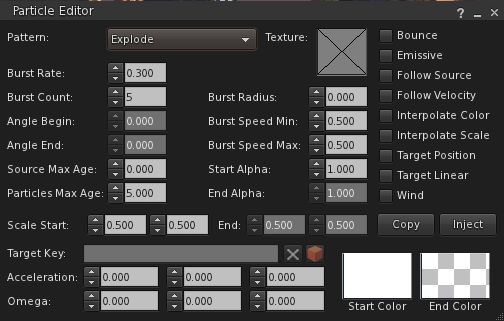
While I’m not going to launch into a full review – I’m saving that for when the FUI version of Firestorm arrives – this release includes a number of cool bits worth mentioning. Most notably among them is Zi Ree’s client-side particle editor, which has been the cause of some angst having been released ahead of Firestorm (for which it was specifically being developed) within the Zen Viewer.
There is a comprehensive guide to using the particle editor on the Firestorm wiki, so I’m not going to delve massively deeply into it here. All I will say is, full kudos to Zi for making it so ridiculously easy, even I can understand it and play with particles…
New particle editor
Another nifty addition from Zi that builders are likely to find handy is the BUILD->DUPLICATE option (CTRL-D). This allows builders to immediately duplicate any prim or linkset they’ve created – hand on repetitive builds.
Inventory gains the ability to search by creator, UUID, description and ALL and filter options to display Links, hide Links or hide everything else but Links to the inventory gear menu.
Estate owners / managers also get some useful updates with this release by way of Ansariel Hiller:
ALT-R will now open the Region / Estate floater
The TOP OBJECTS floater (from the DEBUG tab of the Region / Estate floater) now includes a button allowing Estate owners / managers to teleport to offending objects
Camera smoothing is also now in the Move / View tab of Preferences, as is the ability to adjust the transition time for shifting focus, while the camera View Angle is updated to allow the entry of numerical values – all options machinimatographers should find useful. The transition time option is something I first encountered in Niran’s Viewer, and really like, especially when exploring SL and appreciating the sights I find – so it’s good to see it in Firestorm. I also particularly like the options to disable some of the more annoying notifications thrown out by the Viewer during routine operations.
There are even a couple of new skin options: Firestorm High Contrast and also Vintage – the latter of which harks back to V1 in terms of button colours and presentation.
And all this just scratches the surface of a lot of effort by many within the team to add features and enhance the Viewer’s overall capabilities – kudos to all.
Performance
Given this is a maintenance release, I wasn’t expecting to see the kind of dramatic improvements I’ve been fortunate to experience with other Viewers, Shining Fixes notwithstanding – and that’s pretty much the case. Overall, through nigh-on three hours of playing with the Viewer and leaping around the place, banging prims together and generally poking my nose in and seeing what happens, performance has been pretty much on a par with the 3.2.2 release, with the occasional boost in fps when shadows are enabled. Shadows themselves also seem to render more crisply with this release, although that could simply be a trick of my eyes.
Crash-wise, outside of the issues listed by the team, I did initially have some problems running with shadows active in that clicking the PEOPLE button with deferred & shadows active initially caused me to crash several times. As the problem later went away, I’m assuming it may have been either issues within my PC, or possible issues with the sim I was on at the time.
Overall, this is a worthwhile update to Firestorm – although a read-through of the known issues is well advised.
On Saturday December 17th, a Phoenix / Firestorm Q&A was held at the Rockcliffe University regions, where Jessica took questions on both Viewers from the audience and which had been posted beforehand either to her directly, or via the Phoenix blog.
Jessica and host Nigma Sterling at the Q & A session
The event, hosted by Nigma Sterling, was recorded for those who could not attend, and the video has now been released on YouTube. The video is some 2hrs 30 mins long, and covers a lot of ground.
This is an honest and open response to the many criticisms the team have faced from their user community, and for those that have concerns about Phoenix and / or Firestorm it is a worthwhile spending time watching it.
I’ve not been privy to much of the situation that is alluded to in the video – the heated discussions regarding Phoenix and the perceptions that the team are somehow “abandoning” their users in “forcing” them into the V3 world through Firestorm – and i’m not about to embroil myself in it.
However, I do emphasise very much with Jessica and the team – indeed with all TPV developers in that they all face a difficult hill to climb, whether they are attempting to stay current and work within the constraints of the new Viewer code base or whether they are trying to work within the constraints of a code base (Viewer 1) that has been effectively frozen by LL for a year now, and which LL have themselves indicated is only going to get more and more broken as time goes on.
It’s a thankless task, however you look at it, and one that is never going to please everyone, be it for genuine technical issues or simply because of people’s unwillingness to take the time to work with a new UI. This being the case, I’m going to take a moment and lift a metaphorical glass of mulled wine to all TPV developers and say “thank you” for all of your efforts over the years.
Sadly, I cannot embed the Phoenix / Firestorm Q&A, as it is locked from doing so. However, you can see it here.


 Inara Pey: Living in a Modemworld