Firestorm Beta Release: Group Services and Havok sub-licence

As a result of the release of the Group Services project code to all of the main grid this week (see my SL Projects news report), The Firestorm team have released a beta version of their upcoming Firestorm viewer update.

The new Group Services code allows for improved loading of membership lists of very large groups, together with improved reliability in editing such groups (i.e. assigning roles, removing people, etc.), by the group moderators. however, in order to be used, it requires additional viewer-side code. Without this additional code, the viewer will be unable to display membership lists for groups with more than 10K members.

To overcome this, and to allow Firestorm users who manage very large groups, the Firestorm team have released a beta version of the Firestorm viewer which includes the necessary code – as well as a lot of other updates.
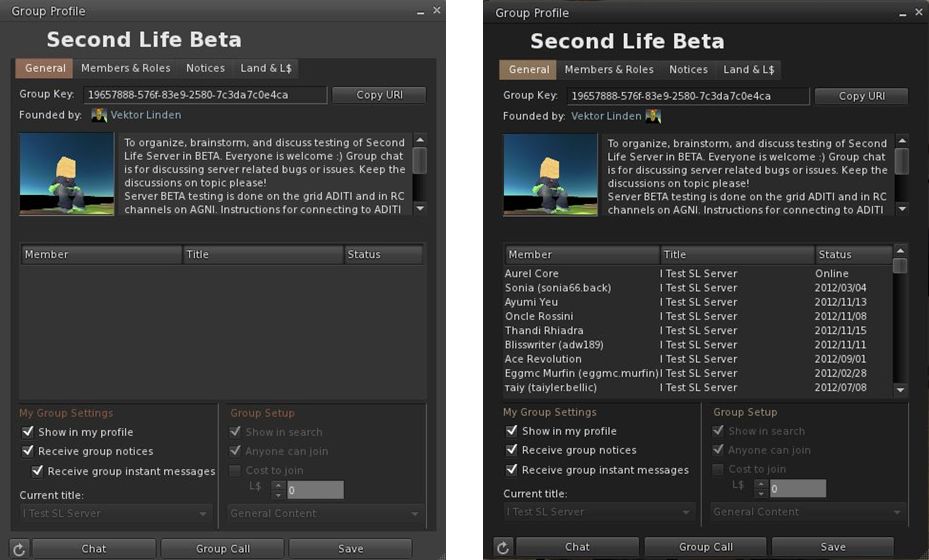
Group Services update – the difference: On the left, an attempt to load a group with almost 20K of members in the current release of Firestorm 4.2.2. On the right, the same group loaded using the new Firestorm 4.3.0 beta.

Announcing the release, Jessica Lyon, the project manager for Firestorm notes, that while this is not an official Firestorm release, it will be supported by the team but requests that only those who need to manage and edit groups with more than 10,000 members download and install this release. She comments:

NOTE:
– This is NOT an official release, but we will provide support for it.
– This has NOT been thoroughly tested by our Quality Assurance team.
– We can NOT make any promises regarding how stable or bug-free it is.
– This DOES have some really cool new stuff in it!

USE IT IF:
– You need to manage large groups inworld.
– You’re tired of seeing unknown alert messages in Phoenix.
– You’re feeling brave, you live on the cutting edge and you want to get an early look at what’s coming in December’s Official Release.

This release means that Firestorm joins Niran’s Viewer, Zen, and Cool VL viewer alongside the official beta viewer in enabling large group editing.

Havok Sub-licence

This beta also includes code to access LL’s new Havok libraries. This means that it will be able to view the pathfinding navmesh, but as a result of the sub-licence arrangement, it will not be able to access OpenSim grids.

Downloading and Installing

The beta viewer is available here for Windows, Mac and Linux. As usual, a completely clean install is recommended for the most stable results.

A full review of the new Firestorm release will be appearing on these pages in due course.

A Note on Phoenix

The blog post from Jessica includes a section directed at those still using the Phoenix viewer, in which she states:

Our developers and support staff have been extremely busy trying to balance their real working and personal lives while continuing their volunteer efforts to develop SL’s most popular viewer for you. Unfortunately, most of us cannot easily compile Phoenix anymore because of missing/expired libraries like Fmod, compiler changes we’ve had to make for Firestorm, OS upgrades (Win8), etc. To update Phoenix to current LL code now would be a very, very big task and, because we are already at our limit of what we can do, there are no plans to update Phoenix Viewer to support this new group code or handle the new notification system at this time. We are, after all, only human.

This is unlikely to make popular reading in some quarters. However, as Jessica notes, the team have striven to make Firestorm’s front-end as much like Phoenix / Viewer-1 as humanly possible. While it is not possible to revert menus, etc. fully to the Phoenix format, the skinning and broad approach to getting as much of the look and feel on Phoenix into Firestorm should go a long way towards easing people willing to make the conversion a lot easier.

This does not mean the end of the road for Phoenix, but with user number falling and Firestorm proving to be a much more stable and reliable viewer which is capable of embracing viewer changes being driven out of LL, it is understandable that the Firestorm team is sounding a warning note as to the future and continued enhancement of Phoenix.

Firestorm: SL, MOSES, OpenSim and the future

firestorm-logoLogging-on to SL today, I notice from the Firestorm MOTD that Jessica Lyon brings word on Firestorm and what is going on with SL’s most stable and most popular viewer – and the viewer of choice for many OpenSim grids.

The team has been hard at work on the viewer while LL have been busy sorting out stability and crash issues on their own beta. As Jessica comment in her blog post, one of the reasons Firestorm is on a long release cycle is that until now, she has preferred to see the viewer go out with significant updates which users will want to have / see (both new capabilities and bug fixes), rather than pushing out much smaller, more incremental releases which might get on people’s nerves the their frequency. The next release will be no different in that regard, with a range of further fixes and well as a host of new features, including William Weaver’s marvellous Phototools, which I simply adore. William (Paperworks Resident in SL) has been working closely with Firestorm developer Ansariel Hiller to get the tools integrated into Firestorm. I’ve been able to use the integrated version ahead of the release, and love the work both Ansariel and William have put in on this.

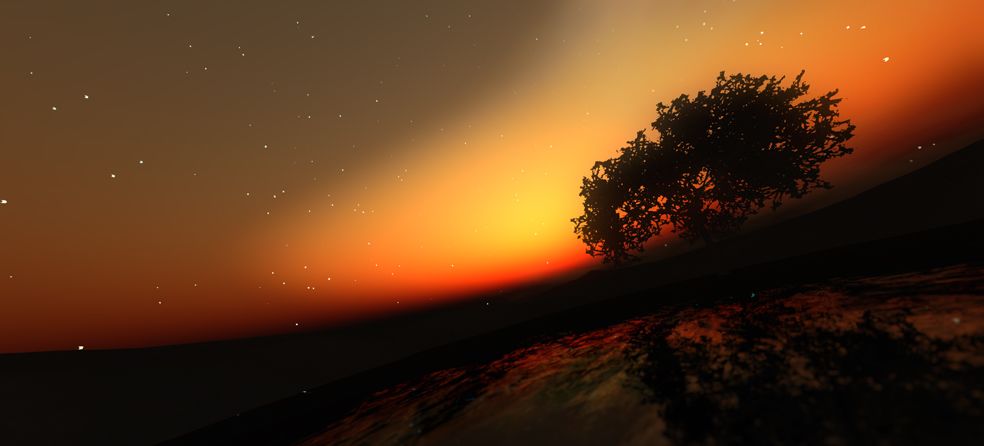
Phototools, fully integrated into Firestorm in the next release, allows stunning images to be produced from within the viewer without necessarily relying on external processing through PhotoShop, etc. (image courtesy of William Weaver)

However, in the future, it seems things will be changing, as Jessica states:

We plan to make that updating process easier for you by setting up seamless behind-the-scenes updates you will hardly even notice, allowing us to provide more frequent updates and even hotfixes to improve your experience faster!

This sounds like the team will be implementing an automatic update process similar to that used by LL to update the official viewer. It will be interesting to see how this is implemented and how people respond to it. While it is likely most people won’t mind  / will welcome the move, some may prefer to keep the option turned off (if possible) so they can track what changes are being made to their viewer installation.

MOSES: collaboration with Firestorm

An intriguing part – for me at least – of Jessica’s news is that the team are liable to be working with Doug Maxwell and his MOSES team.

This is interesting for me as I covered MOSES last year in an article in this blog, and also covered a major upgrade to the platform after meeting Doug at a presentation he gave on the project. He’s looking to enhance OpenSim security for the MOSES grid, and it appears he’ll be working with the Firestorm team on security aspects affecting the viewer, which will in turn be fed back into the OpenSim community.

In terms of direct OpenSim support, Jessica has this to say:

While Second Life still remains the primary focus of our development efforts, we have begun working towards bringing Firestorm Viewer into better compatibility with the OpenSim Platform. It is important to point out where the extent of that effort ends, though. We are making Firestorm work better on the “base” OpenSim Platform, but we cannot fix problems that arise on specific OpenSim grids because of changes those particular grids have made to their OpenSim code. For those issues to be fixed, we will rely on those grids to provide us code contributions to address those issues.

This is a pragmatic and sensible approach and typifies the considered manner in which Jessica approaches projects.

To help support the OpenSim effort, Firestom had two regions on OSgrid donated to them for their use, one of which has been outfitted to serve as Firestorm’s OSgrid headquarters and which has been named, somewhat appropriately, Firestorm Island. Directions for visiting it can be found in Jessica’s post.

All-in-all, an interesting update.

Firestorm’s 2 and 1: celebrating the highs and lows of a TPV

Firestorm achieved a number of significant milestones recently, all of which are worthy of note.

  • On Sunday September 2nd, the viewer was officially two years old
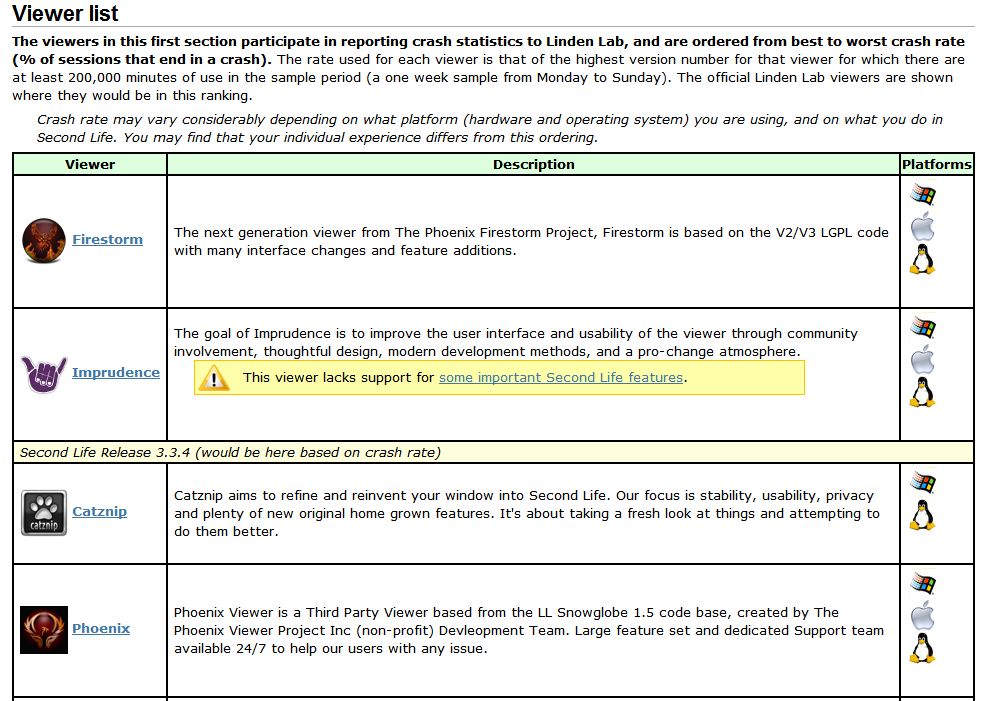
  • On Tuesday September 4th, version 4.2.2.29837 officially achieved the lowest crash rate for any V2/V3-based TPV at just 8.54%. This is even lower than LL’s own 1.23.5 viewer, which although long in the tooth and increasingly out-dated, is still regarded as very stable.
Extract from the Third-party Viewer directory listing, showing the most stable viewers at this time

Also on Tuesday 4th September, the team received official notification from LL that Firestorm has taken over from Phoenix as the most popular viewer in use in Second Life. This was marked by Oz Linden putting out an e-mail through the open-source development mailing list:

“On behalf of Linden Lab, I’d like to extend congratulations to the Firestorm Viewer team.

Last week, Firestorm took over the #1 spot on the list of Second Life viewers in terms of total user time, surpassing its elder cousin, Phoenix. The Phoenix viewer still has a slight lead in number of sessions, but Firestorm viewer sessions are on average significantly
longer – which may in turn be due in part to its substantially better stability.

“The Firestorm team has worked long and hard to support users who want both the latest Second Life features being developed by Linden Lab and the additional capabilities you provide, and this achievement is one you can all be proud of.

“Thank you.

Congratulations to everyone at Firestorm for all the time and effort devoted to the project.

William Weaver’s Phototools: create glorious shots with Firestorm

Update: Phototools is fully integrated into Firestorm.

Not long after joining Second Life, William Weaver, known in-world as Paperwork Resident, became interested in both SL photography and machinima. While he quickly realised the viewer has a huge capability for making both, he found that even in a TPV like Firestorm, many of the controls remain spread across multiple floaters and tabs and buried within the debug settings, making it hard to use the viewer to its fullest potential for in-world picture production without a lot of frustrating shuffling of floaters and tabs.

His solution was to develop Phototools, a menu system for Firestorm that pulls together all the various settings and options within the viewer that a photographer or machinima maker is liable to need during a shoot. With Phototools, it is possible to quickly and relatively easily set-up the viewer to produce stunning visual images in a one-stop pass using a dedicated floater; allowing some stunning results to be had without the need for any post-processing through Photoshop or similar tools.

“Discover” by William Weaver – an image produced in Firestorm using the options made available through Phototools and with no external post-processing

Phototools has been around now for a while, available from Williams, blog, Paperwork Shows, and has been gaining popularity among Firestorm users. However, William has been working on preparing it for full integration into the viewer, and as a part of this work, he has made a number of changes to it which have just been released as version 0.94.

Essentially, Phototools replaces several of Firestorm’s default floaters with updated versions. In the original release, these included a replacement camera floater, which presented a wealth of additional camera and mouse / joystick options. However, as it was also relatively large and cumbersome, William has reverted to using the original camera floater in the new release, with the additional controls incorporated into the main Phototools floater. For those who have been using the earlier version of Phototools, the new release includes an .XML file for the original Firestorm default camera floater.

The Phototools Floater

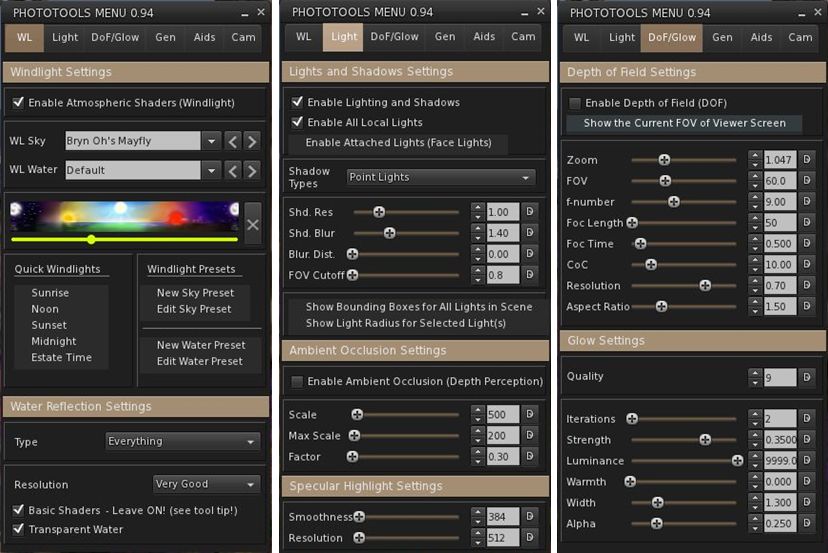
The main floater replaced by Phototools is the Firestorm Quick Preferences floater. For those who find this a very handy tool to have at your fingertips, it is not entirely lost: most of the options it contains are still available in its replacement, which I like to call the Phototools floater. This comprises six tabs: WL – for Windlight settings Light – for lighting and shadows; DoF/Glow – for depth of field and glow effects; Gen – for setting Draw Distance, terrain detail, avatar counts, etc; and Cam – for camera and mouse options.

Three of the Phototools floater tabs (click to enlarge)

Anyone familiar with Firestorm’s Preferences tabs will immediately recognise many of the options presented within the Phototools floater; others may not be so instantly recognisable, as they’ve been pulled from the debug settings. This is where the power of Phototools lay: not in providing new options or functions, but in making those already present in the viewer a lot easier to access and use from a single reference-point with the minimum of fuss and without taking up huge amounts of screen space (and having a heavy impact on frame rates).

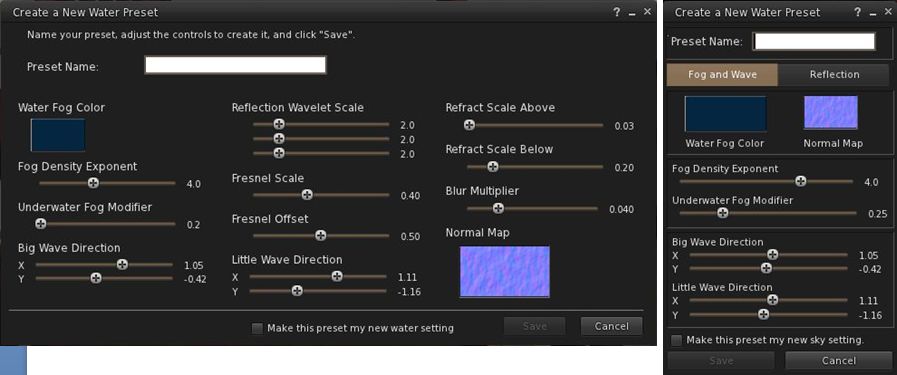
The first tab in the floater is for Windlight settings and this includes options to open the Windlight water and sky presets floaters (which can also still be accessed via World-> Environment Editor ->Sky Presets / Water Presets). Both of these floaters have been extensively re-worked to make them much more compact and screen-friendly when compared to the default versions found in most viewers.

Windlight Water Presets: the default floater (l) and the Phototools updated floater (r) both to scale (click to enlarge)

Taken together, the Phototools floater and revised sky and water presets floaters present all the options needed to manipulate the environment, as seen through your viewer, in three panels which are compact enough not to overwhelm the screen; a major benefit when trying to set-up lighting, etc., for a specific shoot or film sequence and you need to see the impact of changes on your world-view as you adjust lighting and other effects to achieve a specific result.

Another of William Weaver’s images created entirely using the viewer options presented through Phototools

How it all Came About

I recently caught up with William with a view to finding out more about Phototools and the future holds for them. I started by asking him how he got started on the road of developing them.

“When I first started in SL I was using it to write,” he explained. “I would role-play and write chapters in a story from the events of the role-play. While doing this, I started taking some pictures and I noticed SL has a great deal of potential for very good image making.”

He also noticed that a lot of people relied on external post-processing to achieve their finished results, “While I appreciate people who are good with Photoshop and after effects, I enjoy working with the limits of the viewer.” This started him thinking about how the capabilities within the viewer could be presented in a more user-friendly and accessible manner. At the same time, and while also involved in the role-play, William got to make his first SL machinima, which brought him up against additional problems.

Continue reading “William Weaver’s Phototools: create glorious shots with Firestorm”

Firestorm 4.2.2.29837: pathfinding, Flickr and more

Monday 27th saw Firestorm 4.2.1.29803 released. Unfortunately, this included a visual bug being inadvertently introduced into the release which made moving items such as doors and wheels appear to be “broken”. While this was only a visual impact rather than a code breakage, the decision was taken to withdraw 4.2.1 and replace it with 4.2.2 once the problem had been fixed.

As a result, and in case the release of version 4.2.2 included additional updates necessary as a result of fixing the issue, I opted to hold-off on my review of 4.2.1, and wait until I’d been able to look at 4.2.2 before Pressing a review.

So here it is, a look at Firestorm 4.2.2, featuring some of the key changes and updates which include an initial implementation of pathfinding. Alongside this, the release sees includes Katharine Berry’s snapshots-to-Flickr option, temporary uploads from the snapshot floater, new toolbar buttons and more.

A Note on OpenSim

This release does not include any fork between Second Life and OpenSim. That will be coming in a future release, which, as Jessica reports in her blog post on this release, might be a while in coming as the team have a lot of work on their collective plate.

Installation

The windows installer is some 33.7Mb in size – so par for the course with Firestorm. If you’ve previously installed version 4.2.1.29803 then a clean install is not required. However, if you’re upgrading from 4.1.1.28744 or earlier, a clean install is required / recommended.

Pathfinding Tools

As mentioned above, and with the exception of navmesh visualisation, all the main pathfinding tools are present in this release, complete with the expected Firestorm finesse when it comes to Rebake Region.

The Linksets and Characters floaters can be accessed using both the context and the pie menu when right-clicking on an object or character. The Build and Object Profile panels also have their pathfinding information panels added.

The Firestorm team have implemented the Rebake Region functionality somewhat differently to Linden Lab. Rather than incorporating a button displayed at the bottom of the viewer window when a rebake is required, the team have combined the rebake function with the pathfinding icon displayed in the Menu Bar / Navigation Bar (if displayed). Thus, when the icon is displayed (either with or without the initial warning pop-up, as shown in the image below), clicking on the icon will display a dialogue allowing a rebake to be initiated.

Region rebaking in Firestorm: The Menu Bar icon is used to trigger a rebake, rather than a button displayed within the viewer window. The default warning of the need for a rebake (top) may also be displayed, depending upon whether you have left the option enabled or not after its first appearance.

Combined with disabling the initial pop-up (by checking Do not show this again),  this option makes the need for rebakes less intrusive when using Firestorm.

New Buttons

There are three new toolbar buttons in the 4.2.0 release: Asset Blacklist and Sound Explorer, both of which toggle open / close the Asset Blacklist floater or the Sound Explorer floater respectively (each otherwise accessible via the World menu), and Ground Sit – which is pretty self-explanatory.

Snapshots: Flickr, Temp Upload and More

Flickr option on Snapshots floater

Flickr is a popular medium for SL photographers, so having an option to save pictures directly to it is likely to be a benefit to many. With this release, Firestorm obtains Katharine Berry’s code to enable snapshots to be uploaded directly from the viewer to a Flickr account.

In order to work, this functionality requires Firestorm is authorised to access a Flickr account. Therefore, the first time the Flickr tab on the snapshot floater is clicked, a pop-up is displayed, both explaining the need for authentication and what will happen. Clicking on NO on the pop-up will stop the process, and you can use another option on your snapshot floater for saving the image.

Clicking on YES will take you to the Flickr authorisation page, which will outline the possible risks of connecting Firestorm to Flickr (a standard alert page, common when using inter-application authorisation). Read the warning carefully, and if happy, confirm you wish to proceed (refusing cancels the link and denies Firestorm the ability to upload to Flickr).

Confirming that you’re happy to proceed will display a code number on the Flickr web-page. Type this into the authorisation pop-up displayed in Firestorm to complete the authorisation process. Once done, you’ll be able to upload pictures to your Flickr account without further hindrance.

This release of the snapshot floater also includes an option to temporarily upload a snapshot to your inventory. Temporary snapshots are saved to your Photo Album, where they will be available for personal use (e.g. non-transferrable, etc) until your next re-log. Finally for the snapshot floater, all settings changes are saved between sessions.

Use the page numbers below left to continue reading

Helping the community: the Phoenix Firestorm Support region

Update Aug 25th: The region is now open. See the link at the end of this article to visit.

This weekend, the Firestorm team will be launching a new in-world venture: the Phoenix Firestom Support island.

The region is designed to serve two purposes. One is to provide help and support for users of any calibre, via the use of in-world tutorials supported by real life help in the case of users new to SL, and via the provisioning of an area more focused on providing real life help for users more familiar with SL and the viewer. The second is to provide an in-world base of operations to support Firestorm users in particular.

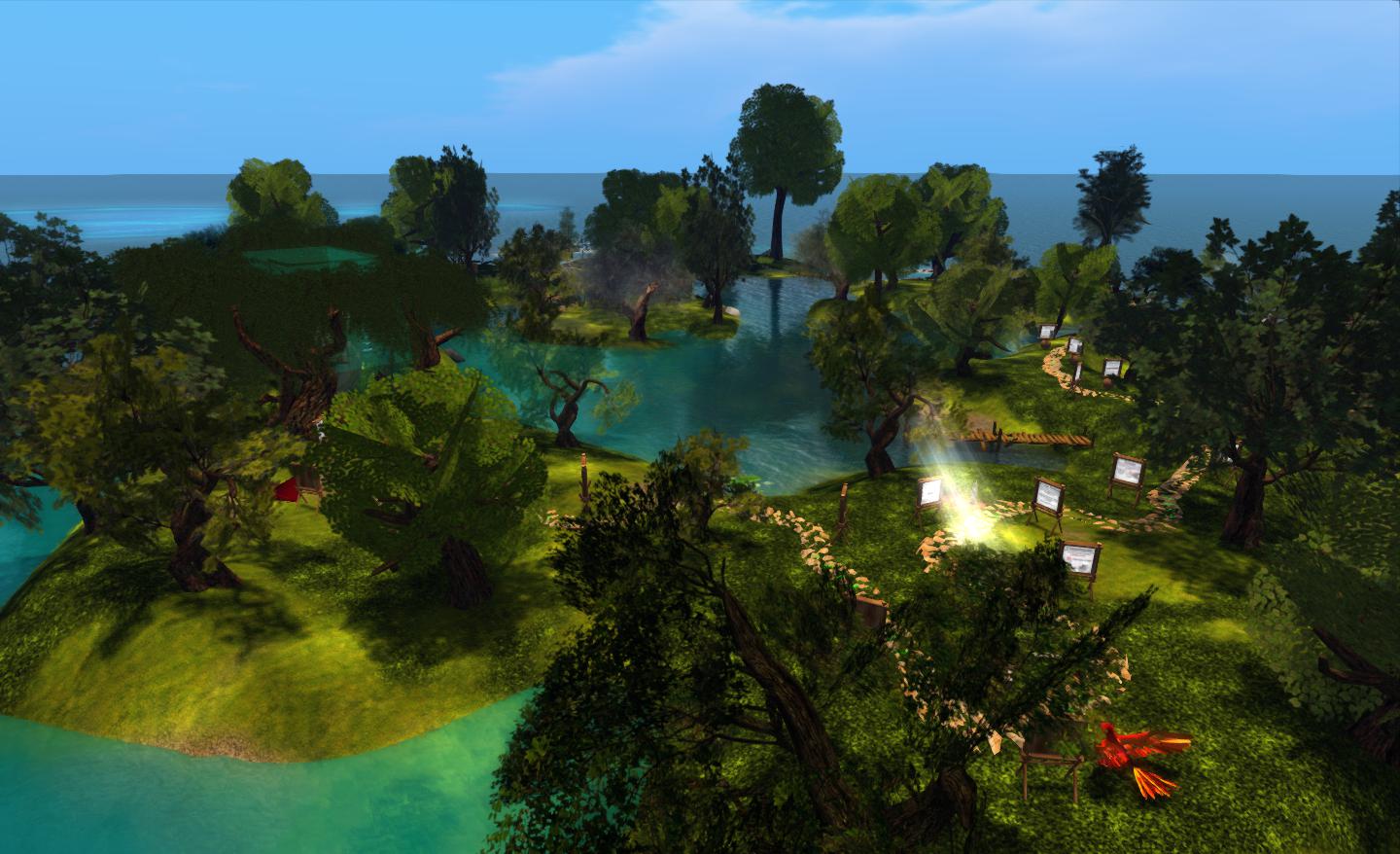
Firestorm’s new support island

The region is somewhat mindful of the old SL Orientation Islands where new users to SL learned about the basics of the viewer and how to do things – so much so, in fact, that I was half-expecting to find a beach ball and table during my preview explorations :). While neither turned up, I did smile on coming across a large and talkative phoenix, itself a reminder of the OI parrot…

However, this is not to say that the region has been deliberately modelled on the old Orientation Islands. As Jessica Lyon, the Phoenix / Firestorm project lead pointed out to me as we discussed the island and the ideas behind it, it’s a matter of form following function. A relaxed and visually pleasing tutorial path with few distractions naturally lends itself to this kind of open-air approach.

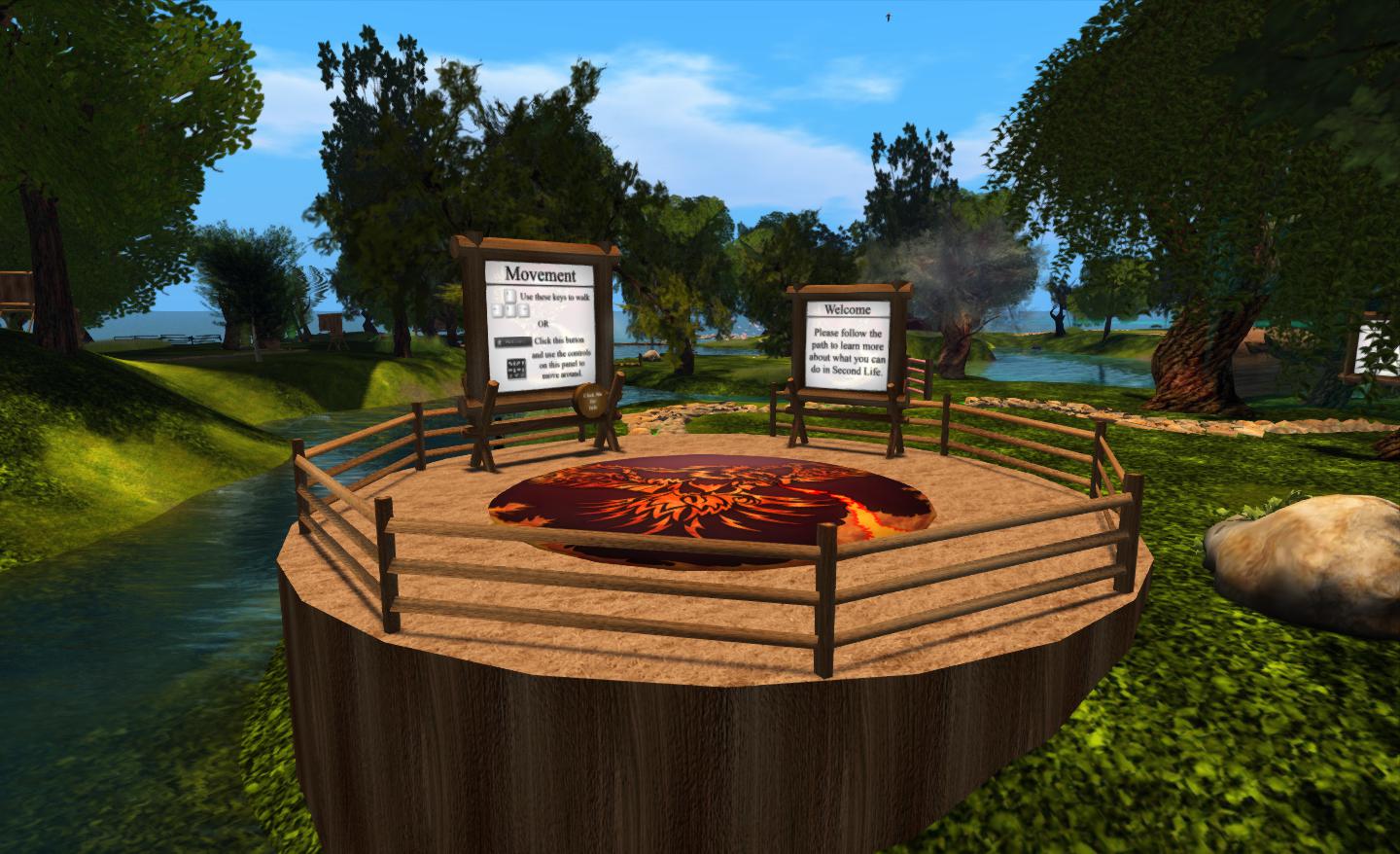
The main element of the region is a path which leads people around the island from the arrival point, taking them past various lessons in gaining familiarity with Second Life and the viewer. These are very much focused on “learn by doing” – such as jumping over a fence to understand walk / jump – and are very clearly and cleanly presented, and obviously intended for the more novice user.

Arrival point

The signs are clear and concise, and while based on Firestorm running in a default mode (i.e. with the pie menu active), they easily translate to other viewers, whether they are using pie or context menus.

Within this sits a central area where questions about Second Life and viewer use that go beyond those that tend to be asked by “new” users can be addressed. This can be reached via a bridge from the outer area of the island or via a teleporter located at the arrivals point.

The central area, where the more experience user can seek focused assistance from staff and mentors

A key aspect of the region is that is designed to be staffed. Although it had originally been hoped that in-situ help relatively small, things haven’t quite work out as originally envisioned. “Our original plan,” Jessica told me, “Was to have a first entry to SL region for zero – 30 day accounts only, and would staff it with our own support staff and a careful selection of mentors/helpers. We have a RegAPI from LL [which would allow Firestorm to run a sign-up page and deliver new users directly to the region]. Unfortunately, it doesn’t work with “Resident” last names, so we had to switch to plan B. Plan B is to open the region to the public, and heavily staff it with mentors and helpers to ensure new and old residents alike get real help from real humans.”

As a result of the switch to “Plan B”, and to ensure the island is properly staffed, invitations to participate have been sent to the RHN, White Tiger Mentors, Mental Mentors and other groups. One potential benefit of this is it will help ensure there’s a much more diverse wealth of experience on-hand to deal with viewer-centric questions than might otherwise be the case were the island solely staffed by Firestorm-focused volunteers.

Continue reading “Helping the community: the Phoenix Firestorm Support region”