On April 1st, the Firestorm team released and April Fools video in the spirit of their 2013 “Firestorm Mobile” hoax.
As fun it was, there was a secret within the joke which many – including me – missed at the first watching of the video, largely because we didn’t follow the suggestion and manually type the URL at the end of the video into a web browser.
For those who may have missed things, and to provide a frame of reference, I’m including the video in this post as well.
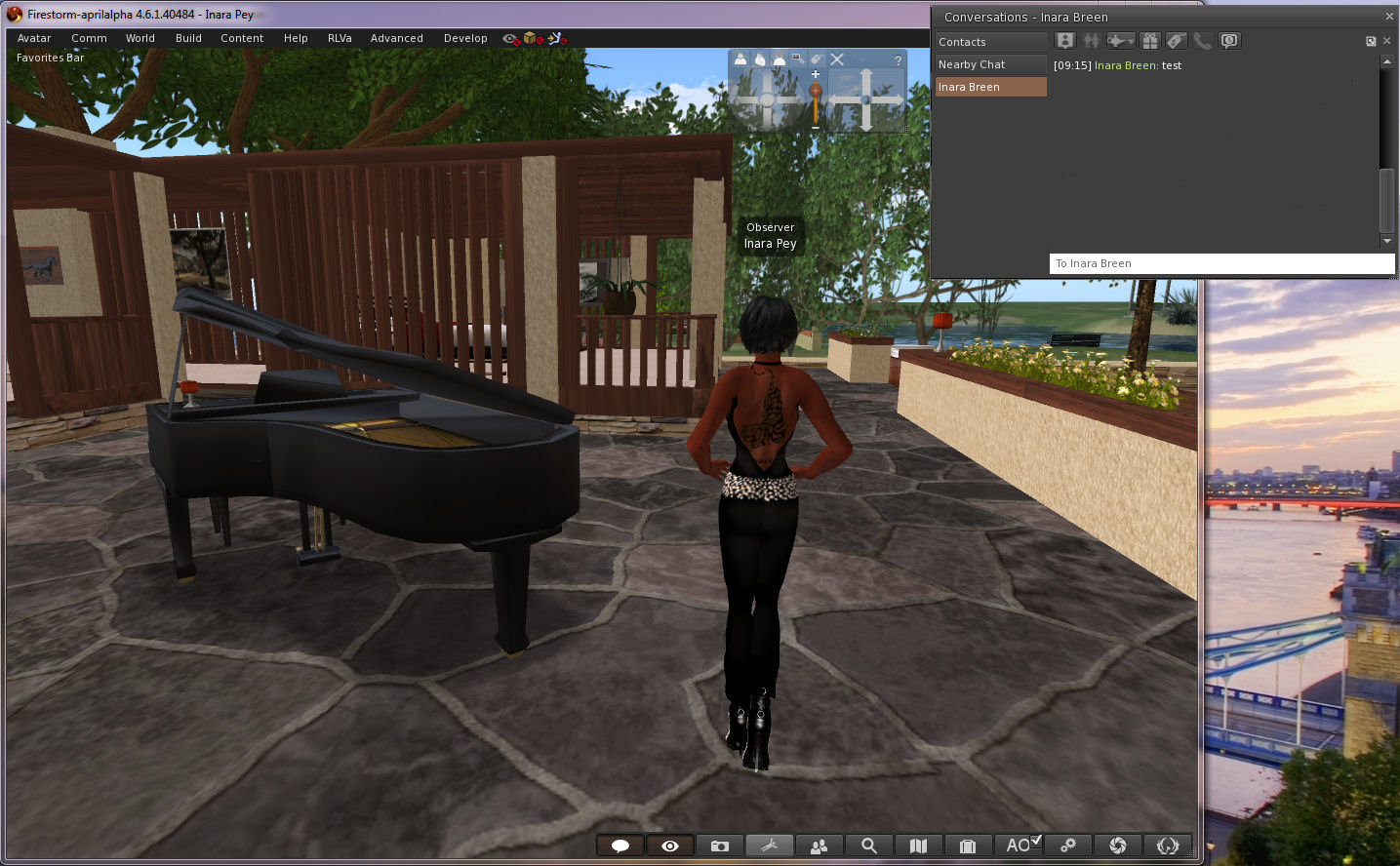
Jessica Lyon contacted me just after I’d published a post on the Firestorm and Catznip April Fools and gave me a proper “Gotcha!” So, having taken the time to stay quiet on the matter, as Jessica requested (and in order to go wipe the egg from my face!), I’m here to say, as many Firestorm users have been poking me about over the last 24-hours, that the Firestorm Dynamic User Interface isn’t a joke. It’s here. I’m using it. What’s more the Firestorm team have now blogged to confirm it.
The viewer,Firestorm 4.6.1.40484 is available for download for Windows only, and will run on both Second Life and OpenSim.
It really isn’t an April Fools – Firestorm 4.6.1.40484 really does allow you to move some floaters outside of the viewer window!
Now, the viewer – as Jessica and the team wish to express loud and clear – isn’t the finished article. It’s currently experimental, and as such, subject to unpredictable behaviour. It is not recommended for use as a primary viewer.
There are also some other points to note:
Not all of the floaters in the viewer may be capable of being pulled out of the viewer window. Those that can appear to float “above” the viewer window, rather than “in” it
Not all of thefloaters work smoothly at this time, and may be subject to jumping and / or, flickering, and options on menus associated with them may not be accessible as a result. There may be other issues, such as:
You cannot drag / drop items from the Inventory floater in-world
Conversations in the communications floater tabs may not scroll soothly
Floaters outside of the viewer window cannot be resizedYou cannot resize those floaters which can be moved outside of the viewer window
Torn-off menus cannot as yet be floated
The conversations floater can be pulled out of the viewer – but if you detach a specific IM tab, it will bounce back into the viewer window and cannot currently be dragged back out
Discussing the viewer with me after pointing out I’d been had with the April Fools video, Jessica said:
The intention is that we want to release this code in the hopes that ALL open-source developers out there, TPVs included, will pick it up. fix it, improve it, expand its capability and most importantly SHARE it with one another. It is my hope that this may become a catalyst to renew interest in viewer development among inactive developers and that ultimately this will open a whole new realm of possibilities for SL viewer technology moving forward.
We will not be assigning the gentleman’s agreement on this… it’s too important to make this about credit. I don’t care who releases it first as long as the code is shared equally. We will also work on improving it, but I think this should be a community effort.
Having detachable floaters like this has been one of the Holy Grails for the SL viewer, and has long, and oft been requested. However, the Lab has generally taken the view that to get something like this working would take a considerable amount of effort. The Firestorm’s team work is therefore very much pre-proof-of-concept, as their blog post on the matter indicates:
Firestorm DUI is little more than a very early proof of concept that a dynamic user interface is in fact possible with Virtual World viewers … our very own Nicky Dasmijn managed to come up with this in a relatively short amount of time, and we hope that it will translate to this functionality being available in a reasonable amount of time …
So, if you haven’t already taken it for a test-drive, and remembering the Firestorm DUI isn’t a release, and there may be issues with using it, and that it is not supported by Firestorm at this point in time. So again, when using it, please do notuse it as your primary viewer.
Please don’t report any issues with the viewer here; I’m not a part of the Firestorm team, and cannot help you. As mentioned above, the DUI viewer is currently unsupported!
On Saturday March15th 2014, the Firestorm team hosted a meeting and Q and A session to discuss the recent 4.6.1 release, provide updates on a number of issues, and answer audience questions.
While the meeting was recorded, the Firestorm team are aware that many of their users have hearing difficulties, and / or prefer to read text, so this transcript has been supplied on their behalf.
When reading, please remember:
This is not a word-for-word transcript of the entire meeting. While all quotes given are as they are spoken in the video, to assist in readability and maintain the flow of conversation, not all asides, jokes, interruptions, etc., have been included in the text presented here
In the interests of readability, topics in the transcript are not necessarily presented chronologically compared to the video. For example: questions asked during the various updates, etc., are presented in the Q and A section of the transcript, rather than at the point at which they were asked (unless directly relevant to the topic being discussed). Similarly, topics of discussion which came up during the Q and A session, but which were not tied to specific questions, have been placed under their own subject heading outside of the Q and A section
If there are any sizeable gaps in comments from a speaker which resulted from asides, repetition, questions to others etc,, these are indicated by the use of “…”
Timestamps are provided as guidance should anyone wish to hear the comments in full from any speaker on the video
Questions /comments were made in chat while speakers were talking. This inevitably meant that replies to questions would lag well behind when they were originally asked. To provide context between questions and answers, questions in the transcript are given (in italics) at the point at which each is addressed by a member of the Firestorm team, either in voice or via chat.
Please note: This transcript is provided for informational purposes only. I am not an official member of the Firestorm team, and technical or support issues relating to Firestorm cannot easily be addressed through these pages. Such requests for assistance should be made through the in-world Firestorm Support groups or at the Firestorm support region.
The TL;DR Summary
The following is a brief summary of topics discussed. Timestamps in braces refer to times in the video where the relevant commentary can be heard. All sections are expanded upon in the main transcript – click on the timestamp to go to them.
[0:0015] viewers are often subject to flase flagging by anti-virus programs as carrying a potential virus / Trojan. With the Firestorm 4.6.1, Norton anti-virus in particular had issues with viewer, prompting a positive response from Norton’s support
[0:14:32] Mac issues update: work is being done on some Mac issues within the Lab, but there is no major project to address problems some users are having. Firestorm are somewhat stymied in dealing with issues due to both a lack of developers / developers with free time and because some of the issues are beyond their ability to resolve
[0:31:00] Windows XP officially reaches its end-of-life on Aprial 8th, 2014. What does this mean for users on XP using Firestorm?
[0:38:25] Even running a 32-bit viewer on a 64-bit OS yields stability improvements, although if you have a 64-bit version available, it’s obviously preferable to use that on a 64-bit OS
[0:57:40] Firestorm are often critiqued on the frequency of releases. The team are moving to imporve things to a 3-monthly cycle, and there are reasons why a more frequent cycle may not be feasible
[1:21:05] It remains that Firestorm will not offer nightly or weekly builds, because there are significant support issues
[1:27:32] The team already try to release based on feature sets, however, a time-based cycle offers potentially better management of releases in keeping with the needs of the developers, QA and support
[1:35:21] The target will therefore be a 3-monthly cycle of major releases, with possible interim releases with bug fixes or for special features, such as might be the case with the group ban functionality
[1:58:53] With a target of a 3-monthly release cycle, it is probable that the next 2-3 releases are going to be primarily focused on incorporating features and capabilities coming out of the Lab, simply because there are so many of them: group bans, SSA updates, AIS v3, interest list, voice updates, etc.
[2:01:55] The new download server has performed admirably with not craches or other issues.
[1:55:40] Firestorm classes – with a new release just out, don’t forget there are Firestorm classes which cover all the new features, including things like the updated Contact Sets
Questions and Answers: including information on clean installs / re-installs; using settings back-ups; troubleshhoting issues; the status of voice improvements; why group limits are unlikely to increase in the near future; helping Firestorm support, etc.
Update: Shortly after release, Jessica Lyon dropped me a note to say the Vivox files didn’t actually make it to the release, but will now be made available via a separate download.
On Wednesday March 12th, the Firestorm team released Firestorm 4.6.1.40478, bringing with it a lot of features, fixes, updates and enhancements.
The complete list of changes, together with attributions, can be found in the release notes, and I refer readers to that document for specifics on contributors, FIRE JIRA, etc. The following is intended as an overview of some of the more major / interesting changes to be found in the release.
The first thing to note with this release is that it is, with the exception of the Linux 64-bit version (which is beta), a full release, not a beta or alpha or anything else.
So, if you’ve been avoiding trying 4.5.1 because it was a beta release, now is the time to consider updating. Do make sure when doing so that you take a look at the Firestorm 4.5.1 release notes, which provide a lot of information on that release as well which will of benefit to you as you gain familiarity with 4.6.1. You can also read my review of the 4.5.1 release here.
Downloading – a Reminder
This will be the first release of Firestorm following changes at Google forcing Firestorm to discontinue using Google’s download service (see the Download Server section of my Feb 15th FS meeting transcript for an explanation). This means that all Firestorm downloads starting with this release are via the team’s own download server.
As this is the only server the team has at their disposal for downloading the viewer, you may experience some delay / issues when attempting to download the viewer due to the volume of downloads the server is handling, particularly during the period following the release announcement. Should this occur, the Firestorm team request a little patience, and if you can, to consider re-trying a little later.
Installation
As always, a completely clean install of the viewer is recommended.
Windows 64-bit Installer
Those who have previously installed the windows 64-bit version will be aware that the installer could be painfully slow. With this release, the Windows 64-bit installer has been overhauled, and should be appreciably faster, and also includes some additional tweaks:
Added estimated installation size (200 MB)
Add/Remove panel icon (shared with 32bit installer for simplicity)
Added website URLs (shown in the bottom section of the Add/Remove panel)
Viewer and Installer Blocks
The release of 4.6.1 means that all versions of Firestorm prior to 4.4.2 will be blocked from accessing Second Life in around a week’s time. Additionally, and in reference to the Windows version of Firestorm, note that:
The 32-bit installer blocks the installation on any Windows operating system below Vista, except for 32-bit Windows XP with Service Pack 3
the 64-bit installer blocks the installation on Windows 64 bit on versions older than Windows XP with Service Pack 2.
Updates from the Lab
This release brings Firestorm to parity with many of the Lab’s more recent updates, highlights of which include:
Code parity with Linden Lab’s 3.7.2 code base
Fitted mesh support – for those unfamiliar with Fitted Mesh, I have an overview here
Temporary attachments no longer get removed improperly
… and more
Request Teleport
The Request for Teleport option (show from the People floater) and request.
A feature contributed to the SL viewer by Jonathan Yap, Request Teleport allows users to pass a request to others asking that they be teleported to their location.
I covered the capability when it first appeared in an SL project viewer in September 2013, so in brief:
Select the person to whom you wish to teleport (from your Friends list or Nearby list, etc.), and select Request Teleport
Enter a message in the pop-up, if required, and click OK.
At the “other end”, the recipient of the request will receive the request and can either accept the request, sending a teleport offer, or reject it, in which case no message is sent
If the request is accepted, the sender see the usual teleport offer pop-up.
Note that Request Teleport is not a replacement for Firestorm’s “teleport to” capability, which remains unchanged.
SL Share and Facebook
The four tabs of the SLShare floater (as seen on the SL viewer), which allow those who want to share their SL times via their Facebook account
SL Share is a means by which those who have no issue with linking their SL account with their Facebook account can do so and send messages, photos, etc. to their Facebook account.
This was a feature released by Linden Lab again in September 2013, and I provided an overview at that time. however, it is probably worth repeating a couple of core points:
The feature is opt-in, and available to those who have no problem linking their SL identity with that of their Facebook identity
It has proven very popular among many users who have no problems doing so
It’s not about the “Facebookisation” of Second Life or trying to “make” SL users also use Facebook.
Region Restart Updates
The region restart updates comprise two main elements:
The new on-screen region restart warning, accompanied by a sound and camera shake
A new region restart warning notification, which is displayed in the centre of the viewer window every minute, on the minute, for the last five minutes prior to the region restarting, and which includes a countdown (in seconds) until the regions restarts
A camera-shaking warning which occurs every minute, on the minute for the last five minutes prior to the region restarting, causing the world view to shake., and which is accompanied by a region restart sound.
Note that both the new format notification and the camera shaking can be disabled / enabled as follows:
New region restart notification: Preferences > User Interface > Toasts > Use new region restart notification
Camera shaking: Preferences > User Interface > Toasts > Don’t shake my screen when region restart alert message is shown.
In addition, teleports to regions which are in the final 60 seconds before a restart will be prevented and the viewer will display a message in the format: “The region you’re trying to enter is about to shut down”.
Phototools
Phototools is updated to version 1.2, bringing with it a lot of enhancements, including:
An option to enable / disable screen space reflections (when shadows options are enabled)
The removal of legacy specular highlight and camera aspect ratio controls
Additional sliders/spinners and controls for RenderShadowBias, RedershadowBiasError, CameraMaxCoF, FSRenderShadowSplitExponentY, FSRenderShadowGaussianX, FSRenderSSAOEffect and FSRenderShadowGaussianY
Increased editable value ranges for many spinners allowing greater control
Numerous other updates and amendments.
Details on the Phototools floater can be found here.
In addition, William Weaver, who first developed Phototools, has produced a series of video tutorials on using the floaters, the latest of which is provided below, which also looks at some of the most recent updates:
Contact Sets
Contact Sets, which allows Firestorm users to group their friends / contacts into groups or categories (friends, business contacts, members of s specific RP group, etc.), has been completely revised with this latest release of Firestorm.
Contact Sets now form an additional tab in the Conversations / Contacts floater, and as well as the familiar means of accessing it (via the Contact Sets toolbar button, or by Comm > Contact Sets or by pressing CTRL-ALT-SHIFT-C), it can now be displayed by any of the following methods, and then clicking on the Contact Sets tab:
Via Comm > Conversations / CTRL-T or via the Conversations toolbar button
Via Comm > Contacts / CTRL-ALT-SHIFT-F
Via Comm > Friends / CTRL-SHFT-F or via the People / Friends toolbar button
Contact Sets is now integrated into the Conversations – Contacts floater (image courtesy of the Firestorm team)
The new layout is tidier and more integrated into the Firestorm UI, although a couple of options – such as the Rolodex functionality – are no longer present. New buttons provide a more intuitive approach to managing Contact Sets, and include the able to display friends and contacts using their Display Names or even set your own aliases for them (only visible in your Contacts Sets tab).
An overview and instructions on using the new Contact Sets can be found here.
On Saturday February 15th 2014, the Firestorm team hosted a meeting to cover news on the upcoming release of Firestorm, projects they’re working on, and to answer audience questions.
While the meeting was recorded, the Firestorm team are aware that many of their users have hearing difficulties, and / or prefer to read text, so this transcript has been supplied on their behalf.
When reading, please remember:
This is not a word-for-word transcript of the entire meeting. While all quotes given are as they are spoken in the video, to assist in readability and maintain the flow of conversation, not all asides, jokes, interruptions, etc., have been included in the text presented here
If there are any sizeable gaps in comments from a speaker which resulted from asides, repetition, questions to others etc,, these are indicated by the use of “…”
Timestamps are provided as guidance should anyone wish to hear the comments in full from any speaker on the video
Questions /comments were made in chat while speakers were talking. This inevitably meant that replies to questions would lag well behind when they were originally asked. To provide context between questions and answers, questions in the transcript are given (in italics) at the point at which each is addressed by a member of the Firestorm team, either in voice or via chat.
Please note: This transcript is provided for informational purposes only. I am not an official member of the Firestorm team, and technical or support issues relating to Firestorm cannot easily be addressed through these pages. Such requests for assistance should be made through the in-world Firestorm Support groups or at the Firestorm support region.
The TL;DR Summary
Items here are presented in the order in which they are likely to be of interest to users, rather than chronologically. Timestamps in braces refer to times in the video where the relevant commentary can be heard. All sections are expanded upon in the main transcript – click on the timestamp to go to them.
[0:51:07] The next release of Firestorm will be out around March 9th – possibly a little before, possibly after. Some of what should be in it includes:
From LL: Fitted Mesh, HTTP (hopefully – see HTTP discussion), SLShare (Facebook support), Request teleport, New region restart warnings
RLVa 1.4.9, Animation Explorer, Area Search updates, revised Contacts Sets, Mmany mini-map updates (from Exodus), avatar shape XML import, group list .CSF export, materials support in object exporter, Phototools updates, anti-spam updates, and more
Major and minor bug fixes
[0:17:57] Firestorm Download Server: Firestorm have been forced to discontinue using Google cloud as their viewer download service due to reasons of costs following to changes to Google’s service. As a result, after looking at options for offering viewer downloads, the team has opted to invest in a dedicated download server of their own. This may lead to issues being experienced when downloading future releases of Firestorm. Details in the section Firestorm Download Server
[0:07:54] Cinder Roxley, one of the core Firestorm developers and open-source code contributors to the Lab, has departed Second Life, leaving something of a large hole in the Firestorm team
[0:07:54] Leap Motion: work is underway, now to be led by David Rowe (Strachan Ofarrell in SL), who develops CtrlAltStudio, who is partnering with Firestorm to carry the project forward. Work has started on camera manipulation, object manipulation and avatar movement. However, there is still a major amount of work to be done, at least some of which is contingent upon Leap Motion producing an releasing an update for the device itself. It is therefore unlikely any work on Leap Motion will be appearing in the near future, and certainly on in the next Firestorm release
[0:27:55] Voice issues: Vivox has offered to assist the Lab in dealing with at least some of the issues with SL voice. A new SDK (SLvoice plugin) is due to be released soon. If it arrives in time, it may be incorporated into the upcoming Firestorm release
[1:13:34] Mac issues: and update on matters for Mac users.
[0:41:02] HTTP: Tankmaster Finesmith has been merging the Lab’s HTTP updates into his own Firestorm repository. Depending on what happens the Lab’s HTTP viewer updates, Tank’s work may be merged into the upcoming Firestorm release and form a part of it
The Firestorm have been working hard on readying a new release of the viewer. Beta version of Firestorm 4.5.2 have been under beta evaluation for the last week or so, (and is looking good – the most recent version appears to have cured an issue I’ve had with Firestorm and my GTX 660 GPU, so right now I’m a very happy bunny).
There are still some decisions to be made, as a result, the next Firestorm Q&A session will be on Saturday February 15th. As per usual, the venue for the meeting will be the Phoenix Firestorm Support Island theatre, commencing at 16:00 SLT.
Jessica and the firestorm team promise “exciting news” at the next Q&A session
References to some “great news” and “exciting times are coming” within the blog post announcing the meeting has led to speculation as to what might be announced.
As well as working directly on the viewer, members of the Firestorm team have, as reported in these pages, been working on integrating Leap Motion into the viewer on behalf of the Lab and Leap Motion – so rumours have been circulating that the next release will include Leap Motion support, and it would seem that initial support for the device may be available in one form or another.
Those who use Firestorm for their SL photography may well have a nice little surprise waiting for them as well 😉 , as might Linux users.
However, the best way to be sure of what is coming is to attend the meeting. As usual, and on behalf of the team, I’ll be providing a transcript after the fact.
On Saturday January 11th, the Firestorm team hosted the first of their informal question-and-answer sessions for 2014. The meeting was called at short notice, and I was unable to attend. Due to other pressures and work, I’m not in a position to provide a full transcript of the meeting. Instead the following is offered as a summary of the key discussion points raised in the meeting (with timestamps so that the relevant parts of the recording can be listened to), and a summary of the main questions asked during the Q&A session.
As always, please note:
Questions /comments were made in chat while speakers were talking. This inevitably meant that replies to questions would lag well behind when they were originally asked. To provide context between questions and answers, questions in the transcript are given (in italics) at the point at which each is addressed by a member of the Firestorm team, either in voice or via chat
There was some general discussion to topics such as lag and clearing cache which took place during the “Q&A”, notes on these have been included in the General discussion section below, rather than in the Q&A section
This report is provided for informational purposes only. As such, questions on technical issues relating to Firestorm and / or project-specific questions cannot be answered here unless one of the Firestorm team drops by.
There was a lot of back and forth and sundry chat during the meeting on a range of topics which is not reported upon here.
As ever, my thanks to North for recording and supplying the video of the meeting.
General Discussion
0:00:01- 0:03:09 Firestorm Support: One-on-one Help
The Firestorm support volunteers will be commencing one-on-one help for users who feel they need it. The support will be offered as and when volunteers are available, and will take place in the ground-level central area of the Phoenix Firestorm Support Island. Sessions will likely be held on a drop-in basis: if you have a particular issue with which you need help, drop by and if there are volunteers available, they’ll do their best to help you, both in voice and / or in text.
Do keep in mind that the support team are all volunteers, and as such, they have individual approaches to providing assistance (some will not provide support in IM, for example). Also, as volunteers, it is possible that there may be times when the drop-in area is not staffed; if this is the case, people can either seek assistance through the Firestorm support groups or try the drop-in area another time.
0:03:15-0:10:00 Official Firestorm Support
There have been issues of users presenting themselves as “Firestorm advisors” and IMing people in the support group chat, etc. If anyone using Firestorm is unsure as to whether someone talking to them in support chat (or IM), they can verify the person’s status in a number of ways:
If the conversation is taking place as a result of contact via the Firestorm support group chat (either in chat or initiated from their and taken to IM) – check to see if the person’s group chat is in bold – if it is, this indicates they have moderator status, and are a member of the Firestorm Support team
If you use Firestorm legacy profiles, open the profile of the individual concerned and check the Account section – if they are a member of the Firestorm support team, it will be listed (If you’re using web profiles by default, go to Preferences > General and uncheck Use Web Profiles by Default, top right – a viewer restart is not required.)
Check the Support page on the Firestorm web site. This lists the support volunteers – but do check the last updated timestamp at the bottom of the page, as it may not have been updated recently (although the team do maintain it).
How to identify if someone is a member of the Firestorm support team (top) and how to see the Firestorm legacy profiles (bottom)
This is a something of a sensitive issue, as the support chat is a community service, and as such the support team members appreciate other Firestorm users providing help to one another if official support team members are unavailable or already busy. As such, they do not wish to discourage users from providing such help to one another. However, what is (understandably) not appreciated is people presenting themselves as “official” Firestorm reps when they are not, and who consequently may not be in a position to access all information relating to a support issue or provide accurate information on the viewer’s future.
 On April 1st, the Firestorm team released and April Fools video in the spirit of their 2013 “Firestorm Mobile” hoax.


 Inara Pey: Living in a Modemworld