Firestorm: major updates on the way

There is a lot of exciting news coming out of the Phoenix / Firestorm team this week, as Jessica Lyon revealed during the fortnightly Phoenix Hour Metamix TV broadcast on Tuesday. Here are the highlights.
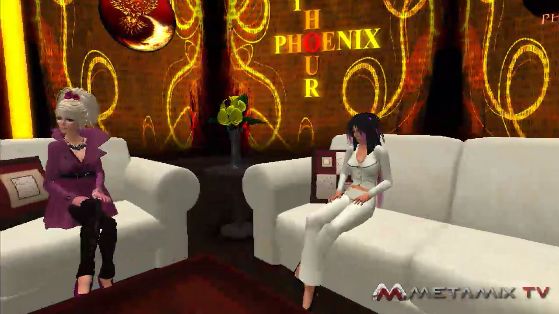
Phaylen (l) with Jessica

Hybrid with Mesh

The next release will be a true hybrid version for Firestorm, utilising code from the SL Viewer 2.6, 2.7 and 2.8 / 2.8.3 releases. It will include the capability to render mesh objects.

There is no actual release date for the new version – although Jessica hopes it will be in “The next couple of weeks.” The version is being referred to as 2.6 internally, as this was the code it was initially based on. However, given it has now developed into a hybrid encompassing several V2 releases, it is possible the version number will change to reflect the fact Firestorm is not tied to a specific Snowstorm build.

There are a couple of “blockers” to the release, one of which is getting the spell check tool into this release. This has hit a few problems, but the number of requests that have been received for its inclusion mean that it Jessica would prefer not to release the next version until the spell check is working.

Jessica Lyon discusses Firestorm

Beyond this, there are a number of other 2.6-related targets to be met, which (I gather) include regression fixes. However, rather than delaying the release unduly, the team may opt to release 2.6 with the major additions (mesh, the spell check, etc.) as a Release  Candidate, then add the remaining 2.6 targets before moving it to a Full Release status.

Viewer Modes in Firestorm

Viewer 2 introduced the concept of Viewer “modes”: Basic or Advanced. The next release of Firestorm will introduce a similar concept of “modes”, but executed very differently, in that three interface modes will be supported:

  • Phoenix mode: the Viewer presents a Phoenix-like UI
  • Viewer 2 mode: the Viewer presents a Viewer 2/3 UI
  • Firestorm mode: the Viewer presents its own hybrid UI

Friends List Overhaul – Contact Sets

This is something that is bound to excite a lot of people – and it is also something LL have been thinking about, going on comments at SLCC 2011.

Firestorm will include the ability to group / categorise your friends and contacts.

Called Contact Sets, the new feature allows a user’s Friends list to be organised according to individual needs (e.g. all business contacts can be put into a set, close friends into another set; individuals can appear across multiple sets, etc.).

Additionally, users will be able to set Viewer tag colours for their Contact Sets, making it easier to identify people from a Contact Set when seen in their own in-world view or when looking at mini-map icons.

The feature also includes the ability to include people not on a user’s Friends list, however:

  • It will not give a user any additional privileges over someone they include in this way, so users will not be able to see the online status, etc., to “non-Friends list” people in a Contact Set
  • Any group Teleports, conference calls, etc., will not be seen by “non-Friends list” people in a Contact Set

Other Features

The next release will include a number of additional features, including:

  • The Phoenix Log-in Manager will be included, allowing users to quickly and easily log-in to Second Life using any of their avatar accounts, as is currently the case with Phoenix. Once an avatar has been logged-in through the Viewer, the information is retained by Firestorm and is available from a drop-down list in the log-in screen
  • The Grid Manager has been improved, thanks to code donated by the Kokua project, together with some OpenSim support code, allowing Firestorm to operate more smoothly with OpenSim grids
  • Selection beam customisation has been added to Firestorm, allowing you to customise your selection particle beam
  • Auto-correct has been ported from Phoenix into Firestorm. Auto-correct is a macro-like option which can also be used as an auto-complete tool: if you have terms you frequently use, such as referencing a web page (your blog?), you can use auto-correct to set up a suitable abbreviation & when you type the abbreviation, the full text is automatically inserted into the chat / IM bar
  •  Viewer tags gain greater customisation in terms of how you see them; custom colours can be used, rather than being restricted to a pre-defined set
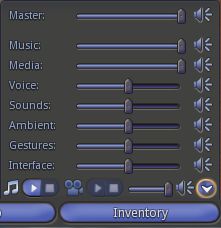
  • Volume control pop-up (Impudence example) to be in Firestorm

    The volume control pop-up common to V1.x Viewers next Firestorm release, providing users with access to all volume control sliders. This will be accessible by clicking the volume control option at the TOP RIGHT of the Viewer window, rather than the bottom right, as with V1/x TPVs

  • Font options are to be introduced, allow users to change the font used in the Viewer. A warning here is that the Viewer is coded around the default font size, so if you change the font, words may not correctly display
  • Proxy options will be included in the next release,while scripts opened and edited from inventory will be able to save them in LSL or Mono
  • Additional skins will be provided with the next firestorm release. In addition, there is also documentation available on how to create a Firestorm skin this includes information on a competition for new skins to be officially added to Firestorm
  • Display Names will offer users t the abilityo alter Display Names for other people as they are seen in their own in-world view. So if someone has used ASCII to create an incomprehensible Display Name, you can change it to some readable for yourself, with the following important notes:
    • The change doesn’t impact the actual user’s Display Name as they or others see it
    • This doesn’t in any way affect another user’s user name
    • The new name will appear in asterisks, and is not persistent if the person concerned later changes their Display Name to something else.
Major Bug Fixes

  • Log-in bug: Firestorm can crash as a result of too many chiclet notifications being received while offline. The default for the number of chiclets the Viewer can handle was raised in the current release, and this is thought to have been the problem. The permitted number has been reduced to the LL default in the upcoming release. In the meantime, those experiencing this problem, there is a work-around in the Phoenix wiki
  • Screen blackout / freeze on teleport: the mini-lock-up that can turn the screen black and  / or freeze things following a teleport has been linked to an issue with the LL code, but a fix is to be included with the next Firestorm release.

Other Notes

  • The Contact Set feature will be included in a Phoenix maintenance release around seven days after the release of Firestorm
  • There are other V1-based Viewers successfully integrate mesh rendering into their offerings, the code might be included in Phoenix in the future.

The full presentation can be seen on Metamix TV, complete with the Q&A session. Overall, these updates are almost exactly what people have been asking for – not just with Firestorm, but of linden Lab as well when it comes to the improvements to the Friends list. As such, Contact Sets idea in particular is liable to set Firestorm head-and-shoulders above other Viewer 2.x offerings and could potentially see a lot of people switching over to it.

Firestorm: usage grows & new video out

firestorm-logoThe Firestorm development team report that Linden Lab has confirmed Firestorm is now the third most popular viewer by number of distinct users and in terms of hours spent using SL. This moves it into third place in terms of popularity, ahead of the old official 1.23 Viewer.

According to the Viewer Directory (last updated 12th July), Firestorm sits in sixth place overall in terms of crash rates, putting it directly behind the official 2.7.2 release, and up on the official 2.7.5 release. Interestingly, the current full release of the official Viewer (2.7.4) isn’t listed.

To aid people making the transition from the Viewer 1.x environment, Phoenix have produced a new video tutorial, which is well worth a look-in:

(with thanks to CS Pfeffer for the nod on the video)

Firestorm Beta

firestorm-logoSecond Life Viewers are making the news this week. As Linden Lab roll-out the Windlight Project Viewer and Viewer 2.7.1 with “real time” shadows, Jessica and the team over at Phoenix Firestorm roll out a Beta version of their offering.

Firestorm has been around in a couple of pre-release versions for a while, both of which I’ve looked at here in the past. I have to say that overall, it’s been a magnificent addition to TPVs even while still a work-in-progress; currently my only complaint is that it isn’t as faster, fps-wise as either Kirstenlee’s S21 and LL’s own viewer 2.

The Beta release moves Firestorm closer to prime time, and includes many features users have been requesting, making it something of a true hybrid – Viewer 2 functionality with the capability to use Viewer 1 facilities such as pie menus. Here’s a bullet-point outline of some of what to expect with it:

  • The option to switch between Viewer 1 pie menus (default) and Viewer 2 context menus
  • A resizable chat bar in the bottom toolbar area
  • Radar (still embedded in the People tab of the Sidebar by default) gets:
    • A minimap option
    • Most of the features of the Phoenix radar
    • Additional options
    • The ability to undock it from the People tab and have in displayed in its own window
  • Client-side AO with improved functionality
  • Massively-improved Bridge capabilities and security
  • Keyword alerts
  • Shared Windlight settings
  • Everything currently in the pre-releases.

You can download the Beta from here.

A video has also been produced, featuring Jessica herself, to support the release:

Storming the fire….

firestorm-logoJessica Lyon over at Phoenix has announced that a pre-Alpha version of the Phoenix Firestorm Viewer will be released on Monday 31st January. Over on the Phoenix website she states:

Speaking of Firestorm!As most of you already know, we have been very busy working on the Firestorm Viewer. Most of you seem to also know that we plan to put out a “Preview” build of firestorm at the end of this month.. and most of you seem to be very eager to try it out. A lot of work has gone into Firestorm already but is mostly interface improvements and changes. It is critical that you understand the Firestorm Preview is just that… a preview, it is not yet ready for full-time use. But this will give you an idea of what’s in store in the future. If you would like to try out the preview of Firestorm at the end of the month, please join our in world group named Phoenix-Firestorm Preview Group. The build will be announced in that group and you can find help there as well.

Do understand! The Firestorm Preview build should be considered Pre Alpha! Not beta, not Release Candidat.. it is pre alpha and as such it has a lot of bugs that still need to be worked out.

To aid those eager to get their hand on it, Jessica and the team – in a move Linden Lab really, really, really should have thought of for themselves prior to the issuance of Viewer 2.0 a year ago – have released a video introduction to the new Viewer.

The highlights are:

  • Phoenix has adopted a broad Viewer 2.x front end that is robustly “clean” in its overall look.
  • They have followed Kirstenlee Cinquetti’s lead and completely re-sized the Sidebar so that it no longer takes up the entire right-side of the screen, but fits into its own window
  • The Sidebar is now accessed from a set of tool bar buttons – again like Kirstenlee’s Viewer2 hybrid, but with the buttons actually embedded in the tool bar, rather than on a floating palette – and those buttons that are not required can be “turn off” (hidden)
  • In a further improvement, the behaviour of the Sidebar is more persistent: if a specific Sidebar tab (say, HOME, is undocked, moved and closed, Firestorm will remember the last used position and size of the tab, and will reopen it again at that size and position rather than pushing it back into the Sidebar once more (one assumes this behaviour is persistent between log-ins)
  • Within the Inventory tab on the Sidebar, there is an additional button to quickly and easily open a further Inventory window – no need to remember keyboard combinations
  • The chat bar / tool bar combination at the bottom of the screen is re-sizeable, thus allowing those who wish to have more room for their chat entry to have more room – again, especially useful when the more useless Sidebar buttons are hidden
  • Viewer 1.x camera control / movement control window functionality is retained – both can be open at the same time, although both use the Viewer 2.x layouts
  • Firestorm retains the Viewer 1.2x combined window for chat / IMs and your Contacts list (avoiding the need to use the “Nearby Friends” Sidebar tab) and which includes the local chat entry bar that has been conspicuous by its absence in Viewer 2.x
  • Further, there is a PREFERENCES option that removes the space-wasting Viewer 2.x “headings” from the chat and IM windows, leaving you with the more user-friendly Viewer 1.2x appearance – and in keeping with Viewers like Phoenix 1.5.2 and Imprudence 1.4 et al, the tabs for chat and IMs in the chat window can be stacked vertically
  • Viewer 2.x’s Navigation Bar / search bar is retained, and by default includes a LAND button (sorely missed from early iterations of Viewer 2) and:
    • Includes a SKY button for quick Windlight tweaks
    • Can be controlled from the LAND display at the very top of the Viewer window, allowing you to turn the Navigation, Search and Favourites elements off or on
    • The bars are all semi-transparent, further lessening their impact on the main display window
  • Other items that are familiar to current Phoenix / other Viewer 1.2x-based TPVs will be familiar with include:
    • RLVa support
    • Ability to disable the login, logout and Tp splash and “progress” screens
    • Double-click teleporting
    • Running multiple Viewers
    • An option to quickly and easily change the UI skin (including a skin that retains the Viewer 2-style little Sidebar tabs on the right of the screen for those who like (!) them. A nice touch with the Skin option is the automatic inclusion of Hitomi’s Starlight skins (although there may be issues using Starlight with the pre-release of Firestorm)

There are some things that are potentially missing from Firestorm at present – Jessica states it currently retains the Viewer 2.x behaviour of having media streaming ON by default, something people don’t like – but this will be altered in a future release. The LAND display at the top of the Viewer window, while allowing you to turn things like the Navigation Bar off / on, appears to lack the ability to open the ABOUT LAND window if the Navigation Bar is turned off.

Overall, I have to say this Viewer has me excited. It appears to combine the best of Viewer 2.x and Viewer 1.x to present a crisp, clean Viewer environment that is highly customisable. Certainly, I’m looking forward to trying it out from Monday.

For those who wish to try the pre-release, it is recommended that you join an in-world Group that has been set-up specifically for the Firestorm release – as Jessica states, the Phoenix support network is still itself ramping-up on the new Viewer and so may not be able to provide the necessary support.