Direct Delivery: 21st March launch

In keeping with the time scale indicated by Oz Linden (as pointed to in these pages by Latif Khalifa), Direct Delivery will be launching on March 21st.

The news came via a post from CommerceTeam Linden in the Merchant’s Forum, which states:

Beginning on March 21, purchases on the Marketplace using Direct Delivery will go directly to recipient’s Received Items folder. The Received Items folder will NOT be used for other inventory transfers at this time. Magic Box purchases will continue to go to the Objects folder.

The Delivery folder will appear on the order and in all email notifications to the recipient.

At launch, we will be sharing additional details as well as updated Knowledge Base articles in all four languages supported on the Marketplace. We will also provide more details on migration.

Direct Delivery is the mechanism that will replace Magic Boxes for merchants using the SL Marketplace and which should bring improvements to the overall delivery of items purchased on the Marketplace. It has been in development now for around a year, and reached public beta in January this year, which presented the first real opportunity to report on the system in detail to a wider audience.

No Wider Use of Received Items – Yet

A core part of Direct Delivery is the Received Items panel. This was originally going to be a sub-section of the inventory floater and would be used to received items purchased on the Marketplace into your inventory. However, Linden Lab recently sought to extend the functionality of Received Items so that all new incoming items to your inventory would arrive in Received Items, essentially breaking-out the idea into a project of its own, which was not particularly well received by the community.

As a result of feedback on Received Items, and because of wider impacts of the system on SL functionality, LL have started revising aspects of the broader Received Items functionality. Because of this, and to repeat LL’s own statement, Received Items will only be used for SL Marketplace Deliveries at the March 21st launch. All other items incoming to your inventory will continue to be handled as they are now

Merchants have requested as to when the wider functionality might be rolled out, but LL has, at this time, declined to comment beyond re-confirming that the project is “on hold”.

While it would be nice to have a clearer roadmap as to Received Items itself, the fact that LL have listened to concerns from all parties – merchants, RLV users, those providing feedback to the initial survey and the follow-up is to be applauded, and one hopes that the dialogue will continue in the run-up to the Direct Delivery launch and thereafter through to the roll-out of the wider Received Items functionality (assuming this goes ahead), in order to ensure all potential adverse impacts are either avoided or at least reduced to manageable levels.

Problems

Direct Delivery itself, as a long-term project, both serves as demonstrating the complexities involved in making alterations to the overall SL infrastructure, and the need for open and on-going dialogue between the Lab and the merchant community / community as a whole; something that many feel has been distinctly lacking at times, with the project almost rolled-out inspect of known issues.

Even now problems potential remain, with questions still being asked about ANS functionality once Direct Delivery goes live, a subject Darrius Gothly gave considerable insight to last November. Potentially more damaging is the fact that little further communication on Direct Delivery appears to be on the cards prior to the launch, again as noted in the forum post:

At launch, we will be sharing additional details as well as updated Knowledge Base articles in all four languages supported on the Marketplace. We will also provide more details on migration

Direct Delivery is a major change in functionality, especially for merchants. While many have been involved in the development of the project and the initial “private beta” (even with its daft requirement to complete an NDA before merchants could find out what they were signing-up for) prior to the public beta, many equally have not – and precisely what has changed as a result of the public beta – if anything – many be equally unclear.

As such, there needs to be a positive communications campaign ahead of the launch in order to ensure merchants have all the information at their fingertips prior to the launch, and have time to ensure they are fully prepared for Direct Delivery going live. Similarly, a more pro-active approach to announcing the roll-out needs to be taken towards the user community as a whole – preferably through a full blog posting ahead of March 21st announcing the arrival of Direct Delivery and informing / reassuring users as to what to expect, with a follow-up on the day of the launch.

If nothing else, a more pro-active approach to the launch will help restore some of the trust between merchants and the Commerce Team / Linden Lab, which has been somewhat eroded during the development of Direct Delivery and through earlier projects, such as the morphing of XStreet into SL Marketplace (itself frequently a morass of conflicting communications) and other breakages.

I’m not alone in being concerned over the “wait until the day” approach when it comes to further information, as implied by the forum post: Tateru points to this with a comment on her blog about allowing 14 days for information absorption, and Darrius Gothly also posts on the subject as well.

It’s good that LL have been listening to concerns over Received Items and that they are responding to such fully and carefully by placing the broader aspects of the project on hold. I very much hope that they do listen to concerns being voiced around the matter of Dirrect Delivery announcements and documentation and continue to respond positively to these concerns by addressing them ahead of time, as suggested here and elsewhere.

Received Items: LL provide feedback

On March 1st, due to the level of concern arising from the initial beta, LL put out a call  for feedback in the form of a short survey (now closed). This weekend they provided feedback to those who participated in the survey in the form of a proposal on how the new functionality might be improved and a further request for people’s views on the proposal itself.

The notice of feedback came through a notecard from Brooke Linden which was delivered in-world via Dakota Linden. The notecard reads:

Hi all,

We’d like to thank you for your feedback on the use of the Received Items folder. Based upon the feedback, we have pulled together a similar, but hopefully improved, proposal. Please take a look and provide feedback.

After which there are links to the proposal and an additional survey.

The proposal offers the promise of some improved functionality over the initial beta, including:

  • Context-sensitive menus within Received Items that allow you move specific asset types directly to their system folder OR to the Objects folder (so that notecards can be moved directly to the Notecards folder, landmarks directly to the Landmarks folder, etc.), without the need to drag-and-drop manually
  • Selecting multiple items (as opposed to folders) within Received Items will display a similar context menu allowing the items to be moved to an appropriate folder or to the Objects folder
  • Selecting multiple folders will display a menu presenting options to move the folders either to the Objects folder or you MY INVENTORY root folder
  • The promise to “fix” current issue around offline delivery problems through the use of the Received Items folder.

There are a number of other changes outlined, some of which LL are requesting specific feedback against (for example: they are proposing capping the number of items a resident can receive in an hour to prevent the system being used for griefing, and they are looking for suggestions as to a reasonable number at which to cap hourly deliveries), as well as instigating measure that are presumably aimed at getting people to manage Received Items: such as blocking the ability to rez items directly from the panel (which may actually become a floater in its own right).

Overall, the proposal is a step forward compared to the initial beta system, but it is unlikely to address all concerns – which is why open feedback via the JIRA and on blogs / the SL forum relating to specific concerns remains important. However, what is being offered in terms of context menus, the ability to search (and hopefully sort) Received Items does make the idea something of a stronger offering, and if the system does solve issues around failed deliveries, etc., then that alone might well outweigh some of the shortcoming people might otherwise feel the system has – although there are still potential problems that need to be addressed.

It will be interesting to see how the RI project develops, and whether there are further revisions based on the feedback given to the new survey – and whether all the ideas outlined in the proposal are implemented. However, what is really important within this process is the fact that LL are demonstrating a willingness to pro-actively engage with the community and seek solutions where a fundamental change in the way most people work with SL is seen to be counter-intuitive to the ways in which people use the platform, or which seemingly fails to offer any significant advantages over current capabilities – and this is to be applauded.

Received Items: feedback request

Linden Lab have added an update to their blog post on Received Items, requesting feedback.

That’s good.

The bad things are that people only have until 17:00 SLT today (1st March) in which to complete the survey, LL haven’t actually gone out of their way to tell anyone or anything about the survey. While the update is on the blog…there’s no dashboard link to the blog post itself.

My own thoughts on the idea are pretty clear, and from what I’ve seen, reaction to the system hasn’t been that great elsewhere. I’ve no idea if this is all part of the general stirring of thing inventory, a-la the Simplified Inventory Project Viewer, or what. However,  if you have tried the system out, then now is the time (just!) to give some solid feedback to LL.

The survey link is there  – or you can follow it right here. The survey itself is short and to the point, and shouldn’t take too long to complete.

Related Links

Received Items: the good, the bad and the “$%^&*!”

So, as I was updating the Viewer Round-up for this week, I thought I’d have a run with the new Received Items Beta launched last week.

Those familiar with Direct Delivery testing will already be somewhat familiar with Received Items – it is a section of the Inventory floater wherein anything purchased from the Marketplace will show up. However, the overall functionality has now been extended so that anything you obtain or receive by way of a “new” inventory item will pop-up within it.

To test the new functionality, you’ll need to run one of the following versions of the official Viewer: the Beta (3.2.9.249510 or later), Development (3.3.0.248913 or later) or the Direct Delivery Project Viewer (3.3.0.249395 or later). For testing, I used the latest Beta, 3.2.9.249510, which has been available since before the Received Items Beta was announced, but which has the Received Items capability available within it.

You’ll need to be on the Beta grid (Aditi) to carry out the tests, and will need to visit one or more test regions, as detailed in the Received Items Beta wiki page and my original blog post on the subject.

Where to Find the Panel

I’ve read reports of people having problems finding Received Items. It should appear as a “button” at the bottom of your Inventory floater. Clicking the “button” will open-out the panel.

Opening Received Items

If, for any reason, the button is not apparent within your inventory floater, try this (with thanks to Innula Zenovka):

  • Go to the Fast Return test region on Aditi (this is the LIGHTER GREEN area within the GC Test 9 region)
  • Rez a prim and wait for the auto-return to send it back to you – it’ll take around a minute
  • Open your inventory floater and the Receive Items “button” should now be visible – click on it to open it as described above, and your prim should be sitting inside it

I spent an hour or so playing in the test regions to see what Received Items does / does do, and here’s a summary of my findings, together with some broader observations and feedback.

Situations where there is no change to current behaviour

  • Rezzing an item from inventory – the item will still return to its originating folder when you TAKE it back
  • Taking a copy of a rezzed object you own will still return it to your Objects system folder
  • Trying to rez / build in a no rez area will generate the usual warning without anything being rezzed / returned
  • Trying to move an in-world object into a parcel with NO OBJECT ENTRY set: item will be blocked and the usual pop-up displayed

Situations where Received Items IS used

  • Creating a new object or linkset and taking it to inventory
  • Taking a copy of an object belonging to someone else (permissions allowing
  • Purchasing / taking anything from an in-world object (prims set to give / sell, Vendor systems, etc.)
  • Anything returned to you manually by someone else, or via parcel auto-return
  • Anything someone else gives you in-world
  • Items sent to you while off-line
  • Multiple items in a single delivery (e.g. items from a suitably scripted giver or passed to you via folder)
  • Anything you purchase via SLM or which is brought for you as a gift.

Other points of note

  • When receiving items via a transfer when on-line, you will still receive a pop-up notification – but without the ACCEPT button, which has been replaced by SHOW – clicking this will open your inventory floater and the Received Items panel. The remaining options, DISCARD and BLOCK remain unchanged
  • If you are offline when an item is sent, you’ll still get a notification sent (which will appear when you log-in and get sent to your e-mail, if you have IM forwarding set-up) as per current behaviour
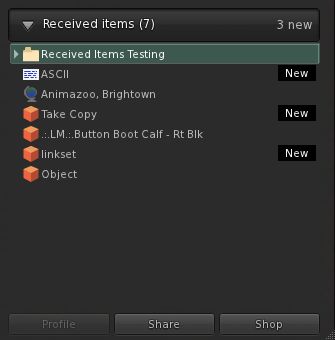
  • Recently received items tagged as “New” (click to enlarge)

    Recently received items will be tagged as “New” in Received Items, helping with identification (right)

  • Received Items provides almost the same degree of functionality for items it contains as the rest of your inventory. However:
    • You cannot directly rename items (i.e. right-click and select RENAME from the menu), although you can select the item’s Properties and rename it from there, if permitted
    • You cannot paste a copy of an object into Received Items (but you can obviously paste it into your main inventory panel wherever you like)
  • If you delete items from Received Items and they will go to your Trash, as usual. However, if you subsequently restore an item from Trash that was in Received Items – it will go to the most appropriate folder in your inventory (so a notecard will be restored to Notecards, a landmark to Landmarks, etc.)

Received Items as a Folder

Received Items seen as a folder in the RECENT tab (click to enlarge)

For those that like to use the RECENT tab in inventory, it is worthwhile pointing out that Received Items also appears here as a folder (although there is no corresponding folder in the main inventory view). The folder view has the same functionality as the panel, but offers an alternative way of viewing incoming items. The major difference between the two is, when viewed as a folder in the RECENT tab, Received Items does not display “New” against recently received items.

However, this will only last during your current SL session – as soon as you log-out from SL, the “Received Items” folder will vanish from RECENT, just like everything else, leaving you with just the Received Items panel to peruse the next time you log-in.

On the good side

Providing a single “point-of-entry” for new items coming into inventory may well ease the process of understanding how works inventory and getting newcomers started on good inventory husbandry and may encourage those who don’t engage in inventory  housekeeping to do so… Which is not to say this new approach is without issues or necessarily preferable. Right now, it has to be said the negatives outweigh the positives.

On the poor side

There is no hierarchy to Received Items: Outside of items that are received into folders via their delivery mechanism (e.g. SLM or a scripted object), Received Items presents a “flat” view of incoming goods. This is liable to create a headache for some.

For example, many in the rental business put-out “for rent / sale” signs on their vacant parcel, and may add trees and other bits and pieces – up to and including houses and sim extenders on the parcel as well. Some or all of these get returned by the new tenant when the parcel is rented – and until now have gone to the Lost and Found folder, where they can be easily identified and disposed of.

But under the new system, all this now gets lumped-in with everything else the Estate Owner / Manager is receiving as well. This could get very onerous in terms of sorting through stuff and separating the wheat from the chaff.

There is no capability to sort / order / filter items: Obviously, the intention is for Received Items to be routinely cleared-down by users on receipt of incoming goods, no matter what the source. However, there are going to be times when – even with the best intent in the world, the Received Items panel is going to run the risk of getting choked  – such as in the case of estate management as mentioned above, or where information is specifically requested via notecard (such as requests for product help) and so on. Even someone being away from SL on vacation for a week or to could come back to find their Received Items brimming. As such, it would be nice to offer people the ability to sort / order / filter contents.

Creates an artificial divide in inventory: The Received Items panel does tend to split inventory into two, and unless it is clearly and properly explained to the likes of new users, it could end up creating as main problems as it is intended to solve, particularly if new users are no encouraged to use it as intended, but simply allow incoming items to reside in the panel. Communication is the key here – and that’s not really LL’s strongest suit.

(Currently) does not appear to solve the capped IM problem: I have read from feedback elsewhere, but have been unable to verify myself, that this new approach doesn’t presently overcome the problem of goods failing to be delivered if IMs are capped. Whether this is because the code itself doesn’t contain a “fix” for doing so, or whether it’s actually not working as hoped, I can’t say. However, this is causing concern, and may still need to be addressed.

Opinion

There has been a lot of negative feedback from users on this new approach. Whereas Received Items was accepted for the forthcoming Direct Delivery system, people are questioning why everything now has to go into Received Items, rather than the more intuitive approach we currently have.

I personally can see both sides of the coin: as an established user, I’m very familiar and comfortable with the current behaviour – notecards coming in go to Notecards, landmarks to Landmarks, and so on. As such, I can only see this approach as being something of a step backwards – and I’m someone who is pretty obsessive about keeping my inventory sorted.

However, for new users, then the system – again with the caveat of “as long as it is properly explained” – offers a much easier-to-understand approach to the receipt of goods and items. At least initially. There is also the fact that it does present (or should eventually present) one consistent mode of behaviour for new items entering inventory – and consistent can be often be good.

The problem really is that this approach is one in which – yet again – established users appear are being faced with something that is definitely less intuitive and potentially useful than the current system in order to “improve” matters for the ever-elusive new user. Even for those (like me) who are obsessive about keeping inventory sorted, this approach adds an irritating additional level of management, simply because we do now have to faff around moving various received items around that once pretty much took care of themselves in the first instance.

As such, Received Items does run the risk of leaving people with the impression that the existing user community simply doesn’t figure in LL’s thinking, and how we use SL on a daily basis simply isn’t really understood. I could say more on that topic, but Saffia Widdershins already has, and very eloquently.

Related Links

Received Items beta launch

This slipped in under the radar yesterday – I almost missed it, but for a Reddit post from “Finethanks”: the Received Items Beta Launch.

Considered a part of Direct Delivery (and therefore technically already in beta), the Received Items functionality will actually be used to receive all incoming items reaching your inventory – notecards, snapshots, gifts, even items returned under parcel auto-return – as well as items being delivered via the upcoming Marketplace Direct Delivery system.

The blog post reporting the beta launch reads in full:

Look for Received Item in your inventory (Beta Viewer)

The Received Items Beta launches on Aditi today. Received Items is a new subsection of Inventory where all incoming items, including purchases, gifts, shared, and returned items, will be placed. Received Items is displayed in a separate section of your inventory panel in the Second Life Viewer, making it easier for Residents to see and manage incoming objects.

This Beta is a chance for Residents to try out these new capabilities. It also provides Second Life business owners with advance notice so they can plan for any additional communication or customer support around this upcoming change.  The production deploy is currently planned for mid to late March, so please help to spread the word!

Because Received Items and Direct Delivery will use the new Received Items folder, both systems will launch together.If you would like to try out Received Items, please see the Received Items Beta instructions on the wiki. These instructions include pointers to Knowledge Base articles and ways to provide feedback.

You’ll need the latest SL Beta Viewer for testing, and may want to look at the Knowledge Base page as well. Aditi regions were testing is enabled are:

Additionally, there are a number of “special testing” regions that have been created for specific tests:

To access any of these regions, you’ll most likely need to log-in to Aditi first and then cut & paste he SLurls into your address bar, or use the World Map to reach them.

JIRA reports on the new functionality should be raised under the SVC project and categorised as “inventory”.

Related Links

with thanks to “Finethanks” on Reddit.

Direct Delivery beta

Direct Delivery (DD) – the mechanism that will replace Magic Boxes for merchants using the SL Marketplace and which should bring improvements to the overall delivery of items purchased on the Marketplace – is in open beta for people to try on the Beta (Aditi) grid.

Direct Delivery has been subject to many ups and down over the last twelve months, but this beta should bring it a step closer to reality. Given LL’s overall track record on the delivery of new Marketplace services, this is something that has merchants understandably nervous and concerned.

Documentation relating to the new system has also been updated, including the release notes and a set of getting started instructions – both of which are worth a read, although the latter are somewhat irritating (see below), and will be rationalised and clarified prior to DD going live.

For those (merchants especially – although it would seem those curious as to how purchasing goods using the new system can also have a bit of a go) wishing to try-out the system:

  • You’ll need to have the Direct Delivery Project Viewer (version 3.2.7.247349/dated 10th Jan or later), complete with its funky blur-tinted UI elements (new to this Project Viewer, or sign of another change coming to the UI?)
  • You’ll need to have an active account on Aditi and should log into that first if you’ve not done so in a while (indeed, you might want to change your password as per the linked instructions & force an account update if you haven’t)
  • You’ll need to be able to log-in to the Aditi Marketplace (this may throw up a security certificate warning, depending upon your web browser settings).

Testing Purchases

For those simply curious as to how they’ll be affected when purchasing goods, it’s very straightforward:

  1. When logged into the Beta Marketplace, simply purchase any item commencing with “DD”.
  2. Open your Inventory panel and click on the RECEIVED ITEMS tab at the bottom of the Inventory panel to expand it – and your purchased items should be in a folder, ready to be moved into the location of your choice in your Inventory.

Note: Items purchased on the Beta grid will only be available in your Beta grid inventory and purchasing them will not impact your Main grid L$ account balance. If your Beta grid account does not have a L$ balance, you can raise a support ticket. Funds cannot be transferred between the Beta and Main grids.

Direct Delivery: from the Marketplace to you (some Marketplace steps omitted) – click to enlarge

Testing Uploads (Merchants)

Items using Direct Delivery no longer need to be boxed-up – part of the idea being that people receiving goods will no longer need to rez a package in-world and unpack it (although if you wish to box items still (and some of the limitations of the system actually mean you may still need to), you can.). Nor do they require a Magic Box; instead they use a new addition to the Viewer – the Merchant Outbox – to upload goods to the Marketplace.

You can organise your items either in your inventory itself, or within the new Merchant Outbox panel (located in the ME menu on the Project Viewer) prior to uploading. Of the two options, the former is probably the preferred, given that anything organised solely in the Merchant Outbox will vanish as soon as it has been uploaded.

The basic steps are:

  1. Open your Inventory and the Merchant Outbox (ME->MERCHANT OUTBOX).
  2. Drag the items from your Inventory panel to the Merchant Outbox panel.
  3. If required, organise items by folders in the Merchant Outbox (individual items dropped into the Merchant Outbox will automatically be placed in their own folders).
  4. Click the SEND TO MARKETPLACE button.
  5. You should get an on-screen confirmation when all items have been sent.
  6. Log into your Marketplace account on ADITI.
  7. When logged into the Marketplace:
    1. Click on My Marketplace (top right) and select MERCHANT HOME.
    2. On the MERCHANT HOME page, click on MANAGE LISTINGS on the left (or click on INVENTORY at the top and then select MANAGE LISTINGS from the drop-down).
    3. Your listings are displayed, with unassociated items at the top.
    4. Use the ACTIONS option to the right of each item to create a new Marketplace listing in the usual way.

Obviously, multiple items can be uploaded via the Merchant Outbox, I’m using a single item purely for demo purposes.

From you to your Marketplace store & ready to be listed: Direct Delivery (click to enlarge)

Irritating

The tests themselves are easy to carry out. What is irritating is the lack of attention paid to the “getting started” instructions. Vis:

  • The instructions wibble on about downloading a Magic Box (this is testing Direct Delivery, right?) – a Magic box isn’t required for a basic test of the DD functions – either when purchasing goods or uploading them
  • They direct you to place the Magic box at one of two locations on the Beta grid  – one of which is – or was during my testing – (wait for it) NO REZ (virtuatrade Campus S).

If mention of Magic Boxes is included for those who wish to carry out more involved testing (such as comparing what happens on uploading, how the system handles  / differentiates items uploaded via either mechanism, etc.), then this should really be made clear in the instructions. Also, and as a minor quibble, why isn’t the Magic Box itself set-up as a DD item? That would kill two birds with one stone (get a Magic Box for more involved testing and test the receipt of DD items in a single pass).

There is also an error in the Selling in the Marketplace instructions which might lead some to get a little confused. These direct people to their MERCHANT HOME page, and then to click on MANAGE INVENTORY, when in actual fact the required link is MANAGE LISTINGS, which is located under the INVENTORY heading.

Feedback

I’m not entirely sure why this level of testing is now required, as it all seems very basic. But then, I wasn’t involved in the closed beta testing and I haven’t been keeping up with discussions on DD via the Merchant’s forum. As it stands – and leaving aside the inevitable amount of work required to shunt stuff from Magic boxes to the DD system, this process seems straightforward and easy to understand for merchants and consumers alike (“getting started” instructions for the Beta notwithstanding).

My tests here are, of course, pretty basic. It’ll be worth keeping an eye on the Merchants’ forum and the Beta thread to see if any major issues come out of the beta process, as well taking a read through the documentation listed below.

Links to Documentation