Viewer 2’s Basic Mode gains a new feature today – that of Voice.
While I don’t generally use Voice myself – I have nothing against it, I just move largely in the world of role -play in SL, and Voice can be illusion-shattering in that regard -, I think it’s a pretty good option to have within Second Life, and adding it to the Basic Mode makes sense. To a point.
The problem is, a lot of things are “coming” to the Basic Mode (or have been indicated at coming) – currency, for example. To be fair, I’ve suggested some additions myself, although they appear to be fewer than those LL are contemplating. Which leads to a problem I’ve touched on before.
If LL keep adding to the Basic Mode, how long until it ceases being the “Basic Mode” and becomes “The Viewer”? The function of a Basic Mode, I thought, was to ease new users into the Second Life / Viewer experience. Ergo, it makes sense to keep the Basic Mode relatively simple and clean. While things like Voice are very useful to have, the fact remains that if things keep getting added to the Basic Mode, then it won’t be long before any advantages gained in introducing it are going to be washed away.
In discussing this with Rodvik a while ago, I pointed out the need to provide a better transitional experience between the Basic and Advanced modes of the Viewer. It’s something he apparently generally agreed with, although he also appeared to imply that Basic might be more to do with making Viewer development more iterative, and that at some point in the future, Basic may merge with Advanced – presumably because the code base has been overhauled and made somewhat more modular, making future Viewer maintenance a lot easier. If so, this throws the purpose of the Basic Mode into a whole different category than “simply” being a tool to help new users – and it’s future becomes somewhat more intriguing.
Personally, while I’m all in favour of making the Viewer a lot more modular (something I understand Bagman Linden (Jeff Petersen) is quite keen on) to the point of potentially making elements of the Viewer “optional” / “installable as required” where users are concerned, I still think that the Basic Mode holds a lot of potential where new users are concerned, providing LL address its current shortfalls without overloading it with features and providing they add the means to bridge the gap between it and the Advance Mode smoothly.
It’ll be interesting to see which direction they do opt to take.
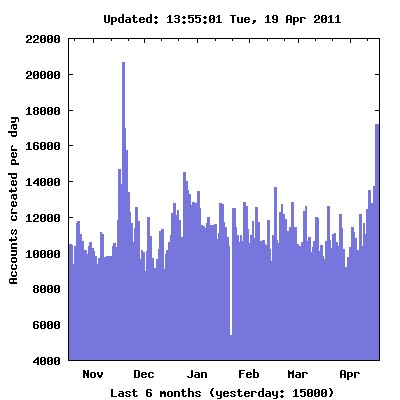
Figures collated by Tateru Nino (see below) show that the new Basic Mode of the Viewer have had a positive impact on user sign-ups, with a dramatic upward trend since its introduction at the end of March. The new sign-up pages, reported on yesterday, have had an even bigger impact, it would seem – and despite teething problems. The latter point was hinted at by Rodvik yesterday when he commented in a Tweet to myself:
Thanks, yeah should be fixed quickly. Even with those the results have been amazing.
This is a positive thing, and shouldn’t be dismissed as it demonstrates that without additional marketing and promotion, SL can generate user interest.
What remains unclear at present is how well the new Basic mode does at retaining users – and as Rodvik rightly points out, it’s going to be a few weeks before the figures on user retention become clear. Certainly, I’d still be somewhat concerned, as the “new user experience” leaves a lot to be desired, as Theia Magic and others have commented upon.
Rodvik has also indicated that the Basic Mode is to be enhanced over time; as I’ve previously mentioned, while some additional functionality would benefit the Basic mode, there is a risk that add too much, and the line between Basic and Advanced becomes so blurred as to be non-existent. Given this, I still hold to my position that it is the Viewer HELP functions that need to be overhauled, rather than simply dropping more and more into Basic (unless said “more” is modular in format and can be activated at a time of the user’s own choosing).
I’m really hoping that ears at LL are receptive to the idea of a more integrated HELP for Basic / Advanced modes; it would get a lot of people “over the wall” in terms of transitioning from one to the other a lot quicker.
Beyond this, the issue of orienting users once they are in SL does remain a problem. Some have called for a reinstatement of the mentors; others have called for a revamp of the welcome islands, etc., in line with some of the privately run welcome areas. From Theia’s reports, it would seem a degree of policing of the LL-run welcome points needs attention. It is a little ironic that the Lab is paranoid about adult language getting into the forums and the like – but anyone with Voice enabled can be immediately verbally abused on arriving in-world for the first time.
Personally, I’m confident that Rodvik is more than aware of what needs to be done – as does Bagman Linden. That the Basic mode has had such a positive impact is good news, and I cannot see anything other than it being capitalised upon in the coming weeks and months as more of the initial user experience is brought into focus and revised / improved.
(with thanks to Tateru Nino by way of Rodvik Linden)
Opinions relating to the Basic mode available in Viewer 2 are mixed. While finding it usable in my original review, several aspects left me concerned as to how well it might fill the role for which it appears to have been designed. I specifically questioned the fact that beyond things like basic movement, the view controls and communicating, it has very little in common with the Advanced mode – and there is no obvious continuity in the assistance available for those who opt to start with Basic and come to the point where they want to transition.
One Small Step for a Viewer; One Giant Leap for the User
In fairness, getting to grips with the Viewer at the best of times isn’t easy; while Torley has produced some outstanding videos, these aren’t always easy to locate. Worse, the So-called Quick Start Guide suffers from a combination of having the wrong emphasis in part and missing important and basic information (like actually modifying your avatar’s appearance, rather than simply changing clothes). Also, it’s fair to say the Quick Start Guide hasn’t been updated to reflect the arrival of additional and attractive functionality, thus putting it further out-of-synch with the Viewer.
Put all of this together – the more intense UI of the Advanced mode, a less-than-helpful Quick Start Guide, only the broadest elements of commonality between the Basic and Advanced modes of the Viewer, etc. – and it becomes clear that moving up from the Basic mode to the Advanced mode is not so much a matter of taking the next logical step as it is about taking a leap of faith that the effort is going to be worth it. This considerably undermines the usefulness of the Basic mode.
If the Basic mode is to prove worthwhile, work needs to be put into providing some level of continuity between the two modes of the Viewer to help those making the transition. Indeed, with a little forethought, re-working where and how people get help in the Advanced mode may well assist those leaping straight into it, opting to avoid the Basic mode altogether.
Such continuity / general assistance could be achieved first and foremost by incorporating the HOW TO button with an expanded number of pop-ups (providing overviews of, say, the Sidebar, the revised Toolbar, the menus and the Favourites bar). Doing this would immediately achieve two things:
It would provide needed continuity of approach to seeking help for those moving up to Advanced from Basic.
It offers an obvious place to find basic help and information for those leaping into the Advanced mode of the Viewer and bypassing the Basic mode altogether.
All the pop-ups associated with HOW TO (both Basic and Advanced) should additionally contain links to the Viewer Quick Start Guide, where more in-depth information would still reside. These links should display a pop-up informing the user the QSG will be opened in their external browser (although the Advanced mode should still retain QSG access from the Sidebar as an option).
To further increase the relevancy of the QSG, it should be re-formatted into two sections: BASIC and ADVANCED:
BASIC should provide additional information relevant to the Basic mode and which is not included in the HOW TO pop-ups (such as the more familiar WASD keys being available for movement, information on the various icons that appear on the right of the toolbar, etc.)
ADVANCED should provide more in-depth information available to Advanced mode users
Where any overlap occurs between the two modes, simple visual indicators should be used to indicate options those options only available to the Advanced mode.
Help, Don’t Hinder
It is fair to say that the current QSG is encumbered by several problems:
It is out-of-date
It lacks key information users will want to know – such as instructions on physically altering an avatar, as mentioned earlier
It contains a lot of what might be regarded as extraneous information. For example, while one understands LL’s desire to promote Premium Accounts, is it really necessary to have the latter third of the QSG read like a brochure for Linden Homes – especially as there is already an entire section of the Sidebar given over to this very topic?
It would therefore seem preferable that any re-vamp of the QSG should also focus on ensuring it is updated to reflect more recent version of the Viewer and on assisting the user more effectively, rather than engaging them in a sales pitch for Premium Accounts.
Obviously, a better alignment of the two modes of the Viewer and overhauling the QSG will not solve all the problems inherent in joining Second Life – there are many other aspects of getting into SL that also need to be addressed over an above the Viewer itself.
However, changes like these should help to ease people into using the viewer and encourage a greater tolerance towards it by presenting a more easy-to-follow route into getting help and understanding the UI. In short, it will do more to help users in gaining familiarity with either mode of the Viewer, rather than possibly hindering them.
As stands, as long as the disconnect between both modes of the Viewer remains, it is hard to see how the Basic mode can achieve any lasting positive impact on new users.
On the 16th March, Linden Lab pushed a new version of Viewer 2 into a Development release. Version 2.6.1.223988 has two modes associated with it: “Advanced” – the Viewer we are all now familiar with, and “Basic” – a version with a trimmed-down feature-set designed to get new users familiar with the Viewer and UI.
I downloaded a copy of the Viewer (thanks, Ann!), and took it for a spin. Here’s what I found.
Installation and Start-up
Installation is as you’d expect from a Second Life Viewer: simple and direct. Given this is a Development copy, it goes into its own folder, but be warned: the Viewer appears to use the same folders for caches, etc., as the Release version.
On starting the Viewer however, there is an immediate difference: the splash screen now has an additional button, which allows you to set the default mode of the Viewer – either BASIC or ADVANCED, with the former selected by default following installation.
The new Mode button
Toggling between the two modes is a little clumsy: you have to select the alternate mode, then quit the Viewer (you are prompted to do so) before manually re-starting. This shouldn’t be too much of an issue for those moving up from Basic to Advanced, but it would still be nice to see the re-start handled automatically: confirm your wish to quit and have the Viewer resume without you having to go find the icon and clicking on it once more.
The User Interface
Once the Viewer is started, things get interesting. For a start, there is no menu bar at the top of the screen, nor are there any options available to display one, or the Favourites bar by right-clicking up there. Instead, there is just the address bar and the media play / pause button and the volume control.
There is also no Sidebar.
The button bar at the bottom of the screen also demonstrates noticeable differences. The familiar chat box, Gesture and View buttons are there, everything else is somewhat different.
The Basic Mode Button bar
Replacing Speak (the Basic Mode does not support Voice), Move and Snapshot buttons, the new user has a range of function-specific buttons:
Destinations
Opens up a full-width window across the bottom of the UI, displaying all the major destination categories, thus:
The Destination window
Click on a category, and a new set of options is displayed, complete with a Browser-analogous “back” option to get back to preceding views. Clicking on an actual destination will teleport the user there – something that is potentially a little disconcerting the first time it happens, as there is no pop-up to warn the users as to what is about to happen; the screen simply blanks to the black teleport screen. Given there is no World Map or search function, the Destination button is pretty much the only way of getting around the Grid with the Basic mode.
My Avatar
Opens up a full-width window in much the same way as Destinations, but this one featuring a range of avatar looks, defined both in terms of ethnicity and dress style
The My Avatar window
Clicking on an avatar option will automatically drive the user’s appearance and clothing to change to the selected option – again, a very clean, easy way for new users to quickly change their look and style to something they are happier with. Given there is no way to edit appearance, or get to any form of Inventory, it is also the only way to change an avatar’s appearance.
People
Opens up a compact form of the People tab from the more familiar Viewer 2 sidebar. Most of the functionality here is the same as for the full Viewer, other than the options found under the Tools “cogwheel” icon. This has been simplified to have only the View Profile, Add Friend, IM, Teleport and Block, Report and Zoom In options.
Profile
Opens up the Viewer Browser to display the avatar’s profile.
How To
This is potentially the most useful button for new users, and is well-presented for what it does. As the name implies, it presents a series of what I’d call “cue cards” on how to perform basic tasks: walking, talking, starting an IM, flying, changing the user’s view, using the keyboard to change the view, and using the Destination and Avatar buttons.
Options can either be paged through using the intuitive “>” and “<” buttons, or by clicking on the top menu and selecting an option from the drop-down list.
Two of the How To button “cue cards”
In-world Interactions
In terms of in-world interactions, the Basic Mode of the Viewer functions pretty much as with the “full” Viewer, but with a reduced option set; as one might expect, there are no options to build or edit objects, for example. However, there are also some nice touches: left-click on the centre of another avatar, for example, and a blue dot is displayed. Release the mouse button and your avatar walks directly to them (although this can cause a few bumps and shoves if the route is not clear between the two avatars!).
Right-clicking on another avatar displays a simplified menu, comprising View Profile, Add Friend and IM, and the Block, Report and Zoom In options. Simply pointing at another avatar displays the familiar name pop-up and “information” symbol that in turn leads to their “mini-Profile” and IM / Profile / options buttons.
Similarly, right-clicking on an object provides a four-function menu comprising: Sit Here, Stand Up, Zoom In and Touch. The last displays any menu associated with the object (providing the menu is contained in the root prim, obviously).
One further thing that is glaringly absent from the Basic mode UI and in-world interactions, is that the user has no ability to either purchase Linden Dollars or make purchases. Given this is designed to be a basic introduction to Second Life, one can understand why such options have been left out. However, while “Shopping” itself is not included as a category in the Destination options, the new user isn’t going to travel far before they do encounter opportunities to buy things – and the fact that they can’t using the Basic mode could see it being abandoned before it has served its purpose.
Impressions and Thoughts
As a first-cut “introductory” Viewer, the Basic mode is not that bad; it offers what is essentially a point-and-click approach to finding your way around in-world – something that pundits have been crying out for – while at the same time presenting a relatively clean and easy-to-follow user interface that will help the new user gain familiarity with the basic functionality of the Viewer as a whole.
The Destinations button is particularly useful in getting new users out and about, again given there is now search or world map; while the avatar button makes it relatively easy to change looks – albeit it with shape as well.
However, while the How To button and “cue cards” have been well laid-out, one cannot help but think they would benefit from a few more items: how to jump, a quick explanation of left and right clicking on objects, etc., just for those that are nervous about simply diving in and click all over the place. Similar, a brief overview of common terms would not go amiss: what is a Profile? What is the “cogwheel” button? What does “Report” mean? And “Block”? “How do I unblock someone I blocked by mistake?”
Another concern is that while the Basic mode is very good as a first look, the step up to the “full” version of the Viewer is nevertheless huge. It would be useful if, on first detecting the mode has been changed, the Viewer itself could direct the use to the Quick Start Guide and offer the new user a smoother transition from Basic to Advanced modes. This would be invaluable, given the fact that core elements of functioning in Second Life – inventory, search – are completely absent from the Basic mode, and as such, liable to leave the user somewhat confused.
Finally, and given the recent RedZone situation, and the fact that devices like it are still very much in operation in-world, one would prefer to see the Viewer start-up in either Basic or Advanced modes with the media turned off – together with a How To “cue card” on how to turn it on. It would also be nice to see the Media Filter included as a part of the Basic Viewer, again with a simple “cue card” guide.
These points aside, the Basic mode is a good first step for users entering Second Life for the first time. Even the lack of any ability to buy things can be forgiven, despite my earlier reservations; it provides enough impetus for people to find their feet in SL and get the basics under their belt. Certainly, given this is only a first look, there doubtless can and will be opportunities to tweak it as people coming into SL are exposed to it, in order to ensure it does adequately meet the needs of new users.
Kudos to the team who have been working on it!
If you wish to have a look yourself, the Development version can be found here.