On Sunday, October 25th, the Alchemy team announced the release of version 3.8.5.36974 of their viewer. This is an update which primarily focuses on a lot of under-the-hood updates and fixes which may not always be obvious to users, but which are intended to further improve viewer stability and improvements. However, it also includes some interesting tweaks as well, of which more below.
As always with any viewer release, please refer to the release notes for details on updates, improvements and fixes, as provided by the development team.
The first noticeable change with this release lies with the version number, which leaps from 3.8.2 from the last release to 3.8.5 – the result of Alchemy (alongside UKanDo and Kokua) pacing the Lab’s version numbers for viewer updates. The idea with this is to make it easier to quickly identify which of the recent releases from the Lab has been merged into a release from any TPV with a matching version number. So in this case, Alchemy is merged-up to the Lab’s 3.8.5 code and the October Maintenance release viewer.
The other major visual change to the viewer with this release is a new skinning option. This allows users to choose the look of the viewer UI skin, and to create their own skins, which they can use on their own or share with others, marking alchemy as the latest viewer to offer support for custom skins.
The option can be found under Preferences > Skinning, and as the release notes indicate, the viewer currently includes just two options at present, in order to keep the install size down: Alchemy’s own dark skin (default) and the Lab’s classic V3 viewer skin. However, the release notes appear to suggest that further skins may be added to the viewer – or perhaps made available for download through the alchemy website – in due course. There will also apparently be a guide produced, offering users instructions on making their own skins.
The Skinning option, new with Alchemy 3.8.5 allows the use of custom UI skins with the viewer
Using a skin simply requires selecting it from the list of available options, clicking the Apply button and then confirming your selection by clicking on Yes in the follow-up dialogue box. Restarting the viewer will then apply the selected skin.
Other Updates
The Alchemy 3.8.5 refresh option allows you to refresh textures / meshes worn by yourself or other avatars
As well as the above, the 3.8.5 release of Alchemy includes:
libcurl 7.45.0, boost 1.59, the replacement of C++11 with C++14
ALCH-312 – a Refresh option has been added to assist with loading avatar mesh and textures
ALCH-278 – the Group list (CTRL-SHIFT-G) now includes an “eye” icon to show if the group can be viewed in your Profile (icon shown) or is hidden (icon not shown) – groups are hidden through the Group Profile floater, as usual
ALCH-270 – a message logger and builder for packet and message inspection for debugging and fixing OpenSim. This feature will be locked to developer builds
ALCH-297 – the Fast Timers legend is now scrollable by the scroll wheel
ALCH-290 – the Destination Guide now updates when teleporting between OpenSim grids
Numerous bug fixes and many under-the-hood changes.
There is still no RLV support for Alchemy with this release, which may disappoint some. However, what is there makes for a useful update, and ensures Alchemy stays on par with the Lab’s continuing run of updates and additions to the official viewer.
On Thursday, August 20th, the Alchemy team released version 3.8.2.36473 of their viewer in the first of their promised monthly updates.
This release brings the viewer to par with the Lab’s 3.8.2 code base – which means Viewer-Managed Marketplace support. Also, and interestingly, the windows version of the viewer is now built using Visual Studio 2015 (this will generate a VS2015 Redistributable message as a part of the installation process as core elements required for the viewer to run are installed).
Also with this release – and the Alchemy team are calling it a release, rather than a “beta”, as with recent updates – is support for up to 2 gigabytes of texture memory; improvements to the build floater and right-click context menu option; some tweaks to Preferences; and the arrival of OpenSimulator support as well.
So, as a quick look at the main updates.
Alchemy now has VMM support
The SL VMM support offers the expected Marketplace Listings panel, found under the Me menu.
I admittedly did not play with it extensively (i.e. I didn’t attempt to create an entirely new listing, as I don’t have anything not already listed via VMM), but everything did appear to be working quite happily while I poked at updating listings, etc.
In Preferences, the Sound and Media tab gets two new sub-tabs. The first of these is for media, and entitled Sounds; it also includes a toggle for enabling / disabling audio stream notifications.
The second sub-tab is called Voice, and does exactly what it says on the label: provides access to the Voice options.
A minor update to the Setup tab sees the Use Built-in Browser option re-labelled to be more generic in recognition of OpenSimulator support (“in-world” rather than “Second Life”).
A new tab in Preferences, called Grids, provides access to the viewer’s grid manager for adding OpenSimulator grid details, which can then appear on the log-in / splash screen grid selection. By default, both the SL main (Agni) and beta (Aditi) grids are listed, and adding further grids is the usual case of adding the appropriate URI, with the Grid Manager set to recognise the more popular destinations.
Alchemy 3.8.2 brings with it OpenSimulator support
In testing I found everything working as expected, and I had no issues adding Kitely and logging-in. In addition to the new grid options, the OpenSim updates also include both hypergrid support, and support for OpenSim variable regions.
The build tool updates come in two parts. The first is an expanded build sub-menu available from the right-click context menu, which now includes the various script-related options (recompile, reset, set running, etc). The second is the addition of a check box to the build floater itself to automatically synchronise settings (repeats, offsets, etc), between materials layers on an object / object face.
Alchemy 3.8.2 brings with it expanded build options in the right-click context menu, and the ability to synchronise materials on an object / object face
All told a tidy update in which the OpenSimulator support could be very welcome. As always, for full information on updates, any known issues, etc., please refer directly to the release notes.
On Thursday, July 16th Alchemy both released their latest beta and announced they are considering moving to monthly releases in order to better keep pace with the Lab’s own releases.
Such a schedule would in part depend upon what the Lab have coming downstream, even allowing for their aim of promoting a viewer every other week. So we’ll likely see how this pans out. In the meantime, there is Alchemy Beta 3.8.1.35916. The following a brief summary of the release; as always, please refer to the release notes as well.
This update brings Alchemy to parity with the Lab’s 3.8.1 code base, meaning it has everything found in the Lab’s release viewer up to and including the attachment fixes found in the SL viewer 3.8.1.303130.
Some of Alchemy’s new additions: displaying the avatar name in the viewer title bar and the audio information floater
In terms of Alchemy additions, the 3.8.1 release brings an optional musical stream identification floater (accessed via Me > Audio Ticker), and now shows the currently logged-in avatar’s name in the viewer title bar; a useful addition if you’re running multiple instances of the viewer and wish to see which is which when they are minimised.
A further addition is the option to view profiles (your own and other people’s profiles either in the “legacy style” floater or as a web profile. The profile view can be switched by checking / unchecking Preferences > Interface > General > Open profiles in web mode.
Which profile: legacy or web? You get to choose
Among the under-the-hood changes and the fixes in this release can be found OpenSSL updates, while a further update visible to users is a fix to prevent the radar spamming a series of messages about avatars in a previous region “leaving” when teleporting to another region, if you have it set to report “entering” and “leaving” agents (see ALCH-223).
There is a known issue with the viewer starting on Windows. If you receive a message similar to “The application was unable to start correctly (0xc000007b)”, please download and install one of the following two files from Microsoft:
If you are using the 32-bit version of Alchemy: vcredist_x86.exe
(The above links will take you to the respective download pages at Microsoft, where you can review the file details prior to downloading.)
There is also a known issue when trying to alter Music URL etc., when accessing About Land via the land information icon in the navigation bar. This will be fixed in the next release; for now the workaround is to right-click the ground and access About Land via the context menu.
A small, tidy update. Will be interesting to see if the Alchemy devs do opt to try for monthly updates.
Update:Drake Arconis has pointed-out an inaccuracy in the original version of this review in relation top the Avatar Hover Height slider and spinner. I’ve now corrected the article to reflect his feedback.
Alchemy released their latest beta viewer on Tuesday, June 16th. Version 3.8.0.35816 is described as “another step in the road to Alchemy’s first major release and includes hundreds of new fixes and improvements over it’s predecessors.”
Quite what all the fixes and improvements are is a little hard to tell without pouring over this and the last release, as the release notes are light on details – assuming the “hundreds” in the description for the release is not hyperbole. Ergo, this review is more a set of highlights for the release.
What we do know is that this beta brings Alchemy right up to date with the Lab’s most recent 3.7.30 code base, and includes the Experience Tools updates (which, as they are at RC status in the official viewer, and there are no known issues with them, are ripe for incorporation in RPVs).
Installation
The viewer comes in Windows 32/64-bit, a Mac universal 32/64 bit and Linux 64-bit flavours via the download page, However, some Windows users may see the following message when trying to run the viewer:
The application was unable to start correctly (0xc000007b)
As per the Alchemy release notes, should this happen, please download and install one of the following two files from Microsoft:
If you are using the 32-bit version of Alchemy: vcredist_x86.exe
(The above links will take you to the respective download pages at Microsoft, where you can review the file details prior to downloading.)
Experiences
Alchemy 3.8.0 supports the Lab’s new Experience Keys / Tools. This means that when you visit a location using the Experience Keys capabilities, you will receive complete information on the Experience and the permissions it requires you to give in order to join it, as opposed to the brief summary which is displayed by viewers that do not currently have the Experience Keys code included in them.
In addition, it also means you can review the details of the experiences you have joined, and those to which you may have contributed, through the Experience floaters, accessed via Me > Experiences.
Alchemy now includes support for Experience Keys, allowing users to see full details of an experience and the permissions it is requesting (l), use the permissions floater to search for experiences and review the details of those they’ve joined / to which they have contributed or those they own (c) and review the details of individual Experiences they’ve joined (r)
For details on Second Life experiences, please read my early review of the official experiences release candidate viewer (note a more updated review of Experience Keys will be produced when the capability has been formally rolled-out).
Avatar Hover Height
The Avatar Hover Height slider / spinner can be found in Alchemy’s Quick Preferences
Alchemy 3.8.0 includes the on-the-fly Avatar Hover Height capability from the Lab. However, rather than being a slider / spinner control accessed from the avatar right-click context menu, it has been implemented as a chat command: “/hover”, followed by the amount by which you wish to adjust your avatar’s apparent height. For example, “/hover 0.1” will raise your avatar’s apparent height by 0.1 metres, and “/hover -0.1” will decrease you avatar’s apparent height by the same amount.
Update: As noted in the comment from Drake Arconis, the slider for Avatar Hover Height can be found on the Alchemy Quick Preferences (use the cog at the top right of the screen to display – see above right right or the floater itself).
Alchemy viewer made a Christmas Day release of their latest Beta, version 3.7.23.34447, on December 25th.
Described as being something of an interim release pending the next full release, the update sees the viewer maintain parity with the Lab’s code base (3.7.23). This means it should have recent Lab-driven updates such as the latest maintenance fixes. There’s also a number of tidy updates and tweaks as well.
The headline update on the Alchemy blog is the inclusion of FMOD Studio, which “provides the latest in 3D audio in gaming”. I didn’t in all honesty noticed that much of a difference switching between the same music stream while swapping between this release of Alchemy and the official SL viewer; but doubtless there is additional work under the hood to eliminate bugs and issues, and I believe the update may be offered as a contribution to the Lab.
The viewer also sees the following new additions:
A WORN tab in inventory – always useful to have
A nicely reworked Object Profile floater
A new Transaction Log (Me > Transaction Log), described as “useful for keeping short term track of tips, donations, and sales”)
The ability to “pop-out” profile pictures, as seen with some other TPVs, by clicking on them
A new status bar icon for Flycam use with the likes of Space Navigator
Inclusion of Qarl Fizz’s Tree and Grass picker from the Inworldz Viewer.
The SL viewer Object profile floater and the Alchemy updated layout and additional information.
The Transaction Log is likely to be handy for those receiving regular indirect payments. Transactions are recorded across the current log-in session, and when I pulled an old tip jar script from inventory and dropped it into a prim cube, the log immediately recorded payments from my Alt just fine. Received payments are recorded in terms of time, name of payer and amount, and each can be ordered in ascending / descending order.
The new Flycam icon – visible when Flycam mode is active
I’m not entirely convinced of the new Flycam icon, mainly because the “usual” button found at the bottom of the screen worked just fine, so this seems to be a change for change sake, rather than for any definable improvement. However, this is purely a personal observation, and the new icon appears in the top right corner of the status bar when the Flycam capability is in use with a Space Navigator.
Alongside of these changes, the release notes for the update offers bullet points on the remaining updates in the release, and the bugs which have been addressed. Rather than repeat things here, I’ll leave it to those interested in the viewer to take a poke at them.
One thing very worth the mention is that Linux users get a special treat with this release, as with it, Alchemy supports 64-bit Linux distributions.
And interesting, lightweight release (no bad thing given all the Christmas excesses people have been enjoying!), which probably hides a lot more work under the hood than is at first apparent. I’m curious to see what is in store with future releases for machinima makers and photographers, as it certainly sounds as if the Alchemy devs are cooking something up there. But in the meantime, this update should help keep Alchemy users happy.
On Monday October 27th, the Alchemy team released version 3.7.19.34077 Beta of their viewer. This latest release brings with it a series of updates, nips, ticks and tweaks which collectively move the viewer further towards a full release status.
As with the last release (for which I also provided an overview), the latest version is available for Windows on both 32-bit and 64-bit flavours, and a “universal” Mac offering suitable for both 32-bit and 64-bit (Linux is still “coming soon”). As is common for my reviews of viewer updates, this is not a detailed examination of every change made in the release, but rather an overview of those items which are liable to be of significant interest to users. Details of all updates can be found both on the Alchemy release notice for the viewer, and the change log.
Lab Updates
As this release of Alchemy is based on the Lab’s 3.7.19 code base, it has almost all of the most recent updates from LL, with the notable exception of the revised log-in splash screen – so the log-in area remains in its familiar place at the foot of the screen. And I say “notable” here only because I’ve become familiar with using the Lab’s log-in screen while playing with various versions of the official viewer, not as any indication of anything else.
The viewer does, however, get the latest bug fixes, etc., from the Lab to make it to release status and incorporates things like the updated snapshot floater and AIS v3. More particularly given the deployment of CDN support across the grid, it includes Monty Linden’s latest viewer-side HTTP updates, which should see the viewer handle scene loading a lot faster, as well as generate significant improvements in inventory fetching.
Search
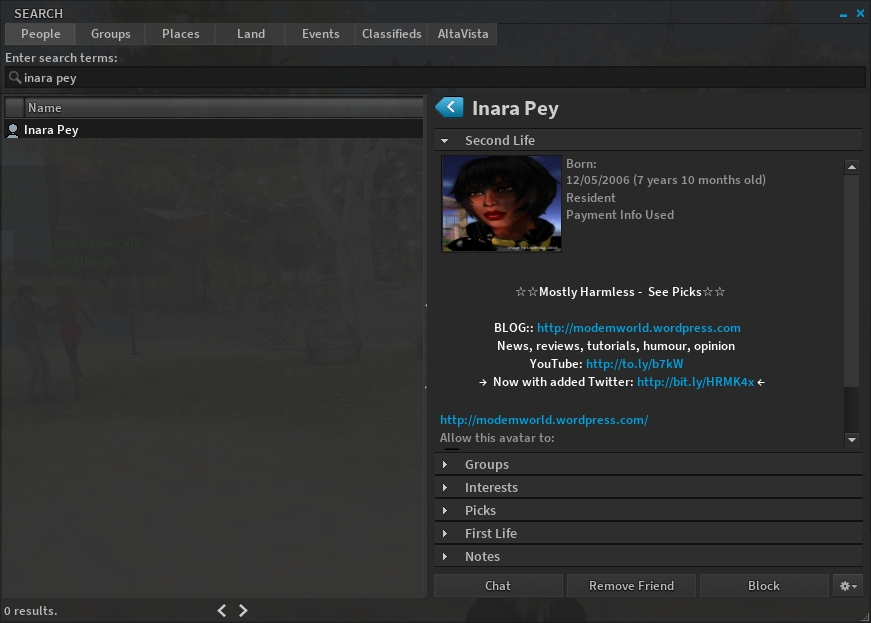
Search has been given an impressive overhaul with this release, allow the use of both the v3-style web search option and also legacy search. Considerable effort has gone into how results in the legacy search options are displayed, so that all the information relating to a specific search item can be shown in the right side of the search panel without the need to open additional floaters (see below).
Alchemy now has full legacy search support, which includes the ability to display all the information on a selected item (such as my profile, as seen above) on the right side of the search floater panel
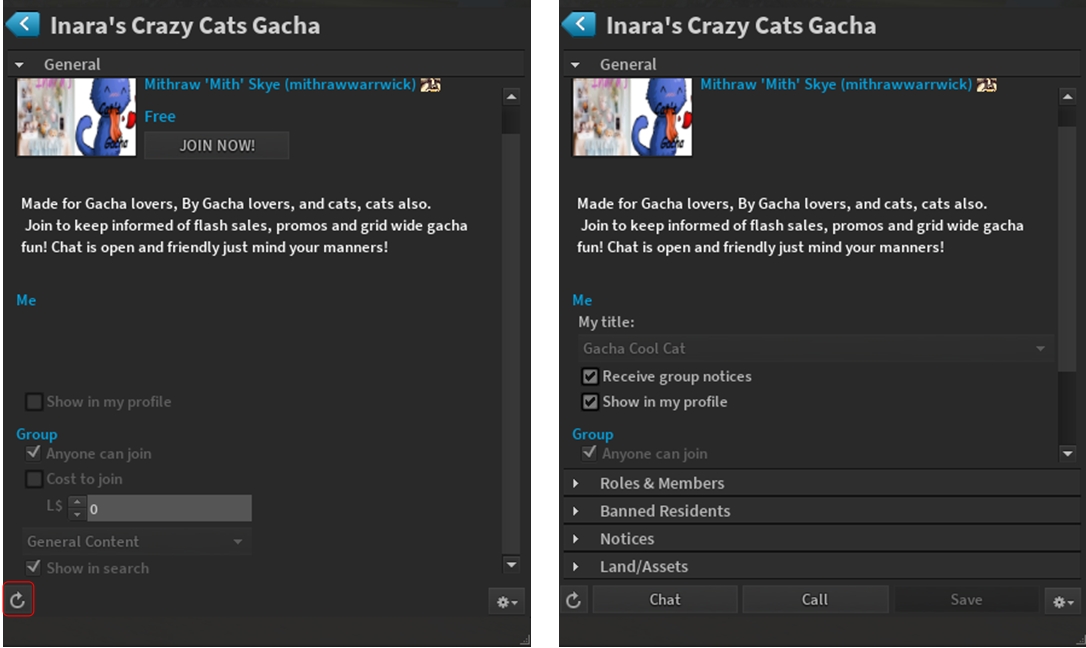
Another nice refine is that when searching for groups, if you select a group you have not joined, only the essential information is displayed – group description and purpose, the JOIN button, creator, who can join, etc. However, should you join the group, simply click on the reload button, and the displayed group will update to show all options and information.
When using the Search option to locate a group you have not joined, the results pane will only display the essential information on the group (l). However, should you then join the group, clicking on the reload button (highlighted on the left image) and the group information will update to a full display
World Map
The World Map gets an update with this release, with some trimming and realigning, together with a noticeable move of the legend and search options to the left of the map tile area. If I’m honest, I’m really not sure of how much of a difference this makes. There doesn’t seem to be that much space reclaimed, and the move of the legend, etc., to the left of the map seems as much as change for the sake of change rather than presenting a specific benefit. But then, that is the subjective nature of using viewers – we all see things differently.
Camera Floater
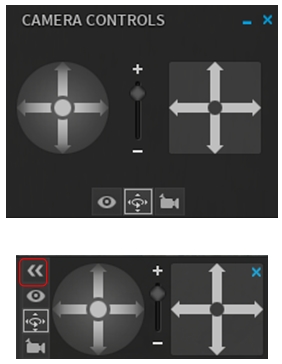
The old and new camera floater – note the button for minimising the controls on the latter
A potentially more appreciable change lies with the camera controls. Until now, Alchemy has defaulted to the v3-style camera floater which, as the website release notice states, takes a fair amount of screen space, a lot of which is made up of a blank panel.
The new Alchemy camera floater is a lot smaller and neater, making it a lot less real estate hungry without losing any of its useability.
For those who would like it almost completely out-of-the-way without having to close it entirely, the control buttons now include a button (highlighted in the lower image, right) which will hide / show the actual camera movement controls, sliding them neatly out of, and into view.
All told, a nice, tidy update.
Chat Updates
Alchemy 3.7.19.34077 includes a number of updates to chat, including:
When an avatar is typing in chat, “Typing” is displayed over their head (can be enabled / disabled via Preferences > Chat > Show Nearby Chat Indicators)
When someone engaged in an IM conversation with you is typing a message, a pen will appear alongside their name in the Conversations floater, indicating they are typing, and “XX is typing…” will appear in the header bar of the conversations floater, where XX is the other person’s name
You can prevent Alchemy from sending those people your own IM typing notifications via checking Preferences > Chat > Don’t Send Typing Notification in IM
You can change the nearby chat channel for use with translators and scripts:
/setchannel \ will set the desired channel (so /setchannel \1 will set it to channel 1)
/setchannel 0 will change it back
Alchemy will now allow up to 3096 characters in a single chat message.
Other Items of Note
Ability to display a pop-up when people enter / leave a region (People floater > Options > check Radar Alerts)
Option to select the display of user names, display names, both, etc., (Preferences > General > drop-down menu under Usernames (the Highlight Friends option the drop-down replaces can now be found under the Colors tab)
Preferences > Move & View includes three new check boxes:
Always enable flight ability
Moonwalk (aka don’t turn avatar around when walking backwards)
Nimble (aka don’t run certain animations, such as the landing “splat” when falling, to appear more nimble)
New movement options under Preferences > Move & View
Inventory auto-accept options moved from Preferences > Privacy to Preferences > Interface > Inventory
Preferences > Interface has two new sub-tabs, Mouselook and Security, and numerous new options throughout all the sub-tabs
Teleport progress bar now displays the region to which you are teleporting
A further nice update from the Alchemy team, which adds some neat additions to the viewer – the work on legacy search is particularly impressive. There has also been a lot of under the hood work as well, with memory leak fixes, fixes for bottlenecks, slowdowns, etc., which the Alchemy team say should lead to better performance in addition to the updates that have come from the Lab.
For those who tend to ask, there is still no support for the Restrained Love API as yet, but it the promise is there that it will be added in the future.
 On Sunday, October 25th, the Alchemy team announced the release of version 3.8.5.36974 of their viewer. This is an update which primarily focuses on a lot of under-the-hood updates and fixes which may not always be obvious to users, but which are intended to further improve viewer stability and improvements. However, it also includes some interesting tweaks as well, of which more below.



 Inara Pey: Living in a Modemworld