This comes by way of Nalates Urriah, who keeps a finger on the pulse of things technical on the servers-side of SL (as well as covering much else). Due to the nature of the problem, it’s worth repeating here.
There is a problem with inventory on the Beta (Aditi) grid. Essentially, the inventory you have on the Beta grid is a copy of your Main grid inventory. However, it only gets refreshed / updated when you carry out a change to your log-in password. Recently, people who have been changing their passwords to refresh their Beta grid inventories have subsequently had at least two problems:
Anything “new” in a refreshed inventory (i.e. was not there prior to the password reset) will not rez in-world the inventory
Things created following the password reset and saved to inventory may vanish at the next log-in to the Beta grid.
Additionally, people are reporting that after initially logging-out of Aditi, they are unable to re-log to the same region, as they get a “region unavailable” error, whereas the region in question appears perfectly OK post log-in.
Given people are being asked to try-out various elements of new SL capabilities on Aditi, this is causing some concern and tending to put a major hole in any ability to test such capabilities. For those logging-in to Aditi for the first time (or the first time in a very long time), this may mean that very little will rez from MY INVENTORY, depending upon how long a person has been involved in SL and how their inventory has matured over the years.
A JIRA has been raised on the issue – SVC-7727 – if you’ve experienced the issue for yourself, please make sure you Watch it – and if you have specific details of cases where you experienced the problem that aren’t already listed, please add details.
There are now numerous tutorials on creating mesh objects in the likes of Blender for upload to Second Life; however, getting everything just right with mesh objects, their LODs, textures, etc., isn’t easy. The unwary might even end up sending a little too much uploading and adjusting items. To this end, it is best to use the Beta grid (also known as Aditi or the Preview grid) to work on models until you’re satisfied, and then upload them to the Main grid.
As many have never logged into the Beta grid, here’s some simple instructions and pointers.
Note that this article assumes you are certified for mesh uploads on the Beta grid (if you are already certified on the Main grid of uploads, you may still need to re-certify yourself on Aditi (with thanks to Opensource Obscure for the reminder)).
Updating Your Beta Grid Account
If you have not logged-in to the Beta grid in a while, the chances are your account information (including your inventory data) is going to be stale. If you already have items in your inventory you wish to work with, this may be an issue. So the first step may well be to refresh to Beta grid details. This is done quite easily:
Click on the down arrow button in the ACCOUNT window near the top left of your Dashboard
Click on CHANGE PASSWORD
Set a new password for yourself and SAVE it – remember this will be immediately applied to all your SL log-ins, including the Viewer
Wait 24 hours.
Log into the Beta grid.
Logging-in to Aditi, the Beta Grid
If you’ve never logged-on to the Beta grid before, there are some additional steps to complete, depending on whether or not you have the grid selection option displayed on your Viewer’s log-in screen.
Notes
Obviously, as we’re talking specifically in relation to mesh, remember to use a Viewer with mesh upload capabilities
If you opt to use the official Mesh Development Viewer, you will, by default, be logged into the Beta grid (unless you change the grid selection option).
Displaying the Grid Selection Option
Start your Viewer.
If the grid selection option is displayed, continue with Logging-in to Aditi, below
To display the grid selection option:
Display your Viewer’s preferences (Me -> Preferences in the case of Viewer 3 or use CTRL-SHIFT-G)
Access the ADVANCED tab
Make sure SHOW GRID SELECTION AT LOGIN is checked
Click on OK to close the Preferences floater.
Displaying the grid selection option
Logging-in to Aditi
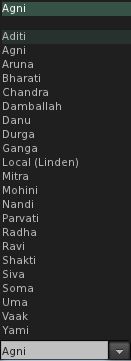
With the Viewer log-in window displayed, click on the grid selection arrow to display a list of available grids (see right)
Click on ADITI for the Beta grid
the log-in splash window will change to display the fact you have selected the Beta grid
Log-in using your avatar name and password as you would with the Main grid
You should be logged into one of the Beta grid welcome areas
Note you will have a L$ account balance, which is not transferrable to the Main grid!
Where to Work
As with the Main grid, the Beta grid is host to a number of sandboxes. Some of these are for general use, some are for very specific purposes; the majority have rules assoicated with them, again as with the Main grid – and you should, as always, familiar yourself with the rules and things like return times in order to avoid upsets.
While mesh is enabled across the Beta grid, there are a number of dedicated mesh sandboxes (SLurl). These tend to have the most recent releases of the server-side code related to mesh, and while they can be crowded at times in turns of the amount of items to be found on them, they tend to present the best place to work.
How Do I Preserve Upload Settings between Grids?
The Viewer should save all settings you use with a model, so when you log-in to the Main grid and select the model for upload, your settings for the model should appear in the upload floater.
What Else?
The following Linden Lab resources may be of additional assistance:

 Inara Pey: Living in a Modemworld