Security Exploits (SEC)
Overview
If an issue poses any of the following threats to Second Life, its Residents or content, then it is an exploit and should be reported:
- Exposes real life Resident identity without consent.
- Destroys content.
- Permits unauthorized access to Second Life/Linden Lab resources.
- Compromises a client or server host subjecting it to remote control.
There are two ways to file security exploits:
- Via a Second Life Security Exploit JIRA, as described below. This is the preferred method of raising such issues.
- Via email to security-at-lindenlab.com.
Notes:
- By their very nature, SEC JIRA reports are not available for public viewing.
- The SEC project (and security mailing list) is only for reporting security exploits that might compromise a Residents identity or the Second Life Grid. All other requests including account issues and account security will not be addressed – these should be reported directly to the Second Life support team.
SEC Bounties
Linden Lab offer a L$10,000 (approx US $40) bounty for each previously unknown exploit that can be verified. Such bounties are generally awarded after the reporter helps confirm that an issue has been fixed, and are contingent on not disclosing the issue prior to Linden Lab publishing a fix.
Filing A Security Exploit Report (SEC)
When reporting a SEC issue, please provide as much detail as possible, Including the environment used (e.g. operating system, hardware, CPU, GPU, location in SL where first encountered, etc.), together with a clear and complete set of instructions on how to reproduce the issue. SEC issues should preferably be reported as soon as discovered / reproduced.
- Log-in to the Second Life JIRA using your Second Life log-in credentials.
- Click on the blue Create button in the top menu bar.
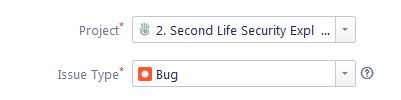
- Check the top of the form an make sure Project is set to 2. Second Life Security Exploit (SEC) – Use the drop-downs to set it, if required.
Complete the Basic section of the form as shown in the image below. Note that the Summary (title), Environment and Description fields are all mandatory.

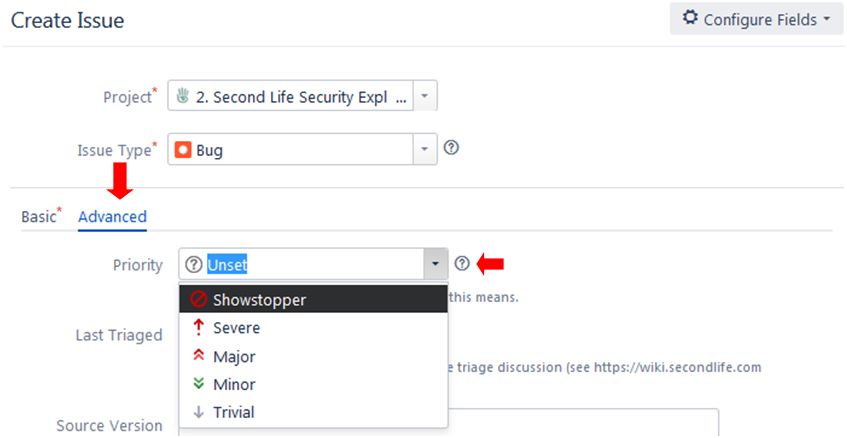
When you have completed the Basic section of the form, you can optionally click on Advanced and use the Priority drop-down to set what you believe the severity of the exploit might be. If you do so, note that it may be changed during the triage process and that you should not complete any other the other parts of this section of the form.
Submitting Your SEC Report
When you have confirmed the information is correct and as clear as possible, and any images / files are attached, click the Create button at the bottom right of the form to submit your bug report.
What Happens Next
The report will be triaged by the Lab. Accepted reports will be tracked internally, and the Advanced tab updated with relevant progress / feedback. Issues with significant or widespread impact will often be fixed in short order, otherwise, Lindens attempt to bundle low impact security fixes when they do update or maintenance work on related code.
Third Party Viewer Violations
What is a TPV Violation?
A TPV violation is any action possible within a viewer that contravene the Second Life Terms of Service and / or the Second Life Terms and Conditions, and / or the Policy on Third Party Viewers (for example: a viewer that exposes / transmits user account information to a third party).
The TPV Violation form is not for reporting bugs or issues with third-party viewers or for making TPV feature requests. Bugs, etc., related to TPVs should be reported directly to the viewer developer through whatever means they have provided.
As with SECURITY reports, TPV reports are confidential. Only a limited set of users are able to see violations or applications in progress.
Filing a Violation Report
- Log-in to the Second Life JIRA using your Second Life log-in credentials.
- Click on the blue Create button in the top menu bar.
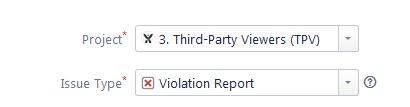
- Check the top of the form and make sure:
- Project is set to 3. Third Party Viewers (TPV)
- Issue Type is set to Violation
- Use the drop-downs to set these, if required.
The Violation Report comprises two tabs: the Field tab and the Attachment tab. Complete both as per the note below:
- Field tab:
- Summary (required field): provide a summary of the violation.
- Component/s: enter the name of the violating viewer(s) – or select the name from the drop-down list.
- Priority: select the priority of the report from the drop-down, or leave as Unset if unsure.
- Version: enter the version number of the violating viewer, if known.
- Description: (required field): provide a clear description of the violation or step-by-step instructions on how the violation can be caused.
- Which TPV or ToS rule is broken?: If you can identify it in either the Second Life Policy on Third Party Viewers or the Second Life Terms of Service rule that has been broken, please list it.
- Attachment tab:
- When you have confirmed the information is correct and as clear as possible, and any images / files are attached, click the Create button at the bottom right of the form to submit your violation report.
What Happens Next
The violation report will be reviewed, and depending on the nature of the violation, the third-party viewer may be removed from the Third Party Viewer Directory. If the violation is found to be related to the Second Life Terms of Service, additional actions may be taken by Linden Lab, depending on the nature of the infringement.
 Inara Pey: Living in a Modemworld