Search Project Viewer released

Linden Lab have released a new Viewer Project to sit alongside their exiting Mesh-enabled Alternative Viewer. This is the Search Project Viewer, which is promising to deliver a new and better Search experience in Viewer 2.

Given that Search has long been a contention where Viewer 2 is concerned – where it initially started out as a massive step backwards in so many respects – the fact that LL have moved it to a dedicated Viewer should be welcome news, in that it gives people the opportunity to properly test the new features, provide feedback and for LL to finally ensure that Search is providing what the user community wants and expects.

I’m not going to go into a long review of the new engine – Ciaran Laval has already done that, and I see no reason to repeat the work he’s done. Certainly the new Search looks very promising, although some of the more irritating problems with the engine remain – such as the number of steps you have to go through simply to be able to see the information you want to get to, regardless of the fact that the Search engine can finally now locate it.

What is interesting to note is that Linden Lab state in the blog post that:

New search will soon be available to you in the official SL Viewer and we will not be implementing it for the 1.23 Viewer. To be clear, you can still use the 1.23 Viewer, but search functionality will be impaired once new search is released into general availability, after the test period. 

Specifically, searches using the ALL and GROUP tabs of the 1.23.x Search will be impaired. So, where does this leave existing 1.x-based Viewers? Again the blog post provides a part of the answer:

 (We cannot speak to which Third-Party Viewers will adopt the new search technology.) All of our development efforts are focused on making SL Viewer with Basic and Advanced modes exceptional for all Residents–new and seasoned. 

In other words, as far as the “official” version of Viewer 1, already frozen in development in many respects, this pretty much marks the end of the road, and it will by up to TPV developers themselves to overcome any functional impairments in search by adopting the new “search 2”. How easy / difficult this might be remains to be seen, but it would certainly seem to add to the burden 1.x TPV developers are having to carry in their attempts to keep things going.

Given that many are already producing Viewer 2 alternatives (Dolphin 2, Firestorm, Kokua, Kirstenlee’s S21, to name but four), this might push them towards making a full and final switch to Viewer 2-based development and allowing any 1.x Viewer offerings they have depreciate.  This many not be a popular move among the wider user community should it happen, but the fact is – and Oz Linden has pointed out – there is a lot coming down the tracks in terms of new functionality within the Viewer that trying to maintain two code bases, or simply trying to backport functionality into the older code, may simply reach a point where it is no longer viable.

If you wish to try out the Project Search alternative Viewer, you can fins the downloads on the Alternative Viewer wiki page.
Voice comes to the Basic Mode Viewer 2

Viewer 2’s Basic Mode gains a new feature today – that of Voice.

While I don’t use Voice myself – I have nothing against it, I just move largely in the world of role -play in SL, and Voice can be illusion-shattering in that regard – I think it’s a pretty good option to have within Second Life, and adding it to the Basic Mode makes sense. To a point.

The problem is, a lot of things are “coming” to the Basic Mode (or have been indicated at coming) – currency, for example. To be fair, I’ve suggested some additions myself, although they appear to be fewer than those LL are contemplating. Which leads to a problem I’ve touched on before.

If LL keep adding to the Basic Mode, how long until it ceases being the “Basic Mode” and becomes “The Viewer”?  The function of a Basic Mode, I thought, was to ease new users into the Second Life / Viewer experience. Ergo, it makes sense to keep the Basic Mode relatively simple and clean. While things like Voice are very useful to have, the fact remains that if things keep getting added to the Basic Mode, then it won’t be long before any advantages gained in introducing it are going to be washed away.

In discussing this with Rodvik a while ago, I pointed out the need to provide a better transitional experience between the Basic and Advanced modes of the Viewer. It’s something he apparently generally agreed with, although he also appeared to imply that Basic might be more to do with making Viewer development more iterative, and that at some point in the future, Basic may merge with Advanced – presumably because the code base has been overhauled and made somewhat more modular, making future Viewer maintenance a lot easier.  If so, this throws the purpose of the Basic Mode into a whole different category than “simply” being a tool to help new users – and it’s future becomes somewhat more intriguing.

Personally, while I’m all in favour of making the Viewer a lot more modular (something I understand Bagman Linden (Jeff Petersen) is quite keen on) to the point of potentially making elements of the Viewer “optional”  / “installable as required” where users are concerned, I still think that the Basic Mode holds a lot of potential where new users are concerned, providing LL address its current shortfalls without overloading it with features and providing they add the means to bridge the gap between it and the Advance Mode smoothly.

It’ll be interesting to see which direction they do opt to take.

Viewer security exploit revealed

Nalates Urriah reports that Linden Lab have confirmed there is a security exploit involving a flaw in the Ogg Vorbis library could lead to Viewer crash issues. It’s not thought that the exploit can either perform privilege-escalation or arbitrary code-execution on users’ systems.

The flaw has been known about since 2009, but the exploit is fairly recent. Ogg files are in widespread use, so this is not an issue specific to the Viewer code. Linden lab has responded to the situation by issuing a patch and an advisory for all TPVs to recompile their binaries for all TPV viewers.

At the time from writing, updating executables for Kirstenlee’s Viewer (S21 7a) and the Firestorm Previews have been released.  Links for the Firestorm downloads (which do not appear to be available on the Phoenix website) are available as follows:

Note that all of the above three releases of Firestorm should be clean installations, not installed over any previous release (which should be removed first).

Other TPVs will doubtless follow, and users are advised to keep an eye on the various Viewer-related blogs and update as required.

Addendum May 16th

Phoenix have released an update that fixes this issue (and others). Find it here.

Bouncing bewbs beget blog bit

Well, Enhanced Avatar Physics are finally formally released  – and blogged about by Samuel Linden, aided by Amanda Linden (honestly, the bouncy bits are that big they require a double team effort?!).

The news isn’t exactly new; people have been blogging and filming the new undulating body parts and having mild fits of hysterics playing with the sliders for a while now.

And truth be told, the enhanced physics are fun and add another level of realism to SL (and without the angst associated with the way bewbs bounce in viewers like Phoenix).

However, we’ve come through nigh-on a month of almost deafening silence from Linden Lab while a myriad of things bork, bomb and basically bugger-up (OK, not quite so alliterative, but you get the point). So you can understand it when people take a tongue-in-cheek line of reportage on the subject, or indeed, mix a little acidity into their view on the news, as Marx Dudek did (sorry; hard to avoid that particular alliterative bit) on Twitter:

What I like best about SL jiggly bits: My breasts bounce with just the right amount of realism while I hover after another failed teleport.

Yes, bouncy bits are fun – but unless this announcement marks a renewal of the Lab actively communicating with the community, people are going to remain pretty unimpressed, even if those of us blessed with them can have bits that wiggle and jiggle and bounce and flounce.

Viewer 2 Basic mode – where next?

Opinions relating to the Basic mode available in Viewer 2 are mixed. While finding it usable in my original review, several aspects left me concerned as to how well it might fill the role for which it appears to have been designed. I specifically questioned the fact that beyond things like basic movement, the view controls and communicating, it has very little in common with the Advanced mode – and there is no obvious continuity in the assistance available for those who opt to start with Basic and come to the point where they want to transition.

One Small Step for a Viewer; One Giant Leap for the User

In fairness, getting to grips with the Viewer at the best of times isn’t easy; while Torley has produced some outstanding videos, these aren’t always easy to locate. Worse, the So-called Quick Start Guide suffers from a combination of having the wrong emphasis in part and missing important and basic information (like actually modifying your avatar’s appearance, rather than simply changing clothes). Also, it’s fair to say the Quick Start Guide hasn’t been updated to reflect the arrival of additional and attractive functionality, thus putting it further out-of-synch with the Viewer.

Put all of this together – the more intense UI of the Advanced mode, a less-than-helpful Quick Start Guide, only the broadest elements of commonality between the Basic and Advanced modes of the Viewer, etc. – and it becomes clear that moving up from the Basic mode to the Advanced mode is not so much a matter of taking the next logical step as it is about taking a leap of faith that the effort is going to be worth it. This considerably undermines the usefulness of the Basic mode.

If the Basic mode is to prove worthwhile, work needs to be put into providing some level of continuity between the two modes of the Viewer to help those making the transition. Indeed, with a little forethought, re-working where and how people get help in the Advanced mode may well assist those leaping straight into it, opting to avoid the Basic mode altogether.

Such continuity / general assistance could be achieved first and foremost by incorporating the HOW TO button with an expanded number of pop-ups (providing overviews of, say, the Sidebar, the revised Toolbar, the menus and the Favourites bar). Doing this would immediately achieve two things:

  1. It would provide needed continuity of approach to seeking help for those moving up to Advanced from Basic.
  2. It offers an obvious place to find basic help and information for those leaping into the Advanced mode of the Viewer and bypassing the Basic mode altogether.

All the pop-ups associated with HOW TO (both Basic and Advanced) should additionally contain links to the Viewer Quick Start Guide, where more in-depth information would still reside. These links should display a pop-up informing the user the QSG will be opened in their external browser (although the Advanced mode should still retain QSG access from the Sidebar as an option).

To further increase the relevancy of the QSG, it should be re-formatted into two sections: BASIC and ADVANCED:

  • BASIC should provide additional information relevant to the Basic mode and which is not included in the HOW TO pop-ups (such as the more familiar WASD keys being available for movement, information on the various icons that appear on the right of the toolbar, etc.)
  • ADVANCED should provide more in-depth information available to Advanced mode users
  • Where any overlap occurs between the two modes, simple visual indicators should be used to indicate options those options only available to the Advanced mode.

Help, Don’t Hinder

It is fair to say that the current QSG is encumbered by several problems:

  • It is out-of-date
  • It lacks key information users will want to know – such as instructions on physically altering an avatar, as mentioned earlier
  • It contains a lot of what might be regarded as extraneous information. For example, while one understands LL’s desire to promote Premium Accounts, is it really necessary to have the latter third of the QSG read like a brochure for Linden Homes – especially as there is already an entire section of the Sidebar given over to this very topic?

It would therefore seem preferable that any re-vamp of the QSG should also focus on ensuring it is updated to reflect more recent version of the Viewer and on assisting the user more effectively, rather than engaging them in a sales pitch for Premium Accounts.

Obviously, a better alignment of the two modes of the Viewer and overhauling the QSG will not solve all the problems inherent in joining Second Life – there are many other aspects of getting into SL that also need to be addressed over an above the Viewer itself.

However, changes like these should help to ease people into using the viewer and encourage a greater tolerance towards it by presenting a more easy-to-follow route into getting help and understanding the UI. In short, it will do more to help users in gaining familiarity with either mode of the Viewer, rather than possibly hindering them.

As stands, as long as the  disconnect between both modes of the Viewer remains, it is hard to see how the Basic mode can achieve any lasting positive impact on new users.

More on bouncing bits

So, SL is all lit up about the forthcoming bouncing bewbs et al in Viewer 2; so much so that people are stampeding over to the website and downloading the Snowstorm latest development version (2,6,3) of the Viewer in which Avatar Physics are to be found.

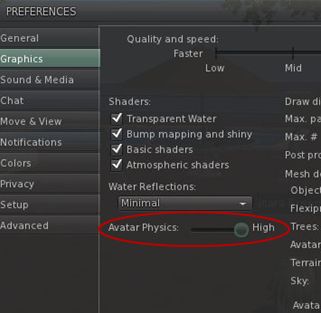
Setting the Avatar Physics rendering slider

To determine how well your Viewer renders Avatar Physics, go to ME -> PREFERENCES -> GRAPHICS, click on ADVANCED at the bottom of the tab, and then adjust the Avatar Physics detail slider.

In what might cause a little confusion for those used to using breast physics in TPVs, Avatar Physics are treated as a new clothing layer in Viewer 2. To enable them, therefore, you need to:

  • Open your Inventory and click “+” at the bottom of the Inventory tab
  • Select NEW CLOTHES -> NEW PHYSICS from the drop-down menu that appears
  • A new clothing layer is created called, by default, “New Physics”.

Once created, wear the new clothing layer, and:

  • Swap to the My Appearance tab in the Sidebar
  • Click on WEARING
  • Right click on the New Physics clothing layer (or whatever you’ve renamed it to) and select EDIT OUTFIT
  • Click on the tools icon to the right of the selected layer to display the Avatar Physics options tab.
Avatar Physics - main options

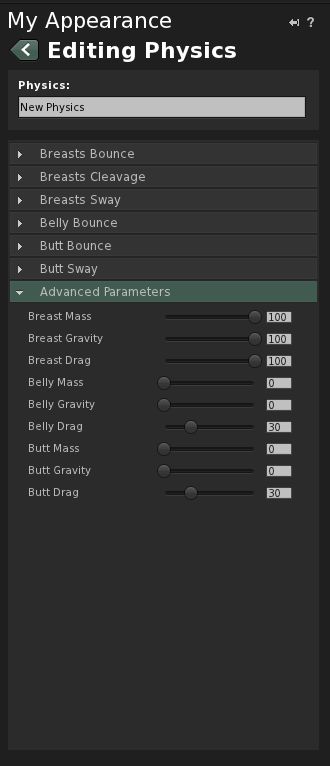
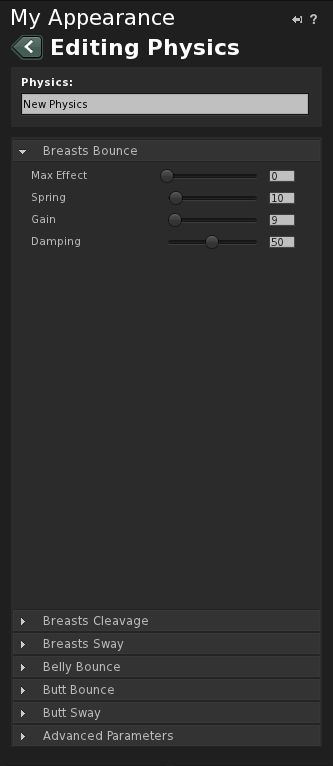
This tab contains a number of controllers:

  • Breast Bounce (open by default on first use)
  • Breast Cleavage
  • Breast Sway
  • Belly Bounce
  • Butt Bounce
  • Butt Sway
  • Advanced Parameters

Each of the first six options comprises a series of sliders rated from 0-100 which adjust four parameters: mass effect, spring, gain, and damping.

Advanced Parameters contains an additional set of parameters (mass, gravity, drag) for breasts, belly and butt respectively. Again, each of these is controller by a slider rated from 0-100.

In all cases, 0 = effect not seen; 100 = effect on maximum exaggeration. The best way to sort out how to set the sliders is through experimentation and finding something you’re happy with. Once you’re happy with things, click the SAVE button at the top of the tab, or SAVE AS at the bottom, if you wish to rename the layer.

Some things to note:

  • Like the Breast Physics in TPVs, activating Avatar Physics in Viewer 2 broadcasts the effects to other compatible Viewers
  • The Avatar Physics system is not    compatible with the Breast Physics in TPVs – you won’t see bouncing bewbs for others using a TPV with Breast Physics enabled; similarly, they will not see your Avatar Physics.

Happy bouncing!