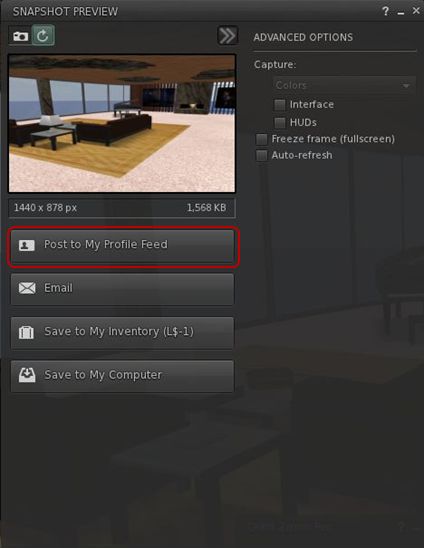
Viewer 3 has had a release slipped out. Version 3.2.4.246439, dated December 8th, brings with it the long-awaited (for those not using a recent TPV or either the Beta or Development versions) updated snapshot floater, allowing you to send snapshots directly to your web profiles feed.
I’d actually missed this release, if it did surface around the 8th, which is a little ironic, as I’ve been trying to keep a weather eye on Viewer 3 updates, but admittedly have had my attention elsewhere in the run-up to Christmas and also trying to put a few upcoming blog posts in order as well.
Installer loses Viewer number
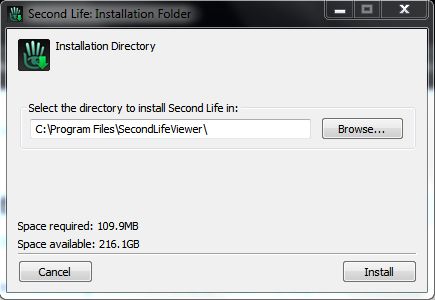
Another change that should make Tateru a little happier 🙂 – is that the installer now simply calls the Viewer the “SecondLifeViewer” (on Windows at least, I can’t speak for other O/s versions of the Viewer) and installs into a folder of that name – the version number is now gone. I can’t speak for the issues on disconnects or those of grpahics issues, but I am assuming it has the OpenGL fixes included (which would, I believe, roughly fit the release date).
Sadly, the click-to-walk still results in mouse steering being, as we say in England, arse-backwards.
I’ve not looked too deeply at the release for other updates, but those using it should have been prompted to update if running an older version; although (again with Windows release at least), because of the install location name change, you need to uninstall the prior version yourself afterwards.
Snapshot floater makes it to a release version of the Viewer, complete with profile feed option
Spelling checkers are something TPV users tend to take for granted; or if you’re a Guardian reader, quite possibly for grunted (sorry, a little English humour….). We’ve been able to bask in the glory of having our misspellings highlighted ready for us to correct (or in some instances, had them auto-corrected, depending on the sophistication of the checker code itself). Those using the official Viewer, however, haven’t been so lucky.
But that is about to change. Enter Storm 83. A year plus old, barely watched or voted upon, and now a coming soon feature. So as Oz comments on the JIRA, “Everyone thank Kitty for volunteering to contribute this feature!” Kitty being Kitty Barnett, who is the assignee for the project, and who has been a prolific contributor to TPV code, including RLV/a.
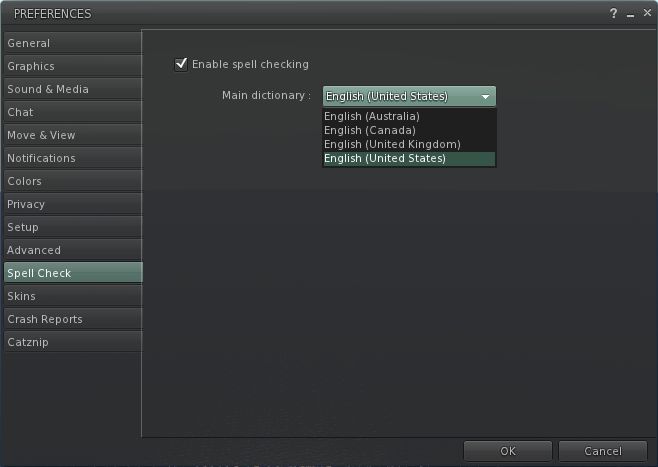
It’s not clear exactly how the feature will be integrated – different TPVs have added it in various tabs within Preferences. However, if we take Kitty’s own Catznip Viewer as a lead (given it is based on Viewer 3), one might hazard a guess and say that rather than being hidden away inside Preferences, as is the case with come TPVs, the Spell Check option will get a tab of its own.
With Catznip the spelling checker is very straightforward: simply tick the check box to enable. American English is the default, but other options are available from a drop-down menu. Spelling errors are then underlined in red in chat, and right-clicking on them will display a nice little menu listing alternatives as well as an option to add the word to a custom dictionary, should you prefer. One suspects the Viewer 3 functionality will be similar.
I’ve no idea whether the dictionary will include the ability to download other language dictionaries, a-la the likes of Phoenix and (shortly) Firestorm. I’ll hopefully take a closer look once the code reaches a Development Viewer or enters the Beta code base.
Viewer 3.2 continues with almost weekly releases. The 3.2.1 (244864) release went public of the 15th November brings the release viewer almost up-to-par with things recently seen in the Beta and Development Viewers, namely:
Chat translation options – in time for the Google free API end-of-line, although the debate over Bing fees is liable to continue
The Viewer also includes a number of crash and performance fixes, together with a bag full of minor bug fixes and corrections.
In the Development branch, the Viewer reaches 3.2.4 (245302). There are no obvious release notes with the Development version (empty wiki page), and no obvious UI updates. I assume the release carries more in the way of bug fixes, etc.
Performance-wise, the new releases (3.2.1 & 3.2.4) offer something of a performance boost on my usual hardware set-up: Viewer frame rates are constant in the mid-30s when on sims with a handful of others but still falls on its bum when shadows, etc., are enabled (to roughly 1/2 the frame rates of Firestorm, and roughly 1/3 those of Exodus). This gives rise to noticeable “stutter” when panning the camera particularly.
Both the new release and the latest Development versions continue to run significantly better in Linden Home regions than Firestorm (again on my set-up). I’ve yet to encounter a single disconnect in these regions when using the official Viewer, whereas, as I’ve mentioned, disconnects and crashes are a fact-of-life when running Firestorm in many of these regions. Frame rates for the 3.2.1 while in Linden Home regions were also significantly better than with the 3.2.0 release of the viewer – 18-20 fps, rather than single digits sitting around the 3-5 fps mark.
I’m not sure where the OpenGL fixes stand – it is hard to get along to Viewer meetings; there is a “dedicated” development stream for fixes to this issue, but I have no idea if these fixes are making their way back to the main Development -> Beta -> Release flow.
The Viewer installer and executable still have yet to be corrected: as far they are concerned, people are still installing and running “Viewer 2”. Tateru Nino raised this point recently (and tbh, I hadn’t actually noticed until she did). I don’t find it an irritant myself, but it is mildly amusing.
The mouse movement / click-to-move reversal is still there however. For those unfamiliar with the problem: up until now (unless using the Basic Viewer mode), you could steer your avatar using the forward / back keys and by pressing and holding the left mouse button with the pointer over your avatar; moving the mouse left / right would move your avatar in the appropriate direction.
With SINGLE CLICK ON LAND set to MOVE TO CLICKED POINT sees this reversed – move the mouse to the right, and your avatar moves left. There’s a JIRA out to request a fix to issue.
Beta-wise, no changes have been made, and the release number remains as per last week.
Overall, 3.2.4 (Development) looks pretty stable, fast and comfortable to use. As I’m not affected by the OpenGL issue, I’m completely unable to comment on how it fairs on impacted graphics cards, and will have to leave that up to someone else. Otherwise, and pending the official release of the OpenGL fixes, these releases may indicate the “radical” element of the Viewer UI change is coming to an end, and it’ll be more a case of polishing things in terms of small enhancements and bug fixes.
And on that subject, if anyone from LL is still reading this blog – there are a few JIRAs on the new UI besides the one linked to above. You might want to point your colleagues towards :).
More people are trying-out the new FUI (apparently “Flexible User Interface”, and not “phooey” as someone jokingly insisted!) in Viewer 3.2, and some interesting JIRA are starting to appear.
If you’ve made the hop, you might want to consider taking a look at some of these and adding your support to any you agree with (remember to WATCH rather than VOTE – or do both to be on the safe side!):
VWR-20738: add ability to organise buttons in Customise Toolbars floater
VWR-27209: a Navigation bar only option to top bar of UI
VWR-27222: add Estate & Statistics Bar buttons and include multi-use separator in Customise Toolbars
VWR-27318 / VWR-27330: provide the option to use either the toolbars or the Sidebar
VWR-27358: allow the Chat Bar and an “IM Bar” to be docked, as if a button-like element, to the bottom bar area
VWR-27388: make any menu option draggable to the button bar
VWR-27448: recover the ability to dock windows at the edge of the screen and have them behave like tabs
VWR-27455: make the button bars on Viewer 3.2 dockable to top/bottom or right/left (depending on the edge) and not only on the middle
VWR-27457: create a “Quick Preferences” button for rapid access to frequently used preferences
VWR-27463: add Picks, Places, and Destinations to menus
VWR-27599: some floater window sizes and positions are sometimes reset to default after a crash, and all are on viewer update
While the following are not strictly Viewer 3.2 related, some may feel they still apply:
VWR-26688: allow notifications to be positioned to a different area of the screen
Note that I don’t pretend that this is an exhaustive list, nor have I included any JIRA for 3.2.0 through 3.2.2 marked as “fix pending”. Finally, JIRA listed above should not in any way be taken as a personal endorsement on my part – they’re simply what came up in search & while perusing the results!
Update 17th November
Adding EXP-1449 left click drag to control avatar not working, when “single click on land” action set to “move to clicked point”.
The latest Development – 3.2.3 (244722) Nov 8 2011 – and Beta – Second Life 3.2.2 (244666) – Viewers include a new snapshot floater that presents a set of simplified controls and some new features.
Snapshot folder – old (l) and new (r)
Send Snapshots to Your Feed
There is a button to send any snapshot directly to your feed ay my.secondlife.com. There is no charge associated with this option, and clicking the button allows you to:
Set the image size
Optionally include a caption for the snapshot and the location where the picture was taken
E-mail Revised
The option to send an image via e-mail has been revised; clicking on the button now opens the message options in the snapshot floater, rather than in a separate floater, and buttons allow you to toggle between the message view and the image settings.
Advanced Options
The advanced options for snapshots are now access by clicking the right-pointing chevrons at the top of the floater. Here you’ll find the familiar check boxes for including the interface and your HUDs in an image, and to set the auto-refresh function. However, there are two options some might not be familiar with that are worth mentioning.
Colour / Depth
Available when saving images to your computer via the drop-down menu, this option allows you to take a full colour image or something more atmospheric. The DEPTH option appears to work with the Viewer’s DoF (Depths of Field) option active in the PREFERENCES -> GRAPHICS tab. Examples of both settings are below.
Save options: Colour (l); Depth with Viewer DoF active (m); Depth with Viewer DoF disabled (r) – note loss of detail in (r)
Freeze Frame
This is probably the feature that will excite most people. Check the option will switch the Viewer to full screen mode, and freeze what you are seeing in-world while allowing you to position the camera for the shot you require!
With freeze frame active, you can pan, orbit, zoom until you’re satisfied, then take the shot. Clicking the refresh bution with the option active will update you screen to the last moves made by any avatars / moving objects in view.
All told, this is a very well-presented update with some fun new features. I like it!
With thanks to Opensource Obscure
Update 11th November
As has been pointed out – I’d somehow missed the fact that freeze frame has been around a while; as has, tbh the colour / depth options. Put this down to me staying up far too late at night looking at things when I should be a-bed!. Article revised to reflect these errors.
Quick note: A couple of other blogs have linked to this piece as a review of the new UI. If you are looking for a review, you can find mine here. This article only references the fact the new Viewer is released, and doesn’t carry any specifics.
Well, well.
After blogging yesterday that Viewer 3.2 had reached Beta – lo and behold, and with no fanfare whatsoever, it’s released!
Apparently there was a blog post about it that Tateru spotted on Monday, but it appears to have vanished into the sub-etha.
Version 3.2.0 (244443), dated Nov 3rd, doesn’t have the latest revisions that the Beta release has – there is no Destination Guide open by default, and there are no translation options on the Chat Preferences, nor does Inventory have the Direct Delivery revision (not surprising, given yesterday’s announcement). The new attach points (Neck and Centre) have yet to appear – although they are in the Beta, so expect them & translate, etc., shortly.
However, everything else I covered in my First Looks piece on the new UI is there – including the direct-to-marketplace shopping button top right of the screen which is liable to annoy many who have in-world shops.
3.2.0 UI
I’m not sure when on Monday the switch-over occurred; I’ve been checking the download page daily of late (sometimes more than twice), and when I downloaded the latest Beta, the release Viewer was still 3.1.2.
Short Random Thoughts on the UI
Given we have a button-based UI, I’m not going to suggest anything radical, but here are some thoughts:
Make the Chat bar optionally “sticky” so that if positioned over the bottombutton area, it displays a-la V1, without the floater surround (i.e. so the “nearby chat” floater title and X to close vanish). This would:
Reduce screen space used by the bar
Allow a further V1-like feel to the Viewer, helping those moving over from V1 feel more at home
Add more button options for greater flexibility, for example:
Environment settings to access the Environment Settings floater (and add sun positions as buttons on the floater)
Quick Preferences button, a-la Phoenix / Firestorm, that provides access to frequently used options such as the Draw distance, Particles count, Height offset, Physics and LOD sliders, etc, and WindLight presets
Button floaters were an idea that crossed my mind as well, but I’m not convinced they’d be a benefit.I hope the code is such that TPVs adopting the UI can add their own buttons easily enough.
I’m a little surprised that the improved camera controls / floater still hasn’t appeared and can’t help wondering what LL are doing with it.
Would also be nice at some point to see some form of client-side AO option included in the Viewer. TPVs have these as standard, they don’t impact on the sales of AOs (as people still need the walks, etc.). On that subject, LL, isn’t it about time the default waddle was reworked into something of a “unisex” walk?
Anyway, random thoughts aside, if you’ve not given the new UI a test, I recommend you do, even if you’re not a regular official Viewer user – it’s worth a look-see, and even if buttons aren’t to everyone’s liking, they at least allow a greater flexibility of approach to screen layout – and even allow a sort-of pseudo Viewer 1.x layout.
Updates: 9th November
Two excellent JIRAs on the UI have been raised, and they are certainly worth Watching (which, as we all know, is the new Voting – although putting in a vote as well won’t do any harm!)
VWR-27388 – make all menu options draggable to the button areas – thanks to Pat Perth
VWR-27455 – make button groups repositionable within the button areas (i.e. move to left/right or top/bottom edge of placement areas – thanks to Gwyneth Llewelyn
I’ve also raised a JIRA for the addition of a “Quick Preferences” button to access specific sliders: VWR-27457.


 Inara Pey: Living in a Modemworld