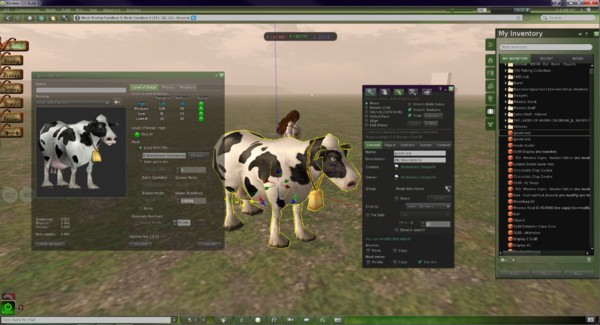
Mesh: Viewer changes coming

In the wake of the arrival of mesh, and in the hope of alleviating confusion / making things a little more understandable, there are changes coming down the road for Viewer 3. Some of these will undoubtedly make their way into TPVs as well, so here’s a quick overview.

The changes described below can be seen in the latest Mesh Development Viewer from Linden Lab (3.0.5 (240741)+), which can be obtained from the alternate viewer wiki download page. note that as this is a development Viewer, some elements may change in relation to descriptions provided here.

Prim Equivalence and Land Impact

For a general user perspective, this is probably going to be the most obvious change.

Prim Equivalence, or PE has been an issue on many levels, not the least of which, for consumers, is that it tends to be bracketed with a prim count value – and is frequently greater than the associated prim count (although there are items where the reverse is true). People therefore get confused as to which is the key value: prim count (which everyone is familiar with) or PE.

In order to try to solve these issues, the terms “Prim Equivalence” and “prim count” are set to be replaced by a single value: “Land Impact”. How this will work takes a little explaining on two fronts, as it relates to a couple of changes within the Viewer and how we need to view things. So bear with me while I attempt to explain.

The first of these changes is that land will no longer be referred to in terms of prim counts and usage, but rather in terms of its “capacity”. Essentially, this means that:

  • Full sims have a “capacity” of 15,000
  • Homestead sims have a “capacity” of 3,750
  • OpenSpace sims have  a “capacity” of 1,875.

Land parcels will also be referred to in terms of their “capacity”:

About Land today: prim counts (l); As it will be: capacity (r) (click to enlarge)

This might all sound like unnecessary semantics – but it does have a point in that it allows everything to be thought of equally, regardless of its origin – as we’ll see below.

Note as well, that nothing is physically being “lost” from your land. A 4096 sq m parcel that had a prim count of 937 prims before the arrival of the new Viewer will simply have a “capacity” of 937 after the new Viewer has entered general use, as shown by the figures highlighted in green in the above images.

To align with this, objects need no longer be through of in terms of their prim count or their PE – but simply in terms of their Land Impact – that is, how much of the available “capacity” on a sim / parcel they take up. This is reflected in changes being made to the Build menu floater:

Build floater: As it is with Prim count & PE (l); The new Land Impact values (r)

As can be seen, the prim count / PE values are being replaced with two simple figures:

  • The impact the rezzed object has on the land
  • The remaining capacity that is available for rezzing further objects.

So if an object has a Land Impact of 15, it will reduce the land capacity by 15; if it has an impact of 150, it will reduce the land capacity by 150, regardless as to whether the object itself is made of prims or is a mesh object.

For people who want more detail on individual objects, the new Build menu also includes a MORE INFO link. This opens an additional floater which provides:

  • Information on the object itself (including the prim count for those missing it!)
  • If the object is a mesh creation, the “weights” applied to it in terms of the bandwidth required to download it, the server resources it uses, its physics weight, etc.
  • The overall land impact: impact of the object itself, impact of all objects rezzed, remaining free capacity and total capacity for the land itself.
MORE INFO: for a prim object (l) and mesh object (r) – note the weights for th mesh object

There will also be a WHAT IS ALL THIS? link which will open a Help page that explains the various figures.

Replacing both prim count and PE with a single, easily understood value (Land Impact) makes sense, and at a stroke makes the impact of rezzing any object in-world easy to understand, removing any confusion between prim count and PE.

Of course, there are going to be voices that proclaim the change is about further “hiding” the “real” cost of mesh objects from the user, with the underlying implication that the users are somehow being hoodwinked by Linden Lab. But, c’est la vie. People are wont to make waves come what may.

It will be interesting to see how merchants react to the change – given that all vendors, etc., refer to prim counts right now, and getting wording changed to “Land Impact” (or simply dropping the word “prim” from displays)  is a nontrivial issue for many. Some may even opt to retain the use of “prim count” in their vendors for this reason.

And when considering merchants – one hopes that Linden Lab will actually remember to update the Marketplace so that listings also reflect the use of “Land Impact” (i.e rename Prim Count!).

Avatar Rendering Cost and Avatar Draw Weight

Alongside the changes around PE and Land Impact, the Viewer will also be losing another measure that has always caused controversy and angst: Avatar Rendering Cost, or ARC.

Always intended to be an indicative figure for the amount of potential Viewer-side lag avatars create, ARC quickly became viewed by some as the figure for determining whether or not an avatar was “creating lag”, which in turn lead to a lot of drama in some quarters – up to and including people being banned from venues / sims on the basis of their ARC count.

DWA: 197,484 – but don’t panic!

From 3.0.5, things will be totally revamped. ARC as a term is vanishing from the Viewer to be replaced by Draw Weight for Avatars (DWA). Furthermore, how DWA is calculated is radically different to how ARC has been calculated, as Nyx Linden explains.

DWA should be far more accurate  than the old ARC system; and therein, one cannot help but feel, lies the rub.

If the figure is indeed more accurate, it is likely to be pounced upon within even greater zeal by those already obsessed with ARC. As such, I can’t help but hope this is one value that Linden Lab don’t make a song-and-dance about when these changes to the Viewer are formally released for general use.

Mesh Uploader

Another source of irritation for content creators has been the mesh upload floater. At SLCC 2011, Charlar Linden himself admitted the current floater is isn’t overly user-friendly. As such, it is also being overhauled, as can again be seen in the current Mesh Development Viewer.

The current upload floater presents a basic set of modifiers that can be applied to a mesh object prior to uploading in order to optimise it. These tend to encourage a lot of trial and error / guesswork on the part of the creator in order to arrive at a desired result.
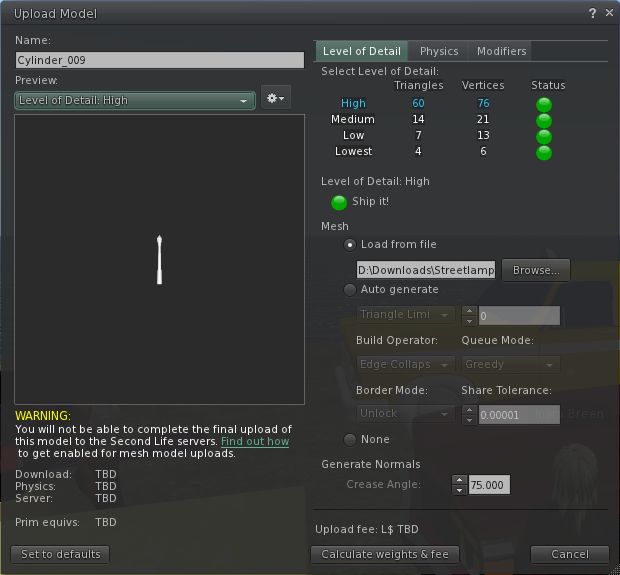
The current mesh object upload floater

The new upload floater offers a greater range of modifiers and the ability to better define the model itself in terms of what it represents (avatar shape, avatar attachment, moving vehicle, etc – see the drop down in the image below), which presumably apply suitable algorithms that help optimise the object and calculate its overall weight.
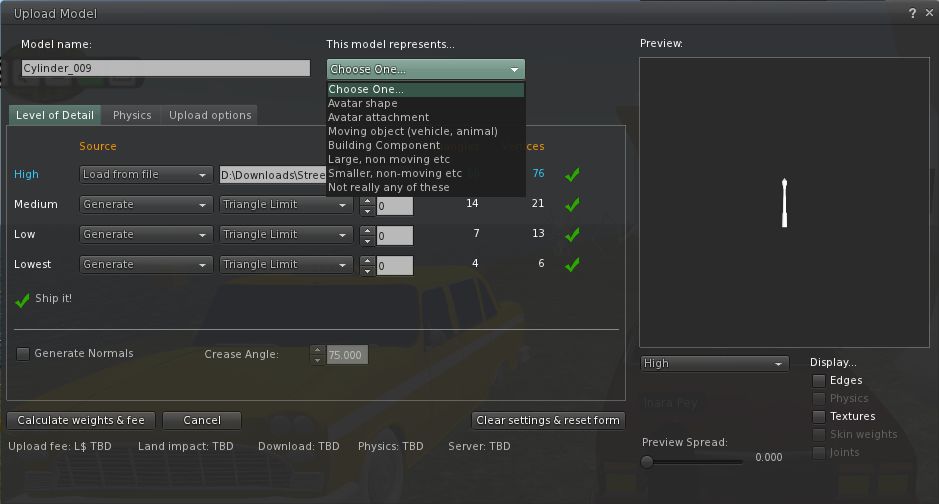
The new mesh upload floater as it appears in the Mesh Development Viewer

I understand that several of the changes in the new upload floater are as a result of consultations with / requests from mesh content creators, so hopefully they will go some way to easing the process of importing objects into Second Life.

More to Come

These are by no means the only changes coming to Second Life and the Viewer as a result of the arrival of mesh object support. For one thing, more needs to be done in the area of mesh clothing in order to make it easier to adjust clothing to fit the avatar, rather than the other way around as is currently largely the case. Therefore we can expect to see further changes in relation to this in the future (indeed, those interested in the issue should check Maxwell Graf’s JIRA relating to a parametric deformer).

In the meantime, the above should hopefully give insight into what is waiting just around the corner.

Kirsten’s Viewer: possible way forward?

Many of us reported last week that development on Kirsten’s Viewer had been suspended due to Dawny being ill. As a consequence of her illness, Kirstenlee has had to seek full-time employment as well as needing more time to care for her.

Today, Hamlet Au published an interesting piece on the fact that if the (approx. 8,500) users of Kirsten’s Viewer were to each donate $6.00, then work could continue on the Viewer for an entire year. That’s not $6 a month – it’s $6.00 per person in total, or 50c a month.

Let me be clear here – as Hamlet is – this is neither Dawny nor Kirstenlee asking for money – this is a suggestion coming from Hamlet following-on from a conversation he had with Dawny. It’s not entirely clear what Kirstenlee’s views are – although I’d be surprised if they were any different to Dawny’s; the Viewer has been a major part of their lives for a long time now, and they have both put heart and soul into it, together with the rest of the team.

Hamlet isn’t suggesting people start donating right away – but rather they use the Kirsten’s Viewer site to register moral support – with dollars possibly coming later, once details have been worked out, and potential options looked at.

Firestorm 3: optional update released

firestorm-logoThe Firestorm team have released an optional update to the Firestorm 3 Mesh Beta release. The update is to deal with a couple of issues, as explained in the official blog post:

“A new bug was brought to our attention recently that effects region restarts while using our Metaharper skin in our Firestorm Mesh Beta. Basically, the region will fail to restart and be left in a state that only LL Support can fix. We traced the origin of the bug, fixed it and have updated our download files.

“If you are an Estate Manager who performs region restarts AND you use the Metaharper skin it is strongly advised that you download our updated version 3.0.1.22566 from our download links on this page. No other skin is effected by this bug. Alternatively, you can fix the issue yourself without installing this optional update by following the instructions listed on this page. http://wiki.phoenixviewer.com/doku.php?id=fs_region_restart_bug

“We have also patched a performance issue some people may be effected by which essentially drops performance when you have many IM windows open at once. If you have performance drops while having multiple IM windows open you may find an improvement with this optional update.

“If you do not fall into the above criteria there is no need for you to update or worry, aside from what’s listed above, nothing else has changed since our 3.0.1.22525 Mesh Beta.”

If you are affected by either of the above, download the update from here.

Kirsten’s Viewer: A sad Farewell

In a sad notice posted today, Kirstenlee Cinquetti has announced the end of line for the foreseeable future – if not permanently – of the outstanding Kirsten’s Viewer. The entry in full reads:

“You may have noticed that the client has not been updated in some time. Sadly Real Life events have taken an unfortunate turn which basically puts an end to any more development. The Plans for S22 have been shelved and the project has been marked as discontinued.

“Installers have been removed as they are now very outdated, the sourcecode will of course remain. The website and forums will stay up for as long is required. Also inworld groups will stay active. It is of course entirely your choice as to how long you continue to use the client, however I do stress that it will fall behind with features and it may be wise to seek alternatives in the near future.

“Dawny has been very Ill, and had to stop working. As you can imagine my priority is to support her in any way possible and that means I have to become the main bread winner, as much as I enjoy working on the client it’s obviously the first thing to go.

“Not much more to say…

“BUT finally I would like to wish everyone who has supported the project over the years, a huge hug and many thanks, Jabba, Altair and all the people who have put up with my ranting and raving and unusual colour choices in UI. 🙂

“Who knows what the future holds! But for now Kirstens Viewer goes into a deep sleep.

“Presses the Shut Down button, Drives spin down, silence……….

“Love to you all, KL”

This is a very sad day for Second Life and Viewer development. Over the years, Kirsten’s Viewer has set the benchmark for SL-related photography and machinima as well as being ground-breaking in many other areas, not the least of which was the development of the first Viewer 2 hybrid client that offered a usable interface well ahead of V2’s own at the time, and which has remained innovative and highly preferable to LL’s own offering. More recently, it became the first and, up until its suspension, only Viewer to support the upload of mesh objects outside of Viewer 3.x.

I’ve always enjoyed using Kirsten’s Viewer – it requires a fairly high-end machine, and at times my PC had struggled with it, but it has always given me faultless performance and the ability to enjoy elements of Second Life that just weren’t available to me through other Viewers – such as the initial iteration of dynamic shadows.

Happier times: Jabba Abbye’s screen capture celebrating the release of S21 Build 9 with mesh object rendering / upload support

I’d like to take this opportunity to thank Kirstenlee and the team for everything they have done and achieved with the Viewer, together with a personal message of best wishes and a return to health for Dawny. For now it is Adieu to Kirsten’s Viewer; perhaps we’ll meet again in the future.

Firestorm 3.0.1 “Mesh” Beta: major features review

firestorm-logoYesterday, the Phoenix / Firestorm team released a Beta version of Firestorm (officially called 3.0.1.22525), specifically aimed at mesh object rendering. The team is keen to emphasise that this is bordering on an “experimental” release, and urge anyone trying it out to read the accompanying release notes – of which more anon.

The release itself was almost destined not to take place; on Tuesday morning the team discovered a series of regression issues that needed to be resolved, then their service provider announced significant issues with their fibre, leaving the Phoenix servers only able to accept around 10 connections at a time!

Nevertheless, the team worked through issues and, following the fortnightly Phoenix Hour on MetaMix TV, the Beta was duly released. So – what is it like?

Starting Firestorm

The differences between this version and earlier releases are apparent from the moment you install and run Firestorm. On the log-in screen alone are three new features:

Log-in screen – new features
  • Log-in drop-down list: Firestorm gains the Phoenix username drop-down list with this release. If you use several alts, names and passwords can be retained by the Viewer and chosen from a drop-down list, making for easy selection. In a further nice touch, if you use the same name to log on to multiple grids, the Viewer will remember the specifics. For example, I have three entries under username: “Inara Pey”, which logs me into the SL Main grid; “Inara Pey @ Second Life Beta” which logs me in to aditi, and “Inara Pey @ InWorldz” which logs me in to InWorldz – the required Grid is automatically selected when I select the user name
  • Beneath the Username field is a new button – DELETE THIS ENTRY (arrowed). This removes the details of the selected avatar from your log-in records held by the Viewer – again, useful if you have multiple avatars and discard one, or if you no longer log-in to a specific grid
  • There is also now an option called DEFAULT SETTINGS. This allows you to select a default “UI” style with which to run the Viewer. By default, it is set to “Phoenix”. Clicking on the arrow to the right of the option displays the additional options of “V3” and “Hybrid” (boxed above).

Now, these have been described as setting different User Interface styles – and to a point, they do (setting V3, for example, will give you the familiar Sidebar tabs from Viewer 2.x/3.x); but if anyone is expecting “Phoenix” will deliver a full-blown Phoenix-esque V1.x UI will be in for a disappointment – the differences in presentation are far more subtle: “Phoenix” delivers a UI that is pretty much identical to the current Firestorm release UI, for example.

Firestorm 3.0.1 “V3” UI option

“Hybrid” refers to a new – and, I’d say cleaner – variant of the Firestorm UI developed for this release, which I’ve now set as my default (as far as possible – there is at least one issue with this release).

Firestorm 3.0.1 “Hybrid” UI option

As with the Viewer Modes in Viewer 2.x / 3.x, changing the default settings will require you quit and restart Firestorm. While this requirement is the same as the official Viewer when switching between Basic and Advanced modes, it would be nice if this could be automated if at all possible: clicking the OK button shutting down and restarting the Viewer in one convenient go.

Firestorm 3.0.1 “Phoenix” UI option

Navigation and other “Top” Bars

By default, both the Phoenix and Hybrid settings have the Navigation Bar at the top of the screen turned off, while the V3 option has it on, together with the Search bar. Speaking of the Search Bar, as there is an option to turn it  off/on, it would be nice if this worked independently of the Navigation bar (currently turning Search on / off only makes a difference if the Navigation Bar is displayed). It’s a small thing, but would add to convenience of use.

The Favourites Bar is on by default in all three, and while I like the fact that in the Phoenix and Firestorm options it is on a transparent background, this may cause issues for some and it is frequently difficult to see against, say, the sky. I also like the Hybrid option’s transparency around the tool bar at the bottom of the screen; this is a nice touch and adds to the feeling that one has a greater in-world viewing area.

Of Sidebars and Pie Menus

The “V3” option of the UI obviously uses the V2.x/V3.x Sidebar and tabs, although options can be accessed from the toolbar at the bottom of the screen as well.

The “Hybrid” UI option uses the “tabless” Sidebar seen in earlier Firestorm releases, with options accessible from the toolbar buttons. In both cases, options can be “torn off” from the Sidebar and floated as independent windows, and will persist as such between log-ins.

The “Phoenix” UI option disposes with the Sidebar completely, and simply floats options in their own windows.

Both the Phoenix and Hybrid options utilise the Pie Menu by default – I would personally prefer the Context Menu were the default in the case of the latter, but I suspect I’d be in the minority for saying so! The V3 option uses the Context by default.

Major New Features

Volume Control Access

Volume Setting Controls

With this release, Firestorm inherits Phoenix’s quick-access panel for all volume control settings. Simply hover the mouse over the volume icon at the top right of the Firestorm window and the control panel will drop down.

All the expected options are there, with sliders, together with options to mute those that are frequently not used: streaming music, media and Voice.

Alongside the Quick Preferences button located down on the toolbar, this is perhaps one of the most eagerly awaited V1 TPV UI options to reach Firestorm.

Built-in Flight Assist

Adding to the client-side AO, Firestorm now sports a flight assist option. This is accessed through PREFERENCES -> FIRESTORM and then checking the ENABLE BRIDGE FLIGHT ASSIST option. As the option itself suggests, the Firestorm Bridge must be worn in order for the flight assist to work; furthermore, you should remove / turn off any other flight assist options before using the built-in flight assist, or you might experience all sorts of issues!

Camera Floater Updates

The camera floater receives an update in the new release, with the Phoenix and Hybrid versions receiving new buttons, while the V3 floater sits somewhere between the previous Firestorm version and the Viewer 3.x controls.

Camera floaters Viewer 3.x (left), Firestorm Beta, Firestorm “V3” and Firestorm “Phoenix” / “Hybrid” (right)

The layout of the new “Phoenix” / “Hybrid” floater makes it appear slightly larger on-screen, and also a little tricker to resize.

Contacts List Changes

The Contacts List has been updated to show whether friends have allowed you permission to map them / edit their items – all to the good. On the downside, a column to show Display Names has been added alongside user names, which tends to push out the size of the window unnecessarily.

Contacts List – a lot of screen space

It would be nice if there were an option to turn off either the user name column or the Display Name column in order to make the List less screen-consuming. If this could be coded, and reduce the amount of screen real estate lost to the window.

Continue reading “Firestorm 3.0.1 “Mesh” Beta: major features review”

Firestorm Mesh Beta released

firestorm-logoThis is a summary report only, due to the circumstances of the release. A full review on the Firestorm Mesh Beta will be forthcoming, complete with a detailed list of all new features and an overview of fixes.

Following the Phoenix Hour today, the Phoenix Firestorm team have released a BETA version of Firestorm with mesh object rendering support.

The release is not to be regarded as a full release – more work is required.

Furthermore, the team has specifically requested anyone wishing to download the release to read the accompanying notes before downloading and trying the Viewer as there are some critical issues.

There is also a list of known bugs that Firestorm has inherited from Linden Lab. These are already known about and the team request people do not raise further JIRAs on them again, please read the list before reporting bugs.

Other points to note:

  • nVidia 400-series and above graphics cards may be prone to immediate crashing on running the Viewer if Basic Shaders are enabled. This again is a bug inherited from Linden Lab, and users of 400-series and above nVidia cards are asked not to enable Basic Shaders
  • The release should clear settings and cache as a part of the installation. If you wish to preserve chat and IM logs, and set them to the default locations, make sure you move them elsewhere first
    • Should settings / cache not be automatically cleared, people should go to PREFERENCES -> NETWORK & CACHE and use the button there to clear settings and cache and then relog
  • This release does not include the spell check option – this will be added in the final release; all effort has gone into responding to user demands to provide a version of Firestorm that can render mesh objects
  • Mesh uploads are not in this release – the code needs further work.
Jessica (r) and Phaylen at today’s show

The following feature are included in the release (not definitive):

  • Default settings log-in mode options (choose between V2, Phoenix, Firestorm “UI”)
  • Custom Viewer tag colours
  • Contact Sets
  • Phoenix Friends List permissions
  • Phoenix particle beam effects
  • Built-in flight assist (via the Bridge) – turn on via Preferences as can cause problems if 2 flight assists running – no boost
  • Script count in pie / context menus
  • Auto-correct
  • Font options to change the UI font (be aware some fonts may not “fit” UI default button sizes, etc.)
  • New Starlight skin offerings
  • Drop-down for all volume controls (top right, with main volume controls)
  • Nearby Voice has sliders
  • Camera Target hints can be fully disabled
  • Improved camera floater controls
  • Improved OpenSim capability (with thanks to Kokua / Imprudence) – but this *unsupported*

I hope to have an in-depth review of the Beta release out in the next 24 hours.

The links