Firestorm 4.2.2.29837: pathfinding, Flickr and more

Monday 27th saw Firestorm 4.2.1.29803 released. Unfortunately, this included a visual bug being inadvertently introduced into the release which made moving items such as doors and wheels appear to be “broken”. While this was only a visual impact rather than a code breakage, the decision was taken to withdraw 4.2.1 and replace it with 4.2.2 once the problem had been fixed.

As a result, and in case the release of version 4.2.2 included additional updates necessary as a result of fixing the issue, I opted to hold-off on my review of 4.2.1, and wait until I’d been able to look at 4.2.2 before Pressing a review.

So here it is, a look at Firestorm 4.2.2, featuring some of the key changes and updates which include an initial implementation of pathfinding. Alongside this, the release sees includes Katharine Berry’s snapshots-to-Flickr option, temporary uploads from the snapshot floater, new toolbar buttons and more.

A Note on OpenSim

This release does not include any fork between Second Life and OpenSim. That will be coming in a future release, which, as Jessica reports in her blog post on this release, might be a while in coming as the team have a lot of work on their collective plate.

Installation

The windows installer is some 33.7Mb in size – so par for the course with Firestorm. If you’ve previously installed version 4.2.1.29803 then a clean install is not required. However, if you’re upgrading from 4.1.1.28744 or earlier, a clean install is required / recommended.

Pathfinding Tools

As mentioned above, and with the exception of navmesh visualisation, all the main pathfinding tools are present in this release, complete with the expected Firestorm finesse when it comes to Rebake Region.

The Linksets and Characters floaters can be accessed using both the context and the pie menu when right-clicking on an object or character. The Build and Object Profile panels also have their pathfinding information panels added.

The Firestorm team have implemented the Rebake Region functionality somewhat differently to Linden Lab. Rather than incorporating a button displayed at the bottom of the viewer window when a rebake is required, the team have combined the rebake function with the pathfinding icon displayed in the Menu Bar / Navigation Bar (if displayed). Thus, when the icon is displayed (either with or without the initial warning pop-up, as shown in the image below), clicking on the icon will display a dialogue allowing a rebake to be initiated.

Region rebaking in Firestorm: The Menu Bar icon is used to trigger a rebake, rather than a button displayed within the viewer window. The default warning of the need for a rebake (top) may also be displayed, depending upon whether you have left the option enabled or not after its first appearance.

Combined with disabling the initial pop-up (by checking Do not show this again),  this option makes the need for rebakes less intrusive when using Firestorm.

New Buttons

There are three new toolbar buttons in the 4.2.0 release: Asset Blacklist and Sound Explorer, both of which toggle open / close the Asset Blacklist floater or the Sound Explorer floater respectively (each otherwise accessible via the World menu), and Ground Sit – which is pretty self-explanatory.

Snapshots: Flickr, Temp Upload and More

Flickr option on Snapshots floater

Flickr is a popular medium for SL photographers, so having an option to save pictures directly to it is likely to be a benefit to many. With this release, Firestorm obtains Katharine Berry’s code to enable snapshots to be uploaded directly from the viewer to a Flickr account.

In order to work, this functionality requires Firestorm is authorised to access a Flickr account. Therefore, the first time the Flickr tab on the snapshot floater is clicked, a pop-up is displayed, both explaining the need for authentication and what will happen. Clicking on NO on the pop-up will stop the process, and you can use another option on your snapshot floater for saving the image.

Clicking on YES will take you to the Flickr authorisation page, which will outline the possible risks of connecting Firestorm to Flickr (a standard alert page, common when using inter-application authorisation). Read the warning carefully, and if happy, confirm you wish to proceed (refusing cancels the link and denies Firestorm the ability to upload to Flickr).

Confirming that you’re happy to proceed will display a code number on the Flickr web-page. Type this into the authorisation pop-up displayed in Firestorm to complete the authorisation process. Once done, you’ll be able to upload pictures to your Flickr account without further hindrance.

This release of the snapshot floater also includes an option to temporarily upload a snapshot to your inventory. Temporary snapshots are saved to your Photo Album, where they will be available for personal use (e.g. non-transferrable, etc) until your next re-log. Finally for the snapshot floater, all settings changes are saved between sessions.

Use the page numbers below left to continue reading
Helping the community: the Phoenix Firestorm Support region

Update Aug 25th: The region is now open. See the link at the end of this article to visit.

This weekend, the Firestorm team will be launching a new in-world venture: the Phoenix Firestom Support island.

The region is designed to serve two purposes. One is to provide help and support for users of any calibre, via the use of in-world tutorials supported by real life help in the case of users new to SL, and via the provisioning of an area more focused on providing real life help for users more familiar with SL and the viewer. The second is to provide an in-world base of operations to support Firestorm users in particular.

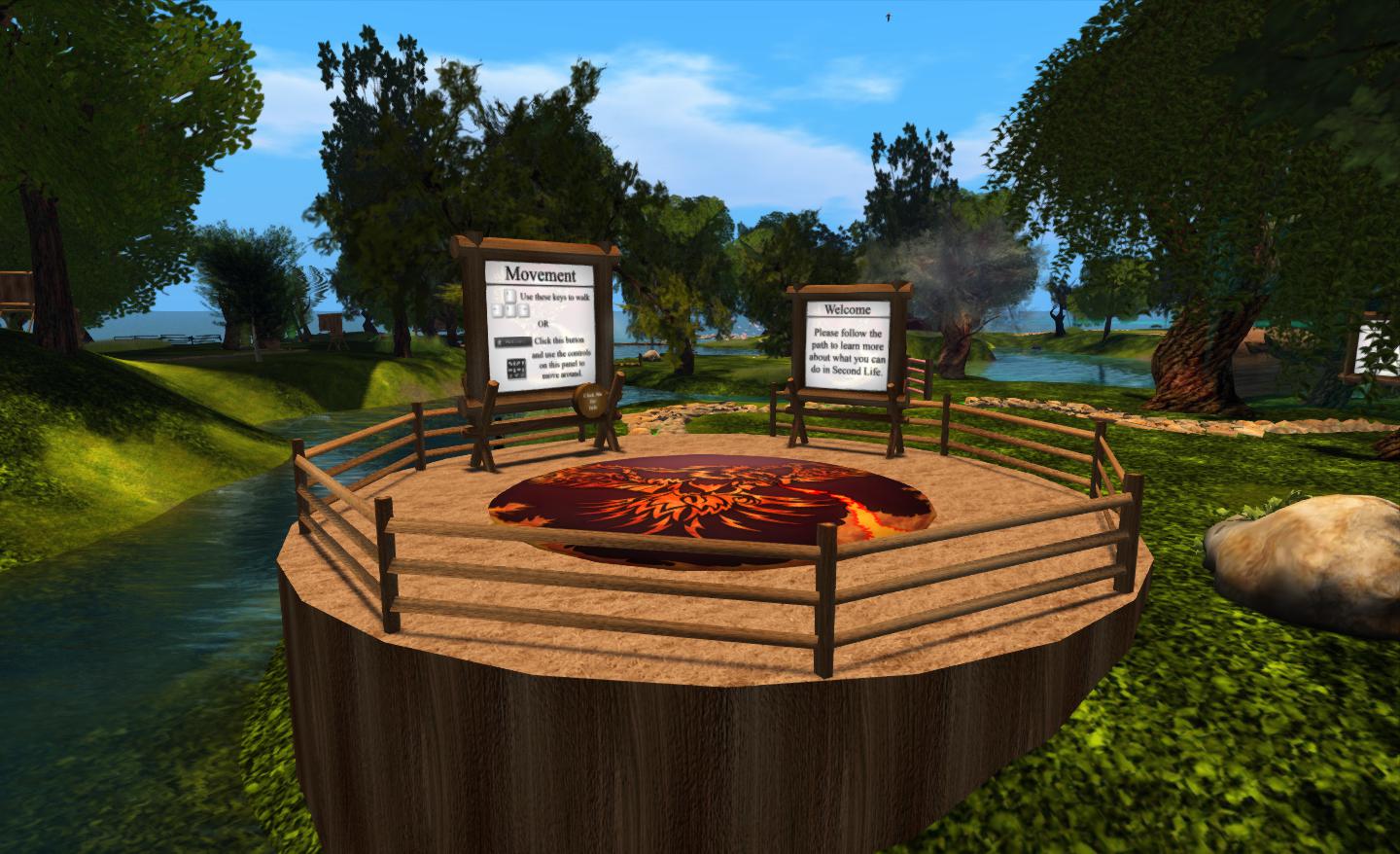
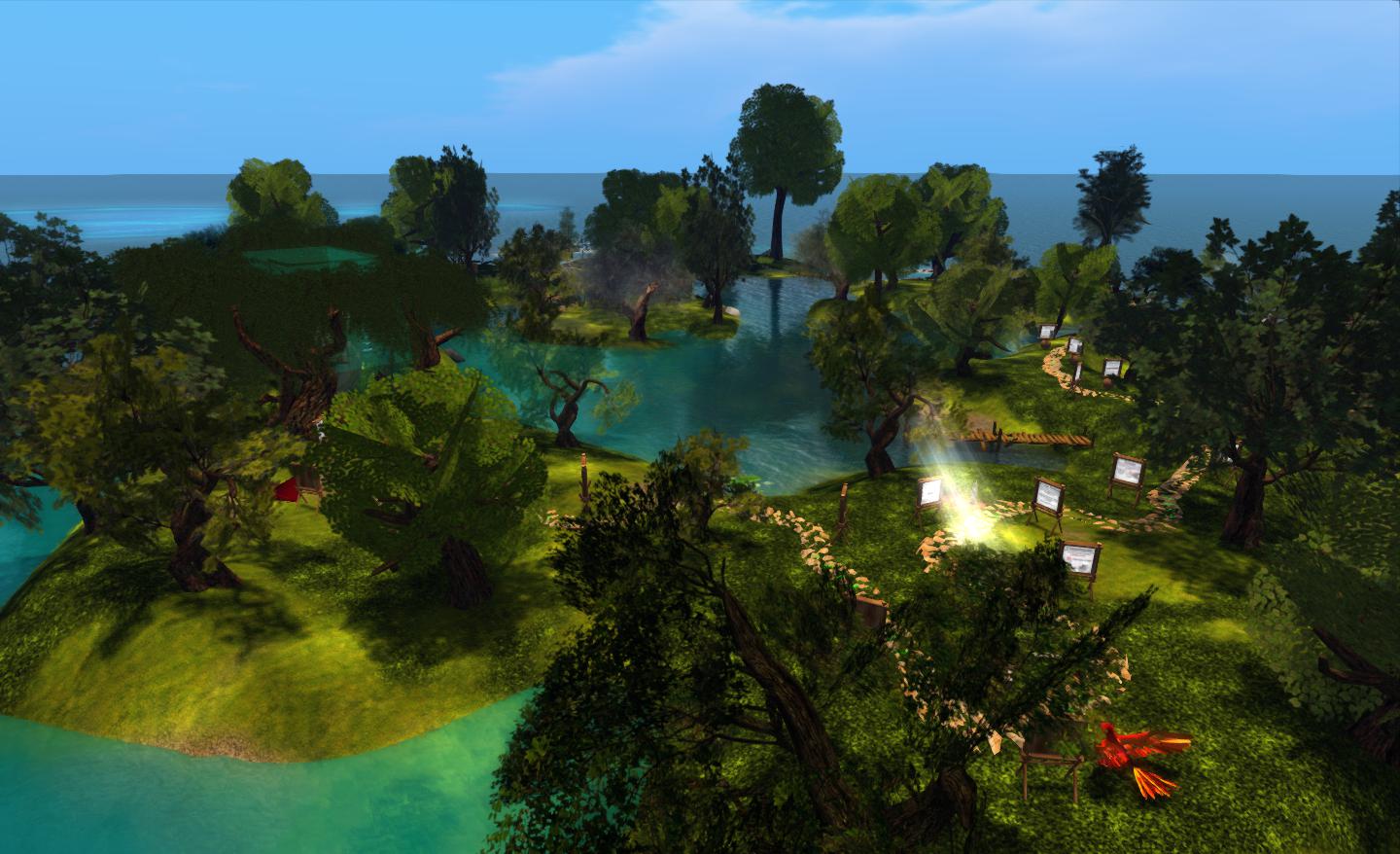
Firestorm’s new support island

The region is somewhat mindful of the old SL Orientation Islands where new users to SL learned about the basics of the viewer and how to do things – so much so, in fact, that I was half-expecting to find a beach ball and table during my preview explorations :). While neither turned up, I did smile on coming across a large and talkative phoenix, itself a reminder of the OI parrot…

However, this is not to say that the region has been deliberately modelled on the old Orientation Islands. As Jessica Lyon, the Phoenix / Firestorm project lead pointed out to me as we discussed the island and the ideas behind it, it’s a matter of form following function. A relaxed and visually pleasing tutorial path with few distractions naturally lends itself to this kind of open-air approach.

The main element of the region is a path which leads people around the island from the arrival point, taking them past various lessons in gaining familiarity with Second Life and the viewer. These are very much focused on “learn by doing” – such as jumping over a fence to understand walk / jump – and are very clearly and cleanly presented, and obviously intended for the more novice user.

Arrival point

The signs are clear and concise, and while based on Firestorm running in a default mode (i.e. with the pie menu active), they easily translate to other viewers, whether they are using pie or context menus.

Within this sits a central area where questions about Second Life and viewer use that go beyond those that tend to be asked by “new” users can be addressed. This can be reached via a bridge from the outer area of the island or via a teleporter located at the arrivals point.

The central area, where the more experience user can seek focused assistance from staff and mentors

A key aspect of the region is that is designed to be staffed. Although it had originally been hoped that in-situ help relatively small, things haven’t quite work out as originally envisioned. “Our original plan,” Jessica told me, “Was to have a first entry to SL region for zero – 30 day accounts only, and would staff it with our own support staff and a careful selection of mentors/helpers. We have a RegAPI from LL [which would allow Firestorm to run a sign-up page and deliver new users directly to the region]. Unfortunately, it doesn’t work with “Resident” last names, so we had to switch to plan B. Plan B is to open the region to the public, and heavily staff it with mentors and helpers to ensure new and old residents alike get real help from real humans.”

As a result of the switch to “Plan B”, and to ensure the island is properly staffed, invitations to participate have been sent to the RHN, White Tiger Mentors, Mental Mentors and other groups. One potential benefit of this is it will help ensure there’s a much more diverse wealth of experience on-hand to deal with viewer-centric questions than might otherwise be the case were the island solely staffed by Firestorm-focused volunteers.

Continue reading “Helping the community: the Phoenix Firestorm Support region”

The grid divide: TPVs and OpenSim support

At the start of the month, Hypergrid Business reported on Linden Lab’s removal of support for the –loginURI parameter from versions of the SL Viewer.

This command is most commonly used to modify the command path used to launch the viewer, allowing it to connect to grids other than Second Life. It has already been removed from the latest development ad beta versions of the viewer, and as such will find its way to the release version in the near future.

For the majority of people who use the official viewer and only access Second Life, the announcement passed largely unnoticed. Even among those who do routinely bounce between Second Life and other grids using TPVs, the impact of the change was minimal – most viewers openly supporting access to both Second Life and OpenSim grids tend to do so through the use of a grid selector / grid manager option – which remained unaffected by the change.

The Shape of Things to Come

However, the removal of support for –loginURI was the tip of the iceberg.

In April of this year, Linden Lab announced a sub-licencing arrangement involving the Havok physics engine. While there is already some Havok functionality evident in the viewer as it is (used in conjunction with mesh uploads and pathfinding), the licence arrangement enables Linden Lab to develop a library of Havok functions for the viewer. In time, this may prove to have significant benefits for Second Life; however, there is a catch.

Once the new Havok libraries are in place and available for use, the terms of the sub-licence require that any viewer accessing them only connects to Second Life. Period. Ergo, no grid selector, no grid manager and no support of –loginURI or any other means of provisioning OpenSim log-in support for such viewers.

In other words, once the arrangement is up and running, those TPVs that currently support both Second Life and OpenSim access, and which are eligible to make use of the new LL Havok libraries, have to make a choice as to their future direction:

  • Do they sign-up to the new sub-licence agreement to gain access to the new libraries and completely forgo any OpenSim support they may have provided?
  • Do they fork their development to provide two flavours of their viewer – one configured to access SL only and make use of the new Havok libraries, the other specifically aimed at OpenSim and unable to access the Havok functions?
  • Do they abandon SL altogether and instead focus solely on OpenSim?
  • Do they perhaps opt to forgo the use of the new library functions and continue “as is”, ignoring any new capabilities provisioned via the Havok libraries?

The option to fork development between SL and OpenSim probably comes down to matters of bandwidth, maintenance and audience. Does a TPV have the bandwidth to develop two flavours of viewer? Does it enjoy a sufficiently largely audience in both SL and OpenSim to warrant the time and effort needed to do so?

Firestorm

The Firestorm team announced in June that they would continue to support both Second Life and OpenSim by forking the development of the Firestom viewer between the two in the near future (if this has not in fact already happened in the intervening time).

While one version of Firestorm will remain focused on Second Life, the second branch will be geared towards general support of the OpenSim platform and not incorporate code from Linden Lab that is ring-fenced by the new sub-licence arrangement.

Niran’s

In July, NiranV Dean confirmed Niran’s Viewer would not be supporting OpenSim – although the decision was possibly as much based on a personal preference as having anything to do with the upcoming Havok sub-licence situation.

Dolphin

dolphin-logoNow, with the new sub-licence arrangement looming, Dolphin Viewer developer Lance Corrimal formally announced on August 18th that future versions of Dolphin will be solely focused on Second Life as he doesn’t have the bandwidth to maintain three flavours of his viewer across two environments (Second Life and OpenSim). He will, however, be providing a clone of the original repository should anyone wish to fork it and make an OpenSim specific version.

It remains to be seen if other TPVs will make formal announcements and which route they will opt to take.

Looking to the Future

Some commentators, on hearing the news regarding –loginURI, reacted negatively, with some citing the move as a further indication of the demise of SL. These reactions would appear unwarranted. It is unlikely that any split in how either Second Life and OpenSim are accessed is going to have a major impact on either the use of SL or its longevity.

Similarly, while some may be personally inconvenienced (having to move between two viewers depending on whether they are logging-in to SL or an OpenSim grid),  it is hard not to see this situation as anything but beneficial for OpenSim. If nothing else, it frees those viewer developers who wish to focus on OpenSim to develop functionality and capabilities  within the viewer that are specifically geared to the platform (e.g. much improved OSSL support) and unfettered from any constraints or worries about maintaining compatibility with SL (such as the 4,096-region teleport limit).

Related Links

SL Viewer: getting up steam for Steam?

secondlifeFollowing-on from the announcement that Second Life will soon be available through Steam, it appears the viewer itself is going through some small changes in order for it to be better used with SL.

Yesterday, I downloaded the latest Development version of the viewer. As per usual, I performed a clean install, removing the older version & the associated user and log files. On starting the viewer, I was surprised to see the log-in screen displayed with an additional pop-up:

SL Development Viewer 3.4.1.263582, (August 16)

Clicking Create Account pops-up the familiar “Do you want to open your web browser” dialogue box, prior to taking you (on clicking OK) to the SL sign-up page. I confess I have not (as yet) run through th actual sign-up process to see if that has changed in preparation for the Steam tie-in, but I’ll be doing so around the time the tie-in is announced as being live, if only out of curiosity.

Clicking Continue from the prompt will allow you to log-in using an existing account, and the prompt to sign-up is not repeated the next time you launch the viewer.

Alongside the new pop-up message, the actual log-in area of the viewer splash screen has been tidied-up and made more presentable.

The cleaned-up log-in credentials area of the splash screen, completed with grid access option enabled (Main and Beta grids only)

Assuming these changes are a part of the preparations for the link-up with Steam, they would appear to answer how users coming to Second Life via Steam will be directed to the sign-up pages. As such, it will be interesting to see what, if anything, will be done to make at least the initial sign-up page more informative as to what Second Life is, or whether this will be handled directly through the SL page(s) on Steam itself (I personally suspect the latter).

The skills divide: investigating a better build floater

As I reported a while back, the Content Creation Improvement Informal User Group has started looking into the matter of the Build floater.

Like many things in the viewer, the Build floater has to cover many tasks, some of them quite basic (moving a lounge chair across a room) through to very complex building and texturing activities required by content creators. Over the years, this has led to the Build floater becoming considerably more cramped and complex as options, capabilities and tools have been added to it.

Even redesigns of the UI – as with Viewer 2.x and Viewer 3.x have brought with them issues of their own. Some of these are code-related, some of them are very much impact the usability of the floater, e.g. localisation problems wherein languages other than English don’t readily fit the floater size and layout, etc.

Some TPVs have sought to tackle the issue over the years, but efforts have tended to revolve around working with the constraints defined by the current Build floater, rather than looking what needs to be done in order to make the use of tools traditionally grouped together as “build tools” more task-oriented.

Firestorm and Phoenix, for example, have retained the old V1 capability of being able to show a minimal toolbar (remember the MORE and LESS options on the old, old Build floater?) which can be used to perform basic object movement and rotation tasks without having a plethora of additional information thrown at the novice user.

The V1-inspired “minimal Build floater” as exemplified by Firestorm

Niran’s Viewer has also sought to address how information within the Build floater is presented: offering it in a left-to-read format which is potentially more readable for many people as it is easier to visually scan.

However, such approaches suffer their own drawbacks. Niran’s Viewer may present the information in a more logical left-to-right flow, but this is really a cosmetic change rather than a fundamental shift in emphasis in how the tools are presented in terms of user needs as opposed to content creator needs. Similarly, the Firestorm / Phoenix approach retains the minimal information approach from Viewer 1.x, but again, even this potentially contains too much information for, say, someone merely wishing to pull out a sofa and position it in their lounge or who wants to adjust the location of a bracelet attachment on their wrist.

Niran’s Viewer: attempting to make the Build floater a little more logic

The CCIIUG is therefore looking not so much to redesign the Build floater itself, but what needs to be done to present options and tools more logically, such as through one or more floaters that could eventually replace the Build floater as we know it. As such, the Group has been discussing requirements in terms of use rather than function:

  • What tools does the lay user, with no interest in content creation, need to be able to see and access in order to complete the simplest of tasks such as the aforementioned positioning of an in-world object or to resize an object (in-world or attached) to suit their needs?
  • How can these be presented in a user-friendly manner that doesn’t swamp the “consumer user” with information superfluous to their needs
  • Where does the cut-off come between “basic” tools (as described above) and the more advanced tools generally the preserve of the content creator?
  • How should the more advanced tools be presented?

These are actually tough questions to answer as they cover very specialist areas, code design, UI design, etc., as well as a need to clearly understand what “consumer” or “novice” users actually require (itself a tough question for anyone who has been engaged in Second Life for any reasonable length of time, as views naturally become more subjective as time passes). However, the work is potentially pertinent for a number of reasons:

  • The Build floater is seeing more and more being pushed into it as functionality within Second Life continues to be enhanced with new tools and features – mesh saw the additional link and pop-up panel; pathfinding has seen the addition of new information panels, etc.
  • It is thought that there may well be a further change pushed into the Build floater as a result of “something new” (no specifics available) coming down the line
  • Even if any new approach coming out of the CCIIUG isn’t adopted by LL, as it amounts to UI improvements, as so long as it does not impact how the in-world experience is shared between viewers, it does not fall foul of the TPV Policy, and so TPVs will be free to adopt whatever improvements may arise from discussions if they so wish.

A working party within the CCIIUG is being formed to look more closely at the matter, and with a view to putting together mock-ups of ideas as to what a new Build tool UI might look like. As such, input is being welcomed from both TPV developers and from users in general on the matter, with the aim of eventually presenting ideas to Linden Lab at some point in the near future.

If you’d like to be a part of the working party, you can join by attending the weekly CCIIUG meetings, held every Tuesday at 15:00 SLT at the Hippotropolis Auditorium. Information on the Build tools discussions to date, please see the links below.

Related Links

Mountain Lion issues for SL viewer

An issue has emerged trying to use the Second Life Viewer on Mac systems running OS X 10.8 Mountain Lion.

Notification of the issue has been posted to the Grid Status Page, which reads:

Issues Opening the Second Life Viewer in MacOSX

[Posted 8:30am PDT, 1 August 2012] Some residents may be experiencing problems opening the Second Life Viewer in a MacOSX Mountain Lion environment. This is due to a security feature of this operating system which is misidentifying some programs as potential security risks. While this is not indicative of any actual issues with our software, we are working on an update to our viewer which should address this. In the meantime there are instructions on how to bypass this feature temporarily, as well as an explanation of the cause of this issue, here:

http://osxdaily.com/2012/07/27/app-cant-be-opened-because-it-is-from-an-unidentified-developer/

Please note that this is not a problem with the viewer, and that we are not responsible for the workaround above – we are merely providing a link to a possible fix posted by a third party.

If you are experiencing issues using Second Life on Mac OSX, you might try the workaround noted above – but again, please note, as the report states, it is a link from a third-party, and Linden Lab (nor I) cannot be held responsible if the workaround fails or causes other unforeseen issues with your computer.