Jessica Lyon, project lead for the Firestorm team, has announced that there will be a limited capacity meeting on Wednesday 13th February at 13:00 SLT, to discuss the Firestorm project. The core part of the announcement reads:
Every once in a while, and probably not often enough, we host a Question and Answer session in Second Life for the Second Life community. The purpose is to give us the opportunity to update you all with what we are doing and give you the opportunity to have a say, ask questions you may have to the team, voice complaints, make requests and in general communicate with us directly. This Q&A will not be quite like our office hours. It will not be as formal, it will be far less structured, and it will not be streamed live.
Seating is limited to 70 avatars and is first come first serve. We will, however, try to record it and offer the recording for folks who couldn’t make it.
All are invited, fans and haters alike, people who use our viewers and those who don’t… everyone. All questions are welcome, we only ask that language be kept PG and folks be civil to each other.
Again, note that the meeting will not be streamed live. The venue for the meeting is the Firestorm Office Hours meeting place on the Phoenix Firestorm support region.
Update February 28th: Nicky has posted that the CHUI code has now been merged with the main Kokua code, and a new version of Kokua is available for testing with it.
Nicky Perian, working on the Kokua viewer for SL / OpenSim, issued an experimental version of the viewer on January 24th which includes the new SL Communications Hub User Interface (CHUI).
Release 3.4.4 (CHUI) has a dedicated repository, and is available for Windows and Linux.
As reported on its launch, CHUI complete overhauls the communications floater within the official viewer, and introduces a new Conversations Logs floater, allowing users to access saved chat and IM histories from within the viewer. In updating the Conversations floater, CHUI brings some functionality to it which users of several TPVs may find somewhat familiar, even if the presentation doesn’t match anything they’ve been used to in the past.
CHUI goes purple: the initial integration of the CHUI code into Kokua
A Kokua blog post accompanying the release of the experimental viewer provides additional information:
The Communication Hub UI has Instant Messaging , Chat, and Voice controls in one floater as was done in version 1 viewers.
Imprudence users have asked that Kokua implement the Imprudence UI for communications. I would like comments from Imprudence users about this interface .
This merge affected many parts of Kokua code. Please test and report problems using our bug tracker.
There is also a link to the Kokua wiki page on recommended practices for using Kokua experimental viewers.
The implementation appears to be a “straightforward” merge of the code, with the familiar Kokua UI colour changes, but otherwise no additional updates. “Straightforward” is given in inverted commas because, as the Kokua blog post notes, the CHUI changes impact many areas of the viewer’s code, making integration somewhat difficult – particularly if the TPV merging the code already has modifications to how communications within the viewer are presented to the user.
The experimental viewer also includes the default “account creation” prompt found in the beta and development versions of the SL viewer which appears to be in relation to the forthcoming SL / Steam link-up, and which is displayed on the viewer’s log-in splash screen if no account details are found on the local computer when the viewer loads. As with other viewers which have merged-up with SL viewer development code, this should be taken as a sign that the code has been included in Kokua by default rather than having any deeper meaning associated with it.
Other recent updates for Kokua (from the 3.4.4.25633 release of January 13th, 2013) include:
The use of Vivox as the default Voice system, as a result of the latter relaxing licencing requirements for grids
The addition of a draw distance slider to the top right of the menu bar
The ability to set a minimum draw distance of 3 metres (seen as a means of improving performance for those involved in close-quarter combat / duelling)
Minor UI changes (such as the “Me” menu being renamed “Avatar”).
Overall, this looks to be a clean implementation of CHUI, and one which gives OpenSim users a further opportunity to get a look ad feel for the revised / new floaters for communications.
Tiling test for Dolphin (3.4.6.26773+): image taken at 3500×2134 resolution using Dolphin 3.4.6.26773. Location: The Island of Armenelos (M) (click to enlarge) – fix also in the latest SL official viewer (3.4.3.28262), Niran’s Viewer (2.0.5+) and RLV (2.8.3.5+)
Graphics Preferences Updates for GPU Classes
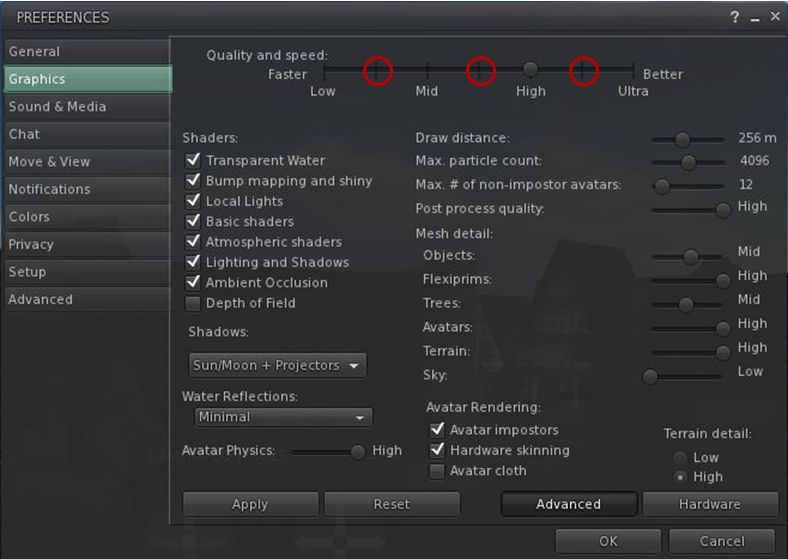
The SL viewer, Dolphin and RLV all include the new Graphics Preferences settings related to the ongoing GPU table updates. These new options place additional “stops” on the Quality and Speed slider between the four original settings of Low, Mid, High and Ultra, which are intended to better represent the default SL capabilities of different GPU classes,
The new “intermediary” graphics settings intended to better represent the default SL capabilities of different GPU classes
SSAO Fix for Horizon Haze
Also included in the recent Dolphin and Niran’s Viewer releases, is Tofu Buzzard’s SSAO improvements for generating horizon haze over Linden Sea (“ambient distance fog”). This helps overcome a long-standing bug within the viewer which has effectively broken / nerfed horizon haze over Linden Water for a considerable time.
SSAO haze effect – fix from Tofu Blizzard, available in deferred mode on Dolphin and Niran’s viewers. (image courtesy of Niran V Dean) – click to enlarge
Space Reflections
Niran’s viewer also introduces an interesting / experimental viewer-side feature from Tofu Blizzard called “space reflections”, designed to create reflections on shiny surfaces when running in deferred mode and with the appropriate Graphics Preferences option enabled. It’s not perfect, but it can be used to produce some interesting effects, as shown below, if only for those running a viewer which can render the desired results.
Tofu Blizzard’s “space reflections”: (l) a viewer running in deferred mode; (r) Niran’s viewer running in deferred with “space reflections” active to produce reflections both on the floor and inside the large sphere (click to enlarge)
On November 17th, the Firestorm team made a beta release of their latest update to Firestorm in order to offer users access to the new Group Services updates for managing large groups. At the time, it was indicated that the “full” release would occur in early December.
Keeping to their word, the team released 4.3.1.31155 on December 3rd, which includes everything featured in the beta release, and a few more goodies besides.
Given I’ve already given a comprehensive review of the beta release, this article will be focused primarily on the updates made between it and 4.3.1.31155 – although there will be some overlap.
As always, please refer to the Firestorm release notes for full details on credits, etc., for code contributions to the viewer, and for details of known issues and problems (known issues carried over from the LL code can be found here).
Download and Installation
As noted in the last review, the download .EXE is big – 40MB, which is unsurprising given that Firestorm packs so much into it. Installation – at a least for Windows users – is where the first set of changes occur, and it is worth recapping on these for people who have not installed the beta release:
A pop-up requesting whether or not the user wishes to have a Windows Start menu entry created for Firestorm during installation
Addition of the version string and estimated installed size to the installer
Addition of new OS detection code to warn if Windows Service Packs are not up-to-date and to prevent Firestorm being installed on Windows XP with
Publisher data, Phoenix URLs and Firestorm icon for the Firestorm entry in the Windows uninstall list
Automatic deletion of all previously installed skins to reduce issues arising from an unclean install
Addition of a DETAILS button in the installer pop-up window to allow the installation to be reviewed.
Havok Sub-licence
As noted last time, Firestorm has now signed a Havok sub-licence agreement with Linden Lab. This means that Firestorm is now available in two flavours – one for SL and one for OpenSim grids, with the SL version having both the –loginURI capabilities and the Grid Manager functionality removed.
This change means that Firestorm is now able to access the new LL-supplied Havok libraries, allowing the viewer to immediately include the pathfinding navmesh visualisation tools (as covered in my review of the beta release), and which could allow Firestorm to switch over to using the official LL mesh uploader code in the future, should they so wish, rather than using the current HACD code for mesh uploads.
For those using OpenSim, Firestorm 4.3.1.31155 can be downloaded here, and I’ve included an update on the OpenSim-specific updates to the viewer at the end of this article.
One point to note is that it is possible to use the OpenSim version of Firestorm on SL – the only difference is the OpenSim flavour of the viewer will not be able to access the SL Havok libaries or use any functionality associated with them.
Updates from Phoenix
Further updates from Phoenix have been added to Firestorm 4.3.1 in addition to those found in the 4.3.0 beta:
Texture Comment Metadata
When opening any texture, this will display the uploader name with a link to their profile together with the date / time the texture was uploaded. If permissions are sufficient, it will also display the asset ID on the texture preview floater.
Progressive Draw Distance (PDD)
A popular Phoenix feature, when enabled, this causes Firestorm to use a progressive Draw Distance stepping after a teleport, to help improve rezzing times. The Firestorm version includes an option to cancel stepping in progress if Draw Distance is manually changed (Preferences > Firestorm > General).
More Phoenix-like default settings for Phoenix Mode
The following Phoenix-like behaviours have been added to Firestorm when running in the Phoenix mode (selected via the Firestorm log-in splash screen):
“Resident” is not trimmed off legacy names
L$ balance changes will be shown in nearby chat instead of toasts
Received Items folder is shown as a normal Inventory folder
Firestorm will now send accept/decline responses for inventory offers after the according button has been pressed and not if the item has been received at the receiver’s inventory already
Group and IM notifications are now sent to the nearby chat console (v1-style) instead of toasts (v3-style)
Legacy Search
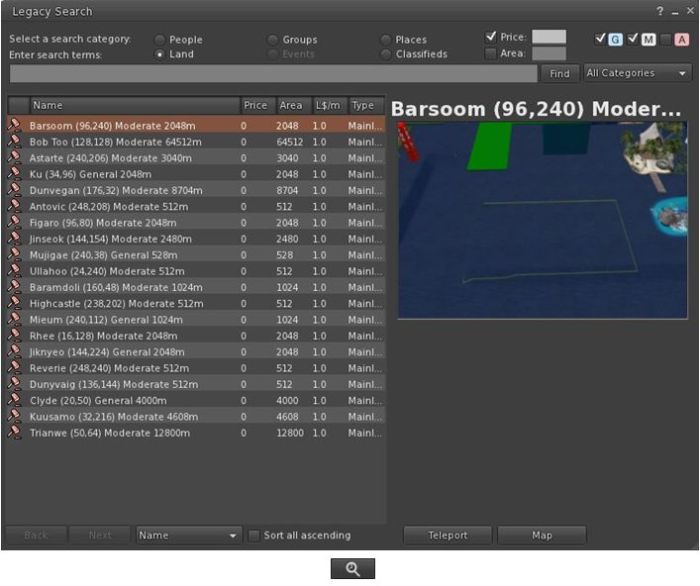
Firestorm 4.3.1.31155 re-introduces the V1-style “legacy” search capability for those who prefer it to the V2/V3 web-style search functionality.
The Legacy Search floater and its associated toolbar button shown in icon mode
Provided by Cinder Roxley, the legacy search option is currently available via a menu option (Content > Legacy Search) or via a dedicated toolbar button, and works for all search categories except Events, which will be added in a future update.
Documentation on the search function is available via the Firestorm website.
Phototools, Windlight and Snapshots Updates
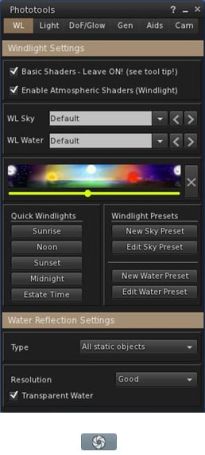
The main Phototools floater & toolbar button, shown in icon mode
Phototools is a suite of floaters which bring together a range of controls, debug settings and options available within the viewer into a single, cohesive set of options aimed at the SL photographer and machinima artist. I’ve covered them in detail previously, and provided a further update in my last Firestorm review. With this release of Firestorm the Phototools floaters (Phototools and revised Camera floater) can be accessed via a menu option: World > Photo and Video.
Alongside of these comes a windlight update of some 100+ presets for water and sky developed by Phototools developer William “Paperwork Resident” Weaver.
These additional presets can be accessed either via the Fixed Sky / Water presets menu option (World > Environment Editor > Environment Settings) or via the Phototool floater (shown right). All of the Phototools presets have “Phototools” at the start of their name.
Also, the Flickr tab on the Firestorm snapshot floater includes Katharine Berry’s update which add the parcel name to the location option.
Update 18:35 GMT: Sometimes one reads the release notes and misses things. See the section on the Volume Controls towards the end of this article
The official SL viewer has now moved to the 3.4.2 code base with the release of version 3.4.2.267137.
This release brings with it a couple of signficant changes and a host of updates and fixes.
Steam Link-up Changes
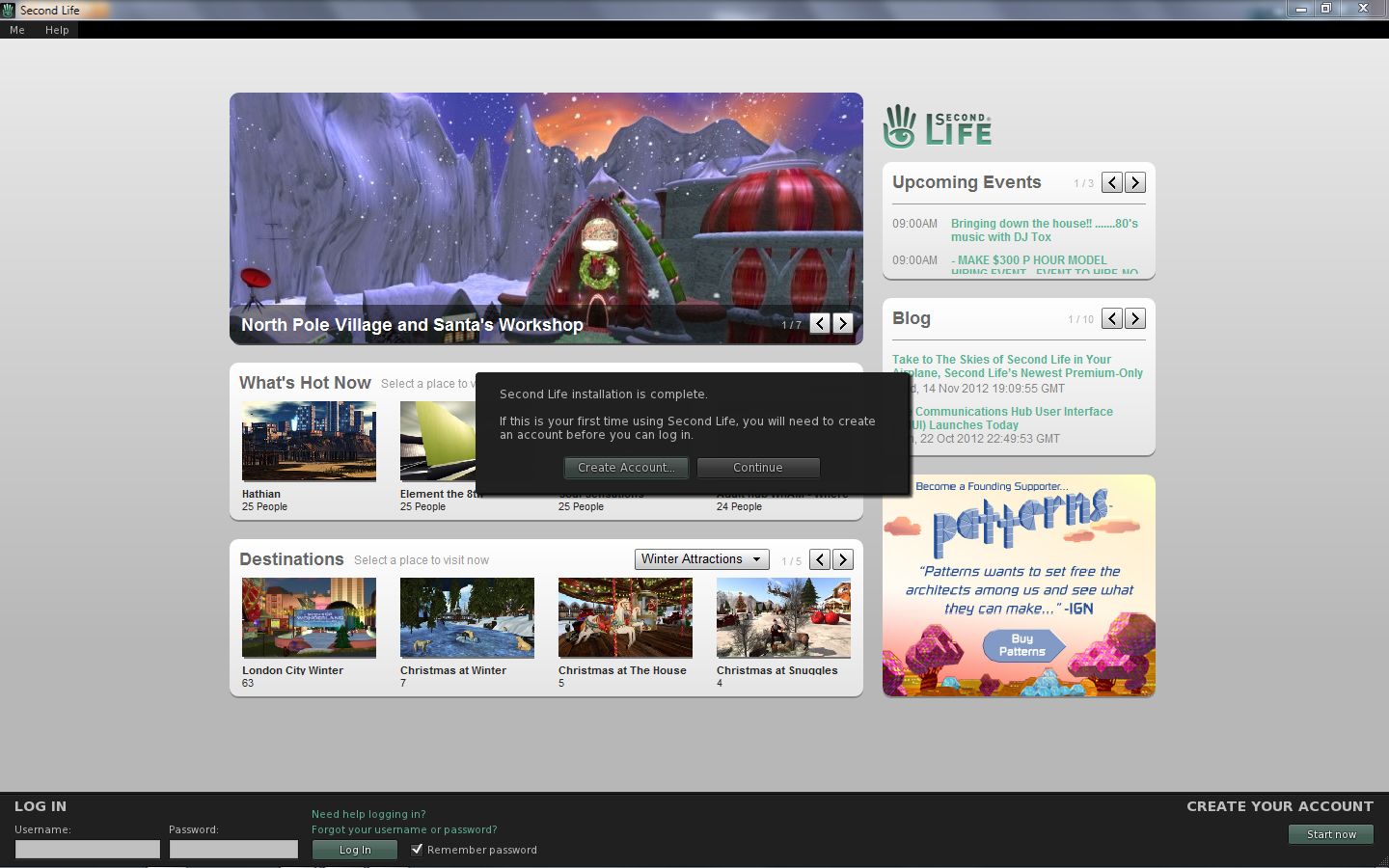
Anyone performing a completely fresh install (including the removal of all account-related folders from the computer) will clearly see that the code for the forthcoming link-up with Steam is now present in the viewer, as the prompt to create an account will be prominently displayed.
The prompt displayed for anyone who installs the SL viewer for the first time – primarily aimed at those who will soon be able to download the viewer through Steam without necessarily having an SL account.
For those who do not perform a clean install, the prompt will not be displayed (as the viewer will locate existing account-related folders), nor will anyone who automatically updates their viewer should they see a prompt to do so. This means that the pop-up dialogue will not plague everyone who has an SL account, so shouldn’t be a source of annoyance. However, the cleaned-up bottom section of the screen (also with a “Create Your Account” option in the lower right corner) will obviously be visible to all, and gives a further indication that things are progressing.
This change also doesn’t mean the Steam link-up is live; I understand from Linden Lab that there are still some steps to be completed outside of this work. But again, given the viewer updates are starting to appear, it is reasonable to anticipate the time for a formal announcement to be drawing closer.
The prompt will also (I believe) be seen by those who come to SL via the “traditional” route of signing-up for an account first via the SL website (or any of the third-party sign-up options which may still be available) and then downloading the viewer. As such, it’ll be interesting to see if anyone gets a little confused by a prompt asking them to create an account when they believe they’ve already done so, rather than simply ignoring the pop-up by clicking CONTINUE.
Group Services Code
Large group management via HTTP service now part of the official release viewer
Key among the rest of the updates to the viewer is Baker Linden’s Group Services code designed to make use of the new HTTP service already available on the grid.
As there has been some confusion as to what this is all about, and at the risk of repeating myself, here’s a quick recap of the main points:
The new code allows for improved loading of membership lists of very large groups, together with improved reliability in editing such groups (i.e. assigning roles, removing people, etc.), by the group moderators
Until such time as the viewer-side code has been incorporated into all TPVs, the “old” method of loading group lists into the viewer will still be available. However, viewers using the “old” method (a protocol referred to as UDP) will have group loading capped at 10K members. This means:
That for groups with 10K or fewer members, there will be no change regardless as to whether the viewer is using HTTP or UDP
But for groups large than 10K, viewers running the UDP code will be unable to load the group until such time as they have been updated to the new code
The code will not lead to any improvements in group chat reliability, and is not aimed at improving group chat.
The new code is gradually appearing across all third-party viewers, with many already incorporating it ahead of this release from LL. Further, the Lab will not be “turning off” the UDP service in the short-term, so there is no risk of a viewer which hasn’t yet updated being completely unable to load any groups at all.
Volume Controls – Update
New volume control options
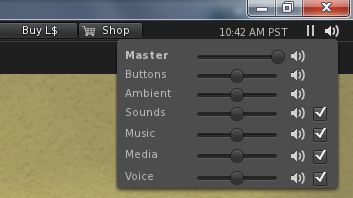
This release also see the official viewer adopt the “Quick volume” controls from Firestorm. These provide access to ALL major volume control options for the viewer, rather than just the master volume control, and can be accessed by hovering the mouse over the speaker icon in the top right of the viewer window.
The controls appear colourless as they are awaiting work to render them in the official viewer UI skin colour; as this work has yet to be completed (JIRA STORM-1868), I missed the fact that the update has reached the release version of the viewer when writing this update.
Other Notable Changes
The list of updates for the release is extensive (and unfortunately without any JIRA references where relevant and tha JIRA themselves are still public). As such, it is advisable to take a look at the release notes to determine what has been fixed / updated.
What’s NOT Included
The new HTTP texture fetching service code from Monty Linden is not in this release. this work is currently a part of the beta viewer project (viewer code base 3.4.3), and will be making its way into the release version of the viewer in the near future.
Performance and Feedback
Performance-wise, 3.4.2.267137 is very good on my personal set-up, and allowing for the arbitrary nature of such FPS tests.These were performed in my “new” test area, a premium sandbox with 3 other avatars present (and building):
Deferred off:
Ground: 38-39 fps
370 metres: 43 fps
2875 metres: 62 fps
Deferred on + lighting set to Sun/Moon + Projectors; ambient occlusion off:
Ground: 11 fps
370 metres:16-17 fps
2875 metres: 18 fps
The non-deferred rates have me wondering what might be achieved on an i5 machine with something like a GTX660 and oodles of memory with a 64-bit OS…
This is a somewhat overdue update to the official viewer and marks a return to periodic viewer releases. Linden Lab still have much more in the pipe to filter down to the release viewer, and it’s liable that we’ll be seeing Christmas before everything is sufficiently caught up such that the release cycle returns to its normal pace. In the meantime, there will be on-going frequent beta updates with changes filtering through to the release viewer as and when they are deemed ready. Overall, however, this release should be welcome news for those who use the official viewer.
Firestorm 4.3.0 has arrived slightly earlier than expected, in the form of an initial beta release made as a result of the implementation of new Group Services code across the main grid.
While this is only a beta, and the associated Firestorm blog post gives fair notice that it may yet be somewhat wobbly while final work on getting it QA’d and ready for a formal release is ongoing, there is more than enough in the release to make it something people are liable to be hungry for. So here’s a preliminary review of the release as it stands today, with the caveat that things may change between now and the full release, which is currently scheduled for December.
Download and Installation
The download .EXE is big – 40MB, which is unsurprising given that Firestorm packs so much into it. I’ve been running pre-releases of this version for a while now, and the size has been consistent between them and while much bigger than other TPVs and the official viewer, it hasn’t grown overly much since the last release.
The installer is actually the place where the updates to the viewer begin for Windows users, as it now incorporates:
A pop-up requesting whether or not the user wishes to have a Windows Start menu entry created for Firestorm during installation
Addition of the version string and estimated installed size to the installer
Addition of new OS detection code to warn if Windows Service Packs are not up-to-date and to prevent Firestorm being installed on Windows XP with
Publisher data, Phoenix URLs and Firestorm icon for the Firestorm entry in the Windows uninstall list
Automatic deletion of all previously installed skins to reduce issues arising from an unclean install
Addition of a DETAILS button in the installer pop-up window to allow the installation to be reviewed.
Lab Updates
Version 4.3.0 of Firestorm sees the viewer merged-up the official Linden 3.4.1 code base and the inclusion of later updates which are just filtering through to the official viewer 3.4.2 code pipe. Together these mean that this release incorporates and number of LL updates, including:
Recent updates and improvements to the viewer-side pathfinding code
Memory leak and memory crash fixes
Translation updates (together with further updates from members of the Firestorm team)
Incorporation of the official LL spelling checker (contributed to LL by Kitty Barnett to LL) and the official Auto-replace function (contributed to LL by Kitty Barnett, Jonathan Yapp, Tankmaster Finesmith and LordGregGreg Back)
Rendering fixes and optimisations
Group Services (group management) update (from the LL 3.4.2 code branch) allowing groups with more than 10K members to be edited and updated
Objects by multiple creators show creator details when viewed in inventory (Properties), rather than “unknown”
This release also incorporates the new LL maturity rating function which:
Notifies a user when trying to enter a region without having set the required maturity level in the viewer and presents the option to change their maturity setting (subject to age verification)
If applicable, sends a message to the person offering a teleport that the recipient is unable to access the region due to their maturity level.
Havok Sub-licence
Firestorm 4.3.0 sees the implementation of the Havok sub-licence agreement between the Firestorm team and Linden Lab. This means that this is the first version of Firestorm to be released without any support for OpenSim access. Both –loginURI capabilities and the Grid Manager functionality have been removed.
However, as Jessica Lyon has previously noted, development of the viewer will be forking, and OpenSim support will continue in the future via a version of Firestorm which excludes the code required to access the LL Havok libraries. How tailored the OpenSim version will be for use on those grids is not clear, and those who use Firestorm to access both SL and OpenSim grids should read Jessica’s comments on support in the future.
The Havok sub-licence agreement does mean that this release of Firestorm can access the new LL-supplied Havok libraries which in the first instance, enable TPV viewers to visualise and model the pathfinding navmesh.
The pathfinding navmesh can now be visualised in Firestorm 4.3.0
Group Services
The Group Services update was the main reason for pushing out a beta release of Firestorm 4.3.0.
This code allows for improved loading of membership lists of very large groups, together with improved reliability in editing such groups (i.e. assigning roles, removing people, etc.), by the group moderators. The server-side element of this code has been available on the RC channels for the last couple of weeks, and was deployed to the main release channel on Tuesday November 13th, making it available right across the main grid.
However, in order to be used, it requires additional viewer-side code. Without this additional code, the viewer will be unable to display membership lists for groups with more than 10K members (although any groups with fewer than 10K of members can still be edited using any viewer). Thus, the decision was taken by the Firestorm team to release 4.3.0 in a beta version so that users responsible for managing groups with very large members lists can continue to edit them.
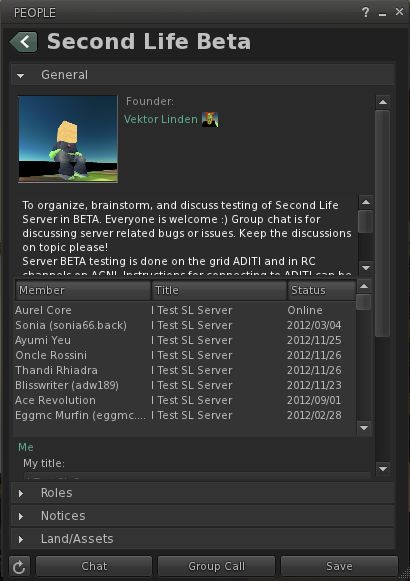
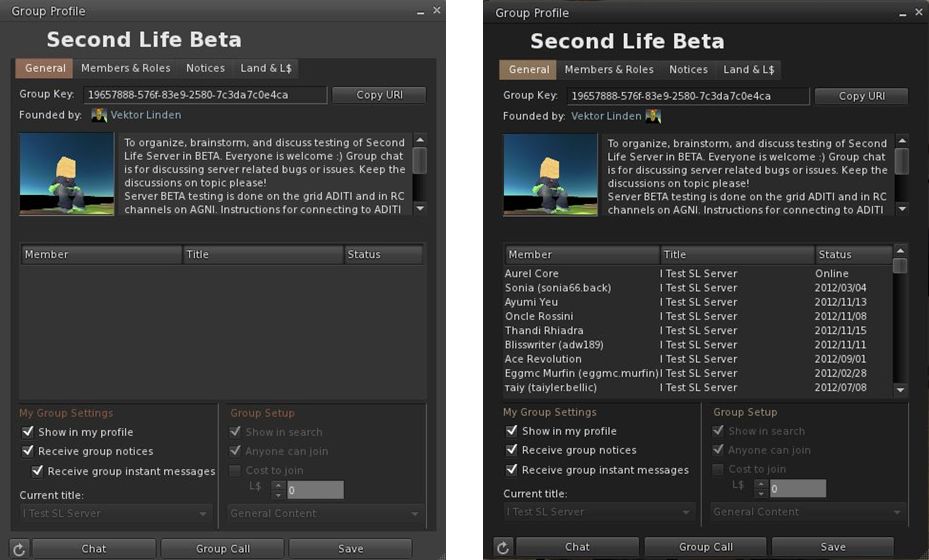
Group Services update – the difference: On the left, an attempt to load a group with almost 20K of members in the current release of Firestorm 4.2.2. On the right, the same group loaded using the new Firestorm 4.3.0 beta.
In making this release, Firestorm joins Cool VL and Niran’s Viewer in being able to handle large groups alongside the official SL beta viewer. However, the remaining TPVs are likely to have updates to support the capability out in the near future (and the code will soon be available in the SL release viewer as well).
Please use the page numbers below to continue reading this review top of page
 Jessica Lyon, project lead for the Firestorm team, has announced that there will be a limited capacity meeting on Wednesday 13th February at 13:00 SLT, to discuss the Firestorm project. The core part of the announcement reads:






 Inara Pey: Living in a Modemworld