Firestorm at three: party, kitties, pendants!

firestorm-logoJune 2013 saw Second Life celebrate its tenth anniversary as a publicly accessible grid. Now September marks the anniversary of SL’s (and OpenSim’s?) most popular viewer as Firestorm turns three.

Anyone who takes time out of their lives to sit down and work on a viewer, providing code and capabilities to enhance our times in-world, and the support so often needed by users, is an unsung hero of Second Life and virtual worlds. It’s no easy task, as I’m sure everyone at Firestorm and other TPVs – even at the Lab – can attest; get one thing wrong and you’re liable to get chased up the nearest tree by a group of users who, if not actively bearing pitchforks, tend to have pretty barbed tongues!

In this, it’s easy to forget that every TPV, including Firestorm, is built, maintained and managed by volunteers. They don’t get paid for their efforts; they don’t consider themselves to have any better grasp of Second Life and virtual worlds than the rest of us – they, like most people, just want to have fun and at the same time they want to make SL more fun for the rest of us. I think that sometimes, in calling for this feature or that feature in a viewer and then getting the hump when it doesn’t appear, we all lose sight of that simple fact.

Join the Party!

So it’s good when an opportunity comes around which lets us celebrate the work that goes into a viewer to take the time to say “thank you” to the folks behind the work. Firestorm users will have just such an opportunity to do so on Tuesday September 3rd, as the Firestorm team throw a Firestorm Third Birthday party at the Phoenix Firestorm support island. The kick-off time is 13:00 SLT, and there is an open invitation from the team to their users to come along and join the fun (well, region limits allowing!).

If you do want to attend, please keep in mind:

  • It is only the one region, so headcount will be limited. Sadly, with over 200,000 users, the team can’t host a party for everyone. However, people are liable to be coming and going throughout the celebrations, so if you don’t get in the first time – keep trying
  • As the party is liable to be very popular, please go along as script-light as possible; it’ll help the region, it’ll help others and it’ll help you. Detach anything you can do without when dancing / chatting – HUDs, scripted attachments, etc.

The Firestorm Kustom Kitty and a Special Pendant

firestorm-firekitty-adTo further mark Firestorm’s third birthday, Jessica and the team have joined forces with KittyCatS to develop a special, limited edition non-breedable custom Firestorm Kitty. The offer is limited to one per avatar, and the kitties are No Transfer. The kitty is fully functional & rumoured to be the cat that dined on the Phoenix. Whether this is true our not, the folks at Firestorm aren’t saying!

The collectables will be available from 09:00 SLT on September 3rd through until 09:00 SLT on September 10th, via vendors in the following locations:

zuri_s_firestorm_pendant_gift
The Firestorm pendant (see left)

Note that If demand is high, you may experience delivery problems. If a vendor faisl to deliver, please follow these instructions to initiate a re-delivery.

In addition, Zuri Rayna has produced a beautiful limited edition Firestorm 3rd anniversary pendant. This is available from the Phoenix Firestorm Support island until midnight SLT on the 3rd September  – and it is stunning!

So Happy Birthday, Firestorm, and many thanks to Jessica, Ed and the rest of the developers, testers, helpers and the support volunteers at Firestorm. Here’s to many more birthdays and celebrations!

Related Links

Kokua and Singularity updates

Both Kokua and Singularity issued what amount to maintenance releases in the latter half of week 35, with Kokua releasing version 3.6.4.29422 on August 28th,  and Singularity releasing version 1.8.2.4929 on August 29th.

Kokua 3.6.4.29442

The release keeps Kokua on a par with LL’s code base, being built on the 3.6.4 code. The release notes identify a potential issue for Linux users with the last release, with Nicky reporting that:

A user on an older version of Linux reported an auto update issue that resulted in no working viewer. Kokua recently updated build systems from Debian Squeeze to Wheezy. While great for users that move ahead of the pack in updating their Linux distributions it left one user (and maybe more) without a working Kokua on their system. So, the request to upgrade was acknowledged and new Kokua was installed. But, it would not run then, when the old Kokua was tried it was stuck wanting to update.

Further testing revealed the issue appears to exist within LL’s Linux build as well, and a JIRA – OPEN-186 has been raised as a result.  In the interim, the team have reverted to building using Debian Squeeze.

This release also sees Kokua gain two potentially useful features – one for mentors / helpers, the other for builders.

Kokua can now optionally display the age of an avatar in the name tag. The option is off by default, and can be enabled via Preferences > Kokua > General > Show each avatar’s age in their name tag. When enabled, the option defaults to showing the age for avatars up to 28 days of age. However, this can be increased / decreased as required, with 0 meaning avatar ages will always be displayed.

The idea behind this is to make it easier for mentors and helpers identify new starters in a welcome area, so that greetings and offers of support can more readily be made.

The new avatar age display in name tags (Preferences > Kokua > General) and the new button for duplicating values for size, offsets, etc., on maps

This release also sees Kokua implement a Duplicate Values button in the Texture tab of the Build floater. This allows the settings for the size, offsets, repeats, etc., set for a texture / normal / specular map to be immediately duplicated to the other maps on an object / object face, saving the need to manually set them in turn when applying maps. If there are no additional maps applied to an object / objects face (e.g. a diffuse map, but no normal or specular), the button is disabled.

The remaining updates for the release include:

  • Sit Here or Stand Up options are now only shown in the right-click context menu for objects
  • A Teleport Here option has been added to the context menus to go with the Sit Here option
  • OXP backup crash fix to prevent selecting individual object(s) from a linkset, rather than the selecting the entire linkset, from causing an immediate viewer crash
  • Links no longer include the trailing “?” in the link when asking to load the indicated web page in notifications
  • Fixed a variable scope bug in LLVOVolume::getApproximateFaceNormal().

Please refer to the release notes for further information.

Singularity 1.8.2.4929

The Singularity release comprises a substantial list of tweaks and updates, including a change to the .DAE and .OBJ export permissions when using the viewer on OpenSim, such that if the grid on which the viewer is being used does not support explicit “export” permission, the exporter now follows the rules set by the original Imprudence exporter.

Additionally, the update includes:

  • Additions:
    • Ability to save textures from the inventory menu
    • An option to open inventory folders in a new separate window
    • An option to show landmarks on map
    • An option to hear speakers at the same volume unaffected by position
    • Show Profile button on teleport and inventory offer notifications
    • Ability to show only legacy names for speakers (in Adv. Chat > Chat UI preferences)
  • Fixes for:
    • The German translation where login notifications appeared as ‘[FIRST] [LAST] is online’ instead of showing the actual avatar name
    • The crash when opening Bumps, Pushes, and Hits floater
    • Windows, audio volume control for plugins is now working allowing gradual falloff in volume for prim media objects that are farther away
  • Improvements:
    • Updated Spanish translation
    • Legacy (pre-multiwear) wearables on some grids showed as (body part) shapes. Clothing (not body parts yet) now show with a (new) red question mark icon in the inventory, and can be used again
    • Animation uploads save the values for ease-in/out parameters for future uploads
    • Disable/Enable UI shortcut changed to Ctrl-Shift-F1 on Linux since the default Ctrl-Alt-F1 is used for switching virtual consoles. The same has been done for the other ctrl-alt-F# shortcuts on Linux
    • Imported changes from Linden viewer to introduce consistent ground texture generation and fix crashes in mesh upload.

For details on the contributors for the above, please refer to the release notes.

Related Links

Restrained Love 2.8.5.5: “z-offset” height adjustment update

In my week 35 project updates on SSA, I brought word that both Henri Beauchamp’s Cool VL Viewer (V1-style) and Marine Kelley’s Restrained Love Viewer (V3-style) have incorporated a means developed by Henri by which the new “hover” capability from LL can be used to make on-the-fly avatar height adjustments in a similar manner to the old TPV “z-offset”.

However, a slight error with the initial release of the new “z-offset” capability within the Restrained Love Viewer (version 2.8.5.3) meant that any changes made were only locally applied; they were not being passed to the baking service for onward transmission. This meant that while you would see your avatar’s height adjust, no-one else would.

Marine has rectified this with the release of Restrained Love 2.8.5.5. If you’ve already downloaded and installed 2.8.5.3, you’ll need to update for the capability to work correctly. As with Henri’s original implementation, there are a number of up-front points to note how things work, as they have changed from the “old” z-offset functionality:

  • As with LL’s hover feature, that avatar shape must be modifiable (if not, the Z-offset won’t work)
  • There will be a delay in setting the offset and seeing the final result because each change does require viewer / server communications. Multiple quick changes to the z-offset should therefore be avoided, as they may not propagate correctly.

Marine notes that there are a couple of niggles with her implementation, and that care should be taken with height adjustments.

In addition to the time taken for adjustments to propagate through the system, you may find that when they have done so, you avatar may appear a little higher or lower than you originally set. Should this happen, don’t juggle with the slider; wait another second or two and the avatar’s height will make a final adjustment and appear as you intended.

With this update, the slider will also adjust a seated avatar as well, although adjustments don’t show-up on-the-fly; instead you have to make an adjustment and wait for it to propagate via the baking service in order to see your avatar shift (along with everyone else).

The update is available for all three versions of Restrained Love, links below.

Related Links

From Niran’s to Black Dragon

Blackdragon logoOn Wednesday August 21st, NiranV Dean officially confirmed that Niran’s Viewer is now depreciated (or as he put it, “Dead”).

He first announced plans to end the viewer’s life in May 2013, when he also announced its successor, Black Dragon. Since that time, he has been working on the replacement viewer, producing a number of beta releases along the way, the latest being version 2.3.1, which appeared on August 23rd.

As I’ve not covered Black Dragon to date, I decided to take a quick look and provide a mini-overview – not a full review, just and overview of the viewer and some of the work Niran has been carrying out.

Download and Installation

The download weighs-in around the same file-size as the official viewer. As with Niran’s Viewer, this isn’t an installer per se, but rather a self-extracting archive which will install the viewer files in the required folder, but which will not generate a Start menu entry, desktop shortcut, etc. You’ll need to do that yourself (not that it’s particularly taxing).

Splash Screen and Logging-in

Black Dragon’s splash / login screen is very similar to that used with Niran’s Viewer. Instead of the usual Destination Guide, etc., options found with the official viewer and a number of V3-style TPVs. Instead, users are treated to one of Niran’s music videos.

Black Dragon Splash / Log-in screen

If the viewer has been installed for the first time, or is a completely clean install, the Create Account / Continue pop-up options will be displayed as per most V3-style viewers.

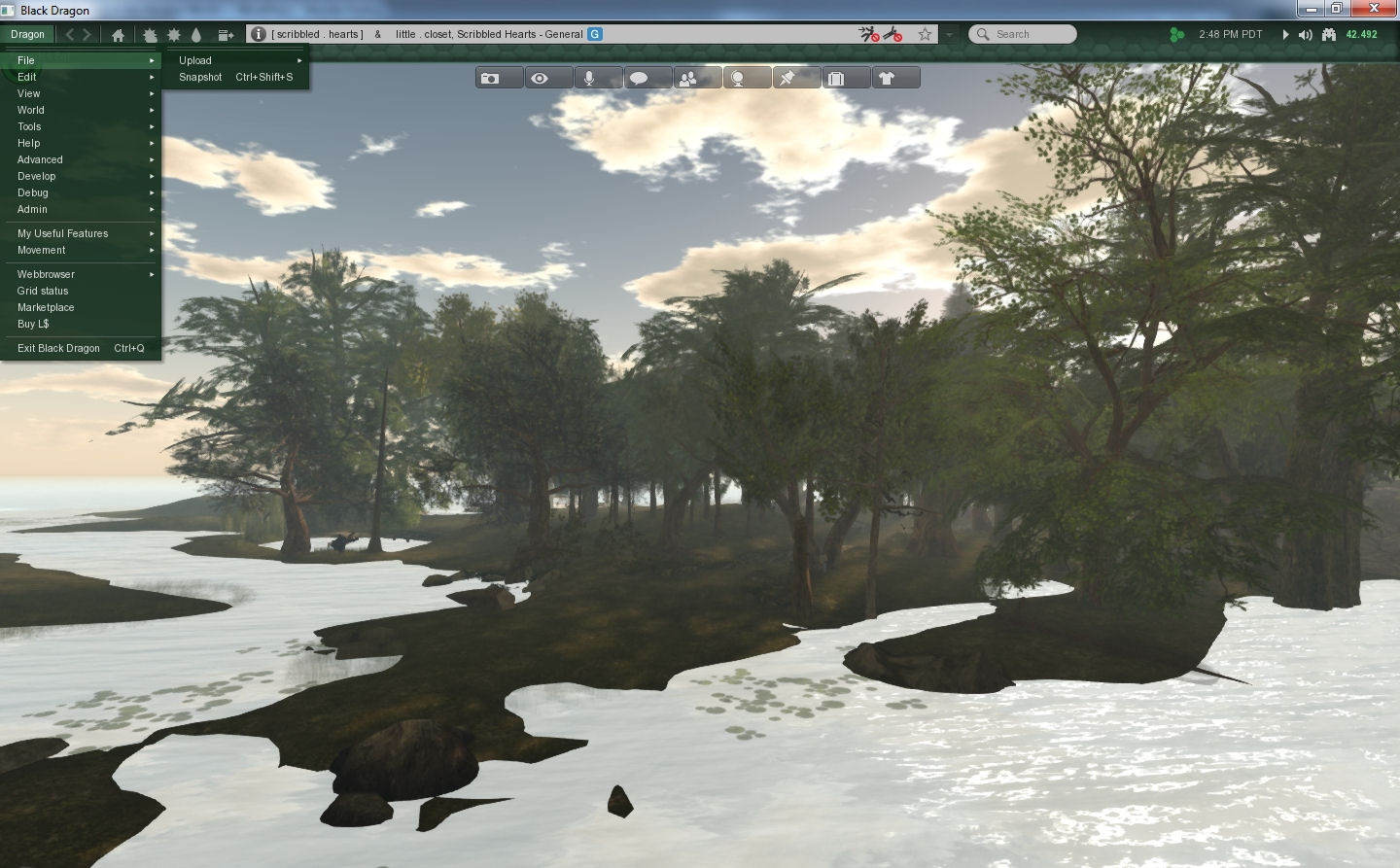
On logging-in, anyone who has used Niran’s Viewer will get a further feeling of familiarity – by default, Black Dragon has its toolbar buttons ranged at the top of the screen, and has a number of other Niran’s-like UI elements, including the vertical menu list, now called Dragon.

I confess, I’ve always liked this approach to the menus. Training the hand to use it doesn’t take long, and it offers a relatively tidy and compact means of having the menus available.

Black Dragon retain's Niran's approach to menus
Black Dragon retains Niran’s approach to menus

Preferences, Floaters and Panels

One thing that has always bugged Niran (and myself to a certain degree) is the amount of “white space” (or “wasted space”, as Niran calls it!)  some of the viewer’s floaters and panels have. While there is an understandable need to consider all levels of eyesight and readability, some of the viewer 3 panels do seem to have an over-abundance of blank space in them which could perhaps be better utilised. Black Dragon goes some way to reversing this; several of the floaters have been tided-up such that they do take-up less screen real estate, offering a more compact display.

However, Niran hasn’t (perhaps wisely) gone to some of the extremes seen in his older viewer, at least for the time being. Frankly, I hope he doesn’t. While a degree of tidy-up in floaters is welcome, I did feel that some of the large-scale redesign of evidenced in various floaters in Niran’s Viewer actually left a lot to be desired. A reduction in “wasted space” didn’t always correspond to an improvement in usability.

Materials and Build Floater

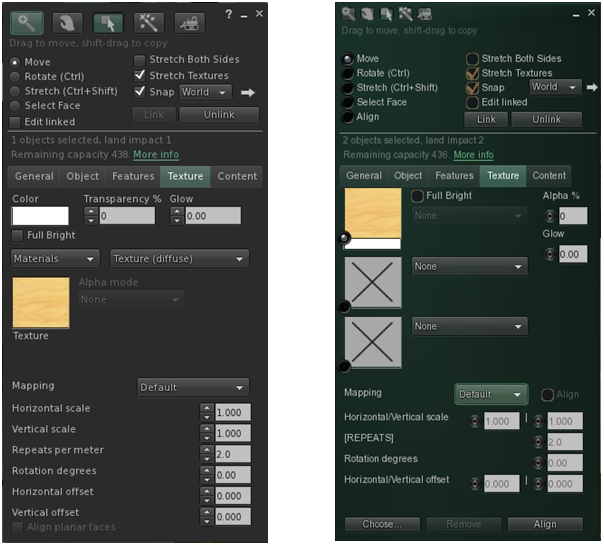
One of the new Lindeny shiny bits to appear in Black Dragon is materials processing, and it is an area where Niran has taken a slightly different direction to the official viewer, offering-up a completely re-worked Texture tab for the application of maps.

The revised Texture tab in Black Dragon's Build floater
The V3 build floater’s Texture tab (l), and Niran’s re-working in Black Dragon (r)

Continue reading “From Niran’s to Black Dragon”

Kokua offers .DAE exports

kokua-logoKokua have released a further update in the form of version 3.6.3.29169 (August 23rd). With it comes some important notes, and the addition of the .DAE (Collada) object export capability.

Installation Notes

This is the first release from Kokua to use the auto update mechanism from Linden Lab, which was incorporated into the viewer with release 3.6.2. However, for Windows users, there are two important points to note:

  • If you are a Windows user and have a pre-3.6.2 version of Kokua installed on your PC, you should first try to run the viewer and allow the auto-update process to fetch and install the latest release. This should work OK with versions of Kokua at least back as far as version 3.6.1.28998 (June 28th 2013).
  • Because all Windows versions from 3.6.2 onwards are installed into a folder called Kokua (rather than Kokua Viewer). So if you have a version older than 3.6.2 already installed on your PC, note that the new version will be installed alongside it, rather than over it. If you then subsequently remove the older version using the uninstaller, your settings (located in C:\Users\[username]\AppData\Roaming\Kokua) will be lost – so make sure you back-up / move this folder before removing any old versions of the viewer & then restore it afterwards.

Those on older versions of Kokua (pre-3.5.1? I’m not entirely clear on this from the blog post) may find that the updater will direct them to install the official SL viewer from the Lab. As Nicky points-out, this is not some conspiracy to force people into using the SL viewer. Should it happen, quit out of the installer and use the Kokua download links (and take note of the 2nd bullet point above).

Collada Export

The major update for Kokua 3.6.3 is the inclusion of the Collada .DAE export capability which was recently added to Singularity, together with the ability to export objects in Wavefront .OBJ format. As the Singularity team made the export options available under a LGPL licence,  Jessica Wabbit has extracted the.DAE export capability and contributed to Kokua.

The export option works in exactly the same manner as with Singularity: it respects object permissions, and you can only export those objects for which you are the creator and owner.

To export an item which fit the criteria, simply right-click on it and:

  • If you are using context menus, select EXPORT > COLLADA DAE
  • If you are using the pie menu, select MORE > MORE > EXPORT COLLADA DAE

Either option will open a window allowing you to save the object to your hard drive. Once exported, the object can be used into applications which support the editing of .DAE files and / or imported as mesh to other virtual environments.

The DAE expoert options in Kokua's context and pie menus. If you're not the creator & owner of the item you're trying to export, they won't be available to you
The DAE export options in Kokua’s context and pie menus. If you’re not the creator & owner of the item you’re trying to export, they won’t be available to you

Note that if you do not have the requisite permissions to export the item, the export option will be unavailable on both menus.

Currently, the system only exports naked prims / sculpts (no textures), but this may be changing in the future – keep and eye on the Singularity team for news.

Commenting on the export capability, Kokua’s Nicky Perrian has said that if there is sufficient interest, the option to export to .OBJ may also be added to the viewer.

Additional Updates

This release sees Kokua use the Lab’s viewer 3.6.3 code base, and the following updates / additions:

  • The upcoming OpenSim Community Conference grid on OS Grid has been added to the grid drop-down list
  • Some tuning of the auto-update feature
  • Addition of a plain text chat history option in the chat preferences tab
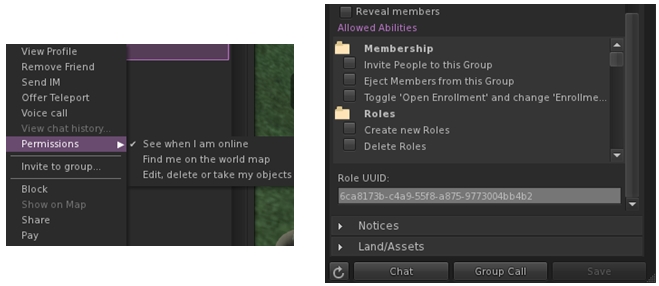
  • Addition of new “Permissions” sub-menu for friends on the People floater for setting the usual options of whether friends can see when you’re on-line, etc. Enabled options display the requisite icon alongside the avatar’s name
  • Addition of group and role UUIDs at the end of the group’s General and Roles panels.
(l) Setting permissions for friends can now be done via a sub-menu int he people folder; (r) the UUID for a group can now be obtained from the group's general tab (role UUID can also be obtained from the Roles tab)
(l) Setting permissions for friends can now be done via a sub-menu int he people folder; (r) the UUID for a group can now be obtained from the group’s General tab (role UUID can also be obtained from the Roles tab)

Feedback

Another, small, tidy update with Kokua which adds what is likely to be a popular feature, given the excitement which followed Singularity’s release with the export options. Using Kokua 3.6.3 myself (although again very briefly due to RL commitments), I found it to be fast, stable and smooth – pretty much as with 3.6.2.

As I already had 3.6.2 installed, I allowed the auto-updater to upgrade me. This actually took a few seconds to acknowledge that an update was available (the delay seemed to be longer than the official viewer, which often has the update pop-up appear as soon as the splash screen has loaded). This tiny point aside, update was smooth and returned me to the log-in splash screen when finished, with 3.6.3 ready to go.

It’s great to see Kokua rolling along like this.

Related Links

Kokua 3.6.2: all set for auto-update

Update August 21st: Nicky Perrian from Kokua has added a comment about a Windows issue with uninstalling, due to a change in the installer.

kokua-logoKokua released version 3.6.2.29072 on August 16th, becoming the first TPV to start operating LL’s viewer update capability since the Lab formally announced it was making the capability available to TPVs if they want to make use of it (Catznip has actually has an auto update capability since release R7, but I’m not clear on whether that uses any of the LL code, or is something the Catznip team built for themselves). Along with this change comes a number of smaller updates.

Download and Installation

The latest Kokua installer (Windows) weighs-in at 36.8 Mb. As expected, the installer runs without a hitch. As I’m still getting around to re-installing viewers on an “as needed” basis on the new PC, I didn’t have to perform a clean install (not that one is recommended in the release notes).

Auto Update

Oz Linden announced that the Lab would be making their viewer release mechanism available to TPVs via an e-mail earlier in the month and also at the TPV developer meeting on Friday August 9th, when he indicated that the Lab were already working with some viewer development teams to help them implement it, Kokua clearly being one of them.

Kokua implements LL's viewer update mechanism code
Kokua implements LL’s viewer update mechanism code

With Kokua, the update options are presented exactly as they are in the official viewer – complete with the check box to update to release candidates. Whether this means Kokua will be completely following suit with the overall release process implemented by the Lab, I’ve no idea.

Obviously, while the code is from LL, viewer updates obtained via it are still coming from Kokua – it doesn’t mean people sill suddenly start getting SL viewer updates!

The change does mean that from now on, updates will be obtained from Kokua’s SourceForge repository as the code does not work with BitBucket. However, the team are at present continuing to post updates to both BitBucket and SourceForge.

Additional Updates

This release brings the viewer up to parity with the Linden Lab 3.6.2 code base, which means it has the more recent materials processing code updates, although not necessarily the very latest to surface in the SL Materials Project viewer, and well as other recent updates within the official viewer. Other notable updates comprise:

  • A return to standard SL viewer Debug for the login menu. This allows the selection of Debug level before logging in
  • “Stop animating me” short cut has been assigned to Shift-S
  • There are several Linux build changes to allow compiling on current compilers (builds on gcc-4.7 and gcc-4.8 have webkit runtime issues)
  • Maximum number of groups has been corrected for OpenSim
  • Freeze/Unfreeze and Eject/Ban context menu options have been added to the people / radar floater, as per Feature Request #1254
  • The Reach Out slider on the people floater mini-map is renamed Radar Range, has been repositioned above the mini-map and now has a maximum range of 4095 metres
  • The Map button in the tool bar is renamed World Map
  • Clicking on the bandwidth or packet loss graph will bring up the Statistics floater
  • The middle mouse button can now be used as a paste function and / or to scroll the world map.

This is another small but very tidy update for Kokua, and the release notes are available on the Kokua blog. While I only had a very brief time to try it out over the weekend, I didn’t notice any issues of import / impact (other than the issue of mesh clothing on other avatars failing to render, which I frequently encounter on Firestorm and the official SL viewer, so is not a Kokua issue).

All-in-all a tidy update.

Related Links