Firestorm’s Xmas party and the Ghost Town in Second Life

Image courtesy MadPea Games

Saturday, December 19th, 2015 marks Firestorm viewer’s official 2015 Christmas Party, and with it comes the opening of The Ghost Town, the first in a series of free-to-play games developed by MadPea Games. These games are intened to give new residents coming through the Firestorm Gateway a means to become more familiar with Second Life through active game play.

The Christmas party will kick-off at 14:00 SLT, which will also see The Ghost Town open its gates to players, features entertainment from Mankind Tracer, Changhigh Trinity Sisters Fireshow and DJs. The entertainments area has been arranged so that around 200 people should hopefully be able to access the party, with three points of entry provided:  Region 1, Region 2, and Region 3.
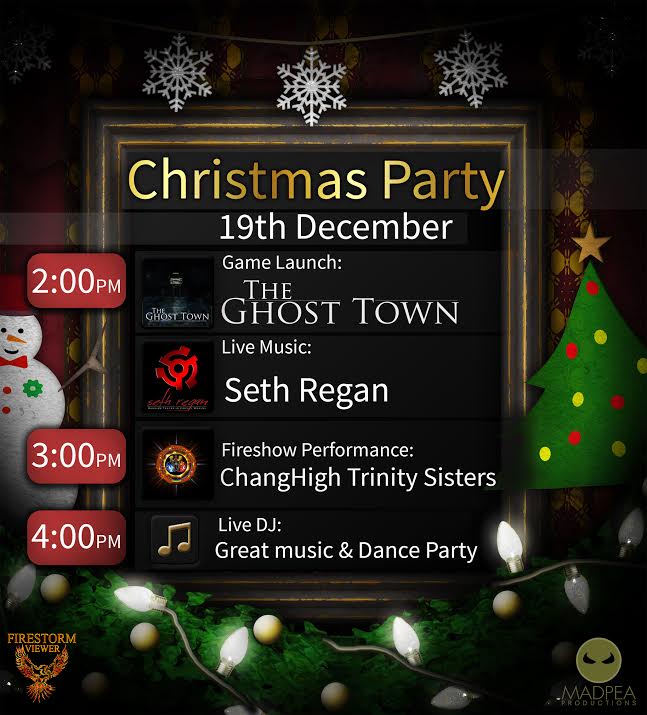
FS-MP-Party-Poster2015

The Ghost Town sees players tasked with  investigating the recent disappearance of local fisherman Big Jimmy. Guided by his journal and equipped with a special camera, players follow the clues left by a mind gone mad and discover the terrible truth behind Big Jimmy’s recent activities.

“New residents who stay and play in our virtual world are essential to the continued success of our grid,” MadPea say of The Ghost Town. “Whilst Linden Lab continue to work to attract new residents once they join and enter the world, we will be doing our part to ensure that they realise the rich, user-created content that is on offer. We hope that by playing our games new residents will learn skills that will help them over the steep SL learning curve while having some fun and collecting some prizes.”
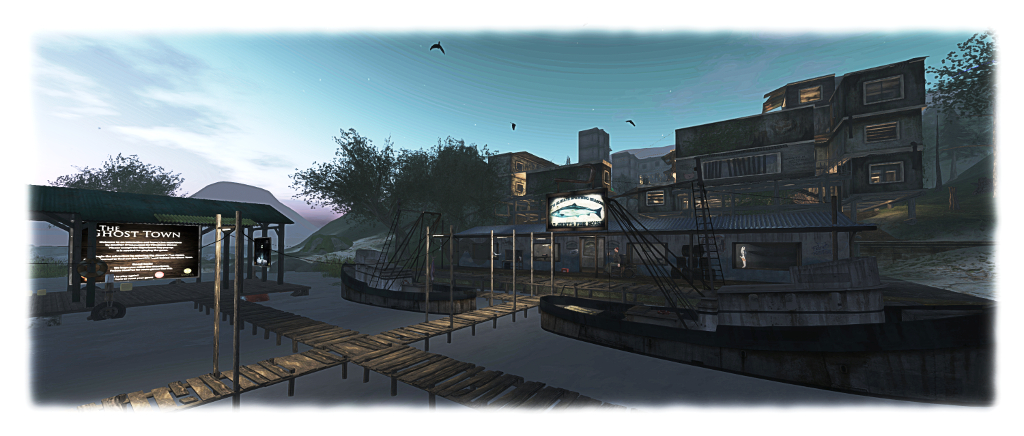
What is the dark secret behind "Big Jimmy's" disappearance - and where will his journal lead new users in Second Life?
What is the dark secret behind “Big Jimmy’s” disappearance – and where will his journal lead new users in Second Life?

As with all MadPea games, The Ghost Town is HUD-driven, and as with their most recent games, utilises experience keys to make game play easier. Gameplay takes place within the Firestorm Gateway regions, where they have to collect the images of 20 “ghosts” using the camera (HUD). Once all 20 have been imaged, players are eligible to claim their prizes.

The prizes on offer have been selected on the basis of being of value to new users and helping them enhance their Second Life experience. They have been provided by creators representing the rich choice of content available in Second Life: abranimations®, Apple Fall,, Black Pearls, Bryn Oh, Cheeky Pea, Deadwool, Elikatira, junk. Lapointe and Bastchild, Lilith’s Den, Plastik, Pose O’Clock, Sn@tch, Snowpaws, The Little Bat, TrAsHeD, United Color, WarBug and zombie suicide.  The MadPea and Firestorm teams both extend their thanks to all of those who came forward with the offer of prizes.
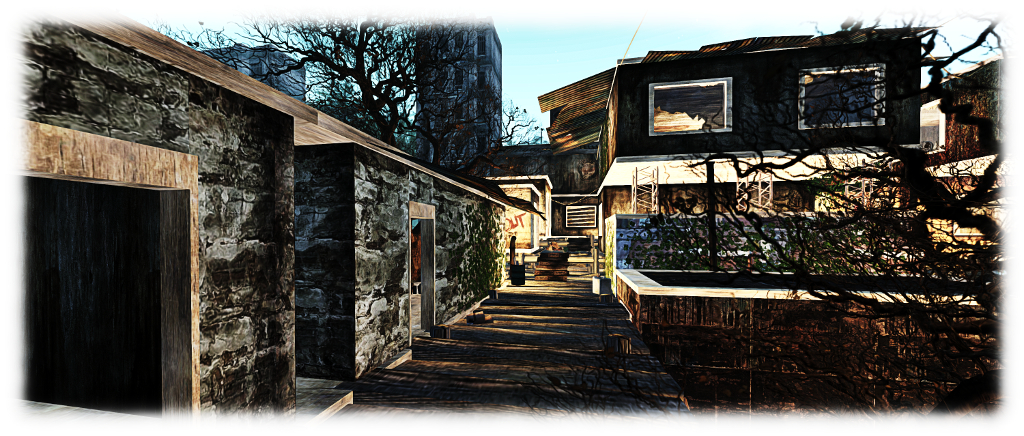
The Ghost Town awaits players new and old

New players will be drawn into the Firestorm gateway through a series of dedicated web landing pages that are in developments (Linden Lab, and quite separately to the gateway trial programme, also use targeted landing pages to attract new users from specific audiences, so it is an approach which seems to yield results). Obviously, existing users are also able to play the game – hence the launch alongside the Firestorm Christmas party.

So, if you’re in the mood for a party, and fancy a spooky new game – hop over to the Firestorm Gateway regions using the region links towards the top of this piece.

Black Dragon 2.4.4.5

Blackdragon logoBlack Dragon, the v3-style viewer by NiranV Dean updated to version 2.4.4.5 (aka version 4.0.0.36527) on Monday, December 14th.

The update primarily includes fixes for issues with Niran’s implementation of Avatar Complexity, and for crash issues, and includes a refactored Places floater.

Niran introduced Avatar Complexity in version 2.4.4.4 of Black Dragon. As I noted when reviewing that release, the split between controls Niran had introduced meant that it could require some juggling with the sliders to get things settled when making random adjustments. However, the was a slightly worse issue for Black Dragon users in that many found that by default, all avatars around them were either “jelly babied” – appearing as a single solid colour to reduce the rendering load on their computer – or not at all.

The reason for this seems to be that Niran missed the fact the LL code sets a default value for Avatar Complexity, based on the anticipated graphics performance of the system on which the viewer is installed, as calculated by the viewer on initial start-up – something he removed from Black Dragon a while ago.  Thus, avatar rendering was defaulting to an exceptionally low value, causing avatars around the user to appear as “Jelly Babies”.

Niran has now introduced his own default value to the viewer, which should correct things. Some users may find it worthwhile playing with the sliders to achieve an ideal for their system / circumstance. He also offers a brief explanation of Avatar Complexity, which essentially replaced the old Avatar Draw Weight (ADW), which in turn replaced the original Avatar Rendering Cost (ARC), within the 2.4.4.5 release notes, and those interested can find out more by reading the official SL wiki entry on Avatar Complexity, or my own overview of the capability.

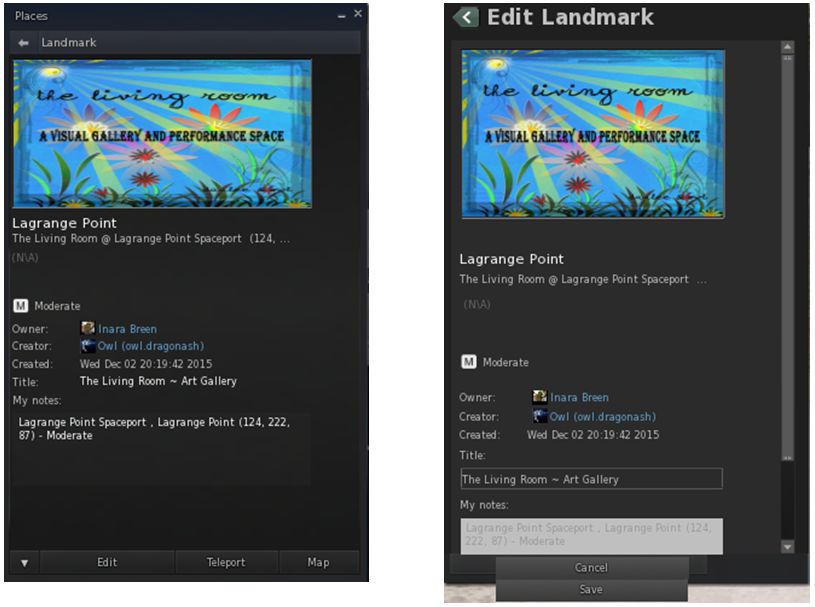
The Places floater overhaul sees the layout refactored to match other panels in the viewer, and a number of fixes added to certain niggles found with it, such as buttons not working (e.g. the Back button at the top of the panel) or it remaining stuck in its last used state.

The Places floater has been overhauled for Black Dragon 2.4.4.5 (left). Issues such as buttons not working correctly or the floater getting stuck in its last used state (shown on the right) have been corrected and the floater's layout tidied-up
The Places floater has been overhauled for Black Dragon 2.4.4.5 (left). Issues such as buttons not working correctly or the floater getting stuck in its last used state (shown on the right) have been corrected and the floater’s layout tidied-up

Black Dragon 2.4.4.5 also includes two additional crash fixes which make updating to it highly recommended. This first is for a bug arising from leftover code, which would be triggered as soon as certain avatars, objects, etc., came within the viewer’s Draw Distance. The second is for a crash occurring whenever you right-click while in either zoom/pan/orbit mode in the tools floater (build window) or when in object view mode in the camera controls floater. As always, please refer to he release notes for the full list of updates.

Additional Links

Black Dragon 2.4.4.4: Jelly babies and graphics presets

Blackdragon logoOn Sunday, November 29th, NiranV Dean released Black Dragon 2.4.4.4 (or 4.0.0.36527, depending on your personal preference). This release incorporates three significant features from the Lab, as well as Niran’s own nips, tucks, tweaks and changes.

First among the changes inherited from the Lab is the latest update to the Chromium Embedded Framework (CEF)  implementation which is intended to provide modern media support (HTML 5.0, WebGL).

Of possible greater interest to the vast majority of users is the addition of the Avatar Complexity rendering and the graphics presets, as found in the Lab’s Quick Graphics RC viewer. I’ve previously provided two overviews of these, in August and June of 2015, so what follows is a brief summary and examination of Niran’s implementation, starting with the graphics presets capability.

Graphics presets, a capability contributed by Jonathan Yap (see STORM-2082), allows users to create, save and use sets of viewer graphics options designed to meet a specific requirement, with the intent to help with viewer performance, and which can be used by any account logging-in to SL using the viewer on which the presets have been created.

This means, for example, you can create a sets specifically for indoor use, limiting your draw distance, reducing levels of detail for things like terrain and sky and water reflections and so, boost your system’s performance when visiting stores, etc., while having another preset with all the bells and whistles enabled for photography. Then with a couple of mouse clicks, you can swap between these and any others you create to meet your needs as you travel Second Life, all without the need to fiddle with settings or relog.

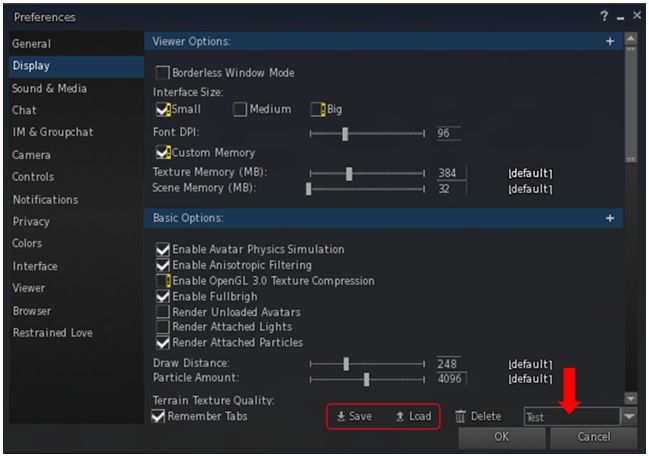
An issue with the official viewer’s implementation of graphics presets is that it requires the use of two rather clunky floaters which eat screen real estate. Niran avoids this by neatly integrating the core preset options (Save, Load and Delete presets) into the foot of the Display tab in Preferences. In doing so, he also makes creating a simple top-down flow through the Display tab options.

The new Graphic Presets Save and Load options can be found at the bottom of the Display tab in the Preferences floater. Simply add a name for the options you've set in the text box (arrowed) and click Save. To load a preset group when the floater is open on the Display tab, enter the name for the preset in the text box and click Load
The new Graphic Presets Save and Load options can be found at the bottom of the Display tab in the Preferences floater. Simply add a name for the options you’ve set in the text box (arrowed) and click Save. To load a preset group when the floater is open on the Display tab, enter the name for the preset in the text box and click Load

This means that creating a new preset is simply a matter of running through the Display options, making sure those you want active are checked and those that you don’t need are unchecked, and that all relevant sliders are correctly adjusted. Then, when you’ve done so, enter a name for the preset group in the text box at the foot of the tab (arrowed above) and click the Save button – then repeat as required.

You can also load an establish preset group from here by typing the name into the text box and clicking Load. Any unwanted presets can be removed by entering the name and clicking the Delete button.

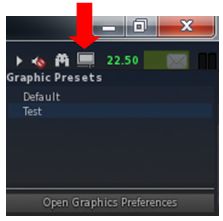
The Presets icon allow you to easily access your graphics presets

When it comes to swapping back and forth between preset groups, however, the quickest way to do so is via the Presets icon located in the top right of the viewer window. Hovering the mouse over this displays a list of all presets you’ve created; just click the name of the one you wish to  activate.

This list also include a button which will open the Preferences floater at the display tab, allowing you to quickly set-up a new preset or modify and existing preset (just make your changes and save to an existing preset name to overwrite it).

As avatars can often be the single biggest impact on the viewer in terms of rendering, particularly in crowded places, Avatar Complexity has been introduced by the Lab as a mean by which those on lower specification systems can set a limit within their viewer for rendering particularly complex avatars (i.e. those with a lot of very high-resolution textures on them and their accessories, or using a lot of high-impact mesh and sculpt attachments etc). Any avatar exceeding this limit will then be rendered as a single, solid colour, vastly reducing the processing load on the user’s system. Because they are rendered as a solid colour, such avatars have been nicknamed  ”Jelly Babies” after the sweet (candy) of the same name.

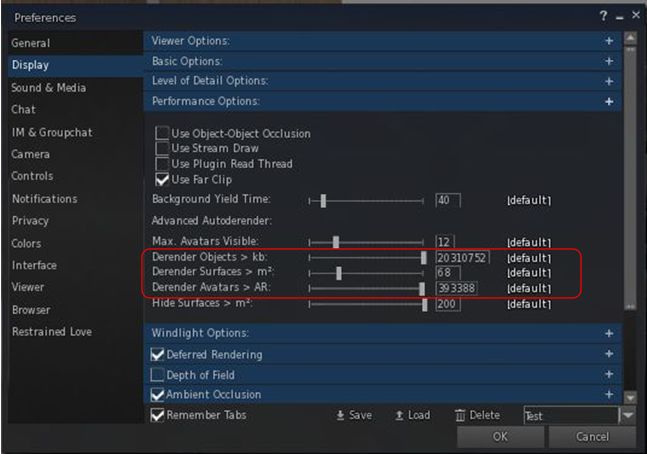
Within the official viewer, the control for Avatar Complexity is a single slider (Maximum Complexity) which controls avatar rendering. Within Black Dragon, Niran control is seemingly split between three sliders, Derender Objects > Kb, Derender Surfaces > m2,  and Derender Avatars > AR. and some juggling between them may be required to achieve optimal results, if you play with all of them.

Avatar Complexity in Black Dragon

Avatar Complexity in the official viewer is still not perfected; this is reflected by the fact that avatars can often remain Jelly Babied even when Maximum Complexity is set to No Limit –  you have to disable avatar imposters to get avatars stuck like this to render correctly (or relog). Black Dragon didn’t seem to exhibit this problem when I was fiddling with it,

Continue reading “Black Dragon 2.4.4.4: Jelly babies and graphics presets”

Kokua 3.8.6: notify me

kokua-logoOn Tuesday, November 17th, Nicky Perian announced the release of Kokua 3.8.6.37336,  which brings the popular SL and OpenSim viewer to parity with both recent Linden Lab code releases and with Marine Kelley’s RLV,  while including some additional tweaks from the Kokua team.

The release was preceded by a test release version focused on integrating the most recent updates for RLV in order to ensure there were no unpredictable outcomes from multiple merges, etc. A request was put to Kokua users to assist in testing that pre-release, which saw around 600 people respond and download the viewer. Their feedback formed the basis for additional refinements to the code leading up to this release, with Nicky passing on his personal thanks to all of those who participated.

The Lab code releases in the Kokua 3.8.6 comprise:

  • Release 3.8.5.305531, dated October 13th – an Maintenance release comprising 90+ fixes, updates and feature requests from the Lab (release notes)
  • Release 3.8.6.305981, dated October 26th – the notifications viewer, incorporating the new notifications floater (release notes).

Notifications Update

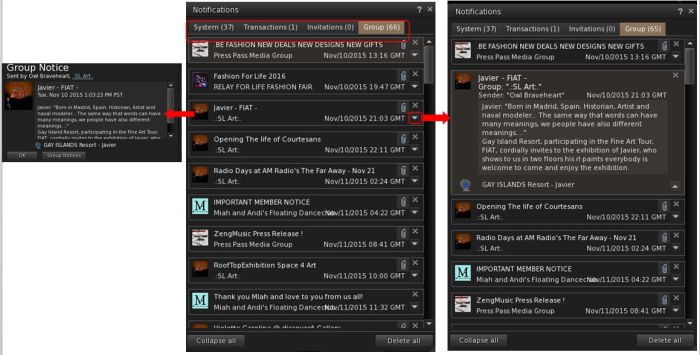
The notifications update presents a new floater for managing all your incoming notifications and notices, the result of a feature request to the Lab from Aki Shichiroji.  This sees incoming notifications split between four tabs: System, Transactions, Invitations and Group, with each tab displaying the total number of notices stored within it.

Kokua 3.8.6 incorporates the Lab's new notifications floater, itself the result of a feature request from Aki
Kokua 3.8.6 incorporates the Lab’s new notifications floater, itself the result of a feature request from Aki Shichiroji

Clicking on an individual notice, or the down arrow to the right of a notification will open the details within the preview panel. Individual notices can also be closed by clicking the X to the right of them. The two buttons at the foot of the floater will either collapse all “open” notifications within the current tab, or deleted them all from the tab.

The RLV updates bring Kokua fully up to par with RLV 2.9.15, including the hotfix release of 2.9.15.1 on November 9th intended to correct BUG-10601.

The Kokua team contributions for this release comprise:

  • Uploading a Blender generated dae, and NOT retaining material group order (see Bug 10326)
  • OpenSim update –  Set Lag Meter Server section to operate at 11 fps.

There are a number of known issues with this release – please refer to the Kokua 3.8.6 release notes for details.

I confess to (once again) not having have that much time to drive this release due to having a busy schedule at the moment. However, when I was able to run it however (sans RLV active), I encountered no significant issues. My apologies (also again) to Nicky for not having spent more time using the release ahead of this summary review.

Related Links

Firestorm 4.7.5: something for everyone

firestorm-logoTuesday, November 17th saw the release of Firestorm 4.7.5.47975.  While not as major in terms of LL features and updates as the August 4.7.3 release, the new version of Firestorm nevertheless brings with it plenty of general fixes and improvements, both via the Lab and the Firestorm team and contributors.

As per my usual MO, what follows is an overview of the release, highlighting some of the more significant / interesting changes, updates and  fixes to be found in the release.  For full details of all changes, and all due credits to contributors, etc., please refer to the official release notes.

The Usual Before We Begin Notes

For best results when installing this release:

Details of any versions of Firestorm to be blocked as a result of this release will be announced in due course.

Lab Derived Updates

Firestorm 4.7.5 brings the viewer to parity with the Lab’s 3.8.6 code base, and so includes the new Notifications updates and changes to the mesh uploader. These and other key updates from the Lab are listed below.

Notifications Update

The notifications update presents a new floater for managing all your incoming notifications and notices, the result of a feature request to the Lab from Aki Shichiroji. Within this floater, incoming notifications are split between four tabs: System, Transactions, Invitations and Group, with each tab displaying the total number of notices stored within it.

Notices are initially displayed in summary format presenting the title, date of receipt and other immediately relevant data, and can be opened in one of two ways:

  • Clicking on a notice directly will open in a new floater (shown below left) – this is a Firestorm-specific feature for the floater
  • Clicking on the small downwards arrow to the right of the notice will expand it within the existing floater (show below right).
The new Notifications floater from the Lab is included in Firestorm 4.7.5.

The floater also includes two buttons: Collapse All and Delete All. Both do as they suggest: collapse all notices open within a tab in the floater and delete all notices with a tab. Two further Firestorm-specific aspects of the notifications floater are:

  • An improved display of condensed group notices and show group name instead of sender name
  • The floater remembers the last selected tab after a relog.

Mesh Uploader Updates

Firestorm 4.7.5 includes the updated mesh uploader from Linden Lab, as seen in the SL viewer 3.8.4.305119 release.

This feature modifies the mesh importer to (optionally) improve debug output, perform name-based LOD association, and handle models with many materials, and allows models with more than 8 unique faces to be imported. When using it, note that:

  • The same limitations on LODs and materials remain in place (e.g. your low LOD mesh materials must be a subset of the full LOD materials).
  • LODs and Physics reps can now be explicitly associated with a given mesh in the full LOD model using name-based matching.
  • By properly naming the meshes in your lower LOD meshes and physics reps, you can avoid issues with ordering of the meshes within your DCC tool and other material mismatching errors.
  • An ImporterDebug option has been added to the settings.xml file which, if enabled, causes more information to be output during import than you can shake a stick at.
    The extra output can be very helpful for diagnosing authoring errors (e.g. violating the material subset constraints mentioned above) and pinpoint what needs to be fixed in the source model for successful import.

Further information can be found in the Lab’s Knowledge Base article.

Other Updates from the Lab

Other notable updates from the Lab include, but are not limited to:

  • A fix for unable to wear a copy of a wearable until relog or swapping to a wearable with a different UUID (see: BUG-8388 and FIRE-16097)
  • A fix for viewer crashing at logout if wearing clothing textured with a local texture (BUG-8872 and FIRE-15787)
  • A fix for viewer crashing if you open Help > About while a group member list is loading (see BUG-9396)
  • A fix for deleting objects too quickly from contents of another object results in viewer crash (see BUG-9492 and FIRE-16352)
  • A fix for alpha masking not working when ALM is enabled if the object has a legacy bump set (see BUG-7263)
  • Fixes for mesh models sometimes failing to load completely (see: BUG-6803, BUG-7239, BUG-8806, and FIRE-15690)
  • A fix for the inventory count sometimes not displaying (see BUG-7263)
  • A fix for group members of large groups in a role which has “Invite people to this group” ability not being able to send group invites (see BUG-9404)
  • A for fox errors when texturing a linkset “Unable to add texture. Please wait a few seconds and try again.” (see BUG-9957 and FIRE-16755)
  • A fix for the massive slowdown when opening “Place Profile” or “About Land” dialogue when the Covenant text is long
  • A fix for broken texture animation on rigged mesh
  • A fix for building block type changing to Torus after cancelling changing of texture for sculpted object
  • The time remaining is now displayed before the avatar name in the parcel ban list for timed bans
  • A huge number of maintenance fixes from various LL Maintenance viewer updates – for the full list, please refer to the Firestorm notes.

Continue reading “Firestorm 4.7.5: something for everyone”

Firestorm seek volunteer gateway marketing manager

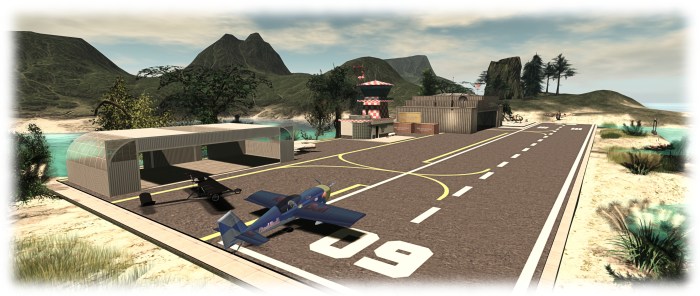
The Firestorm Gateway provides new users with essential orientation in using the viewer and the opportunity to learn about a range of SL activities, such as aviation
The Firestorm Gateway provides new users with essential orientation in using the viewer and the opportunity to learn about a range of SL activities, such as aviation – but it needs marketing and promotional support

The Firestorm team have announced they are seeking a volunteer to handle marketing and promoting Second Life to potential new SL users through the Firestorm Community Gateway and website.

The Firestorm Gateway is a part of a forthcoming trail programme being implemented by the Lab which will see up to 20 community-lead gateways active within Second Life and geared towards helping incoming new users get to grips with the platform more positively, and hopefully improving the chances that they’ll “stick”.

However, in order to attract new users into Second Life, the Gateway – and particularly its associated website – needs to be actively promoted to audiences beyond SL – hence Firestorm’s call for a marketing volunteer.

The Firestorm Gateway incorporates their viewer orientation island and includes social areas for users
The marketing volunteer will be responsible for presenting and promoting the Gateway and – particularly the Gateway website – to potential audiences and target across the Internet, to encourage people

The Firestorm team is specifically looking for someone who is an existing user in Second Life with a solid grasp on what Second Life is and means to its residents, and who has extensive experience with internet marketing, including the use of social media tools.

The full list of requirements and the benefits offered in return are listed in the official  Firestorm announcement, and those interested in applying are asked to send a note card with their information, experience and ideas to Jessica Lyon in-world, or via e-mail to jessica.lyon-at-phoenixviewer.com.