On May 31st, 2018 Linden Lab updated the Love Me Render Release Candidate, viewer version 5.1.5.515811 to de facto release status.
Unfortunately, during the release process, there was an error defining the location of the Windows 32-bit version of the Second Life viewer download, which meant Windows users downloading the viewer when first released received the 64-bit version, regardless of which version of the operating system they are running.
While the issue has been addressed, it did leave some 32-bit Windows users found their systems stuck in a loop of trying to install the 64 bit version of the viewer. As I noted at the time, instructions were issued on how to break out of the loop. However, it appears some 32-bit users may still be encountering problems.
To this end, the Lab has released the “Unloop” Release candidate viewer, version 5.1.6.515965, which as the release notes state:
…is a special release just for Windows 32 bit systems who were caught in an endless loop of 64 bit viewer updates between 5/31/2018 and 6/1/2018. Except for its incremented build number, it is in every other way, identical to the last release.
So, if you are a 32-bit Windows user and are still having issues as a result of the promotion of the Love Me Render release, you might want to try a fresh installation of the Unloop viewer.
Update, June 6th: for those 32-bit Windows users still experiencing problems with this issue, the Lab has issued the Unloop RC viewer.
On May 31st, 2018 Linden Lab updated the Love Me Render Release Candidate, viewer version 5.1.5.515811 to de facto release status.
Unfortunately, during the release process, there was an error defining the location of the Windows 32-bit version of the Second Life viewer download. Because of this error, all Windows users downloading the viewer received the 64-bit version, regardless of which version of the operating system they are running.
While the issue has now been fixed so that 32-bit Windows users will receive the 32-bit version of the viewer, anyone running 32-bit Windows who downloaded the viewer during the 24 hours when the incorrect location was available (12:00 noon SLT on Thursday, May 31st, 2018 through 12:00 noon SLT on Friday, June 1st, 2018) may now find their system is stuck in a loop of trying to install the 64 bit version of Second Life.
Because of this, Kyle Linden issued a forum post on how to correct the problem for those caught in the loop, and I’m reproducing those instructions below for those who may have missed the forum post:
Linden Lab has promoted the latest Maintenance RC to de facto release status. The viewer follows the Lab’s convention of naming their maintenance updates for the viewer after popular alcoholic beverages and aperitifs.
This release includes a range of updates and improvements to the viewer which are worth highlighting, and which will be finding their way into third-party viewers as time goes forward (if they are not already present). Including the following.
Installation and Log-in Improvements
The “Your account will not be available until” login failure message has now been removed, as it is no longer meaningful.
The GPU Benchmark test no longer causing issues when installing the viewer or when setting viewer defaults.
Non-English versions of the viewer can now be installed into non-default paths without causing incorrect fonts to be loaded, corrupting the text of the Terms of Service display in the viewer.
Mac OS updates:
Incorrect VFS (cache) creation time no longer shown in “help>about SL”.
Full version of the build in the applications is now displayed after install on Mac.
Avatar Appearance Updates
A new option added to the Appearance Editor right-click menu: Wear Only This Outfit.
The Edit Outfit panel in the Appearance Editor no longer displays “Loading…” when there is nothing to load.
An avatar’s hairbase is now correctly rendered in Appearance mode when ALM is enabled, and the alpha mask will correctly hide the default hair in the Outfit Editor.
A seated avatar’s rotation is now correctly updated when the object the avatar is sitting on is changed via the build floater X, Y, Z spinners.
Object position (and sometimes size) no longer greyed out when editing avatar parts or attachments.
Temporary attachments can now be detached via gear menu in Appearance >Wearing.
UI Improvements
Abuse Report floater clean-up.
Error messages no longer doubled (the first being generic, the second being accurate).
It is no longer possible to delete an inventory folder while trying to rename it by holding down the Delete key a little too long.
Chat scroll bar now properly displayed after a panel resize.
“Walk/run/fly” toolbar button no longer turns off “fly mode” once per session.
Received Items improvements:
The “New” icon in the Received Items folder now correctly disappears when navigating with keys.
The “New” tag now appears in front of folders when searching.
“Properties” menu item disabled for multiple selection in Object content, because it was causing Received Items to disappear.
The Donation check box no longer covered by the Purchase button when buying land from a group you’re already donating to.
Bottom part of “Filter” button at Snapshot window can now be properly clicked.
World Map no longer shows first friend location after searches.
Unicode correctly appears in the Windows viewer display name.
Arrows ‘Navigate back’ and ‘Navigate forward’ had wrong state.
Profiles now have a Back button.
Debug setting AvatarHoverOffsetZ will work regardless of whether Set Hover Height modal has been opened.
Efficiency & Performance Improvements
This viewer uses the new off-line messages capability to correctly fetch off-line IMs following log-in, hopefully resolving the issue of lost off-line messages.
Viewer no longer attempting to load file/mesh/LOD indefinitely in case of most failures.
Advanced Lighting Mode (ALM) improvements
Normal and specular maps no longer downloaded when ALM is disabled.
Local Textures for Advanced Lighting Projectors now keep the selected texture.
Particles attached to the muted avatars no longer render.
Texture animation flicker at certain frame rates has been removed.
Sculpties should no longer appear as spheres before their shape data has been received by the viewer.
Scripts memory usage should no longer return incorrect values in the Estate Tools.
Unneeded exception handling from LLAppViewer::frame() removed.
ExportCharts for performance analysis re-enabled.
Mods to allow nVidia nSight to capture frames of Viewer rendering have been added.
Deprecated and unused private memory pooling removed.
Various translation updates.
Media Updates
(MAC only): viewer Media Browser no longer doubles entered Cyrillic capital letters.
Magnify glass button no longer returns camera to avatar after select other nearby media in “Start/Stop ALL Media” tab.
Scrollbar should decrease when the number of displayed media decreases.
The viewer no longer sends multiple GET requests against prim media when PRIM_MEDIA_AUTO_PLAY is enabled.
Social floaters launch a somewhat different version of the internal browser.
Crash Fixes
The viewer includes a range of crash fixes, as detailed in the release notes.
Downloads
The viewer can be downloaded from the viewer’s release notes page, if preferred.
Viewer support has been a subject of frustration among SL users who prefer to use Linux (around 1%-1.5% of the total SL user base) over the lack of official support for the operating system.
As I reported at the time, in 2015 and due to a lack of Linux expertise, Linden Lab pulled back from active Linux viewer development in favour of seeking support from the open-source community in order to maintain a Linux version of the viewer (see here for more). More recently, the Lab has been looking to provide a means to build a Linux flavour of the viewer, based on their Alex Ivy 64-bit code base and libraries, but not distribute or build all the various dependencies required for the viewer, instead leaving this to TPVs to do as part of providing their own support for Linux users (see here for more), although this is taking time to happen.
In the meantime, on May 6th, 2018, the Kokua team released the first third-party viewer for Linux based on Lab Lab’s 64-bit Alex Ivy code base, although built using Kokua’s own Linux libraries.
Kokua release 5.1.3.43237 (RLV) and Kokua release 5.1.3.43238 (no RLV) are are supplied in Windows, Mac and Linux flavours. In addition, and as is to be expected, both are built using the latest LL release code base (SL 5.1.3) while the RLV version is at parity with RLV release 2.9.23.0.
The viewer is currently available for download on the Kokua website for those who wish to try it – just scroll down to the RLV 64 bit (active development) or the NORLV 64 bit (active development) sections of the download page for the version you’d prefer to use.
If you are a Linux user and opt to download the viewer, please do take the time to report any issues you find with it via the Kokua Issue Tracker at Sourceforge, as refinement and enhancement of the Linux flavour of the viewer is dependent on the Linux community, perhaps more so than the Mac and Windows flavours (which each have the advantage of larger user bases and more chances of issues being more widely identified and reported).
It should be noted that the Linux flavours of the viewers does come with a warning:
Some areas of the Linux release are still being worked on, however we believe that enough is working and well enough to share this with a wider audience to help us squash any remaining gremlins.
However, the news that there is now an up-to-date 64-bit Linux viewer available for download which is based on the Lab’s current code-base should hopefully come as good news for Linux users.
In March I reported that Chorazin Allen, had joined the Kokua viewer development team. He volunteered after Nicky Perian’s decision to step back from day-to-day management of the project, announced in October 2017 to allow him to enjoy more of his retirement, failed to elicit hoped-for volunteers to take over the general management of the project.
Chorazin, although he modestly describes his C++ coding skills as “rusty” (causing him to initially hold back from volunteering sooner), has considerable experience in project management, software development and build experience coupled with many years of experience of in-world LSL scripting and working with RLV/RLVa.
Since joining Kokua, he has been getting familiar with the rest of the Kokua team, and together they have been working on updates to the Second Life viewer to bring it up to parity with the current Linden Lab code base, including full integration with the Alex Ivy 64-bit code. I’ve been tracking these updates – made through the projects Sourceforge pages, rather than being “official” releases, for the past few weeks via my Current Viewer Releases page and my weekly viewer release summaries.
Kokua: The Future
On April 15th, this work reached a point where the team were ready to resume making formal Kokua releases, and to publish a blog post outlining the viewer’s future development. I strongly urge all Kokua users to read this post in full, and am only bullet-pointing the key elements here:
Until such time as an OpenSim developer can join the project, Kokua will only be actively maintained for use with Second Life.
Kokua for Second Life will be developed as a 64-bit bit viewer only, offering both RLV and non-RLV variants.
The Windows and Mac versions will be actively maintained, based on Linden Lab’s Alex Ivy 64-bit code base.
Effort will also be put towards a 64-bit Linux flavour of the viewer based on the Lab’s Alex Ivy code. However, this will doubtless be dependent on the Lab’s broader attempts to work with the Linux community to develop a 64-bit Linux viewer.
In keeping with a request from Linden Lab, the major version numbers for Kokua releases will reflect the Lab code base release they are based on. So, for example Kokua 5.1.3.xxxxx indicates it is based on the Lab’s 5.1.3 code base.
Legacy 32-bit versions of Kokua will remain available via the download page, but will not be actively maintained.
The Kokua group within Second Life is the preferred medium for user-to-user support and will also be used for group notices about new versions or other significant developments. All other channels of outward communication (IRC, Twitter, etc), have been discontinued.
The Kokua wiki will continue to be used for viewer release notes (as seen in the viewer when a new version is launched) and for the summary of current versions and download sites.
The preferred method of inward communication to the team is via a ticket raised in Sourceforge against the Kokua Project.
Kokua 5.1.3.43129/43130
The formal release the release of Kokua’s Alex Ivy based 64-bit viewer for Windows and Mac, offers the viewer in both RLV (5.1.3.129) and non-RLV (5.1.3.43130) variants on both platforms. It brings with it a full parity with the Second Life viewer up to and including (at the time of writing) the current official release viewer, 5.1.3.51364, formerly the Media Update RC viewer. The RLV version of the viewer also gains parity with RLV 2.9.23.0.
Performance Feedback Capabilities
The core element of the updates made by the Kokua team comprise new performance and information feedback capabilities, including the ability to report on changes in the number of scripts in a region, changes in the server channel with changes of region.
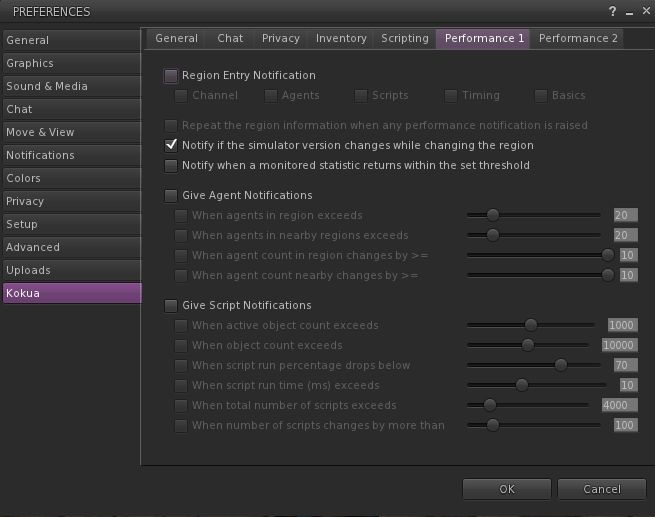
All of the new settings can be found in two new Preferences tabs: Preferences > Kokua > Performance 1 and Preferences > Kokua > Performance 2:
Performance 1 deals with notifications on entering a new region and agent (avatar) and script notifications, which must be enabled on a group basis – agent and / or script notifications, and then individual options within group set as required.
Performance 2 provides notifications on Frame Timing and Basic Performance.
In addition, it should be noted that:
Performance 2 also includes a check box to display the information from these features either as a notification in the top right of the viewer window and in chat history, or have them only displayed in chat history.
All of the options have default values which are intended to be representative of fairly average performance. If you aren’t familiar with what they do, it is probably preferable that you don’t randomly enabling them, as you could end up swamped in notifications and feedback.
It is important to not that any changes made relate what is reported by the viewer and when – changing these values does not change actual simulator performance.
The new Preferences > Kukua Performance 1 tab, allowing users to set notifications for region, agent (avatar) and script notifications.
Some of these options mirror similar capabilities found in other TPVs – such as reporting a change in the server channel when moving between regions; others may be of more benefit to region holders and their estate managers than they are for general consumption. The idea with them is not to simply turn everything on, but to select those options which might be of specific interest.
For example, while knowing how many avatars (agents) are in a region might be of use to some users when hopping about Second Life, information on how the physics simulation is performing or on overall timing information within a region, together with the active object count and script count is only likely to be of interest to those managing a region. Similarly, enabling the Physics time section of the frame monitoring options in the Performance 2 tab could help creators monitor vehicle performance during testing (e.g. on region crossings.
The new Preferences > Kokua > Performance 2 tab, providing Frame Timing and Basic Performance notifications
For a more rounded examination on how these options might be used, please refer to the Kokua release notes, which provide a range of examples of now the tabs might be used. It should also be notes that general “real-time” monitoring of the options provided can also be done via the Statistics (CTRL-SHIFT-1) and Scene Load Statistics (CTRl-SHIFT-2) floaters. Finally, those particularly interested in learning more about the viewer’s statistics reporting abilities and on tuning viewer performance should refer to the Viewer Statistics wiki page, and the Viewer Performance Knowledge Base article respectively.
Feedback
While the lack of OpenSim maintenance for Kokua – at least until such time as an OpenSim developer volunteers to work with the team, as noted – will probably be lamented in some quarters, the “return” of mainstream release announcements of Kokua, together with information how the viewer’s development will proceed into the foreseeable future is to be welcomed.
That Kokua is only being maintained on Windows 64-bit might cause frustration for some. However, given that systems capable of running 64-bit Windows (e.g. supplied with more that 4Gb of RAM) are far more prevalent on the marketplace; ergo, the decision to focus the team’s limited resources on providing support for the one flavour of Windows makes sense.
It’s hard to judge how well the two new Performance tabs will be utilised. Aso noted, for the likes of those engaged in region management, or scripting, they could potentially be very useful. For others, the tabs might rarely see the light of day. But that’s what TPVs are about – providing choice for users.
I’ve not had an opportunity to run Kokus 5.1.3 hard, having only spent part of a morning bouncing around SL with it. However, in that time I found it to be (as usual) robust and providing frame rates and general experience with the official viewer and – on a frame rate basis – somewhat above that managed by Firestorm on the basis of very rough-and-ready “like for like” testing across some of my preferred regions where things like agent numbers., etc tend to remain constant.
Update, March10th: Two new versions of Kokua are available for 64-bit Windows (RLV – version 5.1.3.42936 – and non-RLV – version 5.1.3.42935). These build on recent updates to Kokua using the Lab’s 5.1.3 code base, and feature internal code refactors. They can be downloaded from Kokua’s Sourceforge repository.
In October 2017, Nicky Perian announced he would be stepping back from a direct, hands-on leadership role in maintaining Kokua to enjoy a well-deserved retirement. He put out a call for members of the Kokua community to step forward and help maintain Kokua, although he has maintained a role working on the Mac and Linux versions of the viewer.
On Friday, March 9th, Chorazin Allen – perhaps best known as the creator of Chorazin Creations, a range of RLV-enabled cages and cells for the BDSM community, and the Chain of Command range of scripted plug-ins for the Real Restraints range of products by Marine Kelley- issued a Kokua group notice indicating he would be joining the team, taking directly responsibility for:
The Windows builds of Kokua
RLV updates
Release management and general administration.
In a separate group notice, Chorazin also notes:
You can check on the latest Win64 versions of Kokua by visiting Sourceforge here:
You may also set up notifications from Sourceforge when new versions are added.
RLV users should update to 42932 to get a fix for the garbage collector failing to remove restrictions from vanished objects.
Chorazin notes that – understandably – it will take a little time for the re-organisation within the Kokua team to be completed, and Kokua users are asked to keep an eye on group notices – which will become more frequent as a new version is readied for release – and on the Sourceforge repositories for updates to forthcoming versions.
In the meantime, news that Kokua is to be moving forward will likely be welcomed by the Kokua community, and kudos to Chorazin for taking up the request to help manage the viewer and carry it forward. I’ll continue to cover updates as they are released.
 On May 31st, 2018 Linden Lab updated the Love Me Render Release Candidate, viewer version 5.1.5.515811 to de facto release status.


 Inara Pey: Living in a Modemworld