Important note: The SL Go service is to be shut down on April 30th, 2015. For more information, please read this report.
Draxtor has been working on a promo video for SL Go on the iPad. It’s a fun piece.
Inara Pey: Living in a Modemworld
Second Life, virtual worlds and virtual realities
Important note: The SL Go service is to be shut down on April 30th, 2015. For more information, please read this report.
Draxtor has been working on a promo video for SL Go on the iPad. It’s a fun piece.
 Important note: The SL Go service is to be shut down on April 30th, 2015. For more information, please read this report.
As I (among others) reported on Tuesday, October 14th, OnLive released a version of their SL Go service for the iPad.
At the time of the release, there was an unexpected rotation issue which meant that the screen orientation was locked in one horizontal orientation – if you flipped the iPad around, the screen would appear upside down, although the input areas might actually flip with the screen but still be displayed as if they were upside down.
This was a particular nuisance for people using a bluetooth keyboard or docking station with their iPad, as it meant the viewer would be displayed upside down when docked with either.
On Friday, October 24th, Dennis Harper from OnLive dropped me a note to inform me that this rotation issue has now been corrected, The app should update for those who already have it, and the fix is now a part of all downloads obtained via the Apple iTunes store.
Important note: The SL Go service is to be shut down on April 30th, 2015. For more information, please read this report.
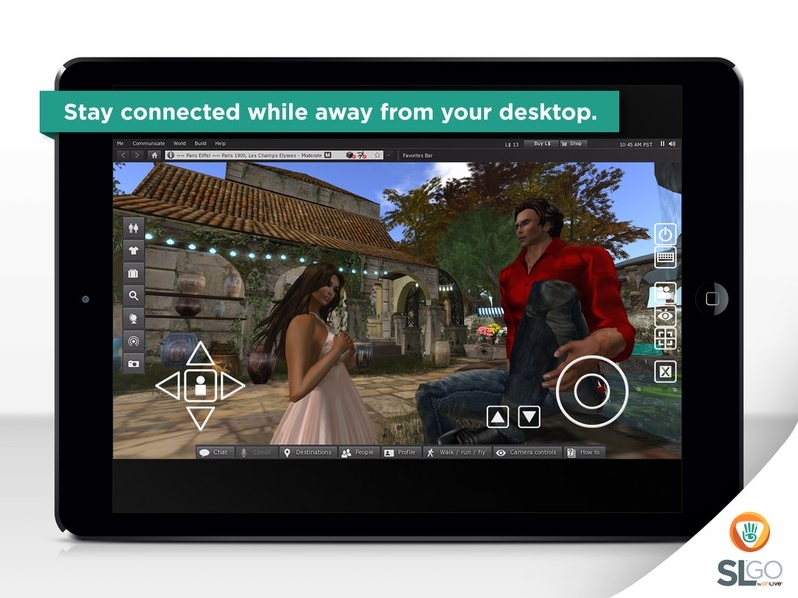
On Tuesday, October 14th, 2014 OnLive, the company behind the revolutionary SL Go service which streams the SL viewer and SL content directly to the user’s computer or hand-held device, announced the product is now available for iOS on the iPad.
Until now, the application has only been available for the Android mobile device platform, although OnLive have been working towards a release for iOS for some time. Now, the application’s arrival for the iPad brings with it the ability for iPad users to access Second Life with the full graphical richness of the SL viewer when on the move.
The press release announcing the launch reads in part:
OnLive, the leader in cloud gaming, today announced the release of SL® Go for iOS, a mobile viewer for Linden Lab’s Second Life® virtual world that extends the player’s Second Life experience to iPad® tablets for the first time. The touch-enabled app builds on SL® Go for Android™, which launched in spring of this year.
SL Go empowers Second Life residents to experience Second Life in full 3D and in real-time on any iPad running iOS 7 or greater, without the need for an expensive desktop computer. New and existing users can simply sign in over Wi-Fi or 4G LTE to enjoy a high-fidelity Second Life experience with amazing graphics quality, full shaders, shadows and full motion capability. Streamed from OnLive’s powerful cloud-based servers, which have been clocked at speeds as high as 200 FPS set to Ultra with Maximum Render Distance, each secure Second Life session enables users to rez quickly into their favorite sims to connect with in-world friends,participate in events, engage in combat games, and enjoy immersion in Second Life at a level never before possible on iPad tablets.
SL Go offers access to the full Second Life Viewer interface, including edit menus, inventory, preference settings and chat management, adding intuitive touch controls. All user customizations are saved from session to session, even if played on a completely different device or platform.Design a beautiful scene using SL Go on your Mac or PC, and then show it off to friends on iPad. Your world transfers seamlessly, making it mind-blowingly easy to stay connected with in-world events.
“Ever since we launched SL Go for Android™, the Second Life community has been clamoring for iOS compatibility,” said Rick Sanchez, VP of Product and Marketing at OnLive. “Now, residents can keep Second Life at their fingertips whether they’re at work, home, out with friends or traveling for the holidays. And with the iPad’s stunning Retina display, the Second Life world is beautifully rendered with breathtaking 3D graphics.”
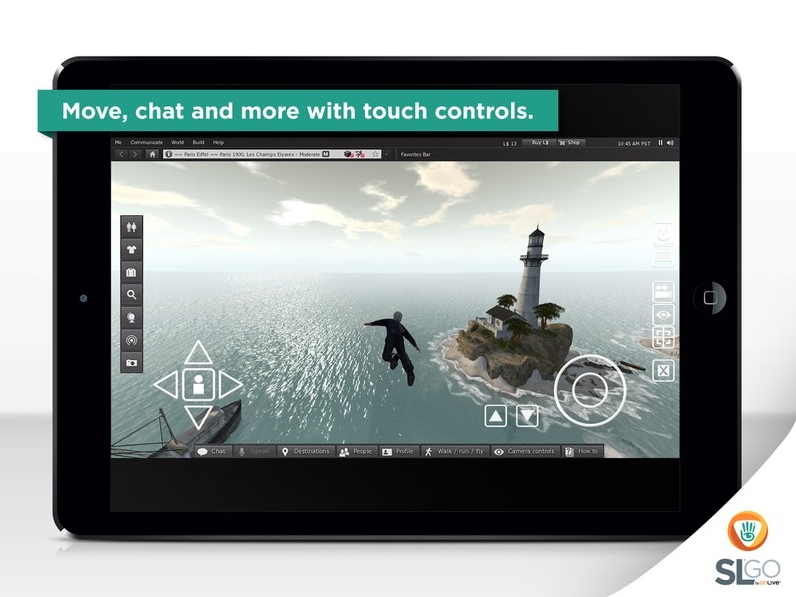
Drax has produced a video to mark the iPad launch as well.
OnLive is the originator of fast-twitch cloud gaming, innovating the delivery of real-time interactive experiences over any network. With ground-breaking video compression technology, OnLive instantly delivers full-featured, media-rich applications anytime and anywhere, across a range of devices. The OnLive Game Service gives gamers the freedom to play their games on PCs, Macs, tablets, and HDTVs. OnLive Go brings the benefits of cloud gaming to MMOs, virtual worlds and other graphics-rich interactive applications. Having pioneered powerful cloud solutions for the most technologically challenging segment, fast-twitch AAA games, OnLive has hundreds of patents that cover its innovations. The company is headquartered in Mountain View, California. More information is available at www.onlive.com and www.onlive.co.uk.
Important note: The SL Go service is to be shut down on April 30th, 2015. For more information, please read this report.
On Friday August 15th, I posted about OnLive announcing that their SL Go viewer for Android devices & low-end computers / laptops had been updated with a fix to enable it to render fitted mesh items correctly.
The update saw the viewer updated to Linden Lab’s 3.7.12 code base, and while the OnLive e-mails didn’t mention this, it meant the viewer also gained some additional capabilities and updates. Perhaps the most notable of these is the inclusion of the SL Share 2 feature for sharing photos directly to Facebook or Twitter or Flickr, together with the default post-process filters.
I had been a little curious as to whether this would work or not (I did wonder if there would be an authentication issue, given everything is running via the OnLive servers). However, now I’ve had a chance to give things a go, I can say that they do indeed work as expected. Well, at least where Flickr and Twitter are concerned; I don’t use Facebook, so have been unable to test that side of things, but there is no reason to assume it won’t work.
 Testing the Flickr upload from SL Go – a quick snap of the house in SL, August 2014, using the snapshot floater’s vignette filter – click for original
That said, trying to authenticate SL Go with Flickr did admittedly have an initial hiccup; I got stuck on Flickr’s “Bad Panda!” (aka, “oops, something stuffed up, sorry”) page the first time. However, second time around, it worked as expected, and I was duly connected. Given the issues with Flickr over the last couple of days (as those using Firefox or Internet Explorer may well still be muttering about), I point the finger at Yahoo as the cause of the hiccup.
After that little problem, everything worked as anticipated. I was able to upload a snapshot (using the Spotlight filter, as shown above), which quickly appeared in my photostream.A follow-up test with Twitter so no problems in authenticating, and the snap (this time using the Sepia filter) and text uploaded fine.
Some might notice a couple of rendering issues in the images. These are not related to the uploads. In particular, because access to the Advanced menu is disabled in SL Go, RenderVolumeLOD is locked-in at a relatively low number (1.25?), so some sculpts refused to render properly, and can be seen semi-rendered in the images. As this was just a quick-fire test of the uploads, I wasn’t that fussed about arranging things so the sculpts were properly “popped-out”.

There is still no capability to save snapshots locally. This isn’t surprising, given SL Go is a streamed service, rather than something running locally with access to the local hard / flash drive, and so is likely going to take a lot more banging on things before it works – if it can be made to work. In the meantime, the SL Share options (particularly Flickr) might at latest offer an additional alternative for saving photos alongside the existing inventory, profile and (my preferred method with the SL Go) e-mail.
Although the viewer is listed as based on the 3.7.12 code base from the Lab, it does not include the Group Ban functionality, which reached official release status on August 4th, 2014. However, as a 3.7.12 based release, it should include all of LL’s updates to the viewer code up to 3.7.12.
All-in-all, a tidy little update which sees a major glitch (fitted mesh) corrected, and the addition of a useful feature in the shape of SL Share 2.
Important note: The SL Go service is to be shut down on April 30th, 2015. For more information, please read this report.
Dennis Harper, Senior Product Manager at On Live has been slipping out word that the company’s SL Go product has been updated.
On August 14th, e-mails were sent to those SL bloggers who previewed SL Go ahead of the launch, announcing that the update resolves the fitted mesh issue which saw any fitted mesh items distorted and stretched to the 0,0,0 point in a region when viewed in the initial release of the viewer. Dennis’ e-mail to me announcing the update reads:
Hi Inara,
This is not a huge announcement, but we finally got an update to SL Go that is compatible with the new ‘fitted mesh” feature. I’d like to get the word out there to SL Go users, and hopefully to some the used SL Go but cancelled due to this bug.
SL Go is still alive and kicking here at OnLive. This code merge took way longer than anyone expected, but now we have a clean version representing the latest code from Linden. Now we get to work on the cool stuff. We have some great plans for the near future that I’m sure you will be excited about.
If you have any questions, please let me know. Thanks again for all your support.
-Dennis Harper-
Sr. Product Manager – SL Go by OnLive

Dennis recently contacted me concerning the need to continue to enhance and refine the SL Go product, and asked if I could help spread the word about the company being willing to offer viewer developers paid contract work in order to help them achieve this goal.
The request resulted in my drafting and publishing a press release / article on behalf of OnLive in early June. So far as I’m aware, the company is still seeking support and assistance with the project, so if you are a TPV developer, and you’d be interested in helping OnLive carry the product forward, adding additional features (and even advising them on features), tweaking the UI and so on, please refer to that article and drop Dennis an e-mail at: dennis.harper@onlive.com.
In the meantime, the fitted mesh update is now live, and should be available to users the moment they log-in to Second Life using the SL Go viewer (obviously, as the viewer is streamed as a part of the service, there is no need to download and viewer update). Congrats to Dennis and the team.
OnLive, the company behind the revolutionary SL Go service which streams the SL viewer and SL content directly to the user’s computer or Android device, is looking to supplement the development of their version of the viewer by hiring contract developers to help with fixes and new features.
Since its introduction in March 2014, SL Go has proven popular among SL users, and OnLive have sought to improve the service in order to better meet users’ needs. In April 2014, for example, the company introduced a new pricing model in response to users’ feedback, and on Tuesday June 3rd, the company announced that the original 20-minute free trial period had been replaced by a 7-day free trial.

Now, conscious of the pace with which the SL viewer is developing, OnLive want to ensure their viewer keeps up-to-date with developments coming out of the Lab and – potentially, as things progress over time – incorporate some of the functionality seen in other TPVs.
“We are looking to move forward with SL Go in many ways,” Dennis Harper, the Senior Product Manager for SL Go at OnLive informed me when he contacted me about this move. “The first order of business would be to merge our code to the latest branch of the SLV code, bringing SL Go completely up to date. Then, it becomes more features. I’d like to do a number of tweaks on the UI and camera to make it easier to use on a tablet. Then voice chat would be a huge addition. The text chat system needs an overhaul.”
The work would be offered on a paid contract basis, and subject to applicants passing an interview process. However, the benefits could be far-reaching, as Dennis pointed out to me, “I would think that this would be a fantastic opportunity for developers,” he said. “They would get to create cutting-edge technology and work with a world-class development organisation.”
So, if you have a solid track record of viewer code development and enhancement, and you would like to be involved in a project at the very cutting-edge of viewer development and implementation, then OnLive would like to hear from you.
To make your interest known, please submit an e-mail with a brief summary of your background and experience to Dennis Harper, Senior Product Manager, OnLive, at this address: dennis.harper@onlive.com.
 Inara Pey: Living in a Modemworld