Logos representative only and should not be seen as an endorsement / preference / recommendation
Updates for the week ending Sunday, January 27th
This summary is generally published every Monday, and is a list of SL viewer / client releases (official and TPV) made during the previous week. When reading it, please note:
It is based on my Current Viewer Releases Page, a list of all Second Life viewers and clients that are in popular use (and of which I am aware), and which are recognised as adhering to the TPV Policy. This page includes comprehensive links to download pages, blog notes, release notes, etc., as well as links to any / all reviews of specific viewers / clients made within this blog.
By its nature, this summary presented here will always be in arrears, please refer to the Current Viewer Release Page for more up-to-date information.
Note that test viewers, preview / beta viewers / nightly builds are not recorded in these summaries.
Official LL Viewers
Current Release version 6.0.1.522263, dated December 5th, promoted December 13th. Formerly the Spotykach Maintenance RC viewer – No change.
Release channel cohorts:
BugSplat RC viewer, version 6.1.0.523335, January 23rd. This viewer is functionally identical to the current release viewer, but uses BugSplat for crash reporting, rather than the Lab’s own Breakpad based crash reporting tools.
Estate Access Management (EAM) RC viewer, version 6.1.0.523351, January 23rd.
On Saturday, January 26th, 2019, the Kokua viewer updated with the release of version 6.0.1.44611 (no RLV) and version 6.0.1.44619 (originally .44610).
The RLV version of the viewer initially brought the RLV version of Kokua to parity with RLV 2.9.25, released on January 25th. However, that release had a bug in it, forcing Marine Kelley to issue a hot fix release, version RLV 2.9.25.1 on January 26th, which was quickly adopted by the Kokua team into Kokua 6.0.1.44619. Outside of this fix, .44619 is functionally identical to .44610.
RLV Updates
The RLV updates can be summarised as:
Force a rebake whenever attachments and wearables are changed.
Prevent the avatar from going into T-Pose while editing an attachment that has been worn only for a few seconds.
When in Mouselook, don’t show rigged attachments that are worn on any head attach points.
Optimise the rendering of the vision restriction spheres.
Remove the artificial far touch restriction when vision is restricted, to allow objects to beyond an avatar’s visual range to be touched.
Kokua Updates
Both the .44611 and .44619 releases include the following updates from the Kokua team:
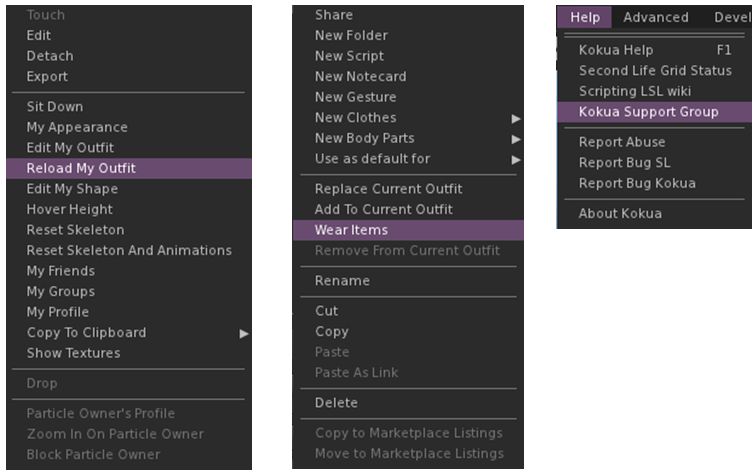
New Avatar right-click context menu option Reload My Outfit: this can be used to resolve clouded logins by manually forcing another attempt to wear the default outfit, effectively adding the current outfit onto itself.
Addition of Firestorm’s Wear Items option added to the inventory folder right-click menu. This causes the wearable items in the folder to be worn, replacing any items on the corresponding attachment points.
Reinstatement of the Help > Kokua Support Group option to obtain in-world help from other users (issues / bugs should still be filed via the Kokua Sourceforge support option).
The new right-click avatar content menu option Reload my Outfit (l); the right-click Inventory context menu option Wear Items (via Firestorm); and the reinstated Help menu > Kokua Support Group option (r)
Removal of the following menu options:
Disable Build Constraints (no longer supported by Second Life servers)
Texture Memory Stats (there was no code behind this menu entry, so it would always do nothing)
Toggle PG (again, there was no code behind this option)
Addition of various Firestorm improvements to login, inventory handling and outfit wearing.
Internal changes to make the performance statistics code more efficient.
A switch to using Linux GCC V7 from V5 for compilation.
Fixes for a number of errors in the XML configuration files for menus and floaters. These reduce the number of entries written to the log files and provides a small performance benefit.
I’ve not had time to drive this viewer following the release, so cannot comment on general performance, etc. However, as chance would have it I did get the chance to try the Reload My Outfit option, which seemed to work pretty well.
Logos representative only and should not be seen as an endorsement / preference / recommendation
Updates for the week ending Sunday, January 20th
This summary is generally published every Monday, and is a list of SL viewer / client releases (official and TPV) made during the previous week. When reading it, please note:
It is based on my Current Viewer Releases Page, a list of all Second Life viewers and clients that are in popular use (and of which I am aware), and which are recognised as adhering to the TPV Policy. This page includes comprehensive links to download pages, blog notes, release notes, etc., as well as links to any / all reviews of specific viewers / clients made within this blog.
By its nature, this summary presented here will always be in arrears, please refer to the Current Viewer Release Page for more up-to-date information.
Note that test viewers, preview / beta viewers / nightly builds are not recorded in these summaries.
Official LL Viewers
Current Release version 6.0.1.522263, dated December 5th, promoted December 13th. Formerly the Spotykach Maintenance RC viewer – No change.
Release channel cohorts:
The Love Me Render RC viewer updated to version 6.0.2.523177 on January 16th.
Project viewers:
The Environmental Enhancement Project (EEP) viewer updated to version 6.0.2.523088 on January 16th.
Logos copyright and Trademark Google, Linden Lab and Apple Inc., respectively
With the recent confirmation that Linden Lab is working on an iOS solution for accessing Second Life, there has been renewed interest in what is available – and it struck me that since my initial reviews of mobile clients such as Mobile Grid Client (2011) – and with the exception of Lumiya – I’ve not really updated on those clients that are available.
This being the case, here’s a quick round-up of those mobile (Android and iOS) solutions recorded on the Third Party Viewer Directory. These are not intended to be comprehensive reviews, but will hopefully provide a general overview of the products and their capabilities / status.
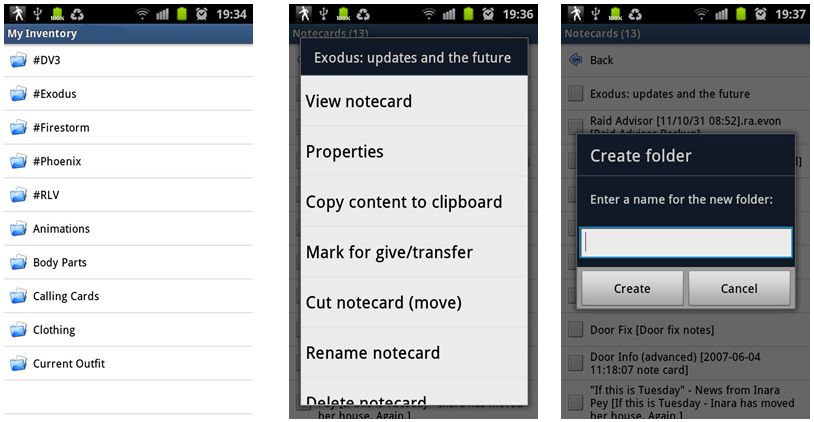
Mobile Grid Client is the longest running of the Android clients listed on the TPV Directory. A text-only application, it provides a range of options, including OpenSim support – but these are subject to the subscription package taken, one of which must be selected after an initial 14-day trial period.
Mobile Grid Client: inventory options (note some , such as the give / copy options are only available by taking the “Pro” subscription)
The available subscription options are:
“Standard” version: L$250 per month, with a selection of features disabled (e.g. giving inventory to others, creating / copying notecards, changing your active group, paying avatars, OpenSim support).
“Pro” version L$450 per month / L$4500 per years, with access to all available features.
In 2011, this was a reasonable application, given what was available at the time. Today, however, and even allowing for the subscription payments being non-recurring (so opting out is easy at the end of a subscription period), when compared to Lumiya (below), Mobile Grid Client is notably over-priced, even at the “Standard” subscription model.
First released in 2012, Lumiya was, up until the start of 2017, routinely updated to keep pace with the latest viewer releases from Linden Lab as well as to provide bug fixing issues with various android platforms.
This application has such a well-rounded suite of capabilities, including plug-ins for voice and improved rendering (both available for free), that it pretty much matches the “full” viewer in features and functions, up to and including Bento support (January, 2017). It even has VR (Cardboard) support!
Lumiya even support HUD use in its 3D world view
Initially text-only when first introduced, Lumiya quickly progressed to basic graphical rendering prior to maturing into a very capable graphical client with continued improvements to the graphical UI to allow for better, easier and more comprehensive in-world interactions. For those who use it, Lumiya also respects RLV / RLVa
Opinion
Lumiya is the Rolls Royce of mobile Second Life / OpenSim clients, although development work seems to have frozen. There have been recent issues for some with the use of voice in recent months.
Even for occasional text use, inventory management, etc., this is the go-to Android client, while the 3D world rendering adds a whole now level to mobile SL / OpenSim use. True, the graphics are not as crisp and fresh as the “full” viewer, but considering everything Lumiya is packing into a hand-held device and it has not been developed within major financial input and technical support, it is not to be dismissed on that basis.
Very much the standard-bearer for what can be developed by way of mobile SL / OpenSim applications using Android.
Appearing around the same time as Lumiya, LittleSight provides basic text chat and IM capabilities to users – albeit with ads displayed periodically. Additional capabilities, such as teleporting, and the removal of the ads can be had on payment of a small fee.
LittleSight: free for basic messaging. What to teleport / get rid of ads? Pay the fee – or just get Lumiya: you still pay, but you get way more bang for your bucks
Opinion
The most limited of the three Android clients, and one with reported issues for users trying to log-in with the latest version. While I encountered no problems myself with logged-in on re-installing LittleSight on my tablet device, I did find the map failed to render, but that seemed to be the only issue.
Given the need for payment, and the sheer volume of capabilities presented in Lumiya, unless the latter expressly will on work on a particular device, it is hard to see why anyone would opt to use LittleSight. You may not need all the tools available in Lumiya, but having them available just in case is not necessarily a bad thing.
Logos representative only and should not be seen as an endorsement / preference / recommendation
Updates for the week ending Sunday, January 13th
This summary is generally published every Monday, and is a list of SL viewer / client releases (official and TPV) made during the previous week. When reading it, please note:
It is based on my Current Viewer Releases Page, a list of all Second Life viewers and clients that are in popular use (and of which I am aware), and which are recognised as adhering to the TPV Policy. This page includes comprehensive links to download pages, blog notes, release notes, etc., as well as links to any / all reviews of specific viewers / clients made within this blog.
By its nature, this summary presented here will always be in arrears, please refer to the Current Viewer Release Page for more up-to-date information.
Note that test viewers, preview / beta viewers / nightly builds are not recorded in these summaries.
Official LL Viewers
Current Release version 6.0.1.522263, dated December 5th, promoted December 13th. Formerly the Spotykach Maintenance RC viewer – No change.
On January 9th, 2019, and thanks to a pointer from Whirly Fizzle, I blogged Lab working on a Second Life iOS client?noting that a Bit Bucket code repository had recently been set-up by Brad Linden for just such a purpose.
In writing the piece, which includes some of the Lab’s recent commentary of the subject of mobile / streaming solutions for Second Life, I indicated that I had contacted Linden Lab with a series of questions concerning the repository and what it might signify, and that I’d provide an update on receiving any reply.
Being so early into the work, the Lab declined to comment on all of the questions I asked, but here is what they did say via-email in responding to my enquiry:
As you point out, we discussed at our Town Hall events last year that we’re actively looking at ways to extend the reach of Second Life to new audiences including mobile platforms. For example, we’re in the early stages of work on an iOS companion app for Second Life.
Right now we’re focused on getting a prototype out to our Residents, at which point we’ll be looking for feedback and suggestions. In the early stages, we will not be tying the app to a streaming service. However, we don’t have anything to formally announce yet about the specific features, capabilities, and availability.
– Brett Linden, Second life Marketing Manager, via e-mail
Granted, it’s not a lot of information, but there are a couple of potentially interesting elements to the statement that might help contextualise things / be indicative of some of the thinking still in place at the Lab. For example, the use of the term mobile platforms and noting that that the iOS work is offered as an example of this work.
This would perhaps suggests (and in answer to some of the questions asked following my original piece) that an Android client is still part of the Lab’s thinking. Certainly, it is something I’d anticipate, given both the popularity of the Android platform and the popularity of Lumiya and Mobile Grid Client*.
I also found the comment In the early stages, we will not be tying the app to a streaming service interesting, suggesting as it does that a future streaming solution is still very much part of the Lab’s broader thinking.
Again, this would make sense given the ongoing move of SL to the cloud. As well as providing the means to deliver SL as a whole to users, the cloud move further deepens the Lab’s relationship with AWS. This might in turn allow them to more positively and cost-effectively (to both the Lab and to users) supply a streaming service to mobile devices and web browsers at some point in the future. Perhaps this might even be part of a broader examination of their product offerings once Second Life is firmly established within a cloud-based infrastructure.
So, food for thought; in the meantime. I’ll continue to update on the iOS work as / if / when news emerges.
* I’m intentionally avoiding LittleSight here, as it is questionable as to whether the app is still being maintained and the repeated complaints that users have been unable to log-in since the last update (October 2016).






 Inara Pey: Living in a Modemworld