Logos representative only and should not be seen as an endorsement / preference / recommendation
Updates for the week ending Sunday, October 6th
This summary is generally published every Monday, and is a list of SL viewer / client releases (official and TPV) made during the previous week. When reading it, please note:
It is based on my Current Viewer Releases Page, a list of all Second Life viewers and clients that are in popular use (and of which I am aware), and which are recognised as adhering to the TPV Policy. This page includes comprehensive links to download pages, blog notes, release notes, etc., as well as links to any / all reviews of specific viewers / clients made within this blog.
By its nature, this summary presented here will always be in arrears, please refer to the Current Viewer Release Page for more up-to-date information.
Note that for purposes of length, TPV test viewers, preview / beta viewers / nightly builds are generally not recorded in these summaries.
Official LL Viewers
Current Release version 6.3.1.530559, formerly the Umeshu Maintenance RC viewer, dated, September 5th – No change.
Release channel cohorts:
Love Me Render viewer, version 6.3.2.531296, released on September 30th.
On Monday, September 30th, 2019, Firestorm released version 6.3.2.58052 of their viewer.
This release features the awaited support for Linden Lab’s Bakes on Mesh capability, together with a number of Lab-derived updates and updates from the Firestorm Team.
Please note that this update is for Second Life only – see below for more.
As per usual, this article provides an overview of the more visible updates in the release. Please refer to the release notes for a full list of updates and all associated credits. Also, note that this update means that version 5.1.7.55786 will be blocked from logging in to the Second Life grid in the near future – check the Firestorm blog for updates.
Why No OpenSim Version?
Jessica Lyon, project lead for Firestorm, recently blogged on the situation regarding OpenSim, and some of the steps the team are having to reverse as well as to take in order to offer some level of support for OpenSim unless they can obtain an OpenSim developer to assist with the viewer. For details see OpenSim the Good, The Bad and the Ugly.
At that time, Jessica had been hoping to provide OpenSim support “as is” with future releases of Firestorm – and had planned this to be the case with this release. However, a major issue was found with this release that could result in OpenSim regions crashing.
This will take time to resolve – hence no OpenSim version with this release. Instead, Firestorm will continue to offer version 6.0.2.56680 for OpenSim users. As the 6.3.2.58052 release installs separately to 6.0.2.56680, both versions can be run side-by-side on the same computer for those wishing to access both Second Life and OpenSim.
The Usual Before We Begin
As per my usual preamble:
There is no need to perform a clean install with this release if you do not wish to.
Do, however, make sure you back-up all your settings safely so you can restore them after installing 6.3.2.
Please refer to the official release notes for a full breakdown and changes, updates and credits associated with this release.
Again, please refer to the Firestorm 6.3.2 release notes for details of specific Lab-derived fixes for this release.
Lab Derived Updates
The version of Firestorm brings the viewer to parity with the Linden Lab 6.3.1 code base, with some cherry-picked updates from upstream release candidate versions.
Bakes on Mesh
Simply put, Bakes on Mesh (BoM) allows system clothing layers as used with the “classic” Second Life system avatar – skins, tattoos, underwear, shirt and jacket layers – to be applied to mesh bodies and heads, and without (necessarily) the need for additional applier systems.
The system requires mesh bodies and heads to be “BoM enabled” – and many creators have already updated their products, or are in the process of updating their products to support Bakes on Mesh. In addition, some applier makers are producing applier systems that leverage Bakes on Mesh to apply wearables to mesh bodies and heads – although these may be limited in some respects due to differences between how skin textures and mesh bodies are made).
Through Bakes on Mesh, Linden Lab hopes:
Users can avoid the need to use appliers, but can add wearables to their mesh avatar directly from inventory.
Creators will be able to simplify avatar mesh bodies and heads by removing the need for some of the “onion” layers. This should – if done – reduce the rendering complexity for bodies and heads, thus hopefully improving people’s SL experience (as avatars won’t be quite so resource intensive or require quite so much “assembly time” when encountering them on logging-on or after teleporting somewhere).
Note that Bakes on Mesh support is required to both use the BoM capability and to correctly view mesh avatars using BoM.
Bakes on Mesh adds new options for applying suitable textures to the baking channels for application on a mesh body by the Bake Service
For more detailed information on Bakes on Mesh, please refer to the following links:
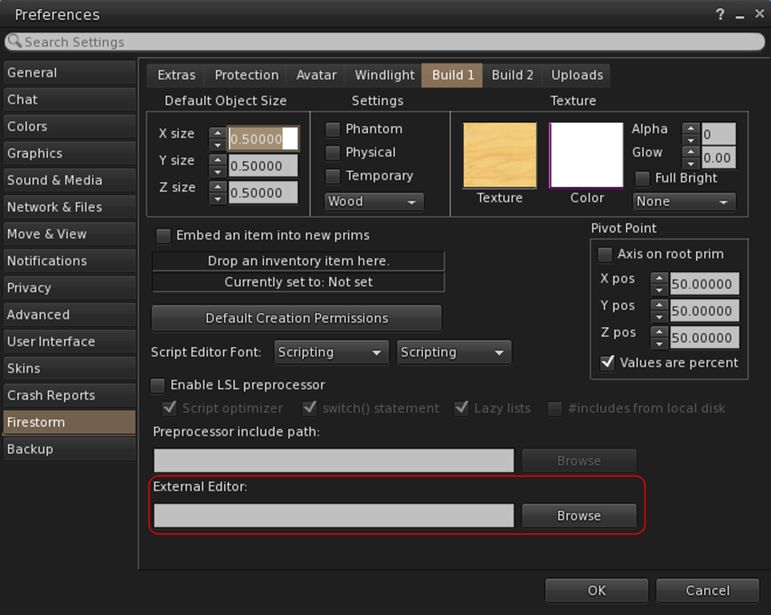
Note cards can now be edited using an external editor. Firestorm has adopted this as follows:
Select your preferred editor:
Go to Preferences → Firestorm → Build 1 → External Editor
Click Browse alongside the External Editor text entry field.
Use the picker to navigate to your preferred text editor and select its .EXE / launcher.
Click OK
The path to the editor should now be displayed in the text field.
This generally only has to be done once, unless you opt to change your preferred editor.
You can now set an external editor when writing / editing note cards
To use the external editor:
Create / open a note card for editing.
Click on the Edit button in the bottom left of the floater.
Your external editor will open and load the text.
Edit the text as required, and save using the external editor.
The edited text will be uploaded to the note card and saved in it.
Notes:
There is no charge applied for the upload and saving to the note card.
Rich text editing (bold, italic, indentation, etc) used within the external editor will be ignored and the text converted to plain text for saving to the note card.
Other Lab Updates of Note
Ability to duplicate a group role – allows you to duplicate a group role so that the copied role has the same permissions and you can just give the copied role a different title (see: BUG-226986).
Open the group profile → Members & Roles → Roles → Left click on a role to select it → Click the Copy Role button
Animesh objects not being highlighted when viewing objects owned by users in About Land fixed (see: BUG-227240).
Animesh objects should now be easier to select (see: BUG-226860).
Depth mode snapshots no longer broken when snapshot size is set to anything above current window size (see: BUG-227191).
Scoreboards and visitor trackers broken by the last CEF update should not longer be broken (see: BUG-226704).
Viewer-side support for playback of sound files up to 30s in length
Note this feature is awaiting simulator support to work.
The ability to share photos & post to Facebook has been removed from the viewer (see: BUG-225205).
This has been broken at the Facebook end for some time, with no sign of being fixed.
Build → Texture → Align Planar Faces should now work on normal or specular maps (see: BUG-6489).
Under Help → Report Abuse, Gaming Policy Violation has been revised to Skill Gaming Policy Violation for clarity.
Firestorm Updates
Link to Discord
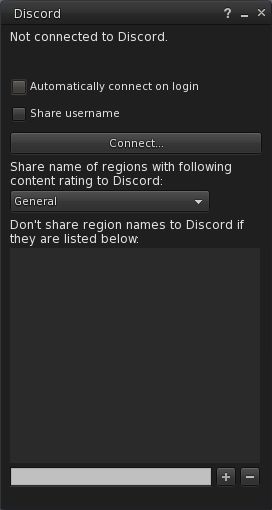
6.3.2.58052 includes the ability to link your Second Life account with your Discord account. Once connected, Discord will show your Second Life on-line status & session length, and optionally, your user name and location in SL.
Discord floater
Notes:
This capability only works with the Discord client – it does not work with the Discord web pages.
To work, you must have the Discord client running when attempting to link to it from Firestorm.
Both Discord and Firestorm must be running with the same access level (note: it is not recommended you run discord in Admin mode).
To link you SL and Discord accounts:
Go to Comm → Discord …
The Discord floater opens.
In the floater you can opt to:
Automatically display you are using Second Life / Firestorm whenever you log-in to the viewer.
Display your Second Life user name.
Select whether or not you wish to display your location in Second Life, or, if opting to show your location, opt to only display it according to the maturity rating of the region you are in.
Create a list of region names you do not wish to have displayed by Discord when you are visiting them, regardless of any maturity rating set in the panel.
When you have set your preferences, click the Connect … button.
Once connected, you can disconnect from Discord at any time by displaying the panel and clicking Disconnect …
Avatar, Appearance and Inventory
Attachment auto-refresh: Firestorm 6.3.2.58052 adds a timer for automatically refreshing attachments when an attempt is made to kill them after a teleport / region change. It is designed to help resolve issues where your attachments are invisible to observers after a teleport or region change, and provides the same functionality as the manual Avatar → Avatar Health → Refresh Attachments (Alt-Shift-R).
Optionally, if the debug setting FSExperimentalLostAttachmentsFixReport is set to TRUE, Firestorm reports attachments that were attempted to get detached during a teleport or region crossing to nearby chat, followed by reporting “Refreshing attachments…” to nearby chat when the auto-refresh starts.
Profile Links to Force Appearance Change: it has been possible for users to put obfuscated links (e.g. “Photo of me in RL”) in their profile floater that, when clicked by another user, would replace outfit with one of the default outfits from the inventory library.
With this update, such links will no longer work, and the obfuscated link will display as “Wear Inventory Folder”. This matches a similar fix included in the Linden Lab Legacy Profiles folder. See also: FIRE-24262.
Fixes:
Removal of the restriction on adding system layers with identical asset UUIDs at the same time (see: FIRE-24334).
LookAt target clamping no longer causes your avatar eyes to cross (see: FIRE-24175).
The Firestorm Animation Overrider should now work correctly with child prim sits.
General Updates of Note
Movement at region crossing: this release fixes the issue of region crossing Predict option (Preferences → Move & View → Movement at Region Crossing) behaving like Stop (see: FIRE-24184).
The option Use HTTP For Receiving Textures has been removed from the SL-only version of the viewer’s Preferences.
This option forced the viewer to switch from UDP texture fetching to HTTP.
As Second Life no longer uses UDP for asset fetching (including textures), the option is no longer required for the SL version of the viewer, thus prompting its removal (see: FIRE-24256).
Payment confirmation is now skipped if paying yourself (e.g. paying your own tip jar) – see FIRE-24208.
Also fixed a case where the payment confirmation notification would not be shown if the amount would be exactly the remaining L$ balance.
FMOD Studio updated to version 2.00.03.
RLV updated to RestrainedLove API: RLV v3.2.1 / RLVa v2.2.0.58052.
Feedback
I actually don’t have a lot to report; I’ve been using the Bakes on Mesh betas for some time, and found the BoM functionality works fine after some early hiccups. One or two of the early beta gave some crashes for me, but the 6.3.2.58051/58052 versions (the latter including a minor update from 58051) have between them been stable – although I’ve only had the 58052 version installed for the time it has taken me to write this review.
Logos representative only and should not be seen as an endorsement / preference / recommendation
Updates for the week ending Sunday, September 29th
This summary is generally published every Monday, and is a list of SL viewer / client releases (official and TPV) made during the previous week. When reading it, please note:
It is based on my Current Viewer Releases Page, a list of all Second Life viewers and clients that are in popular use (and of which I am aware), and which are recognised as adhering to the TPV Policy. This page includes comprehensive links to download pages, blog notes, release notes, etc., as well as links to any / all reviews of specific viewers / clients made within this blog.
By its nature, this summary presented here will always be in arrears, please refer to the Current Viewer Release Page for more up-to-date information.
Note that for purposes of length, TPV test viewers, preview / beta viewers / nightly builds are generally not recorded in these summaries.
Official LL Viewers
Current Release version 6.3.1.530559, formerly the Umeshu Maintenance RC viewer, dated, September 5th – No change.
Release channel cohorts:
Ordered Shutdown RC viewer updated to version 6.3.2.530972 on September 24th.
Logos representative only and should not be seen as an endorsement / preference / recommendation
Updates for the week ending Sunday, September 22nd
This summary is generally published every Monday, and is a list of SL viewer / client releases (official and TPV) made during the previous week. When reading it, please note:
It is based on my Current Viewer Releases Page, a list of all Second Life viewers and clients that are in popular use (and of which I am aware), and which are recognised as adhering to the TPV Policy. This page includes comprehensive links to download pages, blog notes, release notes, etc., as well as links to any / all reviews of specific viewers / clients made within this blog.
By its nature, this summary presented here will always be in arrears, please refer to the Current Viewer Release Page for more up-to-date information.
Note that for purposes of length, TPV test viewers, preview / beta viewers / nightly builds are generally not recorded in these summaries.
Official LL Viewers
Current Release version 6.3.1.530559, formerly the Umeshu Maintenance RC viewer, dated, September 5th – No change.
Release channel cohorts:
Vinsanto RC viewer, version 6.3.2.530962, released on September 17th.
Ordered Shutdown RC viewer, version 6.3.2.530901 released on September 16th.
Project viewers:
Legacy Profiles viewer, version 6.3.2.530836 updated on September 17th. Covers the re-integration of Viewer Profiles.
On Wednesday, September 18th, and after some lengthy deliberation, Jessica Lyon issued a Firestorm blog post outlining the future of that viewer’s future support for OpenSim environments.
The post is going to make difficult reading for OpenSim users, but the reality is that for assorted reasons, the Firestorm team have to consider priorities and how to best support their two disparate user communities.
The most important point with the blog is that Firestorm is not about to abandon OpenSim: but there are certain hard realities that need to be faced.
The first of these is that Firestorm are struggling to meet the demands of OpenSim support. While it is easy to talk about OpenSim in the singular – as if it is a single network of grids running to the same overall framework of server code – this isn’t really the case, as Jessica notes:
So many grids and no standard specification. Grid features that vary from grid to grid. We fix an issue on one grid that breaks something on another. Compatibility with OpenSim is vastly more difficult than it is with Second Life. Add to that the fact that we have to continue to merge upstream code from LL on a regular basis. We just don’t have the human resources.
Resources in this case being a developer who not only has the time to devote to OpenSim development on behalf of the Firestorm Team, but also the depth of knowledge of the various OpenSim protocols required to implement viewer-side updates while avoiding many of the problems Jessica mentions.
To try to assist in matters going forward, Jessica outlines some of the steps that the Firestorm team will be taking:
Firestorm will no longer accept OpenSim viewer features without direct communication via viewer patch contributions, or better yet, some kind of reference viewer. Simply put, the team cannot expected to keep up with all developments in OpenSim, which features have been introduced in some grids and how they might impact others.
Firestorm can only include features compatible with the current recognised OpenSim version number – features based on in-development or upcoming server code cannot be accepted, particularly those that may work on one grid one way, but differently on another or not at all.
Firestorm can no longer guarantee keeping old / deprecated protocols active within the viewer indefinitely. Attempting to do so simply increases many of the complexities involved in developing and maintaining a viewer – and Firestorm is already hard-pressed in keeping pace with updates rolling out of Linden Lab for Second Life and with the major updates and improvements being made to OpenSim.
This last point has particular relevance when it comes to upcoming major releases like Linden Lab’s Environment Enhancement Project (EEP), which will entirely replace Windlight. This is actually what prompted Firestorm to try to split viewer development between different repositories – one for OpenSim and one for Second Life – which in turn resulted in a lot of concerns being raised by OpenSim users that have, in part, informed the thinking leading up to this blog post.
Simply put, Firestorm cannot continue to support both Windlight and EEP, and will be focusing on EEP as that reaches release for Second Life, with the hope that OpenSim will find the means to adopt the EEP protocols in the future. Similarly, it is likely that projects such LL’s on-going Love Me Render work to improve viewer rendering, the Estate Access Management project and others may well impact Firestorm’s ability to support OpenSim.
So What Does This Mean?
Simply put, it means that if Firestorm is to continue supporting OpenSim to the fullest possible extent, it is going to need the help and support of the OpenSim community.
Part of this can be due through the likes of communication and viewer patch submissions and testing, as noted above. However, the most practical way to help Firestorm is for those within the OpenSim community who are competent viewer developers and who have – or can quickly understand – the Firestorm code, to volunteer their time and expertise.
To do so, drop the Firestorm team an e-mail providing your name, contact details and a brief outline of your experience in viewer code development, and how you believe you would be able to help.
So if you are that person – please do considered applying; or if you know someone who can help – point them towards the Firestorm blog post. In the meantime, OpenSim users who may read this blog are asked to follow the link to Jessica’s blog post to read her comments first-hand.
Logos representative only and should not be seen as an endorsement / preference / recommendation
Updates for the week ending Sunday, September 15th
This summary is generally published every Monday, and is a list of SL viewer / client releases (official and TPV) made during the previous week. When reading it, please note:
It is based on my Current Viewer Releases Page, a list of all Second Life viewers and clients that are in popular use (and of which I am aware), and which are recognised as adhering to the TPV Policy. This page includes comprehensive links to download pages, blog notes, release notes, etc., as well as links to any / all reviews of specific viewers / clients made within this blog.
By its nature, this summary presented here will always be in arrears, please refer to the Current Viewer Release Page for more up-to-date information.
Note that for purposes of length, TPV test viewers, preview / beta viewers / nightly builds are generally not recorded in these summaries.
Official LL Viewers
Current Release version 6.3.1.530559, formerly the Umeshu Maintenance RC viewer, dated, September 5th – NEW.
Release channel cohorts:
No updates.
Project viewers:
Project Muscadine (Animesh follow-on) project viewer, version 6.4.0.530473, September 11th.



 Inara Pey: Living in a Modemworld