Logos representative only and should not be seen as an endorsement / preference / recommendation
Updates for the week ending Sunday, June 14th
This summary is generally published every Monday, and is a list of SL viewer / client releases (official and TPV) made during the previous week. When reading it, please note:
It is based on my Current Viewer Releases Page, a list of all Second Life viewers and clients that are in popular use (and of which I am aware), and which are recognised as adhering to the TPV Policy. This page includes comprehensive links to download pages, blog notes, release notes, etc., as well as links to any / all reviews of specific viewers / clients made within this blog.
By its nature, this summary presented here will always be in arrears, please refer to the Current Viewer Release Page for more up-to-date information.
Note that for purposes of length, TPV test viewers, preview / beta viewers / nightly builds are generally not recorded in these summaries.
Official LL Viewers
Current Release viewer version 6.4.3.542964,, dated May 29th, promoted June 2nd, formerly the FMOD Studio RC viewer – No Change.
Release channel cohorts:
CEF RC viewer, version updated to version 6.4.3.543157, June 11th.
Project viewers:
Mesh uploader project viewer updated to version 6.4.4.543141, June 11th.
Speedlight, the browser based / Android Second Life client, gained a further series of updates at the end of May and the beginning of June, together with an important announcement about the client’s future direction.
Key within the updates were the following:
The Android app now supports sending error feedback to the Speedlight team to help with bug fixing.
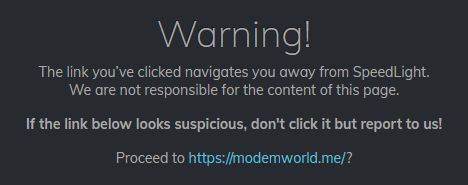
Web links are now displayed in IMs, local and group chats, together with a warning that following them will take a user away from the Speedlight site.
Links contain in IMs, chat and group chat are now clickable. Those that connect to external web pages will display a warning when clicked.
Further performance improvements.
Full-function 3D capabilities are now available to basic and well as Gold subscribers. So, Basic account holders can now move their avatar around.
The feedback capability means that the Speedlight developers are currently focused in bug fixing, although the team also note they are working on group management capabilities – viewing groups, sending notices and moderating group chat, and state these capabilities will be release soon™.
iOS Version Coming
While Speedlight is entirely operating system agnostic in its browser version, allowing it to be used on Windows, OS X, Linux, Android and iOS through a suitable browser, the team has already released a dedicated Android version, as I noted in Speedlight: using the Android app, back in February 2020.
On May 27th, 2020, the Speedlight team have started working on a dedicated iOS version of the client as well, with an expectation that it will follow the same development path as the Android app, and – if all goes according to plan – should initially be made available in around 2-3 weeks.
Observations
The two key points of the recent announcements are likely to be the 3D avatar capabilities now being available to all Speedlight users, Basic or Gold, and the iOS app development, and the upcoming iOS app version.
The former could help make Speedlight a more attractive alternative to users who would like a “light” / mobile client (remembering that with Android, the device must be running version 7.0 or higher, whether using the dedicated app or running Speedlight through an Android browser), but who were not keen on paying a fee to be able to do so.
This does, however, also beg the question as to what the Speedlight team plan to do in order to maintain the attraction of Gold subscription. Currently, there is the mass IM capability, but his is liable to have limited appeal for most SL users, some one can only assume other features will be made available on a Gold subscription basis, although obviously, time will tell on this.
Given that Speedlight is already on the road to developing world rendering with interactive capabilities, the news that they are working on an iOS app version of the client may also be welcomed by users, particularly given that many feel such a capability is is “essential” to a mobile client, and Linden Lab has indicated that it will be some time before their in-development iOS / Android client will have such a functionality.
Logos representative only and should not be seen as an endorsement / preference / recommendation
Updates for the week ending Sunday, June 7th
This summary is generally published every Monday, and is a list of SL viewer / client releases (official and TPV) made during the previous week. When reading it, please note:
It is based on my Current Viewer Releases Page, a list of all Second Life viewers and clients that are in popular use (and of which I am aware), and which are recognised as adhering to the TPV Policy. This page includes comprehensive links to download pages, blog notes, release notes, etc., as well as links to any / all reviews of specific viewers / clients made within this blog.
By its nature, this summary presented here will always be in arrears, please refer to the Current Viewer Release Page for more up-to-date information.
Note that for purposes of length, TPV test viewers, preview / beta viewers / nightly builds are generally not recorded in these summaries.
Official LL Viewers
Current Release viewer version 6.4.3.542964,, dated May 29th, promoted June 2nd, formerly the FMOD Studio RC viewer – NEW.
Release channel cohorts:
Tools Update RC viewer, version 6.4.4.543148, issued on une 5th – this viewer is built using VS 2017 / a recent version of Xcode, and Boost.Fiber. It contains no user-facing changes.
Love Me Render RC viewer updated to version 6.4.4.543142 on June 3rd.
Project viewers:
Mesh uploader project viewer updated to version 6.4.3.542535 on June 3rd.
Since that first article, I’ve provided a number of updates on the development, including that the client will be for both Android as well as iOS, and speaking at the Web User Group meeting on Wednesday, June 3rd, 2020, Keira Linden – who is the Product lead for the client – provided and update on process, the core points of which are bullet-pointed below.
iOS Client:
The iOS version is now in a closed alpha featuring some residents.
In keeping with the Lab’s plans, this version offers the ability to communicate via IM, and has a basic Friends listing.
Further updates will follow – the next being the addition of Abuse Reporting support and improved management for the Friends list.
Once the Lab believe the client has an initial set of functions to make it useful as a communications tool, it will will move to a beta phase and made available to a wider cohort of users for further testing.
Android Client:
Work is progressing, but it will take time for it to reach a point where it is ready for testing.
When it is ready, it will likely follow a similar Alpha / Beta test process to the iOS version.
General Capabilities
Note: this is a reiteration of notes from earlier updates on the SL Mobile client.
It should initially be regarded as more of a communicator / companion app than a fully-rounded client.
The initial intention for the client is to provide users with a means of maintaining basic contact with other users whilst away from their main means of accessing Second Life.
As such, it will support logging-in to Second Life services to support IM and group chat support. However:
It will not initially present you with an in-world location, nor will your avatar rez in-world, it will not not support local chat nor any form of world rendering.
Capabilities such as having an in-world rezzing location, the ability to chat locally, support for scene rendering will be added over time.
However, in terms of any in-world rendering, this will not be part of any initial released (in the meeting it was described as “not even Soon™”), as LL are focused in just trying to get the basic app available to users as soon as reasonably possible.
All information I’m able to provide through this blog, including future updates can be found under the SL Mobile tag, and can be accessed directly from the top menu options:
SL → User Group & Viewer → Viewers → Android & iOS and then selecting either:
On Wednesday, May 27th, the Kokua team released Kokua 6.4.2, bringing the viewer up to parity with the Linden Lab official viewer, 6.4.2 code base (Camera Presets), promoted on May 19th, 2020.
This means that with this release, Kokua now includes:
the Environment Enhancement Project (EEP) release.
The most recent viewer Maintenance updates.
The aforementioned Camera Presets.
In addition, the Restrained Love Viewer (RLV) variants of this Kokua release include both include the latest updates to Marine Kelley’s RLV API updates – version 2.9.27.0 -, which include support specific to EEP, and which the Kokua team have also used with regards the new Camera Presets, as part of their own updates to the viewer.
Lab-Derived Updates
Environment Enhancement Project
In including support for EEP, Chorazin Allen makes an important point that all SL users should keep in mind when moving to EEP-capable viewers:
Before getting into the additional features and fixes we need to point out that EEP represents a major overhaul of the viewer’s weather, lighting, shine and reflection areas – it’s more than just a new weather system with configuration files as inventory assets instead of separate xml files. As a result you WILL find that scenes, structures and avatars can all look different. If you find a particularly noticeable instance you are encouraged to log details of it in LL’s Jira issue tracking system so that these differences can be fixed at their origin.
– Chorazin Allen [my emphasis]
The Kokua 6.4.2 release appears to be a direct implementation of EEP and its various floaters without any alterations to their layout. As such, I do not propose to cover them here; rather I’ll leave you with a series of links to resources:
The Camera Presets controls, developed and contributed by Jonathan Yap, is a capability that allow users to create one more more custom camera presets within the viewer to suit particular needs and then save them. This means, for example, that a user can now have a camera position for general exploring, another suitable for combat games, another for building, etc., all of which can easily be accessed and used at any time.
Again, the Kokua implementation of the UI elements is the same as the official viewer. However, the Kokua implementation of Camera Presets adds addition default presets as follows:
Left, Right and top: provide viewers of your avatr from the left and right side, and from directly above.
FPS (First Person Shooter) – positions the camera directly in front of your avatar and looking forward.
Nearer – a view looking from close behind your avatar designed to be more suitable for corridors and other narrow spaces.
Again, rather than go into specifics on creating and using Camera Presets, I refer readers to my Camera Presets tutorial.
Kokua Updates
Edit Floater – Bulk Rename
Kokua 6.4.2 includes a new button in the Content tab of the Edit floater that allows the contents of an object to be easily renamed. A typical case for this might be when updating the version number of the individual contents on an object for a new release: after the specific elements that have been updated / replaced in the object, the rest can easily be renamed with the new version number.
Kokua object contents bulk rename
As this is liable to be a special usage option, I’ll refer interested parties to the Kokua documentation on how it works.
Animation Override
Client AO updates
Kokua 6.4.2 offers two new options to the client-side Animation Override system:
Chat check box: when enabled, each new animation to run will be reported in local chat in the user’s viewer.
The intent is to allow a user to keep track of the currently running animation when using a new set of poses/animations to decide decide which should be kept or discarded.
It is not recommended this option is kept on at all times, as the animation reports can be intrusive.
Any button: located between the next / previous animation paging buttons a the bottom of the floater, it will randomly select a pose from the current listed set (Walking, Standing, etc), and play it.
Clicking the Next or Previous buttons will resume stepping forward / back through the list of animations from the randomly selected animation.
Hover Height
This release of Kokua includes the hover height slider from Marine’s RLV viewer, with the release notes stating:
Rather than include the small button to reset it to 0.0 we have made the numerical value next to the slider writable allowing any value to be directly entered.
Logos representative only and should not be seen as an endorsement / preference / recommendation
Updates for the week ending Sunday, May 31st
This summary is generally published every Monday, and is a list of SL viewer / client releases (official and TPV) made during the previous week. When reading it, please note:
It is based on my Current Viewer Releases Page, a list of all Second Life viewers and clients that are in popular use (and of which I am aware), and which are recognised as adhering to the TPV Policy. This page includes comprehensive links to download pages, blog notes, release notes, etc., as well as links to any / all reviews of specific viewers / clients made within this blog.
By its nature, this summary presented here will always be in arrears, please refer to the Current Viewer Release Page for more up-to-date information.
Note that for purposes of length, TPV test viewers, preview / beta viewers / nightly builds are generally not recorded in these summaries.
Official LL Viewers
Current Release viewer version 6.4.2.541639, dated May 11th, promoted May 19th, formerly the Camera Presets RC viewer – No Change.
Release channel cohorts:
FMOD Studio RC viewer updated to version 6.4.3.542964 on May 29th.
CEF RC viewer, version 6.4.3.542757, issued May 27th.






 Inara Pey: Living in a Modemworld