The Cool VL viewer becomes the first V1-style SL Viewer to gain the Merchant Outbox for Direct Delivery. The new capability comes with release 1.26.4.7 (.7b for Linux due to a repackaging issue), released on April 5th.
There is no support for the Beta grid (Aditi) or the Beta Marketplace
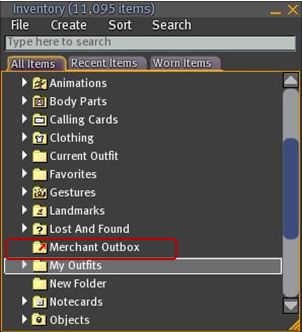
The Outbox is implemented as a folder within Inventory, rather than as a separate floater
There is (currently?) no right-click->Copy to Merchant Outbox capability for items / folders, as seen in V3-based Viewers with Outbox functionality.
Coll VL Viewer: Merchant Outbox folder
To use the Outbox, simply drag and drop folders / items to be transferred to your SL Marketplace store to the Merchant Outbox folder. Or if you prefer, COPY and PASTE them.
If you are dragging one or more folders, a copy of each folder will be made in the Outbox folder with the same name as the original
If you are copying one or more objects into the Outbox folder, each object will be placed in a folder bearing the object’s name (same functionality as V3-based Merchant Outboxes)
To send items to the Marketplace, right-click on the Outbox folder and select SEND TO MARKETPLACE. A pop-up will be displayed in the bottom right-hand corner of the Viewer window upon successfully transfer (and will also note any issues encountered).
As is to be expected, all other constraints (number of items, nested folder levels, etc.) are the same within Cool Viewer and for other Outbox-capable Viewers (as these are LL-imposed contraints).
In testing the capability, I found it functioned smoothly and without any incident: all items dropped into the Outbox folder arrived safely (and suitably “foldered” themselves, where required), and the upload handled multiple items and nested folders without incident.
If there are merchants who have been waiting for a V1-style Viewer to implement Merchant Outbox support prior to committing themselves to Direct Delivery (and allowing for current Marketplace issues), then Cool VL Viewer now provides the answer.
One of the things that has always attracted me to Niran’s Viewer – and is drawing back to it now that performance has once again improved on my hardware – is the fact that NiranV Dean is constantly looking at the UI as a seasoned user of SL and other immersive software and trying to find ways to reorganise things within the UI – particularly menus and floaters. This has led to Niran’s Viewer being highly innovative in both look and feel.
In recent releases, this has been reflected in the fact that right from the moment you load the Viewer, you know you’re using something very unique: The log-in / splash screen has been markedly different from other Viewer for a while, and recently gained a video element to replace static images. The video – shot in the Insilico region – demonstrates the power of Niran’s Viewer as a Machinimatographer’s tool, and is beautifully overlaid with the log-in options without the latter intruding on the video itself.
I’d still link to see some kind of link to the Grid Status page (indeed, given LL won’t step-up to the plate on this one and provide a Viewer-based means for users to be aware of SL issues prior to logging in (not everyone uses the Dashboard). I’d like to see all TPV take a leaf from Firestorm’s book in this regard), but other than that Niran’s approach to the log-in splash screen is enticing. Once you’ve entered your credentials, the screen reverts to the familiar images, progress bar, mandelbrot-like animation and Niran’s famous (and amusing) tips.
Of Floaters and Preferences
Given this is a Preview of an upcoming release, I don’t intend to cover everything that NiranV is doing with the Viewer – I’ll take a broader look once a former release is made. Instead, I’d like to focus on the massive amount of work he’s been putting into the various UI floater panels – which, with this release – reaches the Preferences floater itself.
Now, I’ll be the first to admit that when NiranV first started to work on redesigning the floaters (the Build floater in fact, after revising the World Map), I wasn’t entirely convinced as to the result. Since that time, he’s continued to refine and improve his layouts and I have no hesitation in saying that they are reaching a point where my early concerns have been completely invalidated.
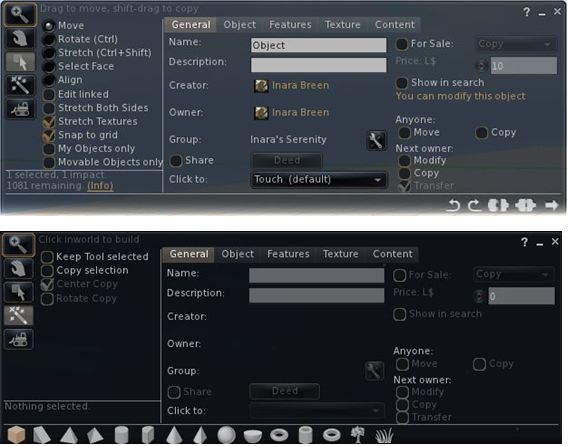
And evolutionary process: the redesigned Build floater as it first appeared in Niran’s viewer (top) and how it looks today
More recently, the work has extended to the People floater, allowing information of friends and groups to be presented in a way that easily scans on the eye and doesn’t require floater resizing or other messing around with each update that comes out.
The People floater showing the Nearby tab with mini-map enabled, and the Groups tab (edited for privacy)
Other examples of Niran’s work can be found in elements such as the Mesh Upload floater, which I looked at recently and which presents the necessary information and options without putting a size 14 footprint all over the in-world view.
Preferences: a Complete Overhaul
Version 1.33 of Niran’s Viewer brings with it something we’ve never really seen in the entire history of the SL Viewer: a radical redesign of the Preferences floater.
That you’re into new territory when accessing Niran’s Preferences is immediately obvious: there are no left-side tabs. Instead, primary options are accessed from a left / right scrollable tab list at the top of the floater, with additional sub-categories for a given option are displayed in sub-tabs access at the bottom of the current Preferences page being viewed.
Options have also been renamed in an attempt to make the tabs more reflective of the options they contain. By default, Preferences will open on the Communications Options tab (above). However, and in a move long overdue in Viewers: the floater will actually re-open to display the last tab actually in use / displayed when OK was pressed / X was clicked on to close the floater.
The tabs as currently displayed in Preferences comprise (from left to right across the top scroll area):
User Options: includes three sub-tabs:
General: analogous to the General tab in the official Viewer and containing the familiar language, content access (General, Mature, Adult), name tag display options and busy response, together with options to set name tag colours
Advanced: provides access to all popular camera, movement and mouselook options found within the official Viewer and TPVs
Privacy: displays the Privacy tab options (clear history, log file options, options for setting who can see you are on-line, etc.
Display and Audio Options: Combines the Graphics and Sound & Media tabs and comprises three sub-tubs:
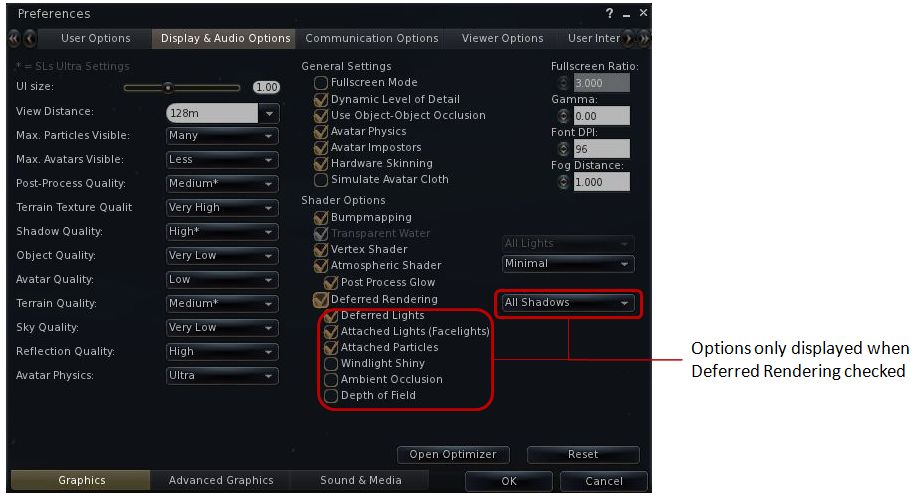
Graphics: displays a re-ordered and improved graphics settings option list as shown below, with advanced options for deferred rendering only displayed when the deferred rendering option is checked. This tab also includes a button for accessing Niran’s own Optimiser floater
Re-ordered and clearer graphics settings
Advanced Graphics: displays all major advanced graphics options (glow definition, lighting, performance options (including visual auto-mute), etc., all logically grouped and accessed via dedicated buttons
Sound and Media: includes the volume controls, media playback options, Voice settings, etc., as found in Sound & Media in other Viewers
Communications Options: brings together the communications options variously found under Chat, Notifications and Colors, and presents them in three sub-tabs which also include the relevant popular TPV options such as MU* poses, OOC auto-complete, etc.
Viewer Options: presents those options usually associated with setting-up the Viewer, including the Setup tab, the Advanced tab and also include a dedicated sub-tab for RLV/a options, all in their own dedicated sub-tabs.
User Interface Options: includes all of Niran’s Viewer’s comprehensive UI customisation options, including the ability to set the colour and transparency of all commonly used floaters in the UI. Includes three sub-tabs: UI Colors, Skins & Themes and UI customisation.
Feedback and Thoughts
NiranV Dean continues to push the envelope in terms of re-working the Viewer UI. In terms of the changes to Preferences, I think the approach taken has a lot of merit and actually provides a much faster means for one to locate options (after traversing the initial learning curve). The layout is easy to use and options have been brought together with considerable thought. Obviously, there is a degree of re-training one must go through to use the Preferences with ease, but this isn’t exactly mountainous and shouldn’t be cause for complaint.
Were I to critique it at all, it would be in that the User Options and Viewer Options contain some degree of cross-over in terms of what they do. As such, even after spending a good deal of time using the Viewer it can still be confusing as to where a given set-up function might be – do I go to User or Viewer (or even the Viewer sub-tab under User Options?). I’m not sure how this could be avoided without having something of a mess in terms of one page displayed a multitude of sub-tabs, but I do feel that these are areas where further work may be required – and is probably being considered, given this is only a preview.
Now, if Niran provides a means to left / right align buttons (I’m not so much fussed by top / bottom alignment on the left/ right, if I’m honest, as I don’t place buttons to the side of the screen) and gets the chat bar so it can be “docked” to (or at least aligned with) the bottom of the Viewer window, I’ll be one very happy bunny!
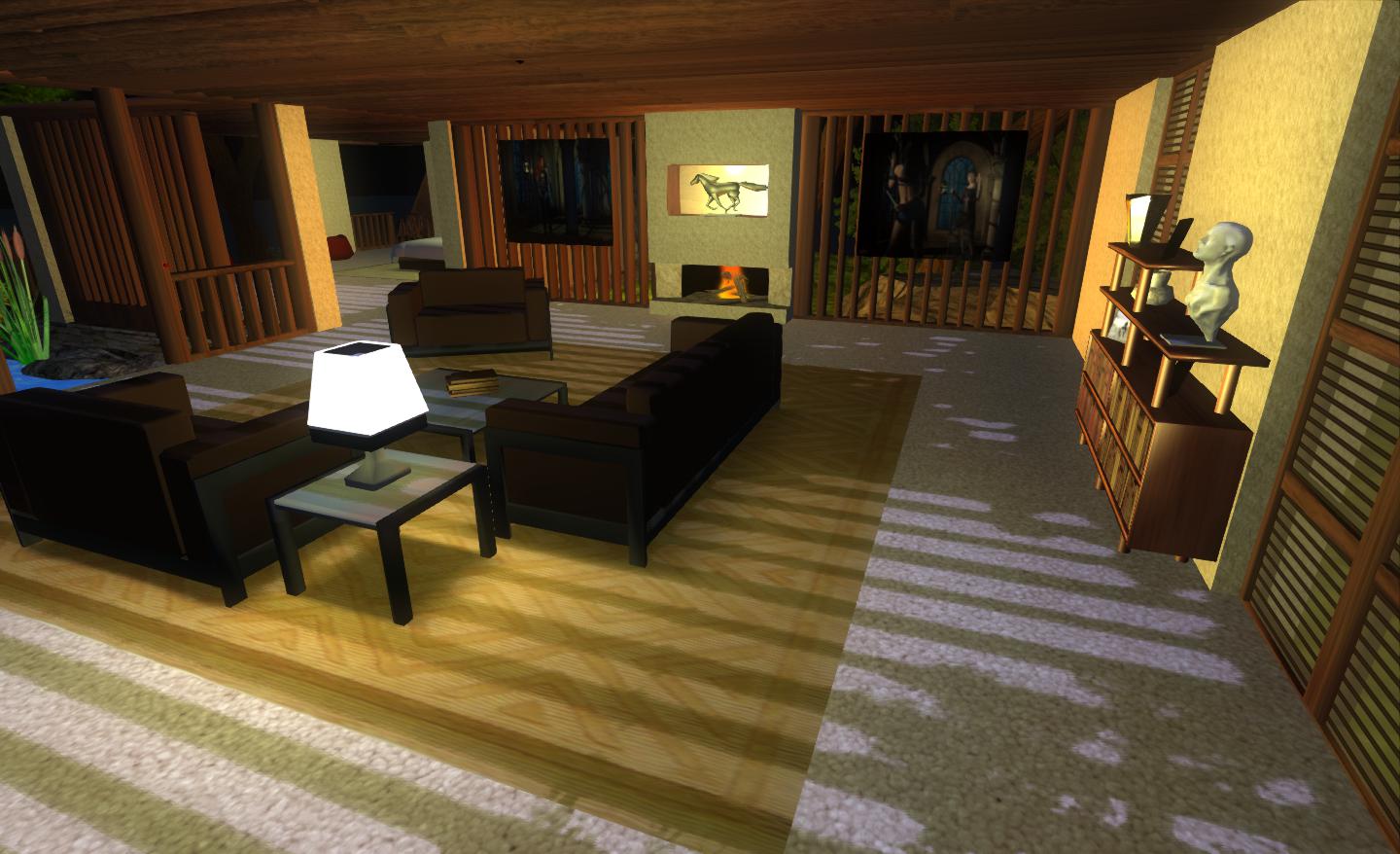
Performance-wise, 1.33 is perhaps the best release of Niran’s Viewer I’ve run on my PC recently, with respectable frame rates at my standard settings in the high 20s / low 30s. Enabling deferred and shadows does still crash this – and rather more so than recently LL Viewer releases, with an average frame rate of just 7-9fps with shadows on running my normal defaults (see the Review System panel on the right of the main page of this blog). However, Niran’s seriously kicks bottoms when it comes to the sheer quality of the world-view generated when running deferred with shadows: the lattice-work of the roof of my house casts beautifully crisp shadows that suffer none of the “greying” or blocky fuzziness I’ve experienced with other Viewers.
Crisp shadows
I’ll have a further look at updates and changes to 1.33 when it reaches a full release status.
This is a weekly summary of changes to all SL Viewers / clients of which I’m aware and which are in popular use across the grid / listed in the TPVD. Detailed links to said Viewers / clients can be found in my Viewer Round-up Page. The links supplied in this summary are either to change logs or to reviews within this blog.
Updates for week ending: 1 April, 2012
This last week has been a busy one, with numerous updates, some connected to Direct Delivery, others as a result of RLV updates.
The SL Development Viewer rolled through two rapid releases: 3.3.2.252228 and 3.3.2.252611
The Direct Delivery Project Viewer remains available, post-DD roll-out. A hint about further updates, or simply waiting to be removed?
Dolphin saw two rapid-fire releases, with 3.3.0.2700 primarily gaining the latest RLV updates and the Direct Delivery Merchant Outbox, and 3.3.1.23706 primarily adding mesh upload capabilities from Kokua
The Kokua team released an experimental version of their Viewer for the Mac
Update April 1st: Dolphin Viewer has been updated to 3.3.1.23706. Percipal updates comprise the Kokua mesh uploader (Nicky Perian), Firestorm’s ability to attach a short message to avatar-to-avatar payments, and some fixes to the gstreamer audio playback and client-side AO.
This week sees the Restrained Life Viewer and Dolphin Viewer gain Merchant Outbox functionality for Direct Delivery.
Restrained Love 2.8.3.1
The V3.2-based standalone version of Marine Kelley’s Restrained Love Viewer is built on the standard V3.2 code, with a number of UI improvements. Marine develops the Windows version, with Kitten Ninetails maintaining the Mac and Linux versions.
As well as the arrival of the Merchant Outbox, this version sees a number of updates and fixes to the Restrained Love capabilities within the Viewer, all of which can be found listed on Marine’s blog. In testing the Merchant Outbox on the Windows version, I found it worked without any problems, while the revision to the position of the draw distance slider helps make this more usable.
Dolphin 3.3.0.27000
This release brings with it support for the Merchant Outbox for Windows, Mac and Linux. In addition, as an added and welcome tweak, Lance has doubled the length timeout on the Outbox so disconnects should be less frequent than may be experienced in other Viewers.
The remaining updates comprise:
The “RLV Height offset” slider is now wide enough to be properly functional, and has a reset button.
A checkbox to disable rendering of attached light sources has been added in Preferences->Dolphin Viewer 3->Graphics.
A fix for scripted sounds from FireStorm has been imported that makes scripted sounds play correctly the first time.
Codebase has been updated to official 3.3.1 source from SnowStorm.
RLV has been updated to 2.08.03.01.
Performance
Both of these Viewers are using the latest 3.3.1 code release from LL, which has yielded some stunning results on my “regular” system. Together with the latest SL Viewer (3.3.0 (251182)), I experienced the following frame rates on my home sim with 4 others present on the same region:
Average fps, no-deferred / no shadows, @ 390m: 45fps
Average fps, no-deferred / no shadows, @ ground level: 36fps
Average fps, deferred / shadows active, @ 390m: 20fps
Average fps, deferred / shadows active, @ ground level: 18fps
While visiting a popular store (Graves main store), with seven other avatars present, my frames rates were: 32 fps with deferred rendering / shadows off, and 14fps with deferred rendering and shadows on. Taken together and in terms of running with lighting / shadows enabled, these figure represent the best results I’ve had for any Viewer running on my PC, and leave me hoping that similar improvements will be seen in other Viewers as they cut over to the 3.3.1 code.
I’m moving the weekly listing to a page on its own for ease of reference – see viewer review panel on the right of the home page for this blog. From this week, I’ll be running a quick highlight of any updates with a link to the main Viewer Round-up page, which also now catalogues all reviews I’ve written on each of the Viewers I keep an eye on. Round-up will always refer to the previous week.
Updates for week ending: 25 March, 2012
After the rush with updates on the 19th (just after I published my last update, forcing me to update the update!), with Niran’s Phoenix and Firestorm all getting news versions, things have been relatively quiet.
Linden Lab have launched a new Pathfinding Project Viewer – currently works on the Beta Grid for pathfinding
Niran’s Viewer upped from 1.30 to 1.31, with further floater customisations
Zen Viewer went to release 3.3.2.0 with the addition of the Merchant’s Outbox
Cool VL Viewer rolled out 1.26.4.5 with “minimal” DD support – Henri is apparently working on a port of the Outbox code, so don’t expect it in this release & give him a change to code / test 🙂
Radegast issued release 1.26, with better inventory support links, DD notifications support, and improvements to the scene viewer
Firestorm 4.0.1.27000 has rolled-out alongside Phoenix 1.6.1.1691, and brings with it a whole host of changes – including the implementation of the team’s take on the Flexible User Interface (FUI).
As is common for Firestorm, it is recommended that you perform a completely clean install with this release.
The changes to the Viewer are apparent from right off the bat: on logging-in for the very first time, a pop-up is displayed asking you if you wish to have which Viewer you are using displayed in the Phoenix / Firestorm support group chat windows – a requirement resulting from the recent TPV Policy changes. Clicking Yes will append “(FS)” after your name when using Phoenix / Firestorm support group chat sessions, clicking No will not display your Viewer choice in the group chat. This is a one-time only pop-up, and only occurs the very first time you use Firestorm (just check the box above the options). Should you wish to change your mind later, you can enable / disable the option directly through a Phoenix / Firestorm support group chat window.
The FUI
The biggest single change to this release of Firestorm is the adoption of LL’s 3.2 FUI – although with the exception of a single button on the left side of the screen, you’d actually be hard-pressed to know Firestorm is now using the FUI. Quiet and full of cunning is the Firestorm team…!
The new UI: only a single button reveals the truth…
If you do need further proof that this is FUI, simply right-click on the buttons at the bottom of the screen and select TOOLBAR BUTTONS; the familiar button picker toolbox will be displayed – and is filled with a tidy range of additional buttons beyond those offered by LL.
Buttons: we haz them
As is common with V3.2-based Viewers, buttons can be placed to the left and/or right of the screen and/or along the bottom of the screen, and can be displayed as text or icons or both. However, in a welcome departure from the norm, buttons on the bottom of the screen can be left / right aligned and those on the left or right aligned to the top or bottom, rather than simply sitting in the middle. Hoorah!
Button alignment and size options
Additionally, and allowing for your screen resolution / size, you can set the buttons along the bottom so that they:
Fill the available space (as shown above, where they fill the entire space between the chat bar and the right side of the screen), and will dynamically resize according to how the chat bar is sized
Will auto-size themselves to the smallest possible size (depending on whether you opt to use icons, labels or icons and labels & the number of buttons on the bar, this may cause the buttons to wrap over two or more lines
Will fix the buttons to a given size (again, depending on the amount of space available, this may wrap the buttons over two or more lines)
Auto-sized buttons
In another move away from a weakness in the FUI, the chat bar in Firestorm is, by default, anchored to the lower left corner of the screen – again: hoorah!
Gimme Some Skin(s)!
Firestorm has, for a goodly while, had an appearance option in the log-in splash screen offering a set of default UI skin effects. These were called Phoenix, V3 and Hybrid. The Firestorm team caught a lot of flak over the use of “Phoenix”, because the UI didn’t look like Phoenix when used.
With 4.0.1.27000, the appearance option button is still there – but it now has four buttons, and does a whole lot more. For a start there are now four options:
Firestorm: which displays the default skinning and look seen so far in the screen shots in this article
V3: displays a more V3.2-like feel to the viewer (the chat window includes chat headers, etc.) and uses Hitomi Tipomi’s Starlight skins
Hitomi’s Starlight CUI option is also available from PREFERENCES->SKINS, which allows you to set custom button colours, etc.
Hybrid: uses the MetaHarper skin and utilises a degree of transparency around various elements of the UI (such as the buttons)
However, it is the final option – currently still called “Phoenix”, but potentially to be re-named “V1” – that should silence critics over the use of the “Phoenix” label. Here’s why:
Firestorm goes V1
Obviously, the UI isn’t totally V1 – “Radar” is called “People”, the menus are still the V3.x menus, pop-ups may not appear as expected – but various additional options (such as IM notifications appearing in the chat console, bottom left) can be set through Preferences. Given the layout has been built from scratch by Zi Ree, herself a V1-style Viewer user, this should satisfy the requirements of most who prefer that look and feel, offering a more than acceptable compromise.
Snapshot Floater Update
Snapshot floater updated
Firestorm 4.0.1.27000 sees the snapshot floater overhauled, with the “slider” effect used on the Build floater being used to open / close the additional snapshot options. PLUS – in a move that will have many cheering – you can now send snapshots to your web profile feed!
Direct Delivery and Other Bits
With Direct Delivery due for roll-out on Wednesday 21st March, this release incorporates the required support for Received Items.
This release also gets the Destination Guide floater (re-worked by Leyla Farazha) and the Avatar Picker floater common to Viewer 3.2 (and their associated buttons).
There are a host of other fixes, tweaks and revisions all of which can be found in the release change log (complete with originator attributions), and which include:
Growl support for Windows (still a work-in-progress)
Optional viewer tag colors based on distance (chat, shout, beyond shout range)
Option to include distance to other avatars in their name tag
Toolbar buttons for area search, statistics, web browser, debug settings
“Eject from Group” on the group participant context menu
RLVa updates
Ability to hide empty system folders in a dynamic way
The AO button is now a single button for configuration with an inset button for turning AO functions on / off.
Feedback
Possibly one of the most anticipated Firestorm updates since the Viewer was first launched, this release packs a lot into it, and it is clear the entire team has worked hard to incorporate a lot of features and people’s feedback, and rise to the challenge of producing a Viewer that can meet the needs of a very diverse audience.
And I think they’ve succeeded.
There is much here to please those who still feel frustrated with the V3.2 in terms of buttons and alignment, those who like the existing Firestorm layout and those who prefer a V1-style approach to their Viewer. Equally, there are probably a couple of things that are going to be missed for those who liked them, such as the Sidebar-like sliding of floater from the right side of the screen (although obviously, panels can be moved there and will persist on opening between log-ins). But we should all try and move with the times…
Performance-wise, this release is on a part with other Viewer releases of late, with fps rates around the mid-30s on reasonably busy sims, dropping to mid-teens with shadows enabled. I’ve not run the Viewer fast or hard enough as yet to really consider stability, but in logging between appearance settings I didn’t have any of the “locking up” on log-out I’ve experienced of late with 3.3.0.24880 (in particular) and .24882.
While it may be my eyesight and the lateness of the hour, shadows appear to render somewhat more sharply with this release, and I’m finding myself wishing Firestorm has a gamma correction capability for photography – but we can’t have everything!
I’m particularly enamoured of the button alignment / autosize functions. These have allowed me to retain the look-feel from 3.3.0.24882 and be able to position my custom “multi-HUD” where it is both within reach and nicely tucked out of the way. Coupled with the anchoring of the chat bar, this alone makes this release of Firestorm a winner in my book.