Firestorm Beta Release: Group Services and Havok sub-licence

As a result of the release of the Group Services project code to all of the main grid this week (see my SL Projects news report), The Firestorm team have released a beta version of their upcoming Firestorm viewer update.

The new Group Services code allows for improved loading of membership lists of very large groups, together with improved reliability in editing such groups (i.e. assigning roles, removing people, etc.), by the group moderators. however, in order to be used, it requires additional viewer-side code. Without this additional code, the viewer will be unable to display membership lists for groups with more than 10K members.

To overcome this, and to allow Firestorm users who manage very large groups, the Firestorm team have released a beta version of the Firestorm viewer which includes the necessary code – as well as a lot of other updates.

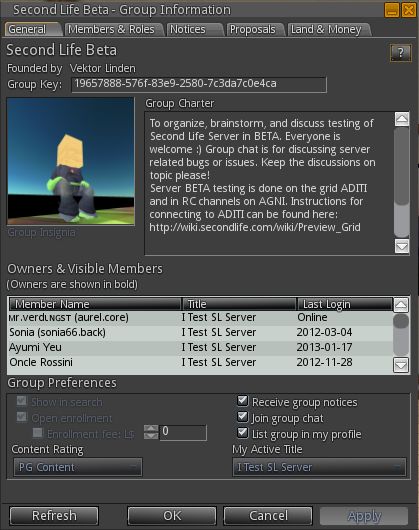
Group Services update – the difference: On the left, an attempt to load a group with almost 20K of members in the current release of Firestorm 4.2.2. On the right, the same group loaded using the new Firestorm 4.3.0 beta.

Announcing the release, Jessica Lyon, the project manager for Firestorm notes, that while this is not an official Firestorm release, it will be supported by the team but requests that only those who need to manage and edit groups with more than 10,000 members download and install this release. She comments:

NOTE:
– This is NOT an official release, but we will provide support for it.
– This has NOT been thoroughly tested by our Quality Assurance team.
– We can NOT make any promises regarding how stable or bug-free it is.
– This DOES have some really cool new stuff in it!

USE IT IF:
– You need to manage large groups inworld.
– You’re tired of seeing unknown alert messages in Phoenix.
– You’re feeling brave, you live on the cutting edge and you want to get an early look at what’s coming in December’s Official Release.

This release means that Firestorm joins Niran’s Viewer, Zen, and Cool VL viewer alongside the official beta viewer in enabling large group editing.

Havok Sub-licence

This beta also includes code to access LL’s new Havok libraries. This means that it will be able to view the pathfinding navmesh, but as a result of the sub-licence arrangement, it will not be able to access OpenSim grids.

Downloading and Installing

The beta viewer is available here for Windows, Mac and Linux. As usual, a completely clean install is recommended for the most stable results.

A full review of the new Firestorm release will be appearing on these pages in due course.

A Note on Phoenix

The blog post from Jessica includes a section directed at those still using the Phoenix viewer, in which she states:

Our developers and support staff have been extremely busy trying to balance their real working and personal lives while continuing their volunteer efforts to develop SL’s most popular viewer for you. Unfortunately, most of us cannot easily compile Phoenix anymore because of missing/expired libraries like Fmod, compiler changes we’ve had to make for Firestorm, OS upgrades (Win8), etc. To update Phoenix to current LL code now would be a very, very big task and, because we are already at our limit of what we can do, there are no plans to update Phoenix Viewer to support this new group code or handle the new notification system at this time. We are, after all, only human.

This is unlikely to make popular reading in some quarters. However, as Jessica notes, the team have striven to make Firestorm’s front-end as much like Phoenix / Viewer-1 as humanly possible. While it is not possible to revert menus, etc. fully to the Phoenix format, the skinning and broad approach to getting as much of the look and feel on Phoenix into Firestorm should go a long way towards easing people willing to make the conversion a lot easier.

This does not mean the end of the road for Phoenix, but with user number falling and Firestorm proving to be a much more stable and reliable viewer which is capable of embracing viewer changes being driven out of LL, it is understandable that the Firestorm team is sounding a warning note as to the future and continued enhancement of Phoenix.

Viewer release summary 2012: week 45

This summary is published every Monday and is a list of SL viewer / client releases (official and TPV) made during the previous week. When reading it, please note:

  • It is based on my Viewer Round-up Page, a list of  all Second Life viewers and clients that are in popular use (and of which I am aware) and which are recognised as adhering to the TPV Policy
  • By its nature, this summary will always be in arrears
  • The Viewer Round-up Page is updated as soon as I’m aware of any releases / changes to viewers & clients, and should be referred to for more up-to-date information as the week progresses
  • The Viewer Round-up Page also includes comprehensive links to download pages, blog notes, release notes, etc., as well as links to any / all reviews of specific viewers / clients made within this blog.  

Updates for the week ending: 11 November, 2012

  • SL Viewer updates:
      • Beta version rolled to 3.4.1.266708 – the first release since confirming the crash issue appears to have been resolved realloc disabled  (release notes)
      • Development version rolled to 3.4.3.266625 on November 8 and then to 3.4.3.266835 on November 9
  • Dolphin released version 3-3-4-1-26336 on November 10 – core updates: pathfinding support (excluding navmesh visualisation, this is pending LL’s sub-licence); RLV has been upgraded to the latest version, 2.08.03.04; area search has been reworked and improved by Techwolf Lupindo from Phoenix-Firestorm; No further support for logging into OpenSim grids (see here) – release notes
  • Kokua rolled to Beta 3.4.1.24900 on November 6
  • Niran’s viewer rolled to 2.0.2225 on November 6 – core updates: fading chat / IMs; imported and update to Hide LookAt from Firestorm; webkit plugin tweak
  • Cool VL updates:
    • Stable branch rolled to 1.26.4.38 on November 10 – core updates: Improved Reload Selected Texture feature to allow sculpt objects to be redrawn on reload of their sculpt texture; changed anisotropic filtering graphics hardware settings so that restart is required between changes; further media on a prim (MOAP) backports and fixes, option remains disabled as work continues; changes to settings names for streaming parcel media to make them more meaningful; reverted experimental “UseNewTargetOmegaCode” setting to FALSE due to vehicle issues; removed “dead” grid from OpenSim grid selector & updated URIs.
    • Experimental branch rolled to 1.26.5.18 also on November 10 – core updates as per main release, plus: tree rendering fix (phantom trees sometimes appearing on the horizon when hovering over a parcel with trees) and tree shadows issues (bad shadows)
    • Release notes
  • Libretto – removed from round-up page due to website being unavailable for a month and no response from creator on status (also removed from the SL Third-party Viewer Directory)

Related Links

Dolphin bids “adieu” to OpenSim, says “hello” to Mini-map

dolphin-logoLance Corrimal released Dolphin Viewer 3.2.24.24816 on November 1st.

The release comprises a small number of updates, of which perhaps the most significant is the inclusion of the revised Mini-map first seen in Catznip R7.

For the most part, I have to say that I’ve never really seen the point of the Mini-map. Certainly, it has its various uses at times – role-play, combat, etc., but for me, the big let-down with it has been the map itself, impaired by an exceptionally weak background texture and god-awful zooming.

Catznip R7 revised all this, as I recently reviewed, completely overhauling the Mini-map and making it an exceptionally useful tool – and one I have been hoping would be adopted elsewhere (such as the code being contributed to LL).

Dolphin now includes the revised Mini-map in this release, and to mark its arrival, Lance has called the release his “Sailor’s Mini-map Mark 2”. It’s well-named, as the new Mini-map is a complete godsend for those into sailing and flying – and will probably be really handy for those who engage in cross-region road races.

The code includes all of Kitty’s refinements and updates, and really does make flying and sailing a joy without needing to necessarily clutter-up the screen with a lot of HUDs and having to waste space with the World Map to confirm your overall location.

Red Alert: using the updated mini-map to avoid parcels with object entry turned off

Not only does it how you your overall direction, it displays upcoming region boundaries, allowing you to make adjustments to course and speed which may help smooth the crossing (very handy in avoiding the risk of trying to make the diagonal corner-crossing between regions, which so often finishes rather badly (at least for me).

The revised Mini-map also helps avoid those pesky parcels where object entry has been turned off, showing them in red in the display, allowing sailors and aviators to navigate around them without suddenly finding themselves bouncing up against something or having their craft vanish from under them.

Other Updates in the Release:

  • Reset graphics preferences to default button in status panel, next to draw distance slider, labeled “GReset”.
  • Z offset reset button relabeled to “Z” to get room for GReset button.
  • “Refresh texture” also refreshes sculpt maps (from Firestorm).
  • “Restore inworld” now also sets the proper land group if you have “Rez with land group” switched on and are a member of that group.
The new reset graphics button (GReset) and revised Z-offset buttons in Dolphin’s menu bar

The Last Dolphin Release Supporting OpenSim

Release 3.2.24.24816 marks the end of line for OpenSim support within the Dolphin Viewer; it will be removed from future releases. That Lance would no longer be supporting OpenSim was made in a Dolphin blog announcement back in August 2012. The reason for this is the new Havok sub-licence arrangement Linden Lab have entered into, and Lance feeling he is unable to support two flavours of Dolphin for SL and OpenSim access on his own – which is a fair and reasonable decision on his part.

Should anyone wish to continue development of Dolphin to specifically support OpenSim access, Lance has created a clone of the original Dolphin repository for anyone wishing to fork the viewer, and he is also leaving the 3.3.19 release installers available for download from the Dolphin website.

Performance

This release of Dolphin sees a slight upturn in FPS rates over recent viewer reviews for me, if again using my rough-and-ride technique. With my usual test defaults (see the Review Systems panel on the right of this blog’s home page), I subjected Dolphin on my Linden Home region with three other residents (including my Alt in the same parcel) with the following results:

  • Deferred off:
    • Ground: 38-39 fps
    • 370 metres: 43-44 fps
    • 2875 metres: 55-56 fps
  • Deferred on + lighting set to Sun/Moon + Projectors; ambient occlusion on, full reflections:
    • Ground: 11 fps
    • 370 metres:15 fps
    • 2875 metres: 17 fps

I did find that running in Deferred with both lighting & shadows and ambient occlusion active within my Linden Home parcel did result is a significant drop in fps (to 5-6). A quick test with Catznip produced the same result.

Overall, a small, tidy, and welcome update.

Viewer release summary 2012: week 44

This summary is published every Monday and is a list of SL viewer / client releases (official and TPV) made during the previous week. When reading it, please note:

  • It is based on my Viewer Round-up Page, a list of  all Second Life viewers and clients that are in popular use (and of which I am aware) and which are recognised as adhering to the TPV Policy
  • By its nature, this summary will always be in arrears
  • The Viewer Round-up Page is updated as soon as I’m aware of any releases / changes to viewers & clients, and should be referred to for more up-to-date information as the week progresses
  • The Viewer Round-up Page also includes comprehensive links to download pages, blog notes, release notes, etc., as well as links to any / all reviews of specific viewers / clients made within this blog.  

Updates for the week ending: 4 November, 2012

  • SL Viewer updates:
      • Beta version rolled to 3.4.1.266511 on Nov 2 – core updates: core updates: tcmalloc re-enabled; realloc disabled  (release notes)
      • Development version rolled to 3.4.2.266405 on October 30
      • CHUI project viewer updated to 3.4.1.266356 on October 30
  • Dolphin released version 3.3.24.24816 on November 1 – core updates: Incorporates World Map background in Mini-map, incl. parcel boundaries, etc. (from Catznip R7); Button to reset Grpahics settings to default in the menu bar (GReset); Refresh Texture refreshes scupts and tortured pirms (from Firestorm); Restore Inworld also sets to land group, if the latter enabled through prefs; this is the final Dolphin version which will support OpenSim access (release notes)
  • Niran’s viewer rolled to 2.0.2212 on October 29 – core updates: fading toats, experimental tweaks to webkit plugin; removal of “Hide Lookat feature (release notes)
  • Cool VL updates:
    • Stable branch rolled to 1.26.4.37 on November 3 – core updates: bug fixes imported from Firestorm; additional bug fixies and optimisations; further media on a prim (MOAP) backports and fixes, option remains disabled as work continues; system clothing layers now stack correctly under RLV; fixes for using Temp directories for plug-ins; OpenSim support: pirms now resizeable to 0.001.
    • Experimental branch rolled to 1.26.5.17 also on November 3 – core updates as per main release, plus:Reverted the “blurry/rainbow texture” fix implemented in the last release for the new HTTP texture fetch, as it caused memory leaks. Recommendation is to disable the new HTTP capability to avoid blurry/rainbow textures, or use the “reload selected texture”
    • Release notes
  • Libretto – removed from round-up page due to website being unavailable for a month and no response from creator on status (also removed from the SL Third-party Viewer Directory)

Related Links

Viewer release summary 2012: week 43

This summary is published every Monday and is a list of SL viewer / client releases (official and TPV) made during the previous week. When reading it, please note:

  • It is based on my Viewer Round-up Page, a list of  all Second Life viewers and clients that are in popular use (and of which I am aware) and which are recognised as adhering to the TPV Policy
  • By its nature, this summary will always be in arrears
  • The Viewer Round-up Page is updated as soon as I’m aware of any releases / changes to viewers & clients, and should be referred to for more up-to-date information as the week progresses
  • The Viewer Round-up Page also includes comprehensive links to download pages, blog notes, release notes, etc., as well as links to any / all reviews of specific viewers / clients made within this blog.  

Updates for the week ending: 28 October, 2012

  • SL Viewer updates:
      • Beta version rolled to 3.4.1.266073, October 21, and then to 3.4.1.266251 on October 24  (release notes)
      • Development version rolled to 3.4.2.266255 on October 25
  • Catznip rolled to R7 on October 23 – core updates: Mini-map improvements, Appearance floater updates and improvements; improved inventory floater and tools;  right-click rigged mesh detach; Remove Folder option in context menu; Legacy Search Places re-introduced; temporary and permanent object blocking; Build tool updates; Chat and Group enhancements; Preferences updates
  • Dolphin released version 3.3.23.24802 on October 27 – core updates: “Restore to last in-world position” re-implemented for objects; “Previous Owner” display in the edit floater ported from Firestorm; The shape editor floater now reports the correct avatar height; log-in panel on splash screen visually cleaned-up
  • Kokua Beta released 3.4.1.0 October 24 – although reports at 3.4.0.7765 in HELP->ABOUT
  • Niran’s viewer rolled to 2.0.2185 on October 24 – core updates: updates to top windlight toolbar buttons and to new Preferences overlay; additional button options; minor rendering updates
  • Zen rolled through 3.4.2.0 on October 22 to 3.4.2.1 on October 23 – core updates (both): Implemented OpenAL and GStreamer Plugins; removal of FMOD libraries & code; fixed and exposed “Email Me IMs” and “Enable Plain Text” Chat Preference Panel booleans; RenderAnimateTrees reintroduced via Debug Menu; missing DLL files added (release notes)
  • Cool VL updates:
    • Stable branch rolled to 1.26.4.36 on October 26 – core updates: The new target omega code enabled by default; added script editor support for new LSL functions and constants updated per the latest LeTigre RC channel deploy; assorted fixes and clean-ups
    • Experimental branch rolled to 1.26.5.16 also on October 26 – core updates as per main release, plus: implemented latest mesh deformer code; lowered the max number of simultaneous connections to 12 for new HTTP code; fixed a “blurry texture bug” resulting from implementing the HTTP core based texture fetcher
    • Release notes
  • Libretto – removed from round-up page due to website being unavailable for a month and no response from creator on status (also removed from the SL Third-party Viewer Directory)

Related Links


Niran’s Viewer turns 2

NiranV Dean has been back working on Niran’s Viewer, and in doing so has lifted the viewer to version 2.0 with a number of initial Betas. On Wednesday October 24th, he made a final release, 2.0.2185, which he calls Niran’s Viewer Rebooted, given the amount of additional work put into it, which finally saw him bypass his planned 1.5 release.

As the last release of Niran’s Viewer in these pages was version 1.46, the following will touch on elements previously released in 1.47 – 1.49 as well.

Download and Installation

The download file remains an archive EXE, rather than an actual installer, and is just on 50MB in size. It will extract the files into a default directory Nirans Viewer in C:\Program Files. If you’ve had a previous version of Niran’s Viewer installed, it is strongly recommended that you remove it first, together with all cache and settings files. The viewer itself has no uninstaller, some removal is a matter of deleting the program folder. The locations for all three are:

  • Viewer: C:\Program Files\NiransViewer (delete this entire folder)
  • Cache: C:\Users\[user name] \AppData\Local\NiransViewer (delete this folder)
  • Settings: C:\Users\[user name] \AppData\Roaming\NiransViewer (delete this folder and all sub-folders inside).

First Time Running

Once you’ve made your initial keyboard camera preferences selection, the log-in screen features a new video from NiranV. I have to admit, I’m curious as to the music track and whether it is taken from something or original, as I rather like the keyboard arrangement in it.

Watch a video while entering your login credentials

You may get an anti-virus alert relating to the SLVOICE.EXE plugin – if you do, make sure that it is the plugin being referenced and clear it. The log-in splash screen is again liable to be something of a surprise to first-time users. There is no familiar splash screen feed from Linden Lab here. Instead, and providing you’re running flash, there’s a YouTube video NiranV has put together and which will play while you enter your log-in credentials in the panel to the right.

Note that Niran’s Viewer isn’t intended for use on OpenSim, so the other grids selection is limited to the SL Agni (main) and Aditi (Beta) grids. Once you’ve entered your you log-in credentials, you’re treated to a series of hints and tips as the viewer logs-in to Second Life.

Preferences Overlay

Niran’s alternative to the usual Preferences floater started appearing in version 1.46 of the viewer, where he referred to it as his “Skyrim influence”. It’s slowly been maturing through a number of releases since then, and with version 2.0, it completely replaces the old Preferences floater, which is no longer available within the viewer.

Accessed via the Preferences toolbar button, CTRL-P or NV->EDIT->PREFERENCES, the overlay does exactly what it says – overlays the in-world view.

Preferences Overlay with a submenu displayed

To the left of the overlay are the main options: Display, Audio Controls, Camera, Chat, User, Interface and Viewer. Depending on the complexity of the screens / options associated with this, clicking on one of them may display a panel directly, or may open-up a sub-menu of further options which in turn will open up individual panels on the right of the overlay.

Preferences overlay with an open panel

Please use the page numbers below left to continue reading this article