2015 viewer release summaries: week 10

Updates for the week ending: Sunday, March 8th, 2015

This summary is published every Monday, and is a list of SL viewer / client releases (official and TPV) made during the previous week. When reading it, please note:

  • It is based on my Current Viewer Releases Page, a list of all Second Life viewers and clients that are in popular use (and of which I am aware), and which are recognised as adhering to the TPV Policy. This page includes comprehensive links to download pages, blog notes, release notes, etc., as well as links to any / all reviews of specific viewers / clients made within this blog
  • By its nature, this summary presented here will always be in arrears, please refer to the Current Viewer Release Page for more up-to-date information.

Official LL Viewers

LL Viewer Resources

Third-party Viewers

V3-style

  • No updates.

V1-style

  • Cool VL Viewer
    • Stable branch updated to version 1.26.12.34 – March 7th
    • Experimental branch to 1.26.13.2 – March 7th
    • Legacy branch to 1.26.8.90 – March 7th
    • Release notes

Mobile / Other Clients

  • LittleSight for Android updated to version 1.6.1.0 on February 22nd – core update: changing the default log-in to a user’s home location to avoid log-in failures.

Additional TPV Resources

Related Links

Firestorm TTT: the clean install

firestorm-logoUpdate, March 10th: In response to feedback following the release of this video, Jessica released a more in-depth video examining clean isntalls, settings back-ups, etc. The new video can be found here.

The Firestorm Tool Tip Tuesday video for March 3rd, 2015, covers what can be a thorny and intimidating issue: that of performing a clean install of the viewer.

In an ideal world, clean installs wouldn’t be needed. However, there are times when installing a newer version of a viewer over an existing version, that things which shouldn’t happen do happen, and things that should have happened don’t happen correctly. And while the frequency with which people are asked to perform clean installs have decreased in recent times for most viewers, they can still be the first step in avoiding later issues.

Where Firestorm is concerned, and given it has so many additionally exposed features with supporting UI elements and so on, the chances of something hiccuping during an install and causing problems later cannot be overlooked. Hence why, when releasing a particularly complex update to the viewer, or when dealing with support requests from users after a complex update being released, Firestorm support will often advise / ask if a clean install has been used with the new release.

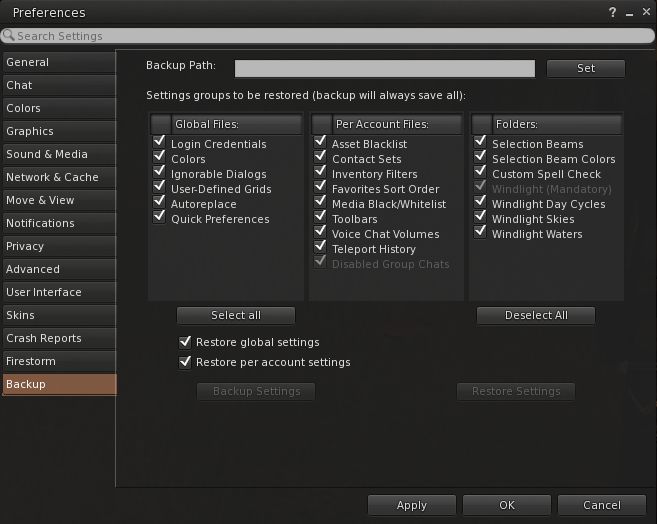
Firestorm's settings backup feature can help remove some of the pain involved in a clean install, by allowing you to save many of your preferred global and account setting locally, and then quickly restore them after a clean install of a new version of the viewer
Firestorm’s settings backup feature can help remove some of the pain involved in a clean install, by allowing you to save many of your preferred global and account setting locally, and then quickly restore them after a clean install of a new version of the viewer

To make things easier, the Firestorm team has provided additional capabilities within the viewer which allow you to not only save things like your chat logs, etc., to a dedicated folder to avoid them being lost as a result of a clean install (as is the case with all viewers), but they’ve provided a means to back-up and restore all of your viewer settings. However, even with these capabilities, performing a completely clean install can be a daunting task for many.

So in this video, Jessica takes you through her preferred method of running a clean install on a PC – starting from ensuring all or logs files and setting are safely saved  / backed-up through to launching the viewer after a clean install and restoring all of your settings.


2015 viewer release summaries: week 9

Updates for the week ending: Sunday, March 1st, 2015

This summary is published every Monday, and is a list of SL viewer / client releases (official and TPV) made during the previous week. When reading it, please note:

  • It is based on my Current Viewer Releases Page, a list of all Second Life viewers and clients that are in popular use (and of which I am aware), and which are recognised as adhering to the TPV Policy. This page includes comprehensive links to download pages, blog notes, release notes, etc., as well as links to any / all reviews of specific viewers / clients made within this blog
  • By its nature, this summary presented here will always be in arrears, please refer to the Current Viewer Release Page for more up-to-date information.

Official LL Viewers

LL Viewer Resources

Third-party Viewers

V3-style

  • No updates.

V1-style

  • Cool VL Viewer – Stable branch updated to version 1.26.12.33, and Experimental branch to 1.26.13.1, both on February 28th (release notes for both).
  • Singularity release a supplemental update, version 1.8.6.6157 on February 27th – core updates: a fix for AMD users wishing to use the latest AMD Catalyst drivers (release notes)

Mobile / Other Clients

  • LittleSight for Android updated to version 1.6.1.0 on February 22nd – core update: changing the default log-in to a user’s home location to avoid log-in failures.

Additional TPV Resources

Related Links

Volumetric lighting: soon for SL?

Blackdragon logoUpdate, March 11th: The capabilities described below are now available in Black Dragon 2.4.1.9, which I’ve overviewed here.

Update, March 4th: Niran is continuing to experiment with shaders, and has posted an interesting snapshot taken under water.

NiranV Dean has always enjoyed a reputation for pushing the limits of the the viewer, first within his Niran’s Viewer, and more recently with his Black Dragon viewer.

A lot of the work he does builds on code developed by Tofu Buzzard – such as with his implementation of screen space reflections and, more recently, Godrays. This work, coupled with his own, has enabled him to earn a reputation for producing a viewer with rich graphical capabilities.

Now Niran is pushing the limits again, using both his one code and elements such a Tofu’s Godrays to bring something to Sl people have long wanted to see: volumetric lighting effects.

On Sunday, March 1st, he released a stunning video showing the work to date. When watching it, be aware that while the camera is moving, everything else is static, other than the grating in the ceiling of the room. When you’ve got that, note how the grating not only casts shadows on the floor, it actually breaks up the light falling through it, just as would happen in real life where light rays hit a solid object and are broken up by it.

“The original Godrays are from tofu,” Niran says of the work. “The problem was, they only worked on objects and terrain; they got cut off on the sky. So I’ve worked on that, and added some code to my viewer, which was really the first iteration of things we saw on my viewer [the updates with Godrays from 2014].

“Since then, I’ve been working on improved resolution and smoother Godrays, moving things to another shader, which brought it’s own problems. Most recently I’ve been moving to another shader for depth of field and improved shadows.”

Interest in the work Niran has been doing has been expressed by the Lab, and he will be offering it as a code contribution for them to consider, although he still has some further work to do.

The first of this is to introduce a global fading effect on the Godrays such that they appear to fade away as an observer looks away from the sun. The basic code is already there, but is disabled in the video, as Niran is still working on things. He hopes to be able to offer the fading effect as a toggle on / off option once the work has been completed.

“The other work still to be done is with particles,” he told me. “Since these Godrays are in the final depth of field shader, they also share the same problems. So, if I can move it into a separate shader on top of everything else, it should resolve the remaining issues, and everything should be good to go.

Of course, contributing code to the Lab doesn’t always mean adoption by the Lab; there can be many intervening factors that prevent the latter. However, Niran is quietly confident his work will be adopted. But if not, “well, there’s always my viewer with it!” he tells me with a wink and a smile.

Singularity provides update to address AMD Catalyst driver issues

singularityUpdate, March 21st: AMD have release a new set of Catalyst™ drivers, version 15.3 beta, which include a potential fix for the rigged mesh issues – see my notes here.

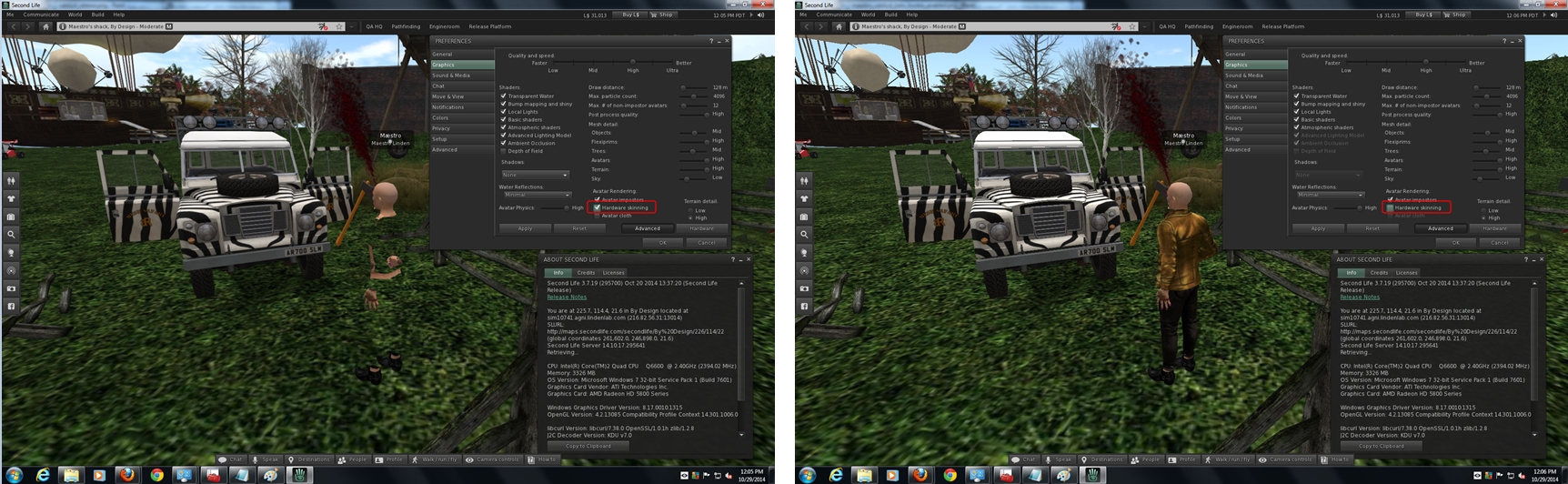
As I’ve previously reported in this blog, recent AMD Catalyst™ driver updates have resulted in numerous issues for SL users running AMD graphics cards and attempting to use the latest driver updates. These started with the 14.9.1 drivers, but which became particularly pronounced with the  14.9.2 drivers failing to render rigged mesh unless hardware skinning is disabled (see: BUG-7653), problems which increased with AMD switched yo automatic updates with the release of their 14.12 drivers.

In December 2014, Yoho Waco offered a workaround for the problems affecting more recent drivers (e.g. 14.12) using the 14.9 DLL files to overcome some of the issues presented by those drivers, and which should work for most viewers. With Yoho permission, I offered his workaround as an article in its own right, and DMC Jurassic reported the same approach could be used with 1.4.4 driver DLL files to resolve issues caused by both the more recent driver updates and those cause by the 14.9.2 driver update.

Recent AMD Catalyst™ drivers (1.4.9.2 onwards) have been problematic for Sl users, presenting a series of mesh rendering problems as a result of changing openGL support within the drivers (image courtesy of Maestro Linden, click for full-size)

Now the Singularity team have stepped up, offering their users who use AMD graphics cards and who have particularly been affected by the rigged mesh issues found when using the more recent Catalyst™ drivers.

Version 1.8.6.6157 of the viewer, released on February 27th, 2015, is labelled as a “supplemental” update to the viewer because, as the release notes state, it only provides a fix for this particular set of problems, and offers no additional updates to the viewer as a whole.

Therefore, if you are not affected by the Catalyst™ driver problems, there is no need for you to update. However, if you have been affected by the problems, then this update could well be for you.

Related Links

With thanks to Maya Rosenstar for the pointer.

Firestorm TTT: command line shortcuts

firestorm-logoThe Firestorm Tool Tip Tuesday video for Tuesday, February 24th offers insight into using local chat as a quick means of using a number of viewer-related and other command options.

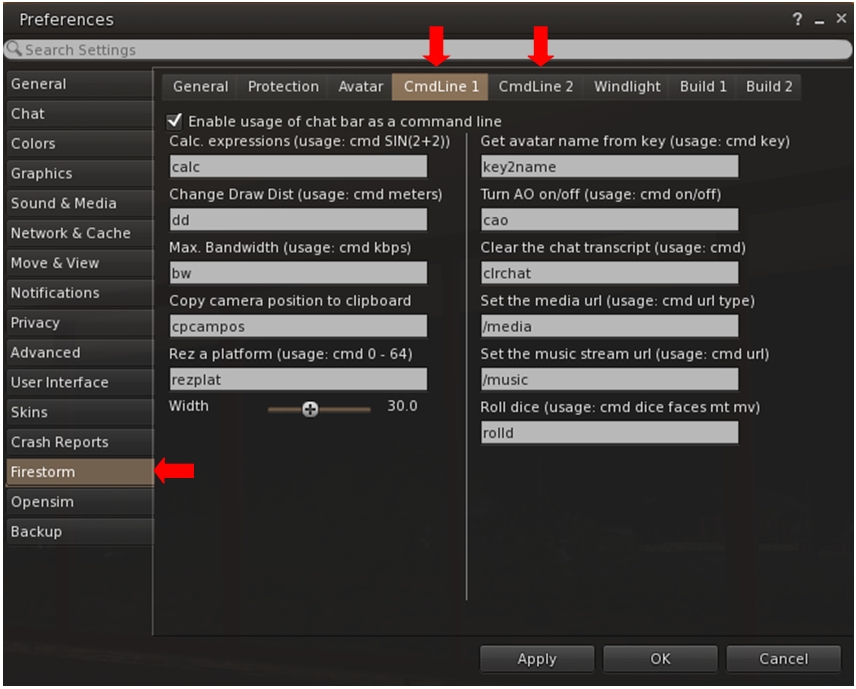
This is achieved by using what Firestorm calls the “command line options”, which can also be found in some third-party viewers (Singularity being another which uses the capability). There are essentially pre-configured shortcuts which allow you to do a number of things; for example, you can quickly step your draw distance down / up, or teleport to a specific region or height within a region, rez a platform, and so on.

Firestorm is one of several TPVs offering "command line" shortcuts which can be typed into local chat to achieve a number of things - the the full list of options via Preferences
Firestorm is one of several TPVs offering “command line” shortcuts which can be typed into local chat to achieve a number of things – the the full list of options via Preferences

In the video, Jessica takes viewers through several of the more popular command line options as well as looking at some of the commands people might not be so familiar with, such as the calculator, turning your Firestorm AO off / on, clearing-down your local chat history display, and so on. She also touches upon customising the command names to make them easier to remember and use, if you need to.

So, if you’ve never looked into using chat command via the command line option, this is the video for you!