2015 viewer release summaries: week 29

Updates for the week ending: Sunday, July 19th, 2015

This summary is published every Monday, and is a list of SL viewer / client releases (official and TPV) made during the previous week. When reading it, please note:

  • It is based on my Current Viewer Releases Page, a list of all Second Life viewers and clients that are in popular use (and of which I am aware), and which are recognised as adhering to the TPV Policy. This page includes comprehensive links to download pages, blog notes, release notes, etc., as well as links to any / all reviews of specific viewers / clients made within this blog
  • By its nature, this summary presented here will always be in arrears, please refer to the Current Viewer Release Page for more up-to-date information.

Official LL Viewers

  • Current Release version: Current Release version: 3.8.1.303130, July 14  (formerly the attachment fixes RC viewer offering a number of fixes for various attachment issues) – download page, release notes
  • Release channel cohorts (See my notes on manually installing RC viewer versions if you wish to install any release candidate(s) yourself):
    • Importer RC viewer version 3.8.2.303565 released on July 17 – provides a modified mesh uploader which can (optionally) improve debug output, perform name-based LOD association, and handle models with many materials, allowing models with more than 8 unique faces to be imported (download and release notes)
    • Maintenance RC viewer updated to version 3.8.2.303563 on July 17 – comprising some 50 updates, fixes and features (download and release notes)
    • Viewer-managed Marketplace RC viewer updated to version 3.8.2.303583 on July 16 – allows Merchants to manage inventory associated with Marketplace Listings from within the viewer + sale of items which Merchants do not have the right copy will now be supported with the Direct Delivery purchase mechanism (download and release notes)
  • Project viewers:
    • No updates.

LL Viewer Resources

Third-party Viewers

V3-style

  • Alchemy updated to version 3.8.1.35916 Beta on July 16 – core updates: parity with LL 3.8.1 code base; avatar name in viewer title bar; music stream info floater; option to display legacy or web profiles  – release notes
  • Black Dragon multiple updates, versions 2.4.3.7  through 2.4.3.9 (July 19th)  – core updates:  incorporation of LL’s  attachment fixes and the Maintenance and VMM RC code updates change logs
  • Kokua issued Mac test version of their viewer, built using the new tool chain – release notes

V1-style

  • No updates.

Mobile / Other Clients

  • No updates.

Additional TPV Resources

Related Links


Alchemy 3.8.1 Beta update

Alchemy-logoOn Thursday, July 16th Alchemy both released their latest beta and announced they are considering moving to monthly releases in order to better keep pace with the Lab’s own releases.

Such a schedule would in part depend upon what the Lab have coming downstream, even allowing for their aim of promoting a viewer every other week. So we’ll likely see how this pans out. In the meantime, there is Alchemy Beta 3.8.1.35916. The following a brief summary of the release; as always, please refer to the release notes as well.

This update brings Alchemy to parity with the Lab’s 3.8.1 code base, meaning it has everything found in the Lab’s release viewer up to and including the attachment fixes found in the SL viewer 3.8.1.303130.

Some of Alchemy's new additions: displaying the avatar name in the viewer title bar and the audio information floater
Some of Alchemy’s new additions: displaying the avatar name in the viewer title bar and the audio information floater

In terms of Alchemy additions, the 3.8.1 release brings an optional musical stream identification floater (accessed via Me > Audio Ticker), and now shows the currently logged-in avatar’s name in the viewer title bar; a useful addition if you’re running multiple instances of the viewer and wish to see which is which when they are minimised.

A further addition is the option to view profiles (your own and other people’s profiles either in the “legacy style” floater or as a web profile.  The profile view can be switched by checking / unchecking Preferences > Interface > General > Open profiles in web mode.

Which profile: legacy or web? You get to choose

Among the under-the-hood changes and the fixes in this release can be found OpenSSL updates, while a further update visible to users is a fix to prevent the radar spamming a series of messages about avatars in a previous region “leaving” when teleporting to another region, if you have it set to report “entering” and “leaving” agents (see ALCH-223).

There is a known issue with the viewer starting on Windows. If you receive a message similar to “The application was unable to start correctly (0xc000007b)”, please download and install one of the following two files from Microsoft:

(The above links will take you to the respective download pages at Microsoft, where you can review the file details prior to downloading.)

There is also a known issue when trying to alter Music URL etc., when accessing About Land via the land information icon in the navigation bar. This will be fixed in the next release; for now the workaround is to right-click the ground and access About Land via the context menu.

A small, tidy update. Will be interesting to see if the Alchemy devs do opt to try for monthly updates.

Related Links

Firestorm ask “viewer translations, can you help?”

firestorm-logoOn Friday, July 17th, Jessica Lyon of the Firestorm team issued a blog post updating users on the progress of the upcoming release, together with an appeal for assistance.

The last release of Firestorm – which I overviewed here – was officially referred to as a “beta” release, as it was rolled out at a time when further updates were expected from the Lab which would prompt a further Firestorm release, possibly in short order. In particular, Firestorm were waiting for the following “big three” from the Lab to reach release status with the Lab:

  • Experience tools, (which were promoted to release status by the Lab at the end of June)
  • The Project Big Bird fixes for viewer-side attachment issues (promoted to the official release viewer on Tuesday, July 14th)
  • Viewer-Managed Marketplace  (which the Lab have just announced as “released”, ahead of the start of the automated migration process for Merchants, despite the viewer code still being at RC status at the time of writing).

While the Firestorm post doesn’t commit to a date when the new release might appear, but does make it clear that the release is coming soon. Also, as well as these particular updates, the blog post indicates it will include additional fixes and updates from the Firestorm team and contributors – including updates from Kitty Barnett for RLVa (one of the most frequently requested updates), and other goodies beside – such as updates to the Unified Snapshot floater.

For those not overly keen on the preview pane in the Unified Snapshot Floater (see above left), the next release of Firestorm should see the return of the "old" snapshot preview (seen above right), with the option to freely switch between the two
For those not overly keen on the preview pane in the Unified Snapshot Floater (above left), the next release of Firestorm should see the return of the “old” snapshot preview (above right), with the option to freely switch between the two via the arrow button

As well as hinting at what is to come, the Firestorm post also includes an appeal for help, as Jessica explains:

There was a time when Linden Lab had the interface translated in multiple languages, and we did, too, since we are based on the Linden code. However, as time passed, new additions to the interface were added, and the translation of these interface elements fell behind. Today most translated language interfaces actually contain more English than the chosen language, and it is becoming more and more difficult to merge these half-translated UI elements with upstream code.

Because of this, the team have decided to discontinue and remove translations which might be regarded as “incomplete” and for which they do not have the internal expertise to correctly maintain.  These comprise: Chinese, Danish, French, Portuguese, Spanish, and Turkish.

However, the team is will re-introduce any of these languages if there are people willing to commit to providing UI translations for them, and maintaining the translations long-term. As such, the Firestorm team is looking to hear from volunteers willing to do so. However, as Jessica notes:

UI translation involves more work than merely providing the terms for the correct language. Volunteers must be comfortable with editing and properly formatting xml files or should be able to learn how to do so.

If you have the necessary language and technical expertise, and are confident you can provide the required commitment to update and maintain a viewer translation for one of the languages listed above, please read the Translating Firestorm wiki page for further information, and then express your interest directly to the Firestorm team via e-mail to  admin@phoenixviewer.com.

2015 viewer release summaries: week 28

Updates for the week ending: Sunday, July 12th, 2015

This summary is published every Monday, and is a list of SL viewer / client releases (official and TPV) made during the previous week. When reading it, please note:

  • It is based on my Current Viewer Releases Page, a list of all Second Life viewers and clients that are in popular use (and of which I am aware), and which are recognised as adhering to the TPV Policy. This page includes comprehensive links to download pages, blog notes, release notes, etc., as well as links to any / all reviews of specific viewers / clients made within this blog
  • By its nature, this summary presented here will always be in arrears, please refer to the Current Viewer Release Page for more up-to-date information.

Official LL Viewers

  • Current Release version: 3.8.0.302622, June 30 – no change
  • Release channel cohorts (See my notes on manually installing RC viewer versions if you wish to install any release candidate(s) yourself):
    • Viewer-managed Marketplace RC viewer updated to version 3.8.1.303315 on July 9th – allows Merchants to manage inventory associated with Marketplace Listings from within the viewer (download and release notes)
    • Importer RC viewer version 3.8.1.303230 released on July 8th – provides a modified mesh uploader  (download and release notes)
    • Maintenance RC viewer updated to version 3.8.1.303166 on July 7th – comprising some 50 updates, fixes and features (download and release notes).
  • Project viewers:
    • Notifications project viewer version 3.8.1.303211 released on July 8th – new Notifications floater separates incoming notifications into System, Transactions, Invitations, and Group. It provides a better way to view, interact with, prioritize and manage incoming notices for busy residents (download and release notes).

LL Viewer Resources

Third-party Viewers

V3-style

  • Black Dragon updated to version 2.4.3.6 on July 9th (Notifications update with rendering improvements – release notes) and then to 2.4.3.7 on Monday July 13th (Maintenance RC update – release notes).

V1-style

  • Cool VL Viewer Stable branch updated to version 1.26.14.0 on July 11th – core update: inclusion of VMM code into Stable branch (release notes); the Experimental branch temporarily removed in preparation for implementing the Lab’s CEF updates.

Mobile / Other Clients

  • Radegast updated to version 2.18 on July 9th – core updates: support for Group Bans and several smaller updates (download and release notes) .

Additional TPV Resources

Related Links


Black Dragon: notifications and shadows

Blackdragon logoOn Thursday, July 9th, NiranV Dean released version 2.4.3.6 of his Black Dragon viewer.

The release brought with it a rapid-fire implementation of the Lab’s new notifications update from LL, which comes a little ahead of the curve, given the Lab prefer their code to be integrated into TPVs once it reaches RC status, and can be regarded as somewhat more stable than might be the case with a project viewer release. However, the code is such that it is apparently easy to manage should updates be forthcoming as that project progresses.

In implementing the notifications update, Niran has made some subtle changes to the notifications floater itself, improving the overall layout, although the overall functionality is pretty much as offered through the Lab’s current project viewer. Rather than describe the functionality here, readers are invited to read my overview of the project viewer.

The other major update with this release of Black Dragon release is related to shadows and lighting, and specifically, the uncoupling of shadow rendering from draw distance.

Because shadow rendering has been bound to draw distance, shadows tend to fade away the closer they are to your draw distance limit, with the result that the further objects are away from you, the less well-defined their shadows appear / the less shadows may influence how they appear, with objects close to the edge of your draw distance sometimes appearing shadowless.

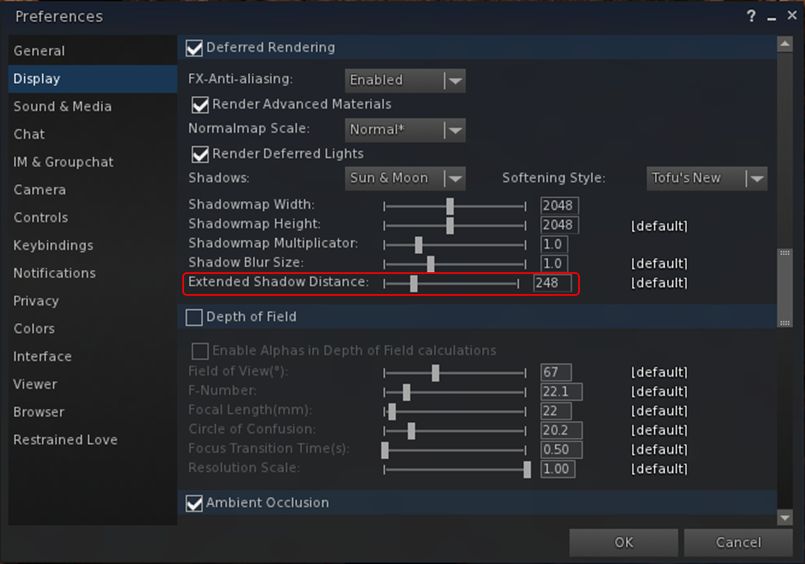
With this change, Niran has added a new slider to the Display tab of Preferences, allowing the user to independently set a “shadow rendering distance”, thus allowing a better rendering and representation of shadows independent of draw distance.

Black Dragon 2.4.3.6: the new shadow rendering distance slider
Black Dragon 2.4.3.6: the new shadow rendering distance slider in Preferences. A similar slider is also in the Machinima sidebar

The result is a much improved depth of view in-world, and greatly enhanced snapshots (see Niran’s samples accompanying the viewer’s release notes).

By-and-large, extending the shadow rendering distance shouldn’t result in any appreciable performance hit. However, there is a caveat, as Niran explains:

Increasing the shadow draw distance will reduce the overall shadow precision, because shadows are split into shadow clip planes, 4 shadow textures if you will, these shadow textures have a given resolution (which you can set in preferences), increasing the shadow rendering distance scales up all 4 planes equally, increasing the area one texture has to cover, reducing the precision in that area obviously. You could counter this by increasing the shadow resolution or multiplier, but that would impact frame rate.

A side benefit of this, as Niran notes, is that because volumetric lighting is calculated via the shadow clip planes and shadow maps, increasing the shadow rendering distance enhances the volumetric lighting effects in the viewer. Again, check the sample images Niran provides with the release notes.

Other updates in this release include:

  • Re-enabling of the experimental auto-hiding of the Textures, Sounds, Calling Cards, Landmarks, Notecards, Scripts, Photo Album, Animations, Gestures, Favourites and My Outfits folders in Inventory (debug: DebugHideEmptySystemFolders)
  • Disabling of the auto-hiding of empty folders by default
  • Improvements to SSAO defaults
  • Freeze world and mode toggling issues, as reported in STORM-2118, fixed and implemented in this Black Dragon release
  • Further RLVa updates.

As always, for the full range of changes / updates, please refer to the release notes.

Additional Links

Radegast updates to 2.18

Radegast is a third-party Second Life / OpenSim client which has proven to be especially popular with those on low-end systems over the years, and gained a solid level of support from the visually impaired, who found the client a lot easier to use than a full viewer – so much so that a special accessibility guide was produced, and special classes held in using the client.

Sadly, ongoing health issues impacting Latif Khalifa, Radegast’s creator, reached a point where, in November 2014, he had to signal that he was unable to continue maintaining the client, although he ensured the source code remained available for anyone who wanted to do so on behalf of the community.

Well, the good news is that on Thursday, July 9th, Radegast was updated to version 2.18. The even better news is that the person making the update was – Latif Khalifa!

The new update brings a number of improvements to the client, which the release notes list as:

  •  Support for Group Bans (RAD-471)
  • Double click on inventory item to wear/attach (RAD-472)
  • RLV support for @acceptpermission (RAD-500)
  • New Automatically Accept Dialogue Function (RAD-490)
  • A fix to allow the main window to minimize to the system tray correctly (RAD-497)
  • Add log-in support for SirinHGpole-Grid to the grid manager (RAD-503).

The Group Ban functionality in Radegast operates the same way as for any viewer:

  • Avatars can be banned from a group by either selecting them in the group members list if they are already a member and using the Ban button (below left), or by using the Group Ban Picker to ban one or more avatars pro-actively from joining the group by using the Ban … button in the Banned Residents tab (below right)
  • Group Ban capabilities can be be awarded to any role in the group by enabling the GroupBanAccess option in the  Allowed Abilities section of the Roles sub-tab.
The Radegast 2.18 update adds Group Bans to the client
The Radegast 2.18 update adds Group Bans to the client use the Ban button in the Members and Roles list to eject and ban a person in the group; use the Banned Residents tab to track those previously banned or to pro-actively ban users from joining the group.

For those unfamiliar with Radegast, it is a full feature but lightweight client able to run on Windows, Linux and Mac OS. It provides pretty much all of the capabilities found in a full viewer, including full inventory management, mesh upload capabilities, voice support, etc.. In addition, it has a few options of its own such as an API for plug-ins, speech recognition and an AI capability (ALICE).

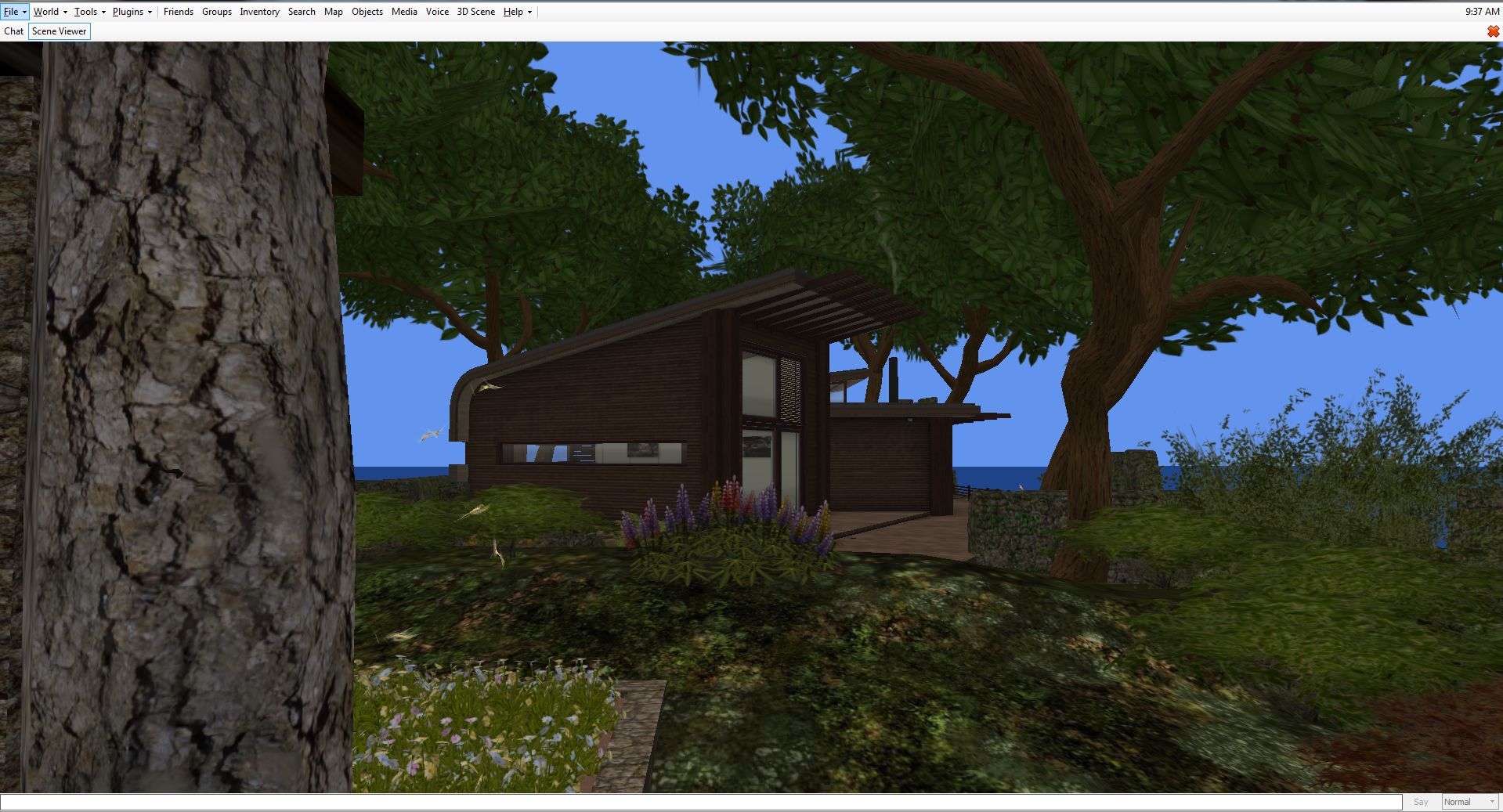
For those who may be without their viewer for some reason, but would prefer to see what is going on in-world, the Windows and Linux versions of Radegast provide a 3D scene renderer in which you can see the world and move around in it, chat with others and – via the Objects option – interact with the things you see around you.

Radegast's in-world view option (the Scene Viewer)
Radegast’s in-world view option (the Scene Viewer) – note this does not support windlight, etc.

All of this has made Radegast a flexible, usable and popular client, and if you’d like to know more about it, please refer to my Radegast coverage in this blog.

Given Latif is still recovering from illness, this update may not signal his full return to supporting Radegast; when I did ask him about this update, he replied, “there were several updates, such as group bans that were done, but unreleased. So why not get them out ;-).” As to the future, we’ll have to see what comes along; but certainly, seeing Latif back in the saddle with this release is great.

Related Links