This summary is published every Monday, and is a list of SL viewer / client releases (official and TPV) made during the previous week. When reading it, please note:
It is based on my Current Viewer Releases Page, a list of all Second Life viewers and clients that are in popular use (and of which I am aware), and which are recognised as adhering to the TPV Policy. This page includes comprehensive links to download pages, blog notes, release notes, etc., as well as links to any / all reviews of specific viewers / clients made within this blog
By its nature, this summary presented here will always be in arrears, please refer to the Current Viewer Release Page for more up-to-date information.
Official LL Viewers
Current Release version: 4.0.6.315555 (dated May 23), promoted July 5th – formerly the Inventory Message RC viewer download page, release notes
Cool VL viewer Stable branch updated to version 1.26.18.16 and the Experimental branch updated to version 1.26.19.18, both on July 23rd (release notes)
This summary is published every Monday, and is a list of SL viewer / client releases (official and TPV) made during the previous week. When reading it, please note:
It is based on my Current Viewer Releases Page, a list of all Second Life viewers and clients that are in popular use (and of which I am aware), and which are recognised as adhering to the TPV Policy. This page includes comprehensive links to download pages, blog notes, release notes, etc., as well as links to any / all reviews of specific viewers / clients made within this blog
By its nature, this summary presented here will always be in arrears, please refer to the Current Viewer Release Page for more up-to-date information.
Official LL Viewers
Current Release version: 4.0.6.315555 (dated May 23), promoted July 5th – formerly the Inventory Message RC viewer download page, release notes
Project Bento (avatar skeleton extensions) updated to version 5.0.0.317597 on July 14th – incorporation of final skeleton and slider updates from the test viewer (download and release notes)
CtrlAltStudio for WINDOWS updated to version 1.2.6.43412 on July 18th – Oculus CV1 support (release notes)
V1-style
Cool VL viewer Stable branch updated to version 1.26.18.15 and the Experimental branch updated to version 1.26.19.17, both on July 16th (release notes)
On July 18th, 2016, Strachan Ofarrel (Dave Rowe) released an updated Windows version of his CtrlAltStudio viewer. Version 1.2.6.43412 Alpha use Oculus Rift SDK 1.5.0 and so should support the Oculus CV1, DK2 and DK1.
The release has been made to provide a level of Oculus HMD support in Second Life and OpenSim following the Lab’s decision to withdraw their own project viewer support for the Rift, after significant issues were found with the July update to that viewer.
However, as Strachan states in his blog post on the release, the CtrlAltStudio Windows update is presented “as is”, and still utilises the Firestorm 4.6.9 code-base, which is itself running well behind current releases, and therefore lacks functionality users might otherwise be familiar with in more recent versions of the SL viewer. This means CtrlAltStudio doesn’t support recent HTTP updates, inventory improvements or the TLS 1.2 update (so the built-in web browser will not work with things like Marketplace transactions when using the built-in browser).
Stratchan also warns that it is unlikely that users will get the level of recommended frame rates for CV1 use (which is something the Lab were stating prior to the release of their update), although he notes – again as did the Lab – that the experience should be enough to get a feel for what user-generated VWs are like in immersive VR.
Windows CtrlAltStudio users should be able to install this version over the 1.2.5 Alpha and 1.2.4 Alpha versions if they have either already installed. Those with older versions of the viewer should carry out a clean install (and can always back up and restore their settings before / after doing so). Note that if you install over the top of a previous version you may need to press the “Reset” button next to the “UI depth” Display Output option.
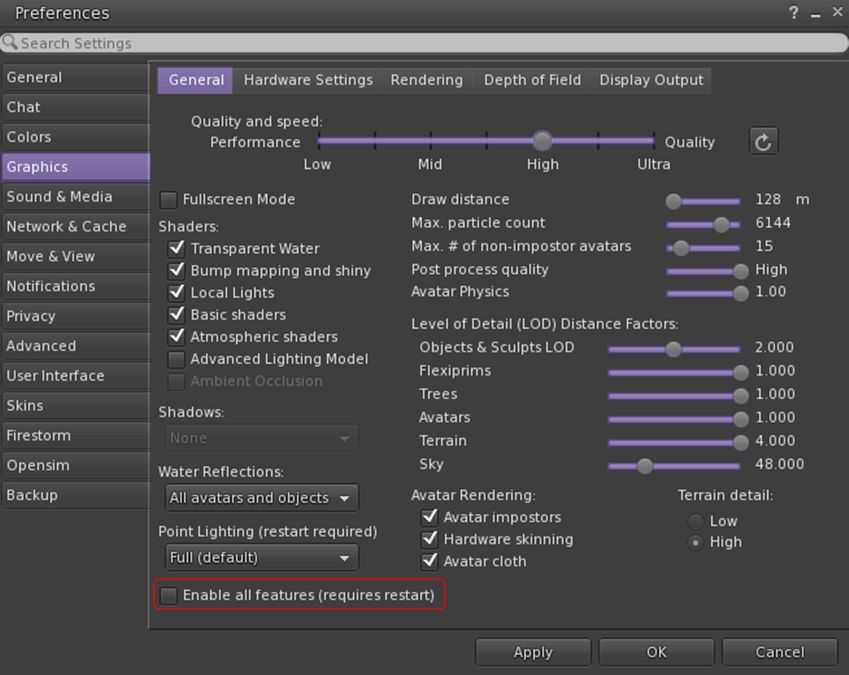
To overcome issues of the viewer failing to recognise very high performance GPUs, CtrlAltStudio 1.2.6.43412 includes and Enable All GPU Features option to force enable all graphics settings (e.g. Basic Shaders, etc.)
The full set of updates in this release are given as:
Updated to Oculus Rift SDK 1.5.0 so that the viewer works with the Oculus runtimes supporting the CV1 as well as the DK2.
Fixed the “UI depth” display setting to work for both DK2s and CV1s.
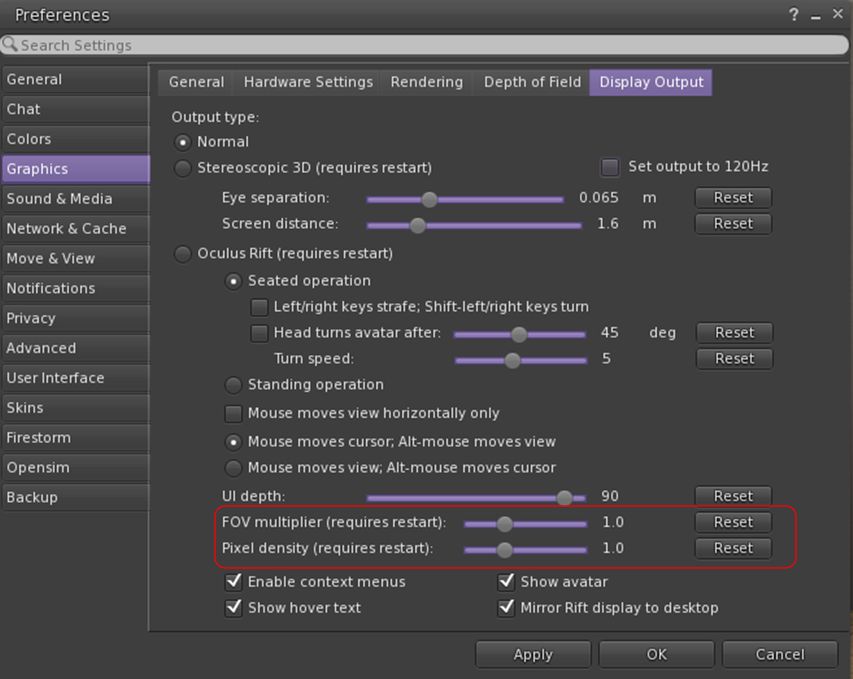
Added an “FOV multiplier” display setting that decreases or increases the field of view with respect to the Rift-recommended value.
Added a “Pixel density” display setting that decreases or increases the number of pixels rendered in the process of calculating the Rift display output.
Removed the following display options which are no longer available in the Rift SDK: “Low persistence”, “Dynamic prediction”.
Fixed crash at start-up if Rift display output is enabled but no Rift is connected and turned on.
Updated the GPU table.
Added an “Enable All GPU Features” display setting that enables all graphics settings that may otherwise be limited if a new, high performance GPU is not listed in the GPU table.
Added a “Combine Xbox One triggers” joystick setting that combines the left and right trigger values of the Xbox One controller into a single value like the Xbox 360 controller outputs, thus letting the triggers be used to fly up and down.
It is worth noting that when in Riftlook mode, the cursor is only visible in the left eye. This is intended behaviour, allowing the cursor to hover over UI elements and in-world objects correctly without having to use additional and complex code to calculate what relative depth should be used to place the cursor in a stereo rendering.
Release 1.2.6.43412 also includes a new FOV Multiplier and Pixel Density display settings to adjust the displayed field of view and number of pixels rendered in the Rift images. Depending on your graphics card capabilities, these may provide improved visuals when adjusted upwards (at the cost of FPS). Reducing the settings will improve FPS. Both require a viewer restart after adjustment
Ai Austin has provided a blog post on his experiences in using this viewer, and I would recommend it for further reading, particularly in you are new to using the Rift with Second Life, as Ai provides point-by-point sets on getting started.
An interesting broader note in Ai’s post is with regards to using the HTC Vive with CtrlAltStudio – a questions which has been raised a a couple of “Meet the Lindens” sessions. In this regards, Ai:
Some users have reported that the CtrlAltViewer set to use the Oculus Rift works with the HTC Vive using LibreVR/Revive. This is a compatibility layer between the Oculus SDK and OpenVR. It allows you to play Oculus games on your HTC Vive.
This summary is published every Monday, and is a list of SL viewer / client releases (official and TPV) made during the previous week. When reading it, please note:
It is based on my Current Viewer Releases Page, a list of all Second Life viewers and clients that are in popular use (and of which I am aware), and which are recognised as adhering to the TPV Policy. This page includes comprehensive links to download pages, blog notes, release notes, etc., as well as links to any / all reviews of specific viewers / clients made within this blog
By its nature, this summary presented here will always be in arrears, please refer to the Current Viewer Release Page for more up-to-date information.
Official LL Viewers
Current Release version: 4.0.6.315555 (dated May 23), promoted July 5th – formerly the Inventory Message RC viewer download page, release notes
This summary is published every Monday, and is a list of SL viewer / client releases (official and TPV) made during the previous week. When reading it, please note:
It is based on my Current Viewer Releases Page, a list of all Second Life viewers and clients that are in popular use (and of which I am aware), and which are recognised as adhering to the TPV Policy. This page includes comprehensive links to download pages, blog notes, release notes, etc., as well as links to any / all reviews of specific viewers / clients made within this blog
By its nature, this summary presented here will always be in arrears, please refer to the Current Viewer Release Page for more up-to-date information.
Official LL Viewers
Current Release version: 4.0.5.315117 (dated May 11), May 18th – no change: formerly the Quick Graphics RC viewer download page, release notes
Oculus Rift project viewer updated to version 4.1.0.317313 on July 1 – Oculus Rift DK2 + CV-1 support (download and release notes) – warning: this update appears to have significant issues: see this comment and those which follow
Visual Outfit Browser viewer updated to version 4.0.6.316422, on July 1 – ability to preview images of outfits in the Appearance floater (download and release notes)
Project Bento (avatar skeleton extensions) updated to version 5.0.0.317134 on June 30 – bug fixes (download and release notes)
Restrained Life Viewer updated to version 2.9.18 on July first, followed rapidly by version 2.9.18.1 (July 3rd) and 2.9.18.2 (July 4th), both containing bug fixes. For the full set of release notes, please refer to the links above
V1-style
Cool VL viewer Stable branch updated to version 1.26.18.13 and the Experimental branch updated to version 1.26.19.15, both on July 3rd (release notes)
On Saturday, June 26th, the Alchemy team announced the official release of Alchemy 4.0.0.37571, which essentially moves the recent Beta releases to release status, together with some tweaks and tucks.
As Alchemy beta users will know, 4.0.0 brings Alchemy up to parity with the Lab’s 4.0.0 code base, and also adds some upstream fixes from 4.0.1. This means the viewer includes the Chromium Embedded Framework (CEF) for media handling.
Given I have provided a couple of overviews for the February and April beta releases of the viewer, the following is a quick bullet-point list of major updates in the viewer:
Automatic update capability (matching the official viewer update capability) – Preferences > Setup
Alchemy 4.0.0 includes auto-update options to help with maintaining parity with latest releases / receiving beta version updates
Enhanced environmental tools
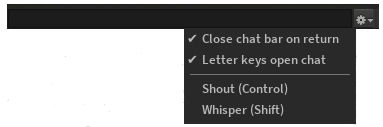
In a change introduced on the April Beta, the local chat bar (see my February Beta release overview) no longer has a chat check-box to activate the option (Preferences > Chat). Instead, the chat bar will open automatically if your mouse focus is in-world (e.g. not already focused on the conversation floater or another floater) and Preferences > General > Pressing Letter Keys is set to Starts Local Chat.
The Alchemy local chat bar and options, as it appears in the 4.0.0. release version of the viewer
At the time of writing, the full release notes were reported as “will be generated soon”, so users are referred to the Alchemy web site for these and a detailed breakdown of updates.



 Inara Pey: Living in a Modemworld