Update October 26th: As noted in the comments, it appears that the new client may be using the OnLive streaming service / application. This has been reported in a recent comment on the forum thread linked to in the article, and also in a further thread on the subject.
Linden Lab has been issuing an e-mail to a limited group of users inviting them to sign-up to be a part of a beta test for a Second Life client for mobile devices.
The e-mail, which has been popping-up in user’s in-boxes for the last day or so, reads:
We’re looking for enthusiastic beta testers to evaluate a version of Second Life designed for mobile devices.
Sound interesting? Then simply…
Visit [link removed] to create a FREE account with <link removed to be safe>, then
Visit [link removed] to complete a 5-minute questionnaire
You have to finish both steps to be considered for the beta.
We’ll email those selected when the program begins and check in periodically over the next couple of months to get their feedback.
This is your opportunity to be among the first to try a new mobile version of Second Life, and we hope you’ll help us to make it a great product with your input.
Thank you for your consideration!
Linden Lab
Some concern had been raised on the SL forums as to whether the e-mail was genuine or not. While some were able to confirm it was indeed genuine. However, just to be clear, I contacted Peter Gray, the Lab’s Director of Global Communications, and to ask whether the Lab would be prepared to point to any specific platforms they’re looking at (iOS, Android, Windows Mobile, etc). He replied saying:
The email you’re referencing did indeed come from Linden Lab. The originating address is related to the system used to send the messages out, and there was initially an unfortunate problem with links, which has since been resolved.
It’s too soon to share details about this service that would bring Second Life to mobile devices (as you can see, we’re beginning a limited beta test), but we’re hoping that with the help of some enthusiastic beta testers, things may progress to a point where we can share more information with the community at large soon.
Do note that the beta programme is via invitation only; there is no public sign-up page available – so don’t go looking for one! Also, not all of those responding to the e-mail will necessarily be selected to participate in the programme.
Lumiya for Android has been the ground-breaking mobile client for Second Life and OpenSim since its launch at the end of 2011
Getting SL onto a mobile device has been a much demanded option. As I reported in April 2012, Comverse had a stab at getting SL onto the iPhone back in 2008, complete with graphics. Back then, it required an intervening server in place and didn’t get too much further than an initial proof-of-concept.
However, mobile devices have come some way in terms of power and capbilities, although until now all moves in the mobile arena have been left to third-parties, with text-focused clients such as LittleSight and Mobile Grid Client on the Android platform, and Pocket Metaverse on iOS, and of course the incredible Lumiya for Android with its rich graphical capabilities and which I routinely cover in these pages.
It’ll be interesting to see exactly what the Lab have put together, and the code they’ve used – home-built, or perhaps using something like Unity3D? Time will tell!
Connor Monaron released an updated UKanDo viewer on Saturday October 20th. Version 3.6.8.27869 brings the viewer up-to-date with the latest viewer release code from the Lab, including the “hot fix” to prevent crashes for those using the latest AMD Catalyst drivers (13.9, 13.10, and 13.11), and adds a lot of useful nips, tucks, tweaks and additions.
Download and Installation
The Windows installer remains unchanged at 28.7 MB in size, and installation was, as with the first version of the viewer I reviewed, smooth and without incident. I ran a completely clean install out of curiosity, and the viewer again installed without a hitch, and AVG Pro didn’t hiccup over things like the voice plugin, etc.
Improved UI
One of the things I found a little hard with UKanDo last time around was the UI colours. The white-text-on-blue-buttons was not always easy to read (for me, at least on my 1440×900 monitor). I’ve no idea if the issue was widespread, or if Connor felt the same, but 3.6.8.27869 sees buttons with black text / icons by default (text turns white when the button is active), which I do find easier on the eyes.
Buttons and Placement
Version 3.6.8 brings with it a couple of new buttons – Quick Tools and Area Search (both of which are looked-at below), and sees UKanDo gain improved toolbar button alignment. As with some other TPVs buttons on the bottom bar can now be ranged to the left or right, and buttons to the left or right of the screen can now be ranged to the top or bottom – kudos, Connor!
Quick Tools
UKanDo Quick Tools
This release brings with it a Quick Tools floater (and associated toolbar button), which is similar to the “Quick Prefs” floaters found in other TPVs, providing rapid access to things like Draw Distance, Bandwidth, Max Avatars, Particle Count, the Windlight presets and so on. The list of options isn’t as extensive as some TPVs provide, but what is here is more than enough to allow users to make rapid-fire adjustments to core settings when necessary – such as when operating in a crowded environment.
Also with this release, and found in the Quick Tools, as well as in Preferences > UKanDo > Miscellaneous, is the ability to set Windlight cross-fading when moving between different Windlight environments / changing Windlight settings.
Area Search
Another popular TPV capability is that of area search: being able to locate a specific object within a region using a range of criteria – object name, creator name, etc. This makes its debut in UKanDo version 3.6.8.27869, and is likely to be a welcome addition among users. It can be accessed either via a dedicated menu button or via the UKanDo menu or by pressing ALT-A.
Area Search comes to UKanDo
Context Menu Updates
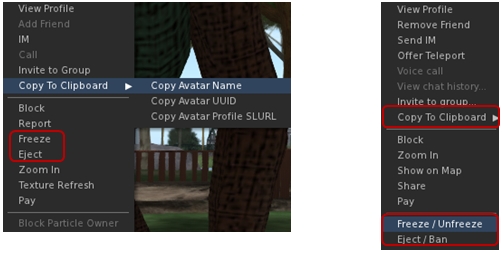
A couple of the context menus in UKanDo get updates as well. The right-click avatar context menu sees options added to copy an avatar’s name, UUID or Profile SLurl to the clipboard. Additionally, and in the case of estate owners / managers / parcel owners, the avatar context menu includes options to Freeze / Unfreeze and Eject / Ban where appropriate.
Options to copy an avatar’s name, UUID or profile SLurl can now be found of the right-click avatar context menu (l) and context menu in the Nearby tab of the people floater (r). In addition, both menus can offer estate owners / managers / parcel owners options to freeze / eject avatars
These options are also available in the right-click context menu within the Nearby tab of the People floater (with the freeze / ban options only appearing for estate owners / managers / parcel owners).
Other Additions, Tweaks and Touches
RLV is updated to 2.8.5.8
Toolbar Buttons floater New “Close” button
World Map New “Clear Selection” button
Help->UKanDo Support Group menu option will either open the group profile or, if you are a member of the group, start group chat
Allow Media to Auto-play is defaulted to off
Play Sounds from Gestures is defaulted to off
Option to allow Chiclet bar and/or Notifications to be placed top or bottom right
Viewer gives audible warning when trying to shift-drag while in edit linked parts/select face mode & object remains locked in place
Version 3.6.8.27869 represents a tidy set of updates and tweaks to UKanDo. The addition of Area Search is liable to be popular, as is the arrival of a Quick Tools floater. I personally like the additional button ranging options (I like my toolbar buttons over to the right of the screen and out-of-the way), and the ban / eject additions to context menus may well prove useful to some!
Performance-wise, this version of UKanDo is right up there with the last, and faces-off very well compared to the SL release viewer upon which it is based. In my PC, with ALM enables, ambient occlusion and shadows (Sun/Moon + projectors) enabled, and a couple of others on my home region, I was again hitting an average FPS of around 68-70.
I did find one or two things at odds in my version compared to the release notes (RenderVolumeLODFactor is reported as defaulted to 4.00, but in my clean install, I found it set to 1.25), but these were very minor issues and easily fixed. One thing I would recommend, however is that the icon for the Quick Tools button is revised. It is currently the same as the icon used on the Preferences button, and when operating with the buttons in Icon Only mode, it could lead to confusion.
I’d still like to see the media filter added to UKanDo, just for the added comfort when wanting to fiddle with media on other land; having something like Will Weaver’s Phototools appear in UKanDo would also be a blast – but these are purely personal preferences. As it is, UKanDo is a perfectly useable viewer, and for those looking for something sitting between the SL viewer and TPVs with all the bells and whistles, it’s worth taking a look at.
UKanDo (pronounced “You Can Do”, and a play on the fact that the developer hails from the UK), started as a personal project for Connor Monaron and friends for use in OS Grid. However, it has grown over time (and use) to become a fully fledged viewer project, and one of the latest to go through self-certification and appear on the Third Party Viewer Directory for Second Life.
The viewer is based on the Linden Lab codebase, rather than being a fork from another TPV, and which sees a number of additional features added to it. Connor’s aim in producing the viewer is to have something which is relatively close to the Linden viewer – which as he states, is fast and usable which having additional functions and features he and his friends find useful.
The list of current additional features is already of reasonable length, and includes some popular additions from other TPV viewers and elsewhere, including:
Marine Kelley’s RLV (disabled by default) and her v3 implementation of the updated “z-offset” capability and menu bar slider
Enhanced build options from other TPVs / developers (high precision within the position, size and rotation fields of the Build floater’s Object tab; prim alignment tool; option to sync values between diffuse, specular and normal maps; expand / collapse Build floater; reset / delete scripts from within the Build floater’s Content tab, etc.)
Katharine Berry’s Flickr upload capability
Right-click to open contents on a worn attachment
Turn avatar when walking backwards on by default
Draw distance slider in the menu bar
and more
I’ve actually been keeping an eye on UKanDo since early August, and thought it was high time I offered something of an overview of it using the current release, 3.6.7.27838.
Download and Installation
The Windows installer is 28.7 MB in size – approximately that of the official LL viewer installer, and runs pretty much as expected, installing the viewer smoothly and I experienced no pesky anti-virus warnings on starting-up SL voice (on AVG Pro), which have crept back into the last couple of viewer installs I’ve run since the last AVG update.
Starting the viewer launches the default LL splash / log-in screen, with buttons in an interesting blue colour.
Camera
For those used to the LL camera default, logging-in will reveal the first noticeable difference: the default camera placement is a lot different.
Camera placement: the default for the SL viewer (l) and the default for UKanDo (r)
Of course, this is somewhat subjective, as we likely all have different views on what constitutes a “good” camera placement; so whether one likes this or not is going to be subjective. I’ve been a supporter of Penny’s alternative camera positioning for a long while now – she allowed me to include in my blog’s tutorial section and I use a variation on one of her other settings -, so while the default used in UKanDo is slightly different to my own, I nevertheless found it refreshing not to have to fart around with camera debugs for once, but simply get on with using the viewer.
Buttons, Preferences and Menus
UKcanDo follows the LL viewer default button display and placement, and the toolbar floater reveals no additional buttons. Similarly, the Preferences floater offers-up more-or-less the same as the LL viewer, although there are some noteworthy additions / tweaks to defaults:
Move and View > Single Click on Land is disabled (rather than set to Move to Clicked Point) and Double Click on Land is set to Teleport to Clicked Point (rather than None)
Colors includes the ability to set name tag text colours
Privacy includes options to Look At / Point AT to private
Set-up includes:
A warning about setting bandwidth no higher than 1500 kbps
An option to always rez objects under the land group, if possible
An option to enable RLV functionality
Set-up also excludes the LL automatic viewer update options
An additional tab – UKanDo offers additional options for the camera, mini-map and avatar (under the Miscellaneous sub-tab) and additional building defaults (under the Build sub-tab, shown below).
UKanDo includes an additional Preference tab – UKanDo – which provides additional build options as well as additional options for the camera, mini-map and avatar (Miscellaneous sub-tab)
The viewer includes an additional menu option – again called UKanDo – which includes options to stop all animations, teleport to ground and show the time (top right of the viewer) in your local time, rather than SLT. The “Me” menu is also renamed “Avatar”, and other menu updates include:
Build > Scripts includes option to delete all scripts in an object
Build > Options includes options to set the build grid mode (world, local, reference)
Help includes options to view the UKanDo viewer support and forum web pages and removes the LL bug reporting option
Advanced includes:
Sub-menu of UKanDo menu options (see above)
Sub-menu for hover tip options
Additional Shortcut sub-menu for build tool selection options
Develop > Avatar includes options to set privacy on Look At and Point At.
Other Points of Note
Given the viewer is based on recent code from LL, it also has the expected support for SSA (which it has had from July 2013), CHUI and materials processing. The viewer also has pathfinding support, including navmesh, which means it is now limited to use with Second Life, as reflected by the Grid Option drop-down on the splash / log-in screen only lists the two SL grids: Agni and Aditi. the SLShare / Facebook options are not in the current UKanDo release, which is hardly surprising given SLShare appeared after the UKanDo 3.6.7 release.
Feedback
UKanDo does exactly what it says on the tin. It is a viewer based on the LL 3.6.7 code base and offers a filtered set of additional options which should actually appeal to a broad cross-section of users.
Performance-wise, the viewer was just shaded by the LL viewer in terms of frame rates in my subjective back-to-back testing on the same region with the same field of view / scene rendered with my usual defaults. The LL viewer managed a consistent 65-70 fps with ALM on, Shadow options enabled and ambient occlusion enabled, with UKanDo hovering around the 58-62 fps, which isn’t a big enough difference to be noticed. Switching off ambient occlusion and setting Shadows to none but leaving ALM active took frame rates over the 100 mark.
Overall I found UKanDo an interesting addition to the TPV stable; as noted at the top of this article, it does exactly what it says on the tin, and does it well. My only slight reservation with it – which is entirely personal – is that I found the combination of blue and white on things like buttons and tabs, etc., a little hard on the eyes after a while. As I generally have the toolbar buttons set to icons only, this wasn’t a major issue with them, but I did actually find myself either leaning forward or squinting at times to read tab labels – which surprised me. Perhaps I am getting old, after all …
The viewer doesn’t include the media filter, so if you are concerned about streams and nitwits, you’ll want to make sure you pop into Preferences > Sound and Media and disable the appropriate options (Allow Media to Autoplay, Play Media Attached to Other Avatars).
If you’re looking for a V3 viewer which is a step closer to the LL default, but which offers a reasonable set of additional functions and options, you might want to take a look at UKanDo and see what you think of it yourself.
The Exodus team released Exodus 13.09.21.1 (Beta) on September 21st, which sees support for materials processing arrive in the viewer.
The release is only available for Windows and Linux, but it sees Exodus come pretty much up to par with the official SL viewer, including the most recent materials fixes and updates which saw light of day as an RC viewer prior to becoming the de facto SL viewer release in week 38. Also included in the release are updates from the recent SL CHUIStorm release, the FMODex updates and the Cocoa updates.
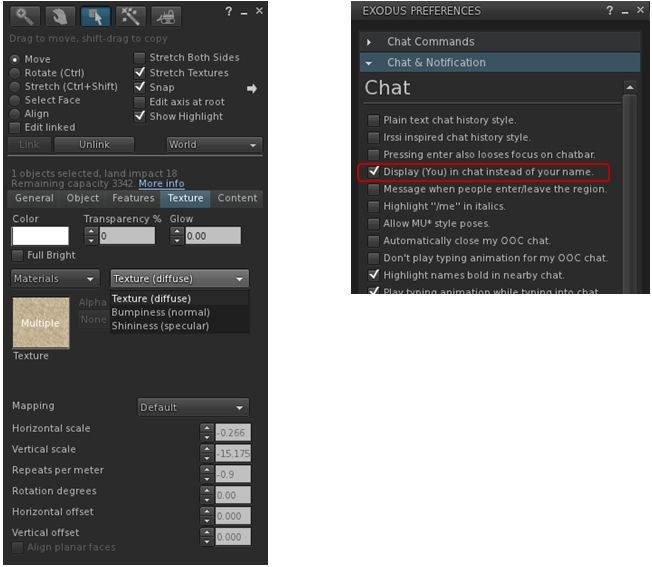
Visual changes to the viewer include the additional texture map options for materials, and an option in the Exodus Preferences floater to enable / disable the replacing of your avatar name with “you” in your chat.
Exodus 13.09.21.1 includes materials processing support (l) and an option to replace your avatar’s name with “you” in your chat window
The installer weighs-in at 35 MB, and installation was for me, as usual, smooth and without incident, including the required Windows extras. One point to note that this release see the Windows installation move from “ExodusViewerBeta” to “ExodusViewer” – so if you have a previous version installed, it will not be overwritten, but can be removed independently of this viewer (just use the uninstaller within the older version’s installation folder). This change is a part of Exodus adopting the Lab’s version update mechanism, becoming the second v3 viewer to do so alongside Kokua.
The release notes give a rather false impression of the amount of work which has gone into the update, but for those who wish to check on what has been included, the viewer’s commit history provides a complete breakdown.
Overall a nice update which brings two versions of the viewer back up to speed. The release notes indicate that this version “will not contain an OS X release”, so I assume Mac users will have to wait for a future release to get back on a par with their fellow Windows and Linux users.
CtrlAltStudio is a relatively new viewer to appear for use with both Second Life and OpenSim. The work of David Rowe, it is based on Firestorm, and the project is revisiting the use of stereoscopic 3D in the viewer, building on the release of the NVIDIA 314.07 video driver. More recently, David has also been working at a first pass at Oculus Rift integration ahead of LL’s own work with the headset.
Version 1.0.0.34218: Stereoscopic 3D View
A proof of concept image with CtrlAltStudio (image: David Rowe)
After various proof-of-concept and beta iterations, the 3D-capable version of CtrlAltStudio appeared on July 27th, 2013.
Version 1.0.0.34218 of the viewer (release notes) uses OpenGL quad-buffered stereoscopic 3D, and requires NVIDIA graphics drivers with 3D Vision support (314.07 or later). It also requires monitors set to 120Hz, and for the viewer to be running in full screen mode. It should work with GeForce GTS250 or better, NVIDIA Quadro cards, AMD Radeon HD 6000 or better and FireGL V7600 or better with recent drivers.
To control the 3D capabilities, David has added an additional Display Output tab Preferences > Graphics, and an additional toolbar button, labelled 3D, which toggles the stereo view on / off.
Sadly, I don’t have the glasses to test the viewer itself, so will have to leave that to others to report on how things look.
Version 1.1.0.34244: Initial Oculus Rift Support
Second Life in Oculus Rift via CtrlAltStudio (image; David Rowe) – click to enlarge
On August 25th, David release version 1.1.0.34244 Alpha with initial Oculus Rift support (release notes). This is well ahead of the Lab’s own implementation of support for the headset, and people shouldn’t expect it to be in any way a complete integration of Rift support. As David comments on the blog post announcing the release:
If you want to stick your Rift-kitted head into Second Life or OpenSim and have a look around, well now you can. I’ve added some basic Oculus Rift support to CtrlAltStudio Viewer 1.1.0.34244 Alpha: you can look around and move about but there is no UI. Full Rift support including UI will come when Linden Lab release their viewer with Rift support in the not too distant future. But in the meantime you can now at least enjoy the sights of your favourite virtual world locations.
Options for Oculus Rift have been added to the Display Output tab in Preferences > Graphics, directly below those for the 3D stereo controls.
The Display Output tab of Preferences > Graphics, showing the stereoscopic and Oculus Rift options
To use the headset with the viewer, David recommends that you first sit down, then get to where you want to be before you don the headset. Once there, wear the headset and toggle “Riftlook” (using the 3D toolbar button or CTRL-ALT-3) to look around and use the arrow / WASD keys to move, remembering that “forward” is in the direction in which the Rift is pointing when “Rfitlook” is enabled.
So if you have the Oculus Rift SDK, why not download CtrlAltStudio and give it a go. Just do remember, the viewer is still Alpha, and subject to limitations, possible odd behaviour.
With Server-side Baking / Appearance due to be enabled on the LeTigre Release Candidate Channel on Wednesday July 10th (from which it will gradually roll across the grid), the Exodus team have issued a new version of the popular Exodus viewer. Classified a beta release, the new viewer update has the version number 13.7.9.1, and includes the latest code updates from the Lab.
This means that with this release, Exodus is:
Server-side Baking / Appearance ready
Includes the Lab’s Communications Hub User Interface (CHUI)
However, the release:
Does not include materials processing support
RemovesRLVa support.
CHUI and SSB/A
VHUI now a part of the Exodus viewer
There is not actually much to report here per se, other than both work entirely as expected. CHUI sees the LL integrated chat / IM conversations floater working in Exodus.
Simlarly, SSB/A works exactly as expected on SSB/A-enabled regions, with other avatars rendering correctly in Exodus, and your own avatar rendering correctly to others.
Exodus SSB/A: (l) my avatar on Exodus and my CTA on the SL viewer – both render correctly in Exodus on the Aditi SSB/A test regions. (r) The same agin, but this time my avatar (foreground) on Exodus, as rendering in the SSB/A-capable SL viewer.
That both SSB/A and CHUI do work flawlessly tends to hide the amount of work the Exodus team have put-in getting both ready to go prior to SSB/A being enabled server-side.
Why No Materials and RLVa?
Materials
Both the integration of CHUI and SSB/A capabilities into a v3-based viewer are very large amounts of work (CHUI has something like over 1200 change sets of its own). They therefore require time and effort to implement – and have likely been keeping the Exodus team more than a little busy (on top of some of them being actively engaged in developing the materials capabilities in SL as well as working on other items such as the Mac Cocoa project).
There’s also the fact that while materials doesn’t use CHUI itself, both the materials code and the CHUI code touch on other areas of the viewer code. Therefore, it makes sense for the Exodus team to focus on implementing CHUI first and then merging and cleaning the materials changes sets (which is exactly the order in which the Lab did things), rather than racing to implement materials, only to find those updates impacted at a later date by required CHUI updates.
So for all those hoping to see materials in Exodus – it will doubtless be coming, you’ll just need to wait a little longer.
RLVa Removal
The blog post for the release explains the reasoning behind the removal of RLVa support from Exodus thus:
By its nature and by necessity, RLVa is an extremely invasive patch. We do not have the resources to maintain this code, and it is the primary reason for our lack of updates recently. We hope that this removal enables us to produce more frequent updates going forward and apologise for the inconvenience.
While the loss of RLVa is perhaps to be regretted, how much it is likely to be missed obviously comes down to the number of Exodus users who make use of it, obviously – and it is worth pointing out that RLVa was something of a late arrival to Exodus in the first place, so it may not be that greatly missed.
Other Updates
This release also sees Exodus:
Using Cocoa instead of Carbon on Mac computers
Gain full screen support on Lion
Fain Retina support for the Retina MacBook Pros.
Feedback
This is not an in-depth test of the latest Exodus beta, but a quick spin around the Aditi block. Everything works, as notes, as expected, and the rendering enhancement which have been part and parcel of Exodus for a long time certainly make their presence felt even in a default rough & ready snapshot such as the one grabbed above for the SSB/A comparison.
I didn’t do any performance tests this time around, as I was on Aditi – I’ll save that for another time :). That said, I’ve always found Exodus to be a solid performer on my current hardware, where it has tended to be my “reserve” viewer (along with Dolphin).
This is a very tidy and timely update to Exodus which brings it back to a par with other popular v3 viewers, and perhaps even a little ahead with the Cocoa support. Kudos to the team!







 Inara Pey: Living in a Modemworld