With Server-side Baking / Appearance starting to be enabled on the grid, the only two maintained viewers not to be SSB/A enabled are Dolphin and Imprudence.
I recently covered the state-of-play with Imprudence, and the fact that the team plan to ramp-up the viewer to support all of the new SL capabilities and viewer changes, including CHUI, materials and SSB/A, but it is liable to be some time before they actually get there.
Now Lance Corrimal, the man behind Dolphin, has provided an update on the status of that viewer. The main part of his blog post reads:
I’m sure there are one or two people wondering what is going on with the Dolphin Viewer lately.
To put it simply, my life has been quite hectic the last few months, and it still is. I have a new job that demands a lot of my time and attention. I’ve moved to a different province because of the job, and when I am actually home (the new job involves a lot of travelling), I’m just too damned tired to spend time on working on the viewer.
That being said, there will be a new version, that will have all the new shinies from the Lab. The CHUI interface, SSA, Materials, you name it.
Just … please do not ask me when. “When it is finished” is all I can say right now.
So – SSB/A and more will all be coming to Dolphin – soon. Just give Lance a little room to breathe as the dust of a busy real life settles around him.
He also notes that Dolphin users seeing the advisory warning users of a mandatory viewer update which is displayed on the splash should be aware that clicking on the link will download the official SL viewer, not an updated version of Dolphin.
The splash screen advisory comes from LL (along with the rest of the splash screen), and will download the official viewer, not an updated version of Dolphin
Lance Corrimal released Dolphin Viewer 3.2.24.24816 on November 1st.
The release comprises a small number of updates, of which perhaps the most significant is the inclusion of the revised Mini-map first seen in Catznip R7.
For the most part, I have to say that I’ve never really seen the point of the Mini-map. Certainly, it has its various uses at times – role-play, combat, etc., but for me, the big let-down with it has been the map itself, impaired by an exceptionally weak background texture and god-awful zooming.
Catznip R7 revised all this, as I recently reviewed, completely overhauling the Mini-map and making it an exceptionally useful tool – and one I have been hoping would be adopted elsewhere (such as the code being contributed to LL).
Dolphin now includes the revised Mini-map in this release, and to mark its arrival, Lance has called the release his “Sailor’s Mini-map Mark 2”. It’s well-named, as the new Mini-map is a complete godsend for those into sailing and flying – and will probably be really handy for those who engage in cross-region road races.
The code includes all of Kitty’s refinements and updates, and really does make flying and sailing a joy without needing to necessarily clutter-up the screen with a lot of HUDs and having to waste space with the World Map to confirm your overall location.
Red Alert: using the updated mini-map to avoid parcels with object entry turned off
Not only does it how you your overall direction, it displays upcoming region boundaries, allowing you to make adjustments to course and speed which may help smooth the crossing (very handy in avoiding the risk of trying to make the diagonal corner-crossing between regions, which so often finishes rather badly (at least for me).
The revised Mini-map also helps avoid those pesky parcels where object entry has been turned off, showing them in red in the display, allowing sailors and aviators to navigate around them without suddenly finding themselves bouncing up against something or having their craft vanish from under them.
Other Updates in the Release:
Reset graphics preferences to default button in status panel, next to draw distance slider, labeled “GReset”.
Z offset reset button relabeled to “Z” to get room for GReset button.
“Refresh texture” also refreshes sculpt maps (from Firestorm).
“Restore inworld” now also sets the proper land group if you have “Rez with land group” switched on and are a member of that group.
The new reset graphics button (GReset) and revised Z-offset buttons in Dolphin’s menu bar
The Last Dolphin Release Supporting OpenSim
Release 3.2.24.24816 marks the end of line for OpenSim support within the Dolphin Viewer; it will be removed from future releases. That Lance would no longer be supporting OpenSim was made in a Dolphin blog announcement back in August 2012. The reason for this is the new Havok sub-licence arrangement Linden Lab have entered into, and Lance feeling he is unable to support two flavours of Dolphin for SL and OpenSim access on his own – which is a fair and reasonable decision on his part.
Should anyone wish to continue development of Dolphin to specifically support OpenSim access, Lance has created a clone of the original Dolphin repository for anyone wishing to fork the viewer, and he is also leaving the 3.3.19 release installers available for download from the Dolphin website.
Performance
This release of Dolphin sees a slight upturn in FPS rates over recent viewer reviews for me, if again using my rough-and-ride technique. With my usual test defaults (see the Review Systems panel on the right of this blog’s home page), I subjected Dolphin on my Linden Home region with three other residents (including my Alt in the same parcel) with the following results:
Deferred off:
Ground: 38-39 fps
370 metres: 43-44 fps
2875 metres: 55-56 fps
Deferred on + lighting set to Sun/Moon + Projectors; ambient occlusion on, full reflections:
Ground: 11 fps
370 metres:15 fps
2875 metres: 17 fps
I did find that running in Deferred with both lighting & shadows and ambient occlusion active within my Linden Home parcel did result is a significant drop in fps (to 5-6). A quick test with Catznip produced the same result.
Lance Corrimal is keeping up a rapid series of releases to his Dolphin Viewer, averaging around one release a week of late. Most have contained nips and tucks or have been driven by SL requirements such as Direct Delivery. However, at the beginning of March he rolled out the “Fujiyama edition” (version 3.2.9.23177), aimed specifically at SL photographers.
With his latest release, 3.3.5.23763, issued on Saturday April 28th and code-named “Fellini”, Lance adds functionality to his Viewer that is specifically aimed at machinimatographers – the code-name clearly being a reference to the late Italian film director Federico Fellini
The functionality in question comes in the form of an adaptation of Marx Catteneo’s machinima floater. In this the release is somewhat serendipitous for me, as I also linked to one of Marx Catteno’s marvellous videos on the 28th to highlight the architecture of this year’s Fantasy Faire.
In integrating the floater into Dolphin, Lance has modified it slightly so that information is tabbed for easier reference, especially when used on smaller screens, and while it may be aimed at the machinimatographer, it contains a lot of options that SL photographers are liable to find very useful.
The floater can be accessed in one of two ways:
via WORLD->MACHINIMA TOOLS in the menus
via a dedicated toolbar button called MACHINIMA TOOLS, which has a nice little movie camera icon (note that the button is not active by default, but must be dragged out of the Button Toolbox).
Using either option opens a compact panel, sized to display on laptop screen as well as larger monitors.
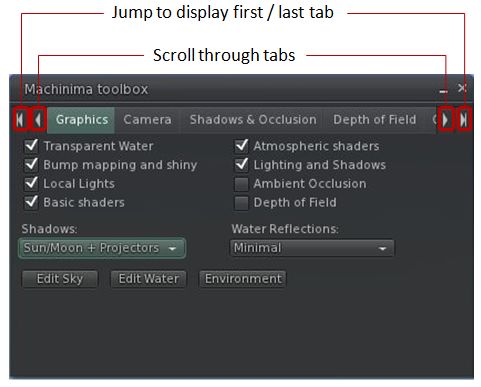
Machinima Toolbox with Graphic tab open
The toolbox essentially provides fast, single-point-of-access to a range of Preferences options as well as to a number of other panels and functions, allowing the machinimatographer / photographer to quickly and easily carry out a range of tasks such as enabling Windlight presets for the sky and / or water, adjusting their camera / flycam, enabling / disabling lighting and shadows, adding / adjusting depth-of-field, adjusting shadow and occlusion settings and much more besides.
Each of the tabs in the label is clearly laid out, and some benefit from having certain functions disabled (grayed out) until such time as their controlling option is enabled. In the Graphics tab, for example, the drop-down for selecting the required lighting types (None, Sun/Moon, Sun/Moon+Projectors), is disabled until the LIGHTING AND SHADOWS option is checked.
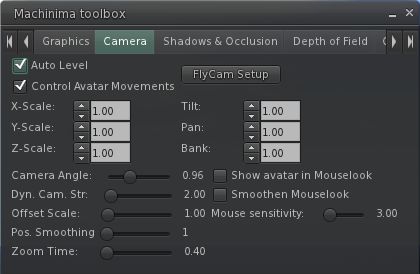
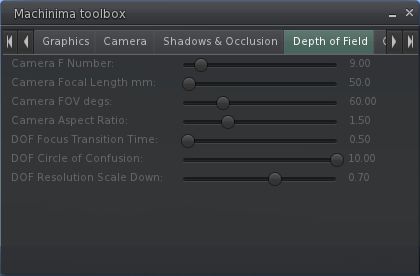
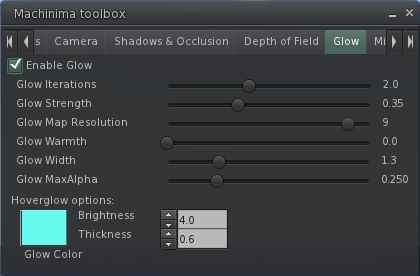
Rather than waste words describing each of the tab, here is a set of screen captures for the remaining tabs in the floater:
Camera settingsShadows & OcclusionDepth of FieldGlow“Miscellaneous” – currently derendering options
The derendering options are liable to prove useful for eliminating bystander avatars who are having a detrimental impact on camera movements, etc., when trying to shoot a video, while the “Miscellaneous” tab as a whole leaves room for further options to be added, should they be required / possibly requested.
Other Updates
As well as the machinima options, the blog post for the release notes the following updates are also included:
Getting a worn attachment into edit by right-clicking it in your inventory and selecting “Edit”-
Opening a Landmark on the map from your inventory, similar to what you can do from within the Places window.
Performance
I’ve not been able to thoroughly test the release in my usual manner due to time constraints elsewhere. However, in the tests I did perform, using my home sim as usual (3 others present in the sim) and both PC and Viewer set to my usual defaults (see the panel on the right of this blog’s home page), I found this release of Dolphin performed as well as other recent Viewer releases from the majority of 3.2-based TPVs. Running with deferred rendering off (no shadows / lighting enabled), the Viewer comfortably ran with an FPS in the mid-30s at 390m, with this increasing to the low 50s at altitude on my build platform (2850m). At ground level, the rate dropped very slightly to average at around 30-21 FPS.
Enabling deferred rendering and setting the lighting option to Sun/Moon+Projectors saw my frame rates fall to around 19-21 FPS at 390m, and to the mid-teens when at ground level. This was again pretty much in keeping with recent releases from the likes of SL and Firestorm.
Overall, an interesting new addition to Dolphin which should prove to be of interest to those interested in both video and photography.
Update 16th March: features from this Viewer have been attributed as coming from NACL, which is apparently incorrect. As information is taken at source, I’ve now removed references from the article below. It is also reported that the Sound Explorer and Asset Blacklist may have licencing issues – see Comments.
Lance Corrimal is working steadily on Dolphin, with roughly a release every couple of weeks of late, providing plenty of new features and tweaks to the V3.2-based Viewer.
The latest release, 3.2.10.23198 offers potentially improved graphics handling for older / lower-specification graphics systems (with the exception of ATi systems) and provides blacklisting capabilities for those who are repeatedly troubled by unwanted sights / sounds or need to find an elusive sound.
Texture Compression
For graphics cards with 512Mb or less of memory, Dolphin will have texture compression enabled by default. This should help prevent such systems crashing when running SL. The option can be manually enabled / disabled via PREFERENCES->GRAPHICS->HARDWARE SETTINGS.
Lance advises that users with ATi graphics cards should avoid using the option, and keep it switched off.
Asset Blacklisting and Sound Explorer
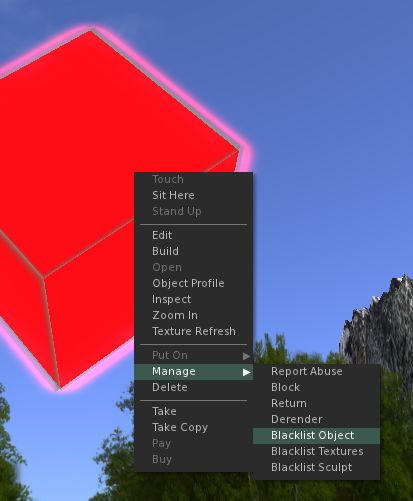
The Asset Blacklist is a means of removing unwanted objects, textures or sculpt maps from your world-view. Sounds can also be blacklisted via the Sound Explorer (described below).
The Asset Blacklist operates in a similar manner to derendering an item, but with the advantages that a) items that are blacklisted remain so until de-listed, so that if you teleport away from a location and return, you do not need to de-render them again; b) the asset blacklist can be shared by accounts using the same Viewer; c) you can even share lists with other users – hand if you are running a Group or similar and your base of operations is blighted in some way.
Problems with things regularly ruining your personal world-view?Add them to your Asset BlacklistAnd enjoy the view
Items are added to the list by asset type – object, texture, sculpt map – and recorded by UUID to prevent a simple renaming of the object causing it to reappear.
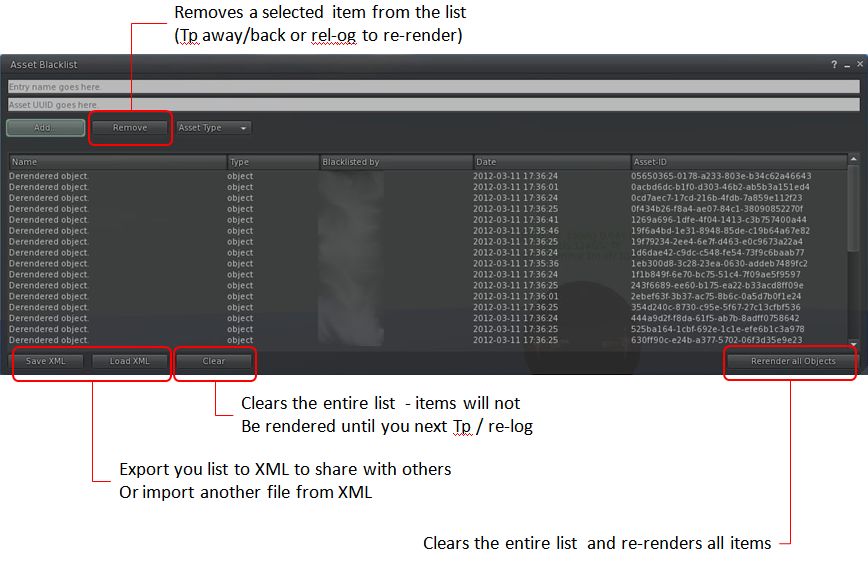
Blacklisted items are managed via the Asset Blacklist floater (WORLD->ASSET BLACKLIST).
The Asset Blacklist floater and key buttons
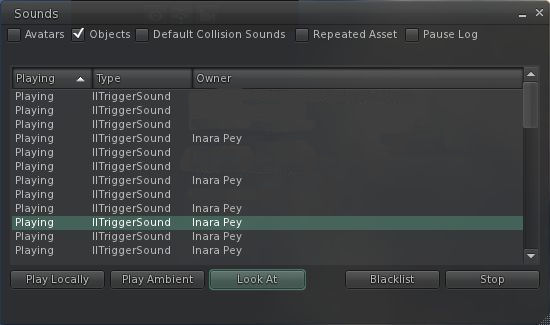
The Sound Explorer allows you to list all sound sources operating around you. It is accessed via WORLD->SOUND EXPLORER. This enables you to filter the available sounds by type, listen to them individually, identify their location and, if required, add them to your Asset Blacklist.
Sound Explorer: locate, listen-to or even blacklist sounds in your location by type
Both of these make extremely useful additions to the Viewer, and will likely prove very useful for those who routinely visit places where there may be issues with items or sounds impacting personal enjoyment.
Other Nips and Tucks
Anti-spam also arrives in Dolphin with this release (ME->PREFERENCES->DOLPHIN 3-> ANTI-SPAM
Help has been extensively overhauled within this release of Dolphin so that all help buttons in the Viewer now redirect to the Dolphin Viewer forum
The “Items incoming too fast” pop-up behaviour has been changed so that it is no longer necessary to click OK in order to remove the message – it will now fade-out on its own (something I hope all other TPVs will adopt; the message is annoying in its default behaviour)
Anti-aliasing is no longer off by default as it doesn’t impact overall performance so much as it once did
Fly-after-teleport has been fixed within the Viewer so that if you were flying prior to a teleport, you’ll still be flying on arrival
There have been some performance tweaks.
Opinion
This release has some nice additions for those that suffer visual / audio blights around their home space in-world. While the “performance tweaks” aren’t specified in the Dolphin blog, while running this release I did obtain a very small improvement of my average fps rates (around 3-4fps), with this release averaging around 41fps at 390 metres, and 23fps on the ground compared with the last release of Dolphin I actively tried (2.3.8.23163). With shadows enabled, this drops-off to around 12fps at 390 metres and 10fps on the ground (all checks with 3 other avatars on-sim)..
I also recently used Dolphin on Kitely, where it also worked flawlessly, making it my 2nd choice of Viewer for visiting other VWs, after Exodus.
After a promising start, and with some great updates in release 3.2.6.7 (mesh deformer, Firestorm build floater, visuals and other elements from Exodus, etc.), Milkshake’s “public” development has ceased – which is a shame however you look at it.
I was in the middle of a review of the latest updates in 3.2.6.7, which included updates to Preferences as well as the inclusion of new code when word came in.I’d actually been discussing an issue with the release with Cinder when word came that, “Unfortunately, there will be no more public releases of milkshake, sad to say.”
I’m not privy to the exact reasons work has ceased on the public side of Milkshake and to pry into things to any great depth would not be fair on Cinder – she deserves her privacy as much as anyone else. But maintaining a Viewer *is* hard work – there are matters from getting time to develop / merge code options through to handling support and so on, all of which can take their toll. Cinder already has a busy in-world life, and it is clear that support issues were concerning her when the Milkshake User Support Policy was published. One cannot blame her for this; I seriously doubt that – even assuming I had the talent for Viewer coding – I’d want to pass over a large part of my in-world time to all the ancillary elements that go into maintaining a popular Viewer – not without a lot of help.
That said, there is no doubt I will miss the public Milkshake. It was shaping-up to be a handy Viewer with plenty of core features from other TPVs that strongly distinguished it from its core base of LL / Catznip. However, a little birdie tells me that it is not all sad news; the chances are, we may be seeing Cinder’s work adding flavour to Viewers elsewhere in the near future.
It’s getting to be hard work keeping up with Viewer releases!
Lance Corrimal has issued an update to Dolphin – 3.2.3 (22899), which he’s calling (a little tongue-in-cheek) the “Fellowship” edition in that, in quoting Tolkien, the development of this release is a “Tale that grew in the telling”!
Based on the latest release of RLV from Marine Kelley, and the official “Shining” 3.2.6 release from LL, the update brings Dolphin 3 bang up-to-date with the latest OpenGL fixes from the lab.
While conditions were not absolutely identical to my earlier “tests”, I made my usual Viewer UI and settings tweaks, and took the Viewer for a spin on my (now “standard”) “test” sims. The results were as follows:
High graphics, no deferred: averaged 46fps at 370m and 38fps at 22m
High with deferred ON: 21fps at 370m and 17fps at 22m
High with deferred and shadows ON (Sun + Moon + projectors): 12fps at both heights
On my home sim, and on my own, frame rates bounced around the 58-61fps mark while up at the house.
Updates
The core updates to the Viewer comprise:
Options to auto-accept / auto-open textures, photos and notecards (both via PREFERENCES->DOLPHIN VIEWER 3->INTERFACE)
Empty system folders (e.g. Objects, Notecards, etc) are hidden from your inventory list
The additional pop-up informing you that a landmark has been added to a folder can be suppressed (from Firestorm)
Firestorm’s inventory filtering options have been implemented in Dolphin, allowing inventory to be filtered by description, UUID, creator, name, etc; or can be filtered by combinations of words separated by “+”(e.g. Joe+Smith) (from Firestorm)
Debug level (verbosity) of log files can be configured (STORM-1790)
Default debug level has been changed to WARNING to make the logs less chatty
The ability to hide empty system folders is rather novel, and works automatically – once a system folder is empty, it is hidden (see right, and note there is no Landmarks or Notecards folder).
If you end up with an empty Body Parts, Clothing, Gestures, Notecards or Scripts folder, you can “unhide” it by creating a new item from the + button on at the bottom of the inventory panel – creating a new item will automatically un-hide the required system folder.
Similarly, creating a Landmark (or left-clicking on a Landmark in a notecard) will automatically unhide the Landmark folder, and so on.
Those who don’t use the system folders may find this capability useful to have and cuts down on the clutter in their inventory.
Selecting additional inventory search filters
In adopting the new Firestorm inventory filters, Dolphin appears to have adopted the accompanying issue that searching on creator, UUID, etc., isn’t particularly intuitive for the first-timer. To search by a specific additional criteria – UUID, creator, etc., – you must click on the gear button at the bottom of the Inventory panel and select the required option in SEARCH BY before you commence a search. It would be nice to see all the filters grouped into a single location in the future.
Lance notes a few other issues with the Viewer – so again, if you experience them, please don’t report them, as he’s liable to be already trying to sort things out where he can, or awaiting a fix from LL. He lists the known issues as:
“Textures with transparency have a grey background instead of the usual checkerboard pattern in any texture preview UI element (e.g. the preview window when you upload a texture, or when you open a texture from your inventory). Applied to prims, the textures will be fine. People, use the temp upload feature and check your new textures on a prim if you need to test something with transparency. This problem exists in all viewers that are based on the latest viewer-development code, even in the official Second Life viewer 3.2.4 from Linden Lab. There is already a JIRA for it: https://jira.secondlife.com/browse/VWR-28037. Please go and watch and vote.
“The alignment handles in the Build Tool all point upwards instead of inwards. The alignment tool still works the same way, it just looks funky.
“The automatic opening of incoming notecards and pictures is highly dependent on lag.
“There is still no Flickr uploader.”
Rendering
This release puts Dolphin back up in the list of “fast fps” Viewers for my system, and rendering on the whole is good, and I’m now getting a similar “pop-out” for sculpts already loaded in local cache (i.e. my furniture at home) on logging-in / teleporting home I get with some of the other recent Viewer releases. Shadows render well, although I’m still taking a bit of an additional performance hit with shadows and occlusion both active.
Overall, a nice set of updates that should please Dolphin regulars.
 With Server-side Baking / Appearance starting to be enabled on the grid, the only two maintained viewers not to be SSB/A enabled are Dolphin and Imprudence.









 Inara Pey: Living in a Modemworld