SL projects updates Week 16 (3): server, viewer, and Aditi summaries

Server Deployments week 16

  • On Tuesday April 16th, the SLS Main channel received Monty Linden’s HTTP updates, which were deployed to BlueSteel and LeTigre in week 15, after having previously been on Magnum for testing – release notes
  • On Wednesday April 17th, the three Release Candidate channels (BlueSteel, LeTigre and Magnum) all received the same package after a planned deployment to BlueSteel and LeTigre had to be abandoned due to scheduling issues. The package deployed included the new server-side LSL Animation Override capabilities, including a fix for BUG-2164 wherein the new capabilities could conflict with built-in animation poses in chairs, etc., as discussed in my week 15 updates. The Magnum release are linked to for reference.

Following the SLS Main channel deployment there were a number of reports of significantly higher ping rates with regions being reported on the deployment thread, which prompted Monty Linden to comment, “There was a significant networking event today that has cleared.  Back to normal at this point…” Other than this, and reports of animation issues, which again may have been the result of server-side work, the deployments appear to have rolled-out smoothly and without significant issue.

SL Viewer Summary

Materials processing: the project viewer gained a further update on April 17th, with the deployment of release 3.5.1.274082, which includes bug fixes and some work on alpha masks. The bug fixes are hard to relate to public MATBUG JIRA items, as they all reference NORSPEC issues, which is LL’s internal materials JIRA reference. A further update to the project viewer is anticipated on either Friday 19th April or Monday, April 22nd.

Materials porject viewer: second update now available, third update to follow soon.
Materials project viewer: second update now available, third update to follow soon.

Server-side Baking / Appearance: speaking at the OpenDev meeting on Wednesday 17th April, Oz Linden indicated that SSB will have at least “one more spin” in the beta viewer before appearing in the SL release viewer. A further update was made to the SL development viewer (3.5.2.274273) on Thursday April 18th, so the beta update is liable to be appearing very shortly.

Further viewer updates: once SSB moves to the release viewer, it is likely that the FMODex update will move into the beta viewer; this should also include a fix for the issue with the Mac version of the viewer wherein it crashes whenever headphones are unplugged (and which, incidentally, is the most widely reported crash issue with the Firestorm viewer).

Aditi Issues

While Aditi has received attention recently in order to overcome logging-in and inventory issues, it still as a way to go before everything is “fixed”. Commenting on this at the Beta Server meeting on April 18th, Monty Linden commented, “[The] beta grid is going to get some attention in the login/inv area. But [I] don’t have a date. The problems are (mostly) understood.”

The password-change-to-update-your-Aditi-inventory might be changing as things are looked at and further updated / corrected. Commenting on this at the Beta Server meeting as well, Simon Linden said, “That trigger was done as a quick-and-easy way to stop having to ask a Linden to import your account.”

In discussing the asset system and inventories, Simon re-iterated that while there is a central asset system, it is really one very large storage system, and that, “The real magic isn’t the asset system, it’s your inventory database. Your inventory is what says which assets are yours.” It is syncing the inventory databases between Aditi and Agni which had become an issue, and also somewhat labour-intensive for LL but for the password change trigger.

Monty, with tongue firmly in cheek, suggested an alternative as to how the inventory / asset system works: “Inventory is recorded onto Post-ItTM notes and optically scanned at rez time.” Which, on reflection, is likely to confirm suspicions many have had!

Other Items in brief

Monty Linden
Monty Linden

HTTP Work

The next round of HTTP work is still being defined within the Lab. When asked what this might comprise, Monty replied, “Mesh download is going to get attention. It currently shotguns our services without really performing well.”

He went on, “Might do an experiment or two with pipelining. – but no promises, still setting priorities.”

It is the last remark which is important: things are still being decided in terms of further work and priorities where HTTP work is concerned. This was further underlined again by Monty when he indicated that “phase 3” of the work (the immediate follow-on to the last block of work) may well be “all viewer-side”, given that the initial work (texture fetching) was primarily viewer-side work and the last batch of work was exclusively server-side. So this appears to be a case of wait and see which route he and the Lab opt to take.

Advanced Creation Tools Permissions

July saw the launch of the first phase of the Advanced Creation Tools, also referred to as experience tools. Following problems with an initial deployment of the tools in June, which resulted them being exploited as a means of griefing, the “first phase” of the release saw the tools implemented with existing permissions system in place, with the intention of updating the permissions system to allow the tools to be more fully used “in the future”. Work on the new permissions system was stalled for a number of months, but has recently been getting more attention and work. The current situation appears to be that the permissions system may well be ready, but those working on the project are still, “sorting out how and when that’s going to be made available.”

Diagonal Region Rendering Issues

While fixes have been deployed to assist with issues with regions sometimes taking a long time to correctly handshake and cache with one another following a restart, this issue of regions which are diagonally opposite one another sometimes failing to render remains. Simon Linden had indicated that a potential fix for this issue was with QA as long ago as week 8; however it appears that the work may have hit problems or actually be stalled. In replying to a comment on the forum deployment thread relating to the issue, Maestro Linden replied with a simple, “Correct, that bug has not been fixed”.
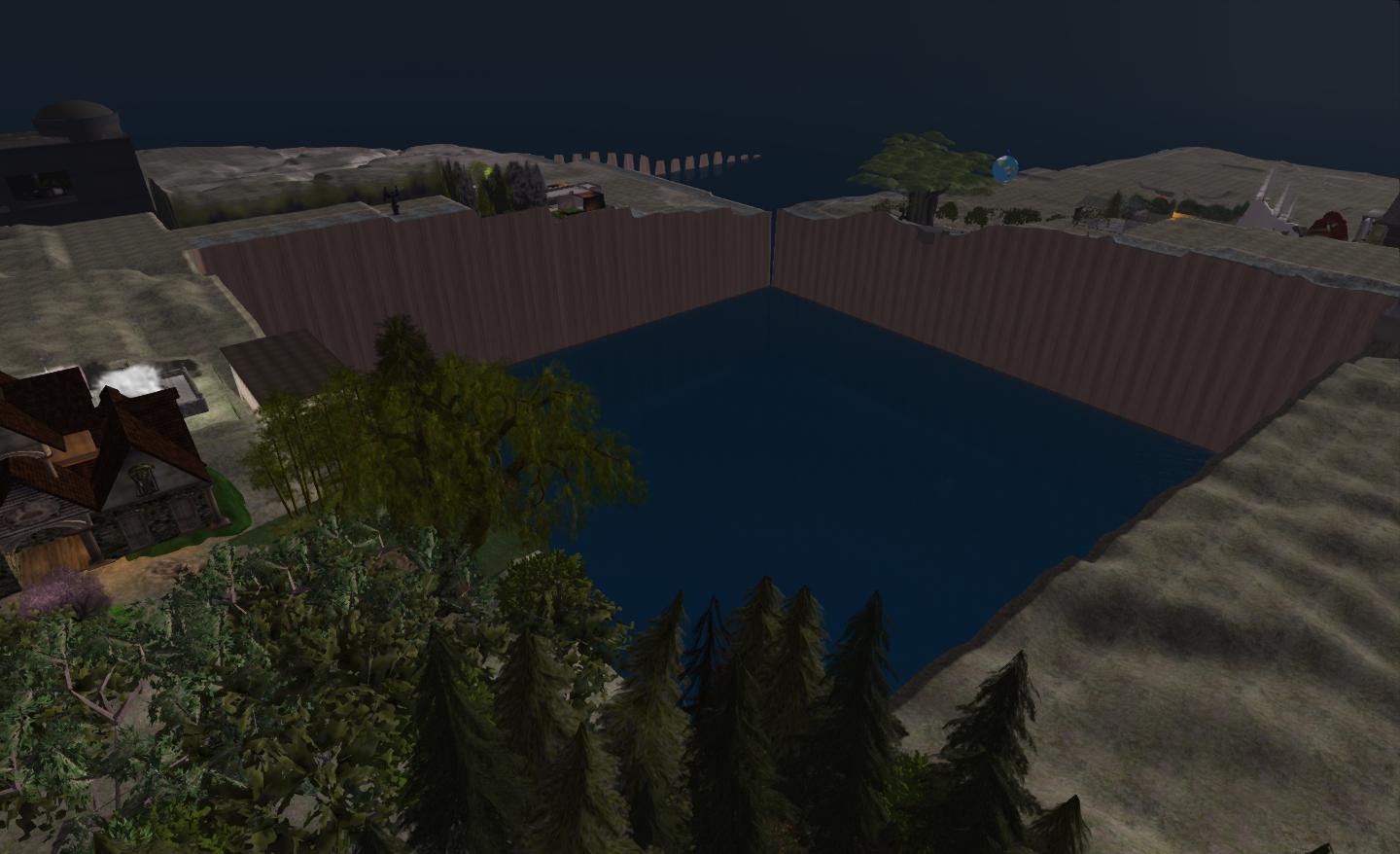
No fix yet; status unclear


SL projects update 16 (2): Server releases; region crossings

Second Life Server (Main) Channel Week 16 Deployment

On Tuesday April 16th, the SLS Main channel received Monty Linden’s HTTP updates, which were deployed to BlueSteel and LeTigre in week 15, after having previously been on Magnum for testing.  These updates can be briefly summarised as:

  • More complete and more correct headers on texture and mesh fetches – these should ensure the viewer is better able to handle objects as they are downloaded to it
  • Keepalive connections for some HTTP-based services

For more details on the project, please refer to both the deployment release notes and to my overview of Monty’s work.

 Second Life Release Candidate Week 16 Deployment

On Wednesday 17th April, all three RC channels should receive the same update package. This comprises the server-side LSL Animiation Override capabilities, this time complete with a fix for BUG 2164, wherein the new capabilities could conflict with built-in animation poses in chairs, etc., as discussed in my week 15 updates.  This deployment additionally includes the slight region performance improvement when there are no pathfinding characters present. Release notes are available

Originally, a separate package had been in preparation for deployment to BlueSteel  / LeTigre, but this has had to be postponed due to “last minute scheduling issues”, according to Simon Linden when speaking at the Simulator User Group meeting on Tuesday April 16th. While attempts were apparently being made to get an alternative project into RC, it was “down to the wire to complete testing” at the time of the Simulator UG meeting, and an announcement confirming BlueSteel and LeTigre would receive the same package as Magnum was posted to the deployment thread not long after the meeting finished.

Object Return from Region Edge

A further update which should reach all three RC channels on Wednesday April 17th is the fix for https://jira.secondlife.com/browse/BUG-313 (estate tools do not return objects between 255 and 256m ) / https://jira.secondlife.com/browse/BUG-2021 (Auto-return not affecting objects at 256m), which see objects right on the region edge sometimes slipping into a “limbo” which prevented them from being returned either under Auto-return or when using estate tools.

There is some concern that the fix, once deployed, may not correct all issues. However, until it is deployed, there’s no actual way of knowing – so further updates may well be following.

Region Crossings

Since the deployment of the fix for BUG-1814 making region crossings in vehicles has been seen as noticeably better by many people. However, some have noted problems which appeared to be linked to crossings between regions running on different simulator versions, and this was discussed at length at a recent Simulator User Group meeting.

Kitto Flora suggested the problem was not so much with different simulator versions, but due to network traffic, commenting, “It’s directly related to your Net traffic rate when you cross. If its 500k – fail maybe 20% of time … If its 50k it rarely fails.”

While I have been flying extensively over the past week, particularly over Blake Sea and the south-lying regions and over parts of Nautilus, I’ve not been monitoring net traffic during my flights – although I do reduce Draw Distance when flying and tend to shunt graphics quality down to medium-low – so cannot comment on Kitto’s observations. I can however state that when I did encounter problems beyond the expected temporary loss-of-control  / rubber-banding – such as my camera skewing off to once side of my aircraft as shown below – it always coincided with a move between one simulator version and another, and never between regions on the same simulator version. So I guess more test and observations are due on my part after this week’s deployments!

Flight testing region crossings: when moving between regions running on different simulator versions, I invariably encountered greater issues (such as the camera being shunt, as shown above) than when crossing between regions on the same simulator (note the chat console reports, lower left and notifications. top right).

The discussion on region crossings raised additional questions. One of these was whether or not the speed one crosses between regions made any difference. Simon Linden replied:

Your speed in-world shouldn’t have any effect on actually making it or not, but faster crossings will show the errors in predicting where objects will be more. Such as the rubber band effect when crossing … your viewer sees you going a certain speed, and keeps moving you that way, while you hit the crossing, get some lag as the data is transferred to the new region, and you’re stuck into the world, then sling-shot back to the new position. 

Questions / comments were also raised around the subject of region crossings and idle regions: specifically whether crossing into an idle region was subject to additional delay as the region “woke up” and that some have experienced issues with regions which are apparently idling being unresponsive to new child avies, and people “bounce” off the border prior to being able to cross. Responding to both the question and the comments, Simon said:

You actually shouldn’t ever be able to do that. It won’t be idling if you can see into it … Also, remember idle regions are not dead, they [are] just are running at a slower frame rate, just like loaded down regions do.

Missing Prims

There are currently no updates on the “missing prims” situation which has been previously reported in this blog, and which has grown markedly more apparent since the last set of interest list updates.

Andrew Linden was not at the Simulator User Group meeting on Tuesday April 16th to discuss either, but is almost certain to be asked at the Beta Server meeting on Thursday 18th April, if he attends.

Related Links

SL projects update week 16 (1): SL viewer, materials, SSB and other bits

SL Viewer Updates

There’s no movement on the release viewer, and likely won’t be until Server-side Baking moves to it, having finally arrived in the Beta viewer on April 12th (see below). The Development viewer was also updated on April 12th, with the release of version 3.5.2.273873, which includes both SSB and CHUI updates.

Materials Project

An update to the materials processing project viewer was released on Friday April 12th – 3.5.1.273855 – with a series of bug fixes included in it. There are further updates on the way, with the next release due around the middle of week 16, which will have further bug fixes and, hopefully, some Alpha mode updates as well. Commenting on the latter at the Content Creation User Group on Monday April 15th, Geenz Spad said, “Actually just got normal maps working on alpha blended objects, and trying to get everything else working on them as well.”

One fix currently pending is that for MATBUG-16, Changing one material, or setting causes another material texture to be lost. This is an issue which can happen as a result of several factors. For example, setting a normal or specular map for one face of an object can result in maps already applied to other faces of an object either being removed or replaced with the most recently added map. The same issue can occur when applying a setting such as glossiness to one face of an object using materials.

MATBUG-16 demonstrated using 2 deiffuse maps and their associated normal maps. (l) the prim with a diffuse map added to one face & with the "stone" normal map still showing for all faces. (r) the normal map add
MATBUG-16 demonstrated using 2 diffuse maps and their associated normal maps. A prim previously set with a stone diffuse map and associated normal map has a green diffuse map applied to one face – the normal map is unaffected (l). However, when the normal map is updated, it changes for the entire prim (r)

This problem doesn’t happen every time mixed materials elements are used on object faces, but can occur when adding multiple materials elements to an object in quick succession. “There are a couple of problems there,” Oz Linden said while discussing the problem at the Open-source Dev meeting on Monday, April 15th. “The updates to the server are happening faster than it will allow, which is one problem. The other is that the updates are not applied locally as smoothly as they should be.”

Tonya Souther, who re-worked the Build floater for materials processing added, “Yeah, that bug has been driving me batty ever since I first did the UI. And I think that’s due to the design of the system…the UI has to ask the server for the material separately, and apply the values retrieved from it to the UI components when they arrive. That ‘s the only way that the UI won’t get out of sync with the actual values stored on the server … I just need to find a way to make the delay not apparent to the user and handle changes that come along in that period.”

For now, the answer seems to be that if you experience any issues with normal / specular maps vanishing or being replaced when using multiple maps / effects across different faces of an object, then allow a short pause between adding the various maps / effects so the viewer and server can keep pace with your work.

Elsewhere, Geenz Spad, one of the architects of the materials processing system, has started a new blog series on materials, Second Life Materials:  A Content Creator’s Guide. In the first part of the series, he answers the question, What’s a material? In the next installment, he promises to take a look at some of the tools which can be used to create normal maps.

Server-side Baking

The viewer Server-side Baking /Appearance code reached the Beta viewer in week 15 with the release of 3.5.1.273869 on April 12th. The initial stats apparently show it is doing well, crash-wise, but the status of incoming bugs is currently unclear. However, it still looks as if the code is currently on course for around a two-week stint in the beta viewer prior to moving to the release viewer channel.

A key bug fix for the system has been SUN-57, which now allows multiple layer of clothing to be worn / swapped on regions which are not running the SSB server-side code (on Aditi), which removes a potential road block from server-side code deployment (remembering that for a time during the server-side deployment, updated viewers must support both the old and new avatar baking services).

The SUN-57 issue, as defined by Whirly Fizzle: left - Outfit A from her My Outfits folder replaces whatever she was previously wearing, and appears correct; centre - after a relog, she repalces Outfir A with Outfit B, and again, everything appears correct; right - she replaces Outfit B with Outfit A, but her skin fails to bake correctly, the head and legs showing the skin associated with Outfit A, the torso still showing the skin from Outfit B (shown naked for clarity) - images courtesy of Whirly Fizzle / JIRA SUN-57
The SUN-57 issue, as defined by Whirly Fizzle, which saw issues occurring in avatar baking using a viewer supporting the upcoming “new” SSB/A service and changing outfits on a region only supporting the current avatar baking process, which saw outfits and skins failing to update correctly following changes. Reportedly now fixed

There are still no definitive timescales for any Agni deployment for SSB/A. As previously reported in this blog, it is still unlikely that any major deployment operations will commence prior to the SSB cove reaching the release viewer.

Other Items

I recently blogged about Oculus Rift and  speculation as to whether it would see use in Second Life. On April 7th, Jon Brouchoud blogged on why SL would be a “killer app” for the headset – an article which has seen widespread reprinting / referral in SL / Opensim related blogs. While I have no particular opinion either way as to Oculus Rift / Second life (although how it will work with the SL UI does intrigue me), I have to admit the following video demonstrating Oculus Rift had me smiling from ear-to-ear. It’s not really related to Second Life, but it is well-worth watching.

SL project updates week 15 (2): Materials, AO capabilities and group bans

Server Deployments Week 15

  • As reported in the first part of this week’s update, there was no Main channel deployment on Tuesday April 9th, the result of issues arising with the previous week’s RC deployments, which LL wanted to fix rather than having them propagate across the grid
  • Magnum retained the same package as week 14 (Monty Linden’s next batch of HTTP updates) and a fix for a crash mode
  • Continuing issues in getting the anticipated updates for the BlueSteel and LeTigre deployment packages ready meant that on Wednesdays April 10th meant that these two channels received the same package as the Magnum RC channel.

The switch-out with the Magnum code being deployed to BlueSteel and LeTigre meant that those regions “lost” the new LSL Animation Override capabilities – existing scripts using the capabilities will still run, but new scripts using the functions cannot be compiled.

Materials Processing

Viewer Update and Documentation

Discussing the materials project at the Open-source Development meeting on Wednesday, April 10th, Oz Linden indicated that an updated version of the project viewer should be available shortly – possibly by the end of the week, as  “lots of fixes are accumulating”. In the meantime, a mixture of Linden Moles and volunteer users are working on materials-focused updates to go into the Good Building Practices guide to help other users get to grips with materials processing and optimising things for SL use. In the meantime, the Materials Data information on the SL wiki continues to be updated.

As pointed out by Mona Eberhardt in the comments relating to materials in this blog, Laverne Donat has produced a very tidy and short demonstration of materials in SL, which I’m including here.

Alphas, Transparency and Costs

Laverne also asked, via Plurk, if and how a specular map can have transparency with the materials processing, before going on to comment (via my blog) that, “After some testing, it seems that you can get specularity with diffuse maps with alpha masking, but not with diffuse maps with alpha blending. I don’t know what the intended behaviour is, but that’s how it works at present.”

This prompted Geenz Spad to reply, “The intended behavior (eventually) is that alpha blended objects will be able to support both normal mapping and specular mapping. Currently this is a work in progress, and due to its current state, it hasn’t been added to the viewer just yet.”

As Alpha Blending is currently the Alpha Mode which is unaffected by the materials / LI accounting situation which has been reported by Qie Niangao, I asked Geenz if Alpha Blending was liable to “trip over” into the LI accounting system, rather than being “grandfathered” (as currently appears to be the case). He further clarified the situation by replying, “Only if you use other material parameters (such as specular mapping, normal mapping, etc.). The only reason why we didn’t add support for shiny on all semi-transparent surfaces, is because it would break content.”

Future Development

In terms of future development, it is unlikely that anything will be happening soon, other than enhancements / fixes for what is currently in the project viewer. While there is a roadmap for future features and additions to the materials system, the Lab is wisely not commenting on plans and direction at this time. Rather, they prefer to see what the overall take-up with the new system is over time and how people start using it (which may in turn affect how and what the Lab decides to do with regards to a “materials round 2”). However, one thing which does appear to be clear is that there are no plans within the current roadmap to extend materials processing to include avatar skins and clothing layers.

AO Capabilities Update

New server-side AO capabilities: udpates delayed until week 16
New server-side AO capabilities: updates delayed until week 16

Although it did not get deployed in week 15 (but should see the light of day in week 16, commencing Monday, April 15th), the update to the new AO capabilities which should have reached BlueSteel and LeTigre is intended improve compatibility between the new animation override system and other scripted objects that animate avatars (such as poseballs). The update was developed as a result of Code Violet raising a JIRA (BUG-2164) pointing out that the new capabilities did not “play nicely” with things like sit animations in poseballs / furniture.

Maestro Linden, speaking at the Best Server meeting on Thursday, April 11th, described the situation thus:

If a user had a custom ‘sit’ animation set, the seat wouldn’t be able to stop the animation properly because if the seat called llGetAnimationOverride(“Sitting”), it would get an empty string unless the exact animation also happened to be in the seat’s inventory. Kelly has a nice solution to this problem, which is to make ‘llStopAnimation(“sit”)’ stop your custom animation, if you had overridden your sit animation. Conveniently, this change means that existing poseballs won’t need any updates to play nicely with the new AO system.

The Beta Server meeting saw some discussion on the new AO capabilities, which enabled Maestro and Kelly Linden to offer further clarifications.

Continue reading “SL project updates week 15 (2): Materials, AO capabilities and group bans”

Interest list and object caching update

In June 2012, Linden Lab announced the Shining Project, aimed at implementing a range of improvements over time designed to improve Second Life’s overall improvements. Part of this work was defined as “Object Caching and Interest Lists”, which the blog post described as “Intending to provide faster drawing of objects that are most likely to be redrawn later in a resident’s session or in the next session.”

Andrew Linden has been developing this project over the last several months, as reported in an ongoing basis in this blog. So far his work has primarily been focused on one side of the equation – the interest list code itself, which has been primarily server-side work.

However, with the most recent updates, Andrew has started looking at the “object caching” side of the equation, with changes made to how the server defines “cacheable objects” held by the viewer. With the next set of upcoming updates, this work is set to expand – and, for the first time within the project – see changes made to the viewer as well.

Current Issues

Before examining the forthcoming updates Andrew has been working on, a quick update on issues people have noticed in relation to interest lists changes.

"Missing" prims - not caused by the interest list work, but possibly exacerbated by it
“Missing” prims – not caused by the interest list work, but possibly exacerbated by it

“Missing” Prims: There has been a marked increase in prims in linksets failing to render, requiring a right-click (as one solution) to make them visible. As already reported in my week 15 project updates, this is not an interest list problem per se, although Andrew views the increase in occurrences of the problem as possibly being related to his changes in how the server defines “cacheable objects”. His investigations are continuing.

Objects out-of-view failing to produce sounds: If an object is initially out of your field-of-view, it is not sent to the viewer until such time as it does enter your field of view, and so sounds from it are not played. Andrew has not had time to look into this, but notes that it is “on his radar”

Finally, and while not a technical issue per se, Andrew reports that some users are still unhappy with the way the server sends updates from objects – particularly those close to your camera  – when they pass out of your field-of-view. While not entirely sure how this can be addressed, Andrew is considering what he calls a “keyhole idea”, wherein instead of just sending updates for objects in the camera’s current field of view  – the camera frustrum  – the server might send updates for all objects within a sphere of a set radius around the camera, as well is its frustrum. However, the problem with this idea is how big a radius should the sphere be? As Andrew notes, “Whatever it is set to probably wouldn’t work for everyone,” so he is still considering options.

Forthcoming Updates

Speaking at the Simulator User Group Meeting on Tuesday April 9th, Andrew revealed that the next Release Candidate submission of his interest list work is now ready. This comprises three elements:

  • Optimisations to reduce CPU cost of sending interest list-related data
  • Improved streaming through re-balancing the bandwidth used by the various UDP message categories
  • New “hints” the server will accept from the viewer to help it build the interest list for the viewer.

This work is aimed in part at making more intelligent use of the information on a region the viewer may already have locally cached from a previous visit, and it relies on both the initial information the viewer sends to the server on connecting to it, and what Andrew Linden calls “cache probes” sent by the server to the viewer. The approach, as explained by Andrew, basically works like this:

  • On connecting to a region for the first time (or after cache has been cleared), the viewer can “tell” the server it doesn’t have any information on the region, resulting in the server sending the viewer all the data it needs
  • If the viewer already has data relating to the region, the server send out a series of “cache probes” (lists of object identifiers – known as their local_id – and their versions), which the viewer then checks against its list of cached identifiers (local_id) and their versions
    • If the cached version number of an object’s local_id matches that sent by the server, the viewer doesn’t send any reply to the server, and the object is rendered directly from cache
    • If the cached version number does not match that sent by the server for a given local_id, it indicates the object has changed since the last time it was cached by the viewer, and a “cache miss” message is sent to the server in reply, which prompts the server to send the updated data, which the viewer then uses when rendering.

    Continue reading “Interest list and object caching update”

SL projects update week 15 (1): Server and viewer; materials and land impact

Upate April 10th: The BlueSteel / LeTigre package did not deploy as planned due to problems getting the updates completed in time. The Magnum package therefore deployed to all three RC channels.

Server Deployments Week 15

Second Life Server (Main) Channel

There was no planned deployment to the Main channel on Tuesday April 9th. The next scheduled deployment will be in week 16 (week commencing Monday April 15th). This was because there were bugs found in both of the RC releases from week 14 which the Lab wanted to resolve rather than having them propagate across the grid.

Release Candidate Channels

All three Release Candidate channels remain on the same releases as week 14, the only updates to be deployed on Wednesday April 10th being:

  • BlueSteel and LeTigre (currently running the new server-side AO capabilities) – should receive  a design change to improve compatibility between the new animation override system and other scripted objects that animate avatars (such as poseballs). This may be in response to a JIRA – BUG-2164 – being raised in relation to conflicts between the new AO capabilities and poseball systems
  • Magnum (currently running Monty Linden’s HTTP updates) – should receive a fix to correct a crash mode.

As always, there is a forum discussion thread for the week’s deployments.

SL Viewer Updates

CHUI – Communications Hub User Interface – Flickering Issue

The CHUI merge with the SL release viewer has brought with it an increase in the ATI/AMD issue of clickable links in the viewer’s UI flickering when anti-aliasing is enabled (BUG-1560, relating specifically to cards running the 12.10 (or later) Catalyst). This tends to happen with links in the chat window, but may also affect the selection box surrounding items in the inventory floater.

Those encountering the problem should consider raising a bug report.

Materials Processing – Land Impact

The most notable update to the SL viewer has been the release of a project viewer for materials processing. The viewer is available on the SL wiki Alternate Viewer page, and the code is available on Bitbucket. However, due to the work still going into the project, both come with caveats:

  • It is still very fragile
  • It is still subject to change in various ways
  • It should not be used on content you care about – particularly if said content is MODIFY / NO COPY
  • It is not recommended that TPVs integrate the code into their release viewer at the moment due to the fact the code will be changing (and there is not SSB merge as yet).

The release of the viewer has also brought with it something of a concern.

Qie Niangao has been carrying out further tests with the Materials Processing project viewer, and has come up with evidence that aspects of the material system can result in objects experiencing sudden (and potentially large) Land Impact value changes. Specifically use of the Alpha Masking and Emissive Mask options when working with alphas can have unexpected results – which is not to say that the result are not unexpected behaviour from LL’s perspective.

Qie describes his discovery in MATBUG-13, is which he offers the following exercise:

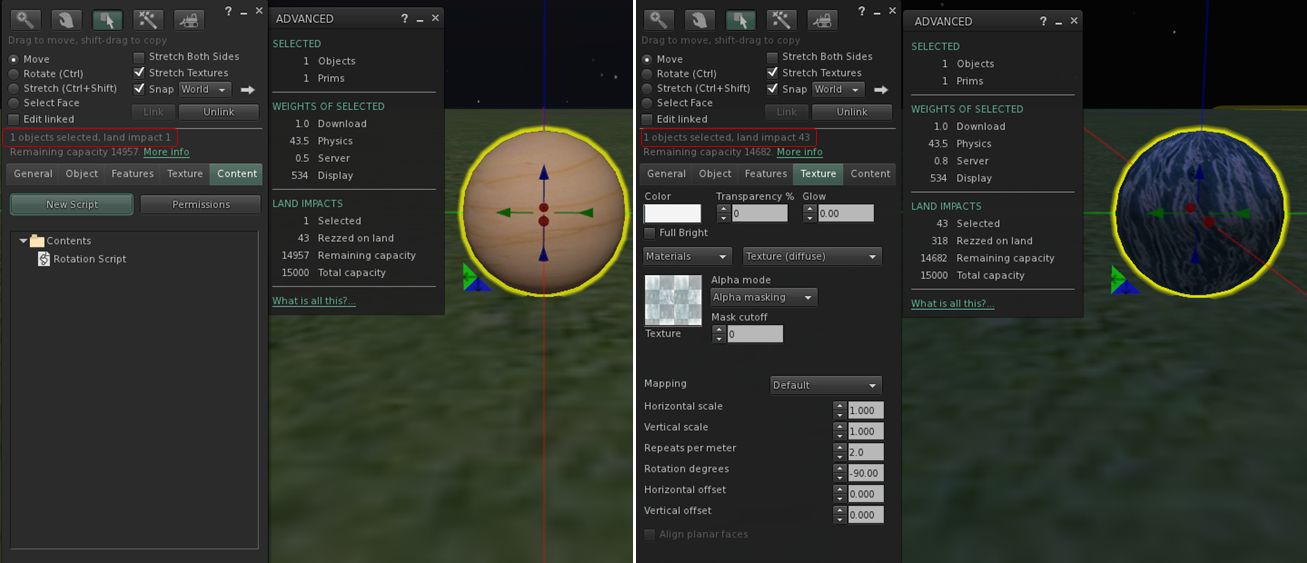
  1. Create a sphere. Hollow it 95%. Add a simple rotation script.
  2. Set the Alpha Mode to Alpha masking. Note that the land impact is now 43. “More info” shows the extra weight attributed to Physics.
Using the Alpha Masking and Emissive Mask Alpha Mode options with tortured prims (in this case a hollow sphere) into the "new" LI accounting system
Using the Alpha Masking and Emissive Mask Alpha Mode options with tortured prims (in this case a hollow sphere) can lead to a inflation of LI for an object

Qie goes on to note that cutting or squashing such an object can have an even more dramatic impact (path cutting the sphere in half, for example, can push LI to 1348, while squashing it almost flat can lead to an LI of 154).

Commenting on the JIRA, Maestro Linden notes:

This is expected behavior. When a material is added to an object, it is enrolled in new prim accounting. A 50cm, 95% hollow sphere has 43.5 physics cost when using a ‘prim’ physics representation. This high cost is caused by the high complexity physics shape. See https://wiki.secondlife.com/wiki/Physics_Optimization for a guide about how to reduce physics cost.

It is interesting to note, however that the same prim using Alpha Blending retains the same physic cost, but only generates a LI of 1. As Alpha Blending is essentially the way alpha layers are currently handled by the system at the moment, Qie’s theory – which I agree with – is that the existing system as been somehow “grandfathered-in” to the LI accounting system.

Continue reading “SL projects update week 15 (1): Server and viewer; materials and land impact”