SL projects update week 26 (3): more viewer, SSB/A and cache

Materials Processing

As reported in part 2 of this update, the release viewer was updated on June 27th with a release containing a number of updates and fixes, including some for materials, such as occlusion culling is less effective than it should be, especially with regards to very large objects; light function sampling being incorrect in advanced lighting model and the legacy Shiny options being overly strong in deferred rendering. The initial fixes for these issues are considered important for TPVs to pick-up when integrating materials into their viewers, while follow-up releases (such as the new 3.6.1277824 beta viewer released on June 25th, being viewed as slightly less important at this time.

Materials continues to be updated and refined, and the Lab is gathering stats on viewer use with ALM enabled

The latest stats the Lab has on viewers show that some 30% of users are currently running with the Advanced Lighting Model option (ALM – otherwise known as deferred rendering), and are thus able to see materials in use in-world, although the stats also appear to indicate that up to 75% of the user base have hardware capable of running with ALM enabled, “with reasonable performance” in terms of frame rates (e.g. an average somewhat above 10 fps). However, given that fps is a highly subjective measure and somewhat dependent on a range of external factors (such as how many other avatars are in the region with you, whether you are moving around a lot or not, etc), the “YMMV” rule comes into play.

The Lab has already carried out a fair amount of performance tuning with ALM, and at the TPV Developer meeting on Friday June 28th, Oz Linden reported that further work is going on in this area, which will include some profiling of the shaders in order to try to further improve performance.

Currently, and as previously reported in these pages, the Cool VL viewer experimental branch and the Black Dragon 2.2.3 beta both provide materials processing capabilities.

Viewer Release Process and Viewer Updates

The expectation is now that the new viewer release process will come into effect during week 28 (week commencing Monday 8th July). The process is actually ready to go, but as with the server-side of things, the 4th July no change window means that the process cannot be implemented in week 27.

Vivox Update

Once the new process is running, the Vivox update is likely to be one of the first items to go to a viewer release candidate. This update should greatly improve Voice quality within SL. A further Vivox update is liable to follow this at some point.

Interest List Improvements

The viewer-side interest list updates are coming, although the viewer repro has yet to be made public, although again it is anticipated that a project or beta viewer with the updates will be made available after the holiday period, and TPVs will be able to obtain the code.

Viewer Settings

The Lab is moving to eliminate the use of viewer settings files based on channel name. This means that in future, a single SETTINGS.XML file will be used for all versions of an SL viewer which is installed. The code for this is moving towards the release channel of the SL viewer, and the hope is that it will prevent issues of confusion when settings appear to be “wiped out” when using multiple versions of the viewer (e.g. such as moving between the SL release viewer and  the SL development viewer and back a few months ago resulted in people’s toolbar buttons “vanishing” from the release viewer).

Continue reading “SL projects update week 26 (3): more viewer, SSB/A and cache”

SL projects update week 26 (2): server, pathfinding bug, viewer updates

Server Deployments – Week 26

As always, please refer to the week’s forum deployment thread for news, updates and feedback.

Second Life Server (Main) Channel

On Tuesday 25th June, the SLS Main channel received the server maintenance package deployed to the three RC channel in week 25. This fixes a number of crash modes, addresses an issue with neighbouring region visibility, and adds the new pathfinding property CHARACTER_STAY_WITHIN_PARCEL to llCreateCharacter() and llUpdateCharacter() – see my week 19 report for details – and the object return functions I reported on in week 23.

While not intended to fix issues of diagonally adjacent regions not being visible to one another (SVC-8130), there are reports that at least some of the regions which have suffered from this issue for a considerable time can be seen from one another once more – although Maestro Linden isn’t entirely convinced the underlying cause of the problem has been corrected.

Release Candidate (RC) Channels

On Wednesday 26th June, all three RC channels (Magnum, BlueSteel and LeTigre) received a new server maintenance package, comprising:

  • A fix for ‘llApplyImpulse now works only in the root prim’ (SVC-8227)
  • Crash mode fixes
  • New LSL function: string llXorBase64(string str1, string str2)
    • Returns a string that is a Base64 XOR of Base64-formatted input strings, str1 and str2.
    • Fixes a ‘bad’ behaviour when the 2nd string contains nulls (“A” in base64) – SCR-35
    • Aside from those cases, this function behaves identically to llXorBase64StringsCorrect()
    •  added to avoid changing the behaviour of existing scripts which may rely on llXorBase64StringsCorrect()’s current output
  • Added max_materials_per_transaction flag to /simulator/features cap
    • This number returns the maximum number of materials that can be sent to the “RenderMaterials” capability in a single request.

MAX_MATERIALS_PER_TRANSACTION

Speaking at the Server Beta meeting on Thursday 27th June, Maestro Linden described the max_materials_per_transaction flag thus:

It limits how many materials the viewer can request details for or set (POST, PUT methods) in a single message. By default, the limit is 50. The reason for the limit is that we don’t want the simulator to hang if a malicious viewer requests the details of 2 billion materials at once.

So, the capability for materials is called RenderMaterials [and] it has 3 HTTP access methods:

  • GET: get the full list of details of all materials in the region
  • POST: get the materials details for a list of material_ids (the server will only parse the first max_materials_per_transaction in the post data)
  • PUT: set the materials properties of up to max_materials_per_transaction object faces

GET is used when you first connect to a region and want to get the materials of everything [in the region, not just within draw distance]; POST is used if, for example, a new object is rezzed with a new materials type, and the viewer needs to resolve what the normal map is, etc; and PUT is used for object editing.

[So] if the viewer needs to edit 80 faces at once, for example, it will know that the server limit is 50, and POST in 2 messages (one for the first 50, the other for the other 30).  [The] ‘max_materials_per_transaction’ flag in the features cap will be a way for the viewer to know if the server limit changes from 50 per message. I’m not aware of any plans to change that limit in the near future, though.

Deployments for Week 27

There will be no server-side deployments in Week 27 (commencing Monday July 1st), as US Independence Day is on Thursday July 4th. The next scheduled deployments will be in week 28, commencing Monday July 8th.

Pathfinding Bug

Elijah Linden has discovered a bug within the pathfinding code, wherein certain regions have continuous navmesh rebaking, which causes some annoying UI effects, hurts simulator performance somewhat and causes memory spikes. Regions can be affected even if pathfinding is turned off.

Voidpointer Linden assumes human form (stock)

The bug arose as a result of the recent CHARACTER_STAY_WITHIN_PARCEL property added to the pathfinding capabilities. Commenting on the bug at the Server Beta meeting on Thursday 27th June, Voidpointer Linden, who implemented the new CHARACTER_STAY_WITHIN_PARCEL property, said:

As part of the STAY_WITHIN_PARCEL changes, I needed to change the way the navmesh is constructed. This involved making sure that every region did a rebake once. Unfortunately, the criteria that I used to test whether a region needed rebaking had a flaw – it can’t see parcel edges underwater [possibly because the navmesh doesn’t include areas below sea level]. So if a region has more than 1 parcel and has no parcel edges above water, then it thinks it needs to rebake. So it does.

And does so repeatedly, as Elijah Linden reported in BUG-2975 (Regions continue to requests rebake after rebakes have been performed).

There is a fix for the issue, but it currently requires testing, and may not appear for a while. In the meantime, there is one assured workaround: if your region is suffering from the issue and has a parcel which is completely submerged, subdivide / raise one part of a boundary for that parcel (and which is not also a region boundary) above water so it can be found by the navmesh rebake process.

This bug is unlikely to be resolved before week 28 due to there being no deployments scheduled for week 27, as mentioned above.

SL Viewer

The SL release viewer updated to version 3.6.1.278007 on June 27th, containing the fixes from the 3.6.1.277611 beta release. This contains some updates related to the viewer being available via Amazon, and fixes for occlusion culling being less effective than it should be, legacy Shiny being too strong in ALM with materials,light function sampling is incorrect in advanced lighting model and a viewer compilation error.

The beta viewer updated to 3.6.1.277824 on June 26th, with the release notes listing the same updates as 3.6.1.277611 and 3.6.1.278007 – so these appear to be work-in-progress fixes.

SL projects update week 26 (1): server, viewer, materials

Server Deployments – Week 26

As always, please refer to the week’s forum deployment thread for news, updates and feedback.

Second Life Server (Main) Channel

On Tuesday 25th June, the SLS Main channel received the server maintenance package deployed to the three RC channel in week 25. This fixes a number of crash modes, addresses an issue with neighbouring region visibility, and adds new LSL capabilities:

  • The new pathfinding property CHARACTER_STAY_WITHIN_PARCEL, which can be used with llCreateCharacter() and llUpdateCharacter(), and is intended to help with keeping characters within parcel boundaries – see my week 19 report for details
  • The new object return functions I reported on in week 23, namely llReturnObjectsByOwner and llReturnObjectsByID, are intended to provide an automated means of returning objects to their owners – see my full update on these functions for details.

This package also includes the following:

  • An update to llReturnObjectsByID() to prevent it from returning other objects which are owned by the parcel owner or estate owner/manager
  • A fix for an issue in which LSL HTTP-in scripts would sometimes see the incorrect URL (BUG-2833)
  • A fix for Bug 2850 (Cannot rez objects in Bluesteel and LeTigre parcels which disallow object entry) – which caused this deployment to be replaced by the Magnum RC package in week 24.

The neighbouring region visibility issue referred to in the package is for SVC-8019, which is related to issues with regions failing to communicate with their neighbours for up to an hour are a restart, causing communications issues (e.g. LSL chat) across region borders. It is not intended to address the issue of diagonally adjacent regions not being visible to one another (SVC-8130).

Release Candidate (RC) Channels

On Wednesday 26th June, all three RC channels (Magnum, BlueSteel and LeTigre) should receive a new server maintenance package, comprising:

  • A fix for ‘llApplyImpulse now works only in the root prim’ (SVC-8227)
  • Crash mode fixes
  • New LSL function: string llXorBase64(string str1, string str2)
    • Returns a string that is a Base64 XOR of Base64-formatted input strings, str1 and str2.
    • Addresses the cases from SCR-35 “llXorBase64StringsCorrect returns wrong result when the 2nd string contains nulls”
    • Aside from those cases, this function behaves identically to llXorBase64StringsCorrect()
  • Added max_materials_per_transaction to /simulator/features cap
    • This number returns the maximum number of materials that can be sent to the “RenderMaterials” capability in a single request.

SL Viewer

General

With the release process yet to switch-over to the new system, the following viewer updates were made in week 25:

  • The SL beta viewer saw an additional release – 3.6.1.277611 on June 21st. This primarily included some fixes for the version of the viewer which is offered via Amazon for download, and rendering fixes
  • The Snowstorm Contributions Test Build viewer was updated to the 3.6.1 code base (version 3.6.1277577, June 20th, for details of the current contributions in the viewer, follow the link). This would appear to be the first step in merging-up a series of third-party viewer contributions which are liable to see a project / beta viewer release after the new viewer release process comes into use.

Viewer Release Process

Commenting on progress with the upcoming new viewer release process at the Open-source Dev meeting on Monday 24th June, Oz Linden said, “We’re in the final verification stages. Might even get it turned on this week.”

As a side note, and In preparation for the new process, I’ve revamped my Viewer round-up page to (hopefully) better reflect the fact that we should be seeing a broader spread of viewers being put out by LL. This is a work-in-progress, and the page may evolve further as the new viewer release mechanism comes into force. Similarly, the weekly summaries produced from this page are also being revised ready for the new release process.

Materials Viewer

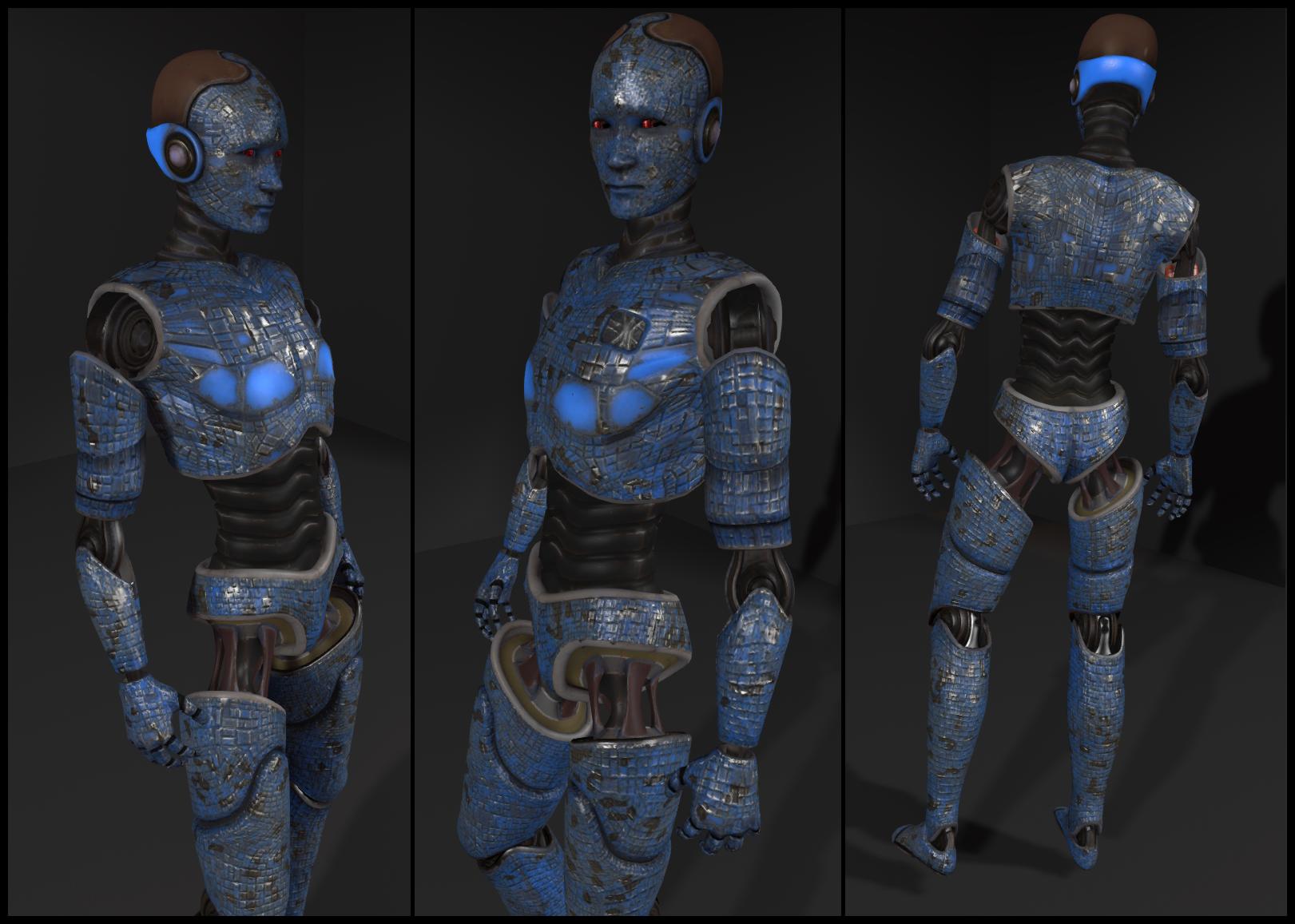
Despite issue with the materials viewer, there are a number of content creators already working on products which leverage the new capabilities. At the Open-source Dev meeting on Monday 24th June, Whirly Fizzle pointed people towards the work of Chip Midnight, who has been working on a mesh avatar using materials properties.

Chip Midnight's mesh avatar model (click to enlarge)
Chip Midnight’s mesh avatar model (click to enlarge)

Whilry also supplied a link to  a thread on the SL Universe forums where Chip discusses the avatar. For those interested, it’s worth following the discussion for the next couple of pages – particularly Drongle McMahon’s reply to Chip on the subject of specular and gloss maps.

Continue reading “SL projects update week 26 (1): server, viewer, materials”

SL projects update 25 (3): Nyx Linden announces SSB/A “imminent”

A note card containing a message from Nyx Linden is doing the rounds in-world concerning Server-side Baking / Appearance. The note card reads in full:

Greetings all,

Nyx Linden (stock)
Nyx Linden (stock)

Wanted to give everyone a quick update on the status of Server Side Appearance. First of all, thanks to all who helped participate in last week’s pile-on test, and a special thanks to those viewers who are already integrating the RegionHandshakeReply flag posted recently. We’ll likely be doing one more pile-on next week, targeting a smaller set of users (to avoid inventory limits that have caused attachments not to load, etc) next week. Let me know if you’d like to participate.

We currently are not aware of any major release-blocking bugs and are starting to look at scheduling the roll-out process. We have a number of QA passes and tests to run through before we can get the final greenlight to do so, so we are currently targeting July 9th as the earliest date at which we will enable SSA for a significant portion of the grid (a server RC channel). Please note that if we find additional bugs in the meantime, or run into other scheduling difficulties this date could be pushed back. We will not be going to RC before this date however.

Please consider this an official warning that this is imminent – We’ve been saying for a while that we’re getting ready for release. We hope with a solid date in mind, all viewers can start messaging to their users that they will need to update or they will start to see issues. There are a few methods by which we will be messaging to the SL community as a whole about this, but we highly encourage you to use your judgement in the best way to reach out to your users and transition them to SSA-compatible viewers.

As always, if you have any questions, or see any issues that could be worrisome if they are not fixed before release, please do not hesitate to reach out to me and/or file a JIRA. Thanks for all your work in preparing for this release!

Nyx Linden

[link and all emphasis mine]

If you want to avoid seeing increasing numbers of grey avatars and / or avoid people telling you, "you're a cloud" when you appear perfectly fine to yourself, update to a version of a viewer supporting SSB/A
If you want to avoid seeing increasing numbers of grey avatars and / or avoid people telling you, “you’re a cloud” when you appear perfectly fine to yourself, update to a version of a viewer supporting SSB/A

As previously noted in this blog, the plan from the Lab has been to deploy SSB/A gradually. Speaking on this at the TPV Developer meeting on Friday June 14th, Nyx indicated the deployment would be a small group of regions prior to moving to a Release Candidate channel (either in whole or in part) and then progress from there.

However, with the preliminary date for this work to commence, and given that almost all maintained SL viewers are now SSB/A-ready (Dolphin and Exodus are the only exceptions at the time of writing), there really is no excuse for people not to update their viewer. The choices are arleady available:

  • Those who prefer the v1-style of UI have the choice of Cool VL Viewer and Singularity
  • Those who prefer the V3-style have the choise of the SL viewer, Catznip, Firestorm, Kokua, Niran’s, and RLV.

In addition, the Lumiya, Meltabolt and Radegast clients are also SSB/A ready.

With thanks to mona Eberhardt

SL projects update 25 (2): server, materials

Update June 21st: A new Materials Support and Tips thread has been started by Creator Linden in the Building and Texturing Forum (with thanks to Daniel Voyage for the poke).

Server Deployments – Week 25

As always, please refer to the week’s forum deployment thread for news, updates and feedback.

Second Life Server (Main) Channel

On Tuesday June 18th, the SLS main channel received the interest list improvement project which have been previously deployed to Magnum (week 22) and BlueSteel and LeTigre (week 24).

Release Candidate (RC) Channels

On Wednesday 19th June, all three RC channels (Magnum, BlueSteel and LeTigre) received the same server maintenance package, designed to fix a number of crash modes and address an issue with neighbouring region visibility. In addition this package:

  • Contains the new LSL pathfinding property CHARACTER_STAY_WITHIN_PARCEL, and the new LSL object return functions designed to assist land owners with the return of objects under controlled conditions
  • Provides fixes for A fix for an issue in which LSL HTTP-in scripts would sometimes see the incorrect URL (BUG-2833) and for Bug 2850 (Cannot rez objects in Bluesteel and LeTigre parcels which disallow object entry).

The neighbour region visibility issue fixed by the deployment is for SVC-8019, which is related to issues with regions failing to communicate with their neighbours for up to an hour are a restart, causing communications issues (e.g. LSL chat) across region borders, rather than being related to the issue of diagonally adjacent regions not being visible to one another (SVC-8130), which is still an issue on the main grid.

The fix deployed to the Release Candidates does not address issues of diagonally-adjacent regions failing to render to one and/or the other
The fix deployed to the Release Candidates does not address issues of diagonally adjacent regions failing to render to one and/or the other

Commenting on the latter issue while testing it with an alt during the Server Beta meeting on Thursday May 20th, Maestro Linden said, “It looks like some kind of false communications timeout in the remote region, where it disconnects your viewer.” Currently, there is no proposed fix for the issue, although the Lab keep poking at it.

Materials Processing

matbug-715-a
Objects using transparencies as rendered with ALM off in the materials viewer (click to enlarge)
matbug-175-b
The same items rendered with ALM active in the materials viewer (click to enlarge)

The Materials Processing project reached a release status on Wednesday June 19th, with the release of Second Life viewer 3.6.0.277516.

However, problems continue to be reported with transparencies rendering as black when using the viewer, (see MATBUG-175, MATBUG-193 and a similar bug, MATBUG-186).

Two possible workarounds for these problems have been suggested, which may work, depending on the precise nature of the issue, if you’re experiencing it:

  • Going into Preferences > Graphics and unchecking Advanced Lighting Model (ALM) before click OK to apply, then going back into Preferences > Graphics and enabling ALM once more
  • If you have water reflections set to Minimum in Preferences > Graphics, try setting them to a higher value and then unchecking / rechecking ALM.

Some of these issues were known well in advance of the viewer reaching a release status, which promoted comments of surprise during the Open-source Developer meeting on Wednesday June 20th that the viewer had been released. Commenting on this, Oz Linden responded:

I’m not at all surprised that people found combinations of visual attributes we hadn’t tested that were busted, really. There are a staggering number of combinations – after you factor in all the possible settings changes on top of them, the number is absolutely not even close to something we could test. The “black issue” makes it sound simple…. we probably had a dozen bugs during development that had that same symptom for different reasons. I’m sure we’ll get it sorted out.

Continue reading “SL projects update 25 (2): server, materials”

Materials Processing reaches SL viewer release status

Update June 21st: Kokua version 3.6.0.28975 has been released, which include Materials Processing support.

Update June 20th: NiranV Dean has released a version of his “in development” Black Dragon SL viewer with Materials Processing support. See his blog post for details.

Further to the first part of my SL projects update for week 25, materials processing has now officially reached release status with the release of viewer 3.6.0.277516.

If you are already running the release version of the viewer (3.5.3.276452) and have automatic updates enabled, the new version of the viewer, you should be notified that the update is available. If not, or if you have not previously installed the SL viewer, but wish to try-out the new materials capabilities, you can download and install 3.6.0.277516 by following the above link to the official download page.

A katara showing detail created by the use of materials properties
A katara  created by June Dion showing surface detail and reflective qualities using materials properties

For those not in the know, Materials Processing adds normal and specular maps to the in-world tools capabilities of the viewer (using the new land impact accounting system in the process!), allowing much higher / improved levels of realism be obtained with textures used on prim, sculpt and mesh items (they do not work on avatar skin and clothing layers).

I provided an overview of the Materials Processing, including brief notes on normal and specular maps when the project reached a beta viewer release status at the start of June, and I refer you to that post for details.

As noted in that article and elsewhere, the materials capabilities introduce a revised Textures tab to the Build floater in the viewer, which allows you to add normal and specular maps to objects and object surfaces, as well as textures (referred to a diffuse maps).

Materils Build floater Texture tab: The diffuse (texture) option, showing the Alpha mode drop-down options (l); the normal map options, with map picker and default bump map drop-down (c); the specular map options, in which the Shininess drop-down displays the familiar low, medium & high shiny options (r)
Materials Build floater Texture tab: The diffuse (texture) option, showing the Alpha mode drop-down options (l); the normal map options, with map picker and default bump map drop-down (c); the specular map options, in which the Shininess drop-down displays the familiar low, medium & high shiny options (r)

Note, as well, that in order to see materials in action, you’ll need to enable the Advanced Lighting Model option in the Graphic tab of the materials viewer. Please also see the Materials FAQ for other information relating to Materials Processing.

Given the capabilities are now available in the release viewer, and allowing for pressing activities around Server-side Baking / Appearance, it is likely that we’ll start seeing more TPVs start to adopt materials in the coming weeks (for example, the Cool VL viewer already has materials support in the experimental branch).

In the meantime, the Lab has released a video demonstrating the capabilities, complete with a Torley Dancing SL10B bear!

Materials Processing represents a collaborative project developed and implemented by both Linden Lab and third-party viewer developers. Originally a proposal submitted by members of the Exodus viewer team in 2012, the project has included the direct involvement of developers from Catznip (notably Kitty Barnett) and Firestorm (notably Tonya Souther) as well as from Exodus (notably Geenz Spad) in the development of the viewer-side tools and capabilities, with the Lab working on the server-side of the capabilities.

If you encounter any major issues with the viewer, such as alpha issues, severe problems with texture rendering as black, etc., please make sure you file a JIRA on the issue, with any screen shots you can provide in addition to details of your system (Help > About Second Life > COPY button to copy / paste system information).

Related Links