Update June 21st: A new Materials Support and Tips thread has been started by Creator Linden in the Building and Texturing Forum (with thanks to Daniel Voyage for the poke).
Server Deployments – Week 25
As always, please refer to the week’s forum deployment thread for news, updates and feedback.
Second Life Server (Main) Channel
On Tuesday June 18th, the SLS main channel received the interest list improvement project which have been previously deployed to Magnum (week 22) and BlueSteel and LeTigre (week 24).
Release Candidate (RC) Channels
On Wednesday 19th June, all three RC channels (Magnum, BlueSteel and LeTigre) received the same server maintenance package, designed to fix a number of crash modes and address an issue with neighbouring region visibility. In addition this package:
Contains the new LSL pathfinding property CHARACTER_STAY_WITHIN_PARCEL, and the new LSL object return functions designed to assist land owners with the return of objects under controlled conditions
Provides fixes for A fix for an issue in which LSL HTTP-in scripts would sometimes see the incorrect URL (BUG-2833) and for Bug 2850 (Cannot rez objects in Bluesteel and LeTigre parcels which disallow object entry).
The neighbour region visibility issue fixed by the deployment is for SVC-8019, which is related to issues with regions failing to communicate with their neighbours for up to an hour are a restart, causing communications issues (e.g. LSL chat) across region borders, rather than being related to the issue of diagonally adjacent regions not being visible to one another (SVC-8130), which is still an issue on the main grid.
The fix deployed to the Release Candidates does not address issues of diagonally adjacent regions failing to render to one and/or the other
Commenting on the latter issue while testing it with an alt during the Server Beta meeting on Thursday May 20th, Maestro Linden said, “It looks like some kind of false communications timeout in the remote region, where it disconnects your viewer.” Currently, there is no proposed fix for the issue, although the Lab keep poking at it.
Materials Processing
Objects using transparencies as rendered with ALM off in the materials viewer (click to enlarge)The same items rendered with ALM active in the materials viewer (click to enlarge)
The Materials Processing project reached a release status on Wednesday June 19th, with the release of Second Life viewer 3.6.0.277516.
However, problems continue to be reported with transparencies rendering as black when using the viewer, (see MATBUG-175, MATBUG-193 and a similar bug, MATBUG-186).
Two possible workarounds for these problems have been suggested, which may work, depending on the precise nature of the issue, if you’re experiencing it:
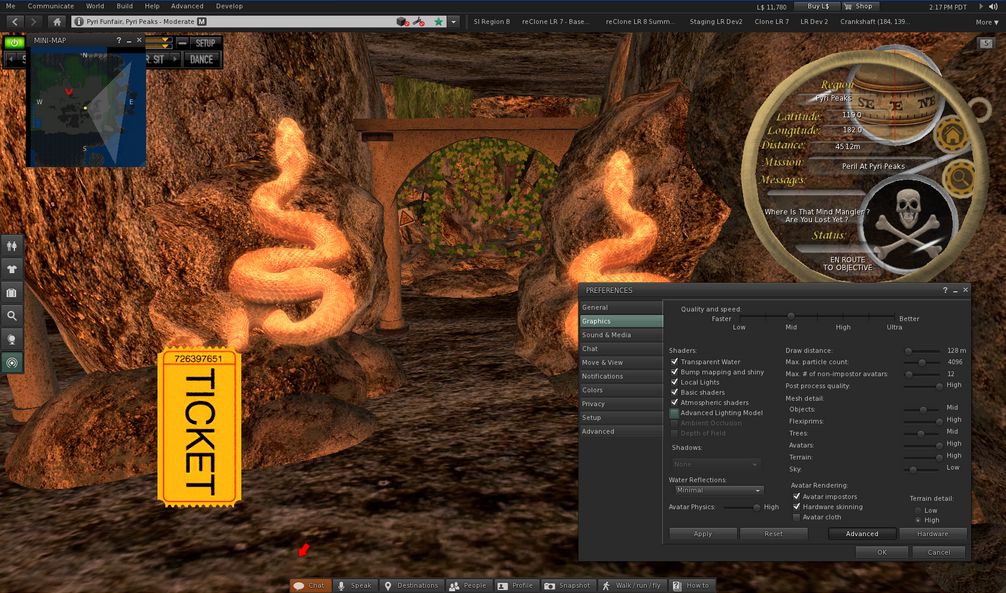
Going into Preferences > Graphics and unchecking Advanced Lighting Model (ALM) before click OK to apply, then going back into Preferences > Graphics and enabling ALM once more
If you have water reflections set to Minimum in Preferences > Graphics, try setting them to a higher value and then unchecking / rechecking ALM.
Some of these issues were known well in advance of the viewer reaching a release status, which promoted comments of surprise during the Open-source Developer meeting on Wednesday June 20th that the viewer had been released. Commenting on this, Oz Linden responded:
I’m not at all surprised that people found combinations of visual attributes we hadn’t tested that were busted, really. There are a staggering number of combinations – after you factor in all the possible settings changes on top of them, the number is absolutely not even close to something we could test. The “black issue” makes it sound simple…. we probably had a dozen bugs during development that had that same symptom for different reasons. I’m sure we’ll get it sorted out.
Update June 21st: Kokua version 3.6.0.28975 has been released, which include Materials Processing support.
Update June 20th: NiranV Dean has released a version of his “in development” Black Dragon SL viewer with Materials Processing support. See his blog post for details.
If you are already running the release version of the viewer (3.5.3.276452) and have automatic updates enabled, the new version of the viewer, you should be notified that the update is available. If not, or if you have not previously installed the SL viewer, but wish to try-out the new materials capabilities, you can download and install 3.6.0.277516 by following the above link to the official download page.
A katara created by June Dion showing surface detail and reflective qualities using materials properties
For those not in the know, Materials Processing adds normal and specular maps to the in-world tools capabilities of the viewer (using the new land impact accounting system in the process!), allowing much higher / improved levels of realism be obtained with textures used on prim, sculpt and mesh items (they do not work on avatar skin and clothing layers).
I provided an overview of the Materials Processing, including brief notes on normal and specular maps when the project reached a beta viewer release status at the start of June, and I refer you to that post for details.
As noted in that article and elsewhere, the materials capabilities introduce a revised Textures tab to the Build floater in the viewer, which allows you to add normal and specular maps to objects and object surfaces, as well as textures (referred to a diffuse maps).
Materials Build floater Texture tab: The diffuse (texture) option, showing the Alpha mode drop-down options (l); the normal map options, with map picker and default bump map drop-down (c); the specular map options, in which the Shininess drop-down displays the familiar low, medium & high shiny options (r)
Note, as well, that in order to see materials in action, you’ll need to enable the Advanced Lighting Model option in the Graphic tab of the materials viewer. Please also see the Materials FAQ for other information relating to Materials Processing.
Given the capabilities are now available in the release viewer, and allowing for pressing activities around Server-side Baking / Appearance, it is likely that we’ll start seeing more TPVs start to adopt materials in the coming weeks (for example, the Cool VL viewer already has materials support in the experimental branch).
In the meantime, the Lab has released a video demonstrating the capabilities, complete with a Torley Dancing SL10B bear!
Materials Processing represents a collaborative project developed and implemented by both Linden Lab and third-party viewer developers. Originally a proposal submitted by members of the Exodus viewer team in 2012, the project has included the direct involvement of developers from Catznip (notably Kitty Barnett) and Firestorm (notably Tonya Souther) as well as from Exodus (notably Geenz Spad) in the development of the viewer-side tools and capabilities, with the Lab working on the server-side of the capabilities.
If you encounter any major issues with the viewer, such as alpha issues, severe problems with texture rendering as black, etc., please make sure you file a JIRA on the issue, with any screen shots you can provide in addition to details of your system (Help > About Second Life > COPY button to copy / paste system information).
As always, please refer to the week’s forum deployment thread for news, updates and feedback.
Second Life Server (Main) Channel
On Tuesday June 18th, the SLS main channel received the interest list improvement project which have been previously deployed to Magnum (week 22) and BlueSteel and LeTigre (week 24). This includes:
A fix for excessive AvatarAppearance packets being sent to the viewer [in which the simulator would send many unnecessary AvatarAppearance messages to the viewer]
A final fix for the “meeroo problem” whereby animations on Meeroos and other animals fail to update correctly when camming around.
Release Candidate (RC) Channels
On Wednesday 19th June, all three RC channels (Magnum, BlueSteel and LeTigre) should receive the server maintenance package briefly deployed to BlueSteel and LeTigre in week 24. to fix a number of crash modes, addresses an issue with neighbouring region visibility, and adds new LSL pathfinding capabilities and object return capabilities:
The new pathfinding property CHARACTER_STAY_WITHIN_PARCEL, which can be used with llCreateCharacter() and llUpdateCharacter(), and is intended to help with keeping characters within parcel boundaries – see my week 19 report for details
The new object return functions I reported on in week 23, namely llReturnObjectsByOwner and llReturnObjectsByID, are intended to provide an automated means of returning objects to their owners – see my full update on these functions for details.
This package also includes the following:
An update to llReturnObjectsByID() to prevent it from returning other objects which are owned by the parcel owner or estate owner/manager
A fix for an issue in which LSL HTTP-in scripts would sometimes see the incorrect URL (BUG-2833)
A fix for Bug 2850 (Cannot rez objects in Bluesteel and LeTigre parcels which disallow object entry) – which caused this deployment to be replaced by the Magnum RC package in week 24.
SSB/A Pile-on Test Update
Nyx Linden (stock)
On Friday June 14th, a Server-side Baking / Appearance pile-on test was conducted on the main grid (see my report on events). The Lab is still going over the results of the test and all JIRA filed and log files submitted. Giving a preliminary summary of the test at the Content Creation User Group meeting on Monday June 17th, Nyx Linden said:
We actually just recently got through looking at the bug reports that were filed. Things are looking good, if you know anyone who saw anything major during the pile-on test please encourage them to file a bug ASAP if they have not already done so.
The system seemed to work quite well for most people, and we’re looking closely at the people who were having trouble resolving to try to figure out exactly what happened. The baking service was doing fine, there were some other services that weren’t used to that many people changing their outfits that close together (hence some attachments had difficulty resolving, etc). If anyone knows of failure cases for SSA (aside from those reported if you log in with very old viewers), please let us know asap.
The test did not include a minor update intended for the viewer-end of things, or the code change to help avoid SUN-74. However, as mentioned in my last SSB/A update, the former isn’t required prior to SSB/A starting its deployment across the grid, while the safest way to avoid encountering problems with non-maintained viewers / viewer without the necessary SSB/A updates is to upgrade your viewer. Now.
Viewer News
Materials Processing
The final beta release (3.6.0.277409) performed well over the weekend, with a crash rate “comfortably under” 9%. The code has been merged with the release viewer and is in its final QA testing ready for deployment. Providing nothing unexpected happens, it should appear on the viewer download page as the release viewer very soon.
Viewer Release Process
Work is continuing on the new viewer release process, which may go live later in week 25 or early in week 26. In the meantime, and as reported in week 24, a viewer source repositories page has been produced on the wiki. There is also a further wiki page explaining the release process, although it is still under development. You can find it listed as the Viewer Integration and Release Processes.
Note that the new process does not mean there will be multiple versions of the release viewer available for download (although there will potentially be multiple project / beta / release candidate versions available for download).
Should two projects reach a point of being ready to go to a release status at the same time (such as with “project 1” and “project 2” in the diagram above), a decision will be made by the Lab as to which should go first. That viewer then changes status to release, with the code pulled back to the viewer-release repository. The second viewer awaiting release will then merge with the changes and put out a further release candidate, and will then move to a release status from there.
For ease of reference, the viewer download page and the Alternate Viewers wiki page remain the default places for most users to obtain versions of the SL viewer.
Other Bits
Object Contents Loading
We’re all familiar with using prims as storage for other items (e.g. “boxed” items sold through the Marketplace or using a prim to store items in inventory we don’t frequently use). when a prim has a large number of items in it, there can be a noticeable delay in seeing the contents listed in the Contents tab of the Build floater. In addition, adding objects can be prone to a slow response as well – and can cause problems such as the loss of No Copy items when dropping more objecting into the Contents tab while the system is already copying / adding items to a prim’s contents. I
n terms of the slow loading issue, some have reported times of 30-40 seconds when trying to list the contents of a prim with 100 or so items, and a question was asked at the Simulator User Group meeting on Tuesday June 18th on whether there was any particular reason for this.
Replying to the question, Andrew Linden started with a cautionary note, “Sure, people can create that many items in contents, but I wouldn’t rank it as a good idea.” He then went on, “I don’t know the exact nature of the bottleneck there, but 30 seconds sounds too long. I’m pretty sure it could be sped up, but I’d have to dig around to see why it is slow.”
Kelly Linden then added: “Object inventory transfer from server to viewer uses one of the oldest legacy methods in Second Life. Updating that is probably a good idea but would require a joint viewer and server version change, or some acrobatics on managing compatibility.”
While agreeing this might be the case, Andrew went on, “The UDP protocol should be able to transmit 300 items in much less than 30 seconds. I’ll try to look around to see what is limiting that. However, I should note… I won’t be attending next week. I’ll be on vacation.”
So, there may be further updates on this in the future.
SUN-74 – Asset Corruptions With Non-SSB/A-enabled Viewers
I’ve recently reported on the issue of BUG-74 in relation to server-side baking / appearance. This affects some non-maintained viewers which do not have SSB/A support and which might result in some worn modify assets (skin, hairbase and eyes) being corrupted – see here for details. The issue was finally repro’d successfully by the Lab in week 23. Since then, investigations have been ongoing.
Commenting on the situation during the TPV Developer meeting on Friday 14th June, Nyx Linden said, “we have a technical solution for SUN-74. I have tested it against 1.23[.5], and the old behaviour is no longer reproducing. So hopefully that will mean that once we get it in a place where we can test against Phoenix there should be no more asset corruption.”
Nyx Linden (stock)
It’s not clear when this will happen, but it seems likely the updates will be deployed to the “closed beta” regions where TPV testing of the SSB/A code has been ongoing for the last couple of weeks, and tests will be taken there to ensure non-SSB/A viewers will not be negatively impacted when moving between SSB/A-enabled and non-SSB/A regions during the initial deployment of Server-side Baking / Appearance.
However, this does notmean that people on older, non-maintained viewers no longer need to update to an SSA/B-compatible viewer.
Regardless of the fix for SUN-74. people on non-maintained viewers will start to see increasing numbers of grey avatars around them as SSB/A is rolled out, and willfind that others see them as a permanent cloud. So the only way to be sure of being ready for the deployment of SSB/A is – update or upgrade your viewer if you have not already done so.
Additional Viewer Patch
A side effect of the work carried out on this issue is that the Lab will also be producing a small viewer-side patch which is not any kind of “bug fix” for SUN-74, but which will help viewers get their own appearance messages “just a little bit faster” than is currently the case.
While TPVs are encouraged to incorporate the patch once it becomes available, it is not seen as a mandatory requirement ahead of SSB/A being enabled on the main grid. As such, TPVs have been encouraged to integrate the patch once it becomes available and as it best fits their own release schedules.
Grid-wide Deployment
When asked about how the Lab plans to deploy SSB/A server-side at the TPV Developer meeting on Friday June 14th, Nyx replied:
Carefully. Definitely carefully. We are doing a lot of testing, and as most of you know, we’re doing an Agni pile-on [see later in this report] … and we have been doing a lot of load testing and we’re pretty confident we have enough hardware on the back-end to handle the load.
[So] We’re going to start with a small group [of regions] and go to an RC channel, and then more, and then take over the entire grid.
Whether “go to an RC channel” means enabling SSB/A across an entire RC channel (Magnum, BlueSteel or LeTigre) or enabling across a portion of regions on the selected RC channel is currently unclear. That decision doesn’t rest with Nyx, but will be dependent upon on number of factors including how well the initial steps in the deployment go.
In light of things like the pile-on test (see the next section) and readying the SUN-74 patch, the Lab remains unwilling to commit to specifying a date by which SSB/A deployment might be expected to start. This is understandable as there is still no guarantee that further issues such as SUN-74 won’t be uncovered as a result of either the pile-on test or as a result of further closed beta testing, which the Lab continues to monitor.
Main Grid Pile-on Test
On Friday 14th February pile-on test was conducted across a number of regions which had been specifically set-up to stress test Server-side Baking with some “real world” avatar numbers. Some fifty or so people turned up for the tests using various viewers with Appearance debugging enabled, including a version of the official viewer which had been pre-set with debugging enabled. The test was in three parts:
Baseline testing on regions using the current avatar baking mechanism
Testing on regions in the Snack RC channel running a version of the SSB/A code
Testing in the “closed beta” region specifically set-up for TPV testing running the SSB/A code
The precise differences between the code on the Snack regions and the code on the TPV test region (the Testylvania Sandbox). Questions were asked in open chat, but the nearest answer which seemed to be given was that the Testylvania region was the one the Lab “cared about the most”.
Testing on the current baking mechanism saw familiar issues of slow clothing / skin rendering and the need to use manual rebakes to try to encourage non-blurred appearances. Things appeared to be a lot better on the SSB/A-enabled regions (I personally experienced no issues in changing skins / clothing layers and found rendering of both fast and error-free, for example). However, some did report issues with rendering, and filed JIRAs / provided log files as a result.
There were multiple reports of attachment rezzing failures as of the asset service coming under pressure as a result of so many outfit / look changes going on simultaneously and in rapid succession. Whether these will see further work undertkaen on the inventory system (some work has already been carried out in a wider context by the Sunshine team), remains to be seen.
Expect more on the tests once LL have had time to chew on the data gathered and review the logs of those who did encounter issues.
As always, please refer to the week’s forum deployment thread for news, updates and feedback.
Second Life Server (Main) Channel
On Tuesday June 11th, the SLS channel received getting the server maintenance project that was on BlueSteel and LeTigre in week 23, and which is intended to fix a simulator crash mode, and a disconnection issue whereby multiple avatars would be disconnected from a simulator simultaneously, giving the impression the region had crashed when it had in fact not done so, and which also impacted LSL HTTP-in URLs.
Based on data since the deployment, it appears the disconnection issue has been addressed, although there was a report that problems of LSL HTTP-in URLs being dropped, Commenting on this issues at the Server Beta meeting on Thursday 13th June, Maestro Linden said, “I managed to confirm that it was a separate problem [to the avatar disconnection problem] Kelly has looked into it, and we think we’ll have a fix for that soon.”
Kelly Linden added, “I’ve been working on some http-in bugs for the last couple of days. I have some fixes but I can’t guarantee they will be 100% effective. There is more Rube Goldberg in that system than I’d like.”
Magnum Release Candidate Channel
On Wednesday June 12th Magnum received an update to the current interest list changes running on that channel, which addresses two bugs introduced by the project. The bug fixes were for the problem of the text of large scripts failing to display in the script editor for people on lower bandwidth connections, and a fix for the simulator spamming the viewer with AvatarAppearance messages when avatars were in view and were moving around, also resulting in bandwidth issues.
There have also been reports of an “invisible avatar” problem occurring on Magnum regions since the week 22 deployments. which take the form of avatars in the local vicinity de-rezzing following an in-region teleport, and will only re-appear following a relog. The issue was reported as still be present in week 23, and again following this week’s deployment. So far, the Lab has been unable to reproduce in-house, so investigations are proving difficult. As BlueSteel and LeTigre are now also on the same release (see below) the Lab will be watching to see if there are additional reports of this issue.
BlueSteel and LeTigre Release Candidate Channels
Maestro Linden likes to work-out during meetings
On Wednesday June 12th BlueSteel and LeTigre initially received a new server maintenance project to fix a number of crash modes, addresses an issue with neighbouring region visibility, and which added new adds new LSL pathfinding capabilities and object return capabilities.
However, soon after deployment, an issue was found on BlueSteel / LeTigre regions – Bug 2850 (Cannot rez objects in Bluesteel and LeTigre parcels which disallow object entry), which resulted in a rollback which saw BlueSteel and LeTigre updated with the Magnum release package.
“it turned out that if a parcel allowed build but disallowed object entry for your avatar, then your avatar would not be able to rez from agent inventory into the parcel,” Maestro explained at the Server Beta meeting on Thursday June 13th, “And your scripted objects (like the pop-gun) would also be unable to rez. Also, Lucia [Nightfire] reported a tangential issue, which was that rezzing in some group-owned parcels required your avatar to have the parcel’s group active, which is not usually a requirement. These bugs were bad enough that … we rolled BS and LT to the same version as Magnum.”
Fixes are underway for this issue, but it is currently not known if they will be ready for next week’s deployments.
Object Return Capabilities Update
Prior to the rollback on BlueSteel and LeTigre, an issue was noted with the llReturnObjectsByID function, resulting in the function being disabled server-side. “It should be (probably) re-enabled with the next release of that code,” Kelly Linden noted. “However it will have a new limitation – it will no longer be able to return objects owned by the parcel owner.”
“We were concerned about a potential griefing vector if a parcel owner absent-mindedly grants the permission,” Maestro added.
I’ve updated my overview of the new capabilities to reflect this change.
Update June 12th, 22:40 BST/14:40 SLT: The BlueSteel / LeTigre deployment which includes these capabilities has been rolled back due to an issue whereby objects cannot be rezzed in BlueSteel / LeTigre parcels which disallow object entry (even if Create Objects is enabled) – BUG-2850. Both regions are now running the week 24 Magnum deployment.
In week 23, Kelly Linden announced new LSL capabilities for the scripted return of objects within a region / parcel. In making the announcement, he indicated the capabilities would be available “some time in the future”, a comment which appears to have been a little overly cautious, as the new functionality received its first outing on the Main channel in the RC deployments to BlueSteel and Le Tigre on Wednesday June 12th.
The new object return functions are llReturnObjectsByOwner and llReturnObjectsByID, and are designed to be used to enable the automated return of specified linksets to their owners.
The object containing scripts using the functions can either be placed in the land, or worn as an attachment but will only work on land held by the object owner.
The primary aim of these functions is to make for easier clearing of private sandboxes and rental parcels in cases where previous users / tenants may have left objects behind on leaving (thus removing the onus on the land owner to locate and manually return items). They are not intended as anti-griefing tools, nor are they a “replacement” for the parcel / region auto-return functions.
The Functions
The functions are defined within the BlueSteel and LeTigre release notes as follows:
OBJECT_RETURN_PARCEL to return all objects on the same parcel as the script which are owned by ‘owner’. The script must be owned by an estate manager or over a parcel owned by the owner of the script.
OBJECT_RETURN_PARCEL_OWNER to return all objects owned by ‘owner’ which are over parcels owned by the owner of the script.
OBJECT_RETURN_REGION to return all objects in the region owned by ‘owner’ – only works when the script is owned by the estate owner or an estate manager.
Parcel owner, estate owner and estate managers can not have their objects returned by this method.
Objects which are owned by the group the land is set to will not be returned by this method.
Throttled at max parcel land impact region-wide per hour.
Returns the number of objects that were returned to their owners or an error code.
Additional Notes and Q&A On Capabilities / Limitations
There are also some additional notes which go with the new functions:
There are no cases where one of these new LSL calls would return an object that you could not manually return yourself
The functions will only work on objects in the same region/parcel as the object containing the script using them. Objects which are returned are coalesced in the recipient’s inventory, rather than being returned as individual objects
The functions work if and only if the user would have permission to return the object via the viewer, and it does not handle encroachment
To prevent severely damaging accidents the mass returns by owner (llReturnObjectsByOwner) will not work for your own items, items owned by an estate owner or manager or items that are owned by the group the land is ‘set’ to
llReturnObjectsByID will not return objects owned by the parcel owner
In order to work on group-owned land the object containing the script using the functions must be deeded to the group by the group owner
The return capabilities are throttled to a maximum hourly quota based on a parcel’s Land Capacity (under About Land > Object). So, if your Land Capacity is 500, then using these LSL functions you can return up to 500 linksets per hour
The throttle is there primarily to prevent a silent war between a rezzer and returner that could impact the back-end servers
Even with the throttling, it is anticipated that the functions should be able to return everything on your land within a region in one go, but not necessarily more than once an hour for large-scale returns.


 Inara Pey: Living in a Modemworld