Interest list and object caching update

In June 2012, Linden Lab announced the Shining Project, aimed at implementing a range of improvements over time designed to improve Second Life’s overall improvements. Part of this work was defined as “Object Caching and Interest Lists”, which the blog post described as “Intending to provide faster drawing of objects that are most likely to be redrawn later in a resident’s session or in the next session.”

Andrew Linden has been developing this project over the last several months, as reported in an ongoing basis in this blog. So far his work has primarily been focused on one side of the equation – the interest list code itself, which has been primarily server-side work.

However, with the most recent updates, Andrew has started looking at the “object caching” side of the equation, with changes made to how the server defines “cacheable objects” held by the viewer. With the next set of upcoming updates, this work is set to expand – and, for the first time within the project – see changes made to the viewer as well.

Current Issues

Before examining the forthcoming updates Andrew has been working on, a quick update on issues people have noticed in relation to interest lists changes.

"Missing" prims - not caused by the interest list work, but possibly exacerbated by it
“Missing” prims – not caused by the interest list work, but possibly exacerbated by it

“Missing” Prims: There has been a marked increase in prims in linksets failing to render, requiring a right-click (as one solution) to make them visible. As already reported in my week 15 project updates, this is not an interest list problem per se, although Andrew views the increase in occurrences of the problem as possibly being related to his changes in how the server defines “cacheable objects”. His investigations are continuing.

Objects out-of-view failing to produce sounds: If an object is initially out of your field-of-view, it is not sent to the viewer until such time as it does enter your field of view, and so sounds from it are not played. Andrew has not had time to look into this, but notes that it is “on his radar”

Finally, and while not a technical issue per se, Andrew reports that some users are still unhappy with the way the server sends updates from objects – particularly those close to your camera  – when they pass out of your field-of-view. While not entirely sure how this can be addressed, Andrew is considering what he calls a “keyhole idea”, wherein instead of just sending updates for objects in the camera’s current field of view  – the camera frustrum  – the server might send updates for all objects within a sphere of a set radius around the camera, as well is its frustrum. However, the problem with this idea is how big a radius should the sphere be? As Andrew notes, “Whatever it is set to probably wouldn’t work for everyone,” so he is still considering options.

Forthcoming Updates

Speaking at the Simulator User Group Meeting on Tuesday April 9th, Andrew revealed that the next Release Candidate submission of his interest list work is now ready. This comprises three elements:

  • Optimisations to reduce CPU cost of sending interest list-related data
  • Improved streaming through re-balancing the bandwidth used by the various UDP message categories
  • New “hints” the server will accept from the viewer to help it build the interest list for the viewer.

This work is aimed in part at making more intelligent use of the information on a region the viewer may already have locally cached from a previous visit, and it relies on both the initial information the viewer sends to the server on connecting to it, and what Andrew Linden calls “cache probes” sent by the server to the viewer. The approach, as explained by Andrew, basically works like this:

  • On connecting to a region for the first time (or after cache has been cleared), the viewer can “tell” the server it doesn’t have any information on the region, resulting in the server sending the viewer all the data it needs
  • If the viewer already has data relating to the region, the server send out a series of “cache probes” (lists of object identifiers – known as their local_id – and their versions), which the viewer then checks against its list of cached identifiers (local_id) and their versions
    • If the cached version number of an object’s local_id matches that sent by the server, the viewer doesn’t send any reply to the server, and the object is rendered directly from cache
    • If the cached version number does not match that sent by the server for a given local_id, it indicates the object has changed since the last time it was cached by the viewer, and a “cache miss” message is sent to the server in reply, which prompts the server to send the updated data, which the viewer then uses when rendering.
    Continue reading “Interest list and object caching update”

SL projects update week 15 (1): Server and viewer; materials and land impact

Upate April 10th: The BlueSteel / LeTigre package did not deploy as planned due to problems getting the updates completed in time. The Magnum package therefore deployed to all three RC channels.

Server Deployments Week 15

Second Life Server (Main) Channel

There was no planned deployment to the Main channel on Tuesday April 9th. The next scheduled deployment will be in week 16 (week commencing Monday April 15th). This was because there were bugs found in both of the RC releases from week 14 which the Lab wanted to resolve rather than having them propagate across the grid.

Release Candidate Channels

All three Release Candidate channels remain on the same releases as week 14, the only updates to be deployed on Wednesday April 10th being:

  • BlueSteel and LeTigre (currently running the new server-side AO capabilities) – should receive  a design change to improve compatibility between the new animation override system and other scripted objects that animate avatars (such as poseballs). This may be in response to a JIRA – BUG-2164 – being raised in relation to conflicts between the new AO capabilities and poseball systems
  • Magnum (currently running Monty Linden’s HTTP updates) – should receive a fix to correct a crash mode.

As always, there is a forum discussion thread for the week’s deployments.

SL Viewer Updates

CHUI – Communications Hub User Interface – Flickering Issue

The CHUI merge with the SL release viewer has brought with it an increase in the ATI/AMD issue of clickable links in the viewer’s UI flickering when anti-aliasing is enabled (BUG-1560, relating specifically to cards running the 12.10 (or later) Catalyst). This tends to happen with links in the chat window, but may also affect the selection box surrounding items in the inventory floater.

Those encountering the problem should consider raising a bug report.

Materials Processing – Land Impact

The most notable update to the SL viewer has been the release of a project viewer for materials processing. The viewer is available on the SL wiki Alternate Viewer page, and the code is available on Bitbucket. However, due to the work still going into the project, both come with caveats:

  • It is still very fragile
  • It is still subject to change in various ways
  • It should not be used on content you care about – particularly if said content is MODIFY / NO COPY
  • It is not recommended that TPVs integrate the code into their release viewer at the moment due to the fact the code will be changing (and there is not SSB merge as yet).

The release of the viewer has also brought with it something of a concern.

Qie Niangao has been carrying out further tests with the Materials Processing project viewer, and has come up with evidence that aspects of the material system can result in objects experiencing sudden (and potentially large) Land Impact value changes. Specifically use of the Alpha Masking and Emissive Mask options when working with alphas can have unexpected results – which is not to say that the result are not unexpected behaviour from LL’s perspective.

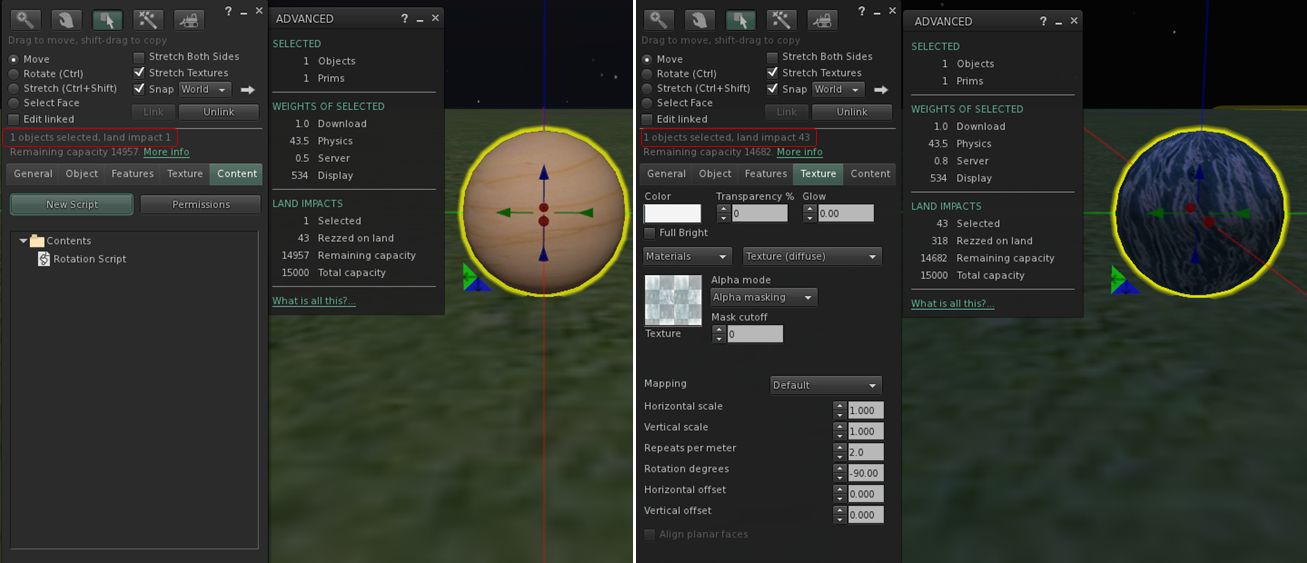
Qie describes his discovery in MATBUG-13, is which he offers the following exercise:

  1. Create a sphere. Hollow it 95%. Add a simple rotation script.
  2. Set the Alpha Mode to Alpha masking. Note that the land impact is now 43. “More info” shows the extra weight attributed to Physics.
Using the Alpha Masking and Emissive Mask Alpha Mode options with tortured prims (in this case a hollow sphere) into the "new" LI accounting system
Using the Alpha Masking and Emissive Mask Alpha Mode options with tortured prims (in this case a hollow sphere) can lead to a inflation of LI for an object

Qie goes on to note that cutting or squashing such an object can have an even more dramatic impact (path cutting the sphere in half, for example, can push LI to 1348, while squashing it almost flat can lead to an LI of 154).

Commenting on the JIRA, Maestro Linden notes:

This is expected behavior. When a material is added to an object, it is enrolled in new prim accounting. A 50cm, 95% hollow sphere has 43.5 physics cost when using a ‘prim’ physics representation. This high cost is caused by the high complexity physics shape. See https://wiki.secondlife.com/wiki/Physics_Optimization for a guide about how to reduce physics cost.

It is interesting to note, however that the same prim using Alpha Blending retains the same physic cost, but only generates a LI of 1. As Alpha Blending is essentially the way alpha layers are currently handled by the system at the moment, Qie’s theory – which I agree with – is that the existing system as been somehow “grandfathered-in” to the LI accounting system.

Continue reading “SL projects update week 15 (1): Server and viewer; materials and land impact”

Playing with materials processing in SL

Update, April 10th: Use of some of the mateirals processing capabilities – notably Alpha Masking and Emissive Masks – can have a significant affect on Land Impact valuse – see my week 14 SL projects update for details.

On Monday April 8th, Linden Lab released the first public cut of the Materials Processing project viewer. As the server-side of the materials processing support was deployed to the main grid earlier in the year, this release means that materials processing – with some caveats – can be experimented with by all.

These caveats are that the viewer is still very much an alpha release, and as such is both subject to change and should not be relied upon as a primary viewer for everyday use in SL. Also, as elements of the viewer may change before it reaches a release status, it is viewed as advisable by LL that people do not use the materials capabilities on MOD / NO COPY items.

So how does it all work? I provided an introduction to materials processing as it applies to Second Life back in 2012. However, the following will hopefully provide a summary for those who haven’t kept up with the news as well as providing a look at the viewer itself.

What is Materials Processing?

Materials processing is the combining of various computer graphics “maps” to significantly increase the level of detail that appears on any object or surface within a computer game. Within Second Life, textures (themselves a form of computer graphics map called a “diffuse map”) are used to add detail to in-world objects and surfaces. The new materials processing capability will introduce two further kinds of computer graphics map – normal and specular –  to Second Life which can be used alongside textures to dramatically increase the detail and realism of objects and surfaces.

  • Normal maps are a means of faking high levels of detail on an otherwise bland surface by means of simulating the bumps and dips that create the detail. Normal maps can be created in several ways – such as from a texture (diffuse) map using a suitable graphics application (and plugin, if required), or by producing a high-quality model (mesh) and using an overlay process to generate a normal map which can then be applied to a lower-quality model of the same object (i.e. one with a lower triangle count) to simulate the same level of detail as the high quality model, as shown below.
Using a normal map to enhance the detail on a low-polygon model
Using a normal map to enhance the detail on a low-polygon model. The image on the left shows a model of some 4 million triangles. The centre image shows a model with just 500 triangles. The image on the right shows the 500-triangle model with a normal map taken from the model on the left applied to it (credit: Wikipedia)
  • In the real world, every highlight we see in an object is actually the reflection of a light source. Surfaces reflect light differently to one another, depending on a range of factors (material, lighting source point(s),  etc.). Specular maps simulate this by allowing individual pixels in an object to have different levels of brightness applied to them, giving the appearance of different levels of light being reflected by different points on the object. Like normal maps, specular maps can be produced in a number of ways, both within 3D graphics modelling programs and in tools like PhotoShop.
A rendering of a lemon using diffuse, normal and specular maprs to create a life-like look and feel
A rendering of a lemon using diffuse, normal and specular maps to create a life-like look and feel

The new capabilities in Second Life allow diffuse (texture), normal and  / or specular maps to be applied to in-world objects (prims, meshes), to achieve a much greater level of realism in their appearance.

First, Create Your Maps

In order to use the new capabilities, you must obviously have the required maps. These ca be created in numerous ways,  and I’m certainly not qualified enough to give a hands-on demonstration myself. As such the following are intended merely as possible pointers.

Normal maps can be readily produced directly from an associated diffuse (texture map), which may be the most common way to do so. Both Photoshop and Gimp, for example, support normal map creation in this way, each using a suitable plugin. Photoshop uses the nVidia normal map filter for example, while Gimp uses a plugin of its own. There are numerous tutorials available on YouTube explaining how to create normal maps using either Gimp or Photoshop and these plugins.

Left: A diffuse map (texture); right: a normal map created directly from the texture

As a user of Gimp, I found the following tutorial by vscorpianc  provides a sold look at getting going with normal map creation, as it covers installing the required Gimp plug-in and also offers-up various resources for image files to play with, if you don’t have anything suitable yourself.

For those working with mesh, there are also various ways in which to produce a suitable normal map – including, as mentioned above, using an overlay from a high-quality model on an identical model of lower quality. Again, as I don’t use the likes of Blender, Maya, et al, You Tube offers what appears to be some easy-to follow tutorials for those who need them.

The same is true for producing specular maps within various graphics applications as well – such as bond1TGC’s tutorial on Specular Map Creation Tutorial or Aleks Markelj’s detailed tutorial Using Photoshop to create Diffuse/Specular Maps.

Continue reading “Playing with materials processing in SL”

Materials project viewer released

Update: subsequent to this article being published, the Lab issued their own blog post on the new project viewer.

Linden Lab released a project viewer for materials processing on Monday April 8th, to go with the server-side support already released.


Materials Processing video demonstration

This is very much an “alpha” status viewer, and as such comes with a series of caveats, including:

  • The viewer is still very fragile
  • It is still subject to change in various ways
  • It should not be used on content you care about – particularly if said content is MODIFY / NO COPY.

As Oz Linden wryly commented at the Open-source Dev meeting where the release was announced, “Regular attendees may notice some small changes in my raft…. I had to reconstruct it because I messed it up playing with this viewer (mostly my fault).” So, if you plan to download and play with the viewer, be warned!

For information on the materials project, please read my overview.

The download itself is available on the Lab’s Alternate Viewers wiki page.

Related Links

Server-side Baking / Appearance update

The Server-side Baking / Appearance  (SSB) project took a significant step forward when, as reported in my week 14 projects update, the viewer-side code reached the SL development viewer. Barring any significant issues, it should also be appearing in the SL beta viewer very shortly.

While it will still be a while before the new service makes its debut on the main grid, viewers supporting the new service are liable to start appearing over the coming weeks and communications from the Lab and TPVs on the subject are liable to increase. As such, it seemed appropriate to blog on the most recent discussions on viewer updates in general (LL and TPV) and on the upcoming server-side code deployment, using the TPV Developer meeting on Friday April 5th as a reference.

A Quick Recap

For those who are still perhaps unaware of what Server-side Baking / Appearance is, I have an overview of the project, with detailed information on what it is, how it will work and what will change. However in short.

  • What is it all about? Primarily solving the issue of “avatar bake fail” (when your skin or clothing layers appear blurry to you or those around you, or when you change outfits and you see yourself wearing the “new” outfit and those around you still see you in the “previous” outfit). This happens because the current process of “baking” your avatar’s appearance (the skin and clothes it is wearing)  is driven by the viewer, and hiccups c in the viewer / server communications can result in the server failing to receive all the necessary information following a change of outfit & is unable to process it, leading to the problems mentioned above.
  • What does it do?
    • The new service moves much of the emphasis for the baking process from the viewer to a series of dedicated servers (sometimes referred to as the “ovens” required to do the baking), which should reduce the amount of viewer / server communication and ensure the “bake” process is more robust.
    • As some of the work is still carried out by the viewer, it also is being updated with new code
  • Why Should I Care? The new service is incompatible with the avatar baking mechanism currently in use. This means that once the server-side of the new baking service starts to be deployed on the main grid, viewers which have not been updated to use the new service will no longer function correctly; people using them will see those who are using updated viewers as permanently grey figures (other than attachments).
The SSB problem in part: I'm stabding on an SSB-enabled region. On the left  - as I appear to others who are using an SSB-enabled viewer; On the right, as I appear to others who are using a viewer which does not support SSB.
The SSB problem in part: I’m standing on an SSB-enabled region. On the left – as I appear to others who are using an SSB-enabled viewer; On the right, as I appear to others who are using a viewer which does not support SSB. The latter group would appear as unrezzed ghosts to me

Where Things stand and the Road Ahead

In order to try to make the switch-over between the “old” and “new” baking services as smooth as possible, and minimise the issue of “grey” avatars, the actual deployment of the new service will effectively be in two parts:

  • Because the viewer side of the SSB code will work with the existing baking service, this will be deployed first, in the hope that people will upgrade their viewers as new versions (both the official viewer and TPVs) become available
  • The server-side code will start to be deployed on the grid as the viewer code reaches the SL release viewer; however, this will be a gradual process, driven in part by the number of people either updating to or transitioning to SSB-capable viewers.

The Viewer – LL and TPVs

As noted above, the viewer code for SSB is now available in LL’s development viewer (as of release 3.5.0.273529), and will shortly be arriving in the SL beta viewer before moving to the release viewer (possibly in around two weeks, although this does depend on whether or not unforeseen issues arise when the code is in either the development or beta viewer).

Third-party viewer developers have also been working on integrating the SSB code into their viewers (and several already have pre-release / alpha / experimental versions of their viewers with the code already implemented, which they have been making available to their users for testing purposes). As such, TPVs are liable to be releasing updates to their viewers in the next few weeks which users will be strongly advised to take for the reasons noted above.

Quite when TPVs will start releasing SSB-capable versions of their viewers is going to be something of a balancing act. Given that there is a chance that unforeseen bugs / issues are found within the viewer code while it is in the SL beta viewer channel, some may opt to not make any release until after the code reaches the SL release viewer channel in order to avoid the risk have having to make two (or more) updates in quick succession as a result of bugs being found. Others may opt to make a release alongside the upcoming SL beta viewer release, and track how things progress, updating their viewer as required.

Communications

A vital part of the deployment process is that of communications. Therefore, in the coming weeks users can expect to see both LL and their preferred TPV developers communicating directly on SSB as viewers become available / server-side deployment commences in order to encourage as many as possible to update to a viewer supporting SSB ahead of the the server-side deployment.

Continue reading “Server-side Baking / Appearance update”

SL projects update week 14 (3): Viewer releases, server-side AO

Server Deployments – week 14

On Tuesday April 2nd, the Second Life Server (SLS or Main) channel received the interest list update which has been running on the Magnum RC channel for weeks 12-13, together with fixes for the following issues:

  • BUG-1779 – Updates for objects that are out of view are delayed for a maximum of 5 seconds, at which point they will be sent
  • BUG-1795 – “Agent appears in incorrect position to other agents after being moved by a sim teleporter”
  • BUG-1814 – “No object updates from vehicles after some region crossings” – yes, the vehicle region crossing bug fix reaches the Main channel (and should be on BlueSteel and LeTigre following the RC deployments on Wednesday 3rd April).

Deployment release notes.

On Wednesday April 3rd, the Release Candidate (RC) channels received the following updates:

  • BlueSteel and LeTigre received the same package as week 13, which includes the new Animation Override LSL capabilities together with the following:
    • The changes deployed to the Main channel on Tuesday April 2nd
    • A fix for BUG-2134 – “Avatar pre-jump is sporadic”
    • Release notes are available (BlueSteel link)
  • Magnum received Monty Linden’s new server-side HTTP updates – release notes.

SL Viewer

There has been some activity within the various viewer channels, and the promise of more to come.

The Communications Hub User Interface (CHUI)

CHUI has now reached the  viewer release channel with LL issuing viewer 3.5.0.273444. This release includes both the new CHUI UI for conversations, etc., as well as a lot of additional refactoring of code. A blog post has accompanied the launch, complete with Torley’s original video on the interface.

Server-side Baking Viewer Code

The viewer-side code for Server-side Baking / Appearance (SSB) reached the SL development viewer with the release of version 3.5.1.273529. With CHUI now in the release viewer, SSB should also be appearing in the SL beta viewer view shortly.

Materials Processing

“Materials is actually making great progress,” Oz Linden reported at the Open-source Dev meeting on Wednesday April 3rd. He went on to say the latest work on the code is showing promise and was due to go to LL’s QA department. If things go well with QA, it is possible that a project viewer could finally be emerging from the darkness. However, as Oz again warned this will only happen when, “We’re confident that 1) it won’t do any serious harm, and 2) it’s not so terrible that it’ll give the project a black eye.”

Nevertheless, things are moving.

Server-side Animation Override Capabilities

New server-side AO capabilities coming soon
New server-side AO capabilities: LSL functions now being deployed to main grid

While the new Animation Override LSL capabilities have only just rolled-out BlueSteel and LeTigre, the server has actually supported overriding animations for over a year; it has just lacked the required LSL functions and some bug fixes. This means that if you use the new capabilities on either BlueSteel or LeTigre, any animations you set will continue to work across the entire grid until you log out.

In noting this at the Server Beta user group meeting on Thursday April 4th, Kelly Linden went on to say:

The new override functions do not allow setting by UUID. My original version (well over a year old) set by integer constants. However there was some desire internally to make the system more flexible, to allow for different states or modifying the state machine diagram, and for that string constants were used. Right now those string constants are converted to integer constants for use in the existing internal state machine.

In other words, the system allows animations to be specified by name (string constant), making the capability somewhat more user-friendly than might have been the case has UUIDs for animations been required. The the string constants are converted to integers for handling by the server’s state machine (the “engine” for animations on the server-side) means that it should be possible for the state machine to be updated in the future without potentially breaking content using the capabilities.

In answering a question on the lack of support for animations such as idling and typing, Kelly again explained that some animation types are not supported by the state engine. These are either handled within the viewer (idling) or elsewhere in server (typing), as such they fall outside the new AO capabilities. Swimming is also excluded, although Kelly couldn’t remember if that is handled viewer-side or elsewhere in the server.

HTTP Updates

Monty Linden’s ongoing HTTP work reached the Magnum RC channel. For those interested in monitoring SL’s port usage, Monty provided a quick summary in response to a question on texture fetches posted to the deployment thread:

The Texture Console speaks truth for texture fetches, either http or udp.  If that is quiet while this transport is going on, it’s something else …. and here are some rules that will determine the traffic:

  • Port 12046 but textures are quiet => mesh fetches
  • Port 12043 (corrected, was 12042) => other HTTP services (“Capabilities”)
  • UDP port 12035, 13000-130XX => simulator communications

Related Links