With the Linden Wilderness experience opening to demonstrate pathfinding capabilities, word hasn’t spread too widely concerning a call for region owners to volunteer for a pathfinding beta on the main grid.
[16:39] Falcon Linden: (3) There will be an Agni beta for pathfinding in the coming weeks. The beta will only be open to region owners (though once pathfinding is released gridwide, it will not require you to own a region to use it). If you are interested, please e-mail pathfinding-beta@lindenlab.com
No further details are supplied, but any region owners who are interested should follow-up with an e-mail.
The pathfinding tools themselves are now available through an Alternate Viewer (scroll to Pathfinding), which can be used by anyone with an interest in pathfinding when used in conjunction with the pathfinding enabled regions on the Beta grid (Aditi):
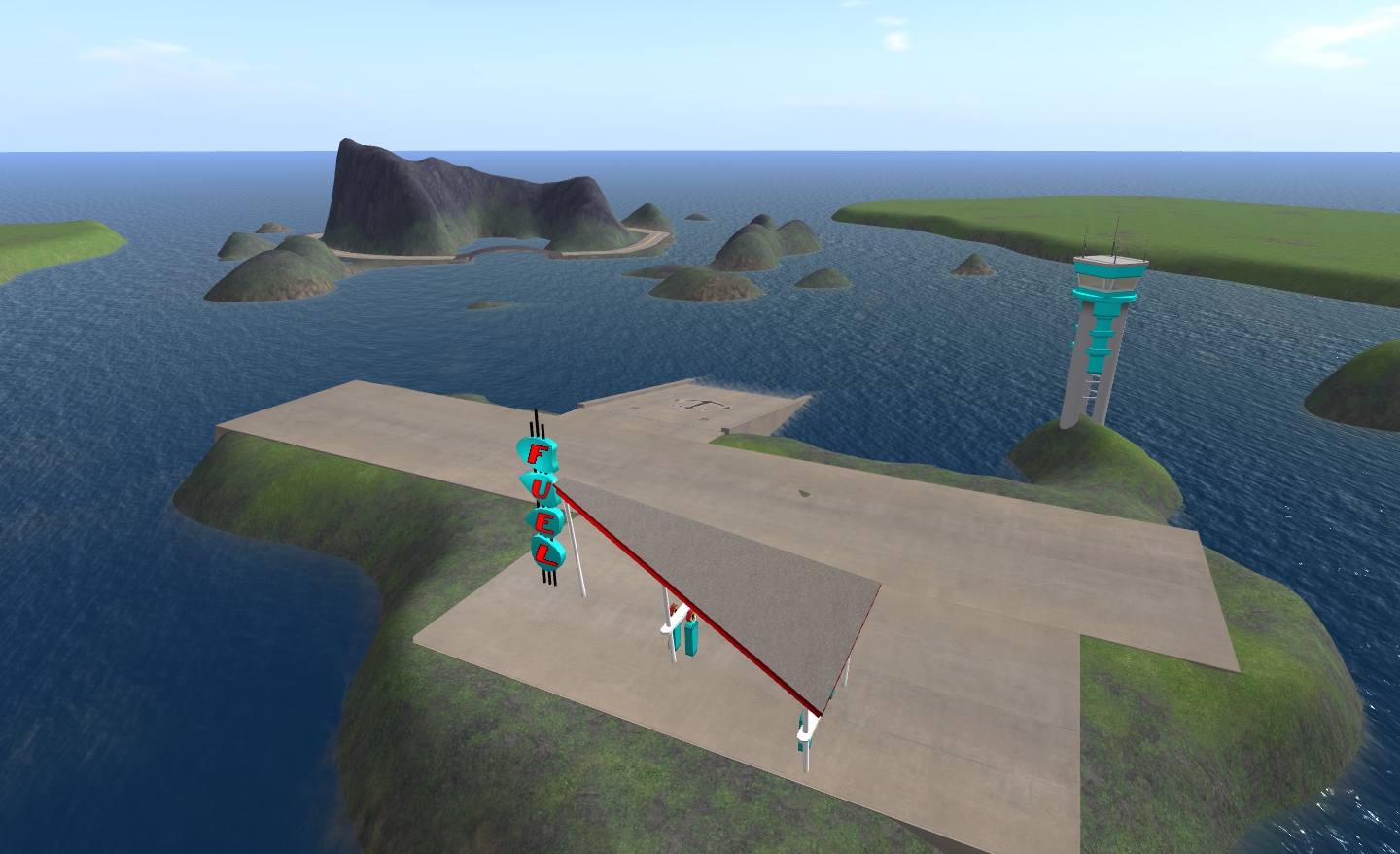
The easiest way of reaching these is to log-in to Aditi and use the World Map to locate the PathTest regions.
One of the PathTest regions on Aditi
Details on the tools themselves can be found on the (in development) pathfinding page of the SL wiki.
There is apparently going to be a Pathfinding User Group starting in the near future. Keep an eye on the UG listings page (or possibly the main pathfinding page of the wiki) if interested.
With thanks to Ciaran Laval for the pointer to the Simulator Group meeting transcript.
LL have started releasing more information on the Advanced Experience Tools developed during the creation of Linden Realms and its predecessor game demonstrated at SLCC-2011.
The blog post (yay! BLOG post!) provides an overview of the new tools and permissions, with the video providing further information. Bear in mind when reading and watching that this is only an initial announcement and that as such, further information will be forthcoming…
The video delves a little deeper into the creation of the tools themselves and which includes some interesting factoids and tidbits of information.
One of the tidbits demonstrates the popularity of the Linden Realms game, which has 5,000 unique visits per day, for a total of 249,000 unique visits since the game opened in (I presume) Beta. Had the game relied upon a “traditional” means of HUD attachment via people’s inventories, the game would be generating 4 million new inventory items per month!
The tools discussed by both blog post and video are:
Teleport agent: this is a new LSL function that enables an agent (avatar) to be teleported automatically to a given location / destination. Within Linden Realms, this is used when people are “killed” by the various threats to their safety; within the video, the LL spokesperson suggests a further interesting use for the capability: the teleport “gun”…
The function supports both local and remote teleports and also respects teleport and access permissions.
Temporary Attachment: this functions is a similar manner to llAtach, but avoids the creation of an item within a user’s inventory. This has two benefits, the most obvious being that people’s inventories don’t get cluttered with items each time they visit a region where the function is in active use and the second, as an extension of this, the asset database itself isn’t overloaded with millions of requests (again, Linden Realms would be generating an estimated 4 million items a month if using llAttach). Attachments for both avatar and screen (HUD) are supported.
The blog and video indicate that temporary attachment is not forced attachment, but a part of the overall Experience Permissions system.
LR Portal: a means of enabling the enhanced permissions system
Experience Permissions: this is a simplified version of the existing permissions system currently in use across the grid. Under the current system, permissions to control your avatar would need to be handled on a case-by-case basis. In something like the Linden Realms game, this means that rather than “dying” and being teleported on contact with a rock monster, the player would get a pop-up asking them if they wish to “die”.
Allowing these permissions to be granted requires action on the user’s part – such as walking through the Portals in the Linden Realms game, but they only need to be granted once, and can be applied across multiple regions (again, as with Linden Realms), allowing for large, continuous experiences to be built.
Permissions that can be granted (according to experience requirements) include:
Teleporting
Attaching objects to an avatar / screen
Control / track camera
Trigger animations
The permissions system is specifically geared to prevent more dangerous permissions such as inventory access, debit a user’s account and change links.
Potential Uses
The potential uses for these tools in terms of games and adventures are clear. However, there are wider applications for the tools, including:
Providing a means for guided tours within sims – providing avatars with HUDs that suggest directions around the sim, allow items of interest to be identified, information relating to those items to be displayed, and so on
Providing a means for store owners to enhance the in-world shopping experience – including how demo items can be provisioned to users using the temporary attach option
The enhancement of more interactive experiences ranging across multiple regions.
Professional Creators Programme
In line with the new tools, LL will be launching a Professional Creators Program. Details on this are currently scant – the blog post simply states, “This program will provide members with helpful resources, such as tutorials and exclusive closed betas. More information will become available in the next few months”. However, Rodvik gave some pre-hints on this via Twitter a couple of months ago, and it seems likely the programme will, like mesh, require filing of some personal information with LL and perhaps taking some form or tutorial like the mesh status upload tutorial. From Rodvik’s comments, the requirements shouldn’t be that intrusive, but given the potential uses of the tools, are seen as precautionary against misuse.
For those wishing to be updated on news and information on the new tools, there is also an in-world Group – the Advanced Creator Tools Notification Group – which can be joined free-of-charge.
Appetites are bound to be whetted at this news (and there are already a fair few in the Advanced Creator Tools Notification Group already!) – and at the little teaser included in the blog post that LL have, “Produced a number of other tools and prototypes to support more rich content creation that we look forward to releasing”.
This comes by way of Nalates Urriah, who keeps a finger on the pulse of things technical on the servers-side of SL (as well as covering much else). Due to the nature of the problem, it’s worth repeating here.
There is a problem with inventory on the Beta (Aditi) grid. Essentially, the inventory you have on the Beta grid is a copy of your Main grid inventory. However, it only gets refreshed / updated when you carry out a change to your log-in password. Recently, people who have been changing their passwords to refresh their Beta grid inventories have subsequently had at least two problems:
Anything “new” in a refreshed inventory (i.e. was not there prior to the password reset) will not rez in-world the inventory
Things created following the password reset and saved to inventory may vanish at the next log-in to the Beta grid.
Additionally, people are reporting that after initially logging-out of Aditi, they are unable to re-log to the same region, as they get a “region unavailable” error, whereas the region in question appears perfectly OK post log-in.
Given people are being asked to try-out various elements of new SL capabilities on Aditi, this is causing some concern and tending to put a major hole in any ability to test such capabilities. For those logging-in to Aditi for the first time (or the first time in a very long time), this may mean that very little will rez from MY INVENTORY, depending upon how long a person has been involved in SL and how their inventory has matured over the years.
A JIRA has been raised on the issue – SVC-7727 – if you’ve experienced the issue for yourself, please make sure you Watch it – and if you have specific details of cases where you experienced the problem that aren’t already listed, please add details.
In his December 2011 address, Rodvik touched on some of the work Linden Lab would be continuing through the early part of 2012 – such as performance and stability – and outlined some of the new features we can expect to start seeing in 2012. Of the latter, he particularly highlighted pathfinding, by saying, “For creators our first new feature for 2012 will be pathfinding. Because worlds feel most vibrant when they are full of life, one of our next focuses for Second Life is the ability to make high-quality “life” within it. So in 2012, we will be rolling out more advanced features that will allow the creation of artificial life and artificial people to be much smoother. For starters, in Q1, we’ll unveil a new, robust pathfinding system that will allow objects to intelligently navigate around the world while avoiding obstacles.”
NPCs: Alpha testing on Aditi soon?
Details of this new capability, aimed towards what are popularly referred to as Non-player Characters or NPCs, is now beginning to emerge.
Rand Linden has updated the pathfinding overview page on the SL wiki to provide initial information, together with an outline pathfinding API page. There is also a set of alpha release notes which suggest that people will be able to start testing the new capabilities on the Beta grid and include a bullet list of currently known issues.
The API and overview pages give insight into the LSL commands that are to be associated with pathfinding – most notably llCreateCharacter, described as, “Convert the current linkset to an AI character. By default, the character’s shape will be an upright capsule approximately the size of the linkset, adjustable via the options list. The linkset must use mesh accounting”, as well as associated commands intended to assist in various modes of movement (and evasion).
The overview page is interesting in that it gives more information on the fact that pathfinding will not itself animate an NPC:
Pathfinding is not an animation system. It does not provide a way to animate a biped or quadruped in conjunction with the new movement functionality. You must use existing methods to animate characters. Nevertheless, pathfinding enables more dynamic movement and provides a better system for controlling character movement than was previously possible. For more information on creating animations, see Animation.
The alpha release notes provide a list of the Aditi test regions however, at the time of writing none appear to be open to public use as yet – I was unable to access any of them earlier today, either via the World Map or via the use of the Address Bar within the Navigation Bar of the Viewer. The four regions in question are (SLurls):
Given they are on the Beta grid, the most obvious way of accessing them is to log-in to Aditi and use the World Map to locate them prior to teleporting.
According to the alpha release notes, the pathfinding commands will only be available on these regions, which appear to include various obstacles and courses NPCs using the functions can attempt to negotiate.
Pathfinding regions
A pathfinding tutorial is also in the offing, although the page for it is currently little more than a placeholder at present – again, expect more updates as they become available.There is also a wiki index page for a category of pathfinding, which should be of assistance in quickly locating the broader information on the subject as well as details of specific dedicated or associated LSL commands.
From this, it would appear that LL are pretty much keeping to the schedule outlined by Rodvik at the end of last year and that by the time you read this, the pathfinding test regions on Aditi may well already be open to public access. For those who are keen to get involved in the project, the updated wiki pages are worth keeping an eye on in lieu of more direct information coming through other channels, such as the blog or technology forum.
The news broke via a Metareality podscast, and follows-on from the previous weeks’ podcast in which Karl Stiefvatar (Qarl Fizz in SL, formerly Qarl Linden) was about to make an Alpha push of the code.
In discussing the release, Karl states, “I should specific immediately that it’s not done; but the heavy lifting part of it is – the tricky 3D math, the place to integrate into the render pipeline,etc, etc, is … So I’ve giving it to you now in this form so that you can give me feedback, because there are decisions that need to be made now that we should make together.”
Karl has released a video demonstrating progress to date, which is available on his website and YouTube:
The video itself is both informative and impressive; demonstrating the deformer working on a standard avatar and on “mesh avatars” human & non-human (so using it, you can now increase the body fat of a mesh avatar if you so wish). Additionally, the deformer works with the Linden-Lab implemented avatar physics as well – again including non-human avatar meshes.
The code does have a couple of additional caveats at present, one of which is that changes applied to an avatar are applied to all meshes attached to the avatar; this is fine where clothing is concerned; but as Karl points out, if you have something like a gun attached to your avatar, you don’t want it to resize as well; so he suggests boolean function may be required to determine which meshes are affected by the deformer – and this may additionally require input from Linden Lab.
Karl openly encourages LL and TPVs to incorporate the code in order to allow users such as clothing designers to experiment with it, as feedback is now the key.
Those wishing to add the code as it stands – and bearing in mind Karl’s warning that this is only an Alpha release can also find it on his website.
A JIRA (SH-1716) has been opened to deal with the deformer code itself, on which a number of baseline questions on the deformer are asked and answered by Karl himself (to reference frame for the project), and within which further questions and feedback is encouraged. Karl specifically asks that you use this JIRA, and not his website for feedback – and as an extension to this, it is suggested that the original parametric deformer JIRA is not used for feedback relating to the code.
SH-1716 already has interesting discussion-points within it, relating to preferred models on which to base the deformer, how to address the question of a boolean function to handle “rigid” attachments (such as the aforementioned gun) – and indeed whether any boolean is in fact required, or whether the matter can be handled via other means. Therefore anyone with a technical interest in the project would do well to give the JIRA a look, bearing in mind Oz’s pleas on the subject of wider discussion (although given the complexity of the subject, one would think that forcing a split in questions & feedback & wider issues could result in something of a fracturing of information on project).
Niran’s Viewer
Those really keen to see the deformer in action might want to download version 1.03 of Niran’s Viewer, which already incorporates the code, but note that NiranV regards this as an experimental release, and the code will likely be removed from the next release.





 Inara Pey: Living in a Modemworld