SL projects updates week 36 (1): server releases, HTTP notes, anti-griefing

Server Deployments

As always, please refer to the week’s forum deployment thread for news, updates and feedback. Deployments are a day behind the usual schedule due to the US Labor Day long weekend.

Second Life Server (SLS Main) Channel – Wednesday September 4th

The Main channel should receive the maintenance package deployed to all three RC channels in week 35, comprising:

  • An update to region restarts initiated by region owners or estate managers which will see the region restart after the last avatar leaves, rather than waiting for the full countdown period to complete
  • Preparatory work to support new estate and parcel access controls – these will require an upcoming viewer-side update in order to be visible to users
  • A fix for a physics-related griefing mode (see below)
  • A crash mode fix.

Release Candidate Channels – Thursday September 5th

All three RC channel should receive the same maintenance package, which comprises  server-side HTTP updates which require a future viewer-side update. In the meantime, these changes should not be apparent in any current viewer release. The updates specifically comprise:

  • When connections between viewer and web services were closed by the server, the last response was sent without a ‘Content-Length’ or ‘Transfer-Encoding: chunked’ header. Last response will now be sent with ‘chunked’ encoding.
  • Throttling actions on Capabilities URL result in 503 status codes back to clients. These responses may include a ‘Retry-After’ header with a delta time giving a hint as to when the client may retry the request. In the absence of such a header, client is expected to make ‘reasonable, best-practices’ delayed retry attempts.
  • Adds support for a new capability, ‘GetMesh2’ for fetching mesh assets with keepalives enabled.

HTTP Notes

The RC deployments look to be the first part of Monty’s continuing work on HTTP connectivity between the viewer and the SL servers. As noted in recent reports, the core focus of this work is on improving mesh fetching capabilities between the two, although Monty is also working on a number of other updates, all of which are aimed at improving the HTTP services between the viewer and the SL servers and making them more robust, as well as paving the way for HTTP pipelining in the future.

Group Ban Lists

Baker Linden continues to work on the new group ban list functionality. The focus is currently on the UI hook-ups and back-end validation checks. It will still be a while before a project / RC viewer is likely to appear, but hopefully not too long.

Anti-griefing Work

Andrew Linden continues to work on “anti-griefing” measures, reporting that the “physics-related griefing mode” which forms a part of the Main channel deployment and which is already on the three RC channels, is to prevent the use of “faux rotating megaprims”.

These are megaprims which used a physics collision exploit to knock avatars out of that region using the ‘resolve interpenetrating objects’ collision logic. “We had  some collision-bypass code there specifically for avatars, but it had been broken some time ago,” Andrew explained, the break apparently allowing the exploit. He’s now fixed the code breakage, and reports from a number of RC sandboxes is that it appears to have worked.

Other Items

There was a report made during the Simulator User Group that some LSL events are failing to execute or aren’t being queued / cued when a script is caught in a loop. details were sketchy, but a BUG report was due to be raised.

Firestorm at three: party, kitties, pendants!

firestorm-logoJune 2013 saw Second Life celebrate its tenth anniversary as a publicly accessible grid. Now September marks the anniversary of SL’s (and OpenSim’s?) most popular viewer as Firestorm turns three.

Anyone who takes time out of their lives to sit down and work on a viewer, providing code and capabilities to enhance our times in-world, and the support so often needed by users, is an unsung hero of Second Life and virtual worlds. It’s no easy task, as I’m sure everyone at Firestorm and other TPVs – even at the Lab – can attest; get one thing wrong and you’re liable to get chased up the nearest tree by a group of users who, if not actively bearing pitchforks, tend to have pretty barbed tongues!

In this, it’s easy to forget that every TPV, including Firestorm, is built, maintained and managed by volunteers. They don’t get paid for their efforts; they don’t consider themselves to have any better grasp of Second Life and virtual worlds than the rest of us – they, like most people, just want to have fun and at the same time they want to make SL more fun for the rest of us. I think that sometimes, in calling for this feature or that feature in a viewer and then getting the hump when it doesn’t appear, we all lose sight of that simple fact.

Join the Party!

So it’s good when an opportunity comes around which lets us celebrate the work that goes into a viewer to take the time to say “thank you” to the folks behind the work. Firestorm users will have just such an opportunity to do so on Tuesday September 3rd, as the Firestorm team throw a Firestorm Third Birthday party at the Phoenix Firestorm support island. The kick-off time is 13:00 SLT, and there is an open invitation from the team to their users to come along and join the fun (well, region limits allowing!).

If you do want to attend, please keep in mind:

  • It is only the one region, so headcount will be limited. Sadly, with over 200,000 users, the team can’t host a party for everyone. However, people are liable to be coming and going throughout the celebrations, so if you don’t get in the first time – keep trying
  • As the party is liable to be very popular, please go along as script-light as possible; it’ll help the region, it’ll help others and it’ll help you. Detach anything you can do without when dancing / chatting – HUDs, scripted attachments, etc.

The Firestorm Kustom Kitty and a Special Pendant

firestorm-firekitty-adTo further mark Firestorm’s third birthday, Jessica and the team have joined forces with KittyCatS to develop a special, limited edition non-breedable custom Firestorm Kitty. The offer is limited to one per avatar, and the kitties are No Transfer. The kitty is fully functional & rumoured to be the cat that dined on the Phoenix. Whether this is true our not, the folks at Firestorm aren’t saying!

The collectables will be available from 09:00 SLT on September 3rd through until 09:00 SLT on September 10th, via vendors in the following locations:

zuri_s_firestorm_pendant_gift
The Firestorm pendant (see left)

Note that If demand is high, you may experience delivery problems. If a vendor faisl to deliver, please follow these instructions to initiate a re-delivery.

In addition, Zuri Rayna has produced a beautiful limited edition Firestorm 3rd anniversary pendant. This is available from the Phoenix Firestorm Support island until midnight SLT on the 3rd September  – and it is stunning!

So Happy Birthday, Firestorm, and many thanks to Jessica, Ed and the rest of the developers, testers, helpers and the support volunteers at Firestorm. Here’s to many more birthdays and celebrations!

Related Links

Kokua and Singularity updates

Both Kokua and Singularity issued what amount to maintenance releases in the latter half of week 35, with Kokua releasing version 3.6.4.29422 on August 28th,  and Singularity releasing version 1.8.2.4929 on August 29th.

Kokua 3.6.4.29442

The release keeps Kokua on a par with LL’s code base, being built on the 3.6.4 code. The release notes identify a potential issue for Linux users with the last release, with Nicky reporting that:

A user on an older version of Linux reported an auto update issue that resulted in no working viewer. Kokua recently updated build systems from Debian Squeeze to Wheezy. While great for users that move ahead of the pack in updating their Linux distributions it left one user (and maybe more) without a working Kokua on their system. So, the request to upgrade was acknowledged and new Kokua was installed. But, it would not run then, when the old Kokua was tried it was stuck wanting to update.

Further testing revealed the issue appears to exist within LL’s Linux build as well, and a JIRA – OPEN-186 has been raised as a result.  In the interim, the team have reverted to building using Debian Squeeze.

This release also sees Kokua gain two potentially useful features – one for mentors / helpers, the other for builders.

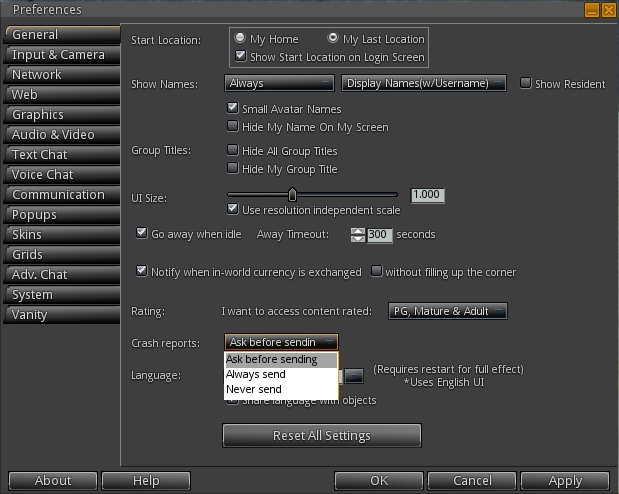
Kokua can now optionally display the age of an avatar in the name tag. The option is off by default, and can be enabled via Preferences > Kokua > General > Show each avatar’s age in their name tag. When enabled, the option defaults to showing the age for avatars up to 28 days of age. However, this can be increased / decreased as required, with 0 meaning avatar ages will always be displayed.

The idea behind this is to make it easier for mentors and helpers identify new starters in a welcome area, so that greetings and offers of support can more readily be made.

The new avatar age display in name tags (Preferences > Kokua > General) and the new button for duplicating values for size, offsets, etc., on maps

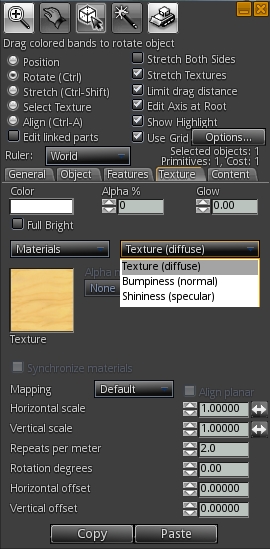
This release also sees Kokua implement a Duplicate Values button in the Texture tab of the Build floater. This allows the settings for the size, offsets, repeats, etc., set for a texture / normal / specular map to be immediately duplicated to the other maps on an object / object face, saving the need to manually set them in turn when applying maps. If there are no additional maps applied to an object / objects face (e.g. a diffuse map, but no normal or specular), the button is disabled.

The remaining updates for the release include:

  • Sit Here or Stand Up options are now only shown in the right-click context menu for objects
  • A Teleport Here option has been added to the context menus to go with the Sit Here option
  • OXP backup crash fix to prevent selecting individual object(s) from a linkset, rather than the selecting the entire linkset, from causing an immediate viewer crash
  • Links no longer include the trailing “?” in the link when asking to load the indicated web page in notifications
  • Fixed a variable scope bug in LLVOVolume::getApproximateFaceNormal().

Please refer to the release notes for further information.

Singularity 1.8.2.4929

The Singularity release comprises a substantial list of tweaks and updates, including a change to the .DAE and .OBJ export permissions when using the viewer on OpenSim, such that if the grid on which the viewer is being used does not support explicit “export” permission, the exporter now follows the rules set by the original Imprudence exporter.

Additionally, the update includes:

  • Additions:
    • Ability to save textures from the inventory menu
    • An option to open inventory folders in a new separate window
    • An option to show landmarks on map
    • An option to hear speakers at the same volume unaffected by position
    • Show Profile button on teleport and inventory offer notifications
    • Ability to show only legacy names for speakers (in Adv. Chat > Chat UI preferences)
  • Fixes for:
    • The German translation where login notifications appeared as ‘[FIRST] [LAST] is online’ instead of showing the actual avatar name
    • The crash when opening Bumps, Pushes, and Hits floater
    • Windows, audio volume control for plugins is now working allowing gradual falloff in volume for prim media objects that are farther away
  • Improvements:
    • Updated Spanish translation
    • Legacy (pre-multiwear) wearables on some grids showed as (body part) shapes. Clothing (not body parts yet) now show with a (new) red question mark icon in the inventory, and can be used again
    • Animation uploads save the values for ease-in/out parameters for future uploads
    • Disable/Enable UI shortcut changed to Ctrl-Shift-F1 on Linux since the default Ctrl-Alt-F1 is used for switching virtual consoles. The same has been done for the other ctrl-alt-F# shortcuts on Linux
    • Imported changes from Linden viewer to introduce consistent ground texture generation and fix crashes in mesh upload.

For details on the contributors for the above, please refer to the release notes.

Related Links

Viewer release summary 2013 week 35

This summary is published every Monday and is a list of SL viewer / client releases (official and TPV) made during the previous week. When reading it, please note:

  • It is based on my Viewer Round-up Page, a list of  all Second Life viewers and clients that are in popular use (and of which I am aware) and which are recognised as adhering to the TPV Policy
  • By its nature, this summary will always be in arrears
  • The Viewer Round-up Page is updated as soon as I’m aware of any releases / changes to viewers & clients, and should be referred to for more up-to-date information
  • The Viewer Round-up Page also includes comprehensive links to download pages, blog notes, release notes, etc., as well as links to any / all reviews of specific viewers / clients made within this blog.

Updates for the week ending: September 1st, 2013

Official LL Viewers

LL Viewer Resources

Third-party Viewers

V3-Style

  • CtrlAltStudio issued an Alpha version with initial Oculus Rift support, with version 1.1.0.34244 appearing on August 25th and 1.1.0.34256 on Sept 1st – core updates: “forward” is now the direction the headset is facing; ability to enter “Riftlook” without a headset connected; lighting rendering fix; ability to turn while seated (download & release notes)
  • Kokua updated on August 28th to version 3.6.4.29422 – core updates: parity with LL 3.6.4 code base; confirmation of Linux Squeeze / Wheezy build issue (with LL viewer as well – see: OPEN-186); ability to copy size, offset and rotation between texture maps; assorted tweaks  (release notes)
  • Restrained Love Viewer updated on August 25th to version 2.8.5.5 (all versions) – core update: on-the-fly “z-offset” height adjustment fix; Linux and Mac version also updated to 2.8.5.5 (release notes)

V1-Style

  • Cool VL updated on August 31st to:
  • Singularity updated on August 29th to version 1.8.2.4929  – core updates: translation updates; Export permissions adjusted for OpenSim; Show Profile button added on teleport and inventory offer notifications; animation uploads save the values for ease-in/out parameters for future uploads; Imported changes from Linden viewer to introduce consistent ground texture generation and fix crashes in mesh upload; + more  (release notes)

Other Clients

  • Group Tools Installer updated to version 2.2.21.0, September 1st (no release notes supplied)
  • Lumiya updated to 2.5.3 on August 27th – core updates: advanced rendering; limited windlight (clouds, stars, time of day), anti-aliasing; ability to buy goods in 3D world view; improved small item selection capability; Adreno GPU fixes (2.5.0 release notes – core updates) – Google Play , Android Pit
  • Mobile Grid Client updated to version 1.21.1194 on August 26th – core updates:IM auto answer functionality if app is in background or screen is off (enabled via settings); small bug fixes and improvements (release notes)

Additional TPV Resources

Depreciated / Discontinued Viewers

  • Niran’s Viewer – discontinued as of version 2.2.0.2701 & superceded by Black Dragon
  • SLiteChat removed from listing; no updates since 2011, removed from TPV Directory & no response from developer
  • SL Second Life Beta viewer – depreciated as of version 3.6.2.278491, July 15, 2103
  • SL Development viewer – depreciated as of version 3.5.2.274629 April 24, 2013
  • Zen Viewer – discontinued by developer and no longer available, January 27th, 2013
  • Phoenix viewer – development and support ended on December 31st, 2012

Related Links

SL project updates week 35 (2): parcel access controls & particle system

Server Deployments Week 35

As always, please refer to the week’s forum deployment thread for news, updates and feedback.

  • On Tuesday August 27th, the Main channel received the update package which includes the “grey box” attachment fix (issue details here), together with an update to for “llListen in linked objects is listening at root instead of linked object local position”; the new code to stop avatars entering a region / objects being rezzed in a region during the last 60 seconds before a restart, and additional fixes for simulator crash modes  (release notes)
  • On Wednesday August 28th, all three RCs received the same update package, which has a fix for a simulator crash mode, a fix for a physics-related griefing mode, and which has a new capability so that region restarts initiated by region owners occur as soon as the last avatar has left the region. This package also includes server-side support for new parcel access controls (see below) – release notes: Magnum, LeTigre, BlueSteel.

Region Shutdown / Restart

In reference to the new capability rolled to the RC channels whereby region restarts initiated by a region owner occur as soon as the last avatar leaves the region (rather than waiting for the time delay to expire), Maestro Linden indicated that the capability will eventually be extended to automated rolling restarts as well.

New Parcel Access Controls

Maestro Linden likes to work-out during meetings

The original post for the RC server package made reference to “estate and parcel access controls”. However, this was an error on Maestro’s part, and he sought to clarify things in a couple of follow-up posts, in which he first made it clear the new controls only apply to parcels, not regions (hence the emphasis above), and then went on to say:

The new feature is to allow a parcel to be configured to allow users to enter a parcel if they are members of the parcel’s group *or* have payment info on file.  This is meant to be a big help toward keeping griefers out, as they often will not add Payment information to their account and group limitations are often managed by the land manager.

This access configuration, which is already available at the estate level, involves enabling 3 options in ‘About Land’->’Access’:

  • Allow public access
  • Allow access only to Residents who: Have payment information on file
  • Allow Group Access: <group>

With the current release viewer (3.6.4 (280048)), this combination of settings is not possible to set in ‘About Land’; enabling ‘Allow public access’ causes ‘Allow group access’ to become disabled.  The upcoming viewer change will make these two settings independent in the UI.

He further explained:

The change is to allow group-based white listing which can parcel restriction based on payment info.  Here’s how the logic plays out:

  1. “Allow public access” means that avatars/groups do not need to be explicitly white listed to visit your parcel.
  2. The “Allow access only to Residents who: Have payment info on file” option is only available when (1) is set (this is also the classic behaviour). 
  3. The “Allow group access: <group name>” setting additionally allows group members to access your parcel, except for those on the ban list.

With only (1) and (2) set, only those with payment info on file can visit your parcel; there is no way to allow your friend/alt who doesn’t have payment info on file to access the parcel.

With (1), (2), and (3) set, you allow two sets of people in:

  • ‘trusted’ accounts, who belong to the parcel’s group
  • any account with ‘payment info on file’ (these users probably aren’t zero-day griefer accounts)

The viewer-side updates required to use these options are currently a work-in-progress. There is an internal viewer available within the Lab which is being used for testing purposes, and it is hoped that the necessary updates will be appearing in a beta or release candidate viewer in the near future.

Continue reading “SL project updates week 35 (2): parcel access controls & particle system”

Restrained Love 2.8.5.5: “z-offset” height adjustment update

In my week 35 project updates on SSA, I brought word that both Henri Beauchamp’s Cool VL Viewer (V1-style) and Marine Kelley’s Restrained Love Viewer (V3-style) have incorporated a means developed by Henri by which the new “hover” capability from LL can be used to make on-the-fly avatar height adjustments in a similar manner to the old TPV “z-offset”.

However, a slight error with the initial release of the new “z-offset” capability within the Restrained Love Viewer (version 2.8.5.3) meant that any changes made were only locally applied; they were not being passed to the baking service for onward transmission. This meant that while you would see your avatar’s height adjust, no-one else would.

Marine has rectified this with the release of Restrained Love 2.8.5.5. If you’ve already downloaded and installed 2.8.5.3, you’ll need to update for the capability to work correctly. As with Henri’s original implementation, there are a number of up-front points to note how things work, as they have changed from the “old” z-offset functionality:

  • As with LL’s hover feature, that avatar shape must be modifiable (if not, the Z-offset won’t work)
  • There will be a delay in setting the offset and seeing the final result because each change does require viewer / server communications. Multiple quick changes to the z-offset should therefore be avoided, as they may not propagate correctly.

Marine notes that there are a couple of niggles with her implementation, and that care should be taken with height adjustments.

In addition to the time taken for adjustments to propagate through the system, you may find that when they have done so, you avatar may appear a little higher or lower than you originally set. Should this happen, don’t juggle with the slider; wait another second or two and the avatar’s height will make a final adjustment and appear as you intended.

With this update, the slider will also adjust a seated avatar as well, although adjustments don’t show-up on-the-fly; instead you have to make an adjustment and wait for it to propagate via the baking service in order to see your avatar shift (along with everyone else).

The update is available for all three versions of Restrained Love, links below.

Related Links