Logos representative only and should not be seen as an endorsement / preference / recommendation
Updates from the week through to Sunday, October 6th, 2024
This summary is generally published every Monday, and is a list of SL viewer / client releases (official and TPV) made during the previous week. When reading it, please note:
It is based on my Current Viewer Releases Page, a list of all Second Life viewers and clients that are in popular use (and of which I am aware), and which are recognised as adhering to the TPV Policy. This page includes comprehensive links to download pages, blog notes, release notes, etc., as well as links to any / all reviews of specific viewers / clients made within this blog.
By its nature, this summary presented here will always be in arrears, please refer to the Current Viewer Release Page for more up-to-date information.
Note that for purposes of length, TPV test viewers, preview / beta viewers / nightly builds are generally not recorded in these summaries.
Official LL Viewers
Release viewer: version 7.1.10.10800445603, formerly the DeltaFPS RC, dated September 11, promoted September 17promoted August 26 – NO CHANGE.
Release Candidate: ExtraFPS RC, version 7.1.11.11074622243, September 30.
Aesthetics improvements: new Antialiasing setting – SMAA; Contrast Adaptive Sharpening; Khronos Neutral Tone Mapping (can be changed to ACES via the RenderTonemapType Debug setting).
The following notes were taken from my audio recording and chat log transcript of the Content Creation User Group (CCUG) meeting held on Thursday, September 5th, 2024.
Tis meeting was also livesteamed on You Tube by the Lab. The video is embedded at the end of this summary, my thanks to the Lab for providing it.
The CCUG meeting is for discussion of work related to content creation in Second Life, including current and upcoming LL projects, and encompasses requests or comments from the community, together with related viewer development work. This meeting is held on alternate Thursdays at Hippotropolis.
Meeting dates and times are recorded in the SL Public Calendar, and they re conducted in a mix of Voice and text chat.
The notes herein are a summary of topics discussed and are not intended to be a full transcript of the meeting.
Aesthetics improvements: new Antialiasing setting – SMAA; Contrast Adaptive Sharpening; Khronos Neutral Tone Mapping (can be changed to ACES via the RenderTonemapType Debug setting).
Near-Term Viewer Release Roadmap
ExtraFPS work is focuses on bug fixes with the aim to get it promoted to default viewer status ASAP.
The first maintenance RC to follow ExtraFPS will be the Maint B viewer, which will include updates put on hold during the focus on performance issues plus additional updates, some of which may be further “post-PBR” performance / aesthetic improvements.
A new project intended to move Second Life away from reliance on the Vivox voice service and plug-in, and to using the WebRTC communications protocol (RTC=”real-time communication”). Roxie Linden is leading this work.
Key benefits:
WebRTC supports a wide range of real-time communications tools in common use (e.g. Google Meet), supporting audio, video and data communications, and is thus something of a “standard” approach.
Offers a good range of features: automatic echo cancellation, better noise cancellation and automatic gain control, much improved audio sampling rates for improved audio quality.
Opens the door to features and capabilities to voice services which could not be implemented whilst using Vivox.
Status
Still awaiting wider simulator RC deployment. Per recent SUG / TPVD meetings, this now looks set to commence on October 16th, although the date may still change.
LL is already looking ahead to further work with WebRTC once it has been deployed, in terms of “Voice and media”. More to follow on this in the future.
Again, as per the previous CCUG meeting, in order for PBR lighting to render anywhere close to correctly, alpha blending had to be switched from SRGB to linear colour space. This can cause some older content using Blinn-Phong, to look either more opaque or more transparent than in did pre-PBR.
For those with access to the Content Creation Discord channel, this work is now available in a pre-release viewer there.
Note: due to a request from Derrick Linden, I am unable to post information on how to access the Content Creation Discord channel. Requests to do so should be made to Vir or Derrick Linden.
This work is supported on (the Beta grid) – again, refer to the Discord channel for details on this.
Those using the Discord build are asked to provide feedback (with screen shots as appropriate).
Originally slated as being a part of the viewer to follow ExtraFPS, the Khronos Neutral tone mapper (another code contribution by Rye Cogtail), which should improve overall ambient lighting in SL, making things somewhat brighter and more vibrant.
Options for this are available within the ExtraFPS viewer as debug settings:
RenderToneMapType – set the desired tone mapper (either Khronos Neutral (new default) or ACES .
RenderToneMapMix – mix between linear and tone-mapped colours.
If this approach is continued, these options will likely become UI elements within the Sky settings, allowing the desired Tone Mapper / mixing be set at parcel level for the viewer, together with Advanced Graphics options for determining which should be the general default.
Results to these have thus far been mixed, so more feedback is being sought – which is felt to be better (ACES or Khronos Neutral (or even something else, etc).
Some concerns have been voiced by creators over the idea that tone mapping can be user-configurable (“how can I make sure the tone mapping on my item is correct, if the user can change tone mapping in their viewer?”).
Allowing tone-mapping offers the ability for people to view Second Life as they prefer / set their regions / parcels to be viewer under specific lighting conditions; ergo offering tone mapping options via the EEP Sky settings as has been suggested above was seen by most at the meeting as a good thing.
Some questioned how consistency of appearance can be maintained (per the question above) if they cannot be certain on the adjustments users make to their viewers.
One suggestion was for LL to designate one as the default that creators should be testing and creating against, and if the parcel is different, then it is up to the parcel owner to deal with.
Overall, keeping with Khronos / glTF would be preferred,
Further help in setting the brightest / contrast for for scenes can also be offered through exposure control and the colour gradient, with Geenz working on these as well.
The above grew into an extended technical discussion through to the end of the meeting, please refer to the video.
In Brief (Q&A)
[Video: 12:23-13:30] A brief discussion on glTF punctual lights (coming with glTF scene import), which might also offer the opportunity to offer more lights on alpha (rather than just the 6 closest, as it currently the case).
[Video: 15:00-16:50] more Bakes on Mesh channels (e.g. individual left / right eye channels to allow for individual eye colours er eye:
Nothing currently planned beyond the existing Aux channels.
LL has had internal discussions on a “simplified editor for decorating houses, etc.”, and feedback has been requested as to what kind when / if the concept of layer channels is re-visited, it might be from the perspective of replacing them with something more accessible – but this is not something currently being investigated.
In terms of channels for individual eye colours (or similar), a feature request was requested.
† The header images included in these summaries are not intended to represent anything discussed at the meetings; they are simply here to avoid a repeated image of a gathering of people every week. They are taken from my list of region visits, with a link to the post for those interested.
On September 27th and 29th, Kokua updated their viewer with the release of version 7.1.10.
As is common with Kokua, the viewer is provided in three variants utilising the same code:
No RLV, version 7.1.10.56206
RLV and “Full time” RLV, version 7.1.10.59780.
The key aspects of this release are parity with Linden Lab’s DeltaFPS viewer code base, and changes made to the Linux system requirements. The following is an overview of some of the key changes between this release and the previous Kokua 7.1.8 release.
Also note that Kokua did not provide a release to match the Lab’s 7.1.9 Altasaurus viewer. However, updates from that viewer are a part of DeltaFPS; as such, the release notes for the Altasaurus viewer are referenced below for those interested.
Installation
Only download Kokua via the Kokua website. Do not utilise and other third-party site purporting to offer the Kokua viewer.
There is no need to perform a clean install with this release if you do not wish to.
Do, however, make sure you back-up all your settings safely so you can restore them after installing 7.1.10.
Linden Lab Updates
DeltaFPS
Viewer version number 7.1.10.10800445603, dated September 17th – release notes in full.
Core updates: performance improvements, building on the improvements in viewer 7.1.9; viewer-side WebRTC support.
Date of promotion to release status: 26th August, 2024.
The release notes for both of the above should be referred to for complete information on updates and resolved issues, only some of which are summarised below.
WebRTC
WebRTC communications protocol (RTC=”real-time communication”) is the new Voice communications protocol for Second Life, replacing Vivox Voice.
Why Make The Change?
Voice in Second Life has been supplied through an arrangement with Vivox. This has required Linden Lab to utilise a viewer plug-in tool – SLvoice.exe – to manage voice services within the viewer., which in turn has made LL both reliant on Vivox for bug fixes for the plug-in, and subject to changes in support for operating systems imposed by Vivox such as the latter ending native support for Linux some years ago).
WebRTC by contrast is the predominant telephony protocol used by web-based applications, such as Google Meet, and is integrated into most common browsers. It has almost all the features common to Vivox in supplying a voice service – spatial in-world voice; peer-to-peer sessions; Group voice (including moderation) and multi-user Voice conferencing – although the are some limitations (see below).
Benefits and Improvements
WebRTC Offers a range of benefits over Vivox, including, but not limited to:
48khz audio bandwidth providing cleaner sound.
User control over:
Audio noise reduction – high reduction for noisy environments, no reduction for clean audio sources (performers, etc.)
Automatic gain control – less need to individually tune other user’s audio levels.
Audio/video device selection.
Improved: spatialization, audio echo cancellation and audio sampling rates for improved audio quality.
The WebRTC options added to Kokua’s Voice preferences
Most significantly, WebRTC removes all reliance on a third-party plug-in for the viewer. Instead, it is supplied as a library and wrapper within the viewer. This means:
Linden Lab has greater ability to address Voice related issues directly, without having to await fixes from a supplier.
WebRTC potentially opens the door to adding features and capabilities to SL Voice in the future, including some which have been long-requested.
Limitations
WebRTC does not support the existing Voice Morphing capability in Second Life.
This is because voice morphs are tied to the Vivox service, and cannot be utilised with WebRTC.
Those who do use the current Voice Morphing capability are directed to this SL Wiki article on Voice Morphing, which provides a list of solutions which can be used with WebRTC.
Note that the Voice Morphing options remain available in Kokua 7.1.10 because at the time of release, Vivox Vorph Morphing remains available on Vivox-enabled regions.
Conferences and group voice calls are limited to 50 participants.
Security
The Second Life implementation of WebRTC addresses security issues such as potential eavesdropping, exposing users’ IP addresses, etc., by routing communication through proxy servers managed directly by LL .
Deployment Notes
At the time of writing, simulator support for WebRTC is limited; deployment is due to become more widespread from October 16th, 2024, and hopefully be grid-wide by the end of October 2024. During this transitional period, peer-to-peer, conference calls and group chat sessions might be subject to various disruptions (e.g. they will not work between those on simulators running Vivox and simulators running WebRTC).
Usability Updates
Object Take
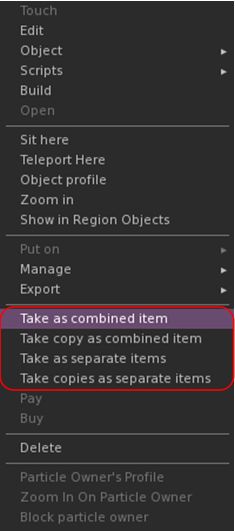
The update multi-object take options
Kokua 7.1.10 includes the Lab’s updates to picking-up objects in-world using the right-click context menu:
When selecting an individual item, the right-click context menu will display the expected Take and Take Copy options.
When selecting multiple items, the right-click context menu will display the following new options:
Take As Combined Item: return all the selected objects to inventory as a single, coalesced object.
Take Copy As Combined Item: return copies all the selected objects to inventory as a single, coalesced object, leaving the originals in-world as individual objects.
Take As Separate Items: return all the selected objects to inventory, but list them as individual items, not as coalesced.
Take Copies As Separate Items: return copies all the selected objects to inventory, but list them as individual items, not as coalesced, leaving the originals in-world.
Note that all of the above Take options will be available in accordance the SL’s permissions system (as with Take / Take Copy).
Avatar Rendering Updates
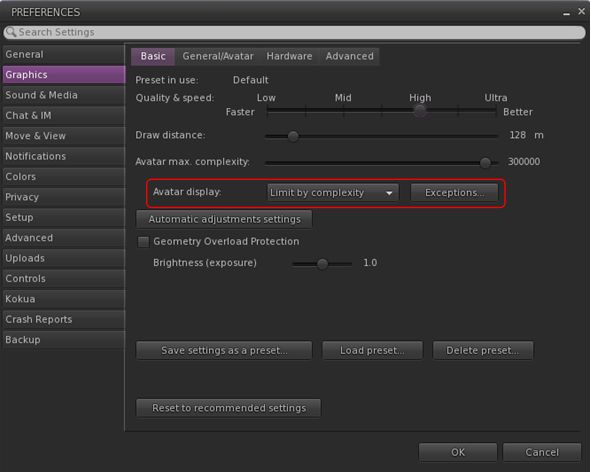
Linden Lab added new options to enable the prioritisation of rendering avatars using the following criteria:
Limit by complexity – any avatar with a complexity greater then your Avatar Maximum Complexity” setting will be rendered as a Jellydoll.
Always show friends – your friends will never be rendered as Jellydolls, no matter what their complexity
Only show friends – all avatars except your friends will be rendered as Jellydolls.
Within Kokua, this options are found under Preferences → Graphics, with the Exceptions drop-down also repositioned in the panel.
New Complexity options from LL within Kokua’s Preferences → Graphics → Basic, including a move of the Exceptions drop-down (also see below)
General Updates / Improvements
Add Images to Inventory Items in Bulk: select up to 50 inventory items → Right click selection → Image.
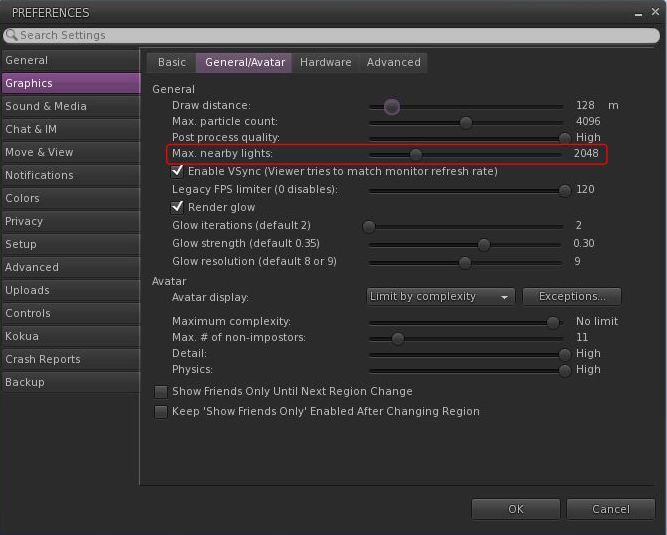
Option to control the amount of lights: Preferences → Graphics → General/Avatar → Max Nearby Lights slider.
Control nearby lighting through the nearby lighting slider
glTF model preview: use a prim to preview the appearance of a glTF scene / model:
Edit the prim. then Top menu bar → Develop → GLTF → Open.
To enable the Develop menu, either go to Advanced → Show Develop Menu or press Ctrl-Alt-Q or go to Preferences → Advanced → check Show Developer Menu
Note that this feature is still in the early stages of development and that glTF models will only appear locally in your own viewer, they will not be rendered for others to see in their viewers.
Better MOAP URL handling in order for users to not only be able to CTRL-C or Cmd-C copy but also to see decoded URL payloads for easy inspection. In the nearby media list, you can also right click a media/data link and Copy URL/Copy Data.
Mirrors disabled by default for all graphics quality levels to improve performance.
You can choose to enable mirrors manually in Preferences → Graphics → Advanced→ Mirrors.
Selected Kokua Updates
Preferences
With the introduction of the new avatar complexity settings by the Lab:
Kokua’s options Show Friend Only Until Region Change and Keep ‘Show Friend Only Enabled Avatar Changing Region have been relocated:
From: Preferences → Graphics → Basic
To: Preferences → Graphics → General/Avatar.
Kokua’s Always Render Friends checkbox is removed from Preferences → Graphics → Basic.
Improve Graphics Speed
The Improve Graphics Speed → Auto-Adjust Settings panel is now correctly sized to fit the displayed information (no overflow).
The Enable VSync options have been inverted so the explanation and note are at the top (Improve Graphics Speed → Auto-Adjust Settings → Enable VSync.
Linux Updates
Kokua 7.1.10 requires a newer Linux system than previous releases; GLIBC 2.35 is required, meaning Ubuntu 22 or better and Debian 12 or better.
This version of Kokua may run on older Linux variants (e.g. Ubuntu 20), however CEF will not run, so web pages within the viewer will not be available.
There are some known bugs in the Linux version which we considered minor enough to proceed with the release.
360 snapshot doesn’t work
Need wine installed for Vivox voice
GLIBC 2.30 systems could still run the viewer, but with a broken internal browser.
This Linux version of Kokua runs much more smoothly due to LL fixing a number of the causes of frame stall which were most noticeable on Linux.
Kokua Team Request
Kokua is provided through time and efforts of a two-person project team. Understandably, the majority of work two people can perform on the viewer is largely focused on tracking and integrating with official viewer releases from Linden Lab. This means that there is limited time for bug fixing and for implementing additional features and requests. The team also has a limited capacity for maintaining the Linux flavour of the viewer.
Because of this, the Kokua team is seeking additional help. In particular they would like to hear from:
People interested in working on bug fixes and enhancements for Kokua, thus reducing the said backlog.
A Linux specialist to help with maintaining the Linux version of Kokua.
Those interested in volunteering their time should drop an e-mail to chorazinallen AT gmail.com. When doing so, please note that:
Experience with C++ is essential.
Familiarity with working with the viewer is a bonus.
The following notes cover the key points from the Web User Group (WUG) meeting, held on Wednesday October 2nd, 2024. They form a summary of the items discussed and is not intended to be a full transcript. A video of the meeting, recorded by Pantera Północy, is embedded at the end of this summary – my thanks as always to Pantera for recording it and making it available.
Note: This meeting was entirely text-based.
Meeting Overview
The Web User Group exists to provide an opportunity for discussion on Second Life web properties and their related functionalities / features. This includes, but is not limited to: the Marketplace, pages surfaced through the secondlife.com dashboard; the available portals (land, support, etc), the forums.
As a rule, these meetings are conducted:
On the first Wednesday of the month and 14:00 SLT.
Meetings are open to anyone with a concern / interest in the above topics, and form one of a series of regular / semi-regular User Group meetings conducted by Linden Lab.
Dates and times of all current meetings can be found on the Second Life Public Calendar, and descriptions of meetings are defined on the SL wiki.
Updates to the Lab’s internal data warehousing infrastructure resulted in some breakages to the data feeds API providing metrics (number of users logged-in, etc), for use by external services and the count of users in regions listed in the Destination Guide.
MFA is being extended across all of the Lab’s web properties, so those opting-in to MFA will find at times that they may have to re-authenticate when accessing a wider range of Second Life web properties.
This work is expected to surface during the October-December 2024.
Hopefully, a blog post will be provided as this role-out goes ahead.
The Marketplace has been undergoing a facelift with its layout, together with other web properties.
With the MP, the changes have been intended to make in more Mobile-friendly and making it more responsive, particularly with mobile.
The deployment on the MP to Mobile had been referenced in the July 2024 WUG meeting, and it is hoped MP for mobile will be “totally shipped” by the end of October 2024.
Some of Marketplace page layout updates: 1 – Buy L$ & current balance display enlarged; 2- new user-related menu dropdown providing access to list and other options; 3 – (partially hidden) updates purchase option buttons; 4 – new scroll bars for viewing additional item images. Note: selected listing for illustrative purposes only
More is to be done with this, and once things are moved further along, it is likely their will be a more formal announcement on changes made and why.
[Video: 6:33-6:56] The overall aim of the changes across all web properties is to make them all consistent in terms of look and general functionality (e.g. colours, were to find links, etc., in the header / footer areas, etc.
There was assorted feedback provided for the MP page layout (e.g. the image sliders, the use of orange, the layout of the a user drop-down menu and use of sub-menus to display options, together with concerns over colour choices and readability for those with visual impairments.
Variants (at one time “Styles” – e.g. having multiple colour options for an item in a single listing) was again raised.
Despite being something stated as being in the works by Reed Linden (since departed from LL) as long a two years ago, and being reported as close to being available for release a year ago, it is once again something the Lab “want to do”.
Apparently, there designs for the idea, but “it’s definitely not happening this calendar year” (no surprises there), but is is noted as something “people want”.
As a part of the web properties refresh, both the Second Life dashboard (secondlife.com) and the associated Account pages below it will be received some TLC.
The Log-in and download pages for the viewer will also be receiving a more responsive, dark mode update.
This work is apparently targeting Q4 of 2024.
[Video: 12:43-19:03] New user sign-up discussion – and extensive discussion on user sign-up page, including:
Lack of explanation around the choice of user name and its potential impact (e.g. being display in the avatar’s name tag, etc.). Which has in turn led to people using their physical world names or gibberish name in the believe that this information will not be shown and they’ll have the ability to create an alias / persona once in-world (as done with many MMOs).
Lack of any password confirmation field to account for mis-types when entering a password.
It was noted that some joining the Lab have the same issue vis: user name.
[Video: 19:33-23:18] Marketplace Categories a discussion on potential new categories and overhauling the Categories listing. Please refer to the video.
LL is engaged in some design work around the idea.
However, due to the complexity of the Marketplace and its development history, it is not an easy task to tackle. There are also some “non-Marketplace technical hurdles” to cross as well.
Please refer to the end of the video for the rounding-out of the above discussions of listing, demos, and categories.
The following notes were taken from the Tuesday, October 1st, 2024 Simulator User Group (SUG) meeting. They form a summary of the items discussed, and are not intended to be a full transcript, and were taken from my chat log and Pantera’s video of the meeting, which is embedded at the end – my thanks to her for providing it.
Meeting Overview
The Simulator User Group (also referred to by its older name of Server User Group) exists to provide an opportunity for discussion about simulator technology, bugs, and feature ideas.
Meetings are open to anyone with a concern / interest in the above topics, and form one of a series of regular / semi-regular User Group meetings conducted by Linden Lab.
Dates and times of all current meetings can be found on the Second Life Public Calendar, and descriptions of meetings are defined on the SL wiki.
Simulator Deployments
On Tuesday, October 1st, the SLS Main channel saw the deployment of the Picnic /Doubtfire update, making it grid-wide.
There were apparently some issues with the deployment, resulting in it taking longer than anticipated, due to a need to fix them on the fly.
Wednesday, October 2nd should see all RC channels restarted without any deployment.
WebRTC Simulator Deployment Status
As a result of an Engineering team summit in week #41 (commencing Monday, October 8th), it now appears the deployment of the WebRTC updates to some of the main RC channels will now not take place until Wednesday October 16th.
In the meantime, WebRTC can still be tested on the four WebRTC regions (WebRTC1 through 4) on the Pop Rock channel, and on the Preflight test RC channel.
SL Viewer Updates
No changes at the start of the week:
Release viewer: version 7.1.10.10800445603, (formerly the DeltaFPS RC), dated September 11th, was promoted to de facto release status on September 19th. This includes:
Performance boosts. Memory management has been optimized and users will experience a higher FPS across various systems. A comprehensive range of bug fixes are also provided. This includes better PBR material handling and resolving frequent crashes. See the release notes for more.
UI for scheduling region restarts now available via a new button located in the Region/Estate floater. (Note: there is currently an issue with scheduled region restarts working correctly and a fix is due to come in the next server release).
Release Candidate: ExtraFPS RC, version 7.1.11.11074622243, issued September 30th.
Aesthetics improvements: new Antialiasing setting – SMAA; Contrast Adaptive Sharpening; Khronos Neutral Tone Mapping (can be changed to ACES via the RenderTonemapType Debug setting).
In Brief
Please refer to the video below for the following:
Game Control:
This work has apparently not been merged into the initial release of ExtraFPS. A bug fix failed to pass QA, causing issues on the Mac flavour of the viewer.
It is hoped that this issue can be resolved and the code merges in the near future.
Combat 2.1:
Rider Linden has published a new proposal specification for “Combat 2.1”, the next update to the Second Life Combat System (SLCS), this one expanding on teams and respawning.
Feedback is being sought on this, with the note that it should be offered sooner rather than later by anyone who may not have seen it, as Rider is hoping to start converting it into actionable items, after which he can then start to implement.
A fix for at least some of the attachment dropping / loss / ghosting issues (see: Attachment loss on RC channel 2024-08-29.10619830788) which can be experienced during region crossing (TP or physical) is being deployed and tested.
The plan is to deploy it with either the WebRTC simulator updates or the Barbecue maintenance update that will follow, depending on which is the the next to go out (currently WebRTC, as noted above).
However, the fix is currently available on Aditi (the Beta grid) for those wishing to test it.
Rider Linden is working on llSetAgentRot (turns the avatar to face the direction indicated by rot., with a +/- 3 degree variance), which should be going into the Barbecue simulator update.
However, there is a corresponding viewer change it requires in order for the avatar turning to be seen viewer-side, and this update is going into the viewer Develop branch for a future viewer update.
This sparked a further discussion which ran into the topic of Child Agents (instances of an avatar which are registered in regions adjacent to the region the avatar is in, allowing the avatar to be “tracked” in case it is actually going to move from the region it is in to the region in which the Child Agent is registered, for example) and the subject of ghosted objects.
LDPW have requested a new LSL function – llTransferOwnership – which would allow a scripted change of ownership for an item with Transfer permissions.
This sparked an end-of-meeting discussion on how it might work and suitable safeguards.
As the function is still in the discussion phase at this point in time, please refer to the video below for further information.
Date of Next Meeting
Tuesday, October 15th, 2024, due to the Engineering Team summit meeting.
† The header images included in these summaries are not intended to represent anything discussed at the meetings; they are simply here to avoid a repeated image of a rooftop of people every week. They are taken from my list of region visits, with a link to the post for those interested.
Logos representative only and should not be seen as an endorsement / preference / recommendation
Updates from the week through to Sunday, September 29th, 2024
This summary is generally published every Monday, and is a list of SL viewer / client releases (official and TPV) made during the previous week. When reading it, please note:
It is based on my Current Viewer Releases Page, a list of all Second Life viewers and clients that are in popular use (and of which I am aware), and which are recognised as adhering to the TPV Policy. This page includes comprehensive links to download pages, blog notes, release notes, etc., as well as links to any / all reviews of specific viewers / clients made within this blog.
By its nature, this summary presented here will always be in arrears, please refer to the Current Viewer Release Page for more up-to-date information.
Note that for purposes of length, TPV test viewers, preview / beta viewers / nightly builds are generally not recorded in these summaries.
Official LL Viewers
Release viewer: version 7.1.10.10800445603, formerly the DeltaFPS RC, dated September 11, promoted September 17promoted August 26.
Performance boosts. Memory management has been optimized and users will experience a higher FPS across various systems. A comprehensive range of bug fixes are also provided. This includes better PBR material handling and resolving frequent crashes. See the release notes for more.
UI for scheduling region restarts now available via a new button located in the Region/Estate floater. (Note: there is currently an issue with scheduled region restarts working correctly and a fix is due to come in the next server release).






 Inara Pey: Living in a Modemworld