A 2nd Hub – Part 2

<- Return to part 1

2ndHub is a social media site specifically developed for users of Second Life. In this 2-part review, I take a tour of the site and look at the various features and options.

In part one, I gave a general overview of the site, and looked at setting up accounts and profiles, as well as how to gain an overview of the various sections of the site.

In this part, I look at the various communications options for 2ndHub, including Events management, and I take a look at the tools provided free of charge by the site for in-world integration and connectivity and provide my personal feelings on 2ndhub.  

Events
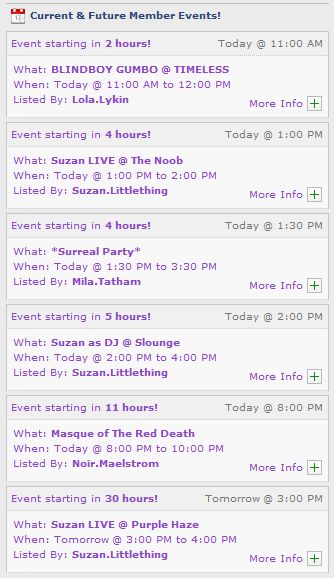
Events list (auto-updated)

You can notify 2ndHub users of upcoming events via the MY EVENTS tab, which allows you to set up multiple events which then appear in the Current and Future Events list on member’s MY HUB page (located on the left side of the page, under the Business Spotlight section.

Events are counted down in terms of the number of hours before they commence, while clicking on the + button can open-up an additional pane of information on the events (what is is, who is participating, for example) as well as displaying any SURL / URL that was included in the original event notice. I personally find it more appealing than the SL “dashboard” web page Events list.

Communications

Communications within 2ndHub are pretty impressive. Within your Profile page and your My Hub page is a Twitter-like set-up, comprising a “What’s Happening” text entry box, and a series of tabs: My Personal Feed, My Priority Feed, Public Feed and My Activity Feed.

The Public Feed for messages (My Hub and Profile pages)

The “What’s Happening” text box allows you to send out messages on any subject you like – how you’re feeling, general greetings, observations, etc.,  – a-la Twitter and Plurk. Messages can be targeted to go to all 2ndHub users, or just to your Friends, or even just to yourself. You can also set-up who can comment in reply.

Like Plurk, images (from your Flickr account, at least, if you have one) and YouTube videos can be embedded into messages. These will be displayed as a link in the message until clicked upon, which will either expand the image / video within the message window, allowing it to be viewed / played. Clicking the link again will close the displayed image / video.

In a further nod to Plurk, you can add a descriptor to a message (i.e. “Inara Pey says,”, “Inara Pey shouts”, etc.).

The HUD option that can be downloaded from the site (see Tools, below) extends the messaging capability further, allowing you to send messages to the 2ndHub site from in-world – very useful if you’re enjoying an event or something and you think others might like to pop along.

Additionally, 2ndHub includes a live chat engine, allowing you to chat directly with other friends who are online (or leave them offline messages). However, this is purely on a one-to-one basis: you cannot invite two or more people into a live chat session (or at least, none I’ve been able to find), which is a shame.

Group communications allow for the creation of Group-based notices which can be posted either to the 2ndhub website or in-world (where they will be received by all avatars within the Group, providing you have a 2ndHub delivery server set-up (see Tools, below). The system supports the sending of attachments (in-world items) with notices, making them almost as flexible as in-world Group notices.

Tools
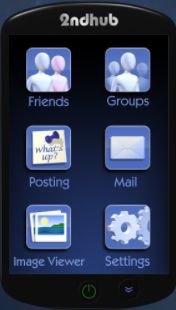
The in-world HUD

In-world HUD. Looking like a small remote control, the HUD provides you with a means of connecting to 2ndhub from in-world. With it, you can:

  • Friends: Send messages to a specific friend when they are not online (or if you are not connected to them as Friends in-world) leave a comment for them on their profile (will also appear in your Personal and Priority feeds; invite a 2ndHub friend to join one of your Groups
  • Groups: Post a Group notice; invite someone near you in-world to join a 2ndHub Group you’ve created (they *do not* have to have a 2ndHub account in order to do so)
  • Posting: send a message to your Profile (will be displayed on your MY HUB page in the Personal, Priority and Public feeds
  • Mail: Allows you to alter your e-mail settings associated with 2ndHub
  • Image Viewer: allows you to use the HUD to view images loaded into it (an interesting tool, but not overly useful, although it does rather nattily cause the HUD to rotate through 90 degrees to a landscape orientation for easier image browsing)
  • Settings: Get the HUD’s help Notecard determine whether you wish to use Second Life’s chat box to enter text with using the HUD or a dedicated pop-up text box (chat line option may not work in all SL Viewers).

Delivery Server: a single-prim in-world server (think SLM Magic Box) that enables you to send Group notices in-world and add attachments to such Notices. There is a dedicated sub-tab under MY TOOLS for managing any Delivery Servers you deploy in-world.

Subscriber Boards: wall-, or floor-mounted board that allow avatars in-world to subscribe to any defined 2ndHub Group(s) you have set-up (one board per Group). Subscribers will be able to receive Group notices, etc., without losing a Second Life Group slot. Like Delivery Servers, there is a dedicated sub-tab under MY TOOLS for managing any Subscriber Boards you deploy in-world.

The tools are all available from MY TOOLS -> Tool Delivery and are free of charge. Each tool selected will be delivered in-world to your avatar.

In Summary

A basic business profile

Overall, 2ndHub is a well-considered website that offers potential for Second Life users who wish to widen their SL-related social networking links and opportunities. Business interests are reasonably well supported, while things like communications capabilities and Group support are well thought-out. The level of SL integration is very good, offering considerable flexibility of use.

Not everything on the site is completed, nor is everything entirely logical. The latter is a minor quirk, and easily overcome; the former suggests that active development of the site might be a little lacking – possibly because the current take-up is perhaps on the low side (around 2.5K registered users at present). Various items like greeters and vendor systems have been promised, but there is no clear indication as to whether these are being actively works upon or not.

Getting to grips with the site  – beyond setting up profiles – can be a tad confusing, this is not helped by the fact that there is no apparent Search option. While “Browse Directory” might be a more accurate description of what someone is doing when seeking friends and  / or businesses, it is not instantly intuitive – as the number of calls for assistance tends to point out.

The other thing that would be good to see – assuming the site is still being actively developed, is it being opened up to virtual worlds that are similar in nature to Second Life – such as Avination and InWorldz. Many people involved in Second Life have a presence in these worlds as well, and providing a central social networking capability that enables these various identities to be linked (given most do link them), would undoubtedly increase the popularity of the site.

The most surprising thing about the site is that it is not in wider use; indeed it seems to have been one of the best-kept secrets of Second Life these past 18 months. I personally cannot recall seeing it mentioned in ads for blogs anywhere, and it was purely by chance that I stumbled across it. I certainly hope this article will help to change that.

This is not designed to be a comprehensive look at the site – there is much that I deliberately haven’t mentioned; so think of this review as something to whet your appetite. Certainly, if you are looking for a new social media environment to which you can link your Second Life identity, 2ndHub is a very good place to start. Equally, if you’ve just been booted from Facebook and do not wish to trouble yourself further with it, or are not convinced that Facebook pages are for you, then 2ndHub may well offer a viable alternative.


A 2nd Hub – Part 1

2ndHub

As shown by Facebook’s actions this week in deleting accounts linked to Second Life avatar names, social media sites and Second Life can make uneasy bed fellows. For a time, it looked like Linden Lab themselves were prepared to bridge the gap when they purchased Avatars United. Sadly, that particular deal went nowhere at an initial flurry of activity, as Avatars United was left dangling for some 12 months prior to Linden Lab pulling the plug on it.

However, during the same time, a social media website designed specifically for Second Life users has been quietly flying under the radar, gathering a solid membership and providing the kind of facilities that Second Life users are liable to use and appreciate.

That site is called 2ndHub, and it is actually pretty cool. Highlights of the site include:

  • Simple sign-up process integrated with your Second Life account(s)
  • Multiple profile types for individuals, SL businesses, groups, etc., with comprehensive linking
  • Twitter-like micro-blogging
  • Easy trending to help you stay in touch with others and share
  • Unlimited update groups that can be linked to personal or business profiles, with in-world notices & attachments, complete with their own pages for posts and comments
  • Flickr integration, with your most recent Flickr uploads showing as small images in your profile, with links to your Flickr page
  • Searchable directories for people, businesses and groups
  • A range of web-enabled tools including SL update groups, subscribers, delivery servers, an in-world HUD

Sign-up

Signing-up to 2ndHub is straightforward, requiring you to provide your Avatar’s name, a user name, password and e-mail address. The latter is required as a part of the verification process; for those concerned about data privacy, the site includes a fairly comprehensive privacy policy which covers how the information provided will be used, and other information relating to privacy and security.

Once you’ve submitted the sign-up form, you will need to complete a 2-step verification process. The first part of this requires you to respond to an e-mail sent to the given address used in the sign-up process; the second requires you visit the in-world 2ndHub location and verify your Avatar via one of the in-world terminals.

As the sign-up process is linked to a specific avatar, you can set-up individual accounts for as many avatars as you may have or wish to include on the site.

My Hub

The My Hub Page

MY HUB is effectively your 2ndHub home page. From her you can access your message options, view your dashboard (both also available from your Profile), and which features live “feeds” on forthcoming events, new users signing-up to 2ndHub, the most recent messages published to the Public Feed, and a very useful rotating selection of business profiles created on 2ndLife – click on any of the featured businesses to go to the page for the business and find out more information, or hover over the + sign for an insert with expanded information.

Tabs and sub-tabs

Navigating from here is relatively straightforward – simply use the tabs below the site banner, together with any sub-tabs they display to help you look around.

Site tour page

The best way of understanding what the major tabs do, is to have a look at the Quick Tour pages. These can be accessed in one of two ways: either by clicking on the ABOUT tab, and then the TOUR 2ND HUB tab, or by clicking on the VIEW OUR SITE TOUR link, located in the 2nd Hub Tour pane, around half-way down the right side of My Hub.

It’s not an entirely comprehensive tour, only providing a static display of each of the major pages – Profiles, My Hub home page, etc., but it should help get you familiar with things enough to find your way around and get started on doing stuff.

Dashboard

The Dashboard

The dashboard provides you with a quick reference as to what is going around you – if you have received any personal messages, any alerts (such as requests for friendship) and so on.

From here you can also log out of 2ndhub, edit your profile, and access your account details (both of which can also be reached via the site tabs). You can also jump straight to your completed profile page by clicking on your avatar’s name.

Additionally, the dashboard also provides access to the Live Chat, which provides a form of instant messaging direct to any friends you’ve connected to in 2ndhub, and provides shortcuts to your business profiles, Groups and the list of Groups you have joined.

Profiles

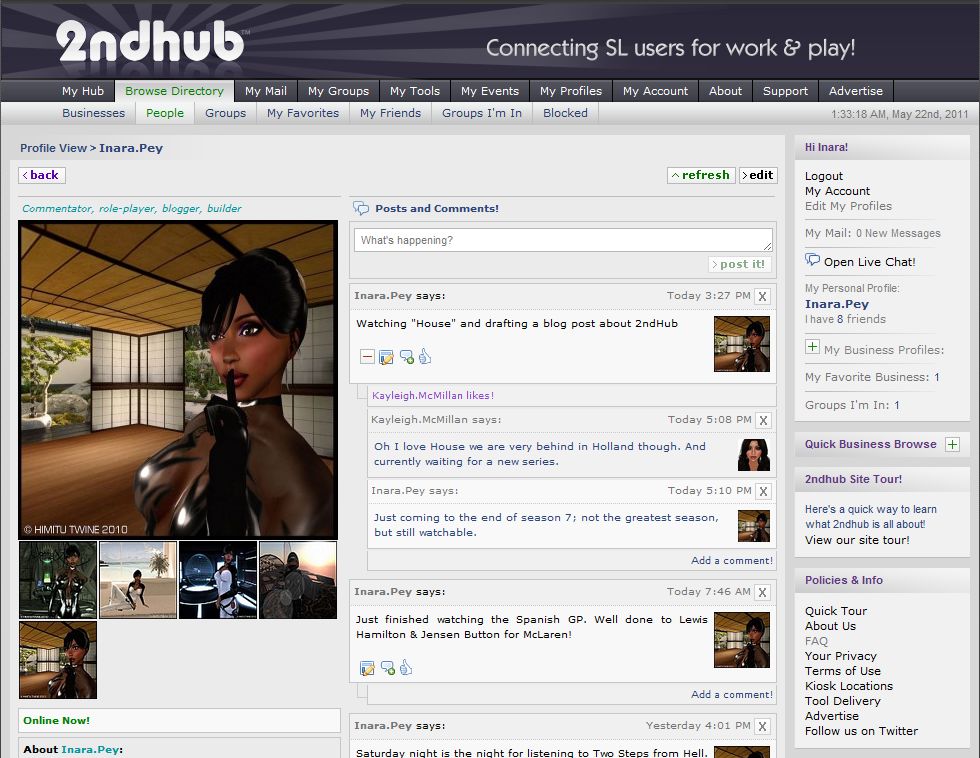
My 2ndHub Profile Page

To get noticed, you should set-up a profile for your Avatar (and any business you wish to promote via 2ndHub); like Second Life, people rarely respond well to a blank profile. Setting-up your  profile is a very straightforward task: click on the MY PROFILES tab and complete the displayed form – making sure any required information is given. As long as you keep obscenities out of any descriptive text, it’s really down to you as to what your write.

You can include a link to any website (such as a blog), and came also upload as many images as you like (in batches of four), one of which you can select as the default image that will appear as your main profile image. When you’re ready, you can preview your profile prior to publishing it.

Business profiles (if you have a business) follow the same principle, and can be automatically linked to your Avatar profiles(s).

Making Friends

Connecting with people is relatively easy, once you’ve worked out the initial step of finding people, as there is no obvious search option; instead there is a tab called Browse Directory, which enables you to browse through profiles (personal and business), Groups, Groups you’re a member of, review those you’ve blocked, and set up a list of personal favourite businesses.

A series of input fields allow any directory searches to be more focused; you can for example search by country, SL user name (in the case of avatar profiles) and / or keywords.

Displaying a specific personal profile will take you to the individual’s profile page, where you can, among other things, send a friendship request. It is here that 2ndHub can flex its muscles: friendship requests are sent to your 2ndHub Dashboard and if you are on-line, will pop-up as an alert for you in Chat. Additionally, a copy of the request will go to your e-mail, complete with a link-back to accept / refuse the request. Accepting an offer will see the requestor’s default Profile picture pop-up in you’re my Friends window on your MY HUB Home tab, and added to the list of Friends in the My Friends sub tab of MY HUB.

Groups

2ndhub supports Groups in much the same way as Second Life. You can create your own Groups, invite people to join them, send out notices (with attachments), and so on. A major feature with 2ndhub Groups is that you can invite anyone to join, whether or not they have a 2ndHub account, using a variety of options (see Tools, in part 2 of this article), and joining a 2ndHub Group doesn’t take up a Second Life Group slot (which perhaps isn’t as vital since in-world Groups were increased to 42).

Joining a Group is a similar process to adding a friend, although all Groups appear to be open (although the creator can limit them to be available only to friends), so joining any Group is automatic on clicking the JOIN button. Groups you are in are listed under the Groups I’m In sub-tab of MY HUB, while you can also opt to leave a Group.

Continued in part 2 ->

Tony’s return

It’s no secret I love music. My tastes are wide and varied – eclectic would very much be the word – ranging from classical (including modern composers such as Karl Jenkins), jazz, new age and film soundtrack composers. One of my particular favourites – thanks again to paternal influences (and he inherited it from his Dad) – has always been the Great American Songbook; a theme that is very popular within Second Life as well, where it features at many a jazz-oriented club and ballroom.

From the end of this week, there will be a new name to add to the list of such venues; well new in a very familiar way, because it is really the return of an old favourite in a new location. This is because on Friday May 20th, Tony’s Jazz lounge re-opens in Second Life.

For those unfamiliar with the jazz / club scene in Second Life, Tony’s Jazz Lounge and Piano Bar was run by Absolut Smirnov, who was also responsible for the romantic Rivers of Venus club before that (which is where I first got to know her well over three years ago). The “old” Tony’s was one of the venues that hosted the Martini Lunches, featuring music from the Martini in the Morning radio station during a two-hour session hosted live and on-air by MTIM’s own Brad Chambers (Martini Philbin in-world).

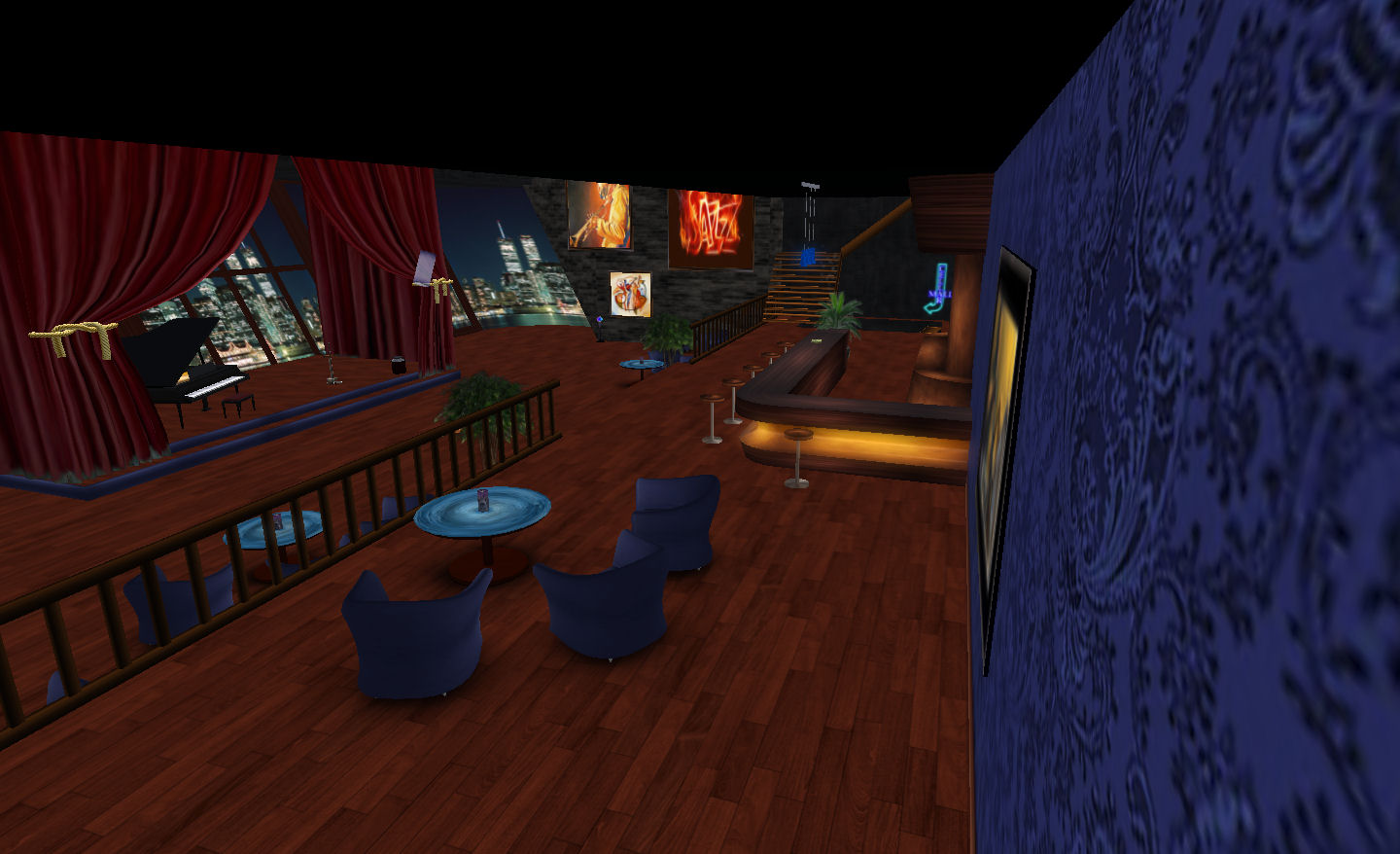
The new Tony’s is located in a slick skybox build above Chindo.  In keeping with the original Tony’s, the club provides an intimate environment well-suited to a romantic evening’s dancing, with a dance floor backed by a bar area and galleried lounge.

The bar and dance floor

The ambience of the club is enhanced by the careful use of colours – a deep blue used on the wall, and bar-area furnishings, dark stonework walls, a rich wooden floor, black ceilings and a very atmospheric cityscape backdrop along one wall.

The dance floor is spacious and flows around a central stage that is ready for live performances and which is itself framed by blood red drapes that further enhance the intimacy of the place.

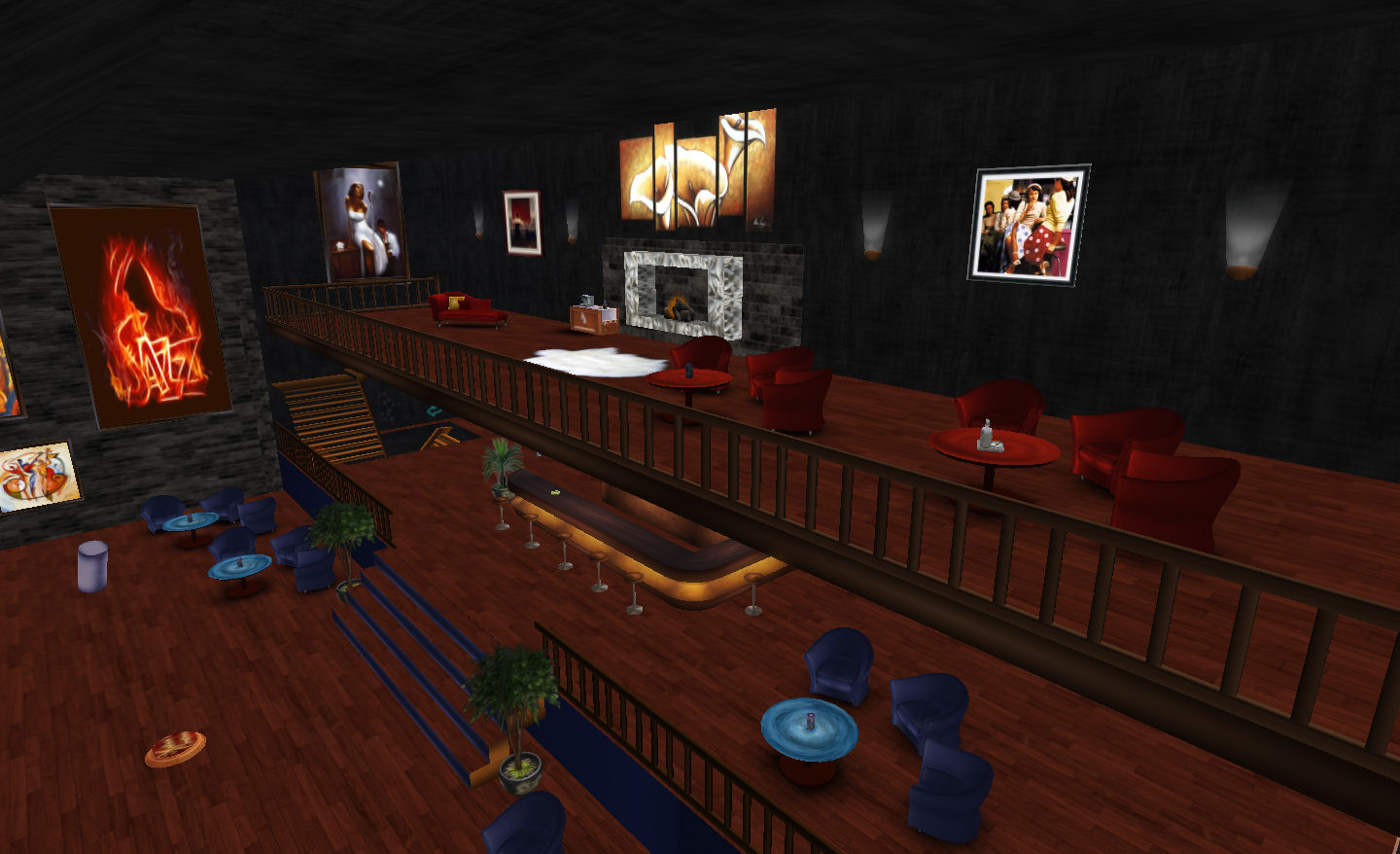
The gallery lounge

The bar area offers a mix of barstool and armchair seating, and is slightly elevated above the dance floor to provide a good view of it for those coming to the club to enjoy a chat and take in the atmosphere. Upstairs, the gallery lounge provides further seating and the homely touch of a stone fireplace.

Lighting throughout is unobtrusive, and the pictures and wall hangings all contribute to the ambience, creating a friendly, cosy environment – which is precisely what Absolut wanted. “My aim is to create a place where you can come to listen to good music, relax, meet friends, see incredible live acts, have a laugh when we have our comedy nights,” she explains, “And just generally get a feeling like Cheers – where everybody knows your name!” She certainly intends for the club to buzz, “I plan on having comedy nights once a month, or weekly as Tony’s grows,” she continued, “Plus weekly blues DJ, and a live musician/jam session weekly, and who knows what else!”

So why is Tony’s back after what has been an extended break? “It was something that was really just beginning to take off when I had to take a leave of absence from SL,” Absolut comments, “It had become a popular spot, and had the ‘right’ feel I think, for everyone who frequented it; I wanted to bring a bit of that back.”

Absolut’s enthusiasm is as infectious as it is genuine; her passion for creating a stylish venue with good music was the key ingredient that made Rivers of Venus an outstanding success, and helped to establish the original Tony’s.

With a relaxed dress code, centred around semi-formal wear, although Absolut admits to liking styles from the 1920s and 30s, couple with a warm, friendly atmosphere, the club looks set to establish itself as a very special place within Second Life.

Why not discover Tony’s Jazz Lounge and Piano Bar for yourself? The club is holding an opening event on Friday 20th May at 5-6pm SLT. The Surl is listed below, so why not slip into your best dancing shoes and grab a limo to what promises to be the coolest place in town?

Surls and Links

MoM: June and beyond

With the May entrants for the Month of Machinima now available, it’s time to look ahead to upcoming months.

May was pretty much free format in terms of theme, the major criteria (other than the obvious copyright and inevitable content rating considerations) being that not single entry should be longer than 3 minutes. For June – and probably beyond – this has been extended to 6 minutes, although longer film lengths can be submitted by prior arrangement.

The themes for the rest of the year have been announced, and film-makers are doubtless already looking at June and beyond:

  • June: Mixed Reality (SL machinima has to be part of the mix)
  • July: Games in SL
  • August: Design and Architecture
  • September: Seasons (the four seasons, season of your life, etc.)
  • October: Elements
  • November: SL Events
  • December: Endings, conclusions.

Full details on Month of Machinima can be found on the SL Wiki.

LEA MoM KO

The inaugural Linden Endowment of the Arts (LEA) Month of Machinima (MoM) kicked-off today at the LEA theatre. On show were the entrants for the May competition, a bewildering array of films covering a wide range of subjects, some dark, some humorous, some musically inclined – all of them outstandingly brilliant. While it is somewhat unfair to single any single film on offer out, I have to admit there were two that I really did like rather a lot… of which I’ll return to in a minute.

Courtney Linden at the inaugural MoM

The event was well-attended, despite the loss of one of the sims serving the theatre as a landing point (LEA 3 was offline), over 50 people were in attendance, with Linden Lab represented by, among others, Courtney and Blondin Linden.

The finalists were all largely present at the event, and it was good to see Toxic, Draxtor and Crap there – and to get a few words in with Crap, who produces some of the most irreverent and funny machinima in SL – as anyone who has seen “Vinnie Linden” will attest.

A section of the audience

Machinima is a powerful demonstration of what can be achieved creativity in Second Life – and in a form that can be carried outside of the virtual boundaries enforced by SL and other similar grids. The talent on display during the opening demonstrated this in full force – even if some of the resultant films were a little bewildering in terms of message and content.

Such is the power of Machinima and the depth of talent available in SL, I’m now more than ever convinced that Linden Lab needs to properly harness the available talent to help them fully and properly promote SL to audiences outside of the grid – something I’ve touched upon previously, and passed mention of while chatting with Courtney Linden, albeit briefly, yesterday.

Inside the LEA theatre

As it stands, the MoM has had a great start; and I hope LL will continue to push it throughout the month, not just via the official YouTube account and upcoming playlist, but through further showings at the LEA Theatre. I certainly hope that future MoM events will be given equal (or even greater) exposure by LL.

For those that missed the event, be sure to check-out the official MoM YouTube account – the playlist will be up shortly (if it is not by the time you read this).

So, which movies did I particularly like? Well – first there was Bakerman’s Trip:

Then there was Crap Mariner’s brilliant Oscar Goldberg Speaks Out:

Month of Machinima kick-off

The first Linden Endowment of the Arts  (LEA)-backed event will be kicking-off in May. The Month of Machinima (MoM) is set to be a rolling event, and one which will highlight some outstanding talent within Second Life.

The new event will kick-off on May 4th, at 10:00pm SLT, with a grand opening planned at the LEA Theatre in-world (which has four arrival points available: LEA 1, LEA 2, LEA 3, and LEA 4).

Additionally,  MoM has a dedicated YouTube account which will feature a playlist of machinimas submitted for the May event can be viewed after the opening ceremony. Currently, a short promotional video is available on the account.

For those more interested in LEA, there is an in-world Group with open enrolment available and where news of LEA-related events as well as news and other information can be obtained.

MoM is undoubtedly a good move on LL’s part, and I personally hope that the level of support shown will not trail off over time, but that it will continue to gain full and proper public exposure via the Lab as it rolls forward over time.