Almost monochrome in Second Life

It’s hard to believe it is May and that summer is supposedly just around the corner. After a burst of sudden warm weather which suggested spring had finally arrived, the weather has been a riot: rain, odd bursts of hail, thunderstorms and high winds. They’re even reporting snow in Devon!

I’m not sure if the weather in real life has affected my thinking about Second Life (some of my thoughts about the platform and my involvement in it has been a little on the grey side this last week), but while running through my list of places to blog about and rifling through the folders of snaps I have of places, I was struck by just how summery my snaps look. So I set off to try something different, although I hadn’t a clue what.

Winter Moon
Winter Moon

Fortunately, I didn’t have to spend too long scratching my head over what it is I was looking for. As soon as I stepped into Winter Moon, Dream Shadowcry’s evocative homestead region, I knew I’d found it.

In a world of often bright, vibrant colours, it’s not often you come across something which is almost  – and quite naturally – monochrome in Second Life, but Winter Moon is precisely that – and it is precisely that in a most magnificent way.

Winter Moon
Winter Moon

Rain pours from the sky when you arrive, and breakers crash against the shore. The lowering sky reduces everything to shades of grey and washed-out colour over which bright white falls tumble, while muslin-like clouds scud across the sky. “Atmospheric” doesn’t come close to describing the way in which this region has been put together – I strongly recommend that you keep to the region windlight settings when you arrive for the first time and, if you can, run with Advanced Lighting Model (“Lighting and shadows” in older viewer versions) active – you can keep shadows set to “None”.

There are paths to follow around the region, and places to discover; wandering and discovery are invited, and in places handy camera and telescopes point to vistas and images worthy of a snap or two – not that the entire region isn’t highly photogenic. Here and there are places to sit, either alone or with a loved one or friend. Some of these lend themselves to quite introspection, others provide an opportunity to dance. All add to the whole.

Winter Moon
Winter Moon

The attention to detail is wonderful – make sure you drop into the little orangery on the south side of the region. This is a beautifully composed piece, complete with half-eaten pizza lying in is box, together with a couple of Pepsi cans alongside the bed which clearly evoke a feeling when seen, and the movie playing on the projector at the foot of the bed further enhances the mood.

I advise keeping to the default windlight when making a first visit – particularly if you can run with Advanced Lighting Model active – because the overall monochrome effect of the region allows for a number of quite unexpected surprises, with sudden splashes of colour appearing as you pass the lamps and lights marking paths and gates.

Winter Moon
Winter Moon

For those not into greys and rain, the region also lends itself to a wide range of windlight settings, making it another perfect location of the SL photographer and explorer, as I hope the few scattered through my sideshow from a previous visit will demonstrate.

A highly recommended place to visit.

[gigya src=”http://www.flickr.com/apps/slideshow/show.swf?v=71649″ width=”625″ flashvars=”offsite=true&lang=en-us&page_show_url=/photos/inara-pey/sets/72157633488042461/show/&page_show_back_url=/photos/inara-pey/sets/72157633488042461/show/show/&set_id=72157633488042461&jump_to=” allowFullScreen=”true” ]

(view slideshow full-screen)

Related Links

E-scape with Whiskey

I’ve blogged previously about Whiskey Monday’s fabulous artistry, which has been (rightly) the focus of many SL-related blogs and which last year made the transition into real life as well.

Starting on Wednesday May 15th, a selection of her work, hand-picked by Whiskey, and entitled “E-scapes” will be on display at he the Kelly Yap Art Gallery in Healy.

Whiskey Monday at the Kelly Yap Art Gallery

This show will run through until the 15th July, and features a number of Whiskey’s landscape shots, captured in-world. All of them are intended to evoke a feeling of solitude, although Whiskey herself has resisted added any text (or subtext) to the images she’s chosen to display, preferring to let them speak directly to the heart of those looking on them.

If you’ve never seen Whiskey’s work first-hand, I urge you to go along and see the exhibition; I’ve little doubt you’ve find yourself drawn-in to her work and very probably leaving with a couple tucked under your arm (you can buy any of the pieces on display).

Healy-2_001

For those who are particularly drawn to her work and wish to enjoy it in real life, you can do so through Fine Art America, where a further range of Whiskey’s work is on offer.  And don’t forget her Flickr stream and blog (see the links below).

Related Links

Firefox Helpers for searching Second Life

Earlier, I blogged about a number of Chrome browser extensions users have developed for use with Second Life, and which Daniel Voyager had spotted. As a result of that article, Lance Corrimal pointed-out he had a number of SL-related search helpers for Firefox, which he suggested he could make available on his Dolphin Viewer website.

Well, he did – so true to my word, here’s a look at them.

The helpers are designed to allow a user to use the Firefox search option to use for terms and items using the various Second Life search engines. In all, Lance provides five helpers:

  • JIRA search – locate any JIRA directly from Firefox search (now subject to JIRA access / viewing)
  • Second Life Search – search for anything directly related to Second Life
  • Second Life Marketplace Search – search for an item in the Marketplace
  • Second Life Marketplace Merchant Search – search for a given merchant in the Marketplace
  • Second Life Wiki search – search the SL wiki from Firefox search.

All of the options can be used without you having to be logged-in to Second Life (or the JIRA or the Marketplace or wiki).

Installation

You’ll need to download and install the helpers:

  • Go to the Dolphin viewer website and download the helpers ZIP file (direct download link)
  • Open the ZIP file and drag-and-drop the five .XML files it contain into the Firefox Searchplugins folder. For Windows this is located at either: C:\Program Files\Mozilla Firefox\browser\Searchplugins or C:\Program Files (x86)\Mozilla Firefox\browser\Searchplugins (depending upon whether you’re running 32-bit or 64-bit Windows)
  • Restart Firefox if you are already running it.

Using the Helpers

The helper options when installed in Firefox

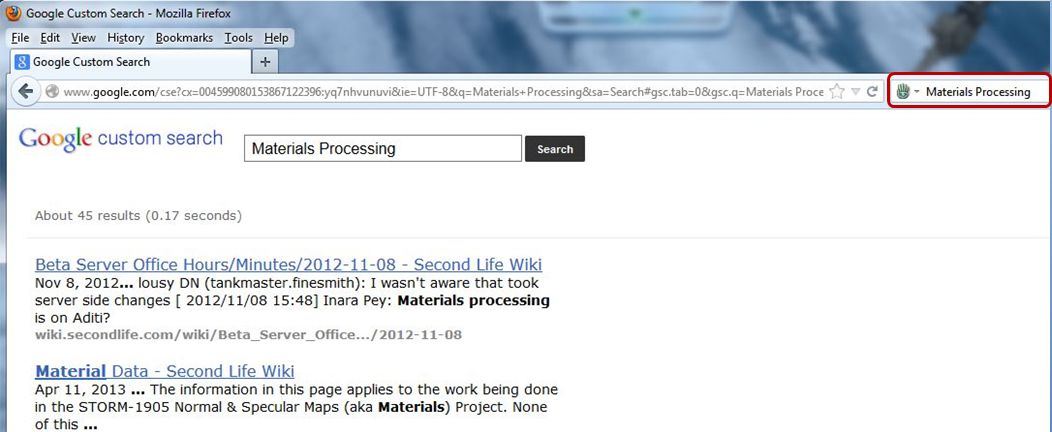
One the helpers have been installed, they will be available directly from the Firefox search option. Simply click on the search engine selector in the search field to display a drop-down list of your installed search engines / options, and select the required SL helper.

When a helper has been selected, its name will base displayed in the search bar, and you can type-in your search term as you would for any other search engine.

The JIRA Search

  • Typing-in a JIRA number (such as “OPEN-173”) will display that JIRA,  assuming it is publicly viewable. If not, you’ll get the “permissions violation” warning if you do not have the requisite JIRA access permissions
  • Typing-in a descriptive text (e.g. “Music stutters”) will display a list of possible JIRA matches, as with the normal JIRA search.

Second Life Search

Typing in any term using this Helper will cause the normal SL search engine to run and will return results using the search engine’s default page display.

Using the SL search option will return results from the main SL search engine - whether or not you're logged-on to the SL website
Using the SL search option will return results from the main SL search engine – whether or not you’re logged-on to the SL website

Marketplace Searches

The two Marketplace searches work in much the same way as the SL Search option, except they invoke the Marketplace search engine. Using the general Marketplace search allows you to display a Marketplace page displaying all products which match the search string, while the Merchant search will display one or more Merchants  matching the search string, allowing you to click on the required name and view the store.

Wiki Search

The wiki search helper will search the English language version of the SL wiki, returning a list of topics which may match the given search text.

An SL wiki search directly from Firefox's search option
An SL wiki search directly from Firefox’s search option

Feedback

Installation is simple, the helpers all do exactly what they same in their names, and work – as mentioned above – regardless of whether you are logged-in to the SL website or not. As such, for any Firefox user who spends time searching SL, they form a most useful suite off add-ons to Firefox (the 2012 changes to the SL public JIRA notwithstanding). Kudos to Lance for developing them and for making them available for general use!

Related Links

With thanks to Lance Corrimal.

Chrome browser extensions: a quick look

Update: Lance Corrimal has produced a set of search helpers for Firefox, which I’ve reviewed as well.

Daniel Voyager brings word that the Chrome browser offers a number of user-made extensions for Second Life. In particular, he points to three which appear to have value. As a sometimes-Chrome user (I tend to switch between it and Firefox on Windows, depending on what each new release brings), I decided to take a bit of a closer look at them. All three were located by searching for “Second Life” in the Chrome extensions web store.

Second Life Friends

This is described as an extension which, “Shows a list of friends online when logged into the SL website” and that “Users can check if their friends are online from any web page, instead of having to go through the tricky Second Life dashboard.”

The extension adds a Second Life icon to the browser, and I assume clicking on it is intended to display a list of friends online when you are logged-in to the SL website (although not necessarily with the web dashboard page open). However, the last update for the extension is 2010, and I was unable to get it to work.

Second Life Marketplace Helper

aaa
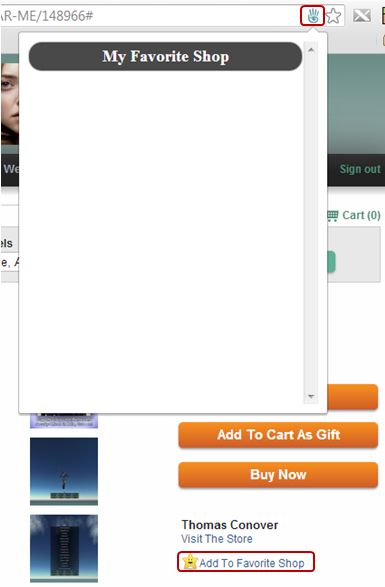
The Marketplace helper showing the address bar icon, additional page link and (empty) “Favourite Shop” list

Apparently last updated in January 2013, this extension is supposed to make browsing your SL Marketplace favourites easier. Installing it does two things:

  • Adds a Second Life icon to the browser’s address bar when using the Marketplace
  • Add a new link to the right side of Marketplace product pages, “Add to Favourite Shop” (note this is not the same as the LL-supplied “Add to Favourites” link, which appears further down the product page).

I gather the idea is to click on the “Add to Favourite Shop” to add an item to a “Favourite Shop” list which can be opened using the icon in the address bar. However, I was (again) unable to get anything to work, although it did not, as the one review of the extension suggested, “make the Marketplace unavailable”.

Chrome Life

This is the one extension I did get to work. It adds a Second Life icon to the Chrome tool bar which, when you are logged-in to the SL website (regardless of whether you have your SL web dashboard page open in the browser or not) will display the number of your friends currently on-line. Additionally, as friends log-in to SL, a pop-up will briefly appear in the bottom right corner of your screen announcing the fact they have.

Clicking on the icon itself will display a list of all your friends currently on-line, and if any have given you permission to map them, hovering the mouse over the globe which appears alongside their name will display a hovertip of their location.

When clicked, the icon also displays a note of your current L$ balance and a list fo your Groups. The extension is also configurable in terms of what is displayed via the Options link in your browser Extensions page.

The Chrome Life options

Feedback

I assume the reason why Second Life Friends isn’t working is because it has not been updated in a good while and may no longer be displayed. Quite why the Marketplace Helper doesn’t appear to work, I’ve no idea. Chrome Life appears handy if you need to keep tabs on specific friends and want to see when they go in-world without having to keep the SL web dashboard open in a browser tab. I’m not sure I’d want to use the extension all the time myself (I actually removed it after playing with it through my Crash Test Alt), but for the SL-addicted it could prove useful :).

Obviously, these are third-party extensions, so the usual warnings about them not in any way being associated with Linden Lab or Second Life and using at your own risk, etc., apply.

With thanks to Daniel Voyager

Take a moment to Smile

Update: We can continue to Smile, as Kaelyn Alecto reports, “Thanks to many insanely amazing donations I have been able to keep my sim open! Come on by and pay a visit and have fun exploring :)” – so please go along and visit!

It All Starts With a Smile

As I’ve mentioned in these pages a number of times,  I tend to use the Photogenic Spots section of the Destination Guide as a reference when looking for places to visit in SL. One of the places listed there is It All Starts with a Smile, located on Onyx Isle, the Homestead region of Kaelyn Alecto and her SL partner, Maxxster. While I’d frequently made a mental note to visit the region in the past, I’d never quite managed it.

Then I heard by way of Mona Eberhardt and Ziki’s blog that the region may be vanishing around May 15th 2013. This is not because the tier is too high per se, but apparently because the region’s tier is partially underwritten by one of the third-party exchanges (TPEs) hit by the Lab’s recent changes to the SL Terms of Service and the decision to write to all such exchanges and request they cease trading / providing Linden Dollars.

It All Starts With A Smile

If this is indeed the case, then it is a shame, because the region is beautifully put together with a keen eye for composition and photography – Maxxster is a photographer himself, and there is a Flickr group devoted to the region.

From the seaside town frontage of the arrival point, complete with carousel and Ferris wheel, you can walk down to a sun-kissed beach, sit on a fading wooden dock or follow a path around the island (or simply climb over the hills behind the shops!) to reach beautiful and restful meadows. There are beauty spots scattered across the island where you can sit and admire the view or snap away with the camera to your heart’s content. Romantics are also catered for, with places to dance, places to sit and cuddle and corners to snuggle in and hide from the world – there is even a cute little caravan with a blanket and pillows spread on the roof, hitched to a sporty little Mini!

It All Starts With A Smile

In short, this is a place designed to bring a smile to your face – and keep it there; which makes its potential removal from Second Life all that more poignant. I don’t – as I hope the destination reviews in this blog demonstrate – run with the “sim deathwatch” crowd; while SL undoubtedly has its problems, there are still many fabulous places left to visit. Even so, when it comes to one which is as beautifully presented as It All Starts With a Smile, then its possible passing is to be lamented.

I only wish I’d visited sooner.

It All Starts With A Smile

P.S.  there is a donations piggy bank at the landing point, and as the saying goes, “Every little helps,” so if you do pop in to have a look around, a few L$ dropped into it would likely be appreciated and might even help keep the region going…

Related Links

It All Starts With A Smile

Mediterranean meanderings

Whenever I browse the Destination Guide, my eyes are inevitably caught by the entry for SolAria, so much so that I knew it was only a matter of time before I’d have to pay the island a visit.

SolAria
SolAria

Built by Maveryck Breen, SolAria seeks to reproduce an oceanside Italian / Mediterranean village suitable for SL photographers and romantics. Covering slightly less than a full region (there is an area of grassland to one side which apparently belongs to another group), SolAria achieves its aims exceptionally well.

The arrival point is a raised piazza overlooking a sheltered harbour. Here you’ll find a fountain, the local trattoria and footpaths and steps leading both up and down and between and around an assortment of houses and shops.

SolAria
SolAria

For the romantics, there are places to dance or to sit together and watch the world go by and waterside walks which, for the inquisitive or those prepared to get their feet wet, might lead you to more than might at first meet the eye. Merfolk in particular might well feel at home in at least part of this build.

Everywhere appears open to explore, and despite the compact size of the build, there is a lot to see once you start exploring  – such as the park on the headland, the busy dockside at one end of the island, complete with ornate bathysphere, and two fortifications facing one another across the island, with a church sitting in between as if keeping two ancient families from sparring with one another.

SolAria
SolAria

This is a build which really is best enjoyed when running in deferred mode; great care has been taken with the lighting, and while there is no windlight pre-set I could determine (I received no pop-up asking me if I wished to accept local windlight), a late evening setting can really emphasise the beauty of the village with the street and house lights.

For the SL photographer, the island is a real delight, leading itself to a whole range of windlight settings which in turn can produce stunning images.  There is even a modest gallery in the village where pictures of the village are on display.

If I’m honest, there are perhaps one or two places – notably inside some of the buildings – where the texturing could do with a little more attention in terms of scaling / repeats, but this is a minor niggle on my part. Certainly, I recently spent a happy afternoon wandering and camming around grabbing snaps and twiddling with windlight – as I hope the slideshow below shows!

[gigya src=”http://www.flickr.com/apps/slideshow/show.swf?v=71649″ width=”625″ flashvars=”offsite=true&lang=en-us&page_show_url=/photos/inara-pey/sets/72157633465760348/show/&page_show_back_url=/photos/inara-pey/sets/72157633465760348/show/show/&set_id=72157633465760348&jump_to=” allowFullScreen=”true” ]

(view slideshow full-screen)

Related Links